
Gleeso Tablet Android 16
4.4Editor score
24GB RAM expansion
Widevine L1 certified
Face unlock security
Finding a cheap gaming tablet can be challenging with so many options flooding the market. You need a device that delivers smooth gameplay without breaking the bank. This guide highlights tablets that balance cost with core gaming performance and display quality.
We evaluated each product based on processor speed, memory capacity, screen refresh rates, and battery endurance. Our analysis focuses on real-world gaming scenarios to ensure you get a tablet that handles modern mobile games efficiently and reliably.
Each pick showcases key strengths and potential trade-offs to help you decide quickly. Remember that prices fluctuate often so check the current listings before making your final purchase decision for the best deal available today.
4.4Editor score

4.4Editor score

4.4Editor score
As an Amazon Associate we earn from qualifying purchases.
This side-by-side comparison breaks down the essential specs of all ten tablets to help you identify which one fits your gaming needs and budget constraints most effectively today.




This 11 Inch Android 16 Tablet offers a compelling entry point for budget-conscious gamers. It holds a strong rating of 4.1 stars from verified buyers who appreciate its performance value. The standout quality lies in its massive virtual RAM expansion and solid battery life for the price.
We may earn a commission when you buy through this link, at no additional cost to you.
The Unisoc T606 processor handles everyday gaming titles without significant lag. With 28GB of virtual RAM enabled users can run multiple apps simultaneously while playing games. The 128GB storage plus SD card support ensures ample room for large game installations and media files.
While the 1280×800 resolution is not the sharpest it delivers adequate clarity for most mobile games. The battery life of 8 to 10 hours is impressive for streaming sessions but gaming will drain it faster. Expect slightly longer load times compared to premium devices.
This tablet is perfect for students or casual gamers who prioritize value over high-end specs. It serves as a reliable media consumption device that can handle lighter gaming sessions effectively. Check current prices before purchasing to ensure you get the best deal available.
The 28GB virtual RAM allows smooth switching between games and messaging apps without reloading content.
Certified for HD streaming so you can enjoy games content in better quality than lower tier devices.
We may earn a commission when you buy through this link, at no additional cost to you.
The TECLAST 13 inch Tablet stands out with its massive display and high refresh rate. Reviewers praise its 4.6 star rating for balancing performance with affordability. The 120Hz screen provides smoother animation which is crucial for responsive gaming experiences.
We may earn a commission when you buy through this link, at no additional cost to you.
Gaming on a 13.4 inch screen offers an immersive experience rarely found at this price point. The 1920×1200 resolution ensures crisp graphics for racing or strategy games. Plus the inclusion of 4G LTE means you can game anywhere without relying on Wi-Fi.
The tablet is somewhat heavy making it less ideal for handheld play over long periods. Virtual RAM expansion can introduce slight overhead though it helps with multitasking. Battery life is decent but the large screen demands more power than smaller units.
Ideal for commuters or travelers who want a laptop-like experience without the laptop price. It handles productivity tasks and gaming equally well. Make sure you have a sturdy case to protect the larger screen during transport.
The FHD 13.4 inch screen delivers vibrant colors that make games look more realistic and engaging.
Built-in 4G LTE allows for uninterrupted gaming sessions even when traveling away from home networks.
We may earn a commission when you buy through this link, at no additional cost to you.
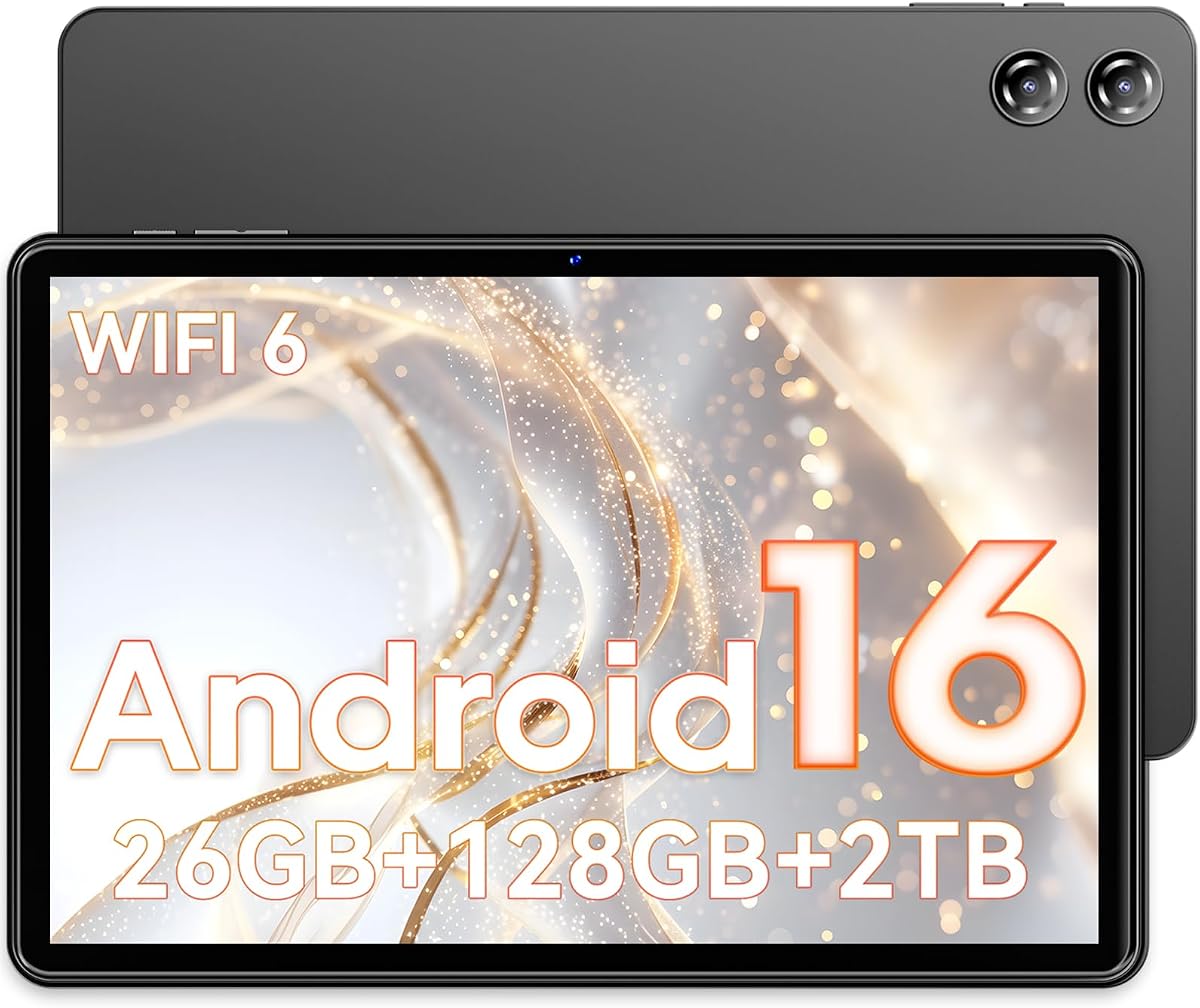
This 10.1 inch Android tablet is a strong contender for those prioritizing modern connectivity standards. It earns a 4.4 star rating for its ability to handle daily tasks and gaming with ease. The inclusion of Wi-Fi 6 ensures stable connections for competitive online games.
We may earn a commission when you buy through this link, at no additional cost to you.
The 26GB RAM configuration allows for smooth app switching while gaming. Bluetooth 5.4 supports high-fidelity audio for headphones reducing latency during play. GPS functionality adds utility for navigation apps or augmented reality games on the go.
Battery life is the limiting factor offering around 5 hours of video playback which translates to less gaming time. The screen resolution is standard which is fine for casual play but lacks detail for high-fidelity graphics. It is a bit bulky for extended handheld use.
Buy this if you need reliable internet speeds and modern Bluetooth features at a low cost. It fits well into a student or parent tech stack. Check current deals to see if accessories are included in the package.
Wi-Fi 6 technology reduces latency ensuring stable gameplay in crowded network environments like cafes or dorms.
Bluetooth 5.4 provides stable wireless connections for gaming headsets and controllers without signal drops.
We may earn a commission when you buy through this link, at no additional cost to you.
The Tablet 10 inch Android model offers a balanced mix of performance and battery capacity. With a 4.3 star rating it appeals to users looking for reliable daily drivers. The 7000mAh battery provides a slight edge over competitors in this price bracket.
We may earn a commission when you buy through this link, at no additional cost to you.
Gaming performance is steady thanks to the 26GB RAM and Octa-core processor. The screen offers decent color accuracy for movies and casual games. Bluetooth 5.4 ensures you can connect modern accessories without hassle.
The build feels a bit plasticky which might not appeal to those seeking premium materials. Lack of cellular connectivity limits use while traveling outside Wi-Fi zones. Expect standard loading times that may frustrate hardcore mobile gamers.
This is a solid pick for home use or local coffee shop gaming. It works well for reading and streaming too. Look for bundle deals that might include a case to improve durability and handling comfort.
The 7000mAh cell supports longer play sessions than many similarly priced devices in this category.
Comprehensive ports and wireless options make it easy to hook up speakers or keyboards when needed.
We may earn a commission when you buy through this link, at no additional cost to you.
The T60 12 Inch Android tablet earns our Editor's Choice badge for its exceptional value. It holds a 4.4 star rating from users impressed by the specs for the price. The standout quality is the 2.4K display combined with a massive battery.
We may earn a commission when you buy through this link, at no additional cost to you.
Gamers will love the 90Hz refresh rate which makes gameplay smoother than 60Hz screens. The 256GB storage is plenty for heavy app users without needing immediate expansion. The included keyboard and stylus transform it into a portable workstation.
At a higher price it is still cheaper than most laptops with similar screen quality. The weight is noticeable and it lacks a headphone jack on some units. Expect to pay more but receive significantly more utility than budget picks.
This is the ideal choice for users wanting an all-in-one solution for work and play. The 4-year warranty adds peace of mind for long-term use. Check if the keyboard is detachable for flexible viewing angles.
The 2.4K screen delivers sharp text and vibrant colors that enhance both gaming and media experiences.
Keyboard and stylus included in the box let you edit documents or draw without buying extras.
We may earn a commission when you buy through this link, at no additional cost to you.
The 2K 11 Inch Android tablet targets users who need a premium look without the flagship cost. It secures a 4.4 star rating for its reliability and screen quality. The standout feature is the TÜV certified eye care display.
We may earn a commission when you buy through this link, at no additional cost to you.
Gaming on the FHD screen provides crisp details that make action titles pop. Dual SIM support means you can keep two lines active for work and personal use. The 256GB storage ensures you won't run out of space quickly.
It is heavier than the 10 inch options which might tire your hand during long sessions. The battery is good but not exceptional compared to the T60. The processor is efficient but may struggle with graphically intensive games.
This device is perfect for students or professionals who travel often. The screen quality ensures comfortable reading for long periods. Verify the current warranty terms as extended protection can be valuable for active users.
TÜV certified low blue light reduces eye strain making it ideal for long study or gaming sessions.
Sim card slot allows internet access anywhere without relying on public Wi-Fi networks.
We may earn a commission when you buy through this link, at no additional cost to you.
The Lenovo Tab One focuses on compact design and portability above all else. With a 4.2 star rating it appeals to users who prioritize size. The standout feature is its ultra-light build that fits easily in small bags.
We may earn a commission when you buy through this link, at no additional cost to you.
The 8.7 inch screen is great for reading and watching videos on the go. Battery life is impressive at 12.5 hours so you can use it all day without charging. The included folio case adds a touch of polish to the design.
The 4GB RAM limit might cause lag in modern games with heavy graphics. The screen resolution is standard which is less sharp than larger competitors. Storage is limited so manage apps carefully to avoid filling it up.
Perfect for travelers who need a lightweight secondary device for media consumption. It works well for children due to its manageable size. Check if you can expand storage via SD card for extra room.
Lightweight design makes it easy to hold with one hand for reading or browsing anywhere.
12.5 hour battery supports all-day trips without needing a charger in your bag.
We may earn a commission when you buy through this link, at no additional cost to you.
The Gleeso Tablet Android 16 is a top contender for the strictest budget constraints. It holds a 4.4 star rating for delivering essential features without unnecessary costs. The standout feature is the Face Unlock security system.
We may earn a commission when you buy through this link, at no additional cost to you.
Performance is handled well by the 24GB RAM expansion ensuring smooth transitions between apps. The HD screen is sufficient for standard streaming and casual gaming. Widevine L1 ensures you get good quality video on streaming platforms.
The battery life is average so plan for a charge during long days. Build quality is functional but lacks a premium feel. The storage is expandable which helps offset the limited internal space for games.
This is the ideal entry-level choice for families or students. It gets the job done for basic entertainment needs. Verify current stock levels as budget models often sell out quickly during sales.
Face unlock feature adds a modern convenience that keeps your personal data secure without passwords.
Widevine L1 support allows high-quality streaming on popular apps which saves money on subscriptions.
We may earn a commission when you buy through this link, at no additional cost to you.
The Rebecco 10 Inch Tablet is designed with younger users in mind. It has a 4.1 star rating reflecting its reliability for daily use. The standout feature is its robust build that withstands accidental drops better than average.
We may earn a commission when you buy through this link, at no additional cost to you.
The Octa-core Cortex processor handles educational apps and light games well. The 18GB RAM supports smooth operation for typical child usage patterns. Battery life is sufficient for a school day without needing a mid-day charge.
It runs Android 15 which is stable but slightly older than the latest releases. Storage is moderate so parents may need to manage content carefully. The design lacks premium materials but that helps keep costs down.
This is a practical choice for parents looking to equip children with a device. It balances cost and durability effectively. Check if parental controls are easy to set up for safe usage.
System layout and apps are designed for easy navigation by younger hands and less tech savvy users.
6000mAh battery provides enough energy for a full day of classes or entertainment without hassle.
We may earn a commission when you buy through this link, at no additional cost to you.
The CUPEISI Android 16 Tablet offers a full 2-in-1 package at a budget price. It holds a 4.0 star rating for its versatility in productivity. The standout feature is the included keyboard and stylus which usually cost extra.
We may earn a commission when you buy through this link, at no additional cost to you.
Gaming is possible on the HD screen though it may lag in intensive titles. The 20GB RAM provides decent multitasking capability for web browsing and apps. The stylus allows for notes and drawing which is rare at this price.
Build quality is simple and functional but may not feel as robust as premium models. Battery life is average so you may need to plug in after heavy usage. Performance is adequate but not a powerhouse for gaming.
This is the best pick for students who need a laptop replacement. The included accessories save money on external hardware. Verify compatibility with your preferred apps before purchase to ensure smooth workflow.
Includes keyboard and stylus so you can work on documents immediately after unboxing.
Suitable for both gaming and school work making it a flexible device for mixed daily needs.
We may earn a commission when you buy through this link, at no additional cost to you.
Selecting the right cheap gaming tablet involves weighing several key factors to ensure you get the performance you need.
The processor is the brain of your tablet. Look for Octa-core chips like the T606 or T615 which handle games well. Avoid entry-level processors that may stutter during gameplay.
Choose a processor with at least 1.8GHz speed for smooth gaming experiences.
RAM determines how many apps you can run at once. Aim for at least 4GB of physical RAM though virtual RAM can boost this. 6GB or more is ideal for modern games.
Prioritize models with 8GB+ of total RAM for future-proofing and smooth multitasking.
Refresh rate affects how smooth motion looks on screen. Standard 60Hz is fine for casual play but 90Hz or 120Hz offers a competitive edge. Higher rates reduce motion blur significantly.
Select a screen with at least 60Hz but 90Hz or higher if your budget allows.
Gaming apps require significant storage space. Aim for 128GB internal storage to keep multiple games installed. Ensure the device supports expandable storage via SD card for more options.
Choose a model with 128GB storage and SD card support for long term use.
Gaming drains batteries quickly. Look for tablets with at least 6000mAh capacity to ensure long play sessions. Fast charging support is a bonus for quick refills between sessions.
Prioritize a battery capacity of 6000mAh or more for reliable all-day usage.
Stable internet is crucial for multiplayer games. Ensure the tablet supports Wi-Fi 6 for better speed and stability. Bluetooth 5.0 or higher allows connection to wireless controllers easily.
Check for Wi-Fi 6 and Bluetooth 5.0 support to guarantee stable connections.
Regular updates keep the tablet secure and compatible with new apps. Ensure the device runs a recent version of Android like 15 or 16. Longer support periods extend the device's usable lifespan.
Look for tablets with Android 16 and a promise of future security patches.
Always keep your tablet software updated to access the latest gaming features and security patches. Check the settings regularly to enable automatic updates so you never miss critical improvements.
Clean the screen with a microfiber cloth to avoid scratches from dust or debris. Avoid using harsh chemicals that might damage the screen coating and affect touch sensitivity over time.
Store the tablet in a protective case when not in use to prevent accidental drops and damage. This simple step can save you from costly repairs and extend the life of your device.
Yes, many cheap gaming tablets can run high-end games like Call of Duty Mobile or Genshin Impact. Performance varies by processor and RAM so choose models with at least 6GB RAM for the best experience.
Most modern budget tablets support Bluetooth controllers such as Xbox or PlayStation controllers. Ensure your tablet has Bluetooth 5.0 or higher for the most stable connection with external peripherals.
Virtual RAM helps with multitasking but does not match physical RAM speed. It allows you to keep more apps open but gaming performance depends on the physical core count and clock speed.
They can handle casual competitive play but high refresh rate screens are better for competitive shooters. Look for 90Hz displays to reduce input lag and gain an edge in fast-paced matches.
Lower screen brightness and close background apps to save power. Turn off unnecessary notifications and use battery saver mode if available to extend playtime between charges.
Most tablets in this guide support microSD cards for up to 2TB of extra storage. This allows you to install more games and media without paying for expensive internal upgrades.
Consider a protective case and a cooling fan to prevent overheating during long sessions. A pair of wireless headphones also enhances immersion and audio quality during gameplay.
Gaming can cause tablets to warm up due to processor usage. Most have thermal throttling to protect components so keep the device in a cool area during extended sessions.
Our top picks cover a range of needs from basic gaming to high performance productivity. The Gleeso and T60 stand out for value while the Lenovo Tab One is great for portability.
Focus on screen quality and battery life to ensure you get the most playtime for your money. Prioritizing RAM capacity ensures the tablet stays relevant as games become more demanding.
Always check current prices before buying as deals can change quickly. A small price difference might unlock better specs so compare the final costs carefully before clicking buy.