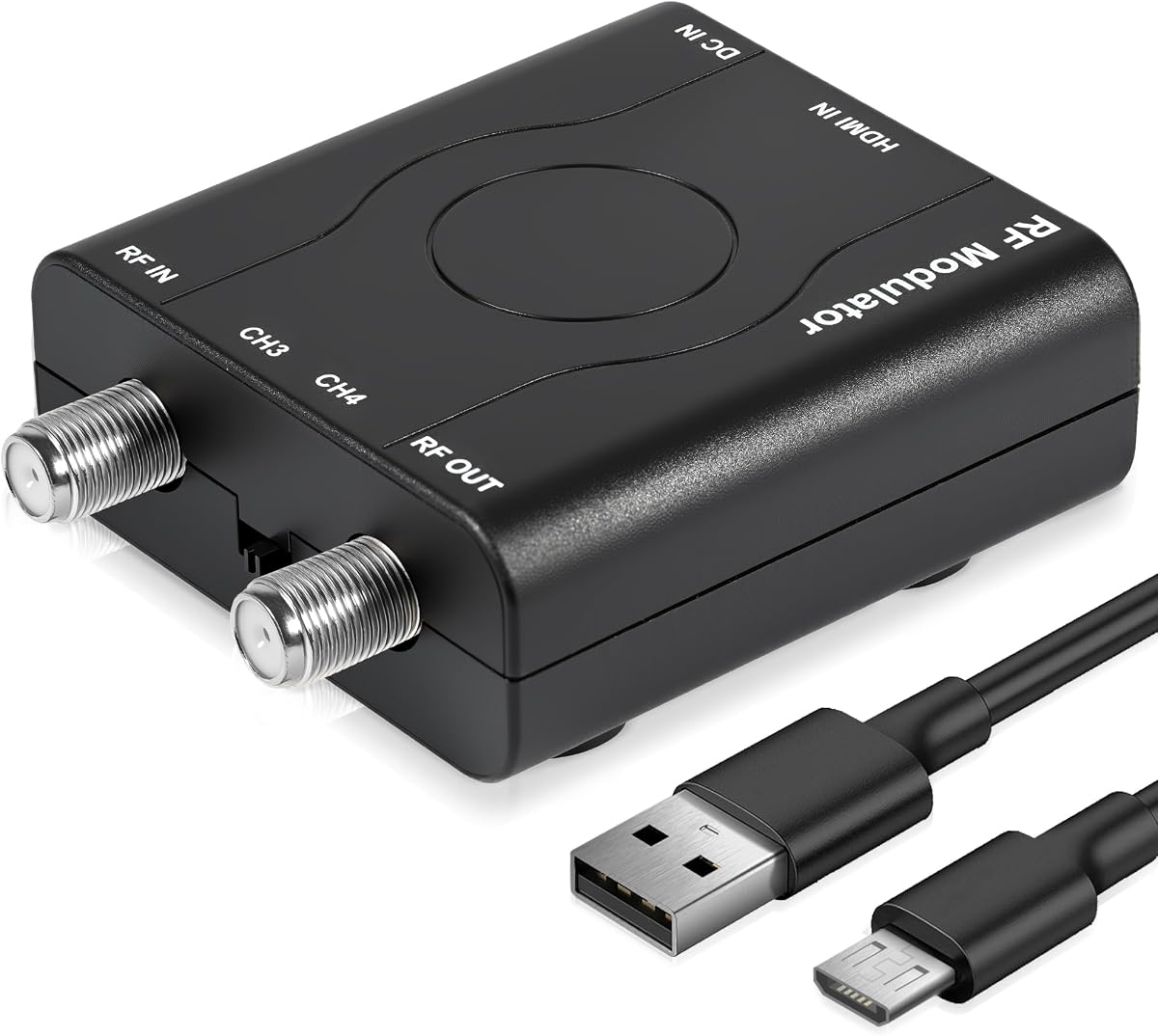
HDMI to RF Modulator
4.3Editor score
NTSC format output with CH3 CH4
1080P PLL control for stability
Compact portable plug and play design
This guide compares the top Coax to HDMI Converter options to help you connect legacy devices to modern displays with reliable signal conversion and ease of
Finding the right Coax to HDMI Converter can transform how you view older media sources on modern screens. These devices bridge the gap between legacy coaxial outputs and contemporary digital displays. Choosing the correct adapter ensures you maintain signal integrity while enjoying high definition viewing experiences across various setups.
We have evaluated ten distinct models based on signal stability, compatibility, and ease of setup. Our analysis focuses on how well each unit handles analog to digital conversion without significant quality loss. We also consider build quality and the included accessories to ensure a smooth installation process for every user.
Each pick highlights specific strengths such as budget friendliness or premium features tailored for security systems. You will find detailed breakdowns of technical specifications and real world performance notes. Please note that product availability and pricing can fluctuate so verify details before making your final purchasing decision today.
4.3Editor score

4.7Editor score

4.4Editor score
The following table provides a side by side overview of all ten products featured in this guide. It highlights key specifications and capabilities to help you quickly identify which adapter best fits your specific connection needs and device requirements without needing to read every detailed review.


This unit serves as a practical bridge for connecting modern HDMI devices to older TVs with RF inputs. It maintains a solid rating thanks to its reliable performance and included accessories that simplify the installation process significantly for most users.
We may earn a commission when you buy through this link, at no additional cost to you.
The device supports high resolutions like 1080P at the input level before converting to NTSC analog signals on channels three and four. Its built in PLL control ensures the frequency output remains stable which is crucial for preventing picture flicker on older analog screens.
While it offers great compatibility with consoles and streaming sticks it does not support laptop connections which limits some use cases. Also note that it cannot convert RF signals back to HDMI so it is strictly a one way adapter for specific legacy setups.
Anyone looking to connect a game console or streaming box to an older TV will find this model highly effective. The included cable and power adapter mean you can get started immediately without hunting for extra parts or worrying about compatibility issues.
No drivers or software installation are required to get this unit running with your existing setup.
The internal PLL technology ensures the output stays locked to CH3 or CH4 without drifting.
We may earn a commission when you buy through this link, at no additional cost to you.
This adapter targets enthusiasts who want to display retro gaming systems on modern digital displays without quality loss. It boasts a wide range of supported devices from classic consoles to vintage VCRs making it a versatile tool for collectors and hobbyists.
We may earn a commission when you buy through this link, at no additional cost to you.
Features include a remote control for managing channel selection and shutdown times which adds a layer of convenience. The unit supports both NTSC and PAL formats allowing it to work with international systems that use different analog standards for video output.
Some users report mixed experiences with signal stability compared to simpler models in this category. The extensive feature list might be overwhelming for those who just need a basic connection without advanced programming options.
If you have a collection of vintage hardware this unit offers the specific compatibility you need to keep them working. It provides a way to enjoy classic games on larger screens though you may need to fine tune settings for the best visual experience.
Designed to work with Atari 2600 NES and other classic gaming consoles out of the box.
The included remote allows easy switching between channels and automated shutdown features.
We may earn a commission when you buy through this link, at no additional cost to you.
This converter is ideal for upgrading security camera systems to use modern monitors without replacing the entire setup. It converts analog BNC signals to high definition HDMI output allowing clear viewing of surveillance footage on contemporary displays with excellent clarity.
We may earn a commission when you buy through this link, at no additional cost to you.
It supports both NTSC and PAL formats automatically detecting the signal to ensure compatibility with various camera types. The addition of an audio port means you can also transmit sound from the camera if the system supports it for a complete monitoring solution.
The housing is built from durable ABS material which helps protect internal components during continuous use. While it operates stably for 24 hours keep in mind that the BNC interface differs from standard RF coax so you need the right cabling.
Security professionals and homeowners looking to view old cameras on new TVs will appreciate the high resolution output. The 3D compensation technology improves motion clarity which is essential for identifying details in moving images during surveillance monitoring.
Converts older signals to 720P or 1080P for sharper viewing on HD monitors.
Low heat generation allows for continuous operation without overheating issues.
We may earn a commission when you buy through this link, at no additional cost to you.
This model provides an economical way to connect modern devices to older TVs that only have coaxial inputs. It supports standard NTSC output and handles high definition inputs smoothly ensuring your content is viewable on legacy displays without expensive replacements.
We may earn a commission when you buy through this link, at no additional cost to you.
The device includes HDCP support which is necessary for many protected video streams. Its compact size makes it easy to hide behind a TV or console keeping your setup looking tidy while still providing reliable signal conversion for your games or movies.
While it is built from standard ABS material it remains durable enough for daily home use. The plug and play nature means you do not need technical expertise to get it running quickly with your existing entertainment system components.
If you need a cost effective solution for connecting a game console to an old TV this unit delivers solid performance. It balances affordability with functionality making it a practical choice for users with budget constraints or temporary display needs.
Supports HDCP 1.4 for streaming protected content from sources like Blu ray players.
Small form factor allows flexible placement near your TV or monitor setup.
We may earn a commission when you buy through this link, at no additional cost to you.
This kit is praised for including everything needed for a quick setup without extra purchases. It converts HDMI signals to RF coaxial output allowing modern sources to connect with older displays efficiently. Users report high satisfaction with the included accessories and clear documentation.
We may earn a commission when you buy through this link, at no additional cost to you.
The device is designed to maintain stable RF output which is critical for consistent viewing on older TVs. It works with a wide range of HDMI enabled devices from streaming sticks to Blu ray players making it versatile for different home entertainment configurations.
Setup is straightforward with a provided user manual that guides you through each step. While it requires external power and locks to specific channels it remains a robust choice for stable signal distribution across multiple rooms or devices.
If you want a hassle free experience with no hidden costs for cables this kit is an excellent choice. The high rating reflects its reliability and ease of use for anyone looking to bridge the gap between new sources and old screens.
Includes power adapter HDMI cable and coaxial connectors for immediate use.
Designed to prevent signal dropouts for reliable viewing on analog TVs.
We may earn a commission when you buy through this link, at no additional cost to you.
This adapter stands out for its tiny size which helps reduce clutter in tight entertainment centers. It accepts HDMI input and outputs analog RF signals compatible with older TVs and CATV systems. Users appreciate the simple plug and play operation and consistent results.
We may earn a commission when you buy through this link, at no additional cost to you.
The unit is built with a solid ABS housing that protects it from minor impacts and everyday wear. It operates without drivers requiring only a power source and HDMI connection to start converting signals for viewing on legacy equipment immediately.
While it does not support reverse conversion it is designed specifically for one way HDMI to coax use cases. The fixed channel output ensures predictable tuning on your TV so you do not have to search for the signal manually.
For those seeking a discreet and reliable adapter for connecting devices to old TVs this model is a strong candidate. The high user rating reflects its ability to perform its specific task consistently without complicated configuration steps.
Small footprint allows placement behind monitors or inside cabinet shelves.
Requires no software configuration or technical knowledge to function properly.
We may earn a commission when you buy through this link, at no additional cost to you.
This modulator is built to provide stable VHF frequency output for older TV systems that rely on coaxial signals. It comes with a USB power cable which can simplify power sourcing by allowing connection to a TV USB port or adapter easily.
We may earn a commission when you buy through this link, at no additional cost to you.
It supports HDMI 1.4 which ensures compatibility with most modern source devices and their digital video streams. The ABS construction adds durability to the unit allowing it to withstand regular use in home environments without damage to the casing.
The device is strictly for HDMI to RF conversion so it cannot take coax inputs and turn them into HDMI outputs. Users looking to connect streaming sticks or consoles to older TVs will find the fixed channel output reliable and simple to tune.
If you need a straightforward way to power your adapter without extra bulky bricks this model offers convenience. It balances build quality with functional features to deliver consistent performance for everyday media viewing on legacy displays.
Includes a USB cable that may allow power from standard USB ports.
Supports standard HDMI versions for broad device connectivity and streaming.
We may earn a commission when you buy through this link, at no additional cost to you.
This converter offers unique flexibility by providing both RF and RCA outputs for different types of connections. It allows you to connect to a TV via coax while also sending an RCA signal to a capture card for recording content simultaneously.
We may earn a commission when you buy through this link, at no additional cost to you.
The coaxial output enables ultra long distance transmission so you can share video to other rooms using existing cable wiring. This feature makes it useful for larger homes where you want to broadcast a signal from one source to multiple TVs.
It includes a channel switch that does not interfere with existing VCRs or other devices on the system. The versatility makes it a strong choice for users who need to split signals or record video while maintaining a standard TV viewing experience.
If you need to share content across multiple TVs or record from HDMI sources this unit provides the necessary ports. It handles various modern streaming devices and consoles ensuring you can integrate them into older setups with ease.
Sends both RF for TV and RCA for capture cards at the same time.
Coax output can distribute video over long cable runs to other rooms.
We may earn a commission when you buy through this link, at no additional cost to you.
This premium converter is designed for security professionals who need to view analog camera feeds on modern HDMI displays. It supports a wide range of formats including TVI CVI and AHD ensuring compatibility with diverse surveillance equipment without upgrades.
We may earn a commission when you buy through this link, at no additional cost to you.
The metal housing dissipates heat efficiently allowing for continuous 24 hour operation in demanding environments. It also offers a BNC loop output which lets you view the feed on an HDMI monitor while sending the signal to a DVR for recording.
Users benefit from clear 1080P output that preserves detail in surveillance footage. The rugged design makes it suitable for warehouses or offices where durability is critical and the system must run reliably without interruption.
If you are upgrading a security system this converter saves the cost of replacing all cameras. It delivers high quality visuals and supports high resolution inputs ensuring you can monitor your property effectively on a new monitor.
Metal casing provides heat dissipation for reliable 24 hour operation.
Recognizes multiple camera formats for flexible integration with existing DVRs.
We may earn a commission when you buy through this link, at no additional cost to you.
This model features meticulous craftsmanship designed to ensure stable and consistent performance over long periods of use. It uses PLL control to maintain a steady output frequency which prevents signal drift and ensures reliable viewing on older TVs.
We may earn a commission when you buy through this link, at no additional cost to you.
The build quality reflects a professional grade design suitable for both home and commercial environments. It handles high definition inputs smoothly converting them to NTSC RF signals that match the expectations of legacy television systems.
Users appreciate the portability and flexible installation that requires no driver software or complex setup steps. The reliable operation makes it a good choice for businesses needing to display content on older screens without frequent maintenance.
If you prioritize build quality and stability for your connection needs this unit delivers consistent results. Its professional design ensures it lasts longer and performs reliably under continuous use in various settings.
Built to withstand continuous operation in commercial or home settings.
PLL control ensures consistent channel output without drifting.
We may earn a commission when you buy through this link, at no additional cost to you.
Choosing the right converter requires understanding your source devices and display capabilities. This guide outlines the critical factors to evaluate before making a purchase.
Most converters are designed to output HDMI to RF or RF to HDMI but rarely both. Determine whether you are connecting old coax devices to new HDMI TVs or modern HDMI devices to old coax TVs. Selecting the correct direction avoids buying a unit that cannot perform your specific task.
Verify the input and output ports match your setup before purchasing to ensure compatibility.
Check if the converter supports NTSC or PAL formats depending on your region. Some units support both while others are region locked. This ensures the converted signal matches what your TV expects to avoid a blank screen.
Matching the video standard is essential for getting a picture on older displays.
Look for models that support the input resolution of your source device. Many converters accept 1080P HDMI input but output analog signals at lower resolutions. Ensure the unit can handle high definition inputs to maintain clarity even when the output is analog.
Higher input resolution support helps preserve image quality during conversion.
Some kits include HDMI cables and power adapters while others require separate purchases. Verify what is in the box to avoid hidden costs. This is especially important if you do not have spare HDMI cables or power bricks.
A complete kit saves time and extra money during setup.
Materials like ABS plastic or metal housings affect durability. Metal housings dissipate heat better for 24 hour operation while plastic may be lighter. Choose based on whether you need continuous operation or occasional use.
Durable housing ensures the device lasts longer under continuous use.
Features like remote control or channel switching add convenience. Some units support loop outs for recording while others are simple pass through devices. Identify which extra functions are necessary for your workflow.
Extra features should match your specific needs without adding complexity.
Some converters draw power from USB while others need external AC adapters. USB power can simplify setup but may limit performance. Check the power requirements to ensure your setup can support the converter.
Ensure your power source matches the converter requirements for stable operation.
Reading recent reviews helps gauge real world performance. Look for comments about signal stability and heat. This gives you a sense of reliability beyond the marketing specifications.
User feedback often reveals practical issues not listed in specs.
Connect your source device to the converter using an HDMI cable and plug the power adapter into an outlet. If using USB power ensure your TV port supports sufficient power output for the unit.
Attach a coaxial cable to the RF output port and run it to your TV. Set your TV to channel 3 or 4 to view the converted signal from your source device.
Keep the converter in a well ventilated area to prevent overheating. Regularly check connections for dust or loose wires to maintain stable performance over time.
Yes if your converter supports RF to HDMI conversion. Many models are designed for connecting legacy devices like VCRs to modern screens. Check the input output labels to confirm it can take coax inputs and output HDMI signals.
Analog conversion often results in some quality loss compared to direct digital connections. However modern converters preserve as much detail as possible. The final quality depends on the resolution of your source and the TV.
Most converters are designed for 1080P or lower inputs. While they might accept 4K signals they typically downscale them for analog output. Check the product specs to confirm maximum supported resolution.
RF signals are analog and travel over coaxial cables used in older TVs. HDMI signals are digital and carry higher resolution video and audio. Converters bridge this gap by translating between these two formats.
Signal conversion requires energy to transform the input to the output format. The power adapter supplies this energy to ensure stable operation and prevent signal dropouts during use.
You can use a coax splitter to distribute the signal to multiple TVs. This allows you to view the same content on different screens. Ensure the splitter does not weaken the signal too much.
We have reviewed ten top converters that handle the transition from old to new displays effectively. Whether you need a simple adapter or a feature rich unit this list covers various needs.
Prioritize compatibility with your specific source devices and the required signal format. This ensures you avoid buying a unit that cannot connect your intended hardware correctly.
Check current prices and availability before purchasing to get the best deal. Product details can change over time so verify the specs on the product page.