
Logitech R800
4.6Editor score
Built-in timer display
Vibrating silent alerts
100 foot range
This guide compares the top laser pointer for presentations models based on visibility, connectivity, battery life, and control features to help you choose the
Finding the right laser pointer for presentations is essential for educators and professionals who need to engage their audience effectively. A high-quality device ensures your message is clear and your movements are smooth during critical speaking engagements.
We evaluated ten top-rated wireless presenters based on laser visibility, connectivity options, battery life, and ease of use. Our analysis focuses on real-world performance in classrooms, conference rooms, and large lecture halls.
Each pick highlights unique strengths tailored to different user needs and environments. Please note that product availability and pricing may change over time, so verify current details before making your final decision.
4.6Editor score

4.6Editor score

4.3Editor score
The following table provides a side-by-side comparison of all ten models to help you quickly identify key specifications and features that matter most for your specific presentation needs.




This presentation clicker stands out with its bright green laser that cuts through ambient light effectively. It is designed for educators and professionals who need reliable visibility in large rooms.
We may earn a commission when you buy through this link, at no additional cost to you.
The USB-C rechargeable battery ensures you never run out of power mid-presentation. It charges quickly and lasts for weeks of daily use without needing disposable batteries.
While it lacks Bluetooth connectivity, the plug and play USB receiver works instantly on most systems. The magnetic storage for the receiver prevents loss and keeps your desk tidy.
Ideal for teachers and speakers who prioritize visibility and convenience. This device delivers consistent performance for critical presentations without technical distractions.
The 532nm green laser is significantly brighter than standard red lasers, ensuring your pointer remains visible on bright screens and large projectors.
The USB-C rechargeable design reduces waste from disposable batteries and offers weeks of runtime on a single hour-long charge.
We may earn a commission when you buy through this link, at no additional cost to you.
The Logitech R400 is a classic choice for basic presentation needs. It offers a reliable red laser and intuitive controls for navigating slides smoothly.
We may earn a commission when you buy through this link, at no additional cost to you.
Its 50-foot range is sufficient for most conference rooms and small lecture halls. The device is lightweight and easy to hold during long sessions.
Users appreciate the built-in docking bay for the receiver which prevents loss. However, reliance on AAA batteries may require extra planning for travel.
Best suited for users who prefer simplicity and brand reliability over advanced features. It performs well for standard office presentations.
The button layout is straightforward with dedicated forward and back keys that are easy to locate by touch.
Using 2.4GHz RF technology ensures a stable connection without the need for Bluetooth pairing or software installation.
We may earn a commission when you buy through this link, at no additional cost to you.
This model offers exceptional value with a 100-foot wireless range and extra volume control buttons. It is a practical tool for dynamic presentations in large rooms.
We may earn a commission when you buy through this link, at no additional cost to you.
The included hyperlinks and window switching features add versatility for tech-focused presenters. The compact design fits easily in a pocket or briefcase.
While the build is simpler than premium options, it performs reliably for daily classroom or office use. The magnetic storage keeps the receiver secure.
Great for users who need extra control features without a high price tag. It is a solid choice for budget-conscious professionals.
Move freely up to 100 feet away from your device without losing signal connectivity during your talk.
Dedicated volume keys let you adjust audio levels quickly without touching your keyboard or computer.
We may earn a commission when you buy through this link, at no additional cost to you.
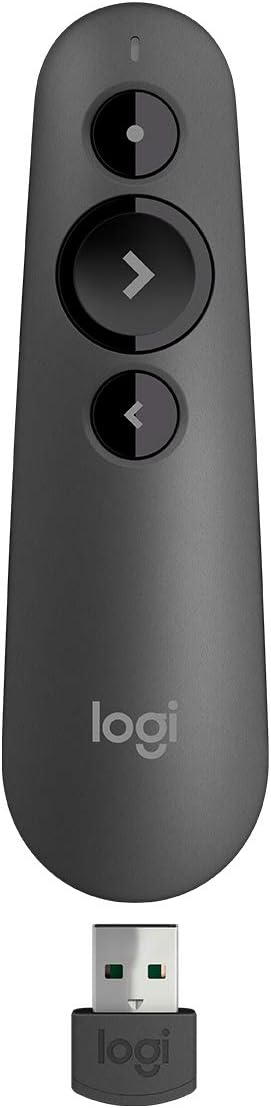
The R800 is a premium device featuring a built-in timer with vibrating alerts to keep you on track. Its green laser offers excellent visibility on any screen.
We may earn a commission when you buy through this link, at no additional cost to you.
Users love the silent vibration that signals time limits without distracting the audience. The device feels solid and balanced in the hand during long talks.
The price is higher than average, but the features justify it for frequent speakers. It is particularly useful for timed conferences and lectures.
Ideal for professionals who need precise time management during presentations. This tool combines advanced features with high build quality.
The visible timer and silent vibration help presenters stay within their allotted time without constant clock checking.
The powerful green laser ensures your pointer remains clear even in brightly lit rooms with high ambient light.
We may earn a commission when you buy through this link, at no additional cost to you.
This presenter supports both Bluetooth and USB connections for maximum compatibility with modern devices. The battery life is exceptional, lasting up to a year on one charge.
We may earn a commission when you buy through this link, at no additional cost to you.
You can customize button functions using the Logitech Presentation App which adds flexibility. It works with iOS and Android as well as desktop systems.
Software setup is needed for some features which may be a hurdle for some users. The battery life saves money and effort over time.
Best for users with mixed device ecosystems or those who need long runtime. It is a reliable partner for diverse presentation scenarios.
Connect via USB for stability or Bluetooth for modern laptops without available USB ports.
The R500s uses energy-saving modes to extend battery life significantly compared to standard clickers.
We may earn a commission when you buy through this link, at no additional cost to you.
This budget-friendly clicker offers an impressive 328-foot range and essential control features like volume adjustment. It is designed for basic but effective presentations.
We may earn a commission when you buy through this link, at no additional cost to you.
The included clip allows you to attach it to a notebook or pocket for easy carrying. It works well on standard presentation software without extra setup.
The build is simple but functional for the price. It is an excellent option for students or small businesses on a tight budget.
Perfect for users who need a reliable tool without extra cost. It delivers core functionality with great range.
Walk anywhere in a large hall or auditorium without worrying about connection drops up to 328 feet.
The compact clip-on design makes it easy to carry and keep safe during travel or daily commutes.
We may earn a commission when you buy through this link, at no additional cost to you.
The N95 features a dual USB receiver for USB-A and USB-C devices and a green laser for better visibility. It is powered by a rechargeable battery that lasts weeks.
We may earn a commission when you buy through this link, at no additional cost to you.
Users can reprogram buttons using the Norwii app for customized control layouts. This flexibility is rare at this price point.
The build feels solid and ergonomic enough for daily use. It is a strong competitor for modern devices with USB-C ports.
Ideal for tech-savvy users who want green visibility and rechargeable power. It offers modern connectivity in a traditional clicker.
The dual USB receiver works with both legacy USB-A ports and modern USB-C devices instantly.
Remap forward and backward keys to suit your specific navigation style using the free software.
We may earn a commission when you buy through this link, at no additional cost to you.
This compact clicker is designed with a rubberized grip for comfort during long sessions. It features a standard red laser and simple controls for ease of use.
We may earn a commission when you buy through this link, at no additional cost to you.
The USB receiver is stored safely under the battery cover which prevents loss. It is very small and lightweight for pocket carry.
The range is limited compared to other options but works fine for small meeting rooms. It is a practical tool for on-the-go presentations.
Best for users who prioritize portability and comfort. It is a reliable basic clicker for daily office use.
The ergonomic rubber coating ensures the device feels secure and comfortable in your hand.
The hidden slot under the battery cover keeps the USB receiver safe when not in use.
We may earn a commission when you buy through this link, at no additional cost to you.
This model features a unique built-in receiver with both USB-A and USB-C connectors for universal compatibility. It includes volume control and a 100-foot range for flexibility.
We may earn a commission when you buy through this link, at no additional cost to you.
The magnetic storage at the bottom keeps the receiver secure during transport. It works plug and play without any software installation.
It is a practical tool for users who switch between Mac and PC often. The battery life is decent with auto-sleep technology.
Ideal for professionals who need one clicker for multiple device types. It balances features and convenience well.
The dual USB connectors mean you never need an extra adapter for different laptop ports.
Auto-sleep technology helps extend battery life so the device is ready when you need it.
We may earn a commission when you buy through this link, at no additional cost to you.
This clicker is designed for extreme portability weighing only 38 grams. It features ergonomic buttons and a simple design for quick slide navigation.
We may earn a commission when you buy through this link, at no additional cost to you.
It offers a 98-foot range and works well with standard presentation software. The battery life is reliable for daily use with one AAA battery.
The lightweight build makes it easy to forget it is in your pocket which is a plus. It is a no-frills option that works well.
Best for users who want the lightest possible clicker. It is a solid basic tool for casual presentations.
At 38 grams this is one of the lightest clickers available for easy pocket carry.
The buttons are designed to be intuitive and easy to press without looking down.
We may earn a commission when you buy through this link, at no additional cost to you.
Selecting the right presentation pointer depends on your specific environment and connectivity needs. This guide outlines the most important factors to consider.
Green lasers are significantly brighter than red ones and perform better on large screens or in bright rooms. Consider the size of your typical venue when choosing between colors.
Prioritize green lasers for large lecture halls and red lasers for smaller meeting rooms where budget is a concern.
Rechargeable models reduce waste and save money over time. They ensure you never forget batteries before a presentation.
Choose rechargeable options if you present frequently or want to avoid the hassle of buying batteries regularly.
Range varies from 50 feet to over 300 feet depending on the model. A longer range allows you to move freely across a stage.
Select a model with a range that covers your largest typical presentation space without signal loss.
Check if the device supports USB-A, USB-C, or Bluetooth for your specific computers. Universal compatibility ensures you can present from any machine.
Look for plug and play devices that work with Windows Mac and Linux without requiring software installation.
Extra buttons like volume control or hyperlink access can streamline your flow. Ensure the layout is ergonomic and easy to use by touch.
Choose a layout that matches your navigation needs to minimize mistakes during live presentations.
Ergonomic designs with rubber coatings provide better grip and comfort. Look for models with storage slots to protect the receiver.
Invest in a sturdy build if you plan to carry the device in a bag daily for travel.
Prices vary widely but higher cost does not always mean better performance. Assess the features you truly need before buying.
Budget models often offer sufficient performance for basic needs without the premium price tag.
Before presenting test the device to ensure the battery is charged or fresh. Connect the receiver to your computer and verify slide controls work.
Keep the laser focused on specific points rather than waving it around to maintain professional composure. Avoid pointing it at eyes or reflective surfaces for safety.
Store the device in a protective case or pocket when not in use to prevent damage. Clean the lens gently with a soft cloth to maintain brightness.
Most models are plug and play and do not need drivers. They work as standard USB input devices on Windows and Mac. Some brands offer optional software for customization.
Green lasers are generally better for visibility on screens and in bright rooms. Red lasers are more affordable and sufficient for standard lighting.
Range varies by model from 50 feet to over 300 feet. Larger rooms benefit from devices with longer wireless capabilities.
Some models support Bluetooth which allows use with tablets. Ensure your device supports USB OTG if using a wired receiver.
Battery life depends on the type. Rechargeable ones last weeks while AAA powered ones can last months with moderate use.
Yes standard presentation laser pointers are Class 2 and safe if used correctly. Never stare directly into the beam.
We recommend the Green Light Presentation Clicker for its superior visibility and rechargeable convenience. The Logitech R800 is ideal for those needing time management tools.
Consider your typical room size and device compatibility before purchasing. Features like volume control or dual USB connectors add significant value for frequent users.
Prices and availability can change so please check the latest details on the retailer site. We hope this guide helps you deliver impactful presentations with confidence.