
Tomee 16MB Memory Card
4.7Editor score
251 blocks capacity
Low cost option
Simple plug and play
Discover the best GameCube Memory Card options for saving your progress. This guide compares top third-party cards for GameCube and Wii consoles.
Preserving your gaming progress is essential for any enthusiast who has invested time into completing difficult levels or unlocking hidden content. A reliable memory card ensures that your save files remain intact even when the console is powered off or reset unexpectedly during play.
We have analyzed ten highly rated memory cards to help you find the right storage solution for your setup. Our comparison covers capacity, compatibility with specific console models, and build quality to ensure your data remains safe over years of use.
Each pick below highlights specific strengths like storage size, speed, or design features that suit different player needs. Please note that prices and availability may change frequently, so verify current details before making your final purchase decision.
4.7Editor score

4.7Editor score

4.8Editor score
This side-by-side comparison details the key specifications and capabilities of each memory card listed. We evaluate storage blocks, compatibility notes, and specific design features to help you distinguish between standard and high capacity options.
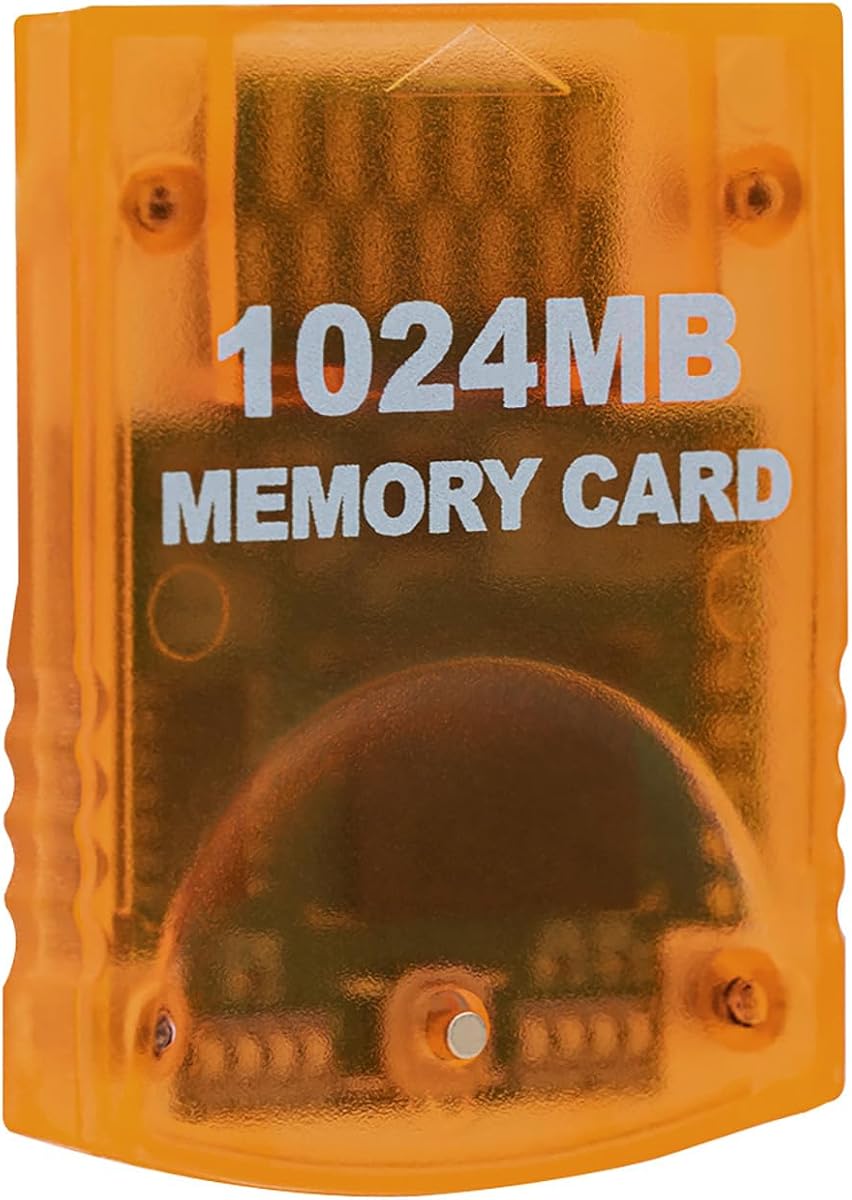


The Tolesum 1024MB Card offers substantial storage for saving progress across multiple titles. It receives high marks for providing real uncompressed blocks which ensures compatibility with games that struggle with compressed data.
We may earn a commission when you buy through this link, at no additional cost to you.
This card splits its capacity into eight independent areas allowing you to organize saves by game genre or project. The indicator lights clearly show which area is active making it easy to manage files without confusion.
While it is a third party item it delivers reliable performance similar to original hardware. Users should remember to power down the console before inserting or removing the card to prevent file corruption during use.
We recommend this card for players who manage large save libraries on original GameCube or Wii consoles. Its capacity and organization features make it an ideal choice for enthusiasts who need robust storage solutions.
Real uncompressed blocks prevent compatibility issues with titles that reject compressed save files entirely.
Eight distinct areas let you keep saves for different games separated without needing multiple physical cards.
We may earn a commission when you buy through this link, at no additional cost to you.
The Tolesum 512MB Card provides a balanced amount of storage for casual gamers and collectors alike. It features four data areas which helps keep save files organized while maintaining a budget friendly price.
We may earn a commission when you buy through this link, at no additional cost to you.
Its design prioritizes ease of use with a simple button to switch between areas. This makes managing saves straightforward even for users who are not tech savvy with older console hardware.
As a third party accessory it offers reliable performance without the cost of legacy hardware. The card ensures your hard earned progress is preserved safely during long gaming sessions on your console.
Choose this option if you need a reliable secondary card at a lower cost. It is perfect for storing saves from a few favorite games without overspending on memory storage.
This card delivers solid performance and storage capacity at a price point accessible to most buyers.
Pressing a button shifts focus between four sections allowing quick access to different game saves.
We may earn a commission when you buy through this link, at no additional cost to you.
The MAYFLASH 512MB Card stands out with top customer ratings for its consistent performance. It supports four storage areas and works seamlessly with compatible GameCube and Wii consoles.
We may earn a commission when you buy through this link, at no additional cost to you.
Users appreciate the reliable connection which minimizes risk of data loss during transfers. The design is compact and fits well in the console slot without wobbling or causing connection issues.
While it does not offer the massive capacity of 1GB options it is sufficient for most standard needs. Its stability makes it a trustworthy choice for those who prioritize reliability over sheer size.
We suggest this card for gamers who want a proven reliable option for saving progress. The high satisfaction rate indicates it meets expectations for performance and durability in daily use.
Top ratings reflect consistent performance that users trust for saving important game files without error.
The card maintains a secure fit in the slot ensuring data reads correctly every time you load.
We may earn a commission when you buy through this link, at no additional cost to you.
The Mcbazel 1024MB Card provides extensive storage for players managing multiple save files across a large library. It features eight parts that can be switched to organize data effectively and keep saves safe.
We may earn a commission when you buy through this link, at no additional cost to you.
Performance is noted for being high speed and efficient allowing quick writes without lag during gameplay. This ensures that saving progress is seamless and does not interrupt your gaming experience unnecessarily.
As a third party card it offers a practical alternative to scarce original options. It is essential for anyone looking to preserve hard earned achievements in games that require external save storage.
This card is ideal for collectors and marathon gamers who need maximum space for their saves. It delivers the capacity needed to handle extensive playthroughs without worrying about running out of blocks.
With over sixteen thousand blocks you can store hundreds of game saves on a single card easily.
High speed processing ensures saves are written quickly reducing wait times during gaming sessions.
We may earn a commission when you buy through this link, at no additional cost to you.
The 16MB Gamecube Memory Card offers a standard storage solution for essential saves. It works seamlessly with both GameCube and Wii consoles providing reliable access to your game progress.
We may earn a commission when you buy through this link, at no additional cost to you.
Designed for durability this card resists damage from drops and power outages making it robust for daily use. The streamlined profile fits snugly reducing the wobble issue common in generic alternatives.
While the capacity is smaller than high end options it is perfect for specific titles needing simple saves. Its budget friendly nature makes it an attractive choice for casual players with minimal storage needs.
Buy this card if you need a basic reliable replacement for a lost or damaged memory card. It ensures you can continue playing without interruption and keeps your saves secure over time.
Shock resistant construction protects your files from accidental physical damage during handling or transport.
The slim design ensures a tight fit in the console slot preventing connection errors during use.
We may earn a commission when you buy through this link, at no additional cost to you.
The Tomee 16MB Memory Card is a straightforward option for storing levels and top scores. It provides essential functionality allowing you to load save copy and delete game data with ease.
We may earn a commission when you buy through this link, at no additional cost to you.
Its compatibility with GameCube games is robust ensuring you can save progress in any title that supports it. Users find it reliable for keeping characters and settings safe during long play sessions.
As a compact card it fits well in any console setup without taking up extra space. The design focuses on delivering core features without unnecessary complexity or bulk for the user.
This card is suitable for those who need a basic reliable storage solution for favorite games. It balances price and performance well making it a practical pick for casual console owners.
Core features allow you to manage saves efficiently without complicated menus or setup steps required.
Store top scores and character progress ensuring your achievements are not lost between gaming sessions.
We may earn a commission when you buy through this link, at no additional cost to you.
The Mcbazel 256MB Card offers generous storage split into two independent sections for better organization. It is designed specifically for GameCube and Wii consoles ensuring broad compatibility across models.
We may earn a commission when you buy through this link, at no additional cost to you.
Fast data transfer allows for seamless gameplay without lag during save operations. The card includes indicators to show which bank is active making it easy to track your saved files.
Its bright pink translucent design adds a touch of personality to your console setup while remaining functional. Users should ensure the console is powered off before insertion to avoid data loss.
Choose this card if you need more space than 16MB but do not require the full 1GB capacity. It balances capacity and ease of use effectively for most gaming needs.
Two independent banks let you group saves by project or game to keep your data structured.
LED lights provide visual feedback on which bank is live simplifying file management.
We may earn a commission when you buy through this link, at no additional cost to you.
The Gamecube Memory Card 251 offers a standard solution for saving game data. It provides 16MB of flash memory which translates to 251 blocks for storing your settings and progress.
We may earn a commission when you buy through this link, at no additional cost to you.
This card is known for its reliability in preserving game settings and data. It is a practical tool for keeping your save files intact during play on compatible hardware.
Users appreciate the simplicity of the card which performs its function without issues. It fits the profile of a standard accessory for those who need basic storage capabilities.
This card is recommended for users who need a straightforward storage option without advanced features. It ensures your progress is saved safely and is ready for the next gaming session.
Uses standard flash technology to retain data without power ensuring saves remain safe offline.
Designed to handle core saving tasks efficiently without extra complexity for the end user.
We may earn a commission when you buy through this link, at no additional cost to you.
The Suncala 1024MB Card features an upgraded innovation chip that saves game data faster than older versions. It includes eight storage sections for organizing your save files and keeping them safe.
We may earn a commission when you buy through this link, at no additional cost to you.
This card is fully compatible with GameCube and Wii consoles and supports high storage counts. The package design is sleek allowing easy insertion and removal of the card from the slot.
A standout feature is the 60 months worry-free warranty which provides peace of mind for buyers. Friendly customer service ensures any issues are addressed quickly to keep your gaming running smoothly.
This card is an excellent choice for those who want high capacity and strong after-sales support. It combines practical storage with reliable performance and a long warranty period for added security.
Newer chip architecture processes and saves game data faster reducing wait times significantly.
Sixty months of warranty protection and responsive support add long-term value to your purchase.
We may earn a commission when you buy through this link, at no additional cost to you.
The AreMe GC2SD Adapter offers an alternative to traditional memory cards by using Micro SD cards. It can handle up to 512GB of storage allowing massive amounts of data to be accessed.
We may earn a commission when you buy through this link, at no additional cost to you.
To function it requires specific loaders like Swiss or GCloader Lite to load the TF card game list. This makes it versatile for users who want to manage large libraries on their console.
The transparent design lets you see the inserted card clearly while maintaining compatibility with both GameCube and Wii. It is a unique tool for those looking to expand storage beyond standard limits.
Consider this adapter if you need extreme storage capacity and are comfortable with additional configuration. It provides a flexible solution for enthusiasts who want to store games or large save files.
Supports Micro SD cards up to 512GB offering far more storage than standard memory cards.
Works with Swiss loaders to automatically load game lists for a streamlined gaming experience.
We may earn a commission when you buy through this link, at no additional cost to you.
Selecting the right memory card involves understanding storage needs and console compatibility. Here are the key factors to consider before you make your purchase.
Storage capacity determines how many game saves you can keep at once. Options range from standard 16MB blocks to high capacity 1024MB cards with thousands of blocks. Larger capacities are ideal for collectors or those playing many games simultaneously.
Choose a capacity that matches your gaming habits and the number of titles you save often.
Compatibility is critical as not all Wii models support memory cards. Only the original Wii with model number RVL-001 has the memory card slot. Family Edition and Mini models do not support these cards so check your model before buying.
Verify your console model number to ensure the card will fit and function correctly.
Memory cards use either compressed or uncompressed blocks. Real uncompressed blocks ensure full compatibility with all games and prevent save corruption. Cards that claim high block counts via compression may fail with certain titles.
Always look for non-compress or real blocks to guarantee reliable performance with all games.
Higher capacity cards often divide memory into multiple independent areas or banks. This allows you to organize saves by game or project for easier management. Switching areas is typically done via a button on the card itself.
Multiple areas offer better organization especially when managing saves for dozens of different titles.
Build quality affects durability and longevity of the card. Shock resistant designs and secure fits prevent connection errors and physical damage. Third-party cards vary in quality so check reviews for reliability feedback.
Select a card with a reputation for sturdy construction to protect your saved progress over time.
Transfer speed influences how quickly saves are written and read. Faster cards reduce lag during save operations ensuring smoother gameplay. Upgraded chips in newer third-party cards often improve performance significantly.
Prioritize cards with high-speed features if you play games frequently that require frequent saves.
Prices vary depending on capacity and brand features. Higher capacity and faster cards cost more but offer better long-term value. Budget options provide basic functionality at lower costs suitable for casual players.
Balance your budget against storage needs to find the best value for your specific situation.
Some manufacturers offer warranties or customer support for peace of mind. Warranty periods can range up to 60 months providing protection against defects. Friendly support can help resolve compatibility or usage issues quickly.
Check for warranty terms and support availability to ensure you are covered if problems arise.
Always turn off the console before inserting or removing the memory card to prevent data loss. This basic step ensures the save files are not interrupted during critical write operations.
Regularly check the card connections by gently removing and reseating it if you experience errors. Dust can accumulate in the slot so keep the console clean to maintain good contact.
Keep your save data backed up by transferring files to other cards when possible. This redundancy protects your progress against accidental loss or hardware failure over time.
No only the original Wii model with the number RVL-001 has the memory card slot. Later models like the Wii Family Edition and Mini do not have this slot so memory cards will not fit.
Uncompressed blocks store data directly without altering it ensuring full compatibility with games. Compressed blocks reduce space but may fail to load properly with certain titles causing save errors.
No GameCube memory cards are designed specifically for GameCube disc saves. Wii titles store saves internally or on SD cards so this card is not compatible with Wii game files.
A 1024MB card holds 16344 uncompressed blocks which can store hundreds of save files. Exact numbers depend on the size of each game's save file but it supports many titles simultaneously.
Many third-party cards perform reliably and are widely used by gamers. They often offer more storage at lower prices than limited official hardware. Check reviews to ensure compatibility and stability.
Powering off prevents interruption during read or write operations which could corrupt save files. This simple habit ensures your progress is written fully and safely to the card.
Save files stored on the card are lost permanently if you do not have a backup. Always transfer important saves to another card or internal storage if possible before losing the card.
No the Wii U does not support GameCube memory cards or GameCube controllers directly. You will need to rely on other methods or emulation solutions not standard physical memory cards.
We highlighted ten top picks ranging from standard capacity options to high storage solutions for enthusiasts. Each card offers unique benefits depending on your specific storage needs and console model.
Prioritize uncompressed blocks and verified compatibility to ensure your save files are secure. Choosing a card with good build quality and speed will enhance your overall gaming experience significantly.
Remember to check current prices and availability before making your purchase as these can change quickly. Investing in a reliable memory card ensures your progress is preserved safely for the long term.