
10Gtek PCIe x1 to M.2 Adapter
4.4Editor score
Desktop Upgrade Solution
Supports Multiple Modules
Includes Bluetooth Cable
This guide compares the top M2 Key E WiFi cards for laptops and desktops, evaluating speed, compatibility, and features to help you choose the best wireless
Finding the right wireless adapter can transform your computing experience significantly. Modern M2 Key E WiFi cards offer incredible speeds and reliable connections for streaming and gaming without lag.
We analyzed ten top products based on specifications, user feedback, and compatibility standards. Our list covers everything from budget-friendly options to cutting-edge Wi-Fi 7 modules for high performance.
Each pick highlights key strengths and potential limitations to guide your decision. Please note that product availability and pricing can change frequently, so verify details before purchasing.
4.4Editor score

4.5Editor score

4.6Editor score
The following table provides a side-by-side look at the key specifications and capabilities of each product on our list to help you identify the best match for your system.
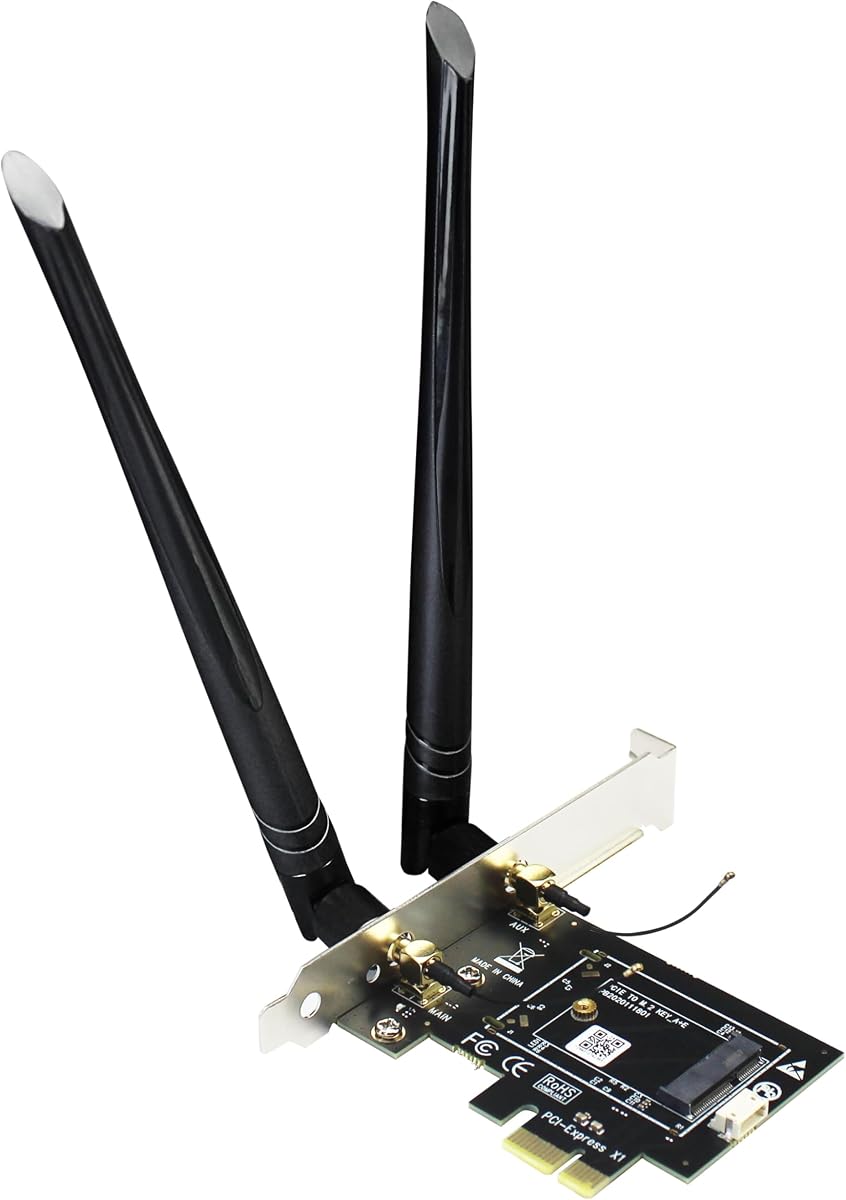

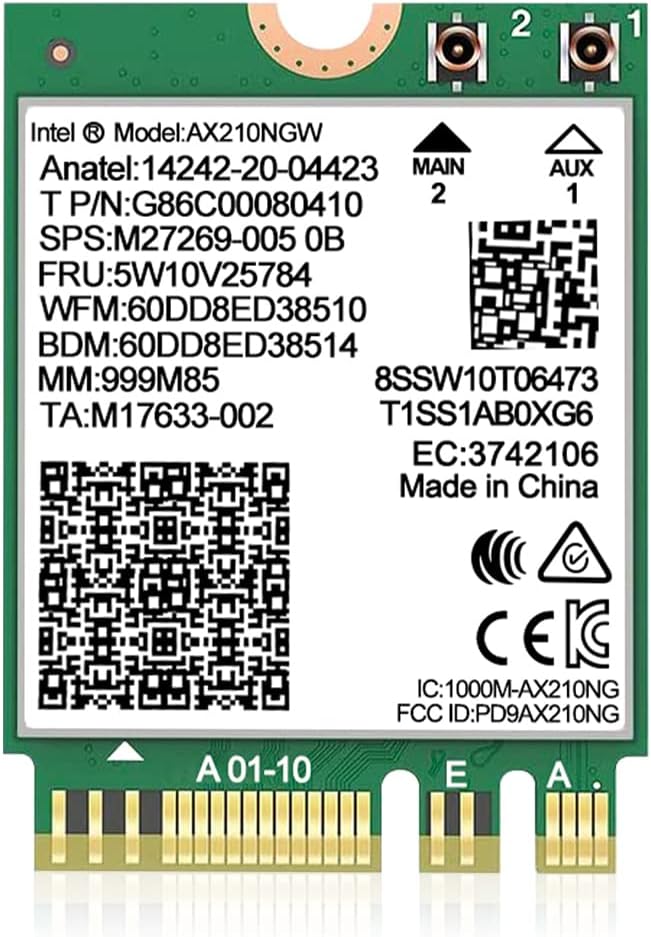




This product stands out as a comprehensive solution for upgrading wireless capabilities. With a strong rating and robust feature set, it delivers reliable tri-band performance suitable for demanding users.
We may earn a commission when you buy through this link, at no additional cost to you.
Powered by the Intel AX210 chipset, it brings the latest WiFi 6E technology to your device. The inclusion of high gain antennas and necessary brackets ensures you get optimal signal strength right out of the box.
While it offers impressive speeds and low latency, you must ensure your motherboard has a compatible Key E slot. Additionally, downloading the latest drivers from Intel is essential for full functionality.
If you need a versatile adapter that balances performance and completeness, this is an excellent choice. It is ideal for gamers and streamers who prioritize stability and speed in their connection.
Accessing the 6GHz band reduces interference and provides faster speeds for high-bandwidth applications like 8K streaming.
The integrated Bluetooth 5.3 allows seamless pairing with modern peripherals while maintaining low latency for audio devices.
We may earn a commission when you buy through this link, at no additional cost to you.
This adapter serves as a crucial bridge for those looking to expand wireless capabilities on desktops with limited onboard slots. It is designed to handle various modules including future-proof options.
We may earn a commission when you buy through this link, at no additional cost to you.
The unique design separates WiFi and Bluetooth signals using different interfaces which allows flexibility in connection setups. This makes it compatible with a wide range of M.2 modules from different vendors.
One limitation is the Bluetooth signal which requires a direct USB connection to function properly. Also older Intel CNVio2 modules are not supported so checking compatibility is vital.
If you have a spare PCIe slot and a modern M.2 module this adapter provides a robust way to utilize them on a desktop motherboard. It is a great tool for custom builds.
It supports a vast array of NGFF modules from legacy standards up to cutting-edge Wi-Fi 7 options.
The PCIe interface allows you to place the card anywhere in your chassis for better cable management.
We may earn a commission when you buy through this link, at no additional cost to you.
This adapter is an excellent choice for budget-conscious builders who want to add wireless functionality to a desktop tower. It focuses on expanding existing modules efficiently without extra cost.
We may earn a commission when you buy through this link, at no additional cost to you.
It includes a full height bracket which makes mounting secure in standard computer cases. The included Bluetooth cable ensures that you can connect the module to the motherboard for full functionality.
The main caveat is that the actual wireless card is not included so you must source that separately. Also the Bluetooth signal path relies on a USB connection that requires a free motherboard header.
For those who already have a spare module or want to test different cards this is the most economical expansion card available. It simplifies the process of adding modern wireless standards to older systems.
Ideal for upgrading older desktop PCs that lack built-in WiFi without replacing the entire motherboard.
Compatible with a wide range of A+E key NGFF modules ensuring flexibility for your hardware choices.
We may earn a commission when you buy through this link, at no additional cost to you.
This card represents the bleeding edge of wireless connectivity for personal computing devices. It is designed to leverage the latest standards for maximum throughput and reduced latency in heavy tasks.
We may earn a commission when you buy through this link, at no additional cost to you.
The support for Multi-Link Operation allows the card to connect to multiple bands simultaneously for enhanced reliability. This feature is particularly useful for real-time applications where consistent connection is critical.
However full performance depends on having a compatible router and a very specific operating system version. This can be a barrier for users who cannot upgrade their OS immediately or use older hardware.
If you are building a cutting-edge setup this card ensures you are ready for future networks. It is a strong option for enthusiasts who want the absolute fastest speeds available now.
MLO technology allows simultaneous use of channels to reduce lag and boost speeds significantly.
The tri-band configuration provides excellent channel selection to avoid congestion in crowded networks.
We may earn a commission when you buy through this link, at no additional cost to you.
This adapter is praised for its solid performance and reliability across a variety of systems. It offers a balanced set of features that suit most users looking for an upgrade over older WiFi standards.
We may earn a commission when you buy through this link, at no additional cost to you.
With Intel AX210 technology you get excellent range and speed without the compatibility issues seen with proprietary chips. The strong rating reflects user satisfaction with the connection stability and ease of use.
You will need to download drivers to get the most out of this card but the process is straightforward. The warranty and lifetime support add a layer of security to your purchase.
For general users and professionals this card provides a dependable connection for all daily tasks. It is a safe recommendation for anyone needing a robust WiFi 6E experience without premium costs.
The consistent speed and low latency make it suitable for video calls and large file transfers.
A year warranty and lifetime technical support provide peace of mind for long-term usage.
We may earn a commission when you buy through this link, at no additional cost to you.
This module brings advanced networking features to laptops at a competitive price point. It maintains the high standards of the AX210 series while offering a compact and reliable design.
We may earn a commission when you buy through this link, at no additional cost to you.
Support for WPA3 ensures that your network security is up to date with current standards. The ultra-low latency makes it a great choice for gaming where reaction time is crucial.
It does not offer any unique bells and whistles but it performs its core functions very well. The focus on essential performance and security makes it a solid choice for practical upgrades.
If you want a straightforward reliable upgrade that works with Windows and AMD systems this is a great pick. It delivers the speed and reliability you need without unnecessary complexity.
WPA3 support ensures your connection is secure against modern threats and encryption exploits.
Low latency and high throughput make it suitable for demanding tasks like gaming and streaming.
We may earn a commission when you buy through this link, at no additional cost to you.
This complete kit is designed to simplify the upgrade process for users who want everything in one box. It includes the card plus high gain antennas and all necessary installation accessories.
We may earn a commission when you buy through this link, at no additional cost to you.
The 8dBi antennas provide a significant boost to signal strength which helps reach further or penetrate walls better. This makes it ideal for users whose router is far from their device.
As with most AX210 cards you will need to install drivers from the official site to enable full functionality. But having the brackets and cables included saves you from searching for adapters separately.
If you need a high-performance antenna setup this kit offers excellent value. It is a top recommendation for anyone wanting maximum signal strength without extra hassle or cost.
The 8dBi antennas provide stronger signal range compared to standard included options.
Everything from cables to brackets is included so you do not need to buy extras.
We may earn a commission when you buy through this link, at no additional cost to you.
This card is built for users who need maximum bandwidth for demanding applications. It uses advanced technology to deliver speeds that are far beyond older wireless standards.
We may earn a commission when you buy through this link, at no additional cost to you.
The integration of MLO allows it to manage multiple connections at once for better stability. This ensures that your network remains responsive even under heavy load or interference.
The strict requirement for Windows 11 means you must be running a modern OS to use it effectively. Also you will need to update drivers from the specific vendor site to avoid conflicts.
If you are running a high-end gaming PC or need rapid data transfers this card is ideal. It offers the fastest speeds currently available for a consumer module in this category.
The 5800Mbps rate ensures you are never bottlenecked by your wireless connection speed.
Designed for gaming and real-time tasks requiring instant response and stable connections.
We may earn a commission when you buy through this link, at no additional cost to you.
This card provides a reliable dual-band solution for users who do not need the absolute latest WiFi 6E features. It is known for stability and works well in varied environments.
We may earn a commission when you buy through this link, at no additional cost to you.
A unique benefit is its compatibility with Linux systems which is rare for many wireless modules. This makes it a top pick for developers or users running open-source operating systems.
The Bluetooth version is slightly older than some newer cards but still offers solid performance for most peripherals. It is a cost-effective way to add modern WiFi to a laptop.
If you use Linux or just need a dependable dual-band card this is a strong choice. It offers excellent performance for streaming and browsing without the complexity of newer tri-band setups.
Works with Linux kernels 6.5 or higher making it a top pick for open-source users.
Provides stable speeds on 5GHz and 2.4GHz bands for all general daily usage.
We may earn a commission when you buy through this link, at no additional cost to you.
This card represents the premium tier of wireless options offering the latest Intel Killer technology. It is designed for users who prioritize the absolute best performance and latency possible.
We may earn a commission when you buy through this link, at no additional cost to you.
With support for the latest Bluetooth 5.4 and Wi-Fi 7 it brings cutting edge features to your desktop. The design ensures ultra-low latency which is perfect for competitive gaming environments.
It is restricted to Intel processors which limits its use but ensures optimized performance for those systems. If you have a compatible system the benefits are significant and clearly noticeable.
For those with high-end Intel systems this is the most robust option available. It delivers the highest performance and modern connectivity standards to maximize your hardware investment.
The BE200 delivers maximum speeds and bandwidth for the most demanding applications.
Specifically optimized for Intel platforms to ensure best-in-class performance and stability.
We may earn a commission when you buy through this link, at no additional cost to you.
Choosing the right wireless card requires considering your current hardware and future needs.
Ensure the card supports the latest WiFi standards like WiFi 6E or WiFi 7 to future-proof your setup. Check that your router and operating system can support these new features for full benefits.
Look for cards that match your router capabilities to avoid bottlenecks in your network speed.
M2 Key E slots are standard for laptops but desktop users may need adapters to use them. Verify that your motherboard has a compatible slot size such as 2230 or other supported dimensions.
Select a card or adapter that physically fits your chassis to avoid installation issues.
Modern Bluetooth versions like 5.2 or 5.3 offer better range and lower latency for peripherals. Ensure the card supports the version you need for your headphones or controllers.
Prioritize cards with newer Bluetooth features if you rely on wireless accessories.
Reliable driver support ensures your card works seamlessly with your operating system updates. Check if the manufacturer provides easy access to drivers and ongoing support.
Choose products with active driver support to avoid connectivity headaches.
High gain antennas can significantly improve signal strength and range especially in larger spaces. Check if the kit includes external antennas or if you need to source them separately.
Opt for setups with good antenna options to ensure consistent coverage.
Some high-performance cards require specific operating system versions like Windows 11 for full functionality. Verify the software requirements before purchasing to ensure compatibility.
Make sure your system meets the OS demands of the card you select.
Balance your budget with the performance you need. Older cards may suffice for general tasks while newer models are better for gaming and streaming.
Assess your usage needs to find the right value for your money.
Choose brands with a good track record for quality and customer support. Reliable manufacturers often provide better warranties and documentation.
Select reputable brands to ensure a smooth experience and long-term reliability.
Install the card carefully into the M.2 slot and secure it with the appropriate screws. If using a desktop adapter ensure all cables are connected properly to the motherboard.
Download and install the latest drivers from the manufacturer or Intel website. This ensures you get the best performance and security updates.
Keep your system cool to prevent overheating which can affect the card performance. Avoid bending antennas excessively to maintain signal integrity.
Not all laptops have a replaceable M.2 slot. Some devices solder the wireless card directly to the motherboard. Check your laptop manual to confirm if the slot is accessible and compatible.
Yes most WiFi 7 cards are backward compatible with older standards. However you will not get the full speed benefits unless you also upgrade your router to support WiFi 7 features.
External antennas can improve signal range but internal antennas on laptops are often sufficient. High gain antennas are beneficial if your router is far away or obstructed.
Installation requires basic tools and care. Desktop users may need to open the case while laptop users need to access the internal compartment. Always power off the device before starting.
Key E is typically used for WiFi cards while Key A is used for SSDs. Some slots are designed for both keys allowing flexibility in module placement.
Many cards support Linux but driver availability varies. Some brands offer better kernel integration than others. Check the product description for Linux compatibility details.
The top picks offer a range of solutions from budget adapters to premium WiFi 7 cards. Each product caters to different needs whether it is speed reliability or compatibility.
Prioritize compatibility with your motherboard and operating system when making your choice. Also consider future needs to ensure your investment lasts longer.
Always verify current availability and details before purchasing. Technology evolves quickly so checking the latest specs ensures you get the best value.