
Nettbe 60 PCS 6 Inches Reusable Cable Ties
4.8Editor score
Reusable hook and loop design
60 piece value pack included
Adjustable for any cable size
A clean gaming setup starts with organized cables. Poor cable management leads to clutter dust buildup and potential safety hazards. The right tools keep wires hidden protected and easy to access for upgrades or maintenance.
We compared ten top rated products based on capacity ease of installation and durability. Each item was selected for its ability to handle gaming gear loads and maintain a professional look under your desk.
Every pick highlights specific strengths like split sleeves for easy routing or heavy duty trays for power strips. Prices vary by retailer so check current listings before buying to get the best deal on your setup.
4.8Editor score
4.6Editor score
4.6Editor score
As an Amazon Associate we earn from qualifying purchases.
This side by side comparison breaks down the key features and use cases for each product. Use this table to quickly find the right solution for your specific desk setup and cable volume needs.




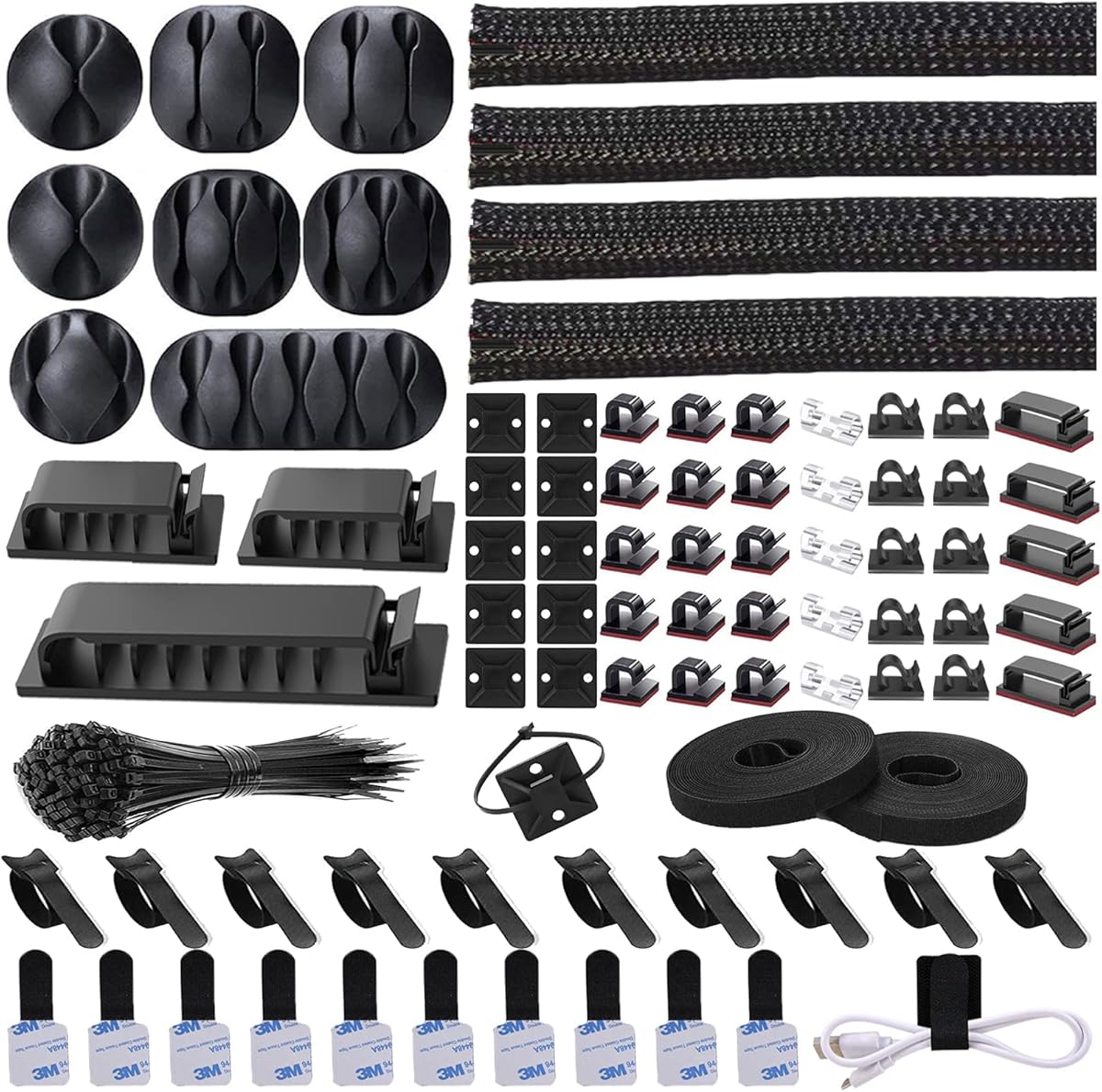
The NOROCME 192 PCS Cable Management Kit stands out as the most comprehensive solution for gaming PC cable management. With a solid 4.6 star rating it offers everything from sleeves to ties in one box. This makes it ideal for users who want a single purchase to handle their entire setup.
We may earn a commission when you buy through this link, at no additional cost to you.
Its standout feature is the split cable sleeves which allow you to load wires without unplugging them. The kit includes 36 cable clips made from strong Polyamide66 material that work on desks and walls. The self-adhesive cable tie rolls provide extra security for bundling groups of cords effectively.
While the kit is extensive some users might find the variety overwhelming if they only need a few ties. The adhesive pads require clean smooth surfaces to bond properly which could be a limitation on textured desks. These trade-offs are minor given the value and completeness of the package.
This kit is perfect for gamers doing a full desk overhaul or building a new battlestation. It provides the flexibility to organize power cables audio wires and peripheral cords all at once. For those seeking a one-stop shop for cable clutter this is the top recommendation.
The split design lets you slide cables in after installation which saves time and effort during setup.
Eco-friendly Polyamide clips ensure long-lasting hold without damaging your furniture or wall surfaces.
We may earn a commission when you buy through this link, at no additional cost to you.
The Cord Management Organizer Kit mirrors the top pick closely with a 192 piece count and similar components. It has earned a 4.6 star rating for its ability to organize cables neatly on desks and walls. This product is a great alternative if you prefer black clips over mixed colors.
We may earn a commission when you buy through this link, at no additional cost to you.
It features split wire looms that make loading cables simple and efficient. The 36 black cable clips are made from Polyamide66 and stick well to clean surfaces like wood or ceramics. The included nylon wire ties allow you to bundle cords tightly without wasting material.
The main downside is that it shares the same adhesive limitations as other kits in this category. You must ensure surfaces are dust-free for best results. However the flexibility of the ties and durability of the clips make these minor issues.
Choose this kit if you want a reliable full set of tools without paying for branding. It handles high cable counts well and keeps your gaming area tidy. For budget conscious gamers wanting quality this kit delivers excellent value.
All clips are black to blend seamlessly with dark gaming setups and reduce visual distractions.
100 nylon ties let you secure multiple groups of cables without running out of fasteners.
We may earn a commission when you buy through this link, at no additional cost to you.
Alex Tech offers a focused solution with this 10 foot cord protector. With a 4.7 star rating it is highly trusted for keeping cables safe from pets and damage. It is best suited for protecting specific runs of wires rather than full desk management.
We may earn a commission when you buy through this link, at no additional cost to you.
The split wire loom is easy to load without cutting or unplug cables. Made from UL recognized material it ensures safety around power cords and audio video lines. The black color blends well under desks and the tubing is insulated for heat protection.
This product does not include clips or ties so you may need separate fasteners. It is designed purely for covering exposed cable sections. However its reliability and safety certification make it a top choice for protection.
Buy this if your main concern is keeping cats from chewing cables. It adds a durable barrier to vulnerable wires. For a dedicated protector this sleeve is efficient and affordable.
The tough sleeve stops chewing and keeps wires safe from curious pets around your desk.
UL Recognized status ensures the material meets safety standards for home use.
We may earn a commission when you buy through this link, at no additional cost to you.
YECAYE provides six J-channel organizers perfect for under desk routing. Rated 4.5 stars these channels keep cords off the floor and out of sight. They are ideal for power cords and peripheral wires at gaming and office setups.
We may earn a commission when you buy through this link, at no additional cost to you.
The outward-facing opening design makes adding or removing cables effortless. Each channel has pre-applied adhesive for quick installation without tools. The flame-retardant PVC adds an extra layer of safety for power strips.
Removal requires a hairdryer to soften the adhesive. This is a minor trade-off for secure mounting. The generous capacity allows multiple wires per channel which reduces the number of channels needed.
This option is great for users who want a hard-shell solution. It looks professional and keeps cables organized under the desk. Consider this if you prefer rigid channels over soft sleeves.
Channels hide wires under desks to keep the floor clear and your setup tidy.
Flame-retardant material reduces fire risk and protects your desk surface.
We may earn a commission when you buy through this link, at no additional cost to you.
Nettbe leads with a 4.8 star rating for its 60 piece reusable cable tie pack. These simple hooks offer the best value for bundling cables in any setup. They are perfect for gamers who need flexible and affordable wire management.
We may earn a commission when you buy through this link, at no additional cost to you.
Each tie is six inches long with a hook and loop design that allows reuse. You can adjust them for different bundle sizes without cutting. This reduces waste and saves money long term.
These ties do not include clips or adhesive so you must tie cables to existing structures. The loop may loosen slightly with heavy loads but remains functional. For simple bundling they work well.
Buy this if you already have clips and just need ties. They are perfect for organizing PC cases and monitor cables. For budget bundling this pack is unbeatable.
Reusable design cuts down on plastic waste and allows for easy reconfiguration.
Straightforward hook loop works instantly without tools or adhesive.
We may earn a commission when you buy through this link, at no additional cost to you.
Scanfield offers a two-pack of 17 inch under desk trays. Users report a cleaner look with fewer visible cables. With a 4.5 star rating these trays are solid for hiding power strips and transformers under your desk.
We may earn a commission when you buy through this link, at no additional cost to you.
Installation uses strong adhesive backing so no drilling is needed. The trays are spacious enough for adapters and keep cables off the floor. This improves the look of your gaming area immediately.
The adhesive can be strong which may make relocation difficult. But the durability ensures the trays stay in place over time. Two trays give you flexibility to place them at different points.
This pack suits gamers with limited under desk space. It keeps power gear hidden and safe. For compact setups this tray delivers reliable results.
Hides power strips effectively to make your desk look neat and organized.
Strong adhesive mounting saves time and avoids damage to your desk surface.
We may earn a commission when you buy through this link, at no additional cost to you.
Univivi provides a 36 inch under desk tray with flexible install. It uses clamps or screws to fit wood glass or metal tables. A 4.5 star rating shows reliability for holding adapters and cables securely.
We may earn a commission when you buy through this link, at no additional cost to you.
The 600D oxford fabric is flame-retardant and holds shape well. The tray folds open to add or remove items easily. Built-in ties help you organize inside the tray neatly.
Clips need at least 5.3 inches of space on the table edge. This may not work for all desk designs. But the heavy-duty clamp ensures stability for larger loads.
Choose this for larger desks needing capacity. The fold-open design is convenient for upgrades. For long desk spans this tray is excellent.
Clamp or screw options work with many table materials for secure mounting.
Folding design lets you add cables without removing the tray.
We may earn a commission when you buy through this link, at no additional cost to you.
This 25 inch cable tray has a 4.8 star rating for its sturdy metal construction. It features a mesh structure that prevents overheating of power supplies. It fits desks from 0.4 to 2 inches thick and includes non-slip pads.
We may earn a commission when you buy through this link, at no additional cost to you.
The open side design lets cables pass through freely. You can change the position easily with adjustable clamps. Assembly takes about three minutes and requires screws to join two parts.
The mesh design keeps dust off but may show wires inside. This is a small trade-off for heat management. The sturdy structure holds heavy power bricks without bending.
Buy this for standing desks needing ventilation. The metal build ensures longevity. For clean cooling cable management this tray is a top choice.
Mesh structure allows airflow to prevent power supply overheating during use.
Non-slip rubber pads adjust to different desk thicknesses securely.
We may earn a commission when you buy through this link, at no additional cost to you.
CableGenie offers ten clips made in the UK for reliable cable holding. The elastic loop holds cables up to one inch diameter. A 4.5 star rating confirms strong attachment and durability for gaming setups.
We may earn a commission when you buy through this link, at no additional cost to you.
The clip allows one-handed operation which simplifies adding cables. You can attach it with adhesive screws or zip ties. The elastic loop does not break when removing cables.
These clips are short so they hold cables vertically. They are not for heavy bundles. The high quality design ensures the grip stays strong over time.
Use this for chargers and HDMI cables behind desks. The UK-made quality ensures reliability. For tight spots this clip excels.
Easy clip design lets you add or remove cables with one hand.
Made in UK engineering ensures strong durable clips that do not fail.
We may earn a commission when you buy through this link, at no additional cost to you.
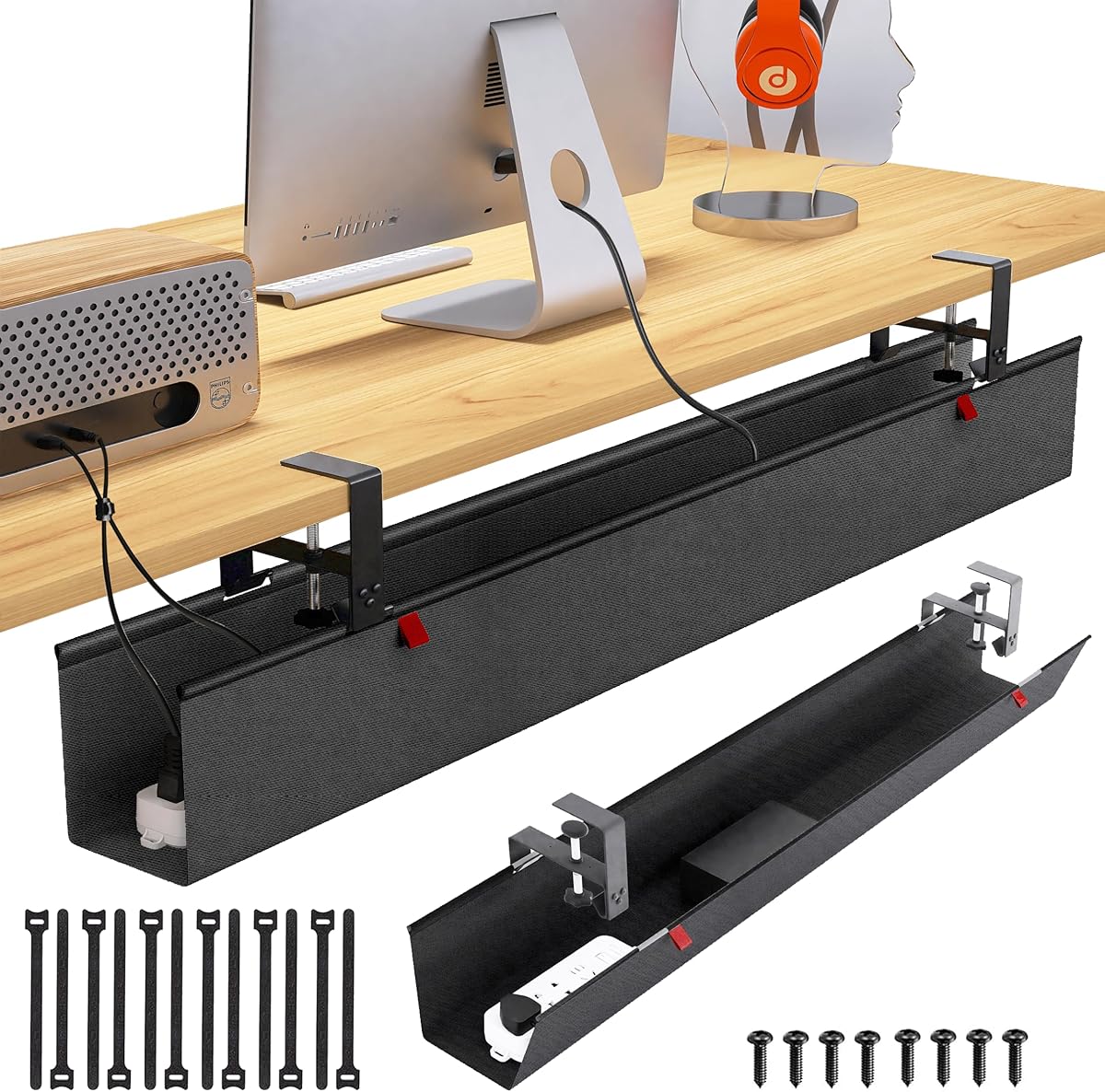
The 48 inch tray is the ultimate premium choice for serious gamers. With a 4.6 star rating it offers a wide 47.8 inch span. The anti-sag base supports heavy power bricks without bowing or deforming.
We may earn a commission when you buy through this link, at no additional cost to you.
High-density black Oxford fabric blocks all view of wires. This keeps under-desk areas dark and professional for streaming. The fabric is breathable to prevent heat buildup during gaming sessions.
The side opening allows easy routing of thick cables. It comes with extra ties for a clean look. The price is higher but the build quality matches its premium label.
Buy this for large battlestations needing full coverage. It protects against dust and pets effectively. For RGB setups this tray is the best choice.
High-density fabric completely hides wires for a clean dark professional look.
Dark design ensures your lighting shines without cable distractions.
We may earn a commission when you buy through this link, at no additional cost to you.
Choosing the right cable management solution depends on your setup needs and space. This guide outlines key factors to consider before making a purchase decision.
Measure your cables and determine how many you need to bundle. Trays should hold power strips and adapters without crowding. Sleeves must match the diameter of your wire groups.
Always check dimensions before buying to ensure fit under your desk or behind your monitor.
Look for strong materials like nylon Polyamide or flame-retardant PVC. These materials last longer and resist wear from movement or heat. Avoid cheap plastics that break under load.
Durable materials ensure your setup stays organized for years without replacing parts.
Consider whether you prefer adhesive no-screw or screw options. Adhesive is quick but needs smooth surfaces. Screws offer stronger hold but require drilling.
Choose the method that fits your desk surface and your comfort with tools.
Split sleeves let you load cables without unplugging them. Solid sleeves require you to thread wires through which takes more time. Split designs are better for existing setups.
If you plan to swap cables often choose split sleeves for flexibility.
Enclosed trays can trap heat around power supplies. Mesh designs allow airflow to prevent overheating. Ensure your choice has ventilation if you store hot gear.
Proper airflow protects your equipment from heat damage during long sessions.
Match the color to your setup. Black finishes blend with gaming rigs better than white. Look for designs that hide wires completely for a cleaner look.
Aesthetic consistency enhances your battlestation style and reduces visual clutter.
Kits offer better value than buying separate pieces. Check what each includes like clips ties and sleeves. Avoid cheap sets that lack durability or key tools.
Invest in quality to save money on replacements over time.
If you have pets choose materials that resist chewing. Dust-proof designs keep connectors clean and extend cable life. Look for protective sleeves for exposed wires.
Protection against pets and dust ensures longer cable life and safety.
Start by unplugging all cables and labeling them for easier reconnecting. Plan your cable routes before attaching any clips or sleeves to avoid mistakes.
Secure clips and trays on clean dry surfaces. Use the adhesive backing or clamps to fix them in place. Allow time for adhesive to set before loading cables.
Bundle cables neatly with ties and slide them into sleeves or trays. Regularly check adhesive strength and replace ties if they loosen over time.
Use under desk trays or sleeves to route cables behind the surface. Clips along the edge help keep wires out of sight.
Yes choose adhesive clips that remove cleanly without drilling. Avoid permanent methods to keep your space intact.
Split sleeves are better for existing setups since you don't need to unplug wires. Solid sleeves are cheaper and stronger for new builds.
Use mesh trays or keep them off the floor. Ensure cables are not tightly packed around hot gear.
Reusable hook and loop ties allow you to adjust bundles easily. They are safer than zip ties which can cut wires.
Yes it keeps cables off the floor and makes your setup look tidy. It also protects wires from damage and pet chewing.
We reviewed ten options ranging from simple clips to full under desk trays. The NOROCME kit offers the best value while the 48 inch tray provides premium coverage.
Prioritize durability ease of installation and capacity when making your choice. Match the solution to your desk type and the number of cables you need to organize.
Prices and stock change often so check the latest deals before buying. The right solution will keep your gaming station organized and ready for action.