
Behringer X AIR XR18
4.6Editor score
Tablet controlled
Integrated Wi-Fi
18 channels
Discover the top digital mixing consoles for live sound and studio recording. This guide compares features, sound quality, and connectivity for every budget.
Digital mixing consoles have revolutionized audio production by offering unparalleled control and flexibility for both live sound engineers and studio professionals. These advanced devices combine multiple input channels, processing effects, and routing options into a single streamlined unit. Choosing the right console requires understanding your specific needs regarding channel count, connectivity, and workflow efficiency.
We evaluated the leading models based on their audio fidelity, user interface design, and versatility across different application scenarios. Our analysis considers the quality of built-in preamps, the range of available effects, and the ease of scene management. Each product was assessed for its ability to handle complex mixes while maintaining intuitive operation for the operator.
Each pick in this list highlights key strengths and potential limitations to help you make an informed decision for your setup. Please note that pricing and availability can fluctuate frequently due to market dynamics and distributor stock levels. Always verify the latest specifications and current offers before finalizing your purchase to ensure you get the best value.
4.6Editor score

4.7Editor score

4.4Editor score
This side-by-side comparison outlines the core specifications and capabilities of each top-rated digital mixing console available today. We focus on input counts, output options, and unique features to help you quickly identify the model that fits your technical requirements and budget constraints.




The Behringer X32 stands out as a powerful tool for both live sound and studio applications. With its 40 input channels and 25 buses, it offers extensive routing capabilities that cater to complex audio setups. The console is highly rated for its ability to deliver pristine audio quality through its advanced processing engine.
We may earn a commission when you buy through this link, at no additional cost to you.
At the heart of the X32 are 32 MIDAS-designed mic preamps that ensure audiophile-grade sound reproduction. The fully automated motorized faders provide instant visual feedback and simplify scene management during performances. Users can control the console via a computer or tablet, allowing for remote mixing and monitoring flexibility.
While the X32 offers immense power, the sheer number of features can be overwhelming for those new to digital mixing. Setting up intricate routing or utilizing advanced dynamics processing requires time and study. However, the investment in learning pays off with unparalleled control over your audio environment.
This console is ideal for professional sound engineers, touring bands, and recording studios that need reliability and depth. Its combination of high-quality components and flexible connectivity makes it a top choice for demanding environments. If you need a console that grows with your skills, the X32 is the definitive pick.
The MIDAS preamps provide clean gain without noise, ensuring every instrument sounds exactly as intended during live performances.
Connect to the console over Ethernet to adjust levels and effects from anywhere in the venue using an iPad or smartphone.
We may earn a commission when you buy through this link, at no additional cost to you.
The Yamaha DM3 Standard redefines what a compact mixer can achieve in terms of sound quality and usability. It delivers Yamaha's renowned sound quality with a 96kHz sample rate that captures every nuance of your audio sources. This ultracompact console is perfect for small venues, broadcast setups, or mobile recording rigs.
We may earn a commission when you buy through this link, at no additional cost to you.
Its best-in-class 9-inch touch screen simplifies navigation and allows for precise adjustments without cluttering the surface with switches. The console features 16 professional Yamaha preamps and supports 18×18 USB audio interface functionality for seamless recording and playback. The intuitive layout ensures that users can focus on the mix rather than fighting the interface.
The main trade-off is the lower channel count which might limit scalability for larger productions without expansion units. Additionally, the heavy reliance on the touch screen means physical controls are minimal for rapid changes. Despite this, the clarity and ease of use make it a joy to operate during critical listening sessions.
Choose the DM3 if you prioritize audio purity and a clean workflow over massive channel capacity. It is excellent for podcasting, small band live sound, and voice-over work where clarity is king. The build quality ensures it will withstand travel while maintaining consistent performance in various environments.
The 96kHz sample rate ensures that high-frequency content is preserved, resulting in a transparent and open sound signature.
Built-in USB audio interface allows direct multitrack recording to a computer without needing an external interface.
We may earn a commission when you buy through this link, at no additional cost to you.
The Behringer WING is a powerhouse designed for professionals who need every input and output imaginable. With 48 channels and 28 buses, it handles large-scale productions without compromising performance or speed. The console includes award-winning MIDAS PRO mic preamps that set a new standard for input quality in this class.
We may earn a commission when you buy through this link, at no additional cost to you.
Connectivity is handled via AES50 ports that allow you to connect up to 144 signals over just three ports. This reduces cable clutter and ensures ultra-low jitter and latency across your entire system. The large capacitive touch screen combined with dedicated physical controls offers a balanced approach to mixing large mixes.
The complexity of the WING can be daunting for users transitioning from smaller analog consoles. It requires significant time to learn the scene management and routing logic effectively. However, for large productions, this depth of control is necessary to manage the sheer volume of audio sources efficiently.
This console is best suited for major venues, touring productions, and broadcast facilities that demand ultimate flexibility. If you need to manage dozens of inputs and outputs simultaneously, the WING provides the necessary power. Its future-proof design ensures it remains relevant as your production needs grow.
AES50 SuperMAC technology allows for daisy-chaining multiple stage boxes to expand inputs without complex cabling.
Motorized faders allow for precise automation of mixes, enabling recallable changes during a performance.
We may earn a commission when you buy through this link, at no additional cost to you.
The Yamaha MGX12 brings digital mixing to those who need a simple yet capable tool for streaming and small events. It features tactile faders and a 4.3-inch touchscreen that makes adjusting levels intuitive. The console includes a USB-C audio interface that supports direct recording and playback for digital content creators.
We may earn a commission when you buy through this link, at no additional cost to you.
Its built-in DSP processor delivers professional sound without requiring external hardware. The simple and standard modes help users get started quickly while offering advanced controls for those who need them. Bluetooth audio input and microSD slots further increase its versatility for modern applications like podcasts and live streams.
While it lacks the deep parameter control of higher-end units, it excels in ease of use and value. The clip safe and auto gain features ensure that you avoid distortion even if you are new to mixing. It is a streamlined solution that focuses on the essentials of sound capture and distribution.
Ideal for solo streamers, small houses of worship, and content creators, the MGX12 is a practical choice. It eliminates the complexity often found in digital consoles while retaining necessary features for clear sound. If you want a reliable mixer that grows with your streaming setup, this is the best budget option.
The dual USB-C ports allow for simultaneous connection to a computer and a recording device or phone.
Auto Gain and Clip Safe features help prevent digital distortion, ensuring safe signal levels for beginners.
We may earn a commission when you buy through this link, at no additional cost to you.
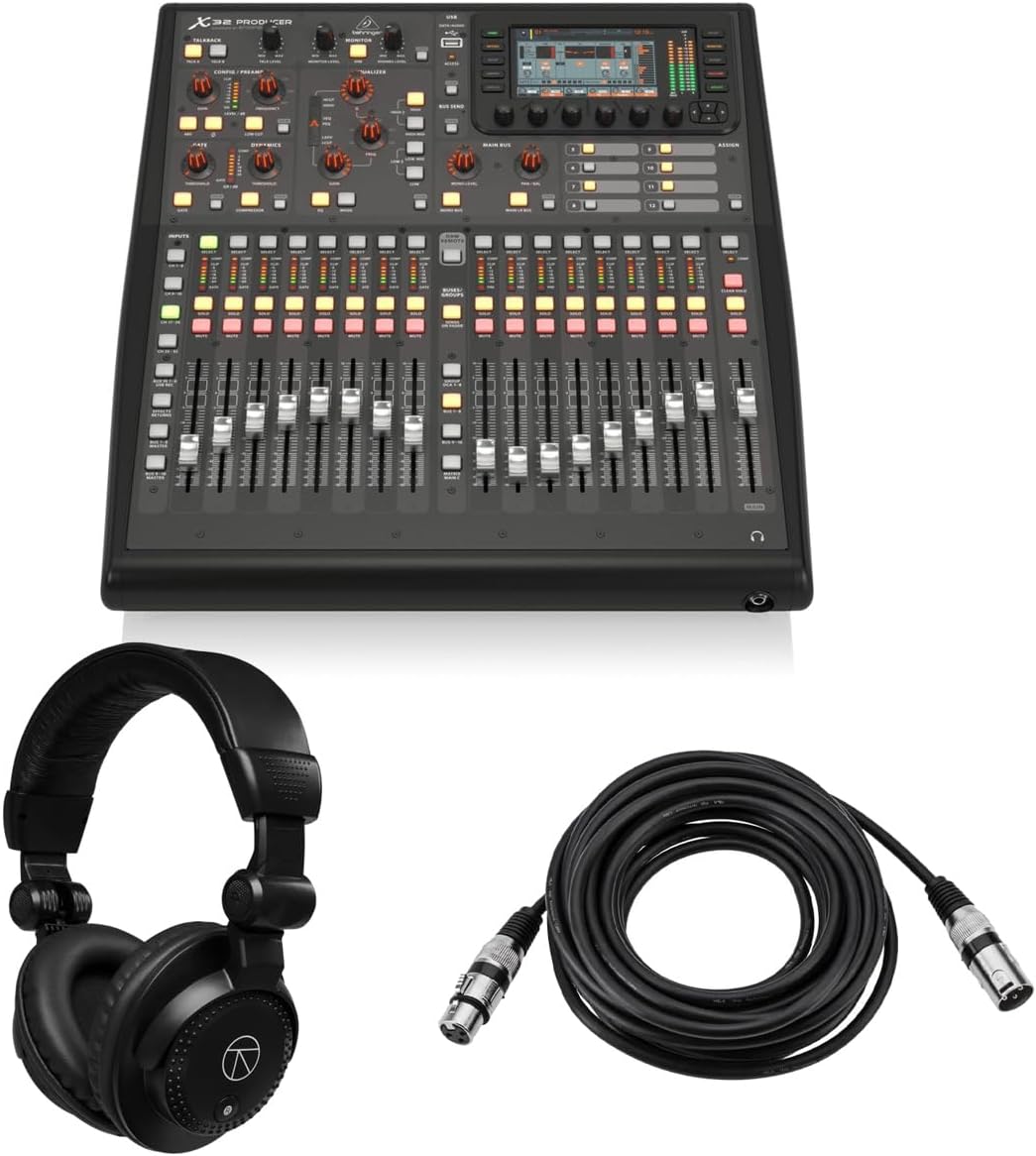
The Behringer X32 Producer is a rack-mountable version of the popular X32 console, optimized for fixed installations and studios. It offers 40 input channels and 25 buses in a compact form factor that fits into standard equipment racks. This bundle includes professional headphones and cables, making it ready for immediate use.
We may earn a commission when you buy through this link, at no additional cost to you.
With 16 programmable MIDAS preamps, it delivers high dynamic range and pristine audio quality. The virtual FX rack features high-end simulations like Lexicon 480L that enhance your mixes creatively. A 5-inch TFT display provides clear visibility for parameters even in low-light environments.
Because it is rack-mounted, you rely on the display or a connected computer for most controls. This limits tactile interaction compared to a full console but saves significant physical space. The robust build ensures it can withstand the vibrations and usage of a professional studio environment.
This model is perfect for installation projects, mobile studios, and broadcast control rooms where space is tight. If you need the power of the X32 without the desk footprint, the Producer is the ideal choice. Its bundle value adds further appeal for users looking for a complete setup out of the box.
The rack-mountable form factor frees up table space while still delivering full digital mixing capabilities.
Built-in simulations of classic hardware processors allow for high-quality reverb and delay without external gear.
We may earn a commission when you buy through this link, at no additional cost to you.
The Behringer X32 Compact offers a smaller footprint while retaining the core capabilities of the full-sized console. It features 40 input channels and 16 MIDAS-designed preamps for audiophile sound quality. This makes it a practical choice for small to medium venues where desk space is at a premium.
We may earn a commission when you buy through this link, at no additional cost to you.
The 17 motorized faders allow for instant overview and powerful scene management during live shows. The individual LCD scribble strips provide clear channel names and settings without needing to look at the main screen. This attention to detail ensures that operators can work quickly and confidently.
While it lacks the physical fader count of the full model, it compensates with layering and screen control. The compact design means it is easier to transport and set up in tight backstage areas. However, users still need to manage layers to access all channels during a mix.
Choose the X32 Compact if you want the full X32 ecosystem without the desk space. It is excellent for mobile DJs, theater sound engineers, and small production teams. The balance of size and performance makes it a strong contender in the budget-friendly digital console category.
Layering allows you to switch between channel banks quickly using the motorized faders and touch screen.
LCD scribble strips on every channel strip help identify inputs and outputs at a glance during complex mixes.
We may earn a commission when you buy through this link, at no additional cost to you.
The PreSonus StudioLive Classic 16.0.2 is a reliable workhorse for small studios and live bands. It features 16 channel inputs with Fat Channel signal processing on all channels and buses for easy EQ and compression. This simplified approach makes it approachable for users who want direct control without deep menus.
We may earn a commission when you buy through this link, at no additional cost to you.
The Class A XMAX preamps provide clean and transparent sound capture for vocals and instruments. With a 18-in/16-out USB interface, you can record multitrack audio directly to your computer. The included software library includes a DAW and capture tools to streamline your recording workflow.
Compared to modern consoles, the StudioLive lacks some advanced features like remote control or extensive automation. The effects are basic and might not satisfy users looking for high-end simulations. However, its straightforward operation remains a strong point for users who prefer tactile interaction over complex software.
This console is best for home studios and small bands that need a reliable USB mixer. It is a classic choice for those who value simplicity and the Fat Channel processing. If you want a mixer that gets out of your way so you can focus on the sound, the StudioLive delivers.
The Fat Channel offers semi-parametric EQ, compression, and limiting on every channel for quick sound shaping.
USB 2.0 connectivity allows for direct recording to a computer with zero latency monitoring via the console.
We may earn a commission when you buy through this link, at no additional cost to you.
The Behringer X AIR XR18 is a completely remote mixer that is controlled entirely via iPad or Android tablets. It features 16 award-winning MIDAS-designed preamps that provide high-quality input sound. The integrated Wi-Fi router eliminates the need for external routers, simplifying setup for small venues and installations.
We may earn a commission when you buy through this link, at no additional cost to you.
You can place the XR18 in a rack or on the floor away from the mixing position and control it wirelessly. The 18 x 18 channel USB interface allows for direct recording on a connected computer. This design is perfect for situations where the engineer needs to be away from the desk.
The trade-off is the lack of physical faders which can slow down quick adjustments during a live performance. While the app is stable, it still requires a reliable network connection to function correctly. However, the convenience of mixing from any room in the venue is a major advantage for installers.
Choose the XR18 if you want a compact mixer for houses of worship or small venues. It is cost-effective and powerful for its size. If you prefer touch controls and remote setup, this unit offers the best value in the budget digital mixer market.
The built-in router creates a dedicated network for mixing ensuring stable connectivity even in crowded Wi-Fi environments.
At an affordable price point, it delivers professional preamps and full digital processing without breaking the bank.
We may earn a commission when you buy through this link, at no additional cost to you.
The Allen & Heath Qu-5 delivers exceptional audio quality through its 96kHz FPGA processing engine. This technology ensures ultra-low latency and precise control for professional live sound and installed audio applications. It offers a flexible mixing architecture that supports up to 38 inputs for versatile routing options.
We may earn a commission when you buy through this link, at no additional cost to you.
You can record up to 32 channels to a USB drive or SD card directly from the console. The 7-inch capacitive touchscreen combined with 17 motorized faders provides an intuitive and responsive user interface. This balance of screen and physical control makes complex tasks manageable during live performances.
The extensive connectivity including AES3 and SLink expansion makes it future-proof for large-scale installations. However, the price and feature set might be overkill for casual users who do not need multitrack recording. It is an investment in high-performance audio processing that pays off in critical listening environments.
This console is ideal for professional sound engineers and venues that require top-tier sound quality. If you need reliable recording and a high-quality mix for complex setups, the Qu-5 is the tool of choice. Its design prioritizes workflow efficiency alongside audio fidelity for demanding professionals.
The 96kHz FPGA engine processes audio with minimal latency ensuring real-time response and precise control.
Record and playback up to 32 tracks directly to a USB drive for live performance documentation and analysis.
We may earn a commission when you buy through this link, at no additional cost to you.
The QSC TouchMix-16 is designed for ease of use with a simple interface that simplifies digital mixing. It features 20 full function inputs including microphone and line options for versatile connectivity. The mixer includes a 4-band full parametric EQ and filters on all channels for precise tone shaping.
We may earn a commission when you buy through this link, at no additional cost to you.
It supports in-ear monitors directly with TRS aux outs that can drive wired IEM systems without extra hardware. This feature is essential for bands that need to reduce stage noise and improve communication. The included carrying bag adds value and protection for mobile DJs and traveling sound engineers.
While the channel count is modest, the sound quality and simplicity make it a reliable choice for many applications. The compressor and gate on all inputs ensure that levels remain controlled and professional. It is a solid unit for those who want digital power without the complexity of a large console.
Choose the TouchMix-16 if you need a straightforward and reliable solution for small to medium events. It is perfect for users who want to avoid deep menu diving and focus on the mix. The combination of quality and convenience makes it a strong contender in the compact digital mixer segment.
TRS aux outputs drive in-ear monitor systems directly saving the need for external splitters or amps.
The interface is designed to be intuitive reducing setup time and minimizing errors during live performances.
We may earn a commission when you buy through this link, at no additional cost to you.
Selecting the right digital mixing console requires careful evaluation of several technical and operational factors to ensure it meets your production needs.
Determine the number of input channels and outputs your typical setup requires. Consider future expansion needs such as additional instruments or recording tracks.
Choose a console that offers at least 20 percent more inputs than your current needs to accommodate growth without immediate replacement.
Microphone preamps are critical for capturing clean and noise-free audio from your sources. Look for consoles with MIDAS or proprietary high-quality preamps for better signal integrity.
High-quality preamps reduce the need for external gear and improve the overall clarity of your mixes significantly.
A user-friendly interface with physical faders and knobs can speed up your workflow during live performances. Consider whether you prefer touch screens or tactile controls for your mixing style.
Test the layout before buying to ensure that common adjustments are easily accessible without navigating deep menus.
Check the available I/O options such as USB, Ethernet, and AES50 for connecting computers and stage boxes. Expansion capabilities allow you to add inputs without replacing the main console later.
Ensure the console supports the protocols needed for your recording or network infrastructure to avoid compatibility issues.
A good digital mixer should include essential EQ, dynamics, and effects processors to shape your sound internally. Advanced routing and FX racks provide creative options for professional productions.
Verify that the onboard effects are sufficient for your genre to minimize the cost of external effects pedals or rack units.
If you need to record live sets, look for consoles with multitrack USB or SD card recording capabilities. Direct monitoring options allow for real-time playback of your recordings on stage.
Integrated recording features streamline your workflow by reducing the need for external recording devices.
Tablet and computer control options enable you to mix from a distance which is useful for large venues. Ensure the software is stable and supports your preferred operating system for remote management.
Remote mixing provides flexibility to adjust levels from the audience area for a more accurate sound check.
Choose a console built with rugged materials and reliable components that can withstand frequent transport. A sturdy chassis ensures long-term reliability in demanding live sound environments.
Prioritize durability if you plan to use the mixer on tour or in high-traffic professional settings.
Always connect your console to a grounded power outlet and use surge protection to avoid electrical damage. Start by connecting your microphones and instruments to the appropriate inputs and setting gain levels correctly. Verify that each channel is routed to the main mix before starting any recording or performance.
Familiarize yourself with the scene management functions to save and recall settings quickly during different events. Use the motorized faders and screen to adjust levels in real time while monitoring the signal path. Utilize built-in effects sparingly to enhance the sound without cluttering the mix with unnecessary processing.
Store your console in a protective case when transporting it and keep it clean with a dry cloth. Avoid exposing the screen to direct sunlight or extreme temperatures to prevent damage to the display and electronics. Regularly backup your scene files and system settings to a computer to prevent data loss.
Digital mixing consoles offer more flexible routing, recallable scenes, and built-in effects compared to analog consoles. They use digital signal processing to provide precise control over sound parameters. While analog consoles offer tactile simplicity, digital models are preferred for complex productions needing high functionality.
Many digital consoles can operate standalone without a computer using their built-in screens and controls. However, remote control via tablet or computer software enhances workflow and allows for deeper editing. Some advanced features and firmware updates require a computer connection for implementation.
Yes, digital mixers with USB audio interface capabilities are excellent for podcasting. They allow you to connect multiple microphones and adjust levels in real time while recording to a computer. Many models include built-in compression and EQ to ensure your voice sounds professional.
AES50 is a networking protocol used to connect stage boxes and expand input and output channels over Ethernet. It allows for high-speed data transfer with low latency between the main mixer and remote I/O units. This technology reduces the need for extensive XLR cabling in large venues.
Digital mixers are ideal for live sound due to their ability to recall scenes and manage complex routing efficiently. They allow for remote monitoring and quick adjustments during performances without needing to move physical equipment. Their built-in processing reduces the need for external racks and pedals.
You typically update firmware by connecting the mixer to a computer via USB and using the manufacturer software. Check the official website for the latest version and follow the provided instructions to ensure a safe update. Always backup your settings before updating to avoid losing your custom scenes.
The Behringer X32 leads this list with its robust feature set and professional-quality components that suit a wide range of uses. For those seeking a compact premium option, the Yamaha DM3 offers exceptional sound clarity and user-friendly operation in a smaller package.
When selecting your console, prioritize input count and preamp quality over flashy features to ensure you get reliable performance. Consider whether you need remote control and multitrack recording capabilities based on your specific workflow requirements.
Always verify current pricing and availability since market conditions can change frequently. By choosing a console that matches your current and future needs, you will enjoy seamless mixing experiences for years to come.