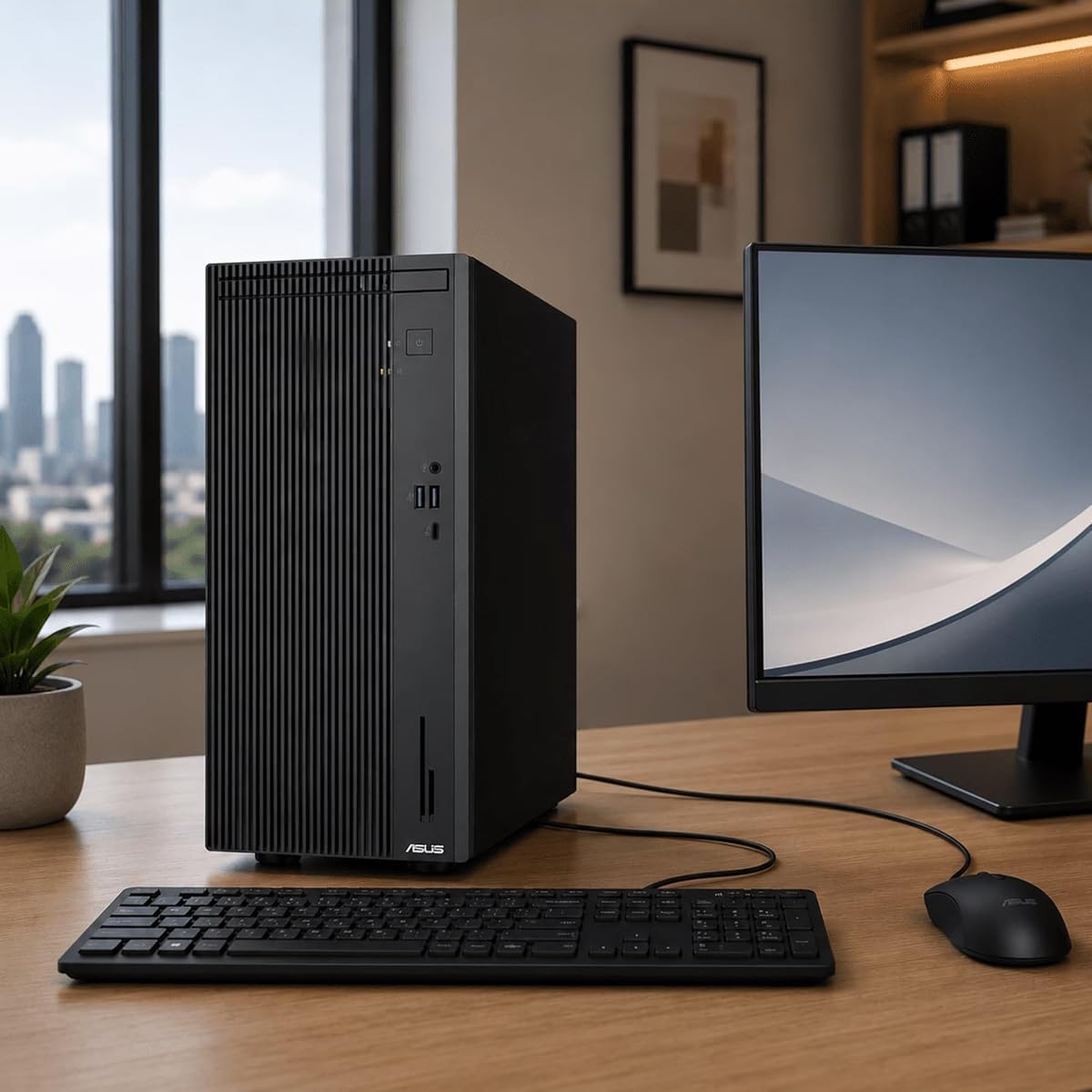
ASUS V500 Business Tower
5.0Editor score
Intel Core i7-13620H Processor
16GB DDR5 RAM Included
Windows 11 Home Ready
This guide compares the top ten ASUS desktop PCs for performance, value, and reliability across gaming and business needs in October 2026.
Finding the right computer for your needs can be challenging with so many options available on the market today. ASUS offers a wide range of desktop systems designed for various tasks ranging from everyday office work to high-end gaming experiences. Each model brings unique features tailored to specific user requirements ensuring you get the best value for your investment.
We have carefully evaluated ten distinct ASUS desktop models based on their processor power memory capacity storage options and connectivity features. Our analysis focuses on real-world performance capabilities build quality and overall versatility to help you make an informed decision. This list covers both budget-friendly towers and premium gaming rigs to suit every preference.
Each pick below highlights key strengths potential limitations and ideal use cases so you can quickly identify the right fit. Please note that product specifications and availability can change over time so always verify details before purchasing. We aim to provide clear and honest insights to simplify your shopping journey for a new desktop system.
5.0Editor score

4.7Editor score

4.2Editor score
The following table provides a side-by-side overview of all ten ASUS desktop systems reviewed in this guide. Compare key specifications such as processor type memory amount storage capacity and operating system to find the model that aligns best with your performance goals and budget constraints.


This desktop represents an excellent entry point for professionals and home users seeking robust performance without breaking the bank. It holds a perfect five star rating reflecting high customer satisfaction with its speed and reliability. The inclusion of a modern Core i7 processor ensures it handles daily workloads efficiently.
We may earn a commission when you buy through this link, at no additional cost to you.
At its heart lies the Intel Core i7-13620H with ten cores and sixteen threads providing ample power for multitasking and content creation. The system comes equipped with 16GB of DDR5 RAM which offers faster data transfer rates compared to older generations. Storage is managed through a combination of a fast SSD and additional external capacity ensuring you have space for all your files.
While the storage setup splits capacity between internal and external drives this design offers flexibility for backups and expansion. The included wired keyboard and mouse ensure stable input without wireless latency concerns though wireless options might be preferred by some users. Overall the value proposition is strong for the performance delivered.
Ideal for small business owners students or anyone needing a reliable workstation for productivity tasks this machine delivers consistently. It balances cost and capability well making it a top recommendation for those prioritizing essential performance features over gaming graphics. We highly recommend this model for general office and home use cases.
The ten core processor allows you to run multiple applications simultaneously without noticeable slowdowns or system lag.
With Wi-Fi 6 and multiple USB ports connecting peripherals and networks is fast and straightforward for any setup.
We may earn a commission when you buy through this link, at no additional cost to you.
Gamers seeking a balanced blend of performance and aesthetics will find this ROG model particularly appealing with its sleek design. It features a strong rating indicating that most users are happy with its gaming capabilities and build quality. The system is pre-installed with Windows 11 Pro offering advanced features for power users.
We may earn a commission when you buy through this link, at no additional cost to you.
Powered by the next generation Intel Core Ultra 7 265F processor this desktop delivers exceptional speeds up to 5.3GHz for demanding tasks. The NVIDIA GeForce RTX 5060 graphics card enables smooth gaming at 1080p and 1440p resolutions with ray tracing support. Additionally the 32GB of DDR5 RAM ensures that memory is never a bottleneck even when streaming or editing video while playing.
The included RGB keyboard and mouse add a touch of style to your setup right out of the box enhancing the gaming experience. However the reliance on air cooling might mean slightly higher noise levels under heavy load compared to liquid cooled systems. The 12-month CPS protection plan adds peace of mind against unexpected mechanical failures.
This machine is perfect for gamers who want a powerful machine without the need for immediate upgrades. It offers a complete package with necessary accessories and strong hardware performance for modern titles. We consider it an Editor's Choice due to its well-rounded specifications and reliable brand backing.
The combination of the Ultra 7 CPU and RTX 5060 GPU ensures smooth gameplay in AAA titles at high settings.
With 32GB of DDR5 RAM you can handle intensive multitasking and content creation without worrying about memory constraints.
We may earn a commission when you buy through this link, at no additional cost to you.
For enthusiasts who demand the absolute best performance available in a desktop format this GM700 model stands out as a top contender. It features a solid rating from early users who appreciate its raw power and premium build quality. This system is designed to handle the most demanding workloads with ease.
We may earn a commission when you buy through this link, at no additional cost to you.
The AMD Ryzen 7 9800X3D processor is a powerhouse delivering seamless multitasking and blazing-fast speeds for gaming and creation. Paired with the AMD Radeon RX 9070 XT Prime OC GPU you get stunning visuals and incredible performance for immersive gaming experiences. The 32GB of DDR5 RAM ensures that even the most intensive applications run smoothly without interruption.
Storage is plentiful with a massive 2TB of PCIe Gen 4.0 SSD allowing for near instant load times and ample space for your library. While the price is on the higher end the performance benefits justify the investment for serious users. The design includes advanced cooling to maintain stability during long sessions of heavy use.
This desktop is ideal for professionals and hardcore gamers who need maximum speed and reliability. It eliminates bottlenecks and provides a premium experience across all computing tasks. We recommend this model for those who want a high-end system that will remain powerful for years to come.
The 9800X3D processor leverages advanced cache technology to deliver unmatched responsiveness in single and multi-threaded tasks.
The RX 9070 XT GPU supports advanced features like enhanced ray tracing and AV1 encoding for superior media playback.
We may earn a commission when you buy through this link, at no additional cost to you.
This S501MER model offers a compelling blend of modern processing power and efficient connectivity features for the average user. It receives a positive rating indicating satisfaction with its speed and ease of use. The system is designed to be compact yet capable of handling diverse tasks effectively.
We may earn a commission when you buy through this link, at no additional cost to you.
At its core is the 14th Gen Intel Core i7-14700 which provides significant performance boosts over previous generations. The system includes 16GB of DDR5 RAM ensuring quick access to files and applications. Connectivity is enhanced by Wi-Fi 6E offering faster wireless speeds and better network stability in crowded environments.
While the integrated graphics may limit heavy gaming this desktop excels in productivity and multimedia tasks. The inclusion of multiple ports including USB-C makes it easy to connect various peripherals and external displays. Storage is handled by a fast 1TB PCIe SSD ensuring quick boot times and responsive performance.
Ideal for home offices and light creative work this machine balances performance with space efficiency. It is a strong choice for those who need a reliable workstation without unnecessary bulk. We recommend it for users prioritizing processing speed and modern connectivity options.
Wi-Fi 6E support ensures you get the fastest possible internet speeds and reduced latency for streaming and calls.
The system supports up to 64GB of RAM allowing for future expansion as your workload increases over time.
We may earn a commission when you buy through this link, at no additional cost to you.
This V500 variant stands out for its generous memory configuration which is rare in standard business desktops. It holds a perfect five star rating reflecting exceptional reliability and performance for daily tasks. The system is ready for Windows 11 providing a modern interface for users.
We may earn a commission when you buy through this link, at no additional cost to you.
The inclusion of 32GB of RAM makes this machine highly capable of handling memory-intensive applications without slowdown. It is equipped with a Core i7 processor ensuring that CPU power is not a bottleneck for typical business workflows. Storage is managed via a 1TB PCIe SSD offering quick access to your data and fast boot times.
Connectivity includes HDMI and DisplayPort allowing for dual 4K monitor support which is beneficial for productivity setups. The integrated Intel UHD graphics are sufficient for display tasks but not designed for heavy gaming. Overall the build quality and performance consistency are strong points for this model.
Best suited for power users in office environments who need extra RAM for virtual machines or large datasets. It provides a stable and fast environment for professional tasks. We recommend this model for those who prioritize memory capacity and reliable performance.
The 32GB RAM allows you to run heavy software simultaneously without system lag or freezing.
Expand your workspace with dual monitor support enabling better workflow management for multitasking professionals.
We may earn a commission when you buy through this link, at no additional cost to you.
This 2026 model brings the latest in hardware technology to the gaming desktop market with promising specs. While it has no reviews yet the component list suggests high performance for future titles. The system features a bold ROG design with iconic styling and RGB lighting.
We may earn a commission when you buy through this link, at no additional cost to you.
Powered by the Intel Core Ultra 7 265KF processor this desktop is built to handle heavy gaming and multitasking demands. The NVIDIA GeForce RTX 5070 graphics card ensures smooth gameplay and advanced visual effects. Thermals are managed with a quad-fan system and 240mm liquid cooler keeping the system running cool.
The chassis allows for easy tool-less access making upgrades simple for enthusiasts. Connectivity is advanced with 2.5Gbps Ethernet and WiFi 6 ensuring low latency for online play. RGB accessories are included to complete the gaming setup immediately.
Ideal for gamers who want the newest tech and are willing to pay a premium for it. It offers a robust foundation for high-end gaming experiences. We recommend this model for early adopters and performance enthusiasts.
The liquid cooling and quad-fan setup keep components at safe temperatures even during extended gaming sessions.
Tool-less access makes it easy to swap components and upgrade the system as new hardware becomes available.
We may earn a commission when you buy through this link, at no additional cost to you.
This bundle variant offers a practical solution for businesses needing a portable storage accessory included with the desktop. It features a Windows 11 Pro license which is beneficial for corporate environments. The performance is consistent with other V500 models in this lineup.
We may earn a commission when you buy through this link, at no additional cost to you.
The core hardware includes the Intel Core i7-13620H processor providing solid speed for office work. 16GB of DDR5 RAM ensures smooth multitasking for typical business applications. Storage is handled by a 1TB SSD ensuring quick boot times and file access.
A key differentiator is the included 64GB USB flash drive which provides immediate portable storage for backups or transfers. However some users have noted issues with upgraded components which may affect long-term reliability. The bundle is targeted at value-conscious business buyers.
Best for small offices needing a professional OS and basic portable storage. It balances cost with essential features effectively. We recommend this model for business setups needing a ready-to-go system.
Windows 11 Pro offers advanced security and management tools suitable for professional and corporate environments.
The included 64GB flash drive offers convenient data transfer options without needing extra purchases.
We may earn a commission when you buy through this link, at no additional cost to you.
This Strix G700 configuration is a workstation powerhouse designed for users needing extreme memory and storage capacity. It holds a perfect five star rating reflecting the high quality of its premium components. The system is built to handle heavy data processing and multitasking without limits.
We may earn a commission when you buy through this link, at no additional cost to you.
The Intel Core Ultra 9 285K processor is a top-tier chip offering incredible speed for demanding workloads. It is paired with an astonishing 128GB of DDR5 RAM ensuring that memory is never a constraint. Storage is massive with 11TB combining SSD and HDD for both speed and bulk capacity.
While the RTX 4060 Ti is a strong card the focus here is clearly on data capacity and processing power. The system runs Windows 11 Pro providing professional features for power users. This desktop is a rare find for those needing extreme specs out of the box.
Ideal for video editors data scientists or engineers working with huge files. It eliminates bottlenecks in workflow and storage. We recommend this model for users with professional needs requiring high capacity.
With 128GB of RAM you can run multiple virtual machines and heavy software simultaneously with ease.
The 11 TB storage combines fast SSDs and high capacity HDDs for both speed and long-term archival.
We may earn a commission when you buy through this link, at no additional cost to you.
This variant of the V500 is specialized for users who need significantly more memory than standard business PCs offer. It is configured to handle heavy multitasking with a 64GB RAM capacity. The base performance is driven by a reliable Core i7 processor.
We may earn a commission when you buy through this link, at no additional cost to you.
The system includes 64GB of high-speed DDR5 RAM which is perfect for running multiple browser tabs and applications simultaneously. Storage is provided by a 1TB PCIe SSD ensuring quick access to your files and fast boot times. The system supports dual 4K monitors making it suitable for creative workflows.
While it lacks dedicated gaming graphics it excels in productivity and data handling tasks. The Windows 11 Home OS provides a familiar interface for most users. This desktop is a strong option for home offices needing extra memory power.
Ideal for users who need to handle large datasets or complex workloads. It offers a stable and fast environment for serious work. We recommend this model for memory-intensive business tasks.
The 64GB memory allows for smooth multitasking even with many heavy applications running at once.
Dual 4K monitor support provides ample screen real estate for managing complex projects and spreadsheets.
We may earn a commission when you buy through this link, at no additional cost to you.
This business desktop is praised for its balance of size and performance making it ideal for tight office spaces. It holds a perfect five star rating showing high customer satisfaction with its reliability and speed. The system comes with Windows 11 Pro ready for professional use.
We may earn a commission when you buy through this link, at no additional cost to you.
The Intel Core i7-13620H processor delivers fast multitasking performance for daily business tasks. It includes 16GB of DDR5 RAM ensuring quick data access and smooth operations. Storage is managed via a 1TB NVMe SSD providing quick boot times and file loading.
Connectivity is robust with Wi-Fi 6 and USB-C ports ensuring you can connect to modern peripherals easily. The compact chassis saves desk space without compromising on performance. It is a reliable choice for standard office environments.
Best for small businesses and home offices needing a dependable machine. It prioritizes stability and speed over gaming features. We recommend this model for professional environments.
The compact tower fits easily on a desk freeing up floor space for a cleaner and more organized workspace.
Windows 11 Pro ensures enterprise-grade security and management tools are available for business users.
We may earn a commission when you buy through this link, at no additional cost to you.
Selecting the right desktop involves assessing your specific needs against technical specifications and budget constraints.
The processor is the brain of your desktop affecting how fast applications run and how many tasks you can handle. For business tasks a modern Core i7 or Ryzen 7 provides sufficient power for daily workflows. Gamers and creators should look for Core Ultra or high-end Ryzen models for maximum speed.
Prioritize multi-core performance if you run virtual machines or render video.
RAM determines how smoothly your system runs multiple programs at once. 16GB is the minimum standard for comfortable multitasking and general use. Users with heavy workloads like 3D modeling or data analysis will benefit from 32GB or more.
Ensure the system is expandable so you can upgrade later if needed.
Solid State Drives offer vastly faster boot times and application loading compared to mechanical hard drives. Aim for at least 1TB of PCIe SSD storage to keep your system responsive. If you store large media files consider a model that includes both SSD and HDD options.
Look for NVMe PCIe 4.0 drives for the best speed available today.
Integrated graphics are sufficient for office work and video streaming. Gaming requires a dedicated GPU such as NVIDIA GeForce RTX or AMD Radeon to handle modern titles. Check if the case has enough space for future GPU upgrades if you plan to game.
Ensure your monitor connects via HDMI or DisplayPort supported by the graphics card.
Modern desktops should include USB-C ports for fast data transfer and charging. Wi-Fi 6 or 6E support ensures fast wireless speeds without the need for cables. Verify there are enough USB ports for your peripherals like printers and scanners.
Gigabit Ethernet ports are useful for stable wired internet connections.
Windows 11 Home is suitable for most personal and home office tasks. Pro versions offer additional security and management features ideal for corporate environments. Check if the OS is pre-installed to avoid setup hassles.
Ensure the OS version matches your software compatibility requirements.
Steel chassis offer durability and better heat dissipation than plastic cases. Look for systems with good airflow to keep components cool during long sessions. A compact design may be necessary for smaller workspaces.
Check if the case allows tool-less access for easier upgrades.
A standard one-year warranty is common for desktops but extended plans offer better protection. Review support options to ensure help is available if issues arise. Buying from authorized retailers ensures valid warranty claims.
Consider models that include accidental damage protection if the unit is portable.
Begin by connecting all necessary peripherals like monitors keyboard and mouse to the correct ports on the back of the tower. Ensure the power cable is securely connected to both the desktop and a reliable surge protector outlet. Turn on the monitor first then power on the desktop to allow proper hardware detection.
Install all available operating system updates and driver packages immediately after setup. This ensures your system has the latest security patches and performance improvements for your specific hardware. Use the pre-installed ASUS control center to manage RGB lighting and system profiles for better efficiency.
Maintain your desktop by keeping the interior free of dust using compressed air every few months. Place the tower in a well-ventilated area to allow air to flow freely around the chassis. Regularly clean the exterior with a soft dry cloth to prevent dust buildup on the vents.
Most ASUS desktops allow RAM upgrades but you must check the specific model documentation for slot availability. Typically V500 and ROG models have extra DIMM slots or support higher capacity sticks. Always check your motherboard manual to see the maximum supported memory before purchasing upgrades.
Yes most models come with Windows 11 Home or Pro pre-installed to allow immediate use. Some business bundles may include specific versions tailored for professional environments. Always check the product description to confirm the OS version before purchasing.
ROG models are specifically designed for gaming with dedicated graphics cards and faster cooling. V500 models with integrated graphics are better for office tasks but may struggle with modern AAA titles. For gaming look for systems with RTX or Radeon dedicated GPUs.
Most towers include HDMI and DisplayPort outputs to support multiple displays. Newer models often support 4K resolutions on both ports for high definition viewing. Check the specific port count to ensure you can connect all your external screens.
You can add more storage by installing additional SATA or M.2 SSD drives in available slots. Some models allow for 2.5 inch HDD upgrades in open bays inside the case. Ensure your power supply has enough connectors for additional drives before installing.
Yes ASUS provides standard one-year hardware warranties and online support resources for troubleshooting. Many models also include an option for extended protection plans at checkout for added security. Contacting ASUS support via phone or chat can help resolve technical issues.
We have reviewed ten distinct ASUS desktop models ranging from budget office towers to high-end gaming rigs. The ASUS V500 Business Tower offers great value for general users while the ROG G700 Gaming provides strong performance for enthusiasts. For those needing maximum speed the ROG GM700 2025 delivers premium power.
Prioritize processing power and memory capacity based on your specific tasks such as video editing or office work. A solid SSD is essential for speed but graphics cards matter most for gaming and 3D rendering. Choose a model with enough future expansion slots to extend the life of your investment.
Remember that prices and stock levels can change daily so verify current availability before finalizing your purchase. We hope this guide has simplified your search for a reliable and powerful desktop system. Good luck with your new setup.