
X99 LGA 2011-3 Motherboard
3.9Editor score
Supports Xeon E5 V3 V4
Four DDR4 RAM slots
NVME M.2 slot included
Discover the top Lga 3 X99 Motherboard options for workstations and servers. This guide compares features, compatibility, and performance to help you choose.
Finding the right Lga 3 X99 Motherboard is crucial for building a high-performance workstation or server. These boards support powerful Xeon E5 and Core i7 processors, offering exceptional multitasking and rendering capabilities for demanding professional workflows.
We compared ten leading Lga 3 X99 Motherboard models based on socket compatibility, memory support, expansion slots, and build quality. Our analysis focuses on value, reliability, and specific features like NVME support that matter most for modern computing needs.
Each pick highlights unique strengths whether you need dual CPU support, extensive RAM capacity, or compact form factors. Remember that product availability and pricing fluctuate frequently so always check current listings before finalizing your hardware purchase decision.
3.9Editor score

4.1Editor score

3.7Editor score
This side-by-side comparison highlights key specifications across all ten Lga 3 X99 Motherboard options. Evaluate socket types, RAM limits, and expansion capabilities to find the perfect match for your specific build requirements.


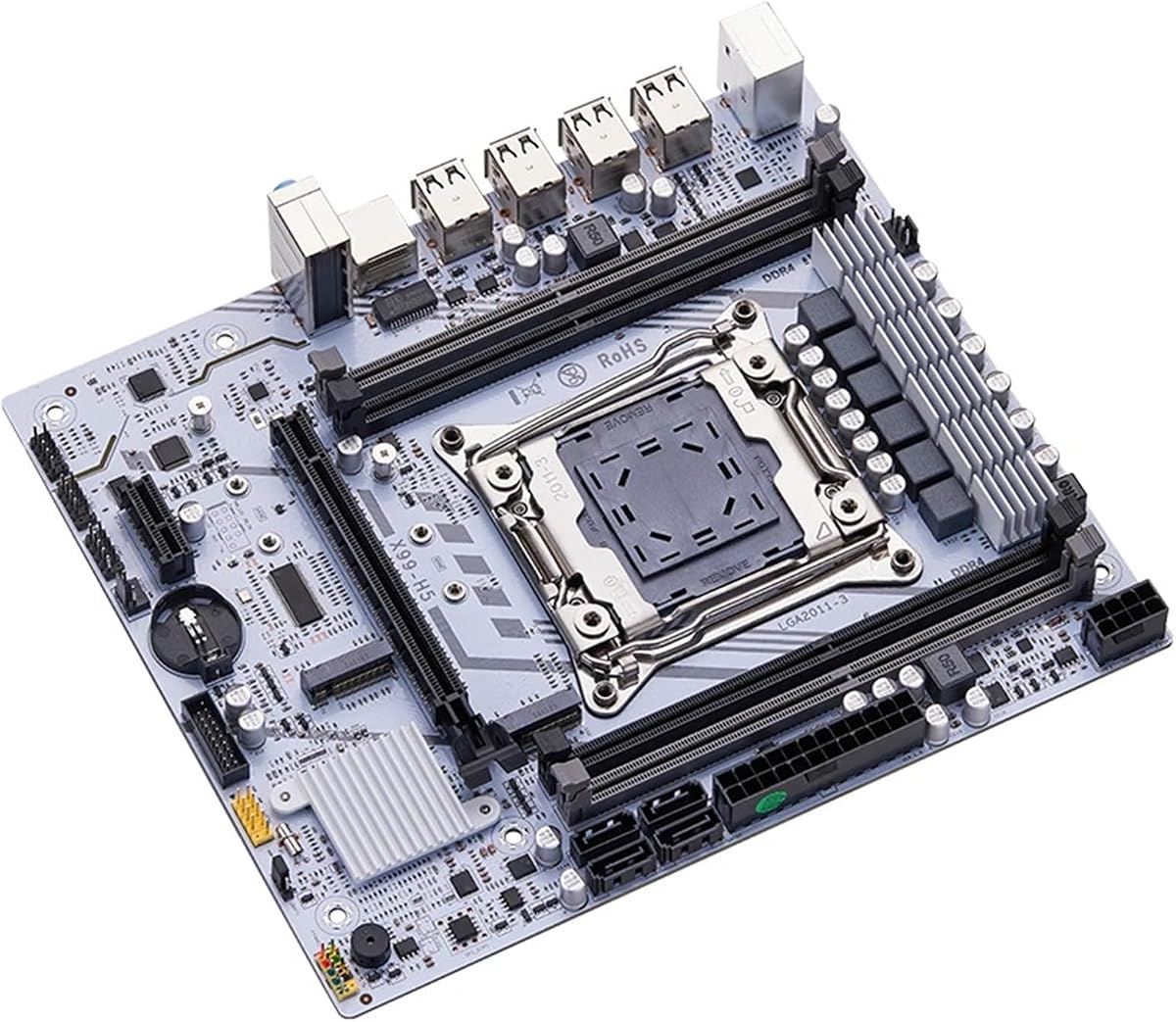

The MACHINIST X99 Motherboard stands out as a powerful option for workstation builds needing robust expansion. It supports Intel Xeon E5 and Core i7 processors with a solid power delivery system designed for sustained performance under load.
We may earn a commission when you buy through this link, at no additional cost to you.
Key strengths include three NVME M.2 slots running at PCIe 3.0 speeds which is rare in this price range. The Intel C612 chipset ensures compatibility with high core counts while the VRM cooling fan keeps temperatures stable during heavy multitasking.
Trade-offs include the need to purchase a CR2032 battery separately and download the user manual. Some users report needing clear CMOS after initial setup but these are minor issues for a board offering such extensive storage options.
Buy this if you need a cost effective server or rendering board with multiple high speed SSDs. It is ideal for professionals who prioritize storage bandwidth and CPU core count over premium brand support or included accessories.
Three NVME M.2 slots allow users to build massive RAID arrays or separate boot and storage drives for faster workflow efficiency.
The 6 phase power supply and VRM cooling fan ensure that high end Xeon CPUs receive stable voltage without thermal throttling during long renders.
We may earn a commission when you buy through this link, at no additional cost to you.
This X99 LGA 2011-3 Motherboard offers a budget friendly entry into high end workstation builds. It covers the essential needs for Xeon E5 V3 V4 and Core i7 processors without charging extra for premium branding.
We may earn a commission when you buy through this link, at no additional cost to you.
The main strength lies in its value proposition. It supports up to 128GB of DDR4 including ECC types and provides a dedicated NVME M.2 slot. The Realtek 8111H LAN port ensures reliable network connectivity for data transfers.
Trade-offs include the absence of a user manual which requires finding a digital copy and lack of additional VRM cooling. However for users who understand basic setup this does not hinder functionality significantly.
Buy this for tight budget builds needing server memory support. It is perfect for home labs or entry level rendering farms where saving money on the motherboard allows investment in better CPUs or storage drives.
Support for both ECC and non-ECC DDR4 allows you to choose cheap server RAM for capacity or fast desktop RAM for speed.
The Micro ATX form factor fits standard mid tower cases easily making it versatile for various chassis sizes and airflow designs.
We may earn a commission when you buy through this link, at no additional cost to you.
The ASUS EATX DDR4 LGA 2011-3 is a professional grade motherboard for workstation enthusiasts. It brings high quality build standards and advanced features like USB 3.1 and 4-way GPU support to the X99 platform.
We may earn a commission when you buy through this link, at no additional cost to you.
Key strengths include the premium components delivering industry leading power efficiency. The 5-Way Optimization software simplifies system tuning while the Q Code Logger helps debug boot issues quickly which is vital for workstations.
Trade-offs involve the larger EATX footprint requiring a compatible case and the higher price compared to budget alternatives. But for reliability and features like Thunderbolt II support this justifies the investment.
Buy this for critical workstations needing maximum stability. It is ideal for video editors or engineers who need multi GPU support and brand backed reliability for their daily productive workflows.
Support for NVidia SLI and AMD CrossFireX allows multiple graphics cards to work together for faster rendering or compute tasks.
The Q Code Logger and Dr. Power LED provide visual feedback on system status helping you troubleshoot issues without extra tools.
We may earn a commission when you buy through this link, at no additional cost to you.
The ASUS X99-A ATX is a balanced option for those seeking reliable X99 performance. It supports overclocking beyond typical limits and offers solid connectivity for general high performance desktop tasks.
We may earn a commission when you buy through this link, at no additional cost to you.
Key strengths include the ASUS OC Socket which helps drive 8-core CPU performance reliably. The Crystal Sound 2 audio codec provides good fidelity for casual multimedia usage without needing a separate sound card.
Trade-offs include fewer USB 3.1 ports compared to newer boards and only two main GPU slots. However for single GPU workloads this board delivers stable performance at a reasonable price.
Buy this for a standard high end gaming or editing build. It fits users who want brand reliability and basic overclocking features without needing multi GPU workstation capabilities.
The OC Socket provides better contact with the CPU for improved power delivery allowing for higher stable overclocks.
Crystal Sound 2 offers low noise audio output suitable for gaming and general multimedia without external DACs.
We may earn a commission when you buy through this link, at no additional cost to you.
This X99 Motherboard with dual CPU support targets serious server builders needing massive processing power. It allows two Xeon E5 CPUs to operate on a single board with extensive memory options.
We may earn a commission when you buy through this link, at no additional cost to you.
Key strengths include eight DDR4 slots allowing up to 256GB or more total RAM depending on module density. Six SATA3.0 ports support multiple storage drives for a large NAS or database server setup.
Trade-offs include lack of clear ratings and limited documentation which may challenge novice users. Without verified performance data buyers should ensure compatibility before purchase.
Buy this for specialized server workloads needing dual cores. It is best for users who understand server hardware and need high core counts for virtualization or rendering.
Two CPU sockets enable extreme core counts useful for virtualization or heavy compute tasks that single CPUs cannot handle.
Six SATA ports allow connecting multiple hard drives or SSDs without needing additional PCIe expansion cards.
We may earn a commission when you buy through this link, at no additional cost to you.
The Tangxi X99 Gaming motherboard focuses on robust construction with an 8 layer PCB. It supports 4 channel DDR4 memory and offers an NVME slot for faster boot and storage performance.
We may earn a commission when you buy through this link, at no additional cost to you.
Key strengths include the 8 layer design which improves signal integrity and stability under load. The 24+8 pin power connector ensures reliable power delivery for high core CPUs.
Trade-offs include a lower user rating suggesting potential compatibility quirks. Also it offers fewer USB ports than some competitors which might limit peripheral connectivity.
Buy this if you prioritize PCB quality for long term stability. It suits builders who understand potential issues and value robust physical construction over brand features.
The 8 layer PCB reduces electrical noise improving memory stability and allowing better potential for overclocking.
Dual 24 and 8 pin connectors ensure the CPU receives consistent power even under heavy multi core workloads.
We may earn a commission when you buy through this link, at no additional cost to you.
This board mirrors the dual CPU capability of the previous option with similar memory specs. It offers eight DDR4 slots and dual PCIe x16 slots for expandability in specialized builds.
We may earn a commission when you buy through this link, at no additional cost to you.
Key strengths include the ability to run two CPUs for extreme core counts. Six SATA ports provide ample storage expansion options for large data repositories.
Trade-offs include a very low rating which indicates significant reliability risks. Users should proceed with caution and verify return policies before purchasing this specific model.
Buy this only for experimental or temporary needs. It may be suitable for test labs but is not recommended for critical production environments due to potential instability.
Two PCIe x16 slots allow adding multiple GPUs or high speed network cards to the system.
Eight memory slots allow scaling RAM to very high capacities for database or virtualization tasks.
We may earn a commission when you buy through this link, at no additional cost to you.
This motherboard offers unique compatibility with both DDR3 and DDR4 memory alongside dual NVME slots. It uses optimized traces to improve memory performance and data integrity.
We may earn a commission when you buy through this link, at no additional cost to you.
Key strengths include the flexibility to use older DDR3 modules or newer DDR4. The passive heatsink helps keep the chipset cool during extended operations.
Trade-offs include a high price point relative to features. It is unclear if the performance gains justify the cost compared to standard X99 boards.
Buy this if you have existing DDR3 hardware or need specific dual NVME configurations. It is niche for users needing these specific legacy and modern memory options.
Support for both DDR3 and DDR4 allows reuse of old memory investments when upgrading to an X99 platform.
Two NVME slots allow RAID 0 for extreme storage speeds or separate boot and app partitions.
We may earn a commission when you buy through this link, at no additional cost to you.
This compact M-ATX X99 motherboard fits smaller cases while maintaining core X99 features. It includes standard SATA connectors and PCIe 3.0 16X slots for essential graphics or storage cards.
We may earn a commission when you buy through this link, at no additional cost to you.
Key strengths are the smaller footprint allowing for compact workstation builds. It supports E5 V3 V4 CPUs making it versatile for various high end desktop tasks.
Trade-offs include limited detail on specific features like memory limits or USB ports. This makes it hard to evaluate full capabilities without checking the official product page.
Buy this if you need a smaller X99 board. It is best for users who prioritize compact case size but still need Xeon or i7 power.
The M-ATX form factor fits into smaller cases saving space while retaining full X99 performance capabilities.
Provides necessary SATA and PCIe slots for standard expansion needs without extra bulk.
We may earn a commission when you buy through this link, at no additional cost to you.
This X99 board focuses on basic reliable functionality with safety protections. It supports DDR4 memory and includes NVME M.2 and USB 3.0 for modern connectivity.
We may earn a commission when you buy through this link, at no additional cost to you.
Key strengths include stable power supply design and multiple safety protections useful for office or gaming builds. The ATX size fits standard cases universally.
Trade-offs include lack of ratings and basic feature set compared to workstation boards. It is a simple board for standard needs without advanced tweaks.
Buy this for simple reliable builds. It is suitable for office machines or gaming PCs needing basic X99 compatibility without complex requirements.
Multiple safety protections help prevent hardware damage from power surges or overheating.
ATX size ensures it fits most standard PC cases easily without modifications.
We may earn a commission when you buy through this link, at no additional cost to you.
Selecting the right motherboard requires understanding specific technical requirements and build goals.
Ensure the board supports your specific Intel Xeon E5 V3 V4 or Core i7 CPU series. Check the BIOS version required for newer processors to avoid boot issues.
Always verify socket compatibility before buying.
Decide if you need ECC/RECC memory for server stability or standard desktop RAM. Check if the board supports 4-channel or 2-channel configurations for optimal bandwidth.
Confirm RAM capacity limits and speed support.
Look for NVME M.2 slots if you need fast boot drives or high-speed storage. Ensure the slot runs at PCIe 3.0 speeds for maximum throughput.
Check SATA port count for additional hard drives.
High core count CPUs need robust VRMs to prevent throttling. Look for boards with adequate phase counts and heatsinks to maintain stable power.
Prioritize boards with proper VRM cooling.
ATX boards offer more slots but require larger cases. M-ATX saves space but may have fewer expansion options. Ensure your case fits the board size.
Choose a factor that fits your case.
Established brands usually provide better BIOS updates and manuals. Smaller brands offer lower prices but may lack long term driver support or warranty coverage.
Weigh price against support needs.
Built-in Gigabit LAN is standard. Some boards offer specific LAN chips for better performance. Check for additional network card slots if needed.
Verify LAN speed and controller type.
Check how many PCIe x16 slots are available for graphics or capture cards. Ensure they operate at the desired bandwidth such as x16 or x8.
Count slots for your expansion needs.
Always install the motherboard on an anti-static surface to prevent electrostatic discharge damage. Use the standoffs provided to ensure the board does not short circuit against the case chassis.
Update the BIOS immediately after installing the first boot to ensure full compatibility with newer CPUs and memory kits. This step is critical for stability and performance.
Regularly clean dust from the VRM heatsinks and fans to maintain proper airflow. Overheating can cause throttling or premature component failure in high power systems.
Most modern X99 boards only support DDR4 memory. A few rare models may support DDR3 but this is uncommon. Check the specific product details for memory type compatibility before buying.
Many X99 server boards support ECC and RECC memory. Some consumer models support it only in specific BIOS modes. Check the product description for explicit ECC support details.
Windows 11 requires TPM and Secure Boot. Most X99 boards lack TPM 2.0 and Secure Boot. You may need third party workarounds to install Windows 11.
The Xeon E5 2680 V4 is a popular balance of cores and speed. For desktop use the Core i7 6950X offers excellent performance without ECC requirements.
X99 boards allow limited overclocking on some K-series i7 CPUs. Xeon CPUs generally do not support overclocking. Check specific motherboard capabilities for tuning options.
Check that CPU power and RAM are seated correctly. Clear the CMOS if the system fails to POST. Ensure the BIOS supports your CPU generation.
This depends on the number of M.2 slots. Some boards support two or three NVME drives. Check the manual for shared bandwidth limitations.
Buying used can save money but carries risks of unknown history or defects. Newer boards from reputable sellers are safer for critical builds.
The MACHINIST X99 and ASUS EATX WS lead the pack with strong features and build quality. The budget X99 PR9-H offers excellent value for simple workstation builds.
Prioritize VRM stability and NVME support when choosing. These factors determine how well the system handles heavy loads and fast data access.
Always check the current prices and stock levels before buying. Product availability changes frequently especially for niche server hardware components.