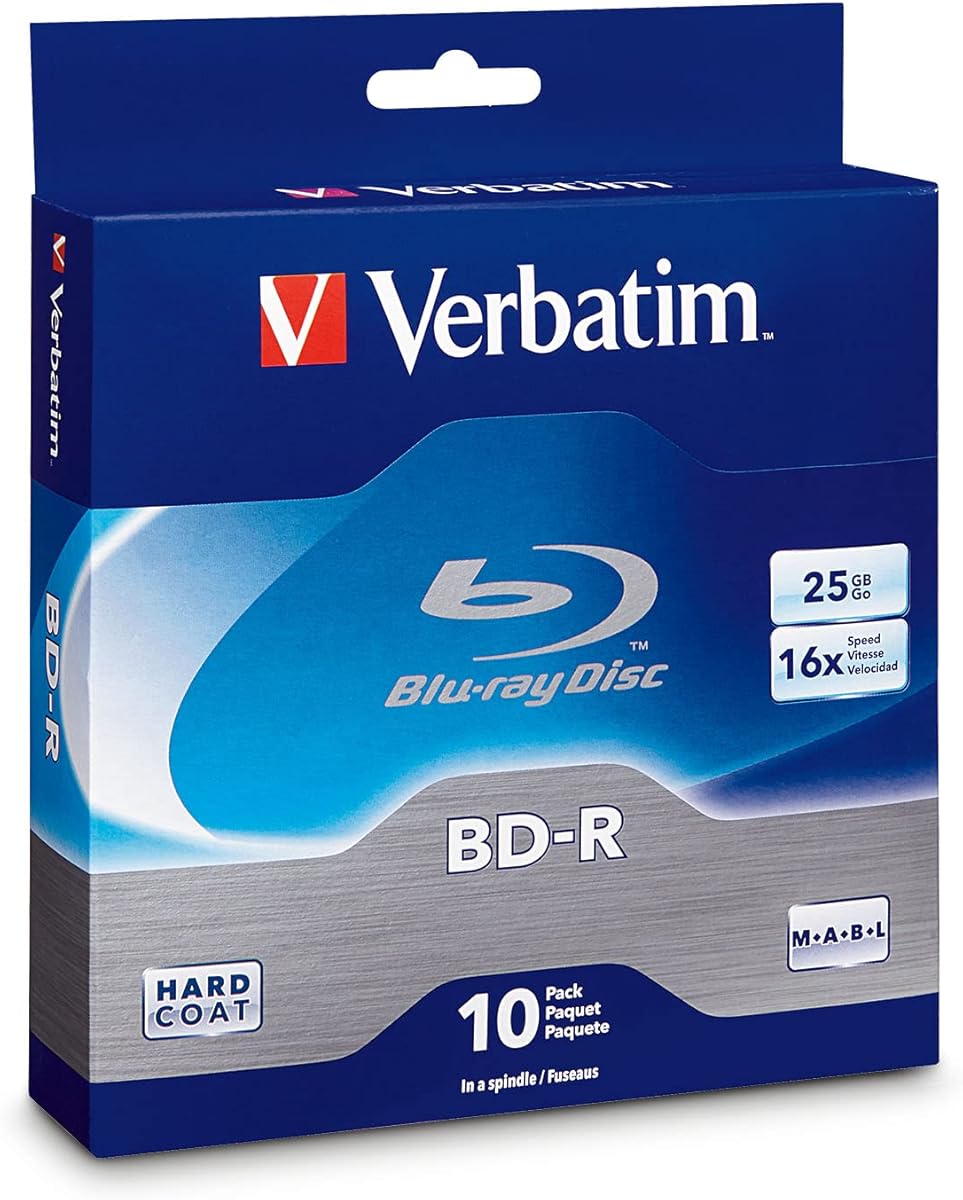
Verbatim BD-R 25GB 16X Blu-ray Recordable Discs with HardCoat, 10 Pack
4.6Editor score
Affordable small batch option
OEM certified reliability
Hard Coat surface treatment
This guide compares the top blank Blu Ray discs for archiving, video backup, and data storage based on durability, speed, and compatibility with modern drives.
Blank Blu Ray discs remain a reliable choice for long-term data archiving and high-definition video storage. They offer substantial capacity and robust protection against physical wear compared to older optical media formats.
We evaluated ten top-rated options based on storage capacity, write speed, surface durability, and compatibility with standard Blu Ray hardware. Our analysis focuses on archival life and user feedback to ensure reliable performance.
Each pick highlights key specifications, standout features, and potential trade-offs to help you find the right media for your needs. Keep in mind that availability and pricing may shift depending on retailer stock and demand.
4.6Editor score

4.6Editor score

4.6Editor score
The following table provides a side-by-side comparison of all ten products included in this guide. It highlights key specifications such as capacity, write speed, and surface type to help you quickly identify the best match for your specific storage requirements and workflow needs.


This product stands out as a reliable choice for archival storage with a rating of 4.6 stars. It features a hard coat surface that resists fingerprints and dust while offering up to 25GB of storage space for HD content.
We may earn a commission when you buy through this link, at no additional cost to you.
The Verbatim BD-R discs are OEM certified and support write speeds up to 16x. They are compatible with major hardware brands like Sony, Pioneer, and Panasonic. The one hundred year archival life ensures long-term data safety for important files.
While the 25GB capacity is standard for single-layer discs, users needing more space may need to buy multiple packs. The hard coat treatment adds a layer of protection but does not make the discs indestructible under extreme conditions.
This pack is ideal for users who need consistent quality for video backups or photo archives. It balances performance with durability, making it a strong candidate for home and office use where reliability is paramount.
The HardCoat treatment prevents scratches and reduces dust buildup, ensuring the disc remains readable for longer periods.
With a certified one hundred year archival life, these discs are designed to preserve your data securely over decades.
We may earn a commission when you buy through this link, at no additional cost to you.
This 50-pack option offers excellent value for users needing large volumes of blank media. It shares the same core specifications as the 25-pack including the hard coat surface and 100 year archival promise. Users report consistent burn quality across the pack.
We may earn a commission when you buy through this link, at no additional cost to you.
The Verbatim brand maintains its reputation for reliability with these discs. They are OEM certified to work with the latest hardware from manufacturers like Dell, Lenovo, and HP. The super hard coat helps resist physical damage during handling.
Buying in bulk reduces the per-disc cost significantly but requires you to have immediate or future use cases. If you only burn a few discs occasionally, a smaller pack might be more practical to avoid long storage times.
This product is best suited for offices or content creators who frequently archive HD video. The durability and speed ensure efficient workflows without compromising on the quality of the stored data over time.
A 50-pack reduces the cost per disc and ensures you always have media ready for large backup projects.
Every disc in the pack is OEM certified to minimize compatibility issues with different Blu-ray writers.
We may earn a commission when you buy through this link, at no additional cost to you.
This 10-pack is an excellent choice for casual users who need a few high-quality discs without a large commitment. It retains the same hard coat treatment and 25GB capacity as the larger Verbatim options. The price point makes it accessible for home use.
We may earn a commission when you buy through this link, at no additional cost to you.
Verbatim ensures these discs are OEM certified and come with a limited lifetime warranty. They support write speeds up to 16x and work well with major hardware brands. The one hundred year archival life adds significant value for personal data storage.
While buying multiple packs for bulk needs increases the total cost, the convenience of a smaller pack outweighs this for many users. It reduces clutter and ensures freshness if you do not burn discs daily. Quality remains consistent across the pack.
Ideal for occasional backups or sharing media with friends and family this pack balances cost and performance. It proves you do not need to buy in bulk to get reliable optical media for your personal collection.
A 10-pack allows you to test compatibility with your writer before committing to larger quantities of media.
The limited lifetime warranty provides peace of mind regarding the manufacturing quality of these discs.
We may earn a commission when you buy through this link, at no additional cost to you.
This pack offers a printable surface on the hub and disc which is useful for creating custom labels without adhesive stickers. It holds 25GB of data and supports speeds up to 10X. Users appreciate the ability to print titles directly on the media.
We may earn a commission when you buy through this link, at no additional cost to you.
Myeco provides 50 discs in a spindle or cakebox packing which saves storage space. The discs are designed for Full HD video resolution and perform well with standard Blu-ray players. The non-stacking ring helps prevent damage during handling.
The 10X write speed is slower than top-tier options but still adequate for most personal backups. Inkjet absorption can vary so testing one disc first is recommended before printing a whole batch. Overall it offers practical utility for labeled collections.
If you need labeled discs for a media library or gift sharing this product is a strong choice. It combines decent capacity with the convenience of direct printing to keep your organized and easy to identify.
The white inkjet hub allows for custom text and images directly on the disc surface without peeling labels.
Packed in a spindle or cakebox these 50 discs take up minimal shelf space while remaining protected.
We may earn a commission when you buy through this link, at no additional cost to you.
This product listing currently lacks detailed information in the provided source data. We were unable to confirm capacity, speed, or surface type for this item. It is important to verify product details before purchasing blank media to ensure compatibility.
We may earn a commission when you buy through this link, at no additional cost to you.
When a product page is incomplete it may indicate a new listing or a discontinued item. Always check the current description on the retailer site for accurate specs such as write speed and archival claims. This ensures you make an informed decision.
Without specific features we cannot evaluate this option against others in this guide. It is safer to choose products with full documentation to guarantee that your data remains safe and accessible over time. Review listings carefully for updates.
We recommend selecting a product with verified specs to avoid potential compatibility issues. Reliable media should clearly state capacity and speed to match your recording equipment. This prevents wasted time and effort on unusable discs.
Always check the current product page for updated specifications to ensure the media meets your needs.
Confirm write speed and capacity match your recorder to avoid failed burns or data loss.
We may earn a commission when you buy through this link, at no additional cost to you.
This listing also shows incomplete data with no specific product details provided. It is difficult to assess quality or suitability without knowing the capacity or write speed. Always verify specs to ensure your discs meet your storage requirements.
We may earn a commission when you buy through this link, at no additional cost to you.
Incomplete listings may result from seller updates or catalog errors. Checking the product description directly on the retailer site can provide the missing details you need. This step is crucial for avoiding returns or unusable media.
We advise focusing on products with full specifications to ensure reliability. Known brands often provide more consistent documentation and support. This helps protect your data and ensures smooth operation with your recording equipment.
Select media with clear documentation to maintain confidence in your backup strategy. Proper labeling of speed and capacity prevents confusion and ensures you use the right discs for your projects.
Visit the retailer product page to confirm all specifications before completing your purchase.
Choosing products with full details reduces the risk of incompatibility or quality issues.
We may earn a commission when you buy through this link, at no additional cost to you.
Another product in this list lacks sufficient data for a proper evaluation. We cannot confirm its capacity or speed without further information. Always ensure you know the technical specifications before buying to guarantee compatibility with your hardware.
We may earn a commission when you buy through this link, at no additional cost to you.
Incomplete product data can lead to confusion about what you are purchasing. It is safer to choose items where the manufacturer provides clear claims about archival life and write speeds. This protects your investment and data integrity.
We recommend avoiding unknown listings unless you can verify details directly with the seller. Reliable media usually comes with transparent documentation and warranty terms. This ensures you can trust the quality of the discs you use.
Focus on products with verified specs to maintain a solid backup strategy. Proper details help you plan storage capacity and speed needs effectively. This leads to better performance and fewer issues during your burning sessions.
Ensure the listing clearly states capacity and speed to match your recording needs.
Choose products with transparent details to avoid surprises when you start burning data.
We may earn a commission when you buy through this link, at no additional cost to you.
This product also lacks necessary details for a thorough review. We cannot determine its suitability for your needs without specific data. Always check the product description for capacity and write speed to avoid compatibility issues.
We may earn a commission when you buy through this link, at no additional cost to you.
Incomplete data might mean the product is new or has a listing error. Verify the details on the retailer site before purchasing to ensure you get what you expect. This prevents waste and ensures your data is secure.
We suggest sticking to products with clear specifications for peace of mind. Known brands typically provide consistent data and warranty support. This helps you choose media that will reliably store your files over time.
Proper documentation is key to successful data archiving. Ensure you understand the specs of the discs you buy to maintain a robust and efficient backup workflow for your personal or professional needs.
Check the product page for full details to avoid buying incompatible or unsuitable media.
Choosing media with verified specs helps protect your important files from data loss.
We may earn a commission when you buy through this link, at no additional cost to you.
This pack offers a straightforward option for users needing basic 25GB storage. It includes 25 discs in a spindle which provides decent protection during storage. The 6x write speed is slower but suitable for non-urgent backups and simple data archiving.
We may earn a commission when you buy through this link, at no additional cost to you.
Users report decent performance for the price point. The discs work with standard Blu-ray hardware though speed may vary depending on the recorder. For casual use this product delivers adequate capacity without the cost of faster or branded alternatives.
The slower write speed means longer burn times for large files. If you need fast throughput this might not be the best choice. However for occasional backups the trade-off in time is often acceptable for the lower cost per disc.
Ideal for budget conscious users who need standard storage this pack serves basic needs well. It offers a practical balance of quantity and capacity for personal or light office use without requiring high-end features.
A 25-pack spindle provides a low-cost entry point for standard Blu-ray storage needs.
Spindle packaging helps protect discs from warping and physical damage when stored properly.
We may earn a commission when you buy through this link, at no additional cost to you.
This premium option combines high-speed performance with a white inkjet printable surface. It supports up to 16x write speeds and offers rapid-dry ink absorption for clear text and images. Users appreciate the ability to print high quality labels directly on the disc.
We may earn a commission when you buy through this link, at no additional cost to you.
Verbatim ensures these discs are OEM certified for compatibility with major hardware. The super hard coat prevents scratches and reduces dust build-up on the printable surface. The limited lifetime warranty adds significant value to this long-term archiving choice.
The higher price reflects the premium features and print quality. It is best suited for users who need professional looking labels and fast burn times. Testing a few discs first ensures your inkjet printer settings are optimized for the surface.
Ideal for content creators or businesses needing organized archives this product delivers reliability and aesthetics. It bridges the gap between functional media and professional presentation without sacrificing data integrity over time.
The white inkjet printable surface allows for professional labels and quick drying ink absorption.
A super hard coat ensures the printed surface remains scratch resistant and readable for years.
We may earn a commission when you buy through this link, at no additional cost to you.
Selecting the right blank Blu Ray discs involves considering several key factors such as capacity, speed, and durability. This guide outlines the essential elements you should evaluate to ensure your data remains safe and accessible.
Most standard Blu Ray discs offer 25GB of storage which is sufficient for about one hour of HD video. Dual layer options exist with double the capacity but may cost more. Determine your typical file sizes to choose between single and dual layer media.
For most personal backups a 25GB disc is adequate. If you work with large datasets consider dual layer discs to reduce the number of physical discs required for a single project.
Write speeds range from 6x to 16x or higher. Higher speeds allow faster burning times but may generate more heat. Ensure your recording hardware supports the speed you choose to avoid burn failures or data corruption.
If you burn large files often choose a 16x disc and drive for efficiency. For occasional backups slower speeds are acceptable and may reduce wear on your hardware over time.
Many discs feature a Hard Coat or similar treatment to resist scratches and fingerprints. This coating helps protect the data layer from physical damage during handling. Look for discs with this feature if you plan to handle them frequently.
A durable surface extends the life of your data and reduces read errors. Always handle discs by the edges to preserve the surface integrity and ensure long-term accessibility.
Archival life indicates how long data should remain readable under proper storage conditions. Top brands often guarantee one hundred years of life. This is critical for legal documents, photos, or medical records that must be preserved.
For long term preservation choose discs with high archival ratings. Store them in a cool dry place away from direct sunlight to maximize their lifespan and data integrity.
Not all disc drives read every type of media. Ensure the discs are OEM certified to work with your specific brand of drive. Check if your hardware supports BD-R versus BD-RE formats before purchasing.
Review the product details for compatibility lists from major manufacturers. This prevents frustration and ensures you can read and write data without issues on your current system.
If you need labels consider discs with an inkjet printable surface. These allow you to print titles and artwork directly on the disc using a compatible printer. This is useful for organizing media libraries or creating gifts.
Ensure your printer supports printable discs and uses ink designed for optical media. This prevents smudging and keeps the disc surface balanced for proper rotation during reading.
Blank discs come in packs ranging from 10 to 50 or more. Buying in bulk reduces the per-disc cost but requires more storage space. Choose a pack size that matches your immediate needs to avoid waste.
If you plan to archive frequently bulk packs offer better value. For occasional use smaller packs keep your media fresh and reduce clutter in your storage area.
Established brands often provide better quality control and warranty support. They invest in research to improve dye and coating technologies. Choosing a reputable brand reduces the risk of media failure over time.
Look for brands with a history in data storage and positive user reviews. A strong warranty and customer support network can save you time if issues arise with your media.
When inserting a disc into your drive ensure it is clean and free of dust. Place it gently on the spindle in your drive or use a cartridge if available. Avoid touching the data surface directly with your fingers to prevent oils from causing read errors.
Use reliable burning software to write data to your disc. Select the appropriate write speed based on your drive capabilities and the disc rating. Always verify the data after burning to ensure the files copied correctly and are intact.
Store discs in a protective case or sleeve when not in use. Keep them in a cool dry environment away from direct sunlight and humidity. Proper storage prevents warping and chemical degradation of the data layer over time.
BD-R discs are recordable once and cannot be erased or rewritten. BD-RE discs are rewritable allowing you to erase and reuse them multiple times. BD-R is generally better for long-term archival as it is less prone to accidental overwriting.
While you can store DVD files on a Blu Ray disc it may not play in a standard DVD player. Blu Ray players can usually read DVD files stored on a BD-R however. For compatibility ensure you format the disc correctly for your target device.
Burning times depend on the write speed and the size of the data. At 16x speed a full 25GB disc might take around 10 to 15 minutes. Slower speeds like 6x can take up to 40 minutes or more depending on the content.
Yes all optical media can degrade if not stored properly. Factors like heat humidity and light exposure can damage the data layer. Proper storage and choosing discs with high archival ratings help minimize this risk significantly.
Most modern operating systems include basic burning tools. For advanced features you may need third-party software that supports Blu Ray formats. Ensure your software is updated to support the latest disc standards and speeds.
No a standard BD-R disc cannot be erased once data is written to it. If you need reusable media look for BD-RE discs which are designed to be rewritten multiple times. Always choose the right type for your workflow needs.
The issue may be due to scratches dust or a dirty laser lens. Try cleaning the disc and the lens with a soft lint-free cloth. Also ensure the disc format is compatible with your player model to avoid playback issues.
Brand name discs often use higher quality dyes and coatings which improve reliability. Generic discs might work well but could vary in quality control. For important data it is safer to stick with reputable brands for consistency.
We have reviewed ten top options for blank Blu Ray discs ranging from budget-friendly packs to premium printable media. Each choice offers reliable capacity and durability to suit different archiving needs and budgets.
Prioritize archival life and surface protection when selecting discs for long-term storage. Ensure your hardware supports the write speed and capacity you choose to avoid compatibility issues.
Prices and availability change frequently so check current listings before making your final purchase. A quick look at retailer stock can ensure you get the best value for your specific storage requirements.