
SABRENT 74 in 1 Internal Reader
4.0Editor score
Supports 74 card types
Includes USB 2.0 port
Very affordable price point
This guide compares the top ten internal media card readers for desktop PCs based on speed compatibility ease of installation and professional needs.
An internal media card reader integrates directly into your desktop PC chassis providing convenient front panel access to memory cards without needing external dongles.
We evaluated ten top rated models focusing on connection types slot variety build quality and compatibility with modern storage standards to help you choose the right unit.
Each pick below highlights key strengths and ideal use cases so you can match a reader to your workflow while keeping in mind that prices and stock may change.
4.0Editor score

4.5Editor score

5.0Editor score
The following comparison table breaks down the core specifications of each model to help you quickly identify which reader matches your specific memory card types and case size.
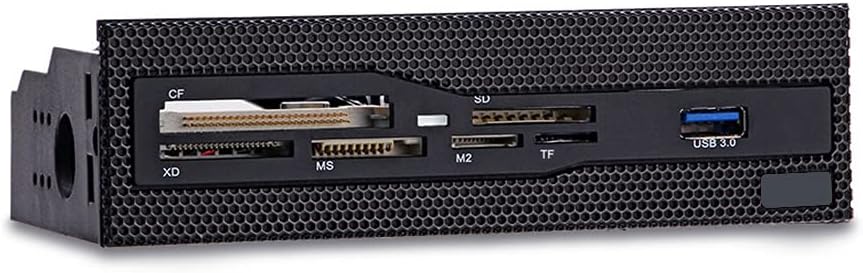


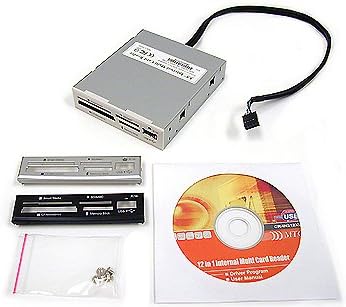
The StarTech Internal Card Reader stands out as the top pick due to its USB 3.0 UHS-II support which delivers exceptional transfer speeds for large media files.
We may earn a commission when you buy through this link, at no additional cost to you.
This model supports accessing four different card slots simultaneously which is a massive advantage for professionals who need to move content between different card types quickly.
While it costs more than basic readers the speed and reliability justify the investment especially for videographers and photographers who deal with high resolution assets daily.
If you need a professional grade internal solution that integrates cleanly into your desktop chassis and supports modern fast cards this is the definitive choice to buy.
USB 3.0 UHS-II support ensures you can offload 4K video or RAW photos significantly faster than older USB 2.0 internal readers.
The ability to read from multiple slots at the same time saves time when transferring footage between cameras using different card formats.
We may earn a commission when you buy through this link, at no additional cost to you.
The SABRENT 74 in 1 offers an unbeatable value proposition for users who need maximum card compatibility without spending much money on their desktop setup.
We may earn a commission when you buy through this link, at no additional cost to you.
It supports a massive array of card formats including rare ones that newer readers often drop making it a great legacy option for older hardware collections.
The trade-off is slower USB 2.0 speeds which might be annoying for very large files but for everyday tasks it performs reliably enough for most people.
For students or home users who just need occasional access to old camera cards this affordable unit covers almost every base you could possibly need.
With support for 74 different memory card types you are unlikely to find a card it cannot read regardless of its age or rarity.
The included USB 2.0 port provides an extra front facing connection point which helps if your motherboard front panel has limited ports available.
We may earn a commission when you buy through this link, at no additional cost to you.
The Vantec Link earns a perfect rating by combining high speed USB 3.0 performance with robust support for modern high capacity memory cards.
We may earn a commission when you buy through this link, at no additional cost to you.
Its Multi-LUN feature allows simultaneous access to multiple cards without needing to reassign drive letters which is a common annoyance with cheaper USB readers.
While it is not the most expensive option on the market it sits firmly in the premium tier due to its reliable performance and extensive format support.
Photographers and videographers dealing with large SDXC cards will appreciate the seamless integration and speed this model provides for daily workflows.
Multi-LUN support lets you use multiple card slots independently without the operating system getting confused or remapping drive letters constantly.
This reader handles SDXC cards up to 2TB so you do not need to worry about compatibility when using the largest modern storage cards.
We may earn a commission when you buy through this link, at no additional cost to you.
This 5.25 inch dashboard model brings modern USB 3.0 speeds to older PC cases that still have drive bays available for expansion.
We may earn a commission when you buy through this link, at no additional cost to you.
The copper plated card slots ensure stable electrical connections which helps prevent read errors when you are moving critical data off your cards.
It fits well into mesh panel cases making it a great aesthetic addition for custom builds that need front facing card access.
If your case has a 5.25 inch bay this unit gives you excellent speed and compatibility without requiring a full case swap.
The USB 3.0 interface allows for much faster transfers compared to older USB 2.0 internal readers commonly found in 5.25 inch panels.
Copper plated slots reduce resistance and improve signal integrity leading to fewer interrupted transfers or read failures during heavy use.
We may earn a commission when you buy through this link, at no additional cost to you.
This panel replaces your front optical drive with a full suite of ports including USB audio and a card reader for a cleaner desk setup.
We may earn a commission when you buy through this link, at no additional cost to you.
The inclusion of both USB 3.0 and eSATA makes it very versatile for users who have legacy devices that need specific connection types.
Audio jacks on the front are a major convenience for gaming or media consumption so you do not have to reach behind the tower.
It is an ideal upgrade for older cases where the front panel has become cluttered or damaged and you want a consolidated control hub.
Having headphone and microphone jacks on the front panel saves time and frustration when you need to quickly switch audio devices.
Combining card reading with extra USB and eSATA ports means you can connect more peripherals without needing separate external hubs.
We may earn a commission when you buy through this link, at no additional cost to you.
The TCC-QL5E offers a robust set of ports including USB 3.0 and eSATA which makes it suitable for power users needing high bandwidth connections.
We may earn a commission when you buy through this link, at no additional cost to you.
Its front panel audio and USB ports improve ergonomics by bringing frequently used connections to eye level rather than hiding them at the back.
The card reader section covers the most common formats so you can handle SD and CF cards directly without adapters for most daily tasks.
Choose this if you are rebuilding an older workstation and want to modernize the front panel with current connection standards and audio access.
USB 3.0 and eSATA support ensure you can handle large drives and fast cards without bottlenecking your data transfer rates significantly.
Putting audio and USB ports on the front reduces cable clutter and makes it easier to plug in devices while seated at your desk.
We may earn a commission when you buy through this link, at no additional cost to you.
Sony branded readers have long been known for reliability and this model supports 17 formats which covers most legacy and standard cards effectively.
We may earn a commission when you buy through this link, at no additional cost to you.
It comes with interchangeable bezels so you can match the color of your existing front panels which is rare among standard internal readers today.
The drive letter software simplifies the setup process especially for users who are less comfortable with manual hardware configuration in their operating system.
If you use older Sony cameras or memory sticks this reader provides a familiar and reliable way to transfer images into your desktop PC.
As a trusted brand in digital imaging Sony hardware often offers better long term durability and support for proprietary card formats.
The ability to swap faceplates between black and ivory lets you blend the reader better into older PC cases with mixed color schemes.
We may earn a commission when you buy through this link, at no additional cost to you.
This compact 2.5 inch unit is ideal for smaller PC builds or users who only need basic support for a few common memory card formats.
We may earn a commission when you buy through this link, at no additional cost to you.
The high customer rating suggests it performs well for its intended purpose even though it lacks the advanced features of larger desktop models.
With multiple bezel options available you can choose a look that fits your case color without needing extra customization or painting.
It is a good choice for home computers that rarely need card reading but want the option available internally without cluttering the desk.
The 2.5 inch bay size makes it easier to fit into tight cases where larger 3.5 or 5.25 inch readers would not physically fit.
Having black silver and white bezels included gives you the flexibility to match the look of your existing PC front panel easily.
We may earn a commission when you buy through this link, at no additional cost to you.
The Akasa model offers dedicated ports for adapters which eliminates the need for extra space when reading smaller micro cards in a 3.5 bay.
We may earn a commission when you buy through this link, at no additional cost to you.
LED indicators for power and data transfer provide clear visual feedback so you know exactly when a card is being read or written.
Adding an extra USB port makes this reader more versatile than simple card slots since it can also handle flash drives directly.
If you need a clean organized look with clear status lights this unit is a solid choice for standard desktop cases and laptops.
Built in slots for adapters mean you do not have to plug a tiny adapter into the reader card slot which often feels fragile.
The status LEDs help you avoid ejecting cards too early because they clearly show when data is actively being transferred to your PC.
We may earn a commission when you buy through this link, at no additional cost to you.
This reader supports 22 formats and uses a metal case which generally offers better durability and heat dissipation than plastic alternatives.
We may earn a commission when you buy through this link, at no additional cost to you.
The ability to use four slots at once is a useful feature for multi-camera setups where you need to offload footage rapidly.
With clear media icons on the slots it is easy to identify which card goes where without needing to memorize the layout.
Choose this option if you want a sturdy reliable reader that supports many formats without needing to worry about breaking plastic parts.
The metal casing provides better structural integrity which helps protect the internal connectors from damage during frequent use or shipping.
Having four active slots allows you to load multiple cards and swap them out without changing slots which speeds up bulk transfers.
We may earn a commission when you buy through this link, at no additional cost to you.
Selecting the right internal reader depends on your case bay size connection speed needs and the specific memory cards you use.
Most desktop internal readers fit 3.5 inch bays common in towers while some offer 5.25 inch panels that double as front hubs with audio.
Measure your available drive slots before purchasing to ensure physical fit and check if your case has the necessary mounting hardware.
USB 3.0 readers are significantly faster than USB 2.0 models and are essential if you transfer large video or RAW image files regularly.
Look for UHS-II support if you have the fastest memory cards to fully utilize their performance and avoid data transfer bottlenecks.
Check that the reader supports your specific cards such as SD SDXC CF or Memory Stick as some budget models drop older legacy formats.
Universal readers that support dozens of formats reduce the need for adapters and ensure compatibility as you upgrade your camera gear.
Higher end readers allow you to read from multiple cards at once which is vital for professionals managing multiple camera sources simultaneously.
This feature saves time during shoots and editing sessions when you need to offload footage from several cards quickly.
Metal housings generally last longer and dissipate heat better than plastic which can be important if you use the reader heavily every day.
Look for sturdy connectors and reliable slot mechanisms to prevent read errors or physical damage from frequent insertion and removal.
Some models include extra USB ports audio jacks or eSATA connections that can reduce cable clutter and free up motherboard ports.
Evaluate if these extra features justify the cost as they can simplify your desk setup and improve overall PC usability.
Ensure the device is compatible with your version of Windows macOS or Linux to avoid driver issues or recognition problems after installation.
Most modern internal readers are plug and play but checking the specs for OS support ensures a smooth setup experience.
Prices vary from under twenty dollars to over forty so balance your budget against the features you truly need for your workflow.
A solid warranty and customer support can save you money in the long run if the device fails or has compatibility issues.
Turn off your computer and open the case to install the reader into an available 3.5 or 5.25 inch bay and connect the necessary cables to the motherboard.
Secure the device with screws and plug the USB power cable into a compatible header on the motherboard before closing the PC case.
Insert your memory card into the correct slot and wait for the operating system to recognize it before transferring files to avoid data corruption.
Most modern internal readers are plug and play and will work with Windows macOS and Linux without extra drivers. However if you use legacy hardware you might need drivers for your operating system.
No you need an adapter to use SD cards in a CompactFlash slot if the reader does not have a dedicated SD slot. Many universal readers include adapter slots for this purpose.
Internal readers often use faster motherboard headers directly which can be more reliable than external hubs. However the speed difference depends on the USB version used in both types.
Yes you can use a bracket to install a 3.5 inch device into a 5.25 inch bay. Many PCs come with adapters to help you fit smaller drives into larger slots.
Check that the card is inserted correctly and the slot is not dirty. Ensure the internal power and USB headers are connected properly to the motherboard for recognition.
Most internal readers support both read and write functions so you can save files to memory cards directly. Check the product specs for write speeds if you need high performance.
We have covered the top ten internal media card readers ranging from budget universal options to professional grade high speed units for demanding workflows.
Prioritize connection speed and slot variety if you work with large files or many camera formats to ensure your setup does not slow down your creative process.
Prices and availability change frequently so always check the current listings on Amazon before making your purchase to get the best deal available.