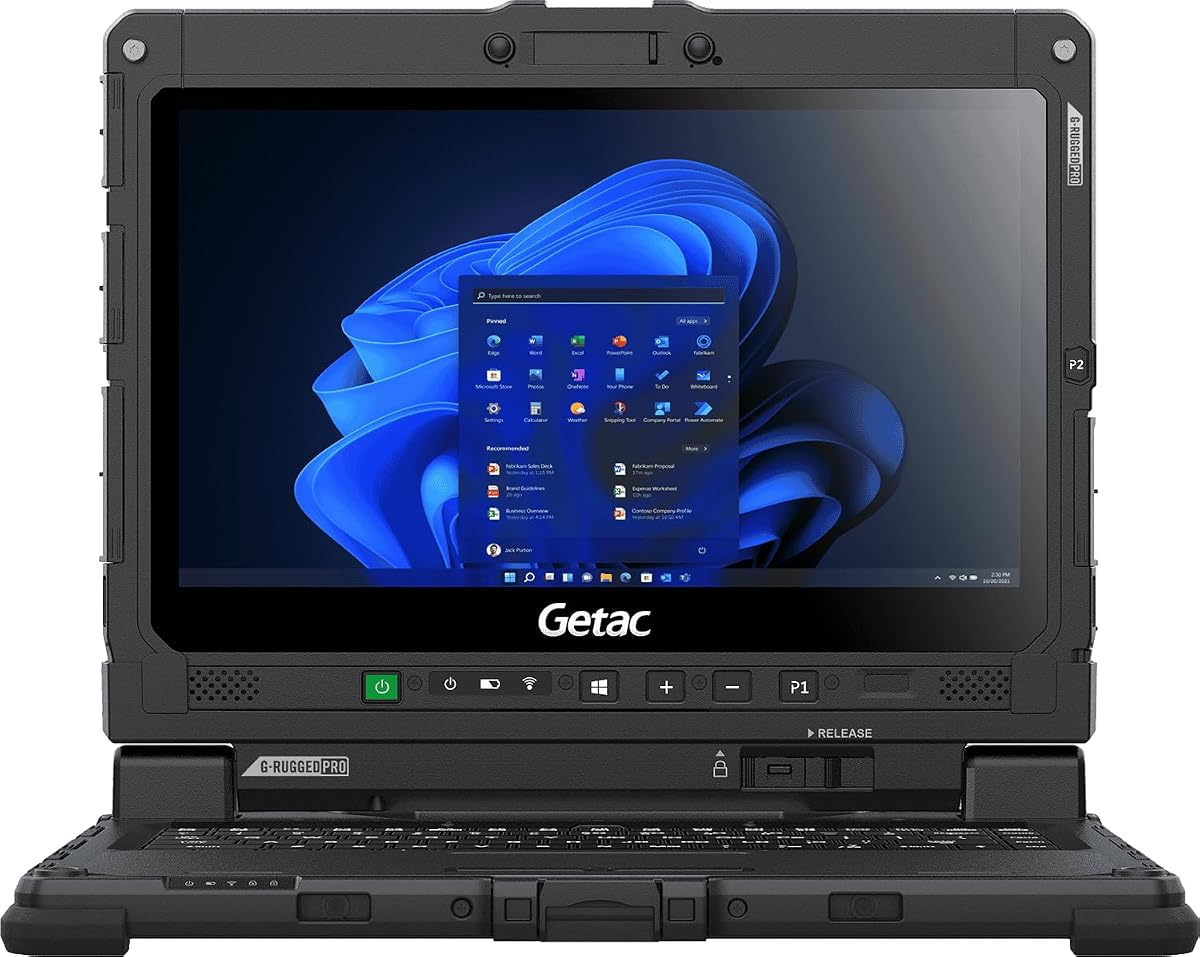
Getac Renewed K120 Rugged Laptop
5.0Editor score
1200 Nits Display
Military Grade Build
Affordable Price Point
Working outdoors requires reliable hardware that performs under direct sun. Standard laptops often fail to show content clearly when glare hits the screen. You need devices engineered with high brightness and protective features to maintain productivity in harsh environments.
We evaluated ten top models based on display brightness, durability ratings, and performance under stress. Our analysis focuses on units that promise readable screens even in midday glare. Each entry highlights key specs that matter for fieldwork and outdoor deployment.
Each pick shows detailed specs, ratings, and real-world suitability for sunlight conditions. Prices and availability change frequently so check current listings before buying. Use this guide to find a laptop that keeps your workflow visible and efficient anywhere.
5.0Editor score

4.1Editor score

4.5Editor score
As an Amazon Associate we earn from qualifying purchases.
The following table compares key specifications across all ten selected models to help you find the right fit for your outdoor needs.


The MUNBYN IRX17 stands out as a top choice for professionals needing visibility in direct sunlight. With a 1000-nit display and rugged IP65 build, it handles tough jobs while keeping content readable. Its Intel i7 processor ensures smooth performance for heavy tasks like CAD design.
We may earn a commission when you buy through this link, at no additional cost to you.
This laptop excels in brightness and durability. The screen remains clear even under harsh outdoor conditions. The industrial strength chassis protects against dust and water. Advanced WiFi 6 connectivity ensures fast data transfer for field operations.
Despite its power, the unit is heavier than standard laptops. This weight adds to durability but reduces portability for light users. The price reflects its premium components. It is best suited for trade professionals rather than casual travelers.
Buyers needing serious outdoor reliability should consider this model. It balances performance and protection well. The camera privacy switch adds security. Ideal for construction or field research teams.
The 1000-nit screen ensures details are visible even in bright sun without squinting or shading.
IP65 and MIL standards make it resilient against rain and dust common in outdoor work zones.
We may earn a commission when you buy through this link, at no additional cost to you.
The Getac K120 offers exceptional value with a 1200-nit screen that beats many pricier options. Its renewed status lowers cost while maintaining military-grade durability. This makes it ideal for budget conscious users needing sun readability.
We may earn a commission when you buy through this link, at no additional cost to you.
Key strengths include its brightness and compact size. The 12.5 inch form factor is easy to carry. The touch interface works well with gloves. It handles standard field apps efficiently despite older hardware.
Older processors may struggle with modern heavy multitasking. Battery life is average compared to newer tech. It is a practical choice for basic tasks but not for heavy computation.
This model fits those needing portable sun readable tools on a budget. The touch is strong. It works well for inspections or light data entry in harsh conditions.
At 1200 nits this display offers top tier visibility ensuring clarity even in the brightest daylight.
Restored to working order it provides high end features at a fraction of the new device cost.
We may earn a commission when you buy through this link, at no additional cost to you.
The Getac S510 brings modern AI performance to rugged laptops. Its Ultra 5 processor handles demanding tasks with ease. The 1000-nit display ensures visibility. It is a top pick for high end field professionals.
We may earn a commission when you buy through this link, at no additional cost to you.
Performance and build quality define this unit. The 32GB RAM supports smooth multitasking. Touch interaction is precise. It withstands drops and vibration well. The webcam supports secure login features.
The high price limits mass adoption. It is a significant investment. Battery life is moderate. It suits enterprise users requiring speed and reliability over cost savings.
Buyers seeking top tier performance should choose this. It covers all bases from screen to speed. Ideal for critical operations where downtime is not an option.
The Ultra 5 processor delivers next gen speeds for data analysis and complex field workflows.
A responsive touch screen allows intuitive interaction even while wearing protective work gloves.
We may earn a commission when you buy through this link, at no additional cost to you.
The MUNBYN IRX16 offers a balanced option for field work. It features a bright 1000-nit screen. The build resists dust and water. It runs Windows 11 Pro for business needs.
We may earn a commission when you buy through this link, at no additional cost to you.
Performance is steady for standard apps. The replaceable SSD makes upgrades easy. WiFi 6 speeds improve transfers. The design is practical and tough. It fits well for daily use.
It lacks the power of higher models. Thermal management is basic. It may slow under heavy load. For general tasks it is reliable enough.
This model suits users needing a tough mid tier machine. It handles basic software well. A good choice for teams on a moderate budget.
The replaceable SSD allows easy upgrades to meet growing storage needs in the field.
IP65 sealing keeps internal components safe from rain and dust during outdoor shifts.
We may earn a commission when you buy through this link, at no additional cost to you.
The HP OmniBook 3 14 features an OLED display for rich visuals. Its battery lasts over 40 hours. It includes AI tools for productivity. The design is light and sleek.
We may earn a commission when you buy through this link, at no additional cost to you.
It handles light tasks well. The screen is beautiful indoors. Connectivity is fast. It supports modern Windows features. The camera works well for calls.
Sunlight readability is poor compared to rugged models. The brightness is low. It is not durable for outdoor abuse. Best for sheltered outdoor use.
Buyers prioritizing battery and color should consider it. It works for light field work. Not ideal for direct sun exposure.
With up to 41 hours of life it supports long shifts without needing a charge.
The OLED panel delivers deep blacks and sharp detail for a premium visual experience.
We may earn a commission when you buy through this link, at no additional cost to you.
The HP OmniBook 3 16 offers a large workspace for multitasking. The touch interface adds flexibility. It is thin and light for travel. Boot times are fast.
We may earn a commission when you buy through this link, at no additional cost to you.
Performance is good for basic apps. The screen is colorful indoors. It handles light video tasks. Connectivity options are standard.
It is not built for bright sun. The screen dims in glare. It lacks rugged protection. Best for indoor or shaded outdoor work.
Buyers needing a big screen should like it. It is good for data entry. Not suited for direct sunlight tasks.
The 16 inch screen offers ample space for viewing multiple windows at once.
Interactive touch capabilities make navigation faster and more intuitive.
We may earn a commission when you buy through this link, at no additional cost to you.
The Dell 15 provides reliable standard computing. ComfortView reduces blue light. The keyboard is ergonomic. It includes onsite service for support.
We may earn a commission when you buy through this link, at no additional cost to you.
It runs Windows 11 smoothly. The display is clear indoors. Build quality is standard. It handles daily tasks well.
Sunlight readability is poor. It is not rugged. Best for office or indoor use. Not for direct outdoor exposure.
Buyers wanting standard reliability should consider it. It is good for casual work. Not for field conditions.
ComfortView software helps reduce eye strain during long sessions.
A roomy keypad ensures comfortable typing for extended periods.
We may earn a commission when you buy through this link, at no additional cost to you.
The HP 17.3 offers large storage at a good price. The anti-glare coating helps with reflections. It includes a cooler for thermal stability. Performance is steady.
We may earn a commission when you buy through this link, at no additional cost to you.
It handles many apps well. The screen size aids data work. Connectivity is good. It is a solid choice for indoor or shaded work.
It is not rugged. Brightness is moderate. Best for office use. Not ideal for direct sun.
Buyers needing storage should like it. It is good for general tasks. Not for tough outdoor work.
The anti-glare coating minimizes reflections from ambient light.
A bundled laptop cooler helps maintain performance during long runs.
We may earn a commission when you buy through this link, at no additional cost to you.
The Panasonic Toughbook FZ-55 is a compact rugged tool. It features a 1000-nit display. The build is durable. It includes a stylus for notes.
We may earn a commission when you buy through this link, at no additional cost to you.
Performance is strong. It handles apps well. The design is professional. It supports secure login.
It is expensive for older models. Not all ports are present. Best for field data entry. Not for heavy compute.
Buyers needing compact ruggedness should like it. It is good for mobile workers. A solid choice for outdoor teams.
An included stylus allows for precise data entry and note taking.
The small size makes it easy to carry while remaining tough.
We may earn a commission when you buy through this link, at no additional cost to you.
The Dell 16 is a productivity focused machine. It has a fast Core 7 processor. The design is modern. It uses ComfortView Plus for eye comfort.
We may earn a commission when you buy through this link, at no additional cost to you.
It handles work apps well. The screen is clear indoors. Thermals adjust automatically. It is light for travel.
It lacks outdoor durability. Brightness is not sufficient for sun. Best for indoor use. Not for direct sunlight.
Buyers wanting speed should like it. It is good for office tasks. Not for field work.
The modern Core 7 processor handles complex tasks with ease.
Built in technology adjusts power usage based on surface stability.
We may earn a commission when you buy through this link, at no additional cost to you.
Selecting a laptop for outdoor use requires attention to specific features that ensure visibility and durability.
Display brightness measured in nits is critical for outdoor use. Standard screens often peak at 300 nits which can be washed out by sunlight. Look for models with at least 1000 nits to ensure text and graphics are legible in direct sun.
A higher brightness rating ensures you can work outdoors without shading the screen.
Durability is key for harsh environments. Look for MIL-STD-810H certification which tests for drops and vibration. IP65 or higher ratings protect against dust and water jets. These features ensure reliability in construction or field settings.
Choose certified rugged models to avoid damage from harsh conditions.
Field work often involves CAD or data analysis. A powerful processor like an Intel Core i7 or Ultra 5 ensures smooth operation. Modern chips handle multitasking better. This keeps productivity high when running complex apps.
Prioritize newer processors for demanding software performance.
Memory speed impacts how quickly files load. DDR5 RAM offers better speed than DDR4. Large SSD storage allows for quick access to local data. Ensure storage is replaceable if you need to expand capacity later.
Look for 16GB or more RAM and expandable SSD options.
Fast internet is needed for remote work. WiFi 6 provides speeds up to 1800Mbps. Thunderbolt ports allow for high speed data transfer. These features reduce latency and improve collaboration.
Select models with WiFi 6 and multiple ports for flexibility.
Long battery life is essential for shifts without power. Some models offer over 20 hours of use. Fast charging helps when you need quick top ups. Consider removable batteries if you need extended runtime.
Opt for long battery life and replaceable options when possible.
Security is vital in public spaces. Physical camera switches allow you to disable the webcam. Secure login via Windows Hello adds protection. These features prevent unauthorized access to your system.
Choose laptops with physical privacy controls.
Rugged laptops often cost more due to specialized build. Ensure you get a warranty that covers accidental damage. Some models offer extended protection plans. This protects your investment in the field.
Check warranty terms before buying to ensure coverage.
Always keep the screen clean. Use a microfiber cloth to remove dust and fingerprints. Dirty screens reduce visibility even on bright displays. Clean the surface gently to avoid scratching the coating.
Store the laptop in a protective case when not in use. Rugged models still benefit from padding. Keep it in a cool dry place to prevent moisture damage. This extends the life of internal parts.
Update your software regularly. Security patches protect your data. Use a surge protector when charging. This ensures safe power delivery to your device during outdoor sessions.
For bright sunlight readability you should aim for a display with at least 1000 nits. Models with 1200 nits like the Getac K120 are even better for intense sun. This ensures text and images remain visible without glare.
Yes rugged laptops are heavier than standard ones due to reinforced frames. They typically weigh between 5 to 8 pounds. However the added weight provides durability and stability during field work.
Many rugged laptops are rated for extreme temperatures. Some models operate from -29°C to 63°C. Always check the specific environmental ratings before using in Arctic or desert conditions.
Some models like the MUNBYN IRX17 offer dual batteries. This allows you to swap them out when needed. Others have non removable batteries. Check the product specs for battery replacement options.
Windows 11 Pro offers advanced security features needed for business. While Home is fine for basic use Pro supports encryption and remote access. Most rugged models include Pro for enterprise needs.
WiFi 6 offers faster speeds and lower latency compared to WiFi 5. It handles more devices simultaneously which is useful in busy sites. This keeps your connection stable during field tasks.
Choosing a laptop for bright sunlight involves balancing brightness durability and performance. The MUNBYN IRX17 and Getac K120 are top picks for their screen quality and build. Consider your budget and field requirements when deciding.
Prioritize display brightness and rugged certifications to ensure reliability. Modern processors and long battery life also add value. Use this guide to find a device that fits your specific outdoor needs.
Always check current prices and availability before buying. Models often change specs or pricing. Visit the links provided to confirm details. This ensures you get the right device for your work.