
Mouse Jiggler Mover Wiggler Undetectable Shaker
4.7Editor score
Driver-free operation
Compact design
Wide compatibility
This guide compares the top laptop jiggler devices to help remote workers and professionals keep their systems active during meetings and idle time efficiently.
Laptop jiggler devices are essential tools for remote professionals who need to keep their computers active during long sessions. These small hardware devices simulate mouse movement to prevent sleep modes and maintain online status across various platforms.
We evaluated ten top-rated models based on undetectability, build quality, ease of use, and compatibility with different operating systems. Our analysis focuses on physical movers that require no software installation for maximum security and convenience.
Each pick below highlights key features and real-world performance notes to help you choose the right solution. Please note that availability and pricing may change over time so always verify current details before purchasing.
4.7Editor score

4.7Editor score

4.1Editor score
The following comparison table outlines the core specifications and capabilities of each selected laptop jiggler model to facilitate a direct side-by-side evaluation of their distinct features.


The TECH8 USA Undetectable Mouse Mover Jiggler stands out with its unique 3D holographic disc and ambient LED ring. With a high rating of 4.7 stars, it is a top choice for users seeking both style and functionality in keeping their systems active.
We may earn a commission when you buy through this link, at no additional cost to you.
This device features three customizable motion levels and an auto shut-off timer. It requires no software installation, ensuring your IT department remains unaware of its presence. The large disc supports various mouse sizes making it highly versatile.
While the holographic disc adds a stylish touch it may be too flashy for minimalist setups. The price point is also higher than basic models but the build quality and unique features justify the investment for many users.
Anyone needing a reliable hardware solution that does not rely on software drivers should consider this model. It is particularly suited for professionals who value a polished desk aesthetic alongside efficient remote work tools.
The ambient glow ring and hologram disc provide a modern look that enhances desk aesthetics while functioning efficiently.
A large disc surface accommodates various mouse sizes ensuring stable movement simulation for different hardware setups.
We may earn a commission when you buy through this link, at no additional cost to you.
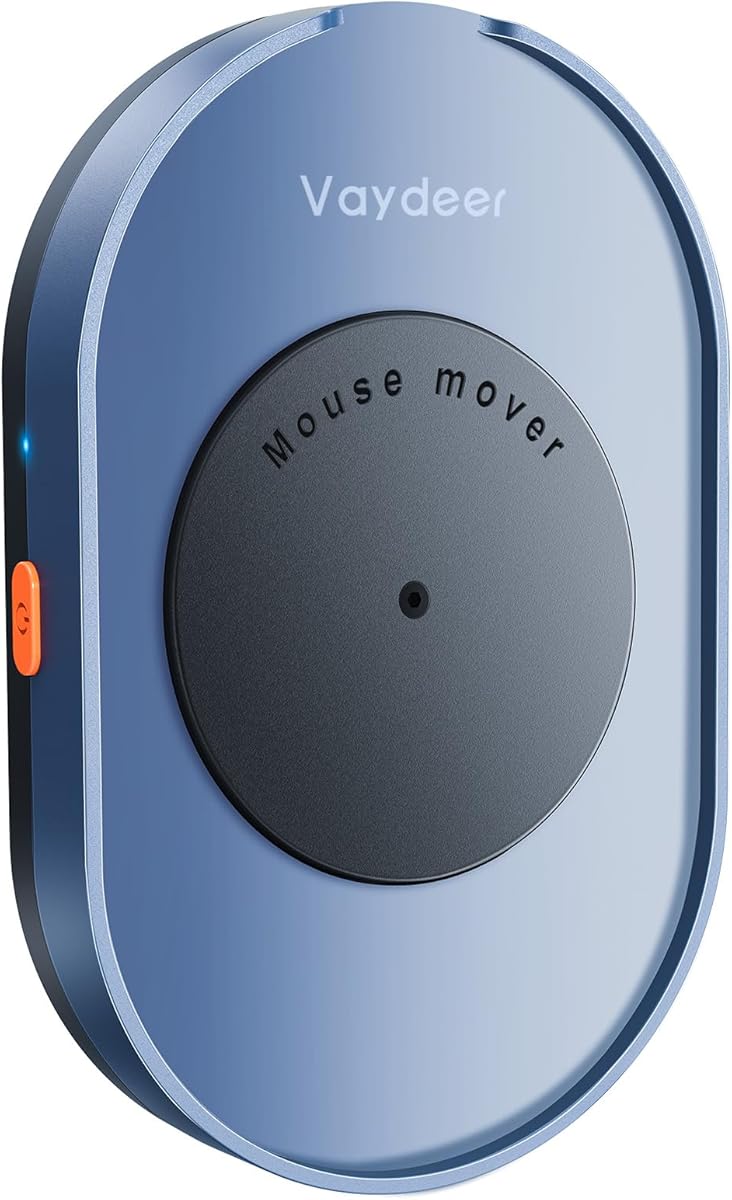
The Vaydeer Undetectable Mouse Jiggler M4 is known for its ultra-silent motor that operates below 45 decibels. It holds ISO security certification which adds a layer of trust for corporate environments concerned about hardware integrity.
We may earn a commission when you buy through this link, at no additional cost to you.
It features an easy-to-use on/off switch so you do not need to unplug the device repeatedly. Power can be supplied via a USB port or an external adapter giving you flexibility in placement and usage scenarios.
The need for a cable might limit placement options slightly compared to cordless alternatives. However the quiet operation ensures it will not disturb colleagues during conference calls or quiet work hours.
This model is ideal for users who prioritize silence and security certification. It works well in office settings where low noise levels are critical and hardware compliance is valued.
Passed ISO/IEC27001:2013 security certification ensuring it meets high standards for safe and trustworthy hardware usage.
The ultra-silent motor produces less than 45dB of noise ensuring your workspace remains quiet during operation.
We may earn a commission when you buy through this link, at no additional cost to you.
The WFB Mouse Jiggler Undetectable 2 Pack offers two units for the price of one making it a cost-effective choice. Each device moves the cursor only 1 to 2 pixels ensuring minimal visibility during active work sessions.
We may earn a commission when you buy through this link, at no additional cost to you.
It is recognized as a standard 2.4G mouse by your computer so no drivers are needed for installation. This compatibility extends to Windows Mac OS Android and even Raspberry Pi systems.
The plastic construction is functional but not as premium as other models on this list. Additionally the slight shaking mechanism might be noticeable on unstable desk surfaces but does not impact performance.
Users looking for a budget-friendly solution or needing spare units should consider this pack. It is a practical option for remote workers who want multiple devices for home and office use.
Purchasing two devices in one pack allows you to cover multiple workstations or keep a backup handy.
Moves the cursor only 1 to 2 pixels so your work remains uninterrupted and undetectable to others.
We may earn a commission when you buy through this link, at no additional cost to you.
The AUEDROT Mouse Jiggler features a USB-C connector making it ideal for modern laptops with limited USB-A ports. It operates in two modes offering slight movement or random movement to suit different user preferences.
We may earn a commission when you buy through this link, at no additional cost to you.
It connects as a USB Composite Device which is trusted by operating systems and avoids security warnings. The simple switch button allows you to toggle modes or turn the device off without unplugging.
While functional this model has a lower rating compared to others in this comparison. It may lack the refined build quality or advanced features found in higher-rated options but serves its basic purpose well.
Users with USB-C only laptops will find this a convenient solution. It is a straightforward plug-and-play option for keeping your system awake without complex setups.
Equipped with a USB-C connector for direct connection to newer laptops and devices without adapters.
A short press allows you to switch between slight and random movement modes instantly.
We may earn a commission when you buy through this link, at no additional cost to you.
The Yonktoo Mouse Jiggler features a slim profile that fits neatly into home offices without taking up much space. It uses a mechanical rotating platform to create continuous physical mouse movement keeping your PC awake.
We may earn a commission when you buy through this link, at no additional cost to you.
The included cable is 4.9 feet long providing flexibility to position the device anywhere on your desk. A one-touch control button allows you to pause and resume movement without disconnecting the hardware.
This model has a lower user rating which may indicate some variability in build quality or performance. However it remains a viable choice for those prioritizing a compact footprint over advanced features.
Ideal for users with limited desk space the Yonktoo provides a simple mechanical solution. It is a good option for those who prefer physical movement simulation over software-based solutions.
The ultra-slim profile ensures it fits easily under monitors or along desk edges without clutter.
Includes a 4.9 foot cable allowing flexible placement of the mouse mover relative to your computer.
We may earn a commission when you buy through this link, at no additional cost to you.
The Meatanty Mouse Mover features an adjustable interval timer ranging from 5 to 60 seconds allowing precise control over activity frequency. A visual LED display shows your settings making it easy to confirm the current configuration.
We may earn a commission when you buy through this link, at no additional cost to you.
It uses a physical turntable approach with random trajectory simulation for high undetectability. The edge protection design prevents mice from falling off ensuring stable operation over long periods without supervision.
While powerful the device has a larger footprint compared to smaller jiggler models. This might make it less suitable for compact travel kits but perfect for fixed desktop setups where space is not an issue.
Users who need granular control over movement timing will appreciate this model. It is a robust choice for office environments requiring reliable and customizable hardware solutions.
Set movement intervals between 5 to 60 seconds to match your specific workflow needs.
Simulates real random mouse movements ensuring your activity looks natural to monitoring software.
We may earn a commission when you buy through this link, at no additional cost to you.
This USB Mouse Mover is crafted from aluminum alloy providing a sturdy and upscale build compared to plastic models. It offers two modes for slight or random movement ensuring flexibility in keeping your system active.
We may earn a commission when you buy through this link, at no additional cost to you.
It includes a USB-C adapter expanding compatibility to modern devices. The device is recognized as a trusted composite device so it will not trigger security alerts on managed corporate systems.
The compact size is beneficial for portability but may offer less stability than larger models. Additionally the basic feature set does not include advanced timers or visual indicators found in other picks.
Ideal for users prioritizing durability and connector versatility this model is a strong contender. It offers a professional feel and reliable performance for standard office tasks.
Made from aluminum alloy for a sturdy construction that feels premium and lasts longer.
Includes a USB-C adapter to ensure compatibility with both legacy and modern computer ports.
We may earn a commission when you buy through this link, at no additional cost to you.
The TECKNET Mouse Jiggler features three distinct modes including slight movement rectangular area and variable-speed random movement. An exclusive color LED indicator displays which mode is active providing useful visual feedback at a glance.
We may earn a commission when you buy through this link, at no additional cost to you.
It is compact and portable making it easy to slip into a laptop bag for travel. The one-button control simplifies operation allowing quick switching between modes without software or drivers.
The LED is small and discreet which is great for stealth but might be hard to read in certain lighting. The lack of a dedicated power switch means you might need to disconnect if you want it completely off.
This device is excellent for users who want a small portable solution with clear status indicators. It is a reliable choice for remote workers who need to manage multiple devices efficiently.
The invisible color LED displays different lights for each mode giving you clear status updates.
Its mini size and minimalist design make it easy to carry in your laptop bag or pocket.
We may earn a commission when you buy through this link, at no additional cost to you.
This compact Mouse Jiggler is recognized as a regular mouse by your computer ensuring it remains undetectable. It is designed to keep your PC awake while you handle other tasks without any extra operations required.
We may earn a commission when you buy through this link, at no additional cost to you.
The drive-free nature means it works instantly on Windows Mac and Linux without any installation. Its tiny size makes it easy to carry and use in various environments including meetings and remote sessions.
As a basic model it lacks advanced features like timers or switches. However its high user rating suggests it performs its core function reliably for the average user.
Best suited for simple tasks this device offers a straightforward solution for sleep prevention. It is an affordable option for anyone needing a lightweight helper without unnecessary complexity.
Recognized as a standard mouse device ensuring no security warnings are triggered by IT systems.
The tiny design ensures it is easy to carry and use without adding bulk to your workspace.
We may earn a commission when you buy through this link, at no additional cost to you.
The Trackpad Mouse Jiggler Device is a unique cordless solution designed to work directly with laptop touchpads. It simulates realistic fingertip movement without requiring any cables USB connections or software.
We may earn a commission when you buy through this link, at no additional cost to you.
Powered by an AA battery it can last up to 6 months with daily use. The silent operation ensures your workflow remains uninterrupted while keeping your screen active during long meetings or downloads.
This device requires specific touchpad settings adjustments for optimal performance which may be a hurdle for some users. Additionally it is more expensive than USB alternatives but offers distinct convenience.
Ideal for travelers who want a clutter-free setup this device is unmatched in its category. It is a premium option for those who prefer wireless solutions for keeping their laptops awake.
Enjoy a clutter-free workspace without cables or connections as it runs on battery power alone.
With up to 6 months of battery life it operates efficiently for average daily use.
We may earn a commission when you buy through this link, at no additional cost to you.
Selecting the right laptop jiggler involves evaluating several key factors to ensure compatibility, security, and performance for your specific work environment.
Physical hardware devices are generally preferred over software solutions because they do not require IT permissions. They simulate actual mouse movement which is less likely to be flagged by security systems.
Always choose a hardware device if you want guaranteed undetectability and ease of use without software restrictions.
Look for devices recognized as standard mice like USB Composite Devices or 2.4G mice. This ensures your IT department will not see it as a suspicious peripheral.
Confirm that the product explicitly states it does not require drivers to install for secure operation.
Consider whether you prefer USB powered or battery operated options. USB devices are convenient but add cables while battery ones offer cordless freedom.
Battery operated devices are better for portability whereas USB models are ideal for stationary desk setups.
Materials like aluminum alloy offer better durability than plastic. A sturdy build ensures the device lasts longer and provides stable movement.
Check for customer reviews mentioning stability and motor noise to gauge real-world durability.
Different models offer slight movements random movement or adjustable intervals. Choose based on how invisible you need the activity to be.
Random patterns are often more realistic and harder to detect by automated monitoring software.
Ensure the device matches your laptop ports. USB-C models are becoming standard for newer laptops while USB-A is still common.
If your laptop has only USB-C you will need a compatible device or adapter.
Look for switches or buttons that allow easy on/off control without unplugging. This saves time during breaks or meetings.
A simple control interface enhances convenience and reduces accidental disconnections.
Prices vary based on features and build quality. Compare value carefully as more expensive does not always mean better.
Check the warranty length to ensure you are protected against manufacturing defects.
Place the device on a stable flat surface near your computer mouse or trackpad. Ensure the surface is clean and free of obstacles that might interfere with movement.
Connect the USB cable or insert batteries as required by the model. Plug it into a free port on your computer to power the device.
Press the power button if available and verify that the cursor moves slightly. Adjust settings if your model allows to match your specific activity needs.
Physical hardware devices that recognize as standard mice are generally not detectable by IT scans. They mimic normal user activity and do not install software on your system. However always check specific product details for certification.
Most models work with any laptop with USB ports or trackpads. Some models are optimized for Windows or Mac but hardware movement is universal. Always confirm compatibility before purchasing.
Yes they are designed to keep you active during meetings or downloads without interruption. They move the cursor minimally so they do not disrupt your screen visibility.
Lifespan varies by brand but most devices are built for daily use. Look for models with high user ratings to ensure reliability over time.
Many modern devices have silent motors under 50dB. Check product specs for decibel ratings if you work in quiet environments.
No top hardware models do not require any software or drivers. They are plug and play devices that work immediately upon connection.
Some models are compatible with Bluetooth mice but others require a physical USB connection. Always check if the device supports your specific mouse type.
We reviewed ten top laptop jiggler models ranging from compact USB tools to cordless touchpad solutions. Each offers unique strengths in undetectability ease of use and build quality.
Prioritize hardware devices that require no software to ensure maximum security and simplicity. Choose based on your specific connectivity needs such as USB-C or trackpad support.
Always verify current availability and specifications before purchasing as product details can change over time. These devices offer an efficient way to manage your work systems effectively.