
Cable Matters Punch Down Tool with 110 Blade
4.3Editor score
Removable twist-and-lock blade
Spring-action low-effort design
Compatible with Cat 5 to Cat 8
This guide compares the top ten Ethernet punch down tools for network installers, evaluating blade quality, ergonomic design, and impact settings for reliable
Choosing the right Ethernet punch down tool is essential for any network installer or DIY enthusiast working on structured cabling projects. A quality tool ensures clean terminations, reduces wire damage, and speeds up the installation process significantly when working with patch panels or keystone jacks.
We evaluated ten top-rated models based on blade durability, ergonomic comfort, impact adjustability, and overall versatility across different cable standards. Our comparison includes tools from reputable brands like Klein, Fluke, and Cable Matters to help you find the perfect match for your specific networking needs and budget constraints.
Each pick highlights unique features such as spring-loaded mechanisms, interchangeable blades, and specialized designs for speed or precision. Please note that pricing and availability may vary over time, so verify current details on the product pages before making your final purchasing decision for your next cabling job.
4.3Editor score

4.8Editor score

4.7Editor score
The following table provides a side-by-side overview of the top ten Ethernet punch down tools available today. Compare key specifications including blade types, impact settings, and compatibility to determine which model suits your professional or home networking projects best.


The Klein Tools VDV427-300 stands out as the top choice for professionals requiring reliability and precision. With a 4.8 rating, it offers a robust metal injection molded blade that withstands heavy daily use without dulling quickly.
We may earn a commission when you buy through this link, at no additional cost to you.
Its adjustable impact-force lever allows users to switch between high and low settings easily, ensuring clean terminations on various wire gauges. The included pick and spudger tools add significant value, making it a complete solution for panel work.
While the price is higher than budget options, the durability justifies the investment for frequent users. The ergonomic cushioned handle provides comfort during long sessions, minimizing strain on the hands and wrists significantly.
Installers who need a dependable tool that delivers consistent results every time should choose this model. It balances performance, comfort, and features better than most competitors in its class today.
The DuraBlade technology ensures clean cuts and secure connections, reducing the need for re-punching wires during installation projects.
The traditional punchdown style with a cushioned handle offers a non-slip grip that enhances control and reduces effort during use.
We may earn a commission when you buy through this link, at no additional cost to you.
Cable Matters offers a compelling budget option with the 110 Blade Punch Down Tool. Rated 4.3, it provides reliable functionality for DIYers and light professional use without breaking the bank or compromising on basic features.
We may earn a commission when you buy through this link, at no additional cost to you.
The twist-and-lock design makes blade changes quick and secure, preventing accidental loosening during operation. The adjustable impact settings allow for fine-tuning force, ensuring precise terminations into jacks and patch panels consistently.
While it may not match the ruggedness of premium tools, it performs well for standard residential or office installations. The spring-action design reduces effort, making it comfortable for moderate volume work sessions.
This tool is perfect for those needing a straightforward, cost-effective solution for structured cabling projects. It delivers consistent results for Cat 5 through Cat 8 networks effectively and efficiently.
The groove aligns with the handle detent to help prevent loosening during use and ensure stable punchdowns every time.
The mechanism allows for fast, low-effort cable seating and termination, improving workflow speed for installers.
We may earn a commission when you buy through this link, at no additional cost to you.
Fluke Networks delivers a premium experience with the D914S Impact Punch Down Tool. Rated 4.7, it combines legendary build quality with features designed to maximize efficiency and comfort for seasoned network technicians worldwide.
We may earn a commission when you buy through this link, at no additional cost to you.
The automatic spring handle simplifies usage by choosing the correct impact level based on wire gauge, reducing user error. The soft touch rubber handle provides superior grip and comfort, reducing hand fatigue during extended installation periods significantly.
Although it commands a higher price, the lifetime warranty and durability make it a smart long-term investment. It is built to withstand rigorous use, ensuring consistent performance on critical infrastructure projects where reliability is paramount.
Professionals seeking the best tool backed by top-tier support and warranty should consider this model. It sets the standard for impact tools in demanding enterprise environments effectively and efficiently.
Fluke backs this tool with a lifetime warranty, ensuring you are covered for any defects or wear over time.
Special design features a rubber handle that reduces hand fatigue and provides a better grip during operation.
We may earn a commission when you buy through this link, at no additional cost to you.
The TRENDnet TC-PDT offers unique versatility by including both 110 and Krone blades in one tool. Rated 4.7, it is ideal for environments where different standards are used, reducing the need to carry multiple tools on-site.
We may earn a commission when you buy through this link, at no additional cost to you.
It meets NDAA and TAA compliance requirements, making it suitable for government projects. The twist and lock holder prevents blade loss and provides secure storage, while the ergonomic design ensures comfortable handling during daily tasks.
While the weight might be slightly more due to the dual-blade capability, the convenience of switching standards quickly is significant. It supports precise terminations and reliable connections for both data and voice cabling systems.
Users needing a tool that adapts to various block standards will appreciate this flexibility. It balances utility and compliance effectively for diverse installation scenarios.
The tool supports both 110 and Krone standards, allowing users to adapt quickly without swapping tools.
A twist and lock holder helps prevent blade loss and provides convenient storage for spare blades inside the tool.
We may earn a commission when you buy through this link, at no additional cost to you.
This model expands on the original by including both 110 and 66 blades, offering broader compatibility for older and newer panels. Rated 4.4, it provides a practical solution for technicians dealing with mixed wiring blocks in legacy and new buildings.
We may earn a commission when you buy through this link, at no additional cost to you.
The twist and lock sockets allow secure storage of blades within the body, enhancing safety and usability during transport. Adjustable impact settings ensure the tool can handle different termination needs without requiring manual force adjustments constantly.
While not as rugged as high-end tools, it performs well for general maintenance and small projects. The spring-action mechanism aids in fast seating, making it efficient for moderate workloads.
Installers needing access to both 66 and 110 standards in one package will find this tool valuable. It combines versatility with ease of use for practical networking tasks.
Both 110 and 66 style blocks are supported, making this ideal for buildings with mixed wiring infrastructure.
The design features a removable blade that stores within the tool body, protecting it during transport and use.
We may earn a commission when you buy through this link, at no additional cost to you.
VCELINK provides a comprehensive kit that includes a mini wire stripper alongside the main punch down tool. Rated 4.3, it caters to users who want a complete set for termination tasks in one affordable package without extra purchases.
We may earn a commission when you buy through this link, at no additional cost to you.
The multi-function design features a wirepuller on the sides to clean up excess cables easily. Adjustable impact-force settings allow for customization based on cable type, ensuring reliable connections across different network standards like Cat 5e and 6.
While the included stripper is simple, it adds value for quick jobs. The ergonomic handle ensures comfort during use, making it a solid choice for frequent installers needing extra tools.
This option is great for those who prefer a one-stop solution for basic cabling needs. It balances functionality and cost effectively for many users.
The package includes a mini wire stripper, providing added convenience for basic preparation tasks.
Features wirepullers on the sides to clean up extra cables efficiently after termination.
We may earn a commission when you buy through this link, at no additional cost to you.
This specialized tool is designed specifically for VCE 90-degree keystone jacks, offering a speed advantage over standard methods. Rated 4.6, it cuts and punches in one smooth operation, reducing time significantly for those using this specific product line.
We may earn a commission when you buy through this link, at no additional cost to you.
It does not require a flat surface, allowing terminations directly on wall plates or patch panels easily. The SK5 steel blade is replaceable, ensuring the tool remains useful long after the blade wears out from heavy use.
While limited in compatibility, its efficiency is unmatched for users of VCE jacks. It eliminates the need for separate stands and manual cutting, streamlining the workflow for high-volume installations.
Installers committed to VCE keystone systems should consider this tool for its speed and convenience. It simplifies the termination process effectively.
Punch down and cut wires in one smooth operation, speeding up installation up to eight times.
The blade head can be replaced when worn, extending the tool's lifespan without buying a new unit.
We may earn a commission when you buy through this link, at no additional cost to you.
Rapink offers a unique termination tool designed solely for their 90-degree keystone jacks. Rated 4.2, it integrates a built-in housing to keep jacks stable during use, reducing the risk of finger injuries common with loose jacks.
We may earn a commission when you buy through this link, at no additional cost to you.
The carbon steel body ensures durability, capable of over 10000 presses without failure. Adjustable trimming depth allows for precise control, preventing damage to the keystone while ensuring clean wire cuts every time.
While specific to one brand, the time-saving benefits for Rapink users are clear. It reduces repetitive crimping and fatigue, making it ideal for high-volume patch panel installations.
Users invested in Rapink keystone jacks will find this tool highly effective. It optimizes the workflow and improves safety for technicians.
The tool keeps jacks in place for perfect crimps, allowing work in tight spaces where traditional tools fail.
Carbon steel body and alloy head ensure long life and safe handling without hurting fingers.
We may earn a commission when you buy through this link, at no additional cost to you.
This kit provides a full suite of tools for coax installation, including a reliable 110 punchdown tool for data cables. Rated 4.8, it is perfect for technicians working on both TV and network systems who want a comprehensive solution.
We may earn a commission when you buy through this link, at no additional cost to you.
The precision punchdown tool features a DuraBlade for clean cuts, while the coax components like crimpers and strippers handle RF cables effectively. A zippered bag keeps everything organized for transport and storage.
While primarily for coax work, the included punchdown tool is robust enough for standalone network tasks. It ensures reliability across different cabling tasks without needing extra tools.
Installers needing both coax and data tools in one package will appreciate this set. It offers convenience and precision for mixed cabling environments.
The kit includes tools to strip, crimp, and punch down modular cables, stored conveniently in a pouch.
Features Klein's DuraBlade cutting edge for clean and accurate wire termination in the field.
We may earn a commission when you buy through this link, at no additional cost to you.
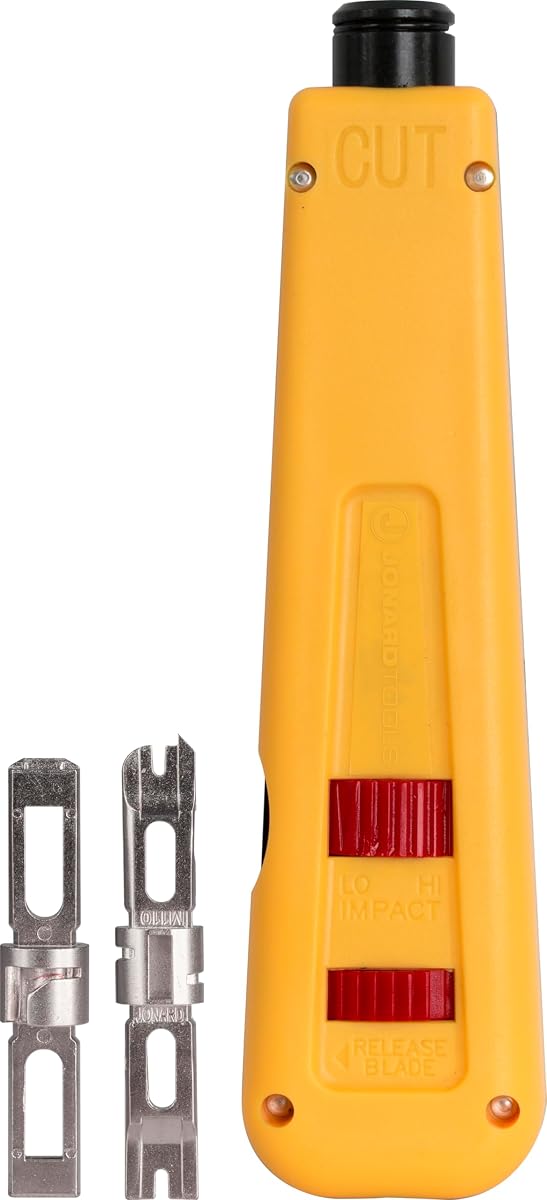
Jonard Tools presents a durable manual option with color-coded design for ease of use. Rated 4.5, it is tested for 100,000 cycles, ensuring it can withstand heavy-duty use without compromising performance or structural integrity.
We may earn a commission when you buy through this link, at no additional cost to you.
The body is color-coded yellow and blue for quick orientation of the cutting side. Hardened alloy steel blades ensure long life, and the enlarged storage compartment keeps blades secure during transport in busy environments.
It includes adjustable high and low impact settings to suit different needs. While it is a manual tool, its robust build makes it reliable for professional use on the job site.
Technicians needing a rugged, long-lasting tool with simple operation will find this model useful. It balances durability with practical design features.
Tested up to 100,000 cycles to ensure long life and reliability for professional daily use.
The yellow and blue body helps users quickly identify the cut side for ease of use.
We may earn a commission when you buy through this link, at no additional cost to you.
Selecting the right tool depends on your specific network standards, frequency of use, and comfort requirements. This section outlines key factors to consider for informed purchasing decisions.
Ensure the tool supports the specific blade types required for your project, such as 110, 66, or Krone. Some tools include multiple blades, while others require separate purchases. Checking compatibility upfront prevents delays during installation.
Choose a tool that matches your existing patch panels and keystone jacks for seamless operation.
Adjustable impact settings allow you to control the force applied during termination. High settings work best for thicker wires, while low settings prevent damage to delicate cables. This feature enhances precision across different cable types.
Look for a tool with easy-to-access switches for rapid adjustments on-site.
A comfortable grip reduces hand fatigue during long installation sessions. Look for soft-touch handles or cushioned designs that fit naturally in the hand. Ergonomics are crucial for maintaining productivity and comfort.
Prioritize models with non-slip grips for better control during use.
Construction quality impacts the tool's lifespan. Metal injection molded blades or hardened steel offer better resistance to wear than plastic alternatives. Durability ensures consistent performance over time.
Check for materials and warranty terms that reflect long-term build quality.
Integrated storage keeps spare blades secure and accessible. Twist and lock mechanisms prevent loss and accidental injury when carrying the tool in a kit. Proper storage simplifies workflow on-site.
Choose designs that protect the blade edge from damage during transport.
Some tools offer specialized features like single-action cutting or built-in housings to reduce termination time. These are beneficial for high-volume jobs where efficiency matters. Standard tools require separate cutting steps.
Consider speed features if you handle many connections daily.
Established brands like Fluke and Klein often provide better quality control and support. Researching brand reviews can reveal reliability and customer service quality. Trusted brands reduce risk of premature failure.
Select a brand with a history of delivering professional-grade tools.
Prepare your cable by stripping the jacket carefully without nicking the wires. Ensure the cable is untwisted only as much as necessary to maintain performance. Proper prep prevents signal issues later.
Align the tool correctly with the wire in the jack slot. Apply firm pressure to engage the mechanism. Listen for the click that indicates proper termination and cutting.
Store the tool in a dry place to prevent rust on blades. Clean debris from the blade edge regularly to maintain sharpness. Proper care extends the tool's usable life significantly.
Most Cat6 jacks use 110-style IDC terminals. Ensure your tool includes a 110 blade or offers interchangeable options. This standard compatibility ensures clean terminations for modern network cables.
Only if the tool supports both blade types or includes an interchangeable system. Some models come with both, while others require separate purchases. Check compatibility before using on different block standards.
For most residential installations, a single impact setting is sufficient. However, adjustable settings provide better control for different wire gauges. It is a useful feature for versatility even in home projects.
Use compressed air to blow out dust from the mechanism. Wipe the blade with a clean cloth to remove debris. Keeping the blade clean ensures consistent cutting performance every time.
Most modern punch down tools cut wires automatically as they punch. Separate cutters are usually unnecessary unless you perform extra trimming. Verify the tool's cutting capability before purchasing.
Professional-grade tools can last for years of daily use. Regular maintenance and proper storage significantly extend this life. High cycle ratings indicate tools built for longevity.
Choosing the right tool ensures reliable network connections and efficient workflow. The Klein Tools VDV427-300, Cable Matters budget option, and Fluke D914S offer top choices for different needs.
Prioritize blade compatibility and ergonomic comfort to avoid strain and errors during installation. Features like adjustable impact and storage add significant value for regular users.
Verify current pricing and availability before purchasing. These tools are investments in your installation quality and safety over time.