
CyberPower ST625U Standby UPS Battery Backup and Surge Protector
4.5Editor score
625VA/360W Standby UPS Power
8 NEMA 5-15R Outlets Included
2 USB Charging Ports for Devices
GreenPower High Efficiency Design
This guide compares the top Cyberpower UPS battery backup models for reliable power protection, surge suppression, and uninterrupted performance for home and
Protecting your electronics from power outages and surges is essential for maintaining productivity and safety. A reliable UPS battery backup ensures your devices stay online during interruptions and protects sensitive hardware from voltage spikes that can cause permanent damage over time.
We analyzed ten top-rated Cyberpower models based on power capacity, outlet configurations, display features, and warranty terms. Our comparison highlights key differences in waveform types, runtime capabilities, and management software to help you find the right fit for your specific power needs.
Each pick below details real-world performance, key strengths, and potential trade-offs based on user feedback and technical specifications. Please note that product availability and pricing can change frequently, so always verify current details before making your final purchase decision online.
4.5Editor score

4.5Editor score

4.6Editor score
This side-by-side comparison table presents the core specifications and key attributes of all ten selected Cyberpower UPS battery backup models to help you quickly identify the best match for your power protection needs.




The CyberPower CP1500PFCLCD stands out as a top choice for users needing reliable power protection with advanced waveform capabilities. It holds a strong rating of 4.5 stars from users who value its robust build quality and comprehensive feature set for home and office setups.
We may earn a commission when you buy through this link, at no additional cost to you.
Its PFC Sinewave output ensures compatibility with active power factor correction power supplies, which is critical for modern computer hardware. The 12 outlets provide ample flexibility, while the color LCD offers intuitive monitoring of battery health and power conditions at a glance.
While it comes at a higher price than basic models, the trade-off is justified by the superior protection and expanded outlet capacity. The 3-year warranty including the battery adds significant value, giving peace of mind against potential power-related hardware failures.
Anyone seeking maximum compatibility and detailed monitoring should consider this unit first. It is especially well-suited for workstations and network gear that demand stable, clean power during outages and voltage fluctuations.
The PFC Sinewave output matches the AC power from your wall, ensuring efficient operation of sensitive electronics without overheating or instability during battery mode.
With 12 outlets split between backup and surge-only options, you can protect multiple devices including monitors, routers, and peripheral hardware simultaneously.
We may earn a commission when you buy through this link, at no additional cost to you.
The CyberPower EC850LCD offers a practical solution for users looking to reduce energy consumption while protecting their devices from power issues. With a rating of 4.4 stars, it is praised for its ECO mode that cuts power to peripherals when connected devices are off or sleeping.
We may earn a commission when you buy through this link, at no additional cost to you.
This model provides 12 outlets to cover multiple peripherals and includes a multifunction LCD panel for monitoring battery status. While the power capacity is lower than some 1500VA options, it remains sufficient for many standard home office setups and home entertainment systems.
The main trade-off is the simulated sine wave output, which may not be compatible with all active PFC power supplies. However, the energy-saving features and reasonable cost make it a compelling choice for general users who prioritize efficiency over maximum power delivery.
Consider this unit if you want to lower your electricity usage without compromising on surge protection. It is best suited for PCs and peripherals that do not require pure sine wave power during battery backup operations.
ECO controlled outlets automatically cut power to peripherals when the main system is off, reducing wasted electricity and lowering your monthly utility bills effectively.
The multifunction LCD shows immediate details on battery and power conditions, helping you stay informed about your UPS status without needing external software.
We may earn a commission when you buy through this link, at no additional cost to you.
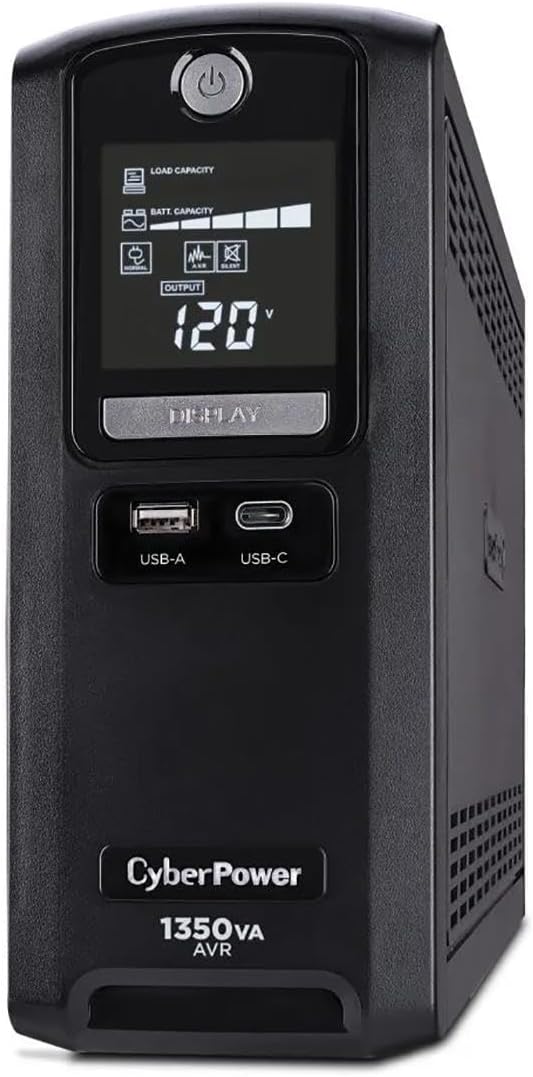
The CyberPower CP1500AVRLCD3 delivers solid performance for those needing 1500VA of protection without spending premium prices. It has earned a 4.5-star rating from users who appreciate its clear color display and robust outlet configuration for diverse devices.
We may earn a commission when you buy through this link, at no additional cost to you.
Automatic Voltage Regulation corrects minor power fluctuations without draining the battery, which extends battery life and ensures consistent power quality. The color LCD alerts you to potential issues before they cause downtime, making it easy to monitor system health.
While it uses simulated sine wave technology, it handles most standard power supplies well. The USB ports add modern convenience for charging mobile devices, ensuring you stay connected even during outages when mobile data is critical.
This unit is ideal for home offices and entertainment setups needing reliable backup power. Prioritize this model if you want high capacity and detailed monitoring at a competitive price point for general use cases.
Automatic Voltage Regulation stabilizes minor fluctuations without switching to battery, keeping your runtime reserve intact for actual outages.
Dedicated USB charging ports let you keep phones and tablets powered up during disruptions without needing extra wall adapters.
We may earn a commission when you buy through this link, at no additional cost to you.
The CyberPower AVRG900LCD is an excellent choice for users worried about surges traveling through telephone and network lines. It has a high 4.6-star rating, reflecting trust in its ability to safeguard desktops and networking devices from complex power events.
We may earn a commission when you buy through this link, at no additional cost to you.
Data Line Protection prevents damaging surges from entering through telecom cables, which are often overlooked in basic setups. Automatic Voltage Regulation keeps your voltage stable without unnecessarily draining battery reserves during minor grid fluctuations.
The main trade-off is the lower 900W output compared to larger units, so it fits best for lighter loads. Its clear LCD display offers essential information without complexity, ensuring you can monitor power conditions easily at your desk.
Choose this model if you have modems or routers that share lines with your phone service. It is especially valuable for home offices where internet stability is just as critical as computer uptime.
Surge protection extends to data lines, shielding modems and routers from electrical spikes that could disconnect you from essential online services.
The intelligent LCD panel provides immediate feedback on battery status, ensuring you always know how much backup time you have left.
We may earn a commission when you buy through this link, at no additional cost to you.
The CyberPower ST625U is an accessible entry point for anyone needing basic surge protection and short backup time. With a 4.5-star rating, users find it reliable for home entertainment systems and small office setups that require essential protection.
We may earn a commission when you buy through this link, at no additional cost to you.
Its GreenPower high efficiency design reduces power consumption even when plugged in, helping to keep energy costs down. Two USB ports allow you to charge mobile devices quickly without taking up wall space or needing extra adapters.
While it offers less capacity than larger units, its compact size and low price make it easy to integrate into tight spaces. The main consideration is that it is designed for short shutdown periods rather than extended uptime for heavy workloads.
Consider this model for budget-conscious buyers needing essential safety for gaming consoles or routers. It is a smart choice for small setups where full home power protection is not required.
GreenPower technology ensures the unit uses minimal power while plugged in, which keeps running costs low for everyday standby protection.
Dedicated USB ports let you keep phones charged during power issues without needing a separate charger or outlet.
We may earn a commission when you buy through this link, at no additional cost to you.
The CyberPower PR1500LCD is designed for professional environments where reliability is non-negotiable. It carries a 4.6-star rating and offers pure sinewave output capable of supporting 100% of its rated capacity without derating for power factor issues.
We may earn a commission when you buy through this link, at no additional cost to you.
Its remote management capabilities allow system administrators to monitor and control the UPS from distant locations using optional network cards. This feature is vital for server rooms where physical access is limited and quick response to power events is necessary.
The extendable LCD panel lets you mount the display where you can see it clearly, which is helpful for rack installations. While the cost is higher, the 3-year warranty and substantial connected equipment guarantee reflect its intended durability in critical infrastructure.
Choose this for server cabinets and mission-critical data storage. It is best suited for business users who need advanced management tools and clean power for heavy-duty equipment.
Remote management cards enable you to monitor status and control outlets from anywhere, ensuring uptime even when you are not on-site.
True sinewave output maintains stable operation for high-load equipment, ensuring servers and appliances run without performance loss during battery.
We may earn a commission when you buy through this link, at no additional cost to you.
The CyberPower CP1500AVRLCD offers detailed visibility into your power status with an intelligent LCD panel that shows estimated runtime. It has earned a 4.5-star rating from users who value the clarity of its information display for planning safe shutdowns.
We may earn a commission when you buy through this link, at no additional cost to you.
Automatic Voltage Regulation corrects voltage issues without switching to battery power, which helps extend the battery's life over years of use. This feature is key for areas with unstable grid power where frequent surges occur without full outages.
With 12 outlets available, you can protect a wide range of devices including desktops, monitors, and routers. The trade-off is the simulated sine wave technology, which works for most but not all modern power supplies requiring pure waveform output.
Select this unit if you want detailed runtime estimates and solid protection. It is well-suited for workstations and home networks where knowing exact remaining power time is valuable for data safety.
AVR technology stabilizes voltage without using battery reserves, keeping your backup power intact for actual outages.
With 12 outlets total, you can secure multiple devices on one unit without needing extra strips or adapters.
We may earn a commission when you buy through this link, at no additional cost to you.
The CyberPower CST135UC is a standout choice for modern connectivity with dual USB ports and robust network protection. It has received an exceptional 4.9-star rating, reflecting high user satisfaction with its reliability and advanced feature set for home and office use.
We may earn a commission when you buy through this link, at no additional cost to you.
Network and coaxial protection safeguard your internet connection from surges traveling through cables, which is vital for maintaining stable broadband service. The dual USB ports provide flexible charging for phones and tablets during power events when wall outlets are unavailable.
Its extended runtime at half load offers ample time to save work and shut down systems safely. The trade-off is that it provides fewer outlets than some larger models, but the added protection features make up for this difference in many scenarios.
Choose this unit if you need reliable internet backup and modern charging options. It is ideal for home offices where stable connectivity and device charging are top priorities during outages.
Coax and network line protection ensures your router stays online even when electrical surges hit the home wiring or phone lines.
Dual USB ports let you charge multiple devices simultaneously without needing separate adapters or power bricks during outages.
We may earn a commission when you buy through this link, at no additional cost to you.
The CyberPower BRG1500AVRLCD2 distinguishes itself with an industry-leading 5-year warranty including the battery. It holds a high 4.7-star rating, indicating strong trust from users who value long-term reliability and protection for their connected equipment.
We may earn a commission when you buy through this link, at no additional cost to you.
The color LCD panel provides clear, immediate alerts about potential issues before they cause downtime, helping you maintain system health easily. USB charging ports are included to keep mobile devices powered during outages, ensuring you stay connected even when power is lost.
While the warranty period is extended, the unit uses simulated sine wave technology, which may not suit all high-end systems. However, the combination of protection and coverage makes it a compelling long-term investment for workstations and home entertainment.
Select this model if you want peace of mind for years. It is best for users who prefer a longer warranty to reduce maintenance costs and ensure sustained performance over time.
A 5-year warranty covering the battery ensures long-term reliability, reducing the need for early replacements or maintenance expenses.
The color LCD panel delivers clear warnings about potential issues before they impact your critical equipment and cause unnecessary downtime.
We may earn a commission when you buy through this link, at no additional cost to you.
The CyberPower OR1500LCDRT2U is a rack-mountable unit designed for professional server cabinets and data closets. It has a strong 4.5-star rating from IT professionals who appreciate its space-saving design and essential monitoring features for critical infrastructure setups.
We may earn a commission when you buy through this link, at no additional cost to you.
Automatic Voltage Regulation maintains stable power without draining the battery during minor grid fluctuations. The multifunction LCD screen provides runtime and power status details that are essential for monitoring in environments where quick access is not always available.
While remote management requires an optional card, the base unit delivers solid protection and essential information for daily operations. The trade-off is the higher cost compared to desktop units, but the space efficiency and professional features justify it in server environments.
Choose this for server racks and network closets. It is ideal for IT users who need reliable vertical mounting and essential monitoring features without clutter.
The rack-mount design saves floor space in server closets, allowing you to keep critical hardware organized and easily accessible.
Automatic Voltage Regulation ensures your hardware receives stable power during minor fluctuations, preserving battery life for actual outages.
We may earn a commission when you buy through this link, at no additional cost to you.
Selecting the right UPS battery backup involves understanding several key factors that influence performance, longevity, and suitability for your specific setup.
Power capacity is measured in VA and watts, indicating how much load the UPS can support during outages. Ensure the wattage rating exceeds the total power draw of your connected devices to avoid overloading the unit.
Match your total device wattage to the UPS rating to ensure reliable backup time and prevent unexpected shutdowns.
Waveforms determine the quality of power output. Pure sine wave is required for active PFC power supplies, while simulated sine wave works for most standard electronics. Check your power supply requirements to avoid compatibility issues.
Choose pure sine wave for modern servers and PFC supplies to ensure safe and efficient operation during battery modes.
Different models offer varying numbers of backup and surge-only outlets. Consider how many devices you need to keep running versus those that only need surge protection.
Select a unit with enough backup outlets to cover your essential gear while using surge-only ports for non-essential peripherals.
Runtime depends on both load and battery age. Higher loads drain batteries faster. Check estimated runtime charts to ensure you have enough time to save work and shut down safely.
Prioritize units with longer runtime at your typical load to ensure a safe shutdown window during unexpected outages.
LCD panels provide real-time data on battery status, voltage, and estimated runtime. More advanced units offer color displays and detailed alerts to prevent surprises.
Choose a display that provides clear, immediate information to help you manage your equipment during power events effectively.
Modern UPS units include USB ports for charging devices and software connectivity for management. These features enhance utility during outages and simplify monitoring.
Look for USB ports and software support if you need device charging or remote monitoring capabilities.
Warranties typically cover the unit and battery for a set period. Connected equipment guarantees protect your gear against damage caused by surges or UPS failure.
Ensure the warranty covers both the battery and the connected equipment to reduce long-term risks and maintenance costs.
Consider the footprint and mounting options. Tower units fit on desks while rack-mount units fit into server cabinets. Proper placement ensures adequate ventilation.
Choose a form factor that fits your physical space and installation requirements without compromising airflow or accessibility.
Install the UPS by plugging it directly into a grounded wall outlet and connecting your devices to the battery backup outlets. Ensure the unit receives a full charge before the first use to maximize battery longevity and performance.
Avoid overloading the UPS by keeping total wattage below the rated capacity. Regularly monitor the LCD display for status alerts and test the battery every few months to confirm it is holding a charge correctly.
Store the unit in a cool, dry place away from direct sunlight and heat sources. Replace the battery according to the manufacturer's recommendations to maintain reliable protection throughout the lifespan of the device.
Typically, a UPS battery lasts three to five years depending on usage and environmental conditions. Regular testing and avoiding excessive heat can extend its effective lifespan significantly.
Pure sine wave is necessary for active PFC power supplies found in many modern computers and servers. Standard electronics often work fine with simulated sine wave, so check your device specifications to be sure.
Generally, you should not plug laser printers into a UPS as they draw high peak power that can overload the system. Use surge-only outlets for printers to protect against spikes without risking battery issues.
Most models have accessible battery compartments under a removable cover. Disconnect the unit, remove the old battery, and connect the new one to the harness carefully, following the manual's wiring guide.
AVR corrects minor high or low voltage fluctuations without switching to battery power. This feature extends battery life and provides consistent power to connected devices during unstable grid conditions.
Runtime depends on the load relative to capacity. Use the UPS manufacturer's runtime charts to estimate time for your specific wattage draw and plan for a safe shutdown before the battery depletes.
The 10 Cyberpower UPS models reviewed here offer a wide range of capabilities for home, office, and server environments. From the versatile CP1500PFCLCD to the budget-friendly ST625U, each unit brings unique strengths tailored to different needs.
When choosing, prioritize capacity and waveform type to match your device requirements. Consider runtime, outlets, and warranty terms to ensure long-term reliability and protection for your critical electronics.
Prices and availability fluctuate so always check current listings before buying. Verify compatibility and warranty details to ensure you select the perfect power protection solution for your setup.