
Bisofice POS Receipt Printer
4.0Editor score
Android 8.1 OS support
Built-in 58mm thermal printer
5000mAh long lasting battery
Handheld pos systems have revolutionized how businesses accept payments. These portable devices allow merchants to move away from fixed counters and serve customers anywhere. Choosing the right one depends on your specific industry needs and operational flow.
We compared ten leading models based on their hardware capabilities, software compatibility, and reliability. Our analysis focuses on real-world usability for retail, food service, and professional environments. Each product was evaluated on its core strengths and potential limitations.
Every pick highlights key features like battery life, screen quality, and payment methods. Prices can change frequently so always check the current listing before buying. This guide ensures you find a terminal that fits your budget and workflow perfectly.
4.0Editor score

4.7Editor score

5.0Editor score
As an Amazon Associate we earn from qualifying purchases.
The following table provides a side-by-side comparison of all ten handheld pos systems. It highlights the most critical specifications to help you quickly identify the model that fits your operational requirements.




The Square Handheld ranks as the Editor's Choice for its exceptional flexibility and ease of use. With a 4.7 rating it stands out for businesses that need to move around their venue. Its slim design fits perfectly in a palm or pocket.
We may earn a commission when you buy through this link, at no additional cost to you.
This device allows you to accept payments take tableside orders and scan barcodes anywhere. The offline payments feature ensures you keep selling even if the internet goes down. It is built to withstand water splashes and dust for durability.
While it requires a Square account there are no hidden fees or long term contracts. The main trade-off is the optional protective case which adds cost if you need extra drop protection. However the core device is robust.
This is ideal for restaurants retail shops and professional services that value mobility. If you want a reliable portable system with simple pricing this model is the top recommendation for 2026.
Take payments directly to customers to reduce wait times and improve service quality.
Continue processing transactions securely even when internet connectivity is unavailable.
We may earn a commission when you buy through this link, at no additional cost to you.
The H10 terminal features the latest Android 14 operating system making it powerful for custom business apps. It includes an integrated 58mm thermal printer and NFC support for contactless payments. This device is designed for heavy daily use in mobile retail.
We may earn a commission when you buy through this link, at no additional cost to you.
With a 6000mAh battery it offers up to 14 hours of runtime which is excellent for long shifts. The 10W fast charging ensures you get back to work quickly. Dual-band Wi-Fi and 4G LTE keep you connected anywhere.
Setup may take time for non-technical users compared to simpler devices. The price is higher but you get more hardware features like fast charging and NFC. It is a strong choice for tech-savvy small business owners.
Choose this if you need robust connectivity and the ability to run specific Android applications. It handles inventory and sales efficiently with its built-in scanner and printer capabilities.
Long-lasting 6000mAh battery supports full day operations without frequent charging.
Stay connected with dual-band Wi-Fi 4G LTE and Bluetooth for versatile use.
We may earn a commission when you buy through this link, at no additional cost to you.
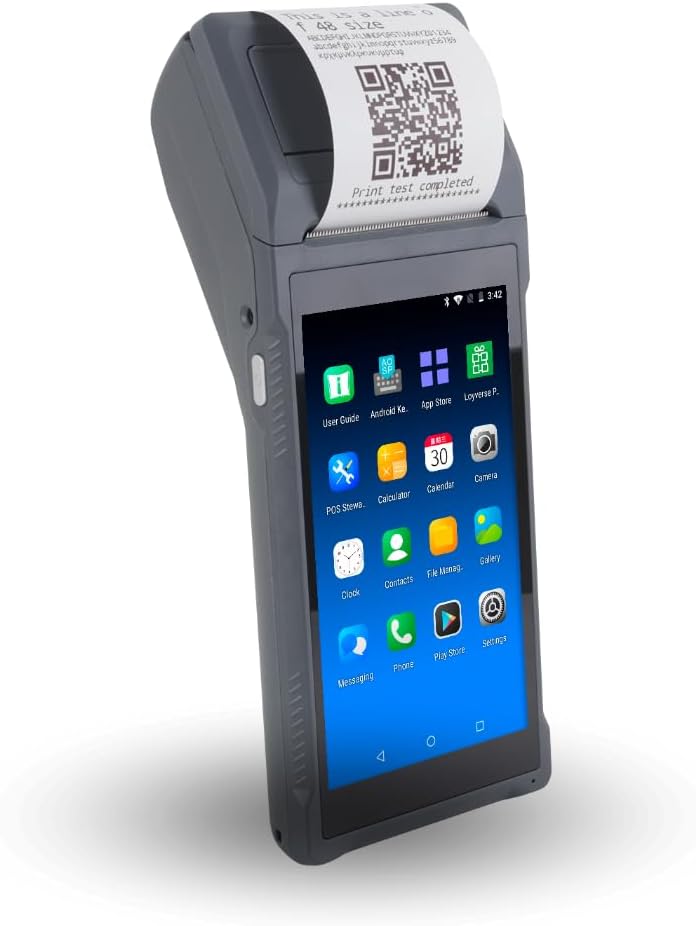
The Bisofice POS Receipt Printer is a top pick for those on a budget. It runs Android 8.1 and includes a built-in 58mm receipt printer. This compact device is great for small businesses like boutiques and cafeterias needing basic POS functions.
We may earn a commission when you buy through this link, at no additional cost to you.
The thermal printing feature keeps operating costs low since no ink cartridges are needed. A 5000mAh rechargeable battery supports enduring working time throughout the day. It is easy to carry around due to its wireless design.
It uses 3G and WiFi which may be slower than modern 4G options. However for low volume transactions this is rarely an issue. The value proposition is high for simple cash flow tracking needs.
Select this model if you want a functional handheld system without breaking the bank. It is a reliable workhorse for entry-level mobile payment processing.
Low purchase price and no ink requirements make this an affordable solution.
Compact size allows easy carrying around the warehouse or shop floor.
We may earn a commission when you buy through this link, at no additional cost to you.
This 4G handheld PDA terminal offers advanced Android 13 and full network compatibility. It features a 5MP rear camera capable of reading both 1D and 2D barcodes for accurate inventory management. The built-in printer allows immediate receipt generation.
We may earn a commission when you buy through this link, at no additional cost to you.
With support for 4G 3G and 2G networks you stay connected almost anywhere. The 3000mAh battery offers extended working hours to reduce charging frequency. A roll of printing paper is included for immediate use.
The memory of 2GB+16GB is standard but may limit heavy multitasking. The screen is smaller than some competitors but clear enough for quick tasks. It is ideal for warehouse and logistics environments.
Choose this for reliable connection and barcode scanning capabilities in dynamic locations. It balances performance and portability well for mobile industrial tasks.
Multiple network options ensure you stay connected in various signal areas.
5MP camera handles 1D and 2D codes for efficient inventory tracking.
We may earn a commission when you buy through this link, at no additional cost to you.
Square Terminal allows you to ring up sales and accept payments anywhere in your store. It processes chip cards in just two seconds for quick customer service. The built-in battery lets you use it cordlessly during busy periods.
We may earn a commission when you buy through this link, at no additional cost to you.
Getting your money as soon as the next business day helps with cash flow. You pay one low rate with no long-term contracts which is transparent. It acts as a mobile POS when paired with Square software.
While it is not a small handheld unit it moves easily from counter to counter. The main limitation is being tied to Square services which is standard but specific. It remains a trusted option for retail.
Select this for a blend of countertop stability and limited mobility. It is perfect for shops that need a single device for payment and receipts.
Fast chip card processing keeps lines moving and customers happy.
Receive funds quickly with next business day deposit options.
We may earn a commission when you buy through this link, at no additional cost to you.
The Q2i terminal combines a 5.5-inch touchscreen with an integrated 58mm thermal printer. It runs Android 11 and supports popular POS software like Square and Loyverse. The built-in scanner reads standard 1D barcodes effectively.
We may earn a commission when you buy through this link, at no additional cost to you.
This device comes with a complete retail kit including power adapter and paper roll. It prints at speeds up to 80 mm per second for efficiency. Dual-band Wi-Fi ensures stable connectivity in crowded retail spaces.
The rating is lower than others which may indicate user experience variability. It does not read QR codes limiting some modern payment options. However the hardware is solid for basic retail needs.
Choose this if you need flexibility in software choices on Android. It is a good fit for standard inventory and receipt processing.
Compatible with multiple popular POS apps for flexible management.
Complete package includes accessories needed to start using immediately.
We may earn a commission when you buy through this link, at no additional cost to you.
The P1 terminal offers robust hybrid connectivity with dual Ethernet and WiFi capabilities. It accepts modern payment types including tap chip and mobile wallets securely. A physical keypad enhances the experience for both staff and customers.
We may earn a commission when you buy through this link, at no additional cost to you.
Designed for fixed checkout locations it reduces counter clutter with its built-in printer. The secure Android operating system ensures safe transaction processing. 8 provides reliable fast processing for busy environments.
It is not designed for carrying around a store like a true handheld. The focus is on stability at a register. This suits retail stores and small restaurants well.
Select this for a professional checkout experience with high reliability. It is a strong choice for fixed point of sale needs.
Dual Ethernet and WiFi ensure stable internet for fast transactions.
Tactile keypad improves user workflow and security for input.
We may earn a commission when you buy through this link, at no additional cost to you.
Alacrity Handheld PDA stands out with Android 14 and an 8-core processor. It features a large 6.5-inch screen for clear operation. The 30W scanning module ensures ultra-fast code reading for efficiency.
We may earn a commission when you buy through this link, at no additional cost to you.
Battery life is exceptional with a 6400mAh capacity reducing need for frequent charging. You can adjust print width between 3 or 2 inches for flexible output. Connectivity includes dual-band Wi-Fi and SIM support for mobile data.
It is a larger device which might not fit small pockets but offers power. The cost reflects premium hardware and features. It is built for demanding daily use.
Choose this for top-tier performance and reliability in high-traffic businesses. It handles complex workflows smoothly and keeps staff productive.
Ultra-fast 2.0GHz processor minimizes waiting times during peak hours.
6.5 inch screen provides clear visuals for easy navigation.
We may earn a commission when you buy through this link, at no additional cost to you.
This terminal features a 10-core CPU for enhanced operating speed and consistency. It prints at 80mm/s with a built-in zigzag-edge paper cutter for convenience. The 2D scan engine reads codes even with scratches or stains.
We may earn a commission when you buy through this link, at no additional cost to you.
It is optimized for scanning non-encrypted cards and requires pairing with a certified reader for payments. The 5.9 inch screen provides precise information for error-free user experience. It is perfect for managing queues and orders.
Users must ensure they have a PCI-certified reader for secure transactions. The hardware is strong for data capture and ticketing. It fits takeaway and mobile order needs well.
Choose this for fast printing and robust scanning capabilities. It is a strong tool for businesses focusing on order management.
80mm/s speed ensures quick output during high-demand periods.
Professional engine reads damaged codes accurately for reliability.
We may earn a commission when you buy through this link, at no additional cost to you.
Clover GO pairs with your mobile device via Bluetooth making it fully compatible with smartphones. It features end-to-end security to protect data. You can set custom tips and create multiple tax rates easily.
We may earn a commission when you buy through this link, at no additional cost to you.
Customers receive receipts via email or text for a paperless experience. It allows creation and management of multiple employee permissions. The low price point makes it accessible for small businesses.
It requires processing through SwyftPAY and is limited to US based businesses. The dock is sold separately if needed. This limits flexibility but keeps the core unit simple.
Choose this for a simple mobile solution with strong security features. It works well for entrepreneurs starting a mobile sales presence.
Email or text receipts reduce paper waste and speed up checkout.
Works with any smartphone via Bluetooth for easy setup.
We may earn a commission when you buy through this link, at no additional cost to you.
Selecting the right handheld pos system requires evaluating several key factors. This section helps you understand what features matter most for your business type.
Most handheld devices run on Android. Newer versions like Android 13 or 14 offer better security and app support. Ensure the OS is updated to run current POS software smoothly.
Always choose a device with the latest stable OS version to avoid compatibility issues.
Look for models that support dual-band Wi-Fi and 4G LTE. This ensures you stay connected even if one network fails. Bluetooth is also essential for connecting to peripherals like printers or card readers.
Prioritize devices with multiple connectivity options to avoid downtime during peak hours.
Battery capacity affects how long you can use the device without plugging in. Aim for at least 6000mAh for a full day of operation. Fast charging support is a bonus for quick top-ups between shifts.
Choose a model with long battery life and fast charging for reliable daily use.
Some devices include a built-in thermal printer while others require an external one. Built-in printers save space but can be harder to maintain. Check if it supports standard paper sizes like 58mm.
Decide if an integrated printer fits your workflow or if a separate one works better.
Ensure the device accepts all major credit and debit cards. Support for NFC and contactless payments is essential for modern transactions. Verify the specific payment processor requirements before purchasing.
Select a system that supports all major card types and payment methods.
For inventory management or retail, scanning capabilities are key. Some devices use the camera as a scanner while others have a dedicated engine. Look for support for both 1D and 2D barcodes.
Ensure the scanning module matches your inventory and product labeling needs.
If you use the device in busy environments durability is vital. Look for water and dust resistance ratings. A protective case might be needed if drops are common in your workspace.
Choose a rugged design or add a case to protect the device from damage.
Compare the upfront cost with any recurring transaction fees. Some systems require long-term contracts which limit flexibility. Others operate with simple flat-rate pricing which is easier to manage.
Avoid long-term contracts and compare total costs over one year before buying.
To start, charge the device fully before first use. Insert a SIM card or connect to Wi-Fi depending on your chosen network. Download your preferred POS application from the app store.
Keep the screen clean with a soft cloth and avoid harsh chemicals. Do not expose the device to extreme temperatures or water unless rated for it. Store it in a secure place when not in use.
Update the software regularly to patch security vulnerabilities. Check for battery health periodically and replace if performance drops. Always pair with a backup network if possible to prevent transaction interruptions.
Some models offer offline payment capabilities that store transactions locally. These transactions sync once the connection is restored. However most require internet for immediate verification and security checks.
Yes, reputable manufacturers use encryption to protect data. Look for PCI certification when choosing a device. This ensures compliance with industry security standards for card information.
It depends on the device model and software. Some lock you into one processor while others allow multiple. Check the product details to see if third-party apps are supported.
Battery life varies by usage but most last a full day. Light users might charge every two days. Heavy users should recharge nightly to ensure readiness for the next shift.
Yes, many track cash sales and other payment methods. You can log these manually or through the app. This helps reconcile total daily revenue accurately.
Yes, most support POS software that syncs with online stores. You can accept orders in the app and mark them as delivered. It creates a unified view of your inventory.
We have reviewed the top 10 handheld pos systems for 2026. Each offers unique benefits depending on your business model. The Square Handheld and Alacrity models stand out for their reliability and features.
Prioritize battery life and connectivity if you move frequently. Ensure the device supports the payment methods your customers prefer. Choosing the right system streamlines operations and boosts productivity.
Prices change so check the latest listings for any deals. Select a solution that grows with your business needs. With the right handheld system your sales process becomes smoother and faster.