
Raywego 49 Inch Curved Ultrawide Gaming Monitor
4.6Editor score
DQHD 165Hz performance
1500R curved immersion
VA panel with HDR400
Finding the right display can transform your virtual driving experience. A wide screen offers unmatched immersion, letting you see track limits and mirrors simultaneously. This guide helps you choose the best option for serious racers.
We evaluated ten top models based on resolution, refresh rate, and curvature. Our analysis focuses on performance metrics that matter most for simulation. Each pick balances visual clarity with responsive gaming features for optimal control.
Every selection showcases key strengths and potential trade-offs for your setup. Prices and availability shift frequently so check current listings before buying. We aim to provide clear insights to help you invest wisely in your rig.
4.6Editor score

4.3Editor score

4.1Editor score
As an Amazon Associate we earn from qualifying purchases.
The following table compares key specifications across all ten monitors. Look at resolution, refresh rate, and curvature to match your racing simulator needs. Each entry links directly to product details for further review.





The Raywego 49-inch monitor offers an accessible entry into immersive sim racing. With a 4.6 rating, it balances cost and performance effectively for budget-conscious enthusiasts.
We may earn a commission when you buy through this link, at no additional cost to you.
Its DQHD resolution ensures crisp track detail while the 165Hz refresh rate delivers smooth motion during high-speed turns. The VA panel provides deep contrast for night racing sessions.
While not as bright as premium HDR options, the HDR400 support enhances shadow detail. The 1500R curve fits most desk setups comfortably without excessive peripheral distortion.
This monitor suits drivers seeking wide field-of-view benefits without premium price tags. It delivers solid performance for daily driving simulations on a tight budget.
The 32:9 aspect ratio replaces dual monitors seamlessly. You gain uninterrupted track vision essential for precise braking and cornering lines.
HDMI 2.0 and DisplayPort 1.4 support various PC configs. Adaptive Sync reduces tearing for smoother gameplay experiences.
We may earn a commission when you buy through this link, at no additional cost to you.
Samsung delivers exceptional visuals with this QD-OLED display. Its 4.3 rating reflects high satisfaction among users prioritizing image quality and speed.
We may earn a commission when you buy through this link, at no additional cost to you.
The infinite contrast and true blacks make night races breathtaking. Pixel response time is virtually instantaneous eliminating motion blur in critical racing moments.
Thermal modulation and logo detection help protect the panel from burn-in. The 144Hz refresh rate ensures fluid motion across all racing titles.
This monitor is ideal for sim racers demanding top-tier fidelity. It combines speed and beauty to elevate every lap into a cinematic experience.
QD-OLED pixels deliver unmatched color vibrancy. You see every track texture and reflection with stunning clarity and depth.
With G-Sync and freeSync premium support, screen tearing vanishes. The low latency ensures your inputs match visuals instantly for competitive racing.
We may earn a commission when you buy through this link, at no additional cost to you.
This Samsung model sets a high bar for speed and immersion. A 4.1 rating indicates strong performance despite its aggressive design choices.
We may earn a commission when you buy through this link, at no additional cost to you.
The 240Hz refresh rate eliminates lag completely for responsive handling. HDR 1000 brightness reveals subtle details in bright sunlight scenes.
The 1000R curve wraps around your vision like a cockpit. It demands a wide desk but rewards with unmatched peripheral presence.
Perfect for competitive drivers needing edge response times. It transforms your setup into a professional-grade racing station effortlessly.
At 240Hz you react to track changes instantly. Every corner entry feels tighter and more precise during intense sprints.
CoreSync projects game colors into your room. It extends immersion beyond the screen for a truly enveloping experience.
We may earn a commission when you buy through this link, at no additional cost to you.
INNOCN blends productivity with gaming features. Its 4.2 rating shows appeal for dual-purpose users needing USB-C flexibility.
We may earn a commission when you buy through this link, at no additional cost to you.
The 5K2K resolution ensures sharp text and track markings. USB-C allows single-cable setup for modern laptops easily.
99% sRGB guarantees accurate colors for content creation. The 1800R curve reduces eye strain during long sessions.
A solid choice for drivers who also work. It offers versatility without sacrificing core simulation performance needs.
USB-C delivers power and video together. This simplifies cable management for mobile rigs or workstations.
PIP lets you run a chat window over the game. Essential for team racing communication while focusing on the track.
We may earn a commission when you buy through this link, at no additional cost to you.
The G91F updates the legacy G9 with modern features. A 4.4 rating reflects satisfaction with its consistent performance.
We may earn a commission when you buy through this link, at no additional cost to you.
Auto Source Switch speeds up game access instantly. HDR 600 enhances contrast without draining budget completely.
The 1000R curve wraps your view for focus. FreeSync Premium Pro keeps gameplay smooth across different PC specs.
Ideal for racers wanting a proven Samsung experience. It delivers reliable immersion and speed for competitive play.
Auto Source Switch detects powered-on devices immediately. This cuts input switching time significantly for tournament readiness.
Height adjust and tilt allow precise alignment. Proper posture reduces fatigue during extended endurance race sessions.
We may earn a commission when you buy through this link, at no additional cost to you.
CRUA delivers high specs at a budget. Its 4.4 rating shows it punches above its weight class.
We may earn a commission when you buy through this link, at no additional cost to you.
120% sRGB brings vibrant visuals for all scenes. The 165Hz refresh rate handles rapid motion smoothly.
No speakers mean external audio needs planning. But VESA compatibility allows easy arm mounting for flexibility.
Great for users prioritizing screen real estate. It offers excellent value for those new to ultrawide racing.
Wide color gamut enhances track textures. Details like tire marks look sharp and realistic throughout play.
Low blue light reduces strain during long races. Flicker-free tech helps prevent headaches over hours of use.
We may earn a commission when you buy through this link, at no additional cost to you.
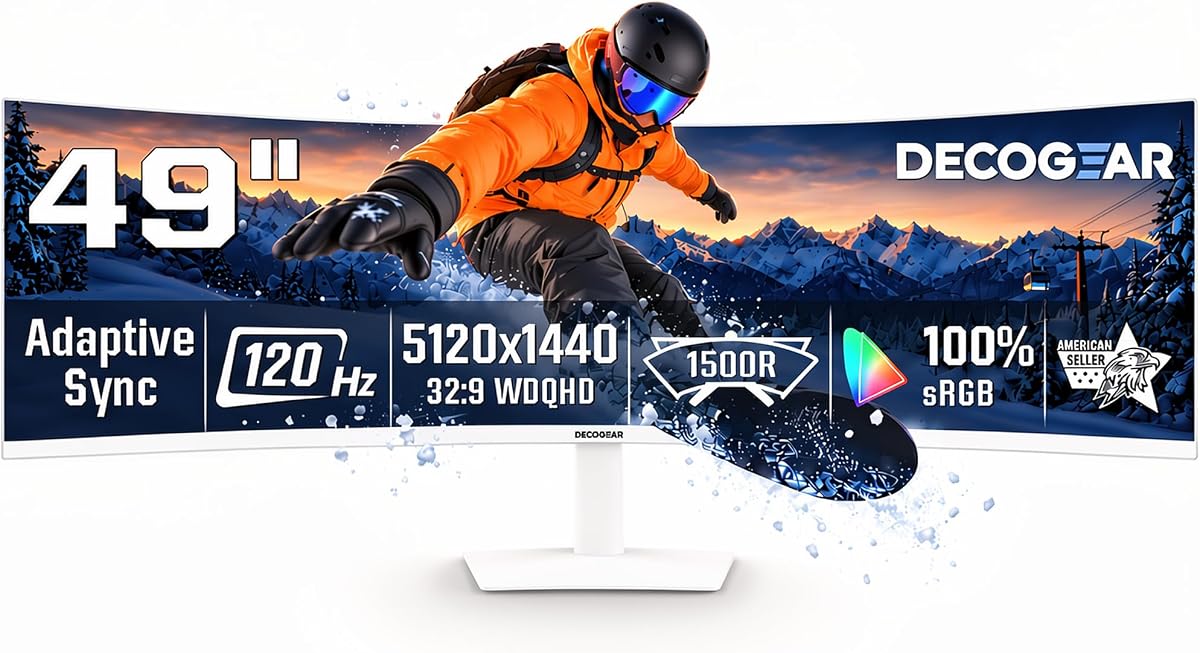
Deco Gear targets hybrid setups with KVM. A 4.1 rating indicates functional performance for specific workflows.
We may earn a commission when you buy through this link, at no additional cost to you.
KVM lets one keyboard mouse control two PC. This aids comparing setups or streaming directly from console.
100% sRGB ensures color consistency across media. Built-in speakers add convenience though external audio is better.
Best for users managing multiple rigs. It simplifies cable management and input switching efficiently.
KVM switches inputs without unplugging cables. Ideal for comparing racing sim performance across different PCs.
65W charging supports laptops without bricks. Keeps your workspace tidy while powering devices simultaneously.
We may earn a commission when you buy through this link, at no additional cost to you.
ASUS offers a legacy option at a lower price. A 4.4 rating reflects trust in its brand reliability.
We may earn a commission when you buy through this link, at no additional cost to you.
DFHD resolution balances cost and width needs. 144Hz ensures responsiveness sufficient for many racing sims.
Eye Care tech minimizes fatigue during long nights. Creative Cloud bundle adds value for content creators.
Good for entry-level sim setups. It delivers core immersion without demanding high-end hardware.
Flicker-free and blue light filters protect eyes. Essential for overnight endurance racing sessions comfortably.
ASUS engineering ensures stable performance over time. Drivers are reliable and feature updates remain consistent.
We may earn a commission when you buy through this link, at no additional cost to you.
Z-Edge focuses on raw speed and clarity. A 4.5 rating suggests excellent value for performance seekers.
We may earn a commission when you buy through this link, at no additional cost to you.
240Hz refresh rate supports competitive high refresh needs. Color accuracy ensures track cues remain precise under pressure.
Speakers add convenience for quick audio checks. USB-C simplifies laptop connection for portable rigs.
Perfect for competitive drivers needing edge speed. It balances refresh rate and visual fidelity well.
240Hz ensures instant response to steering inputs. Every track change registers without lag on screen.
Delta E less than 2 minimizes color shift. Visual feedback on track conditions remains consistent always.
We may earn a commission when you buy through this link, at no additional cost to you.
This QD-OLED model combines speed and visual purity. A 4.1 rating highlights its high-end appeal among enthusiasts.
We may earn a commission when you buy through this link, at no additional cost to you.
True Black reveals details in dark corners easily. 240Hz refresh keeps motion crisp even in complex scenes.
Metal finish adds a premium look to setups. Auto Source Switch maintains convenience without manual input changes.
Best for ultimate sim racing enthusiasts. It offers the pinnacle of immersion and visual fidelity today.
True Black eliminates pixel light bleed entirely. Night tracks appear rich and deep for total focus.
Slim metal finish looks sleek and modern. It complements high-end racing rigs aesthetically perfectly.
We may earn a commission when you buy through this link, at no additional cost to you.
Selecting the right ultrawide monitor requires evaluating several technical factors. This guide breaks down the key specs to ensure your choice supports realistic racing performance.
Resolution determines how much track detail you see. Look for DQHD (5120×1440) to avoid blurry lines or jagged edges.
Higher pixel density ensures sharper text and track markings. This clarity helps you judge braking points accurately during high-speed laps.
Refresh rate impacts smoothness during rapid motion. A minimum of 144Hz is recommended for responsive control feedback.
Low response times reduce motion blur during quick turns. This helps maintain visibility when navigating complex corners at speed.
Curvature defines how the screen wraps around your vision. A 1000R to 1500R curve offers deep peripheral presence.
Too extreme curvature may distort straight lines. Match the curve to your desk width for natural viewing comfort.
Color accuracy ensures track surfaces look realistic under different conditions. Aim for 90%+ DCI-P3 coverage for lifelike visuals.
HDR support enhances contrast for shadow and highlight details. Brighter panels help in daytime racing scenarios without glare.
Ports must match your PC or console outputs. DisplayPort 1.4 often supports full resolution and refresh rates.
USB-C offers power delivery for laptops. KVM switches simplify control across multiple devices for streaming.
Adjustable stands reduce neck strain during long sessions. Height tilt and swivel allow precise screen alignment.
VESA compatibility gives flexibility for arm mounts. This clears desk space for pedals and wheel bases easily.
VA panels offer high contrast suitable for dark scenes. OLED provides infinite contrast but requires burn-in care.
Choose based on your balance of brightness and depth. Consider room lighting when selecting panel types.
Features like PIP/PBP support multi-source monitoring. Auto Source Switch speeds up game launches without delays.
Eye comfort tech like low blue light protects vision. Look for certifications like TÜV for proven protection.
Start by mounting the monitor securely using VESA points if using an arm. Ensure your desk can handle the wide weight safely.
Connect via DisplayPort for full resolution and refresh rates. Avoid HDMI if it limits bandwidth for your preferred settings.
Adjust brightness and contrast to match room lighting. Use calibration modes for accurate colors before racing sessions.
A 49-inch monitor requires about 49 inches of depth clearance. Measure your desk depth carefully to ensure your seating distance fits naturally.
High resolutions demand powerful GPUs for smooth performance. Ensure your card supports DQHD or 5K2K at your target refresh rate.
Curved screens enhance immersion by matching peripheral vision. They reduce the need to turn your head constantly during gameplay.
Monitors with multiple inputs allow switching between PCs. Look for KVM or PBP features to manage both systems on one display.
Enable screen savers and vary your content often. Use logo detection features to dim static elements during gameplay.
144Hz provides smooth motion for most racers. Higher rates like 240Hz help competitive users needing faster response feedback.
DisplayPort 1.4 is standard for DQHD at high refresh rates. HDMI 2.1 supports these rates on newer hardware.
Most support macOS via DisplayPort or USB-C. Check for USB-C power delivery to run laptops without extra chargers.
These ten options cover diverse needs from budget to premium OLED quality. Choose based on your PC power and immersion preferences.
Prioritize response times and refresh rates for responsive control. A wide screen elevates every lap into a more realistic experience.
Prices fluctuate often so check current offers before buying. Investing in a quality display pays off in long-term enjoyment.