
ASRock Intel Arc A580 Challenger 8GB OC
4.6Editor score
Xe HPG Architecture
8GB GDDR6 Memory
PCIe 4.0 Support
This guide compares the top ten Intel Arc GPU options for gaming, AI, and professional workloads to help you find the best graphics card for your needs.
The modern graphics landscape has evolved significantly with the arrival of powerful new architectures designed for diverse workloads. Intel Arc GPUs have emerged as a compelling choice for users seeking high performance across gaming, AI inference, and creative content creation tasks.
To create this comprehensive list, we analyzed technical specifications, architectural features, memory configurations, and cooling solutions across the current market lineup. We focused on how each model handles modern APIs, AI acceleration engines, and multi-monitor support for real-world scenarios.
Each pick below highlights specific strengths like memory capacity, power efficiency, or specialized cooling to match different user requirements. Please note that availability and pricing can fluctuate frequently, so verify current details before making your final purchase decision.
4.6Editor score

4.7Editor score

3.9Editor score
The following table provides a side-by-side comparison of all ten Intel Arc GPU models evaluated in this guide, highlighting key specifications to help you quickly identify the right fit for your system requirements.



The ASRock Intel Arc B570 Challenger stands out as the top performer in this lineup with its robust Xe2-HPG architecture and a strong 4.7 rating from users. It delivers smooth gaming experiences at 1440p and supports advanced AI features for content creation tasks.
We may earn a commission when you buy through this link, at no additional cost to you.
Key strengths include the 2600 MHz clock speed and 19 Gbps memory speed which ensure responsive gameplay. The dual fan cooling system with 0dB technology keeps noise low during light usage while maintaining optimal thermal performance under load.
Trade-offs involve reliance on ongoing driver support for full game compatibility and a memory limit of 10GB which may constrain future AAA titles. However these are acceptable given the price point and current architectural advantages.
This card is ideal for gamers seeking high 1440p performance and creators needing AI upscaling without breaking the budget. We recommend it as the primary choice for most mainstream users building a new system today.
Intel Xe Super Sampling 2 leverages AI to enhance frame rates and image quality in supported games significantly.
A single 8-pin connector and advanced architecture ensure excellent performance per watt for lower electricity costs.
We may earn a commission when you buy through this link, at no additional cost to you.
The ASRock Arc A580 Challenger offers incredible value with its 8GB memory and Xe HPG architecture earning a 4.6 rating. It balances cost and performance effectively for budget-conscious gamers and casual creators looking for modern features.
We may earn a commission when you buy through this link, at no additional cost to you.
Factory overclocking to 2000 MHz provides optimized performance out of the box. The dual-fan design with silent cooling stops fans at low temps while the metal backplate ensures structural rigidity against sag over time.
Users should note the requirement for two 8-pin power connectors and a 650W PSU which might necessitate upgrades for older systems. The 2.4-slot width also requires checking case clearance before installation.
This is the best pick for those wanting solid 1080p to 1440p gaming without overspending. It proves that high performance can be accessible when choosing the right architecture and cooling solution.
8GB GDDR6 on a 256-bit interface running at 16 Gbps delivers excellent bandwidth for 1440p gaming.
Three DisplayPort 2.0 and one HDMI 2.0b outputs support up to four displays simultaneously.
We may earn a commission when you buy through this link, at no additional cost to you.
The ASRock Arc Pro B60 Creator targets professionals with 24GB memory and PCIe 5.0 support though it currently holds a 3.9 rating as the card matures. It is designed for heavy workloads like LLM inference and 3D rendering.
We may earn a commission when you buy through this link, at no additional cost to you.
Its standout feature is the 24GB GDDR6 memory which allows running large models without multi-card setups. Twin media transcoders support AV1 and HEVC exports while four DP 2.1 outputs enable expansive multi-monitor workflows.
The blower cooling style is efficient for server environments but might be louder than dual-fan designs. Driver optimization is still catching up for some specific workstation applications compared to established competitors.
This GPU is perfect for AI researchers and engineers needing high memory and ISV validation. It represents a significant step forward for professional computing on consumer-grade PCIe slots.
24GB GDDR6 with 456 GB/s bandwidth ideal for LLMs and generative design tasks.
ISV Certified & Professional Drivers validated for engineering and design software.
We may earn a commission when you buy through this link, at no additional cost to you.
Sparkle delivers a capable mid-range card with 12GB memory and a high 2760 MHz boost clock earning a 4.5 rating. It is suited for users needing more VRAM than standard cards offer without premium pricing.
We may earn a commission when you buy through this link, at no additional cost to you.
The TORN Cooling 2.0 system with axial fans keeps thermals managed during intense sessions. The metal backplate adds durability while the breathing light adds a subtle aesthetic touch to the build.
Some users may find availability sporadic and the lighting lacks advanced software control. These minor points do not detract from the core performance capabilities for most gaming scenarios.
This model is a great choice for those prioritizing memory headroom and clock speed in a clean design. It balances aesthetics and functionality well for typical desktop setups.
OC Edition Boost Clock at 2760MHz ensures responsive gaming and smooth frame rates.
TORN Cooling 2.0 with axial fans provides efficient thermal dissipation under load.
We may earn a commission when you buy through this link, at no additional cost to you.
This dual-GPU design combines two Arc Pro B60 cards to provide 48GB of memory and immense compute power. It targets high-concurrency inference and complex AI workloads without needing massive multi-card clusters.
We may earn a commission when you buy through this link, at no additional cost to you.
With each GPU operating at 2400 MHz and offering 197 TOPS the total reaches 394 TOPS. The PCIe 5.0 x8+x8 configuration achieves full bandwidth on bifurcating consumer motherboards lowering total system costs.
The turbo edition features triple thermal design with vapor chamber ensuring stable temps during long tasks. Users must verify motherboard support for PCIe 5.0 x16 bifurcation to utilize full performance.
It is ideal for researchers and developers needing local LLM deployment with high memory. This solution offers flexibility for task assignment and native support for PyTorch and vLLM frameworks.
Innovative dual-GPU design combines two cards for 48GB memory for large AI models.
Combined total of 394 TOPS allows flexible task assignment for AI workloads.
We may earn a commission when you buy through this link, at no additional cost to you.
This MAXSUN card features two Arc Pro B60 GPUs working in tandem for parallel processing power. It fits neatly into standard PCIe slots without monopolizing entire motherboard expansion space despite the dual-chip architecture.
We may earn a commission when you buy through this link, at no additional cost to you.
The Turbo Cooling System exhausts heat out of the chassis keeping thermals in check during heavy workloads. Ample 48GB memory provides headroom for rendering and complex visual computing tasks.
Users must ensure their system can handle the power draw and heat output of such a high-performance unit. The dual-slot form factor is impressive but careful airflow planning is required.
It serves professionals needing massive memory and high concurrency in a compact chassis. It is a specialized tool for those focused heavily on AI and professional workload acceleration.
Two GPUs working in tandem deliver exceptional parallel processing power for demanding workloads.
Single large-diameter turbo fan efficiently exhausts heat out of the chassis.
We may earn a commission when you buy through this link, at no additional cost to you.
This bundle combines the B570 Challenger with a reliable PRO-650G 80 PLUS Gold PSU ensuring a complete solution. It is designed for smooth 1440p gaming with built-in power efficiency and stability.
We may earn a commission when you buy through this link, at no additional cost to you.
The GPU leverages XeSS 2 for AI-powered frame generation and image quality boosts. The PSU delivers stable clean power which maximizes system performance and ensures longevity during usage.
Users might find the PSU wattage limiting if planning massive future upgrades but it suffices for current needs. The single-box convenience is excellent for first-time builders or system refreshers.
It is an ideal choice for those wanting a hassle-free upgrade path with quality components. The high rating reflects the strong reliability and performance of the combined package.
Features Intel Arc B570 GPU with 2600 MHz clock on efficient Xe2-HPG architecture.
PRO-650G PSU is 80 PLUS Gold certified and ATX3.1 ready for stable power.
We may earn a commission when you buy through this link, at no additional cost to you.
The GUNNIR Arc Pro B50 LP is a slim low-profile card perfect for small form factor systems. It requires no external power connector and fits into tight spaces while still delivering professional features.
We may earn a commission when you buy through this link, at no additional cost to you.
Equipped with 16GB of GDDR6 it offers substantial capacity for AI and 3D scenes. The Xe2 architecture delivers 170 TOPS INT8 compute power which is surprisingly robust for such a small chassis.
Performance is limited by physical size and thermal constraints compared to full-size cards. However for SFF builds this is often a necessity rather than a compromise.
This card is perfect for edge workstations and mini-towers needing reliable graphics without bulk. It enables local inference and rendering in environments where larger cards simply do not fit.
Single-slot low profile design requires no external PCIe power connector for easy installation.
16GB GDDR6 memory enables loading larger AI models and rendering complex 3D scenes.
We may earn a commission when you buy through this link, at no additional cost to you.
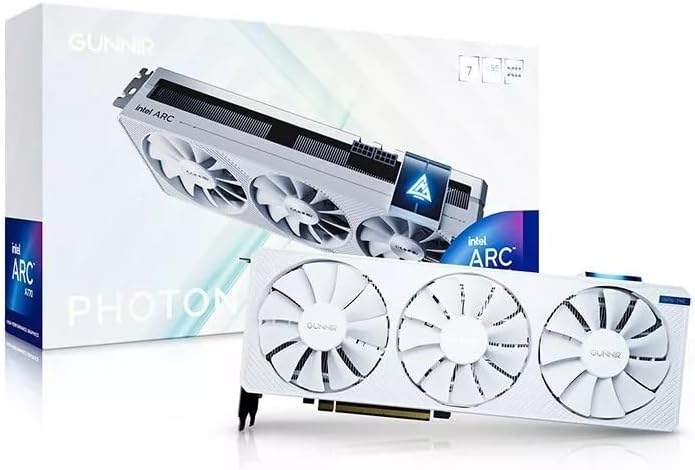
This white graphics card packs a punch with 8GB memory and a 2400 MHz clock speed. It is designed for immersive visuals and seamless gameplay while maintaining a clean aesthetic for white builds.
We may earn a commission when you buy through this link, at no additional cost to you.
A triple fan design ensures efficient cooling to maintain stable temperatures during intense workloads. Future-proof connectivity includes HDMI and DisplayPort support ready to connect to the latest displays.
The white finish might require more frequent cleaning to maintain its look but it looks striking. Performance is consistent with typical A770 models ensuring reliable gaming and creative capabilities.
It is the best pick for those wanting a premium look without sacrificing performance. Users building custom white cases will appreciate this card's design and cooling efficiency.
Packs a punch with 8GB GDDR6 VRAM running at 2400MHz for exceptional performance.
Equipped with triple fan design ensuring efficient cooling to maintain stable temperatures.
We may earn a commission when you buy through this link, at no additional cost to you.
The A310 Omni View is a specialized card featuring four HDMI outputs and a single-slot design. It is optimized for office multitasking and home setups requiring multiple screens rather than heavy gaming.
We may earn a commission when you buy through this link, at no additional cost to you.
With only 50W power draw it is highly efficient and does not require extra connectors. The single fan configuration is sufficient for light workloads ensuring quiet operation throughout the day.
It is not meant for gaming due to limited memory but it excels at display management. Users needing four monitors can rely on this card for stability and connectivity.
This card is the ultimate solution for home offices needing reliable multi-monitor support. It simplifies cabling and setup while keeping power requirements low and cost effective.
Features 4x HDMI Display Output to connect multiple monitors for expanded workspace.
Exclusive 50W design ensures low power consumption without needing external power.
We may earn a commission when you buy through this link, at no additional cost to you.
Selecting the right Intel Arc GPU requires balancing several factors to ensure it meets your specific performance and budget needs.
Memory size is crucial for AI and gaming workloads with larger models requiring significant VRAM pools to avoid bottlenecks.
Look for cards with at least 8GB for standard gaming and 16GB or more for professional AI inference tasks.
Newer architectures like Xe2-HPG offer improved performance and better support for modern features compared to earlier generations.
Prioritize models based on Xe2 for the best balance of efficiency and future compatibility.
Check the TDP and power connectors to ensure your power supply and case airflow can handle the card efficiently.
Verify your PSU capacity before purchase to avoid instability under load.
Effective cooling prevents thermal throttling and ensures consistent performance during long sessions.
Dual-fan or triple-fan designs are recommended for quieter operation compared to single blower fans.
Ensure the card has the necessary ports to connect all your monitors for your workflow.
Modern DisplayPort versions support higher resolutions and refresh rates for better visual quality.
Driver stability and software tools are essential for maximizing performance across different games.
Check for ISV certifications if you use professional creative software for reliable support.
Verify the card dimensions against your case clearance to avoid fitting issues during installation.
Consider low-profile options for small form factor builds to maintain compatibility with compact cases.
PCIe 5.0 and DisplayPort 2.1 provide higher bandwidth for next-gen systems and high-resolution displays.
Prioritize PCIe 4.0 or 5.0 for maximum compatibility with modern motherboards.
Install the GPU firmly in the PCIe slot and connect all necessary power cables before starting your system.
Download and install the latest drivers from the official Intel website to ensure optimal performance and compatibility.
Keep your system clean by dusting fans regularly to maintain cooling efficiency and prevent overheating.
Yes they are excellent for 1080p and 1440p gaming offering strong performance at competitive price points. XeSS technology further enhances frame rates and visual quality in supported titles.
The Arc Pro B60 series with 24GB or 48GB memory is best for AI workloads due to high capacity and optimized compute engines for inference.
Most require a standard PCIe 8-pin connector but check the specific wattage recommendation like 650W for stable power delivery under load.
Measure the internal length and width of your case and compare it with the card dimensions provided in the product details before buying.
Yes Intel has released significant updates improving stability and compatibility with major titles over time for a better user experience.
The Arc A310 Omni View with four HDMI outputs is ideal for multi-monitor setups in home offices needing simple connectivity and low power.
We highlighted top picks like the B570 Challenger for gaming and the Pro B60 for professional AI workloads to suit varied user needs.
Prioritize memory capacity and architectural features if you plan to run complex AI models or creative software in the future.
Always check current availability and verify your system requirements before finalizing your purchase decision today.