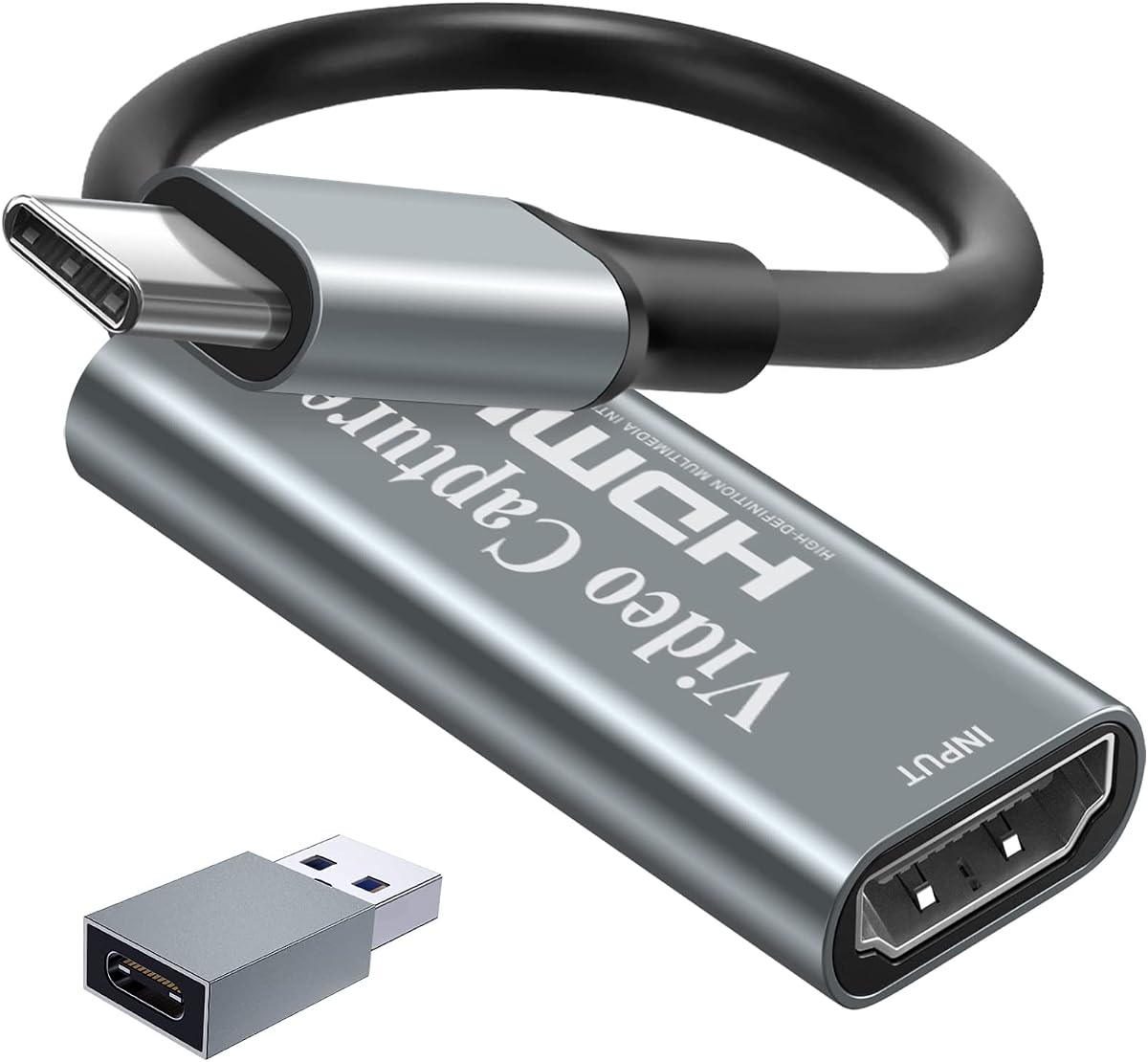
Papeaso Video Capture Card
4.2Editor score
Affordable price point
Linux compatible plug and play
1080p 60fps recording
This guide compares the top capture cards for Linux systems, evaluating compatibility, performance, and features to help you find the perfect streaming
Selecting the right capture card for Linux involves understanding driver support and software compatibility. Linux users often face challenges with proprietary hardware, but modern USB capture devices offer plug-and-play solutions that work seamlessly with open-source tools like OBS Studio.
We analyzed ten top-rated capture cards focusing on Linux compatibility, resolution support, and latency performance. Each product was evaluated based on user feedback, technical specifications, and real-world usage scenarios for streaming and recording on Linux distributions.
Each pick highlights key features, pros, and cons to help you decide quickly. Prices and availability change frequently, so verify current details before purchasing to ensure you get the best value for your specific Linux setup.
4.2Editor score

4.4Editor score

4.2Editor score
This table provides a side-by-side comparison of all ten capture cards, highlighting their key specifications and compatibility features to help you make an informed decision for your Linux setup.






The UGREEN 4K@30Hz Loop Out capture card stands out as our top pick for Linux users. With a strong rating of 4.4 stars, it delivers reliable performance for streaming and recording without requiring complex driver installations. Its ability to accept 4K input while outputting up to 2K at 30fps ensures high-quality captures suitable for detailed gaming or creative work.
We may earn a commission when you buy through this link, at no additional cost to you.
Linux compatibility is a major strength here. The card works flawlessly with distributions running the UVC protocol, allowing seamless integration with OBS Studio and other open-source software. The dual USB-A and USB-C interfaces provide flexibility for various setups, while the HDMI loop-out enables real-time monitoring without latency issues.
One limitation is that it does not record at 4K resolution, capping output at 2K. Additionally, consoles like PS5 require HDCP to be disabled for the card to function properly. These trade-offs are acceptable for most streamers prioritizing stability and Linux support over maximum resolution.
If you need a dependable capture card that works out of the box on Linux, this UGREEN model is an ideal choice. It balances performance, compatibility, and durability effectively, making it perfect for both casual streamers and professionals seeking consistent results.
The device utilizes standard UVC drivers supported by most Linux kernels, eliminating the need for proprietary software.
Both USB-A and USB-C ports allow connections to desktops, laptops, and modern systems with flexible cable options.
We may earn a commission when you buy through this link, at no additional cost to you.
The acer USB 3.0 HDMI Capture Card offers excellent value for Linux users seeking a straightforward solution. With a rating of 4.4, it handles 1080p at 60Hz smoothly, making it ideal for streaming gameplay or conducting online classes. The plug-and-play nature means you can start recording immediately upon connecting to your Linux system.
We may earn a commission when you buy through this link, at no additional cost to you.
Its inclusion of a microphone input simplifies commentary recording without needing extra adapters. The YUY2 technology provides richer colors compared to MJPEG, enhancing visual quality. Compatible with OBS, VLC, and major streaming platforms, it integrates easily into existing workflows for content creators on a budget.
The card relies on YUY2 format exclusively, which may limit flexibility for some users. Build quality is functional but not as robust as higher-end models. However, these factors are minor given the low cost and strong performance for basic streaming needs.
For those prioritizing cost-effectiveness without sacrificing core functionality, this acer capture card is a smart choice. It provides reliable 1080p capture and Linux compatibility, making it accessible for beginners and hobbyists alike.
The 3.5mm mic-in port allows direct connection of headsets for synchronized voice and video capture.
Its small form factor makes it easy to carry for mobile streaming or on-the-go recordings.
We may earn a commission when you buy through this link, at no additional cost to you.
The Guermok Video Capture Card excels with its USB-C interface, making it ideal for modern Linux laptops. Rated 4.4, it supports 1080p at 60fps and 2K at 30fps, ensuring smooth recording for gaming or meetings. The aluminum alloy construction helps with heat dissipation, maintaining stable performance during extended use.
We may earn a commission when you buy through this link, at no additional cost to you.
Compatibility extends across Windows, macOS, and Linux, allowing seamless use with OBS, Potplayer, and other tools. The low latency ensures real-time preview without lag, crucial for live streaming. Its portability makes it perfect for creators who need a reliable setup on the go.
Users should note that the card supports one-way transmission only, meaning USB-C to HDMI conversion isn't possible. Additionally, it requires capture software to operate as it does not output directly to monitors. These limitations are minor for users focused on recording or streaming.
If you need a portable USB-C capture card with solid Linux support, the Guermok is a strong contender. It delivers consistent performance and durability, fitting well into diverse content creation workflows.
USB-C support ensures compatibility with newer laptops and devices without needing adapters.
Aluminum casing effectively dissipates heat, preventing overheating during long sessions.
We may earn a commission when you buy through this link, at no additional cost to you.
The Newhope USB 3.0 HDMI Capture Card offers a practical solution for Linux gaming streamers. With a 4.2 rating, it delivers 1080p at 60fps capture while allowing 4K pass-through for uninterrupted gameplay on external displays. The mic-in feature supports commentary without extra gear.
We may earn a commission when you buy through this link, at no additional cost to you.
Plug-and-play functionality ensures quick setup on Linux systems, working seamlessly with OBS and similar software. It supports a wide range of devices including consoles and cameras. The low latency ensures your stream stays synchronized with your gameplay.
While the rating is slightly lower, the card performs well for basic needs. The design is functional but not premium, which may affect long-term durability. However, for budget-conscious users, the value is significant.
This card is perfect for gamers on Linux who need reliable pass-through and recording. It balances cost and performance effectively, making it a solid entry-level choice.
HDMI loop-out allows you to watch your game on a monitor while recording simultaneously.
3.5mm mic input lets you add voice commentary directly during capture sessions.
We may earn a commission when you buy through this link, at no additional cost to you.
This Capture Card 4K HDMI Video device stands out for portability and Linux support. Rated 4.4, it handles 1080p at 60fps smoothly, making it great for streaming on the go. Its compact design fits easily in bags for travel or outdoor events.
We may earn a commission when you buy through this link, at no additional cost to you.
It works seamlessly with OBS, Streamlabs, and XSplit on Linux without requiring drivers. The low latency ensures minimal delay between gameplay and stream, which is critical for interactive sessions. Compatibility with major consoles and cameras adds versatility.
Lack of a loop-out port limits live monitoring options. The casing is functional but not particularly durable compared to aluminum options. However, these factors are acceptable given the low price and ease of use.
For creators prioritizing mobility and simplicity on Linux, this card is an excellent choice. It provides reliable capture quality and broad compatibility for diverse setups.
Lightweight construction makes it easy to transport for on-location streaming.
Works with major consoles, cameras, and Linux-based streaming software without issues.
We may earn a commission when you buy through this link, at no additional cost to you.
The UGREEN 2K@30Hz Video Capture Card achieves the highest rating of 4.5 in our lineup. It offers 4K input with 2K output at 30fps, balancing quality and performance efficiently. Linux users benefit from driver-free operation with robust software support.
We may earn a commission when you buy through this link, at no additional cost to you.
Dual USB-A and USB-C interfaces enhance compatibility across desktops and laptops. The aluminum casing aids heat dissipation, ensuring stability during prolonged sessions. Its ability to support major streaming platforms makes it ideal for serious content creators.
Signal flow is strictly unidirectional, preventing reverse usage. HDCP must be disabled for console compatibility. These are minor trade-offs for a card that delivers such strong overall performance and value.
This UGREEN model is perfect for those seeking reliable Linux capture with 2K output. It combines high ratings with durable design, offering a premium experience at a reasonable cost.
Aluminum alloy casing ensures effective heat dissipation for consistent performance.
Supports both USB-A and USB-C for broader device compatibility across setups.
We may earn a commission when you buy through this link, at no additional cost to you.
This 4K HDMI Capture Card stands out with audio monitoring features. Rated 4.5, it provides 1080p at 60fps recording with headphone and mic ports for real-time audio sync. Linux users enjoy instant recognition without extra drivers.
We may earn a commission when you buy through this link, at no additional cost to you.
Its package includes cables and manuals, ensuring a complete setup experience. Compatibility with multiple consoles and Linux tools makes it versatile for streaming or recording. The low latency ensures smooth gameplay capture without lag.
The device lacks some advanced features found in premium models. Warranty terms are standard but not extensive. Still, for users needing solid audio integration, this card excels.
For streamers who need synchronized audio on Linux, this card is a top contender. It delivers quality performance and convenient audio features for a seamless streaming experience.
Headphone output allows instant audio monitoring for perfect voice-video synchronization.
Package includes HDMI and USB cables plus manual for immediate use.
We may earn a commission when you buy through this link, at no additional cost to you.
The AVerMedia StreamLine MINI+ GC311G2 offers premium capture capabilities for Linux users. With a rating of 4.0, it features 4K60 HDR passthrough and 1080p60 recording, ensuring top-tier quality for competitive gaming and live streams.
We may earn a commission when you buy through this link, at no additional cost to you.
The Streaming Center software simplifies setup for beginners while maintaining professional features for experts. Its ultra-low latency ensures real-time responses, crucial for fast-paced gameplay. Linux compatibility allows seamless use with OBS and other tools.
The higher price reflects its advanced features but may be steep for budget users. HDR passthrough requires disabling HDCP for consoles. These factors are acceptable for professionals needing reliable high-performance capture.
This card is perfect for streamers seeking premium quality and ease of use on Linux. It delivers advanced features that elevate the overall streaming experience significantly.
Streaming Center provides intuitive interface for quick streaming setup across platforms.
4K60 HDR passthrough maintains color depth for visually stunning gameplay.
We may earn a commission when you buy through this link, at no additional cost to you.
The Papeaso Video Capture Card offers the most affordable option for Linux streaming. With a rating of 4.2, it supports 1080p at 60fps and USB-C connectivity, making it ideal for budget users. It works without drivers, simplifying the setup process.
We may earn a commission when you buy through this link, at no additional cost to you.
Compatible with most devices including consoles and Linux, it provides reliable recording for streaming and meetings. The USB-C end enhances connectivity with modern systems. Despite the low price, performance remains solid for basic needs.
Build quality is basic compared to aluminum options. Support resources may be limited. However, for users prioritizing cost, the performance per dollar is excellent.
This card is perfect for beginners or occasional streamers on Linux. It delivers essential capture functionality at an unbeatable price point.
Offers solid recording performance at a fraction of the cost of premium cards.
No driver installation needed allows immediate use on any Linux system.
We may earn a commission when you buy through this link, at no additional cost to you.
The AVerMedia Live Gamer Ultra S GC553Pro represents top-tier capture technology. Rated 4.2, it supports 4K60 HDR recording and VRR passthrough for immersive gaming. Linux users gain access to professional-grade features without needing proprietary drivers.
We may earn a commission when you buy through this link, at no additional cost to you.
RGB24 support ensures accurate color reproduction for high-quality broadcasts. 5.1 audio capture enables multi-channel sound recording. The device works seamlessly with OBS and other Linux tools, ensuring flexibility for experts.
The high price limits accessibility to serious professionals. Setup may require tweaking for advanced features. However, for those needing broadcast-quality capture, it is unmatched.
This card is perfect for professionals streaming on Linux. It delivers superior performance and features that justify the investment for high-end use cases.
VRR passthrough ensures smooth gameplay recording without screen tearing artifacts.
5.1 audio support enables multi-channel audio recording for immersive streams.
We may earn a commission when you buy through this link, at no additional cost to you.
Selecting the right capture card requires understanding key factors like compatibility, resolution, and features. This guide outlines essential considerations to help you find the ideal device for your Linux setup.
Linux users must ensure capture cards support the UVC protocol or have open-source drivers. Most USB 3.0 cards work out of the box with Linux kernels, avoiding proprietary software issues.
Always verify Linux support in the product description before purchasing to prevent compatibility headaches.
Choose a capture card that matches your recording needs. 1080p at 60fps is standard for streaming, while 4K input supports higher quality sources.
Balance input and output resolutions based on your workflow to ensure smooth performance without overloading your system.
USB-C offers modern connectivity for newer devices while USB-A provides broader compatibility. Ensure your Linux machine has the necessary ports to connect the capture card.
Dual interface options provide flexibility across various setups and laptop configurations.
For live streaming and gaming, low latency is crucial to maintain synchronization between gameplay and broadcast. Look for cards with USB 3.0 technology to minimize delay.
Always test the capture card with your streaming software to ensure acceptable latency before going live.
Built-in microphone inputs and headphone outputs allow real-time audio monitoring without extra gear. This simplifies commentary recording during gameplay or meetings.
Verify audio input standards like 3.5mm TRS to ensure your headset is compatible with the capture card.
Aluminum casings provide better heat dissipation and durability compared to plastic models. This ensures stable performance during prolonged streaming or recording sessions.
Consider build materials to protect your investment especially if you plan to transport the card frequently.
Open-source compatibility with OBS and VLC ensures seamless integration with Linux workflows. Avoid cards requiring proprietary software unsupported on Linux.
Check community forums for Linux-specific usage tips to maximize the card's capabilities.
Balance your budget with the features you actually need. Budget cards may suffice for basic streaming while premium models offer advanced color support and higher resolutions.
Read reviews to confirm real-world performance matches advertised claims for your specific use case.
To begin, connect the capture card to your Linux machine via USB 3.0 or USB-C. Install any necessary open-source drivers if needed though most devices are recognized automatically.
Open your preferred streaming software such as OBS Studio. Configure video and audio settings to match the capture card output resolution ensuring smooth real-time preview and recording.
After use, properly disconnect the device by ejecting safely to prevent data corruption. Store the capture card in a dry place avoiding extreme temperatures to prolong lifespan.
Yes, most USB capture cards listed work out of the box on Ubuntu and other Linux distributions via the UVC protocol. Simply plug in the device and install OBS Studio to begin recording.
While most capture cards support 4K input, recording is typically limited to 1080p or 2K. Ensure your software settings match the card's output resolution for accurate capture.
No, these capture cards are plug-and-play devices supported by standard Linux kernels. Avoid models requiring proprietary software to prevent compatibility issues on open-source systems.
Open-source tools like OBS Studio, VLC, and Potplayer work seamlessly with these cards on Linux. They provide flexible settings for streaming, recording, and previewing video.
Yes, these cards work with PlayStation and Xbox consoles by connecting HDMI output to the capture card. Ensure HDCP is disabled on consoles to allow video signal capture.
Lag may occur due to USB 2.0 connection or high CPU usage. Use USB 3.0 ports and close background apps to reduce latency during live streaming.
Most cards maintain audio synchronization automatically. Use the built-in mic input or external software to ensure voice tracks align with video frames.
The UGREEN 4K@30Hz Loop Out capture card leads our list for overall performance and Linux compatibility. It balances high-quality recording and ease of use perfectly for most creators.
Prioritize features like low latency, resolution support, and USB interface to match your specific streaming needs. A solid Linux-compatible card ensures smooth setup and reliable performance.
Verify current prices and availability before purchasing as market conditions change frequently. Select the card that offers the best value for your Linux workflow today.