
2×2 4k Video Wall Controller
4.6Editor score
Supports HDMI and DVI input
Offers 11 splicing modes
Includes IR and RS232 control
This comprehensive guide compares the top ten HDMI video wall controllers available in October 2026 to help you select the ideal processor for your multi-screen
Finding the right HDMI video wall controller is essential for creating seamless multi-screen displays in professional and commercial environments. These devices take a single video source and distribute it across multiple monitors or televisions to form a unified large-format display.
We evaluated ten leading models based on resolution support, display modes, audio extraction capabilities, and ease of control. Our analysis covers features like bezel adjustment, image rotation, and connectivity options to ensure you find a processor that meets your specific technical requirements.
Each pick below highlights key strengths and trade-offs to help you narrow down your choices quickly. Please note that product availability and pricing can change frequently, so verify current details on the retailer site before making your final purchase decision.
4.6Editor score

4.8Editor score

4.2Editor score
The following table provides a side-by-side comparison of the ten best HDMI video wall controllers available in November 2026. We have condensed the most critical specifications into this overview to help you quickly identify which model aligns with your resolution and connectivity needs.



The J-Tech Digital HDMI Video Wall Controller stands out as the top choice for users seeking reliability and versatility in a multi-screen setup. With a strong rating of 4.8 stars, it consistently delivers performance that meets professional standards. Its ability to combine up to four HDMI displays into one seamless video wall makes it ideal for retail, control rooms, and corporate lobbies.
We may earn a commission when you buy through this link, at no additional cost to you.
One of its key strengths is the support for 4K@30Hz input, ensuring that your source material remains sharp and detailed before distribution. The device offers eight distinct display modes, including 2×2, 1×2, and 1×4 configurations, giving you flexibility in how you arrange your screens. Additionally, the audio extraction function allows you to route sound to external systems via SPDIF optical and 3.5mm ports, which is crucial for immersive experiences.
While the unit excels in many areas, it does have some limitations that buyers should consider. The output resolution is fixed at 1080P, which might not be suitable for users requiring true 4K output across all displays. Also, the device does not support HDR, which could be a drawback for high-end multimedia presentations. However, for most standard business applications, these trade-offs are acceptable given the overall value and performance.
If you are looking for a dependable video wall controller that balances price with functionality, this J-Tech model is an excellent investment. Its image rotation and edge masking features help minimize bezel gaps, creating a more uniform viewing experience. With free lifetime technical support from a dedicated team, you can be confident that assistance is available whenever you need it.
The edge masking function allows you to adjust the output picture edge by up to 8 pixels, preventing image distortion and ensuring a cleaner look across the video wall.
Support for multiple audio formats and extraction ports means you can easily connect external speakers without needing additional hardware between the source and the controllers.
We may earn a commission when you buy through this link, at no additional cost to you.
For users on a tight budget who still need professional-grade video wall capabilities, this 2×2 4k Video Wall Controller offers exceptional value. It allows you to transform four TV screens into a single wall display without breaking the bank. The device supports HDMI and DVI inputs, making it compatible with a wide range of older and newer equipment.
We may earn a commission when you buy through this link, at no additional cost to you.
Its core function involves splitting a complete HDMI or DVI 4K image signal into four HDMI outputs. This setup supports 11 different splicing modes, including vertical and horizontal options, which provide significant flexibility in layout. The inclusion of a memory function ensures that your last settings are saved when the device is unplugged and reconnected, saving you time during setup.
Despite its low cost, this controller does not compromise on essential features. It offers 180-degree rotation for specific outputs to minimize bezel gaps and an edge mask function to correct alignment issues. Control is handled via IR remote, RS232, or physical buttons, allowing for integration into larger automated systems. However, users should note that DVI inputs do not support 4K resolution, so HDMI is preferred for high-definition content.
This model is particularly well-suited for small businesses or installations where cost-efficiency is paramount. The plug-and-play design means no drivers are required, simplifying installation. With support for various resolutions and robust control options, it remains a competitive choice in the budget segment of the video wall controller market.
The ability to accept DVI inputs alongside HDMI makes this unit a versatile option for integrating legacy equipment into modern video wall setups.
Control methods include remote, RS232, and button press, ensuring you can operate the device manually or integrate it into a remote monitoring system.
We may earn a commission when you buy through this link, at no additional cost to you.
The J-Tech Digital 4k 2×2 4K60Hz HDMI Video Wall Controller represents the premium end of the market, designed for environments where performance and connectivity are critical. It supports 4K@60Hz input signals, ensuring that high-resolution content is processed without lag. This unit is ideal for command centers or high-impact advertising displays where quality cannot be compromised.
We may earn a commission when you buy through this link, at no additional cost to you.
A standout feature of this controller is its LAN and web control capabilities, which allow for remote management of the video wall. This is particularly useful for large installations where physical access to the device may be difficult. The device also offers seamless switching between sources, meaning there are no visible delays or picture losses when changing inputs.
In terms of display flexibility, the unit supports 10 different video wall configurations and includes a rotation function to flip images 180 degrees. It can upscale or downscale output resolutions to match your display requirements, providing versatility across different hardware setups. However, the higher price point reflects these advanced features, making it a significant investment for smaller setups.
If you require a professional solution with extensive control options, this model delivers on its promises. The support for HDCP and RS-232 ensures compatibility with secure content and traditional control systems. With a dedicated support team available, you can rely on expert assistance to navigate the more complex features of this premium video wall controller.
LAN control allows administrators to adjust settings and switch sources remotely, which is invaluable for large-scale installations in distributed environments.
The ability to upscale or downscale output resolution ensures that content looks optimal regardless of the native resolution of the connected display panels.
We may earn a commission when you buy through this link, at no additional cost to you.
The OREI 4K 2×2 HDMI or USB-C Video Wall Controller is a robust solution for modern displays that need to connect via USB-C. It supports input sources up to 4K 60Hz, ensuring that your content is delivered with high fidelity. The device is designed to work with various input sources, including PCs and media players, making it versatile for different applications.
We may earn a commission when you buy through this link, at no additional cost to you.
One of the key features of this model is its extensive list of display modes, including 2×2, 1×2, and 1×4 configurations. It also includes an audio extraction feature, allowing you to output sound via optical and analog ports. The 180-degree rotation function is particularly useful when you need to invert displays to align with your physical setup.
While it offers strong performance, it does not support HDR10 or Dolby Vision, which might limit its appeal for high-end home theater setups. However, for business and commercial use, these limitations are often negligible. The inclusion of RS-232 control allows for integration into larger automation systems, adding to its professional utility.
This controller is a solid choice for those who need a reliable processor with USB-C connectivity. The included remote and user manual make setup straightforward. With a dual voltage power supply, it is also suitable for international use, adding to its value as a global deployment option.
USB-C input support ensures compatibility with newer laptops and devices that may not have traditional HDMI ports, simplifying the connection process.
Audio extraction through optical and analog outputs allows you to route sound to external systems easily without additional hardware complexity.
We may earn a commission when you buy through this link, at no additional cost to you.
This OREI Video Wall Controller is designed for multi-screen displays that require flexible input options. It supports both HDMI and USB-C inputs, making it adaptable to a variety of source devices. The device processes input up to 4K 60Hz, ensuring high-quality image processing before distribution to your displays.
We may earn a commission when you buy through this link, at no additional cost to you.
One of the main advantages of this controller is its bezel adjustment feature. This allows you to tweak the display to account for physical screen borders, resulting in a more seamless visual experience. The 180-degree rotation function further enhances setup flexibility, particularly in environments where screens might be mounted upside down.
While the input supports 4K 60Hz, the output is fixed at 1080p. This might be a consideration for users who expect full 4K output across all screens. However, for most commercial signage or information display purposes, 1080p remains a standard and sufficient resolution. The optical audio output ensures that you can connect external sound systems without interference.
The device comes with a dual voltage power supply, making it suitable for international travelers or global deployments. With RS-232 control, it can be integrated into automation systems for remote management. Overall, it offers a strong balance of features for the price, making it a practical choice for various video wall needs.
The bezel adjustment feature allows for fine-tuning the display output to minimize the visual impact of screen borders in a multi-monitor setup.
Inclusion of a dual voltage power supply with an adapter makes this unit ready for use in different regions without needing extra hardware.
We may earn a commission when you buy through this link, at no additional cost to you.
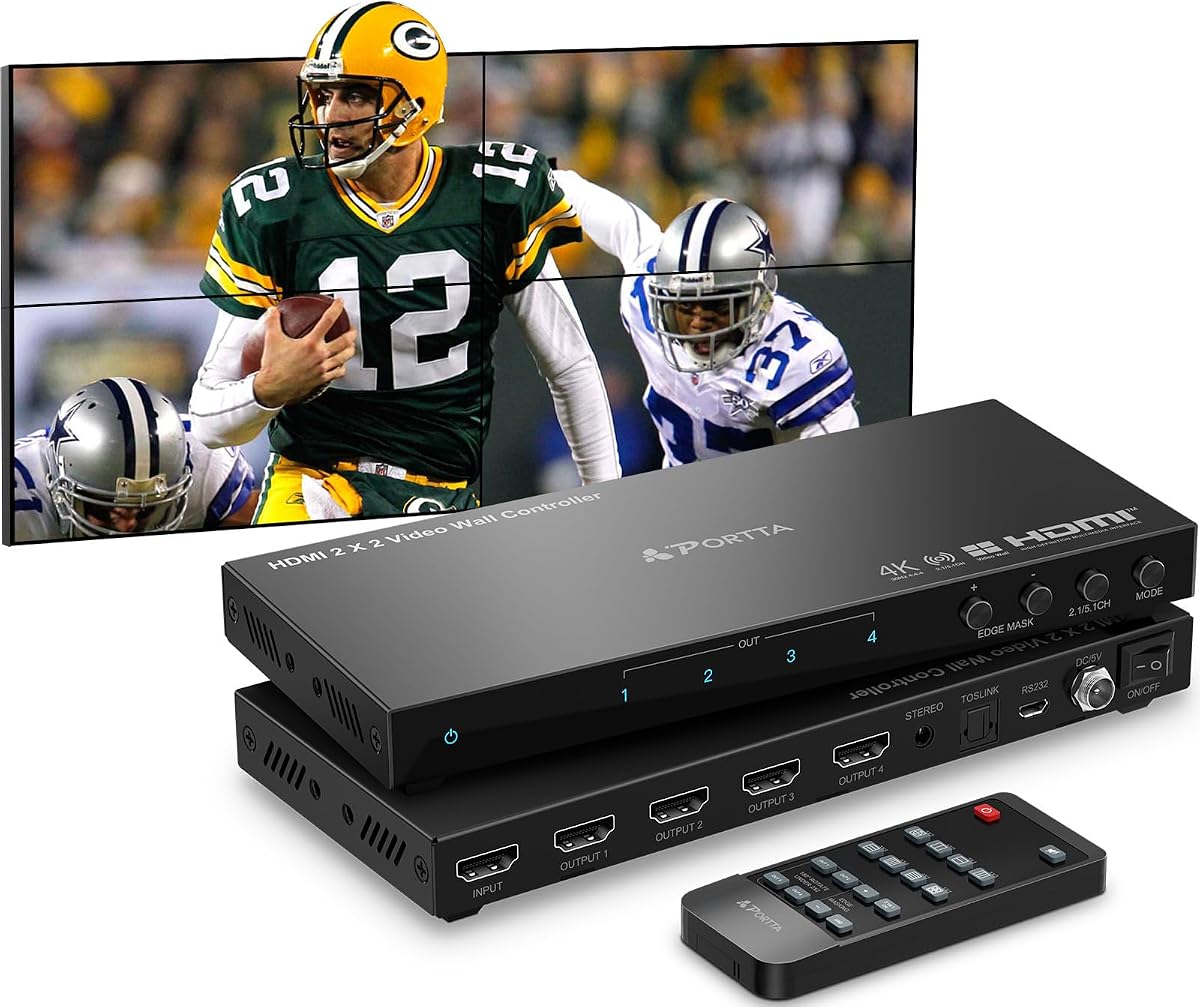
The PORTTA Video Wall Controller provides a wide range of display configurations, supporting 11 different splicing modes. This flexibility allows users to arrange their screens in various layouts to suit different content requirements. It is designed to handle a single HDMI input and distribute it across four outputs, making it a straightforward solution for basic video walls.
We may earn a commission when you buy through this link, at no additional cost to you.
One of its notable features is the 180-degree rotation capability for individual screens. This is especially useful when you need to adjust the orientation of specific monitors within the array to minimize bezel gaps. The device also includes edge masking to prevent distortion and ensure the image looks natural across the combined display.
Control options are diverse, with support for manual control, IR remote, and RS232. This ensures that the device can fit into both manual and automated setups. The audio extractor supports Toslink and 3.5mm outputs, giving you flexibility in how you manage sound. However, the output is fixed at 1080p, which is a standard trade-off in this price range.
This controller is ideal for advertising, entertainment, and information display applications where layout flexibility is key. It comes with mounting ears and a two-year warranty, adding to its value. With lifetime technical support, you can expect assistance if you encounter any issues during setup or operation.
Support for 11 splicing modes allows you to customize your video wall layout to fit the physical space and content presentation needs precisely.
Edge masking helps prevent unnatural appearance by adjusting the output picture edges, ensuring a cleaner look across the video wall array.
We may earn a commission when you buy through this link, at no additional cost to you.
This OREI model combines a 4×4 HDMI matrix with video wall capabilities, offering a powerful solution for complex multi-screen setups. It allows you to switch four HDMI sources to four displays or split a single source across multiple screens. The inclusion of web control provides a modern approach to managing your video wall remotely.
We may earn a commission when you buy through this link, at no additional cost to you.
The device supports inputs up to 4K@60Hz, ensuring that high-quality content is maintained throughout the processing chain. It is compatible with various source devices such as Blu-ray players, PCs, and gaming consoles. Advanced EDID management ensures that each display is correctly recognized and configured for optimal performance.
While it offers robust features, the setup may be more complex than simpler controllers due to the matrix functionality. The price point reflects the added capabilities of supporting multiple sources and outputs simultaneously. However, for environments where switching between different inputs is frequent, this model provides significant value.
This unit is best suited for professional environments that need flexibility in source routing. The video wall feature allows for unified content display, while the matrix capability ensures you can manage multiple signals effectively. With its comprehensive feature set, it stands out as a versatile option for demanding installations.
Support for four HDMI inputs allows you to connect multiple sources and switch between them effortlessly without needing extra hardware.
Web control enables you to manage settings and switching via a browser interface, simplifying administration for remote locations.
We may earn a commission when you buy through this link, at no additional cost to you.
The ISEEVY 4K60 Video Wall Controller stands out by supporting true 4K outputs for each connected display. This means that each of the four HDMI outputs can deliver 3840*2160 resolution, maintaining the sharpness of your source content. It supports both HDMI and USB-C inputs, accommodating a wide range of source devices.
We may earn a commission when you buy through this link, at no additional cost to you.
With multiple splice modes like 2×2, 1×2, and 1×4, you can arrange your displays to suit different viewing requirements. The ability to rotate each output port 180 degrees helps with physical mounting arrangements, ensuring that your content is always oriented correctly. This flexibility is valuable in complex installation scenarios.
The plug-and-play design ensures that setup is straightforward without the need for extra drivers. The device is designed for stable 24×7 operation, making it suitable for environments that run continuously. While it comes with a higher price point, the ability to output true 4K across all screens justifies the investment for high-fidelity displays.
This controller is ideal for professional setups where visual quality is paramount. Whether you are creating an advertising display or a monitoring station, the high-resolution output ensures clarity. With its robust design and flexible features, it provides a reliable foundation for high-end video wall projects.
Support for 3840*2160 output on each port ensures that your video wall delivers crisp and detailed visuals across the entire array.
Designed for stable 24×7 operation, this controller is built to handle continuous use in commercial environments without performance degradation.
We may earn a commission when you buy through this link, at no additional cost to you.
This video wall controller offers a unique USB auto display feature, allowing you to insert a USB drive and have content play automatically. This is ideal for digital signage applications where content updates are frequent and manual intervention is minimal. The device supports input resolutions up to 3840×2160@60Hz, ensuring high-quality processing.
We may earn a commission when you buy through this link, at no additional cost to you.
It supports a variety of video wall modes and includes border adjustment to eliminate black edges, creating a cleaner look. The built-in audio output allows for sound playback without needing external extraction. Additionally, it supports IR extension for long-distance remote control, which is useful for large or hard-to-reach installations.
The device also allows for adjustments to image brightness, sharpness, and contrast, giving you fine control over the final look. While the USB playback is convenient, it may not support all file formats, so compatibility should be checked. The high customer rating reflects its reliability and ease of use in typical deployment scenarios.
If you need a controller that supports USB media playback alongside standard HDMI inputs, this model is an excellent choice. It simplifies content management for displays that need to run on a loop. With its extensive feature set, it delivers strong value for professional and commercial video wall setups.
USB auto display allows you to insert media and start playback without manual source selection, streamlining operations for digital signage.
Built-in adjustments for brightness, sharpness, and contrast let you fine-tune the image to suit the specific lighting conditions of your environment.
We may earn a commission when you buy through this link, at no additional cost to you.
This ISEEVY controller is designed for larger video wall setups, supporting up to six HDMI outputs. This allows you to create a 2×3 or 3×2 arrangement, which is ideal for large-format displays that need more coverage. Each output port supports 3840*2160 resolution, ensuring high-quality visuals across all connected screens.
We may earn a commission when you buy through this link, at no additional cost to you.
It supports multiple splice modes, including 2×2 and 1×5 configurations, giving you flexibility in how you arrange your video wall. The inclusion of USB-C input makes it compatible with modern devices. The 180-degree rotation feature helps with physical mounting, ensuring that content is always oriented correctly regardless of screen placement.
The plug-and-play design simplifies installation, and the device is built for stable 24×7 operation. While it requires more cables for six outputs, the capability to manage a larger array justifies the effort for big displays. It is an excellent option for large retail spaces or command centers requiring extensive visual coverage.
If you need to expand your video wall beyond four screens, this model provides a reliable path forward. The support for high resolutions and robust control options makes it a strong contender for professional deployments. With its design focused on stability and flexibility, it meets the demands of large-scale video wall installations.
With six HDMI outputs, this controller enables the creation of larger video walls such as 2×3 or 3×2, perfect for expansive visual coverage needs.
USB-C input support ensures you can connect newer laptops and devices without needing adapters, maintaining a modern and clean setup.
We may earn a commission when you buy through this link, at no additional cost to you.
Selecting the right HDMI video wall controller requires understanding your specific needs in terms of resolution, input sources, and control options. This guide outlines the key factors to consider to ensure you find a processor that meets your requirements.
One of the most critical factors is the resolution support for both input and output. Ensure the controller supports the maximum resolution your source devices can output, such as 4K 60Hz. Similarly, verify that the outputs can handle the native resolution of your displays to avoid downscaling issues.
Always check the input and output resolution limits in the product specifications to ensure compatibility with your existing hardware.
Consider the variety of display modes available on the controller. Look for models that support common layouts like 2×2, 1×4, and portrait options. The ability to rotate images or adjust bezels can significantly improve the visual experience by minimizing gaps between screens.
Select a controller that offers the display modes and rotation features that align with your physical installation needs.
If your setup requires separate audio, check for audio extraction features. Many controllers offer optical and analog outputs to route sound to external speakers. This is essential for environments where you need high-quality audio without it being tied to the video display.
Verify the available audio ports and supported formats to ensure they match your sound system requirements.
The method you use to control the device is important for ease of use. Look for models with IR remotes for manual adjustments and RS-232 or LAN support for integration into automation systems. Web control adds an extra layer of convenience for remote management.
Choose a controller that offers the level of control you need, whether manual or automated.
Ensure the controller supports the types of inputs your source devices use. HDMI is standard, but USB-C or DVI options may be necessary for older or modern equipment. Multiple inputs can also allow you to switch between different sources without re-plugging cables.
Match the input options to your source devices to avoid the need for additional adapters or converters.
For installations in different regions, check if the power supply supports dual voltage. Build quality is also important for devices that need to run 24/7. Look for models with good warranties and support to ensure long-term reliability.
Consider the power requirements and warranty terms to ensure the device fits your operational environment.
Finally, consider your budget. While premium models offer more features, budget-friendly options can still provide reliable performance for basic needs. Weigh the features you need against the price to find the best value for your specific use case.
Balance the cost against the features you truly need to avoid overpaying for unnecessary capabilities.
To get started, connect your source device to the controller using a high-quality HDMI or USB-C cable. Ensure the cables are rated for the resolution you are using to avoid signal issues. Connect your displays to the output ports in the order you want them to appear on the video wall.
Once connected, power on the device and use the remote or software to select the desired display mode. Adjust settings like rotation and edge masking to align your screens perfectly. If you are using audio extraction, connect your speakers to the optical or analog outputs.
Regular maintenance involves checking cables for damage and keeping the controller in a well-ventilated area to prevent overheating. Keep the firmware updated if possible to ensure compatibility with new devices. Avoid touching the ports directly to prevent physical damage.
Yes, it is important to use high-speed HDMI cables that support the resolution you plan to use. For 4K content, you should use cables rated for High Speed with Ethernet. Using poor-quality cables can result in signal loss or flickering.
Yes, many of the reviewed controllers support USB-C input. However, ensure your laptop outputs video over USB-C and that the controller supports the resolution you need. You may need a USB-C to HDMI adapter depending on your specific setup.
Most modern controllers include bezel adjustment or edge masking features. These allow you to crop the output slightly to account for the physical thickness of the screen borders. You can adjust these settings through the remote or configuration menu.
Many models include RS-232 or LAN control capabilities, which allow you to integrate the controller into a remote management system. Look for features like web control if you need to access settings from a computer or mobile device.
The controller will downscale or upscale the signal to match your displays. Most controllers support input resolutions lower than their maximum output, so a 1080p source will work fine on a 4K controller.
Not necessarily. Many controllers come with audio extraction outputs that allow you to connect external speakers directly. If you need more advanced audio features, you may still need a separate system, but basic needs are often covered.
Most budget controllers support four screens, but there are models available that support up to six. Check the number of output ports in the product specifications to ensure it matches your desired setup size.
Yes, professional-grade video wall controllers are designed for continuous operation. Look for devices that specify stable 24×7 work and have adequate cooling to ensure long-term reliability in commercial settings.
Choosing the right HDMI video wall controller depends on your specific needs for resolution, layout flexibility, and budget. The models reviewed above offer a range of options that cater to both entry-level and advanced professional requirements. By understanding your source and display needs, you can narrow down your options effectively.
Consider factors like input type, audio extraction, and control options when making your final decision. A unit that supports your future needs will save you from upgrading too soon. Whether you are setting up a retail display or a corporate control room, quality hardware makes a difference.
Always check the current availability and details before purchasing. Prices and stock can change, and ensuring you have the correct model for your setup is essential. With the right controller, you can create impressive multi-screen displays that enhance your content delivery.