
Redragon K673 HE Wired Hall-Effect Rapid Trigger Magnetic Gaming Keyboard
4.1Editor score
8000Hz polling rate
Rapid trigger support
Adjustable actuation
Discover the top keyboards for Valorant ranked by speed and precision. We compare Hall Effect, magnetic, and optical switches for competitive FPS performance.
Finding the right keyboard for Valorant means prioritizing speed, accuracy, and reliable response times. Competitive players need tools that minimize input lag and maximize control during intense firefights and strategic moments.
We evaluated ten top-rated gaming keyboards focusing on switching technology, polling rates, and layout efficiency. Each model offers unique features designed to enhance counter-strafing, rapid tapping, and overall gameplay fluidity.
This guide details what each pick brings to your setup along with key strengths and trade-offs. Prices fluctuate frequently so verify current offers before purchasing to ensure you get the best value today.
4.1Editor score
5.0Editor score

4.6Editor score
This table compares key specifications across all ten models to help you decide quickly. Focus on switch type, polling rate, and layout to match your playstyle and desk space.






The Redragon K618 HE stands out as a top choice for Valorant players seeking precision and speed. With a perfect rating from users it delivers exceptional performance through low-profile magnetic switches designed for rapid input.
We may earn a commission when you buy through this link, at no additional cost to you.
Its rapid trigger feature enables instant reset for counter-strafing which is crucial in tactical shooters. The built-in macro keys allow custom bindings without needing heavy software installations saving time during setup.
While it lacks wireless connectivity the wired connection ensures zero latency for competitive play. The slim design reduces wrist strain which helps maintain comfort during long gaming sessions or daily tasks.
This keyboard is ideal for players who prioritize speed and customization without breaking the bank. Its combination of hardware features and intuitive controls makes it a strong contender for serious Valorant enthusiasts.
The low-profile switches reduce travel distance allowing quicker key registration than standard mechanical options for faster reaction times.
Dedicated macro keys let you record complex sequences on-the-fly making it easy to bind utility or abilities instantly.
We may earn a commission when you buy through this link, at no additional cost to you.
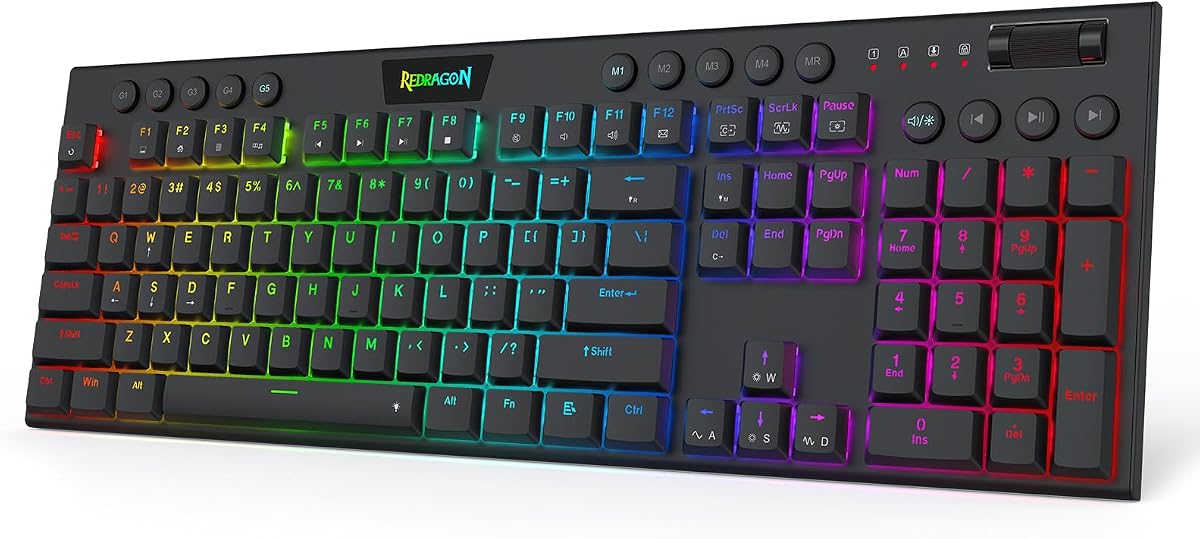
Budget-conscious gamers will find great value in the Redragon K673 HE which offers premium features at an accessible price. Its magnetic switches provide the rapid response needed for competitive play without high costs.
We may earn a commission when you buy through this link, at no additional cost to you.
The 8000Hz polling rate ensures inputs are registered almost instantly reducing delay between action and on-screen response. A single control knob simplifies volume and lighting adjustments keeping hands on the keys.
While the software is straightforward it covers essential tuning like actuation depth and trigger sensitivity. The floating structure dampens noise making it suitable for shared spaces or streaming setups.
For those entering competitive FPS titles this keyboard balances cost and performance effectively. It removes barriers to entry for high-speed gaming while providing reliable hardware for consistent matches.
Inputs transmit up to eight times faster than standard keyboards ensuring every move counts during critical moments.
Independent switch-plate design gives a soft bounce instead of a harsh clack enhancing comfort over long sessions.
We may earn a commission when you buy through this link, at no additional cost to you.
The Razer Huntsman Mini delivers top-tier performance for players willing to invest in premium hardware. Optical switches register keystrokes at the speed of light ensuring minimal latency for fast-paced gameplay.
We may earn a commission when you buy through this link, at no additional cost to you.
Razer Snap Tap optimizes movement inputs which can improve counter-strafing consistency in tactical shooters. The full aluminum frame provides structural integrity ensuring the board stays stable during intense typing.
While costly its build quality and feature set justify the expense for enthusiasts. The compact layout frees mouse space though it requires learning key combinations for missing navigation keys.
This keyboard suits those who demand the fastest possible response and a robust build. Its ecosystem integration and customization options make it a standout for dedicated Valorant competitors.
Light-based actuation eliminates mechanical bounce for faster and more reliable key presses than traditional switches.
Synapse prioritizes the latest input between assigned keys streamlining movement and reducing finger fatigue.
We may earn a commission when you buy through this link, at no additional cost to you.
The Redragon K686 HE mirrors the performance of its sibling while offering slight variations in build. Its magnetic switches ensure rapid input registration which is vital for competitive accuracy in shooters.
We may earn a commission when you buy through this link, at no additional cost to you.
Users benefit from an 8000Hz polling rate reducing latency between key presses and system recognition. The dual-module floating structure provides a soft tactile feel that reduces finger strain over time.
While it shares core features with other models in the line the K686 HE focuses on consistency and comfort. The media knob allows easy volume control without disrupting gameplay flow.
This model is a reliable choice for gamers seeking high-end specs without premium pricing. Its balanced performance and quiet operation make it suitable for both gaming and work environments.
No physical contact during keypress prevents wear ensuring consistent performance throughout the keyboard lifespan.
Save multiple actuation settings via software to adapt to different game requirements effortlessly.
We may earn a commission when you buy through this link, at no additional cost to you.
Corsair delivers a compact solution with the Clipper PRO MINI which excels in both speed and durability. MGX switches offer adjustable actuation points allowing players to fine-tune their exact response needs.
We may earn a commission when you buy through this link, at no additional cost to you.
Rapid Trigger technology ensures instant reset enabling faster tapping and movement transitions essential for tactical shooters. The IP57 rating provides peace of mind against spills during intense gaming sessions.
The 60% layout maximizes mouse space while retaining essential functionality for FPS games. PBT keycaps resist wear ensuring the board maintains a premium feel over long periods of use.
Ideal for players who want a space-saving build without sacrificing high-end features. This keyboard blends robust construction with precise controls to support consistent competitive performance.
IP57 water and dust resistance combined with fast switches ensures reliable performance even in active setups.
Multi-Action and Smart Tap features add layers of customization for efficient playstyle adaptation.
We may earn a commission when you buy through this link, at no additional cost to you.
The Aula WIN60 HE combines advanced magnetic technology with user-friendly web-based configuration. Its hot-swappable design allows easy customization of switches to match personal preferences without soldering.
We may earn a commission when you buy through this link, at no additional cost to you.
Rapid trigger mode with ultra-low latency ensures rapid-fire inputs register accurately. The 8000Hz polling rate provides an edge in responsiveness for competitive players demanding precision.
While the layout is compact it maximizes desk space for broader mouse movement. The RGB lighting offers visual flair while maintaining focus on performance and functionality.
This keyboard is perfect for enthusiasts who want modularity and speed in one package. It supports a wide range of playstyles through its deep customization and responsive hardware.
Hot-swapping allows you to try different magnetic switches to find your ideal tactile or linear feel.
Access full customization without heavy software downloads using the lightweight web driver interface.
We may earn a commission when you buy through this link, at no additional cost to you.
The AULA WIN68 HE offers a slight layout upgrade over the 60% models by including arrow keys. This addition improves usability for gaming navigation and general typing without adding bulk.
We may earn a commission when you buy through this link, at no additional cost to you.
Magnetic switches enable rapid triggering and adjustable actuation allowing precise control over keystroke depth. The 8000Hz polling rate ensures inputs are transmitted instantly for consistent gameplay performance.
Web-based customization simplifies setup for users wanting to tweak lighting and macros easily. The compact design remains portable making it easy to take to LAN parties or work setups.
This model is suited for players needing a bit more functionality than a pure 60% board. It balances compactness with essential keys while maintaining high-speed performance.
Arrow keys and function access retain utility while saving desk space compared to full-size layouts.
Ultra-low latency ensures commands execute immediately keeping you ahead in fast-paced matches.
We may earn a commission when you buy through this link, at no additional cost to you.
Wireless freedom meets gaming performance with the AULA F75 Pro offering tri-mode connectivity for versatile setups. Its 2.4GHz mode provides low-latency connections suitable for competitive gaming.
We may earn a commission when you buy through this link, at no additional cost to you.
Hot-swappable switches let users swap to preferred mechanical types for their ideal typing feel. The side-printed PBT keycaps offer durability and a unique aesthetic that stands out.
While wired options often beat wireless speed the F75 Pro minimizes lag enough for most players. The multi-function knob adds convenience for volume and lighting adjustments without breaking focus.
This keyboard suits those who want a versatile device for gaming and work without cables. It delivers strong build quality and flexibility making it a great hybrid option.
Switch between wired 2.4GHz and Bluetooth to match your setup and usage needs effortlessly.
Swap switches easily to refine your mechanical experience without needing soldering skills or tools.
We may earn a commission when you buy through this link, at no additional cost to you.
The ATTACK SHARK X68 HE delivers impressive magnetic performance at a very affordable price. Rapid trigger support enables quick resets for accurate movement and rapid shooting tactics.
We may earn a commission when you buy through this link, at no additional cost to you.
Its top mount structure and PORON layers enhance typing feel reducing noise and vibration during use. Web driver access simplifies remapping and macro setup without complex software installation.
While build materials are modest the performance rivals more expensive boards. It provides essential features for competitive play without unnecessary bloat or cost.
Ideal for entry-level gamers seeking high-speed performance on a tight budget. It offers strong value by focusing on speed and customization rather than extra frills.
Ultra-fast polling and precise RT ensure inputs register instantly giving a competitive edge in matches.
Sound dampening layers create a quieter experience helping maintain focus during long sessions.
We may earn a commission when you buy through this link, at no additional cost to you.
ASUS offers a feature-rich option with the Strix Scope II 96 which balances full-size functionality with a compact footprint. Hot-swappable ROG switches provide flexibility for customizing your typing and gaming feel.
We may earn a commission when you buy through this link, at no additional cost to you.
Tri-mode wireless ensures seamless connectivity across devices while maintaining low latency for gaming. The 96% layout includes a numpad without the full bulk of a 104-key board.
Integrated sound dampening enhances acoustics making each keystroke satisfying yet quiet. It suits players who need number keys for work or macros without sacrificing gaming performance.
This keyboard fits users wanting a versatile all-in-one solution. It combines connectivity build quality and layout efficiency into a single high-end peripheral.
Retain number keys and arrow keys in a narrower frame that fits most modern desk setups.
ROG SpeedNova ensures stable low-latency wireless connection for responsive gameplay anywhere.
We may earn a commission when you buy through this link, at no additional cost to you.
Selecting the right keyboard requires understanding key technologies and layout preferences that affect your gameplay performance.
Hall Effect and magnetic switches allow rapid trigger and adjustable actuation which is critical for fast-paced FPS games. These switches detect keystrokes without physical contact reducing wear and increasing speed.
Opt for magnetic switches if you want customization and durability for long-term competitive use.
Polling rate determines how often the keyboard sends input to the computer. Higher rates like 8000Hz reduce latency improving responsiveness during intense matches.
Prioritize keyboards with 8000Hz polling if you demand the fastest possible input registration.
Adjustable actuation lets you set how far a key must press to register. Shallow actuation aids rapid taps while deeper actuation prevents accidental presses.
Choose models that allow fine-tuning to match your personal typing style and game needs.
Compact layouts like 60% or 68% free up mouse space for lower sensitivity aiming. However they may lack navigation keys requiring function key combos.
Select a layout based on how much desk space you need versus functional key availability.
Quality materials like aluminum frames and PBT keycaps resist wear and damage over time. Dampening layers can also improve comfort and reduce noise.
Look for sturdy construction to ensure the keyboard withstands heavy use during daily play.
Wired keyboards offer the lowest latency while wireless provides flexibility and reduces cable clutter. Consider 2.4GHz wireless if you need mobility without compromising speed.
Pick wired for pure competitive play but consider wireless if you prefer a clean desk setup.
Good software allows key remapping macro creation and lighting adjustments. Web-based drivers can simplify setup without installing heavy applications.
Ensure the software is user-friendly to fully utilize the keyboard's advanced features.
Prices vary widely based on features like wireless connectivity switch type and build quality. Budget options often deliver strong core performance for competitive play.
Balance features against your spending limit to get the best performance for your investment.
Familiarize yourself with rapid trigger settings by adjusting actuation depth to suit your playstyle. Use software to save profiles that match specific game requirements.
Keep the keyboard clean by gently brushing away dust and debris from switches regularly. Use compressed air to remove particles that could interfere with key movement.
For wireless models monitor battery life and charge before sessions to avoid interruptions. Use the USB receiver or Bluetooth connection for stable and consistent input performance.
Yes Hall Effect switches enable rapid trigger allowing keys to reset instantly after release. This feature significantly improves counter-strafing speed and accuracy in tactical shooters.
A 60% layout maximizes mouse space for low-sensitivity aiming which many pros prefer. However ensure you can adapt to missing arrow keys via function layers.
Higher polling rates like 8000Hz reduce input latency so keystrokes register faster. This makes movements and shots more responsive during critical combat moments.
Modern 2.4GHz wireless keyboards offer low latency comparable to wired ones. They are suitable for competitive play if they have minimal input delay.
Shallow actuation around 0.1mm to 1.5mm helps rapid firing but deeper settings prevent misfires. Find a balance that suits your finger pressure and playstyle.
Many keyboards include firmware support for rapid trigger but software allows fine-tuning actuation and mapping. Check if the model supports web or desktop drivers for full control.
PBT keycaps are more durable and resistant to shine compared to ABS. They offer better texture and longevity for intensive use over time.
Yes magnetic switches have no physical contact points to wear out. They typically offer longer lifespans and consistent performance than traditional mechanical switches.
Choosing the right keyboard for Valorant can enhance your precision speed and overall gameplay experience. Each option in this guide offers unique strengths tailored to competitive FPS demands.
Prioritize rapid trigger technology and adjustable actuation to maximize responsiveness. Consider layout size and durability based on your personal comfort and setup needs.
Prices and availability change so verify current deals before purchasing. Finding the perfect fit helps you dominate every match with confidence and control.