
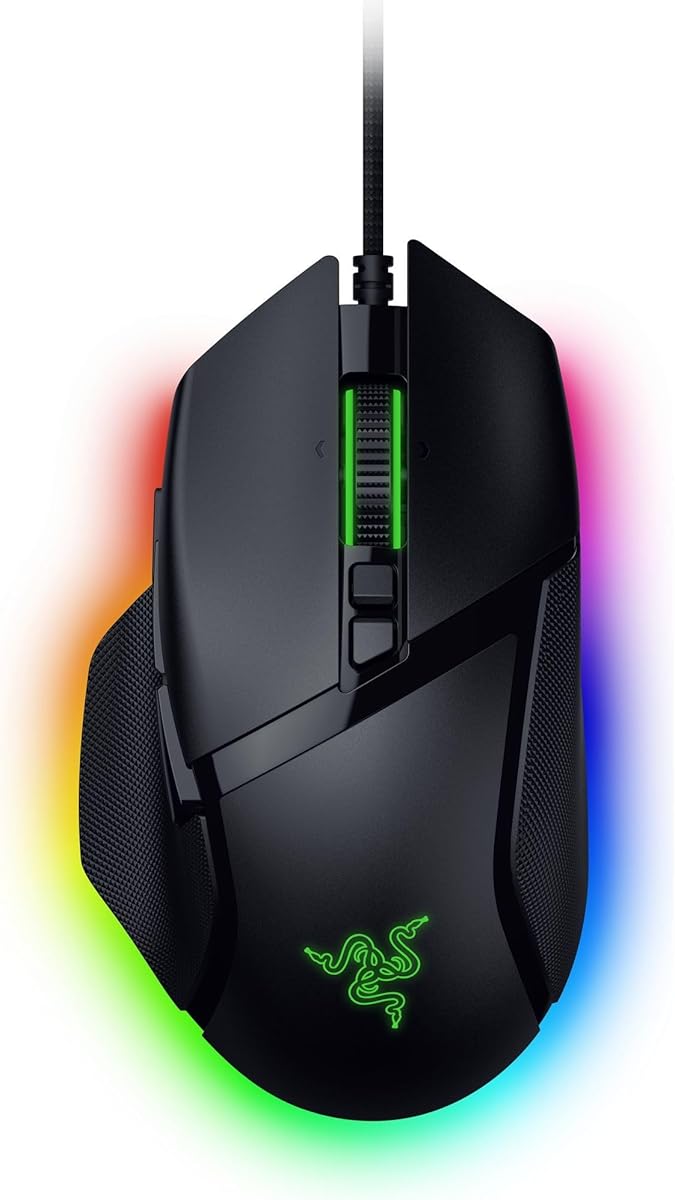
Razer Basilisk V3
4.6Editor score
HyperScroll tilt wheel for smooth scrolling
11 Chroma RGB lighting zones
Ergonomic design with thumb rest
Discover the top ten analog gaming mice for precision and comfort. This guide compares sensors, build quality, and features to help you choose.
Analog gaming mice offer precise control and tactile feedback essential for competitive play. They combine ergonomic designs with advanced sensors to track every movement accurately during intense sessions.
We compared ten top-rated models based on sensor performance, build quality, and user comfort. Each product was evaluated for reliability, customization options, and overall value for different gaming styles.
Each pick highlights key strengths and ideal use cases for various gamers. Prices fluctuate often so check current listings before purchasing to ensure you get the best deal available today.
4.6Editor score

4.6Editor score

4.5Editor score
This table provides a side-by-side comparison of all ten featured models. It highlights key specifications and unique features to help you quickly identify the right mouse for your needs.



The Logitech G502 Hero stands out as a top-tier wired gaming mouse with a stellar rating. It features the HERO sensor for unmatched tracking accuracy and includes multiple programmable buttons for complex actions.
We may earn a commission when you buy through this link, at no additional cost to you.
Its standout qualities include a dual mode scroll wheel and customizable RGB lighting. The adjustable weights allow users to tailor the mouse feel to their specific grip and playstyle preferences perfectly.
Some trade-offs include reliance on proprietary software and a wired design. These are acceptable given the performance stability and the rich feature set it offers for competitive gaming scenarios.
Gamers seeking precision and versatility should buy this model. It is highly recommended for those who need extensive control options without sacrificing build quality or sensor performance.
The HERO sensor delivers sub-micron level tracking with zero smoothing for absolute accuracy during rapid movements.
Eleven programmable buttons allow you to map macros and commands directly to the mouse for faster reaction times.
We may earn a commission when you buy through this link, at no additional cost to you.
The Razer Basilisk V3 offers incredible value for gamers on a budget. It maintains high performance standards with a responsive sensor and durable switches suitable for long gaming sessions.
We may earn a commission when you buy through this link, at no additional cost to you.
Key strengths include the versatile HyperScroll wheel and comfortable ergonomic design. The extensive RGB customization adds visual appeal without compromising the core gaming functionality of the device.
Trade-offs involve dependence on software and a relatively heavy chassis. These are manageable given the price point and the robust build quality that ensures longevity over time.
Casual gamers and students should consider this model. It provides premium features at a lower cost making it accessible for a wide range of players.
The HyperScroll tilt wheel offers free-spinning for quick navigation and tactile mode for precise control when needed.
Designed with a thumb rest and contoured shape to reduce strain during extended use without discomfort.
We may earn a commission when you buy through this link, at no additional cost to you.
The Logitech G403 Hero is a reliable choice for those seeking balanced performance. It features a robust build and a sensor that handles various gaming scenarios effectively for daily use.
We may earn a commission when you buy through this link, at no additional cost to you.
Strengths include the rubberized grips and adjustable weight for personalized comfort. The LIGHTSYNC RGB technology allows for visual synchronization with other gaming peripherals easily.
Trade-offs include a lower button count compared to MMO mice. This is acceptable for FPS players who prioritize precision over complex macro capabilities.
Players looking for a comfortable all-rounder should buy this mouse. It delivers consistent performance without unnecessary complexity or steep learning curves.
Includes a removable weight to adjust balance and feel based on personal preference.
Constructed with lightweight materials to ensure agility during fast-paced gameplay.
We may earn a commission when you buy through this link, at no additional cost to you.
The Logitech G203 serves as an excellent entry point into gaming peripherals. It delivers essential features without unnecessary bloat making it perfect for newcomers to PC gaming.
We may earn a commission when you buy through this link, at no additional cost to you.
Strengths include the mechanical button tensioning for crisp clicks and durable construction. The RGB lighting adds flair while the sensor remains accurate for everyday tasks and games.
Trade-offs are minimal given the price but it lacks advanced features like DPI switches. This is acceptable for casual gamers who do not need extensive customization options.
Students and casual players should choose this mouse. It provides a dependable foundation for gaming without a significant financial commitment.
The small size fits well on smaller desks and is ideal for palm grip users.
Delivers smooth tracking performance even on standard desks without a mousepad.
We may earn a commission when you buy through this link, at no additional cost to you.
The Logitech MX518 revitalizes a classic design with modern sensor technology. It combines nostalgia with high-end specs to deliver a reliable experience for veterans and new users.
We may earn a commission when you buy through this link, at no additional cost to you.
Strengths include the HERO 25K sensor and on-board memory for profile storage. This ensures settings remain intact across different PCs without needing software installation.
Trade-offs involve a weight that might feel heavy to some and an older aesthetic. These are acceptable considering the performance reliability and build integrity it offers.
Fans of classic ergonomics should buy this model. It balances traditional comfort with cutting-edge tracking technology perfectly.
Save up to five profiles directly on the mouse for instant access on any computer.
The 1ms report rate ensures minimal latency for fast competitive gameplay scenarios.
We may earn a commission when you buy through this link, at no additional cost to you.
The Corsair Scimitar RGB Elite is built specifically for MMO and MOBA players needing extensive controls. Its unique side button slider ensures optimal ergonomic positioning for your hand.
We may earn a commission when you buy through this link, at no additional cost to you.
Strengths include 17 programmable buttons and a robust PixArt sensor for accurate tracking. The contoured shape with finger rest provides stability during complex macro execution.
Trade-offs include weight and reliance on iCUE software for customization. These are acceptable for target users who prioritize functionality over light portability.
MMO enthusiasts should invest in this mouse. It offers unparalleled access to commands and macros essential for high-level play.
The Key Slider System lets you move side buttons to fit your grip perfectly.
Execute complex in-game actions instantly with dedicated button mapping capabilities.
We may earn a commission when you buy through this link, at no additional cost to you.
The Razer Basilisk V3 35K delivers top-tier performance with a Focus Pro sensor for unmatched precision. It is engineered for gamers demanding absolute accuracy and speed.
We may earn a commission when you buy through this link, at no additional cost to you.
Strengths include the Gen-3 optical switches for rapid response and a flexible Speedflex cable. These features reduce friction and enhance the overall user experience significantly.
Trade-offs involve a higher price point and software dependencies. These are acceptable given the superior build quality and performance metrics offered.
Pro gamers and enthusiasts should buy this model. It is built to withstand competitive demands while providing advanced customization options.
The Focus Pro 35K sensor tracks on various surfaces including glass for versatility.
Gen-3 switches provide zero double-clicking issues and faster actuation speeds.
We may earn a commission when you buy through this link, at no additional cost to you.
The Corsair NIGHTSWORD RGB offers a unique smart weight system that allows precise balance adjustment. It is designed for gamers who prioritize perfect weight distribution for stability.
We may earn a commission when you buy through this link, at no additional cost to you.
Strengths include the ability to choose from 120 weight configurations and high-end rubber grips. The sensor ensures accurate tracking across various play styles without lag.
Trade-offs involve a premium price and a potentially heavy base weight for some. These are acceptable for users seeking a truly personalized feel.
FPS players needing stability should buy this model. It stands out for its innovative approach to weight customization and comfort.
Smart software automatically detects center of gravity for optimal setup every time.
High precision optical sensor delivers consistent tracking for critical aiming moments.
We may earn a commission when you buy through this link, at no additional cost to you.
The Corsair M65 RGB Ultra is optimized for FPS gaming with high polling rates and sensor fusion. It aims to provide the fastest response times for competitive shooters.
We may earn a commission when you buy through this link, at no additional cost to you.
Strengths include the Marksman sensor and AXON technology for ultra-low latency. The aluminum frame ensures durability and a premium build quality for long sessions.
Trade-offs include high cost and a heavier build compared to lightweight alternatives. These are acceptable for users prioritizing precision and stability over speed.
Competitive FPS players should buy this mouse. It offers cutting-edge technology to enhance accuracy and reaction times significantly.
Native 8000Hz polling rate provides faster feedback to your system than standard mice.
The iconic aluminum frame ensures the mouse stays sturdy under intense usage.
We may earn a commission when you buy through this link, at no additional cost to you.
The Razer Basilisk V3 Custom offers extensive customization options for both look and function. It features a robust sensor and ergonomic shape to support long gaming sessions effectively.
We may earn a commission when you buy through this link, at no additional cost to you.
Strengths include 11 programmable buttons and vibrant RGB lighting for a personalized setup. The Focus+ sensor ensures accurate tracking without smoothing or filtering artifacts.
Trade-offs involve a lack of physical weight adjustment. This is acceptable for users who prefer a fixed balance over adjustable configurations.
Gamers who love personalization should buy this model. It blends style with practical features to create a unique gaming tool.
Over 16.8 million colors allow you to match your desk setup perfectly.
The Focus+ sensor delivers pixel-precise accuracy for all your gaming needs.
We may earn a commission when you buy through this link, at no additional cost to you.
Selecting the right analog gaming mouse depends on various factors including sensor quality, ergonomics, and additional features.
The sensor is the core component that tracks your movements. Look for models with high DPI and IPS ratings to ensure smooth tracking across different surfaces. Zero smoothing or acceleration ensures your physical movements are translated exactly on screen.
Prioritize mice with optical sensors for consistent performance and reliability during intense gaming sessions.
Comfort is critical because you will use the mouse for hours. Choose a shape that matches your grip style whether palm claw or fingertip. A good ergonomic design prevents strain and fatigue over time.
Ensure the mouse feels comfortable in your hand before committing to a purchase.
The number of programmable buttons varies by model. MMO players may need many keys while FPS players prefer fewer. Ensure the software supports the macros you need.
Select a button layout that feels natural for your gameplay style.
Weight affects control and fatigue. Some mice offer adjustable weights to tailor the feel. A balanced center of gravity improves precision.
Test different weights to find what suits your wrist strength best.
While not essential to performance RGB lighting adds aesthetic appeal. Some models sync with games or other peripherals. Decide if this adds value to your setup.
Choose RGB features based on personal preference rather than necessity.
Durability ensures longevity. Look for mice with high click ratings and sturdy materials. A robust build withstands accidental drops and heavy use.
Invest in materials that feel solid and reliable.
Most mice require software for customization. Check if the interface is user-friendly and offers robust options. Good software allows deep tweaking.
Ensure the software is stable and supported regularly.
Decide between wired and wireless. Wired offers zero latency while wireless offers freedom. Wired is often preferred for competitive play.
Choose based on your priority of performance versus convenience.
Connect your mouse to a USB port and install the required drivers. Allow the software to recognize the device automatically.
Customize your button mappings and DPI settings to fit your playstyle. Save profiles if the mouse supports onboard memory.
Keep the sensor clean and the mouse pad free of dust to ensure accurate tracking. Store the mouse in a safe place when not in use.
The ideal DPI varies based on playstyle and monitor size. Most gamers find 800 to 1600 DPI suitable for competitive play. Adjust based on comfort.
RGB lighting is purely aesthetic and does not affect performance. It adds visual flair but is not essential for gameplay. Choose if you enjoy customization.
Yes all models listed work with laptops as well as desktops. Ensure your OS is supported by the manufacturer software for full functionality.
High quality gaming mice can last for several years with proper care. The switches are rated for tens of millions of clicks ensuring durability over time.
Most models offer support for Mac but some features may require specific software. Check compatibility before purchasing to ensure all functions work properly.
Wired mice provide zero latency while wireless offers more freedom of movement. Choose wired for competitive gaming or wireless for general use.
Clean your mouse every few weeks to maintain optimal performance. Use a soft cloth and mild cleaner to avoid damaging the surface.
We covered ten top picks offering diverse features from precision to ergonomic comfort. Each model meets different needs depending on playstyle and budget.
Prioritize comfort and sensor quality over extra features if you play often. A solid foundation ensures better performance and less fatigue.
Remember that prices fluctuate so check current listings before finalizing your purchase to get the best deal available now.