
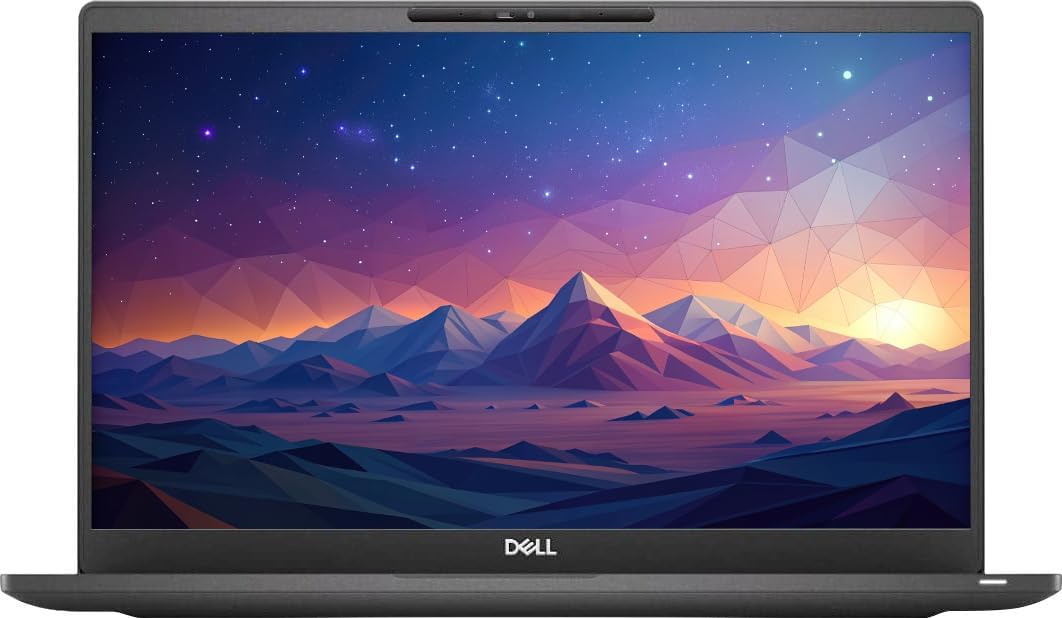
Dell Latitude 5420
3.8Editor score
Intel Core i5-1135G7
8GB RAM and 256GB SSD
14 inch FHD Display
Finding a reliable laptop without breaking the bank is a common challenge for professionals and students alike. Amazon Renewed Laptop options offer a compelling solution by providing professionally inspected devices that function like new at a fraction of the cost.
We have carefully evaluated ten top-rated models based on processor power, memory capacity, storage speed, and overall build quality. Our comparison focuses on business-grade machines from trusted brands like Dell and Lenovo that meet strict refurbishment criteria.
Each pick below highlights specific strengths and potential trade-offs to help you make an informed decision. Please note that availability and pricing can change quickly, so verify current details before completing your purchase on Amazon.
3.8Editor score

3.9Editor score

3.7Editor score
As an Amazon Associate we earn from qualifying purchases.
The following table provides a side-by-side overview of the key specifications for each model to help you quickly compare performance and features.




The Lenovo ThinkPad L14 stands out as the top choice for professionals seeking modern performance in a reliable chassis. With a 3.9 rating, it delivers a balanced mix of processing power and connectivity that suits daily business tasks effectively.
We may earn a commission when you buy through this link, at no additional cost to you.
Its AMD Ryzen 5 7530U processor provides six cores for efficient multitasking while the 16GB of RAM ensures smooth operation across multiple applications. The inclusion of Wi-Fi 6E and Bluetooth 5.3 keeps you connected with the latest wireless standards.
While the 256GB SSD is standard for this category, it may require external storage for heavy file users. The screen is clear and non-touch which reduces fingerprint smudges but the brightness is modest for outdoor use.
This laptop is ideal for office workers who value keyboard quality and port selection over raw graphical performance. It represents a smart investment for those needing a durable machine with updated internal components.
You get two USB-C ports alongside USB-A and HDMI 2.1 allowing flexible setup for monitors and peripherals without dongles.
The traditional Trackpoint nub allows precise cursor control without taking your hands off the home row for typing tasks.
We may earn a commission when you buy through this link, at no additional cost to you.
This Latitude 7420 model offers a premium experience with its carbon fiber build and powerful i7 processor. It is designed for users who need robust performance and durability in a business environment.
We may earn a commission when you buy through this link, at no additional cost to you.
The 11th Gen Core i7 processor supports higher clock speeds for demanding workloads while the 512GB SSD provides ample space for files. The backlit keyboard adds usability in low light conditions.
Although it commands a higher price, the build quality justifies the cost for those who carry their laptop daily. The battery life is decent but the extra features impact endurance slightly.
Buyers prioritizing material quality and speed will appreciate this option. It remains a top contender for executive or field work where reliability is non-negotiable.
The 14-inch FHD screen offers anti-glare protection and wide viewing angles suitable for long hours of content consumption.
Windows 11 Pro includes enhanced security features and management tools for business users requiring encrypted storage.
We may earn a commission when you buy through this link, at no additional cost to you.
The Latitude 5420 provides a solid entry point into business laptops with a competitive price. It balances cost and performance well for users with basic to moderate computing needs.
We may earn a commission when you buy through this link, at no additional cost to you.
Its Intel i5 processor delivers sufficient speed for web browsing and office suites. The Windows 11 Pro OS ensures you have access to enterprise features without extra licensing.
While 8GB RAM may limit heavy multitasking it is manageable for most standard workflows. The SSD ensures quick boot times and responsive system performance.
This model is perfect for students or light office work. It offers excellent value when you need reliability without paying for unnecessary high-end specs.
The 14-inch chassis is slim enough to fit easily in backpacks for commuters who need portability.
You get HDMI and USB ports for connecting to projectors and external drives effortlessly during presentations.
We may earn a commission when you buy through this link, at no additional cost to you.
This variant of the Latitude 5420 improves on the budget model by offering 16GB of RAM which significantly aids multitasking. It is a practical upgrade for users needing more headroom.
We may earn a commission when you buy through this link, at no additional cost to you.
The i5-1145G7 processor is slightly faster than the standard i5 and handles daily tasks with ease. The system stays responsive even with many browser tabs open.
The main limitation is the storage capacity which is common in this price range. Adding external storage is a simple solution for those with large media files.
It is a strong choice for professionals who need more memory but do not want to pay premium prices. The screen clarity and build quality meet business standards effectively.
The DDR4 RAM configuration ensures stable performance for long work sessions without thermal throttling issues.
The FHD panel provides sharp text and clear images suitable for document editing and spreadsheet work.
We may earn a commission when you buy through this link, at no additional cost to you.
This Latitude 7420 combines a good processor with generous storage and memory making it a highly versatile option. The 4.0 rating suggests consistent performance and reliability.
We may earn a commission when you buy through this link, at no additional cost to you.
Users benefit from the 512GB drive which reduces the need for cloud storage or external drives. The 16GB of RAM supports smooth operation for most business applications.
While the chassis is not premium metal it is durable enough for office use. The display offers good color accuracy for general viewing.
It is a safe bet for anyone needing a reliable all-rounder. The balance of specs ensures the machine stays relevant for years of daily use.
The larger SSD allows for faster data transfer rates and quicker file access during critical workflows.
Built-in Wi-Fi and Bluetooth keep peripherals like mice and headsets connected without clutter.
We may earn a commission when you buy through this link, at no additional cost to you.
The Latitude 7400 offers a slightly older generation of Intel processor but maintains strong connectivity options like Thunderbolt. It is a practical choice for those on a tighter budget.
We may earn a commission when you buy through this link, at no additional cost to you.
The NVMe drive ensures that boot times are fast despite the older CPU. The 16GB of RAM compensates for the processor age in memory-intensive tasks.
Windows 11 is supported on this model which is crucial for future-proofing. The build quality remains sturdy for business environments.
If you do not need the absolute latest speed this model delivers excellent value. It handles standard office work without any noticeable lag.
The Type-C port supports rapid charging which minimizes downtime when working away from a power outlet.
The 1080p display is sharp and bright enough for indoor work environments and clear reading.
We may earn a commission when you buy through this link, at no additional cost to you.
This model has a strong 4.2 rating indicating high user satisfaction for basic workloads. It is designed for stability and reliability in an office setting.
We may earn a commission when you buy through this link, at no additional cost to you.
The 16GB RAM ensures that the system remains fluid during normal use. While the screen is HD it is functional for text based work.
The battery life is average which is typical for older business models. It works well for desk based usage where it can stay plugged in.
For organizations needing multiple units this offers good cost efficiency. It is a reliable machine for standard administrative tasks.
The keyboard layout is comfortable for typing long documents without causing hand strain.
You get multiple USB ports and HDMI which simplifies connections to monitors and printers.
We may earn a commission when you buy through this link, at no additional cost to you.
The 5490 model stands out for its larger storage and higher resolution screen compared to peers. It is suitable for users who need more local space for files.
We may earn a commission when you buy through this link, at no additional cost to you.
The i5 processor is older but sufficient for general business use. The 16GB of RAM allows for comfortable multitasking.
Its 4.2 rating reflects the reliability of the refurbished unit. The build quality is robust and withstands daily transport.
This is a great choice for field workers needing to store data locally. The FHD screen provides better clarity for detailed work.
The 512GB drive gives you room to keep large databases or media files locally without external drives.
The FHD display ensures that text and images look crisp and easy to read.
We may earn a commission when you buy through this link, at no additional cost to you.
This version of the 5400 upgrades the screen to FHD which improves visual quality significantly. It is a smart pick for users who prioritize display resolution.
We may earn a commission when you buy through this link, at no additional cost to you.
The 4.0 rating highlights its reliability for daily tasks. The processor boost to 4.1GHz helps with responsive performance.
The 8GB RAM is adequate for standard office use but limits heavy workloads. The SSD ensures fast system startup and file access.
It is a balanced option for those needing a sharp screen without high cost. Suitable for presentations and general productivity tasks.
The FHD panel offers better brightness and color depth than standard HD displays for comfortable viewing.
The processor turbo mode allows quick bursts of speed for launching applications and opening files.
We may earn a commission when you buy through this link, at no additional cost to you.
This high-end model offers 32GB of RAM which is rare in this category. It is perfect for power users who run virtual machines or heavy software.
We may earn a commission when you buy through this link, at no additional cost to you.
The i7 processor combined with Thunderbolt 4 allows for rapid data transfer and external display support. It handles complex workflows with ease.
While it costs more the performance boost is significant for specific needs. The build quality matches other Latitude models.
Consider this if you need maximum memory for professional development or engineering. It is a rare find at this price point for high specs.
The 32GB of RAM ensures that memory usage does not become a bottleneck for large data sets.
Thunderbolt 4 ports allow for charging and high-speed docking with a single cable connection.
We may earn a commission when you buy through this link, at no additional cost to you.
Selecting a refurbished laptop requires attention to several technical factors to ensure you get a device that meets your specific needs.
The CPU generation dictates how long the machine will stay relevant. Look for 11th Gen Intel or newer Ryzen processors for better efficiency.
Always check the generation number to ensure you get the latest features and performance available.
16GB of RAM is the sweet spot for multitasking. Avoid 8GB models if you plan on keeping many applications open.
Higher RAM ensures smoother performance and extends the useful life of the laptop significantly.
Always choose a solid state drive over a mechanical hard drive. SSDs provide faster boot times and file access.
NVMe SSDs are faster than SATA SSDs so prioritize them when available for better speed.
Full HD resolution is standard for modern work. Ensure the screen is anti-glare if you work in bright environments.
Avoid HD panels if you need sharp text for reading and writing for long periods.
Modern laptops should include USB-C for charging and data transfer. HDMI is essential for connecting to external displays.
Check for enough USB-A ports for peripherals like mice and external drives.
Amazon Renewed products typically come with a 90-day warranty. This protects you against early hardware failures.
Always read the warranty terms to know how to file a claim if issues arise.
Ensure the laptop comes with Windows 11 Pro for business features like encryption. Older systems may need updates.
A clean installation without bloatware is a sign of a good refurbishment process.
Refurbished items are graded based on cosmetic wear. Grade A usually means minimal scratches or scuffs.
Check the condition rating to ensure the device meets your visual standards before buying.
Upon receiving the device check all ports and keys immediately. Ensure the battery holds a charge before full setup.
Keep the laptop clean by wiping the screen with a microfiber cloth. Dust out vents regularly to prevent overheating.
Update the OS and drivers promptly to fix bugs and improve performance for your daily tasks.
Yes, Amazon Renewed laptops undergo professional inspection and testing to ensure they function like new. They come with a minimum 90-day warranty to protect your purchase.
Certified Refurbished means the product was professionally inspected and certified by a qualified vendor. It includes functionality testing and basic cleaning to restore it to good working order.
Most business laptops in this list come with Windows 11 Pro installed. Always verify the specific product details to confirm the operating system version.
Some Latitude models allow RAM upgrades but others have soldered memory. Check the specs sheet before buying to see if the memory is accessible for expansion.
Yes, Amazon generally offers a standard return policy for most electronics. Check the seller's specific return window before completing your order.
Contact Amazon customer service immediately to report any physical damage. They will arrange a replacement or refund based on their policies.
Some models come with original chargers while others use compatible generic ones. The product description usually specifies what accessories are included.
The Lenovo ThinkPad L14 and Dell Latitude 7420 i7 offer the best balance of performance and build quality for most users.
Prioritize models with at least 16GB of RAM and an SSD for smooth daily performance in any business setting.
Prices and availability change quickly so verify the current specs on Amazon before making your final purchase decision.