
VEVOR 60W CO2 Laser Engraver
5.0Editor score
Large 24 by 16 inch work area
Four-way pass-through design
Compatible with multiple software
This expert guide compares the top 10 60W laser engraver models available in October 2026 for accuracy safety and professional performance.
Choosing the right 60W laser engraver can transform your creative projects into professional outputs with precision and speed. These machines offer significant power for cutting various materials while maintaining safety standards for home and business use. Understanding the key features helps you select a model that fits your specific workflow needs.
We evaluated ten top-rated 60W laser engravers based on safety certifications speed capabilities and software compatibility. Our analysis considers enclosure designs camera systems and overall build quality to ensure reliable performance. Each product listed represents a distinct approach to laser engraving technology for different user requirements.
Every pick highlights unique strengths such as dual laser systems autofocus features or large work areas. While models vary in specific capabilities they all deliver the power needed for demanding engraving tasks. Please note that specifications and availability may change so verify details before purchasing.
5.0Editor score

4.5Editor score

4.2Editor score
The following comparison table outlines the core specifications of each 60W laser engraver model to help you decide quickly.




The Creality Falcon2 Pro stands out as a comprehensive solution for serious makers needing reliable 60W power. It combines high output with robust safety features suitable for professional environments.
We may earn a commission when you buy through this link, at no additional cost to you.
Its dual laser system allows for precise positioning alongside heavy cutting tasks. The fully enclosed design ensures safe operation without direct laser exposure risks.
While it carries a premium price the build quality justifies the investment. The camera system reduces setup time significantly compared to manual alignment methods.
This model is ideal for businesses requiring consistent batch production. The safety certifications make it a responsible choice for shared workspaces.
The Class 1 enclosure includes emergency stops and intelligent monitoring for secure operation.
Integrated camera and air assist streamline the engraving process for faster results.
We may earn a commission when you buy through this link, at no additional cost to you.
This desktop variant offers exceptional speed for high volume tasks with its 240000mW output. It is designed to handle mass production needs efficiently.
We may earn a commission when you buy through this link, at no additional cost to you.
The integrated enclosure maintains safety standards while the built in camera aids in positioning accuracy. Users report quick installation times for immediate use.
The speed allows for rapid cutting of various thicknesses in single passes. However new software features may require learning time for beginners.
It suits professionals focused on throughput and material versatility. The safety features ensure compliance in regulated environments.
Exceeding 500mm/s speeds drastically reduce processing time for large batches.
Can cut through 60mm acrylic in a single pass for thick materials.
We may earn a commission when you buy through this link, at no additional cost to you.
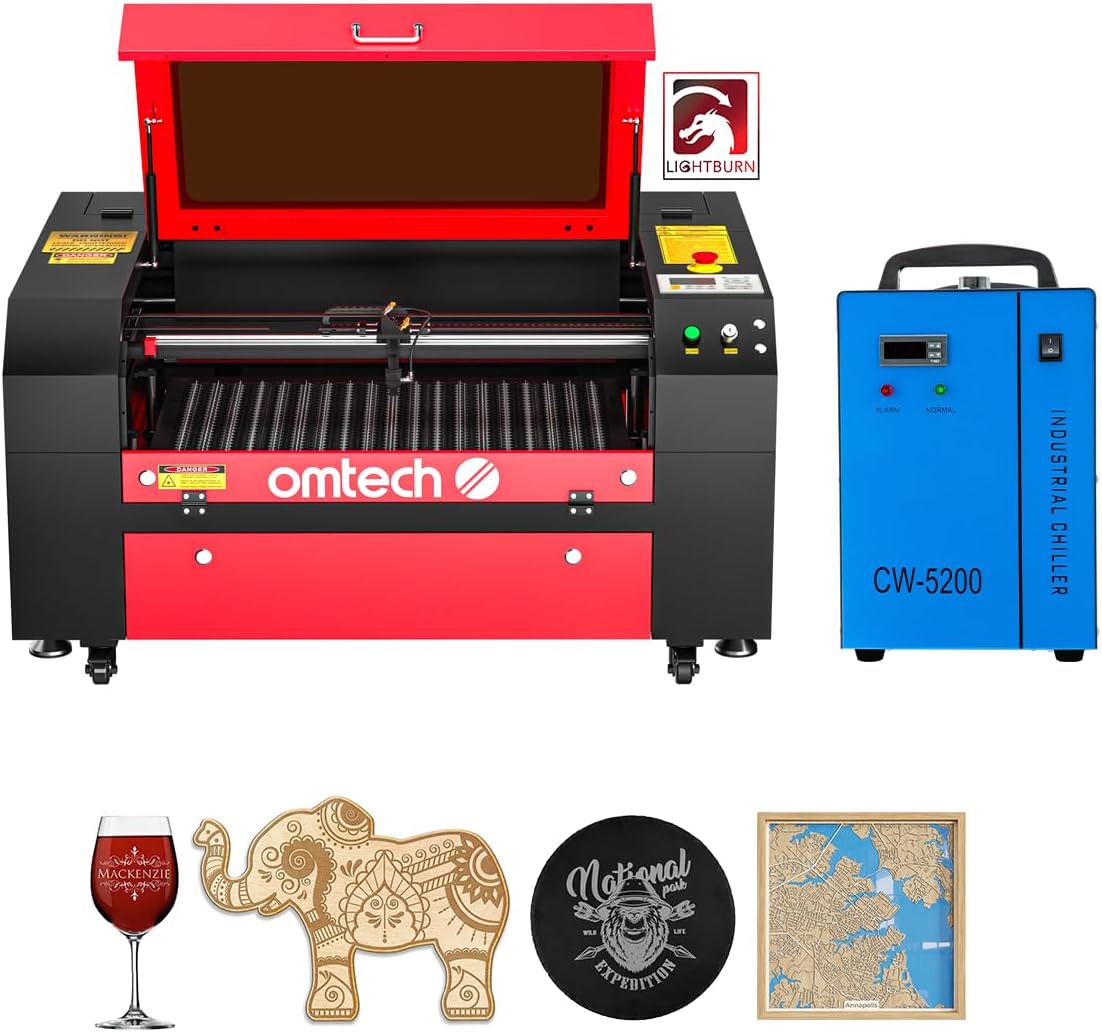
OMTech offers a robust CO2 option with a generous work area for large projects. The autofocus feature removes the guesswork from manual adjustments.
We may earn a commission when you buy through this link, at no additional cost to you.
The included water chiller ensures consistent performance during long runs. LightBurn compatibility provides a familiar interface for designers.
While limited to non metal materials the engraving depth and speed are impressive. The large bed accommodates items like furniture panels easily.
This machine is great for makers needing size over metal capability. The bundle offers value for commercial signage work.
Handles deep engraving on nonmetallic materials up to 0.4 inches.
Built in air assist removes dust to protect lenses effectively.
We may earn a commission when you buy through this link, at no additional cost to you.
This model emphasizes user friendly automation with smart safety stops. The HD camera makes operations more visual for easier monitoring.
We may earn a commission when you buy through this link, at no additional cost to you.
It allows batch processing for both engraving and cutting tasks efficiently. Pre assembly ensures you can start using it quickly out of the box.
Safety features like auto stop when opened provide peace of mind during use. The exhaust system helps maintain a clean working environment.
It is well suited for small businesses needing efficiency and safety. The camera integration is a strong addition for precision work.
Official software and free options available for flexible design needs.
Fire resistant enclosure prevents hazards during high power operations.
We may earn a commission when you buy through this link, at no additional cost to you.
The xTool F2 Ultra brings industrial fiber technology to desktop users. It can engrave over 100 consistent colors on metal with ease.
We may earn a commission when you buy through this link, at no additional cost to you.
Dual AI cameras provide unmatched precision and material detection. It handles everything from glass to steel without changing tools.
While expensive it delivers unmatched versatility for diverse material projects. The speed reduces production time significantly compared to standard lasers.
This is the ultimate choice for jewelers and metal workers. The premium features justify the high cost for pros.
Pre set color files allow one click color matrix engraving.
AI auto detection increases positioning accuracy to 0.2mm.
We may earn a commission when you buy through this link, at no additional cost to you.
Monport offers a dedicated fiber solution optimized for metal marking tasks. It supports a 100000 hour lifespan for long term reliability.
We may earn a commission when you buy through this link, at no additional cost to you.
The customized galvanometer system achieves high accuracy for detailed work. LightBurn compatibility ensures smooth workflow integration.
While the work area is small it is ideal for jewelry and tools. The speed is suitable for rapid prototyping of metal parts.
This unit is perfect for businesses focusing solely on metal products. The included software provides easy operation for new users.
Optimized for 150 by 150mm area to prevent distortion.
Works with any metal including gold silver and brass.
We may earn a commission when you buy through this link, at no additional cost to you.
VEVOR provides an affordable option with a massive work area for large items. It supports materials like acrylic and wood efficiently.
We may earn a commission when you buy through this link, at no additional cost to you.
The four way pass-through design accommodates long materials easily. It includes an air assist system to keep cuts clean.
Manual focusing is straightforward using the control panel knobs. It is a strong choice for hobbyists needing space.
This machine offers high value for non metal engraving needs. The simple design ensures reliability over time.
Includes honeycomb and aluminum blade beds for versatility.
Pull-out waste tray simplifies the cleaning process.
We may earn a commission when you buy through this link, at no additional cost to you.
OMTech bundles a commercial grade CO2 machine with essential accessories. The motorized autolift simplifies bed adjustments significantly.
We may earn a commission when you buy through this link, at no additional cost to you.
With a 28 by 20 inch bed it handles large commercial projects. The tube offers long life when used consistently at lower settings.
The bundle includes a water chiller for stable cooling. It transforms artistic visions into physical realities quickly.
This model suits small businesses needing professional reliability. The software support ensures easy design workflow.
Reaches up to 10mm deep on various nonmetallic materials.
Speeds up to 600mm/s for fast production.
We may earn a commission when you buy through this link, at no additional cost to you.
Aliencell focuses on photo quality engraving with high frequency precision. It offers a massive 26 by 21 inch bed for large projects.
We may earn a commission when you buy through this link, at no additional cost to you.
The intelligent auto-focus system locks onto material instantly. Software allows you to see results before processing to reduce waste.
The speed of 600mm/s ensures quick turnaround for batches. It is ideal for businesses requiring high detail work.
This machine is perfect for those needing visual accuracy. The safety certifications provide confidence in operation.
20kHZ frequency ensures clean sharp results at maximum acceleration.
Fully enclosed Class 1 design with flame sensors.
We may earn a commission when you buy through this link, at no additional cost to you.
Cloudray offers a portable solution dedicated to metal engraving. It supports over 100 color markings using JPT technology.
We may earn a commission when you buy through this link, at no additional cost to you.
Two F-theta lenses allow flexible working areas. The speed reaches up to 10000mm/s for rapid production.
It is ideal for rings and tools requiring high detail. The deep engraving capability allows for permanent markings.
This unit is suited for jewelry makers needing precision. The included accessories make it ready to use.
Portable and lightweight design makes it easy to transport.
Resolution accuracy of 0.01mm for intricate designs.
We may earn a commission when you buy through this link, at no additional cost to you.
Selecting a 60W laser engraver involves evaluating power type safety and workspace needs.
CO2 lasers are better for nonmetals while fiber and MOPA lasers excel on metals. Diode lasers offer a middle ground for mixed materials.
Choose the type based on your primary materials to ensure optimal performance.
A 60W output allows for thick cuts and fast engraving. Higher power means faster production times for business users.
Ensure the power rating meets your specific thickness requirements.
Enclosed designs with Class 1 ratings protect users from harmful light. Safety locks and emergency stops are vital for shared spaces.
Prioritize safety certifications if children or others access the area.
The bed size determines the maximum material dimensions you can engrave. Larger beds accommodate bigger projects but increase the footprint.
Measure your workspace to select the right bed dimensions.
Check if the machine supports industry standard software like LightBurn. Native software should be intuitive for ease of use.
Compatible software ensures smooth design integration and control.
Higher speeds increase throughput but may compromise detail. Look for systems with fine positioning for intricate work.
Balance speed needs with the required quality of output.
Active cooling like water chillers extends tube life and performance. Air cooling is common for diodes but limits run time.
Invest in a cooling system for long duration projects.
Prices vary widely based on features. Ensure warranty coverage includes the laser source and electronics.
Consider long term support when selecting a manufacturer.
Start by securing the material flat on the bed to prevent movement during engraving. Use masking tape to minimize surface burn marks.
Always test on scrap material to find optimal power and speed settings for each job. Adjust focus using the auto-focus or manual guides.
Clean the lenses and mirrors regularly to maintain beam quality. Store the machine in a dry environment to protect electronics.
Yes especially models with Class 1 fully enclosed designs. They minimize exposure risks and include emergency stops for safety.
Diode and MOPA models can mark metals while CO2 cannot. Check the specs to ensure metal capability if needed.
It can cut wood acrylic leather and some metals depending on type. It is ideal for signs and personalized gifts.
Most support LightBurn or come with native apps. Ensure software compatibility before purchasing for smooth workflow.
CO2 tubes last around 3500 hours while fiber lasts 100000 hours. Proper cooling extends the lifespan significantly.
Yes wood is a primary material for these machines. You can engrave detailed patterns or cut thick wood.
CO2 models often require one while diodes may not. Check the bundle contents to confirm cooling needs.
It varies by material and power. Some models can cut 40mm basswood in single passes.
The top picks offer diverse options for home makers and professional businesses. Safety and speed are key drivers in this high power category.
Prioritize enclosed safety and software compatibility for the best experience. Ensure the work area fits your largest typical project.
Check current pricing and availability as models change frequently. This guide helps you find the right tool for your creative needs.