
ELUTENG Curved Monitor Light Bar
4.6Editor score
Stepless dimming
Wireless remote control
Asymmetric lighting
This guide compares the top curved monitor light bars for glare free lighting and eye care across gaming and office setups with detailed reviews.
Finding the right curved monitor light bar can transform your workspace by reducing eye strain and eliminating screen glare. These devices sit atop your screen to provide focused task lighting without cluttering your desk. They are essential for anyone spending long hours in front of a curved display.
We compared ten top-rated models based on optical design, compatibility with curved screens, and smart features like auto-dimming. Each product was evaluated for build quality, ease of installation, and overall lighting performance to ensure you get the most value for your investment today.
Each pick in this list highlights key strengths and specific use cases to help you narrow down your choices quickly. Please note that product availability and pricing can fluctuate frequently so verify current details before making your final purchase decision online.
4.6Editor score

4.7Editor score

4.7Editor score
The following table provides a side by side comparison of all ten models to help you visualize differences in size, features, and compatibility at a glance.


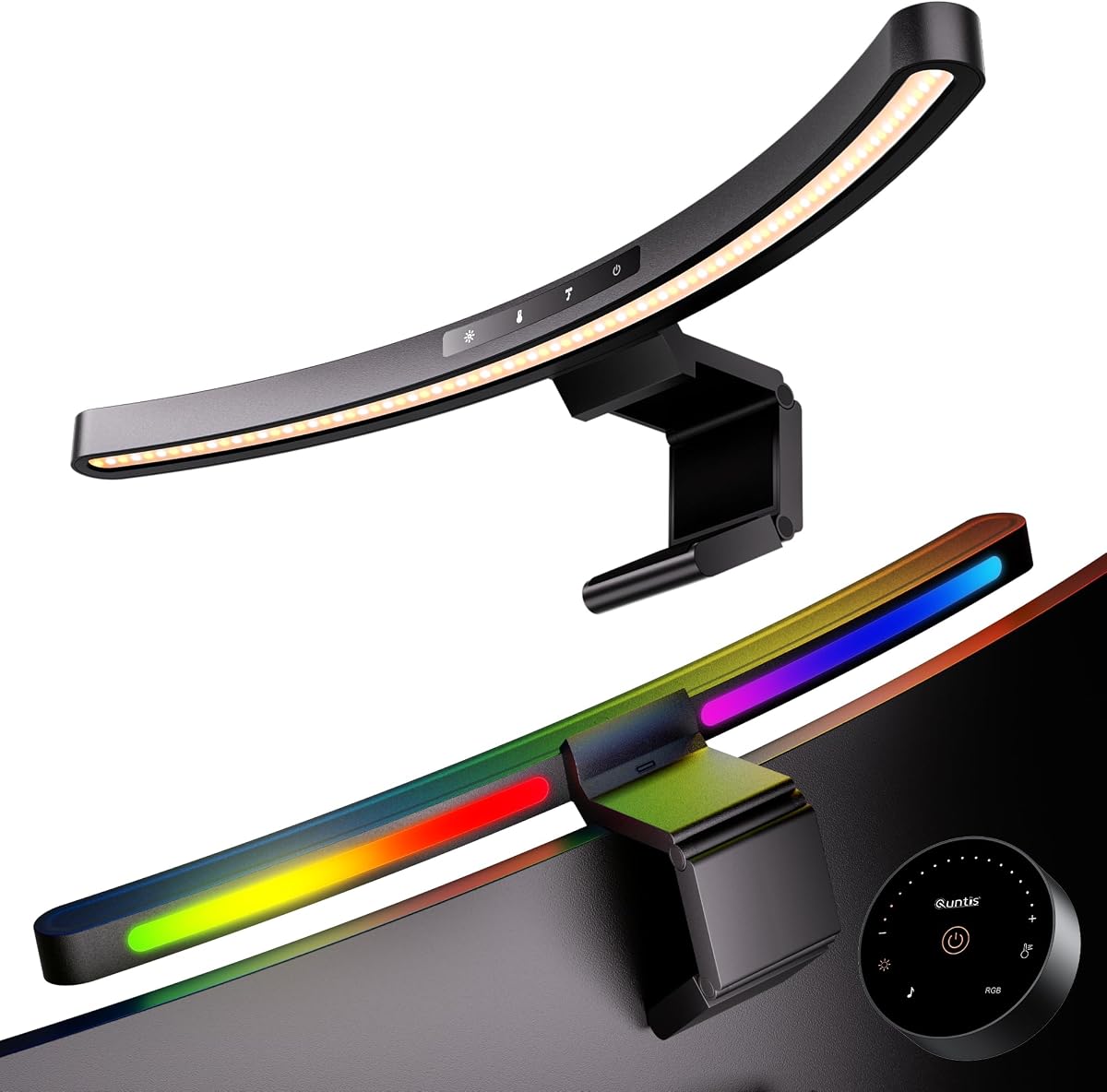


The Quntis Curved Monitor Light Bar stands out as the top choice for users with large ultrawide displays. It offers a unique dual-bar design that follows the curve of your screen to provide even illumination. With a rating of 4.7 stars, it has earned trust among professionals and gamers alike.
We may earn a commission when you buy through this link, at no additional cost to you.
Its standout feature is the ability to pivot each light bar independently. This allows you to adjust the lighting angle for specific tasks like drawing or typing. The stepless dimming and color temperature control ensure you can always find the perfect ambiance for your workspace.
While it is more expensive than budget options, the advanced features justify the cost. The auto-dimming sensor adjusts brightness based on ambient light. The only minor trade-off is the initial setup which requires careful alignment to avoid screen glare.
If you need a high-performance lighting solution for a curved monitor, this is the model to buy. It excels at reducing eye strain and improving focus during long work sessions.
Each side of the light bar can be pivoted independently to match your desk layout or task needs perfectly.
The built-in light sensor automatically adjusts brightness to prevent eye strain during long hours of screen use.
We may earn a commission when you buy through this link, at no additional cost to you.
The BenQ ScreenBar Halo 2 is the definitive premium choice for professionals who demand the best lighting performance. It features a wireless controller that lets you adjust settings without reaching for the light bar. Its 4.7 rating reflects its high quality and reliability.
We may earn a commission when you buy through this link, at no additional cost to you.
One of its best features is the motion sensor that turns the light on when you sit down. This adds convenience and saves energy. The wireless controller includes a display showing exact brightness and color values for precise adjustments during work.
While the price is significantly higher than other models, the durability and features are worth it. The light fits a wide range of monitor thicknesses without damaging the screen. The only downside is the cost for casual users on a budget.
Choose this if you want a long-lasting, professional-grade lighting solution. It is ideal for photographers and designers who need accurate color rendering and minimal eye fatigue.
The intuitive wireless dial allows you to control brightness and color temperature from across your desk easily.
This model securely mounts on monitors ranging from 0.17 to 2.36 inches thick to suit various setups.
We may earn a commission when you buy through this link, at no additional cost to you.
The ELUTENG Curved Monitor Light Bar offers the best value for users looking for affordable lighting without sacrificing core features. It provides essential functions like stepless dimming and color adjustment. With a 4.6 rating, it is a reliable choice for home offices.
We may earn a commission when you buy through this link, at no additional cost to you.
It includes a wireless remote that simplifies operation. The remote uses standard dry batteries which last longer than button cells. The base-free design keeps your desk clear while the asymmetric lighting prevents reflections on your screen.
Compared to premium models, the brightness is lower and the design is simpler. However, it covers the basic needs of task lighting effectively. The low price makes it an easy decision for anyone on a tight budget.
This is the top pick for budget-conscious buyers who still want quality eye care. It works well for reading and general computer use without breaking the bank.
The included wireless remote lets you control all lighting settings from your desk without needing to touch the bar.
The base-free design effectively reduces the burden on the desktop keeping your work area tidy and orderly.
We may earn a commission when you buy through this link, at no additional cost to you.
This Quntis model focuses on flexibility with its dual independently adjustable light bars. It is designed specifically for large ultrawide curved monitors. The 4.5 rating indicates strong performance in matching the curve of your screen for even lighting.
We may earn a commission when you buy through this link, at no additional cost to you.
The pivoting bars allow you to extend them for broad coverage or fold them for focused light. The high RA98 CRI ensures colors look natural which is great for creative work. The memory function saves your last settings for convenience.
The clamp mechanism is robust but requires some effort to install correctly on curved screens. While it lacks extensive RGB options compared to other models, the core lighting quality is excellent. It is a solid choice for precision tasks.
Buy this if you need adaptable lighting for a large curved screen. It balances performance and price well for users who prioritize light distribution over extra features.
Two curved LED light bars pivot independently giving you flexible control over coverage and light intensity.
With an RA98 CRI this light ensures your screen colors appear natural and accurate during work.
We may earn a commission when you buy through this link, at no additional cost to you.
The ONWAY Curved Monitor Light Bar stands out for its built-in camera base that keeps your webcam centered. This feature saves desk space and improves your video call setup. It has a 4.5 rating for providing reliable lighting across various screens.
We may earn a commission when you buy through this link, at no additional cost to you.
The auto-dimming function adjusts light based on room brightness. You control all settings via a wireless touch remote which is easy to use. The design ensures no glare hits your screen while illuminating your desk effectively.
While the remote uses batteries that need replacement, the convenience is worth it. The light quality is good though it lacks the advanced color control of premium models. It is a practical option for remote workers.
Choose this if you want a clean setup with integrated webcam support. It simplifies your desk while providing essential eye-care lighting for daily tasks.
The included camera mount compatibility keeps your webcam centered for calls and streaming without taking up desk space.
Touch-slide controls let you smoothly adjust color temperature and brightness levels for precise customization.
We may earn a commission when you buy through this link, at no additional cost to you.
This Quntis model is designed for gamers who want immersive lighting effects. It features music sync RGB modes that react to sound in real time. The 4.6 rating reflects its popularity among users who enjoy customizable ambient lighting.
We may earn a commission when you buy through this link, at no additional cost to you.
The dual-control design allows touch adjustments on the bar or use of the remote. It also includes a camera base for secure webcam placement. The auto-off timer helps you take breaks during long gaming sessions.
While the 17.7-inch length is shorter than ultrawide options, it fits most standard monitors well. The RGB effects are fun but can be turned off for work. The build quality remains sturdy and reliable.
This is the top pick for gaming setups. It combines task lighting with ambient fun to enhance your entertainment experience.
Access 10 audio-reactive RGB modes that respond to sound in real time during gaming or movie nights.
Unlike remote-only lights this design keeps key functions available on the bar when the remote is unavailable.
We may earn a commission when you buy through this link, at no additional cost to you.
The Quntis Monitor Light Bar offers a comprehensive feature set with a focus on convenience. The sensitive remote control makes it easy to adjust brightness and color without reaching out. It holds a 4.4 rating for its reliable performance.
We may earn a commission when you buy through this link, at no additional cost to you.
The triple-fold clamp adapts to irregular monitor shapes which is great for curved screens. The auto-dimming feature ensures optimal light levels automatically. The 2-hour timer reminds you to take breaks for eye health.
While the remote is convenient, battery replacement is necessary. The clamp is adjustable but requires tightening to stay secure. Overall it provides strong value for office use.
Buy this if you want a reliable remote-controlled light for your desk. It balances features and ease of use effectively.
The patented triple-fold weighted clamp naturally adapts to most flat curved and irregular monitors.
A built-in ambient light sensor allows you to achieve optimal illumination with a double-click of the remote.
We may earn a commission when you buy through this link, at no additional cost to you.
The Geisofu Monitor Light Bar is a budget-friendly option for gamers wanting RGB flair. It offers dual light modes with RGB backlighting to enhance immersion. The 4.3 rating suggests it meets expectations for entry-level lighting.
We may earn a commission when you buy through this link, at no additional cost to you.
You can set a 1-hour timer to remind yourself to rest. Touch buttons allow quick changes between modes. The design focuses on preventing glare and flicker during extended gaming sessions.
It is not recommended for flat panel displays but works well on curved ones. The build is lightweight and simpler than premium models. It is suitable for casual users.
Choose this for a fun gaming aesthetic on a budget. It delivers key features without the high cost.
Geisofu dual light Mode monitor light bar curved has 7 Colors RGB backlight on gaming desk led lights.
The curved monitor light bar is equipped with a touch function transition between modes seamlessly using 4 buttons.
We may earn a commission when you buy through this link, at no additional cost to you.
The LYMAX Curved Monitor Light Bar boasts an impressive 4.9 rating for its smart features. It includes a human sensor that turns the light on when you sit down. This convenience makes it a strong contender for high-end users.
We may earn a commission when you buy through this link, at no additional cost to you.
The arc follows your screen contour to eliminate reflections entirely. You can adjust settings via touch or the included remote. The memory recall function restores your last settings after power-off.
While the price is on the higher side, the features justify it. The sensor may be sensitive in some environments. However, it offers a seamless experience for daily use.
This is a top choice for automation and eye care. It combines smart technology with excellent build quality.
High-sensitivity PIR sensor detects your presence instantly lights up when you sit down fades to off after you leave.
Engineered for 34 plus curved monitors arc follows your screen contour to eliminate reflections and eye strain.
We may earn a commission when you buy through this link, at no additional cost to you.
The Laliled Monitor Light Bar is a straightforward option for basic desk lighting. It features an asymmetric design to prevent screen glare. With a 4.2 rating, it is a reliable choice for simple tasks.
We may earn a commission when you buy through this link, at no additional cost to you.
It includes a 1-hour timer to remind you to rest. You can choose from three color temperature modes. The adjustable angle lets you tailor lighting to your specific setup.
While it lacks advanced features like auto-dimming, it covers the basics well. The price is very competitive for these functions. It is good for those who want simplicity.
Buy this for essential eye-care lighting without complexity. It is easy to install and use daily.
The Laliled monitor light bar has an asymmetrical optical design that only illuminates your desktop to ensure no screen glare.
The computer light bar includes a 1-hour timer mode to remind you to rest after prolonged eye use.
We may earn a commission when you buy through this link, at no additional cost to you.
Choosing the right curved monitor light bar requires understanding key factors like size compatibility and optical design to ensure it meets your needs.
Ensure the light bar fits your screen size and curvature. Many bars are designed for 27 to 34 inch monitors with specific curvature like 1000R or 1800R. Always check the product specifications before purchasing to avoid fit issues.
Always verify the monitor size and curvature range to ensure a secure fit without gaps.
Look for asymmetric lighting designs that direct light onto the desk rather than the screen. This minimizes glare and reflections that can cause eye strain. A proper optical design ensures the light is useful without being distracting.
Prioritize asymmetric designs to prevent light from reflecting off the screen and hurting your eyes.
Adjustable brightness and color temperature are essential for different tasks. Stepless dimming allows precise control while presets offer convenience. Ensure the bar provides sufficient lux for your workspace to maintain focus.
Choose a model with stepless dimming for better control over your lighting environment.
Features like auto-dimming and high CRI ratings help reduce eye fatigue. Auto-dimming sensors adjust light based on ambient conditions while high CRI ensures accurate color representation. These features are crucial for long hours of work.
Look for auto-dimming and high CRI ratings to protect your eyes and maintain color accuracy.
The clamp mechanism should be stable and adjustable to fit your monitor. Some models offer space-saving designs that allow webcam use without obstruction. Check the clamp thickness limits to ensure it grips your screen properly.
Select a clamp that fits your monitor thickness securely and allows webcam compatibility.
Most bars use USB power which is convenient for desks. Check if it includes a cable and adapter or if you need to source them separately. Wireless remotes add convenience but require batteries which need periodic replacement.
Verify USB power options and remote battery requirements to ensure continuous operation.
Some bars include RGB lighting for gaming or timers for breaks. These extras enhance the experience but may not be necessary for work-focused users. Decide which features matter most to your workflow before buying.
Consider if RGB or timer features align with your personal needs or gaming preferences.
Prices vary widely from budget options to premium models. Determine your spending limit and prioritize features that offer the most value. Higher price often means better build quality but budget models can still be effective.
Set a budget that balances essential features with long-term quality and reliability.
To install, align the clamp with your monitor edge and secure it firmly. Ensure the bar sits directly above the screen without touching it. Adjust the angle so light falls on your desk not your eyes.
Use the remote or touch controls to set brightness and color temperature based on time of day. Activate auto-dimming if available to save energy. Turn it off when not in use to extend lifespan.
Clean the surface with a soft cloth to prevent dust buildup. Check battery levels in remotes regularly to maintain functionality. Periodically inspect the clamp for wear to ensure stability.
Most curved bars can work on flat screens but may not follow the arc. Check compatibility specs as some are flexible. If it has a straight design it will sit flat on a curved screen without issues.
Auto-dimming uses a built-in sensor to detect ambient light. It adjusts the light bar brightness accordingly. This ensures consistent illumination without manual changes during the day.
No most use standard USB power from your computer or adapter. This makes them easy to integrate into any desk setup without extra wiring. Just ensure you have a free USB port available.
Yes many models have a base or clip that allows webcam placement. Check product details for camera compatibility. Proper installation ensures your webcam is centered and unobstructed.
Stepless allows smooth continuous adjustment of brightness. Presets offer fixed levels for quick changes. Stepless provides more flexibility for precise control in various conditions.
Yes if they have anti-glare designs and certifications like RG0. They reduce strain by directing light away from eyes. Always check for blue light hazard ratings for safety.
We reviewed ten top models ranging from budget picks to premium solutions for different needs. Each offers unique strengths whether it is automation or RGB gaming effects.
Prioritize optical design and eye care features to protect your vision during long work sessions. Ensure the fit matches your monitor for a seamless experience.
Prices and availability change so check the latest details before buying. A right light bar enhances comfort and focus on your desk.