
OwlTree Desktop Computer Power Button
4.8Editor score
Acrylic material build
Multiple indicator lights
Compact design
Finding a reliable external PC power button can transform how you interact with your desktop setup. Whether your tower is hidden under a desk or placed in a hard-to-reach corner, an external switch adds convenience and improves accessibility for daily use.
We analyzed ten highly rated products based on user feedback, installation flexibility, and build quality. Our comparison covers basic switches, models with reset functions, and advanced units featuring USB hubs or wireless remote capabilities for diverse computing needs.
Each selection highlights specific strengths like cable length, LED indicators, and mounting options to help you decide. Prices and availability change frequently so please check current listings before purchasing to ensure you get the best deal available today.
4.8Editor score

4.6Editor score

4.5Editor score
As an Amazon Associate we earn from qualifying purchases.
This side by side comparison details the key specifications and features of each selected product to help you find the perfect external power solution for your specific computer setup.


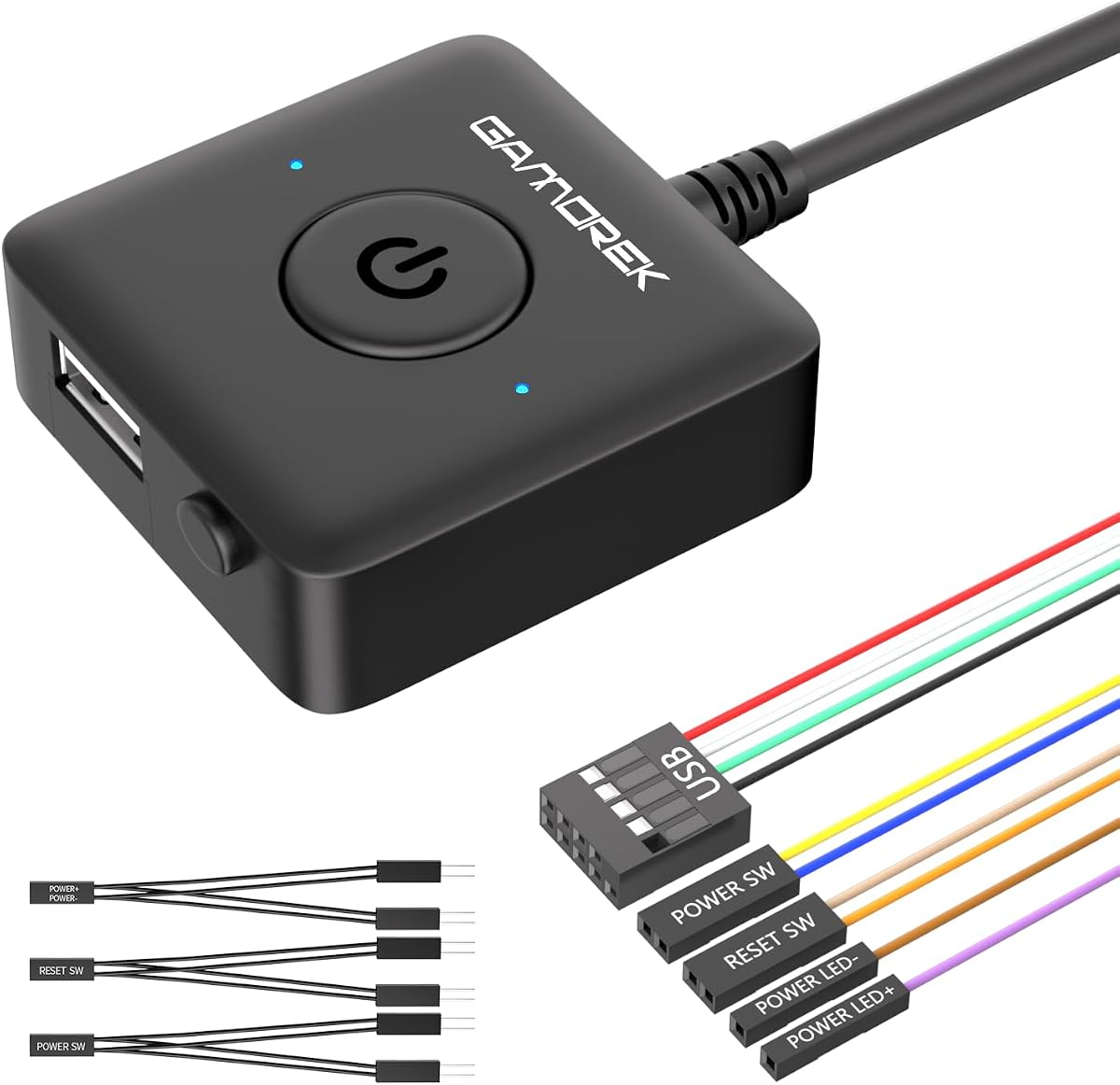


This external power switch stands out for its exceptional cable length and reliability. With a 118 inch cable it reaches even the most distant desks or under desk mounting spots while maintaining signal integrity.
We may earn a commission when you buy through this link, at no additional cost to you.
The included splitter allows you to keep your original chassis button functional alongside this new switch which is great for dual control needs. The LED indicator provides visual confirmation of system status at a glance.
Installation is straightforward using the provided adhesive stickers without needing to drill holes. While the cable is long it requires careful management to avoid tripping hazards or clutter on the floor.
Ideal for users with hidden towers or those upgrading old cases with damaged buttons. This model offers the best balance of reach and simplicity for most desktop setups today.
The 118 inch cable ensures you can place the switch anywhere without tension or signal loss on even with large desks or under floor mounting.
The splitter board enables simultaneous use of both the front panel and external button allowing seamless integration with existing hardware configurations.
We may earn a commission when you buy through this link, at no additional cost to you.
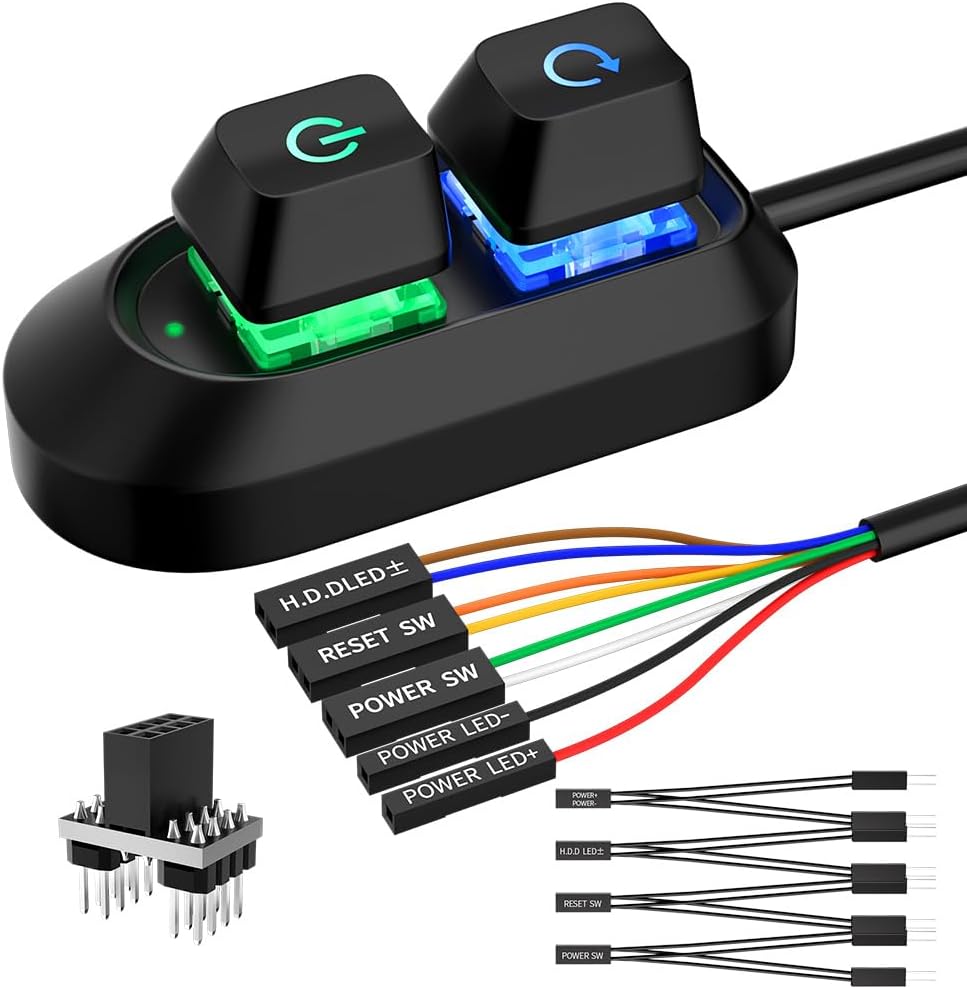
OwlTree delivers a sleek and functional external switch that balances cost and quality effectively. The acrylic material provides a polished look that fits well in modern desktop environments.
We may earn a commission when you buy through this link, at no additional cost to you.
Unlike many budget options this unit includes both power and reset functionality plus indicator lights for power and hard drive activity. This feature set is rare at this price point.
The 1.6m cable is sufficient for most desks but might feel short for deep or under desk setups. The buttons are responsive and the mounting adhesive holds securely over time.
Choose this if you need a reliable switch with reset capabilities without spending much. It is an excellent fix for damaged chassis panels or adding convenience to barebones systems.
The acrylic construction offers durability and a refined aesthetic that enhances the look of your workspace without compromising performance or ease of use.
Having separate power and reset buttons plus HDD LEDs gives you full control over system states which is critical for testers and developers.
We may earn a commission when you buy through this link, at no additional cost to you.
This wireless solution eliminates physical buttons entirely by using a remote to control power states from across the room. It is perfect for theater PCs or hidden under desk installations.
We may earn a commission when you buy through this link, at no additional cost to you.
The PCIe receiver connects directly to the motherboard allowing reliable power on and off commands without software. The range reaches up to 50 feet ensuring comfort from any position.
You must disable ErP settings in BIOS for it to function correctly which can confuse some users. Also the remote needs batteries and the receiver takes up a PCIe slot.
Best for home theater setups or offices where accessing the tower is inconvenient. This model represents the pinnacle of convenience for users prioritizing distance over traditional switches.
Forget cables entirely as this remote allows you to start or shut down your PC from anywhere in the room with minimal effort and maximum convenience.
The receiver board ensures a stable connection to the motherboard power pins guaranteeing consistent performance without the need for external USB adapters or software.
We may earn a commission when you buy through this link, at no additional cost to you.
This standard external switch offers straightforward functionality for those who need basic power control. The 1.7M cable provides ample reach for most desktop setups without excess slack.
We may earn a commission when you buy through this link, at no additional cost to you.
It includes a splitter so you can keep the original front panel button active while adding a convenient external one. The LED indicator gives you a clear view of power status.
The build is primarily plastic which is durable enough for home use but feels lighter than premium alternatives. It is an ideal choice for fixing a broken case button quickly.
Buy this if you want a no fuss solution that works out of the box. It is well suited for general home users or computer rooms where simplicity is key.
The 1.7M cable strikes a balance between reach and manageability making it suitable for standard desk or rack placements without excessive looping.
The included splitter ensures dual functionality without complex wiring allowing seamless integration with existing motherboard headers and front panel connectors.
We may earn a commission when you buy through this link, at no additional cost to you.
This model expands on basic power with included reset and HDD LED connections for a comprehensive control experience. The 2M cable ensures you can reach any desk or rack easily.
We may earn a commission when you buy through this link, at no additional cost to you.
The inclusion of both a splitter board and cable gives flexibility based on available space. It is ideal for cases where the original button is damaged or needs relocation.
Connecting multiple wires requires patience but the labels make it manageable. This unit suits users who want full front panel functionality on a remote location like a desk or test bench.
Choose this for custom builds or repairs needing full feature parity with the original chassis. It offers a robust solution for enthusiasts and power users seeking advanced control.
Power reset and HDD LED support provide full control over system status which is essential for monitoring activity and restarting systems without opening the case.
Having both board and cable splitters allows you to adapt to tight spaces or complex routing paths during installation for a cleaner final setup.
We may earn a commission when you buy through this link, at no additional cost to you.
This switch adds a touch of style with a 7 color breathing LED effect that enhances your setup without requiring software configuration. It is designed for visual appeal and convenience.
We may earn a commission when you buy through this link, at no additional cost to you.
The 2M cable provides generous reach for under desk or hidden installations ensuring reliable connection. Its low voltage design ensures safety and stable performance during daily use.
While it lacks a reset button the RGB feature makes it stand out for aesthetic builds. The button is responsive and the adhesive mount holds firmly on most surfaces.
Pick this if you want to add visual flair to your workspace while gaining easy access to power. It fits well in gaming setups or rooms where lighting matters.
The breathing RGB LED adds a subtle glow that complements modern setups without needing complex software or additional controllers to activate or customize.
Designed with low voltage principles this switch ensures safe operation without risk to motherboard components making it reliable for daily use.
We may earn a commission when you buy through this link, at no additional cost to you.
This unit doubles as a power switch and a convenient front USB port for easy device access without reaching behind the PC. It is great for keyboards or mice that need frequent unplugging.
We may earn a commission when you buy through this link, at no additional cost to you.
The included PCI bracket helps route cables cleanly through the case back panel keeping your desk tidy. It also supports reset functionality for complete control over system state.
Installation requires connecting a 9 pin USB header which may not be available on older boards. However it modern systems this feature greatly reduces cable clutter and improves workflow.
Ideal for users who need extra USB ports or organized cable management. This model merges power control with connectivity convenience for a streamlined desktop experience.
Extending USB access to a convenient location simplifies connecting peripherals and accessories regularly without moving your entire PC tower around your workspace.
The PCI bracket allows neat routing of internal wires maintaining a clean aesthetic and reducing cable clutter inside your case for better airflow.
We may earn a commission when you buy through this link, at no additional cost to you.
This compact switch combines power control with a 4 port USB 3.0 hub for fast data transfer and charging capabilities. It is perfect for industrial or office use requiring quick access.
We may earn a commission when you buy through this link, at no additional cost to you.
The 5Gbps transfer speed ensures efficient file moving between flash drives and external drives. The button is easy to install and supports power and reset lines for full control.
The cable is shorter at 1.2M so consider your desk layout before buying. The hub requires a motherboard USB header which must be available for full functionality.
Best for users needing fast USB access alongside power control. This hub simplifies connectivity for peripherals and offers a practical all in one solution for busy desks.
USB 3.0 support delivers fast file transfers and reliable charging for modern devices ensuring efficient workflow without bottlenecks in data movement.
With four ports available you can connect multiple devices simultaneously such as keyboards mice and drives without needing additional hubs or adapters.
We may earn a commission when you buy through this link, at no additional cost to you.
This small portable switch weighs only an ounce and fits easily in tight spaces. The 2M cable ensures flexible routing for large cases or under desk mounting options.
We may earn a commission when you buy through this link, at no additional cost to you.
It comes with a splitter cable to maintain original functionality while adding external convenience. The design is minimal but functional for basic power control needs.
Installation is simple using adhesive plates that stick to any surface. The compact size makes it ideal for test benches or cramped workspaces where space is limited.
Select this if you prioritize size and simplicity over extra features. It is a lightweight reliable option for standard home or office use.
At just over two centimeters this switch fits anywhere without obstructing your workspace or requiring extra room on your desk or rack.
Despite its small size the materials ensure durability for daily use without adding bulk to your setup or affecting cable management options.
We may earn a commission when you buy through this link, at no additional cost to you.
This model features a robust aluminum housing that offers superior durability compared to plastic alternatives. It includes reset and HDD LED support for comprehensive control similar to front panels.
We may earn a commission when you buy through this link, at no additional cost to you.
The 2M cable allows flexible placement and the splitter board enables dual button usage. It is designed for heavy duty use in offices or labs where reliability is critical.
Aluminum construction adds weight and cost but ensures longevity and a premium look. Installation requires standard pin connections but is straightforward with the included manual.
Buy this if you need a durable long term solution for high traffic areas. The premium build and full feature set make it a solid investment for any setup.
The aluminum casing resists wear and provides a sturdy feel that outlasts plastic models ensuring your switch remains functional for years of daily use.
With power reset and HDD LED connections you get full parity with front panel features allowing complete monitoring and control from a remote location.
We may earn a commission when you buy through this link, at no additional cost to you.
Selecting the right external power button involves evaluating cable length, compatibility, and build quality. These factors determine ease of installation and long term reliability for your specific setup.
Cable length is critical when your PC is far from your desk or under a table. Most options range from 1.6 meters to 2 meters with some offering extensions up to 118 inches for extreme reach. Measure your distance carefully to avoid strain on the connectors.
Always choose a cable that exceeds your needed distance to allow for neat routing and slack management.
Ensure the switch matches your motherboard headers. Standard 4 pin connectors work with most ATX boards but verify POWER SW, RESET, and LED pinouts before buying. Incorrect pins can prevent the switch from functioning correctly.
Check your motherboard manual to confirm pin positions and ensure the switch provides matching connections.
Plastic models are lightweight and cost effective but may feel less premium. Aluminum or acrylic builds offer better durability and aesthetics for visible installations. Consider where the switch will be placed and how much wear it will face daily.
Prioritize metal or high quality plastic for high traffic or visible locations to ensure long term resilience.
Look for extra features like reset switches, HDD LED indicators, or USB hubs if you need more than basic power control. These additions provide comprehensive system management and can reduce the need for separate peripherals.
Opt for models with reset and LED support if you want full front panel capabilities at a remote location.
Adhesive stickers are standard but some kits include brackets or metal plates. Ensure the mounting method fits your surface and will hold securely. Strong adhesive is vital for reliability especially in areas subject to movement.
Select switches with robust adhesive or included brackets for the most secure installation on your chosen surface.
Splitters let you keep both the original front button and the external switch active. This is useful for backup control and testing. Verify the splitter matches your motherboard pins and cable types for seamless integration.
Choose units that include splitters if you want dual control options without replacing your existing front panel.
Some switches offer wireless control or RGB LEDs for enhanced convenience and aesthetics. Wireless models need a receiver card but free you from cables entirely. RGB adds visual appeal but requires no software for simple breathing effects.
Consider wireless or RGB options if you prioritize style or distance over traditional wired connections.
To install safely power off your PC and disconnect the power cable before opening the case. Identify the front panel header pins on your motherboard matching the manual. Connect the switch wires to the correct pins ensuring secure contact and proper alignment.
Position the external button where it is easily accessible using the adhesive or bracket. Run the cable through an open panel slot and route it neatly to avoid tripping. Secure any loose cables with ties or clips for a clean look.
Regularly check the connections to ensure they remain tight and corrosion free. Avoid pressing the button forcefully and keep dust away from the switch contacts. Replace adhesive stickers if they lose grip to prevent the switch from moving.
No these switches are designed for desktop motherboards with standard POWER SW headers. Laptops do not have these exposed connectors and cannot use external hardware buttons for power control. Please use the built-in laptop buttons instead.
Yes most kits include a splitter board or cable that allows both switches to work simultaneously. Connect the original front panel header and the new switch to the splitter so either can control power. This provides flexibility without losing original functions.
Most switches are plug and play and do not require drivers because they mimic the native motherboard power header. However wireless models may need specific software for remote pairing. Check product details to confirm if any software setup is required.
Match the LED wires to your motherboard headers usually labeled PLED or SYSLED. Connect positive and negative wires correctly to ensure lights work. If unsure consult your motherboard manual for pinout locations and correct polarity.
Check that the wires connect to the correct POWER SW pins and that the connections are secure. Ensure your motherboard BIOS does not have settings like ErP blocking power on features. Verify the power supply and cables are functional first.
Yes standard ATX headers apply to most Mini ITX boards too so compatibility is usually fine. Verify your specific board has exposed pins for front panel switches before buying. Most models explicitly support standard desktop layouts.
Some motherboards support waking from sleep via power button but this depends on BIOS settings. Ensure your system is configured to allow wake events from the front panel pins. Check your BIOS power management options for compatibility.
Use a soft dry cloth or slightly damp microfiber towel to wipe the button surface. Avoid using liquids directly on the switch or letting moisture enter the housing. Do not use harsh chemicals that might damage the casing or labels.
We found the PC Power Button with 118 inch cable to be the best overall choice due to its exceptional reach and reliable splitter support. For budget seekers OwlTree offers great value with extra features like reset buttons and indicator lights.
Prioritize cable length and connector compatibility when selecting a model to ensure it fits your specific setup perfectly. If you need advanced features look for USB hubs or wireless options that add convenience beyond basic power control.
Prices fluctuate frequently so check current listings before purchasing to secure the best deal available. Verify compatibility with your motherboard headers to avoid installation issues and ensure smooth daily use for your desktop system.