
WALI Quad Monitor Desk Mount
4.6Editor score
Supports up to 22 lbs per arm
Includes C-clamp and Grommet base
Full range of motion adjustments
Creating a multi-monitor workstation requires reliable hardware that supports your screens securely while maximizing desk space. A good 4 Monitor Mount with Adjustable Arms elevates displays to eye level, reducing strain and improving your overall productivity throughout the day.
We evaluated ten top-rated quad monitor stands based on build materials, weight capacity, range of motion, and ease of assembly. Each product was assessed for stability, cable management, and compatibility with various screen sizes and VESA patterns to ensure a comprehensive comparison.
Each pick below highlights specific strengths and ideal use cases to help you find the right fit for your workspace. Please note that product availability and pricing may change over time, so verify details before purchasing to ensure you get the best value.
4.6Editor score

4.5Editor score

4.5Editor score
As an Amazon Associate we earn from qualifying purchases.
The following table provides a side-by-side comparison of all ten quad monitor mounts evaluated in this guide. Review key specifications such as weight capacity, screen size compatibility, and mounting options to quickly identify which model aligns with your specific workspace needs.



The VIVO Pneumatic Arm Quad Ultrawide stands out as a premier solution for professionals needing to mount large and heavy screens. With a 4.5 star rating, users praise its ability to handle ultra-wide monitors without sagging, making it ideal for complex workstations.
We may earn a commission when you buy through this link, at no additional cost to you.
Its heavy-duty cast aluminum construction ensures long-term durability and stability. The pneumatic system allows for effortless height adjustments with a simple hand touch, which is a significant ergonomic advantage during long work sessions where screen positioning changes frequently.
While the price is higher than standard steel mounts, the investment pays off in build quality and functionality. The main trade-off is the requirement for a sturdy desk to support the clamp, but this is common for heavy-duty mounting solutions.
Buy this if you need to mount screens up to 49 inches or require smooth vertical adjustments without manual locking mechanisms. It is the best choice for traders, designers, or engineers needing a reliable, high-capacity quad monitor setup.
The pneumatic arms reduce physical effort when moving screens, promoting better posture and reducing wrist strain during frequent adjustments.
Supporting both single 49 inch and multiple 38 inch screens allows for flexible multi-monitor configurations in a single sturdy unit.
We may earn a commission when you buy through this link, at no additional cost to you.
The PUTORSEN Quad Monitor Mount is uniquely designed to support a large ultra-wide screen on top while accommodating smaller screens below. This configuration is perfect for traders or analysts who need a central data feed alongside reference monitors.
We may earn a commission when you buy through this link, at no additional cost to you.
Its heavy-duty steel construction combined with a reliable gas spring ensures that the heavy top monitor remains steady. The 3-section arm design distributes weight evenly, preventing sagging even under significant load, which is critical for maintaining alignment over time.
A minor drawback is the specific layout requirement, which might not suit every desk geometry. Additionally, the assembly process involves more steps due to the dual-height design, but the included hardware and manual guide you through the process effectively.
This mount is the top choice for users who need a central wide display surrounded by smaller screens. Its robust build and specialized design make it a premium option for specialized workflows requiring distinct screen hierarchies.
The layout places the primary ultra-wide screen at a prime viewing angle while keeping secondary monitors accessible without clutter.
The 3-section arm provides extra rigidity compared to standard single-joint arms, ensuring the setup stays level even after adjustments.
We may earn a commission when you buy through this link, at no additional cost to you.
The WALI Quad Monitor Desk Mount offers exceptional value, providing reliable support for four screens at a budget-friendly price. With a 4.6 star rating, it is a favorite among users looking to organize their workspace without overspending on premium features.
We may earn a commission when you buy through this link, at no additional cost to you.
Its high weight capacity of 22 lbs per arm means it can handle most standard 32-inch monitors securely. The two-stage locking system allows for versatile mounting on various desk thicknesses, ensuring compatibility with most office furniture found today.
While it lacks advanced pneumatic features found in costlier models, the mechanical adjustments are sufficient for most needs. The only real trade-off is the heavier feel of the steel frame compared to aluminum options, but this contributes to its solid stability.
Choose this mount if you need a functional, durable quad setup without breaking the bank. It is ideal for home offices or student setups where budget is a priority but reliability cannot be compromised.
The affordable price makes it accessible for anyone looking to reclaim desk space and improve ergonomics immediately.
Manual locking mechanisms are straightforward to use and provide stable positioning once the desired angle is set.
We may earn a commission when you buy through this link, at no additional cost to you.
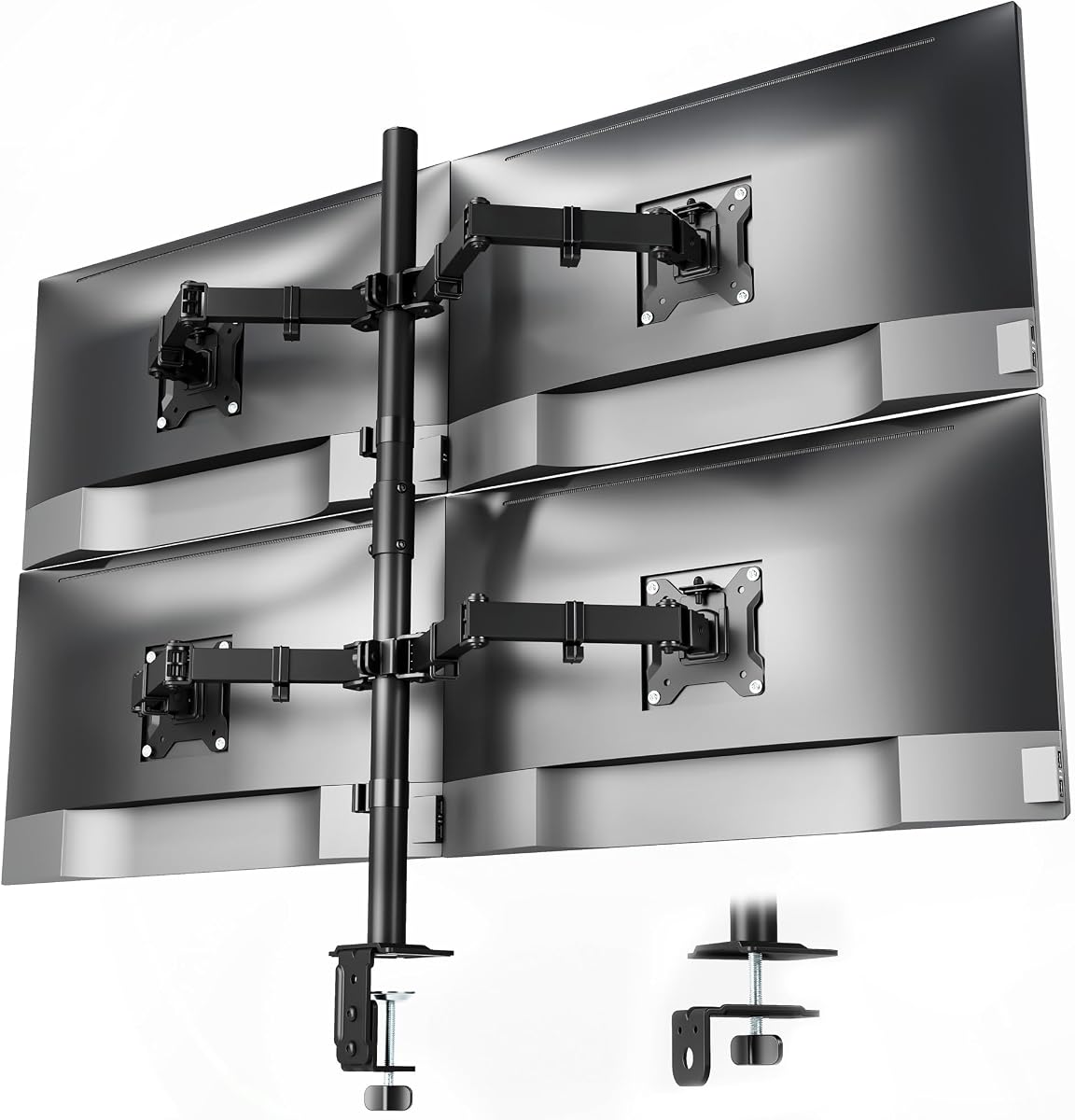
The WALI Stacked 4 Monitor Mount is designed specifically for standard office monitors ranging from 13 to 27 inches. Its vertical stacking design efficiently organizes multiple screens without consuming lateral desk space, making it a practical choice for smaller work areas.
We may earn a commission when you buy through this link, at no additional cost to you.
The integrated cable management helps keep wires tucked neatly into the arms, reducing visual clutter significantly. The steel frame provides excellent stability, ensuring that screens remain level and secure even during frequent adjustments or typing vibrations.
One limitation is the max screen size of 27 inches, which may not suit users with larger displays. Additionally, while the cable clips are functional, they can sometimes feel less rigid than the main mount structure, requiring occasional adjustment.
This mount is perfect for corporate environments or home offices using standard 24-inch monitors. It balances functionality with affordability, offering a clean and professional look for typical four-monitor configurations.
The vertical stacking design maximizes vertical real estate while keeping the desk surface clear for other essentials.
Dedicated routing guides keep cables hidden from view, contributing to a tidy and distraction-free working environment.
We may earn a commission when you buy through this link, at no additional cost to you.
The monTEK Quad Monitor Stand emphasizes stability and safety with its advanced joint design and high-grade materials. Users appreciate the robust build that keeps displays securely in place, eliminating the risk of screens tilting or sagging unexpectedly over time.
We may earn a commission when you buy through this link, at no additional cost to you.
The quick-release VESA plates simplify installation and removal of monitors, which is convenient for those who swap displays frequently. Its range of motion allows for versatile positioning, supporting both landscape and portrait orientations seamlessly.
A slight limitation is the 32-inch screen limit, which fits most standard monitors but excludes larger ultrawides. The assembly is straightforward, though the heavy-duty nature of the mount means it requires a solid desk surface to hold the clamp effectively.
Choose this stand if your priority is a secure, sag-free mounting solution. It is ideal for general office work or gaming setups where consistent screen alignment is critical for long-term comfort and visual quality.
The advanced joint design distributes weight evenly, ensuring that heavier screens remain perfectly level without manual adjustments.
Quick-release plates make it easy to mount or detach monitors, facilitating maintenance or upgrades without heavy tools.
We may earn a commission when you buy through this link, at no additional cost to you.
The VIVO Quad Pneumatic Monitor Mount offers a balanced blend of features with its pneumatic arm system. It allows for smooth transitions between heights without manual locking mechanisms, enhancing the ease of use throughout the workday.
We may earn a commission when you buy through this link, at no additional cost to you.
The combination of steel and aluminum provides a durable yet manageable structure. Tension can be adjusted to match the weight of your specific monitors, ensuring that lighter or heavier screens both remain stable during use.
While it lacks full pneumatic control on all brackets, the dual side arms cover most ergonomic needs effectively. The main trade-off is the cost compared to manual-only mounts, but the added convenience justifies the expense for many users.
This model is a solid choice for general office users seeking a comfortable, adjustable setup. It is particularly well-suited for teams or individual workstations where frequent screen repositioning is a daily routine.
Pneumatic arms allow quick vertical shifts without unscrewing knobs, saving time and effort during collaborative work sessions.
The mix of materials ensures strength while keeping the weight manageable for desk installation and long-term durability.
We may earn a commission when you buy through this link, at no additional cost to you.
The Pholiten Quad Monitor Arm Desk Mount focuses on user comfort with advanced gas spring technology. This feature allows for effortless positioning of screens, ensuring that the setup can be adjusted to match your specific height and angle needs easily.
We may earn a commission when you buy through this link, at no additional cost to you.
The scientific design aims to improve posture by enabling flexible screen placement. Whether you need vertical or horizontal viewing, the 360 rotation and tilt options provide the flexibility required for various tasks and environments.
However, the weight capacity is limited to 10 kg per screen, which is sufficient for most but may restrict heavier models. Cable management is functional but not as integrated as some other premium options on the market.
Buy this mount if ease of adjustment is your top priority. It is well-suited for users who value ergonomics and want a smooth, low-friction experience when configuring their workspace daily.
Gas springs provide a fluid movement experience, making it feel like the screens float rather than requiring force to move.
Both C-clamp and grommet options ensure compatibility with a wide range of desk types, simplifying the initial setup.
We may earn a commission when you buy through this link, at no additional cost to you.
The MOUNTUP Quad Monitor Stand offers strong value with its comprehensive warranty and customer support. Users benefit from a 3-year support policy that provides peace of mind, ensuring help is available if any assembly or mechanical issues arise.
We may earn a commission when you buy through this link, at no additional cost to you.
Its solid base design supports four arms efficiently, saving desk space by centralizing the mounting point. The quick-release VESA plates make attaching monitors straightforward, and the integrated cable clips help maintain a clean and organized appearance.
The weight limit of 17.6 lbs per arm is lower than some competitors, which might be a constraint for heavier monitors. Additionally, assembling four arms on one base can take more time compared to single-stick mounts, but the instructions are clear.
This stand is ideal for users who want reliable after-sales support and a centralized mounting solution. It is a great fit for home offices or small teams where durability and customer service are valued alongside performance.
The 3-year support ensures that any issues are resolved quickly, protecting your investment in the long run.
A single solid base reduces clutter on the desk edge and distributes the load of four monitors evenly.
We may earn a commission when you buy through this link, at no additional cost to you.
The MOUNT PRO 4 Monitor Mount is designed for vertical flexibility with its extra tall pole that reaches up to 31.7 inches. This feature allows for standing or sitting positions, making it highly adaptable for different work styles and ergonomic needs.
We may earn a commission when you buy through this link, at no additional cost to you.
It accommodates a wide range of screen sizes from 13 to 32 inches, offering broad compatibility. The full range of motion ensures you can switch between landscape and portrait modes easily, optimizing your viewing experience for different content types.
While it shares a similar weight limit with other models in this range, the vertical adjustability sets it apart. The only trade-off is a basic clamp system that may require checking desk thickness to ensure a secure fit.
This mount is perfect for users who need a dynamic workstation height adjustable for standing desks. It is a practical solution for those who prioritize height adjustments and versatile positioning over heavy load capacity.
The tall pole extends sufficiently to accommodate screens at a standing height, promoting better posture during long work hours.
Labeled parts make the assembly process intuitive, reducing the time and effort needed to set up the monitors.
We may earn a commission when you buy through this link, at no additional cost to you.
The VIVO Quad Monitor 13 to 32 inch offers a classic design that has been trusted for years. It features a 3 plus 1 articulating structure that provides solid support for a range of monitor sizes, making it a versatile choice for standard setups.
We may earn a commission when you buy through this link, at no additional cost to you.
Its drill-free installation option simplifies the setup process, allowing you to mount the stand quickly without damaging your desk. The included cable clips help keep wires tidy, maintaining a clean workspace appearance without extra accessories.
While it has a slightly lower rating compared to newer models, it remains a solid performer for the price. The main challenge is ensuring the clamp fits your desk thickness securely, which may require careful measurement before purchase.
Choose this model if you want a proven, reliable quad mount at a reasonable cost. It is best suited for home offices or classrooms where standard monitors are used and budget is a key consideration.
The classic articulating arms offer a reliable solution that has stood the test of time in various office environments.
Drill-free mounting means you can install the stand quickly without special tools, saving time during initial setup.
We may earn a commission when you buy through this link, at no additional cost to you.
Choosing the right quad monitor mount involves evaluating several key factors to ensure compatibility with your workspace. This guide walks through the essential considerations to help you make an informed decision.
Ensure the mount supports the size and weight of your specific monitors. Most models support screens up to 32 inches with weight limits ranging from 17.6 lbs to 22 lbs per arm, while others offer higher capacities for ultrawide displays.
Check both the VESA pattern and weight specs to avoid instability or sagging issues over time.
Look for mounts that offer both C-clamp and grommet base options to ensure compatibility with your desk. Some desks may have a specific thickness range, so verify that the clamp can secure the mount firmly without damaging the surface.
Having multiple mounting options provides flexibility if you decide to move or reconfigure your setup later.
Full adjustability includes tilt, swivel, and rotation capabilities that allow you to position screens at the most comfortable viewing angle. Consider models with height adjustment poles or pneumatic arms for easier vertical positioning.
Better ergonomics reduce neck and eye strain, especially during long work sessions.
Materials like steel and cast aluminum affect both durability and stability. Steel is generally more robust for heavier loads, while aluminum offers a lighter yet strong alternative that may prevent sagging in the arms.
Durable materials ensure the mount lasts longer and maintains alignment under daily use.
Integrated cable management systems keep wires organized and hidden within the arms, preventing clutter and tripping hazards. Look for mounts that include clips or channels to route power and video cables neatly.
A clean cable setup enhances both the look and safety of your workspace.
Consider how easy the assembly is and whether the mount includes clear instructions and all necessary hardware. Quick-release VESA plates can simplify attaching monitors, reducing the overall setup time significantly.
A smooth installation process saves effort and ensures the mount is secure from day one.
A good warranty or customer support policy can protect your investment against defects or installation issues. Brands that offer multi-year support provide peace of mind and reliability for your workspace.
Always check the warranty terms to ensure long-term protection for your equipment.
If you have limited desk space, a stacked vertical design might be better than a wide spread. Consider how much room the base and arms will take up when fully extended.
Optimizing space ensures you still have room for other peripherals and comfort.
Start by securing the base firmly to your desk using the provided clamp or grommet. Ensure it is stable before attaching any monitors to prevent tipping or slipping during use.
Adjust the tension or springs according to the weight of your screens so they stay in place without manual support. Regularly check the joints to ensure smooth movement and alignment.
Keep the arms and joints free from dust by wiping them occasionally with a soft cloth. Tighten any loose screws annually to maintain stability and prevent wear on the mounting hardware.
Many mounts support curved screens as long as they match the VESA hole pattern and weight limits. Always verify the specific product details to ensure your curved display fits within the supported range.
Glass desks may require special mounting adapters or clamps designed to grip smooth surfaces without damage. Check the mount specifications to see if they offer solutions for non-standard desk materials.
Most quad mounts offer drill-free C-clamp or grommet base options that do not require drilling holes in your desk. This makes installation easier and allows for flexibility if you move your setup.
Weight capacity varies by model, typically ranging from 17.6 lbs to 22 lbs per arm. Some heavy-duty models support even more, so match the mount to the total weight of your monitors.
Most quad monitor mounts include cable clips or channels to help manage wires neatly. These features keep cables organized and out of the way for a cleaner workspace appearance.
Yes, most mounts allow full 360-degree rotation so you can switch between landscape and portrait orientations. This flexibility is useful for tasks requiring vertical screen real estate.
We reviewed ten top-rated quad mounts, highlighting the VIVO Pneumatic Arm for ultrawide setups, PUTORSEN for mixed screens, and WALI for budget needs. Each offers distinct features tailored to different workspace requirements.
When choosing, prioritize weight capacity and adjustability to ensure your screens remain stable and ergonomic. Consider desk thickness and mounting options to guarantee a secure fit without compromising your workspace integrity.
Remember to verify current availability and specifications before purchasing to ensure the model meets your specific needs. Selecting the right mount can transform your workspace efficiency and comfort significantly.