
Digital Magnifier 5 Inch Electronic Auto Focus
3.9Editor score
2X to 32X zoom capability
Simplified buttons for ease of use
Integrated foldable handle bracket
Living with low vision can make daily tasks like reading menus or labels incredibly challenging. Digital magnifiers offer a practical solution by enlarging text and images on a screen, restoring independence and confidence to users who need visual assistance in their everyday lives.
We compared ten highly rated electronic reading aids based on magnification range, screen quality, portability, and ease of use. Our selection process prioritized devices that offer clear displays, customizable color modes, and ergonomic designs suitable for elderly users and those with specific visual impairments like macular degeneration.
Each product pick below highlights key specifications, pros, and cons to help you make an informed decision. Please note that product availability and pricing can change frequently, so always check the current details on the retailer site before making your final purchase for vision assistive needs.
3.9Editor score

4.6Editor score
4.0Editor score
As an Amazon Associate we earn from qualifying purchases.
This side-by-side comparison table lists every selected digital magnifier with their core specifications to help you quickly identify the device that best fits your visual needs and budget requirements.


The Eyoyo 3.5" Portable Digital Video Magnifier is a top choice for users seeking a compact and reliable vision aid. With a rating of 4.6, it stands out for its portability and ease of use in various settings.
We may earn a commission when you buy through this link, at no additional cost to you.
This device offers a versatile magnification range from 2X to 25X, which is sufficient for most reading tasks like books and menus. The 8 adjustable color modes allow users to customize the display for maximum contrast and comfort.
While the 3.5-inch screen is smaller than some competitors, it makes the unit easy to carry. The AV output feature is a significant plus, allowing connection to a television for those who prefer a larger display.
We recommend this magnifier for individuals who need a portable solution for daily reading. Its snapshot function and ergonomic design make it a practical choice for long-term use without causing fatigue.
The 8 color modes help users with different vision needs find the right contrast for comfortable reading.
AV output ensures you can connect to a TV for a larger viewing experience when needed.
We may earn a commission when you buy through this link, at no additional cost to you.
The Digital Magnifier 5 Inch Electronic Auto Focus is an excellent budget-friendly option for those needing a larger screen without breaking the bank. It offers a strong magnification range and a user-friendly interface suitable for seniors.
We may earn a commission when you buy through this link, at no additional cost to you.
This unit provides a 5-inch screen with up to 32X zoom, making it easier to read small text on labels or menus. The 26 color modes ensure that users can adjust the display to reduce eye strain and improve clarity.
The simplified button design is a key strength, as it reduces confusion for elderly users or those with limited dexterity. The integrated handle bracket allows for flexible positioning during reading tasks.
While the rating is lower than premium models, the value proposition is high. This magnifier is best suited for budget-conscious shoppers who prioritize basic functionality and a larger display for daily reading needs.
Simplified buttons ensure that users can operate the device without confusion or frustration.
Zooming up to 32X allows for detailed viewing of small text and intricate objects.
We may earn a commission when you buy through this link, at no additional cost to you.
The Portable Digital Video Magnifier for Visually Impaired delivers a high-quality viewing experience with a crisp 800×480 resolution. This device is designed to provide clear, distortion-free images even at high magnification levels.
We may earn a commission when you buy through this link, at no additional cost to you.
With a 5-inch screen and zoom up to 32X, it is ideal for detailed reading and viewing. The 26 color modes allow for significant customization, which is crucial for users with color blindness or low vision.
The ergonomic foldable handle ensures comfort during extended use, and the memory function saves your preferred settings for ease of use. AV output connectivity adds versatility for larger screen viewing.
This model is best for users who prioritize image quality and comfort. It is a reliable choice for those with macular degeneration or other visual impairments requiring a robust visual aid.
Professional image processing DSP ensures true-to-life color restoration and sharp details.
The device memorizes your habits to save you time adjusting settings every time.
We may earn a commission when you buy through this link, at no additional cost to you.
The 5 Inch Low Vision Aids Electronic Auto Focus is a solid option for those looking for a simple and effective reading tool. It mirrors many features of the previous model but focuses on ease of use.
We may earn a commission when you buy through this link, at no additional cost to you.
Its 5-inch screen provides a comfortable viewing area, and the 32X zoom ensures that small text is legible. The simplified button layout is particularly helpful for users who may struggle with complex interfaces.
This device is suitable for daily activities like reading recipes or shopping lists. The integrated handle design allows for both handheld and flat positioning, adding flexibility to its use.
For buyers seeking affordability without sacrificing core magnification needs, this is a worthy choice. It supports low vision needs effectively through contrast modes and reliable optical performance.
No redundant buttons make the device accessible for elderly users or children.
Designed to meet daily reading needs with consistent performance.
We may earn a commission when you buy through this link, at no additional cost to you.
The VEVOR Portable Digital Magnifier stands out with its impressive 48X zoom capability and dual lens system. This makes it one of the most versatile options for viewing both close-up text and distant objects.
We may earn a commission when you buy through this link, at no additional cost to you.
With a 5-inch HD screen and 13MP lenses, the image quality is sharp and detailed. The inclusion of HDMI and AV outputs provides multiple ways to connect to larger screens for enhanced viewing.
The 26 color modes and adjustable brightness help tailor the experience to specific visual needs. However, some users may find the battery life shorter than expected for extended sessions.
This magnifier is ideal for users who need high zoom levels or travel frequently. Its dual lens feature is a unique selling point that differentiates it from standard single-lens devices.
Switch between near for reading and far for signs or boards easily.
Zoom up to 48X provides exceptional detail for very small text.
We may earn a commission when you buy through this link, at no additional cost to you.
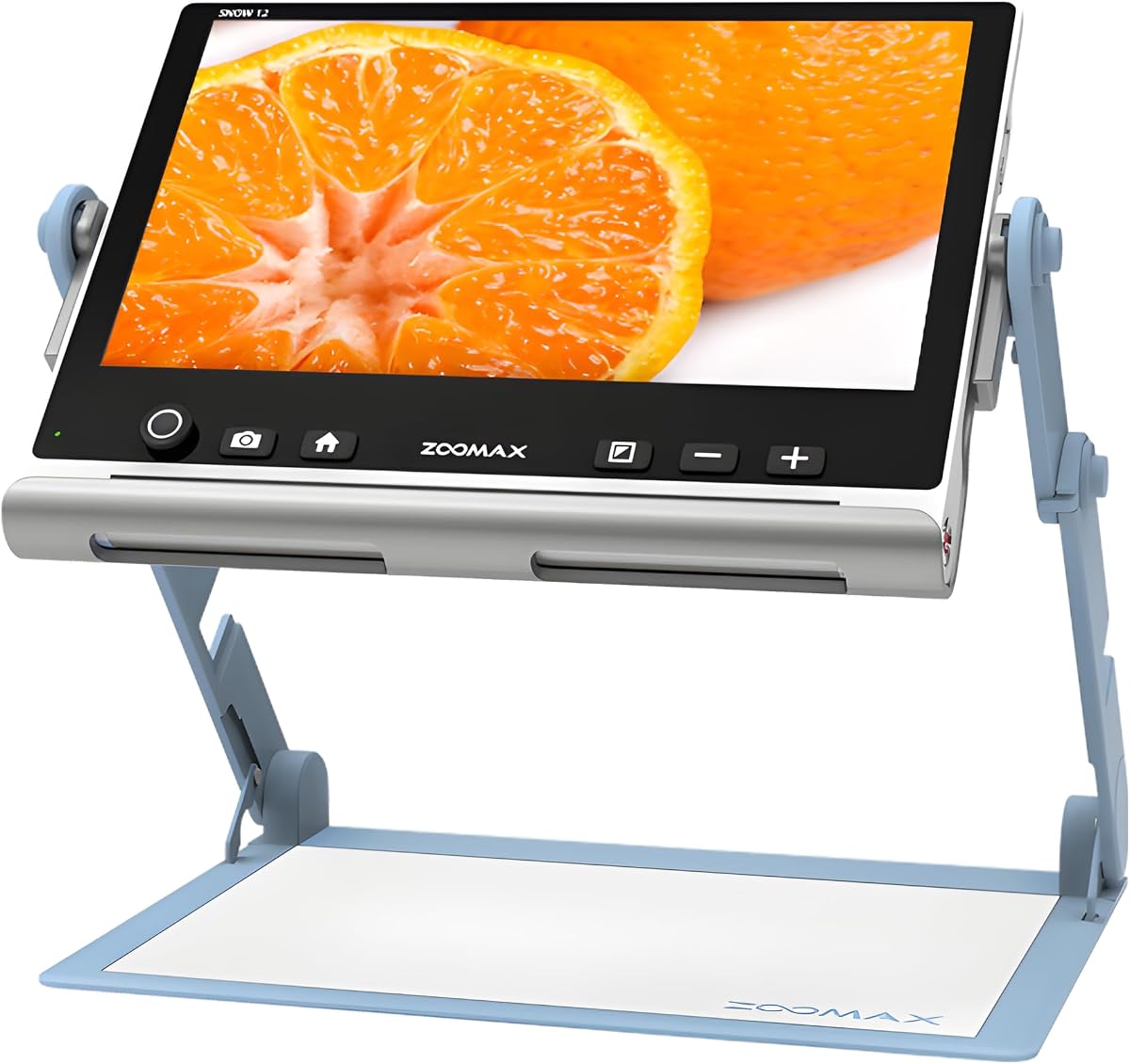
The Zoomax Snow 12 is a premium electronic reading aid that integrates advanced OCR and text-to-speech technologies. It is designed to provide genuine visual independence through both visual and auditory output.
We may earn a commission when you buy through this link, at no additional cost to you.
With a 19X magnification and a 12-inch foldable stand, it offers stability and clarity. The multilingual support makes it accessible to users in diverse environments or traveling abroad.
While the price is higher, the advanced features like OCR justify the investment for those who need to convert text to speech. It is lightweight enough to be ultra-portable despite its larger size.
This device is best for users who want cutting-edge accessibility features. The combination of visual magnification and spoken output sets it apart as a top-tier choice.
Optical Character Recognition technology reads text aloud for better independence.
Support for over 20 languages expands usability for non-native speakers.
We may earn a commission when you buy through this link, at no additional cost to you.
The Eyoyo 5" Portable Digital Video Magnifier is known for its impressive battery life, which makes it reliable for long reading sessions. With over 4 hours of continuous operation, it reduces interruptions for users.
We may earn a commission when you buy through this link, at no additional cost to you.
Its 5-inch screen provides a clear display with 32X zoom and 17 color modes for customized viewing. The foldable handle ensures comfort, and the AV output adds versatility for larger screens.
The battery capacity of 4500mAh is a significant advantage for users who may not have easy access to charging during the day. This ensures consistent performance for travel or extended use.
This magnifier is best for those who prioritize endurance and portability. It balances good image quality with a battery that lasts through daily tasks like reading books or newspapers.
The 4500mAh battery provides uninterrupted reading sessions without frequent charging.
Foldable handle ensures a comfortable grip for extended use without strain.
We may earn a commission when you buy through this link, at no additional cost to you.
The Portable Digital Video Magnifier Electronic Reading Aid features an ergonomic design with large buttons and a memory function for easy use. This model is tailored for elderly users or those with limited dexterity.
We may earn a commission when you buy through this link, at no additional cost to you.
With a 5-inch screen and 32X zoom, it provides clear views of text and images. The integrated foldable handle allows for flexible positioning, and the free switching between far and near cameras adds versatility.
The memory function stores your habits before shutdown, so you do not need to adjust settings every time. This convenience is a key selling point for daily users who want consistency.
For buyers looking for a device that prioritizes user comfort and simplicity, this is a strong option. Its design elements make it accessible and efficient for regular visual aid tasks.
Buttons designed for easy pressing make operation intuitive for seniors.
Switch between far and near cameras to view different distances easily.
We may earn a commission when you buy through this link, at no additional cost to you.
The Eschenbach SmartLux Digital Portable Magnifier is a lightweight device designed for users on the go. It offers clear HD video and a simple interface suitable for quick reading tasks.
We may earn a commission when you buy through this link, at no additional cost to you.
With zoom levels from 5X to 12X and 5 viewing modes, it provides adequate magnification for menus and labels. The image capture feature allows users to save text for later review.
This model is ideal for short-term assistance rather than prolonged reading sessions. Its lightweight construction makes it easy to carry, and it comes with a cleaning cloth for maintenance.
We recommend this for users who prioritize portability and ease of use. It is a practical choice for shopping or traveling where a compact aid is needed.
HD video ensures clear and detailed images for better visibility.
Lightweight design makes it easy to carry and use anywhere.
We may earn a commission when you buy through this link, at no additional cost to you.
The 5.0 Inch Digital Magnifier Electronic Reading Aid offers one of the highest zoom ranges in this comparison, reaching up to 48X. This makes it highly effective for reading very small text and detailed objects.
We may earn a commission when you buy through this link, at no additional cost to you.
Its 5-inch screen provides a clear view, and the simplified buttons ensure easy operation for seniors. The external battery lasts over 4 hours, which supports extended use during daily activities.
This device is best for reading labels, menus, and instructions rather than long novels. The AV output allows connection to a TV for a larger screen experience when needed.
For users who need high magnification without complex settings, this is a strong choice. It balances zoom power with user-friendly features to assist with low vision tasks.
Zoom up to 48X is useful for very small text and detailed tasks.
External battery lasts over 4 hours for uninterrupted reading sessions.
We may earn a commission when you buy through this link, at no additional cost to you.
Selecting the right digital magnifier involves considering factors such as screen size, magnification range, and usability features tailored to your specific visual needs.
Screen size determines how large the text appears and how comfortable it is to read. A larger screen like 5 inches or more is generally better for detailed work, while resolution ensures the image remains sharp at high magnification.
Look for HD or high-resolution screens to avoid blurring when zoomed in.
The zoom range indicates how much the device can enlarge text. Most units offer between 2X and 48X. Higher zoom levels are necessary for severe low vision or reading extremely small print.
Ensure the device offers sufficient zoom for your specific reading materials.
Color modes allow users to adjust the display for better contrast. Options like white on black or yellow on blue help reduce eye strain and make text more visible for users with color blindness.
Choose a model with multiple color modes to find the best setting for your eyes.
If you travel frequently, a lightweight and compact design is crucial. Foldable handles and brackets allow for flexible positioning and easier storage during travel or storage.
Look for devices that are easy to carry and have comfortable grips.
Battery life impacts how long you can use the device without recharging. Models with higher capacity batteries or external power options are preferable for extended use during outings.
Check the battery duration to ensure it meets your daily reading needs.
Features like AV or HDMI output allow the magnifier to connect to a TV for a larger viewing experience. This can be helpful for those who prefer not to use the small screen directly.
Consider connectivity options if you want to share content on a larger display.
Simplified buttons and memory functions make operation easier for seniors or users with limited dexterity. Avoid devices with too many complex settings if simplicity is a priority.
Opt for models with intuitive interfaces and customizable settings.
Some devices offer OCR, text-to-speech, or image capture. These features add value for users needing advanced accessibility tools or a way to save text for later reference.
Evaluate if these extra tools align with your specific visual needs.
To use your digital magnifier, place the device on the text you wish to read and adjust the zoom level until the content is clear. Use the color modes to find the contrast that works best for your vision.
Keep the lenses and screen clean with a soft cloth to ensure optimal image quality. Avoid dropping the device or exposing it to extreme temperatures to maintain its longevity and performance.
Regularly charge the battery to prevent unexpected power loss during use. If your device has an external battery, ensure it is fully charged before long reading sessions.
A digital magnifier is an electronic device that uses a camera to enlarge text and images on a screen. It helps users with low vision read books, menus, and labels more easily by providing high contrast and adjustable zoom.
Anyone with low vision, macular degeneration, or color blindness can benefit from a digital magnifier. It is particularly helpful for seniors who need assistance reading small print in their daily lives.
Select a magnification level that allows you to read text comfortably without causing eye strain. Most devices offer a range from 2X to 48X, so test different settings to find what works best for you.
Yes, portable digital magnifiers can be used outdoors for reading menus or labels. However, ensure the device has sufficient brightness and contrast modes to handle varying light conditions.
Many digital magnifiers offer color modes that enhance contrast for users with color blindness. Features like white on black or blue on white help improve visibility for those with specific vision challenges.
Battery life varies by model, but most portable digital magnifiers offer between 4 to 6 hours of continuous use. Check the specific specifications of the device to ensure it meets your needs.
Many digital magnifiers are designed with seniors in mind, featuring simplified buttons and memory functions. These features make the devices intuitive and easy to operate without technical expertise.
Yes, many digital magnifiers support AV or HDMI output for connecting to a TV. This allows users to view enlarged content on a larger screen for better visibility and comfort.
We have reviewed ten digital magnifiers that offer a range of features to suit different needs. Whether you need a budget-friendly option or a premium model with advanced accessibility tools, there is a choice for everyone.
Prioritize factors like screen size, zoom range, and ease of use when making your decision. The right device can significantly enhance your reading experience and independence in daily tasks.
Remember to check the current prices and availability before purchasing. Investing in the right digital magnifier can make a meaningful difference in your visual health and quality of life.