
LG Smart Monitor Swing
4.1Editor score
WebOS smart platform integration
Rolling wheeled base stand
AirPlay 2 and screen share
Finding the right display can transform your workflow significantly. A large touchscreen offers intuitive control for design and presentation needs. This category blends high resolution with interactive capabilities for modern users.
We evaluated ten models based on resolution, touch technology, and connectivity options. Each entry represents a distinct approach to blending visual clarity with direct screen interaction. Our analysis focuses on real-world usability for professionals.
Each pick highlights specific strengths like port variety or stand flexibility. Note that prices fluctuate frequently due to market demand and promotions. Always verify current availability before making your final purchase decision today.
4.1Editor score

5.0Editor score

4.2Editor score
As an Amazon Associate we earn from qualifying purchases.
The following table provides a side-by-side comparison of all ten selected models. It highlights key specifications to help you quickly identify the right fit for your specific workspace requirements and budget constraints.



This display stands out as a top choice for its exceptional 4K clarity and high refresh rate. It receives a perfect rating for delivering smooth motion and sharp text across various applications. The touch interface adds a layer of interactivity that enhances workflow efficiency significantly.
We may earn a commission when you buy through this link, at no additional cost to you.
Key strengths include the lightning-fast 144Hz refresh rate which ensures buttery-smooth motion during dynamic tasks. The connectivity options are robust with HDMI 2.1 DP 1.4 and a full-featured Type-C port supporting video power and touch. The stand offers height adjustment tilt swivel and pivot for optimal ergonomics.
While highly capable there are some trade-offs regarding system compatibility. macOS devices are limited to 2-point touch functionality due to protocol limitations. Mobile devices and consoles support display-only output. The high power consumption requires a specific power-up sequence using the included adapter before signal connection.
Ideal for professionals creators and power users needing a massive interactive canvas. The expansive 32-inch real estate supports multitasking with multiple windows side-by-side. It transforms a desktop into an elite productivity powerhouse. We recommend this model for those prioritizing performance and versatility.
The 144Hz refresh rate delivers ultra-smooth motion perfect for creative design and seamless daily multitasking tasks.
Connect desktops laptops or consoles easily with HDMI 2.1 DP 1.4 and a full-featured Type-C port for single-cable setup.
We may earn a commission when you buy through this link, at no additional cost to you.
The LG Smart Monitor Swing reimagines workstation flexibility with its rolling stand and smart features. It achieves a strong rating for its ability to function independently without a PC using webOS. The touchscreen control adds intuitive interaction for work and entertainment scenarios.
We may earn a commission when you buy through this link, at no additional cost to you.
Standout features include the rolling wheeled base that allows effortless movement across rooms with a hidden adapter compartment. The webOS platform enables streaming and remote PC access without a connected computer. Three USB-C ports support video data and power delivery up to 65W for laptops.
The premium price reflects the advanced mobility and smart capabilities. The webOS interface requires internet for some features which may limit offline utility. While color accuracy is vibrant the brightness is standard for indoor use. This model suits collaborative environments needing movement.
Best for offices or homes requiring a movable display that works without a PC. The flexible stand and smart features enhance productivity in dynamic spaces. It is an excellent choice for presentations or shared work areas. We recommend it for those valuing adaptability.
The stable wheeled base ensures solid support while the hidden adapter keeps cables concealed for a clean organized look.
Powered by webOS it manages office tasks and streaming while AirPlay 2 and Screen Share enable seamless device mirroring.
We may earn a commission when you buy through this link, at no additional cost to you.
This model offers an accessible entry point into large touchscreen displays with solid performance. It holds a favorable rating for balancing cost with features like QHD resolution and 100Hz refresh. The design targets users needing intuitive interactions for gaming or office work.
We may earn a commission when you buy through this link, at no additional cost to you.
Key strengths lie in its 100% color space coverage ensuring vibrant true-to-life hues for design tasks. The 100Hz refresh rate ensures fluid motion reducing blur for fast-paced videos. Connectivity is versatile with a USB-C port supporting video data and charging alongside HDMI.
While affordable it lacks 4K clarity and has touch compatibility limitations with certain gaming consoles. The brightness is adequate for indoor use but may struggle in bright ambient light. The stand is adjustable but lacks pivot rotation compared to higher end options.
Recommended for users seeking a large interactive screen on a budget. It fits well for multimedia entertainment graphic design or office presentations. The combination of resolution and refresh rate offers good value. We suggest this for cost-conscious professionals.
Delivers sharp detailed imagery with 100% color coverage for vibrant rich and true-to-life hues vital for professionals.
Features USB-C for strong compatibility and a stand that tilts rotates and adjusts height for optimal comfort.
We may earn a commission when you buy through this link, at no additional cost to you.
This monitor blends visual clarity with practical features like built-in speakers and RGB lighting. It is designed for office commercial and home use with a focus on plug-and-play simplicity. The touch interface supports ten points for intuitive navigation without complex drivers.
We may earn a commission when you buy through this link, at no additional cost to you.
The 2K resolution provides crisp distortion-free visuals while the 100Hz refresh rate eliminates motion blur effectively. USB connectivity ensures compatibility with smartphones computers and industrial equipment. The ergonomic stand supports tilt swivel and portrait rotation for flexible viewing angles.
Trade-offs include the lack of a verified rating which might signal mixed reviews. The brightness is standard and the design is more aesthetic than high performance. It is best suited for general use rather than demanding creative workflows.
Ideal for users needing a stylish interactive display with speaker convenience. It fits well in offices or home setups requiring reliable daily performance. The VESA mount compatibility aids in desk space savings. We recommend this for casual or commercial use.
IPS panel offers wide viewing angles and RGB lighting creates a premium desktop layout alongside integrated stereo speakers.
Compatible with Windows Raspberry Pi Android and Linux systems ensuring stable operation for diverse application needs.
We may earn a commission when you buy through this link, at no additional cost to you.
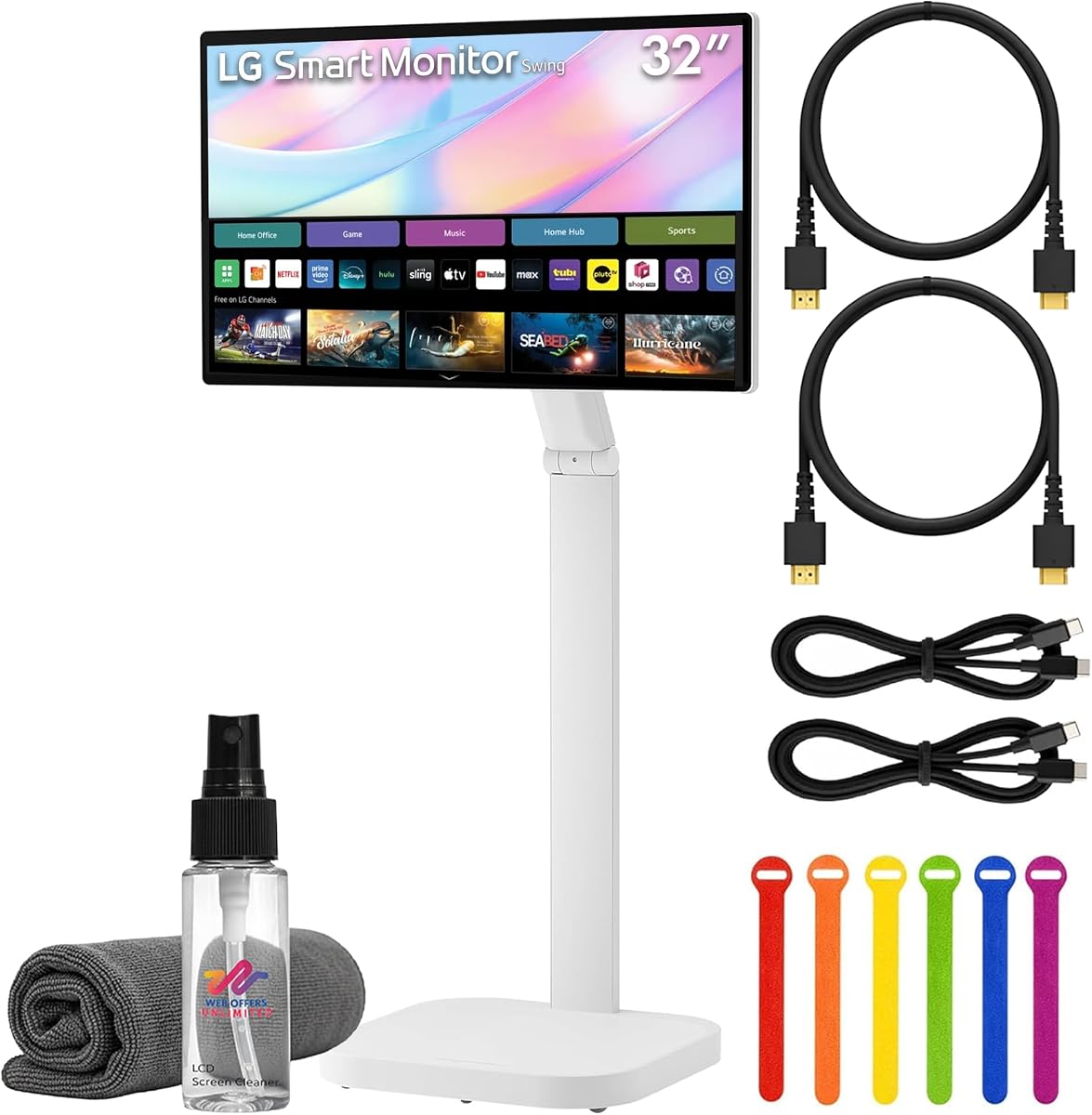
This bundle expands on the base model with essential accessories for immediate setup. It delivers a robust smart experience with webOS and HDR support for varied content. The rolling stand facilitates movement making it suitable for collaborative environments.
We may earn a commission when you buy through this link, at no additional cost to you.
Accessories include HDMI and USB-C cables plus cable ties and a cleaning kit. The webOS platform enables streaming services and cloud access independently. Connectivity supports 65W power delivery for laptops making the desk clutter-free with single-cable setups.
The premium price includes convenience but might exceed strict budget limits. The bundle contents are practical but the core monitor shares features with other models. It is best for those wanting a ready-to-use package without extra purchases.
Recommended for offices needing a quick deploy solution with mobility features. The bundle adds value for users who need cables and cleaning supplies. We suggest this for streamlined procurement. It is a strong choice for shared spaces.
Includes HDMI USB-C cables cable ties and screen cleaning kit to ensure a complete setup experience out of the box.
WebOS enables streaming services remote PC access and cloud apps without requiring a connected computer or media device.
We may earn a commission when you buy through this link, at no additional cost to you.
This signage display is engineered for durability and ease of integration. It is built for high traffic environments where reliability is paramount. The design supports adding external PCs and includes safety compliance for professional deployments.
We may earn a commission when you buy through this link, at no additional cost to you.
Features include VESA mounting with power passthrough for simplified installation. It is compliant with UL-60950 and IK-07 impact testing ensuring robustness. The built-in IoT control allows for remote management and monitoring of device status.
The cost reflects commercial grade standards which might be unnecessary for home use. Specifications are minimal in consumer listings which limits detailed comparison. It is best suited for businesses requiring specific compliance standards.
Recommended for commercial signage or industrial settings needing durability. The ease of adding PCs makes it versatile for various applications. We suggest this for professional deployments. It is a reliable choice for businesses.
Compliant with UL-60950 and IK-07 impact testing ensuring it withstands high traffic environments effectively.
VESA mounting and power passthrough allow easy addition of external PCs for customized system configurations.
We may earn a commission when you buy through this link, at no additional cost to you.
This monitor offers a traditional display experience without touch capabilities. It provides reliable performance for standard office tasks with solid color accuracy. The design focuses on basic usability and longevity for general viewing needs.
We may earn a commission when you buy through this link, at no additional cost to you.
Key strengths include the IPS panel which ensures consistent colors from wide angles. The Full HD resolution provides clear text for productivity tasks. The brightness is sufficient for indoor settings making it a dependable choice for everyday work.
The lack of touch functionality limits interactive use cases. Resolution is lower compared to modern 4K options available today. It is best suited for passive viewing or standard computing needs.
Recommended for users needing a large screen without interactive features. It fits well for general office environments or home use. We suggest this for budget conscious buyers prioritizing brand. It is a reliable standard option.
IPS panel provides wide viewing angles ensuring consistent color accuracy across the screen.
350 cd/m2 brightness ensures clear visuals for typical indoor office or home environments.
We may earn a commission when you buy through this link, at no additional cost to you.
This model offers a commercial touch experience with Samsung's standard build quality. It delivers a rated performance for basic touch and display needs. The design is straightforward for general purpose use in various settings.
We may earn a commission when you buy through this link, at no additional cost to you.
It features FHD resolution with a touch layer for interactive capability. The build quality reflects commercial standards ensuring durability. The packaging is standard making it easy to ship and install quickly.
Specifications are limited in public listings which may hinder detailed comparisons. The focus is on core functionality rather than advanced features. It is best suited for basic interactive tasks.
Recommended for simple touch needs where brand reliability is key. It fits well for basic signage or office applications. We suggest this for standard deployment. It is a solid choice for basic use.
Commercial grade build quality ensures durability for standard touch and display requirements.
FHD touchscreen display type provides clear visuals with interactive capabilities.
We may earn a commission when you buy through this link, at no additional cost to you.
This display offers a standard LCD experience with basic touch features. It is designed for routine interactive use where high performance is not critical. The refresh rate and resolution are suitable for typical daily tasks.
We may earn a commission when you buy through this link, at no additional cost to you.
It features 1920×1080 resolution for clear text and images. The 75Hz refresh rate provides smoother visuals than standard 60Hz panels. The professional black finish fits well in corporate environments.
This is an older model which may lack modern connectivity. The refresh rate is lower than many gaming or creative options available now. It is best for general administrative work.
Recommended for users needing a standard display with minimal requirements. It fits well for basic touch interactions in offices. We suggest this for cost effective solutions. It is a practical choice for routine work.
75Hz refresh rate standard provides smoother motion than basic 60Hz panels for improved visual fluidity.
V.37 connectivity support ensures compatibility with standard external devices.
We may earn a commission when you buy through this link, at no additional cost to you.
This display offers a flexible experience with mobility features and smart capabilities. It delivers strong visual clarity with 4K resolution and touch interaction. The design targets users needing a movable smart display.
We may earn a commission when you buy through this link, at no additional cost to you.
Features include AirPlay 2 and Screen Share for seamless device sharing. The rolling stand supports height tilt swivel and pivot adjustments. 65W power delivery simplifies connection for laptops.
The lower rating suggests potential issues or user dissatisfaction. The premium price may not justify features for all buyers. It is best suited for mobile collaboration needs.
Recommended for users valuing mobility and smart features. It fits well in shared workspaces needing flexibility. We suggest this for dynamic environments. It is a viable option for flexible work.
Rolling stand mobility feature with tilt height swivel and pivot adjustments supports flexible viewing.
AirPlay 2 and Screen Share support device sharing while 65W USB-C power delivery simplifies laptop connections.
We may earn a commission when you buy through this link, at no additional cost to you.
Selecting the right touchscreen monitor requires understanding specific features that impact usability and performance. We outline key factors to consider for making an informed purchase decision.
Resolution determines the sharpness and detail of your display. For a 32-inch screen, 4K (3840×2160) offers superior clarity for design work compared to 2K or Full HD options. Higher resolution ensures crisp text and detailed images essential for professional tasks.
Always prioritize 4K if your workload involves visual detail. Standard resolutions are sufficient for basic office tasks but limit future-proofing.
Capacitive touch provides a responsive and intuitive experience similar to smartphones. It supports multi-touch gestures which are vital for design software and presentations. Resistive options are cheaper but less responsive for daily interactive use.
Look for 10-point capacitive touch for the best fluidity and gesture support in your daily workflow.
A higher refresh rate like 144Hz ensures smooth motion and reduces blur. This is crucial for creative work and video editing where fluidity matters. Standard 60Hz panels may feel sluggish during fast movement.
Choose 100Hz or higher if you prioritize smooth motion and responsiveness in your daily tasks.
Versatile ports like HDMI 2.1 DP and Type-C are essential for modern setups. A full-featured Type-C port allows video audio and power over a single cable. This reduces clutter and simplifies connecting laptops and mobile devices.
Ensure the monitor supports USB-C power delivery to charge your laptop while using the display.
Adjustable stands allow you to customize height tilt and rotation for comfort. Height adjustment helps prevent neck strain during long sessions. A swivel and pivot feature adds flexibility for sharing content with colleagues.
VESA mount compatibility is vital if you plan to use a monitor arm for desk space optimization.
Not all monitors support touch equally across different systems. macOS devices often limit touch functionality due to driver protocols. Verify specific compatibility notes for iOS Android and gaming consoles before buying.
Check if your devices support multi-touch or if they are display-only to avoid disappointment.
Some models like LG Smart Monitor include built-in operating systems like webOS. These allow streaming and remote access without a PC. While convenient, they may require internet access and add complexity to the setup.
Consider if you need a standalone smart experience or if you prefer a traditional monitor connected to your PC.
For commercial or high-traffic environments, look for models rated for 24/7 operation. Safety certifications like UL compliance ensure the device meets rigorous standards. Commercial models often feature robust touch layers for frequent use.
Evaluate if the monitor is for home use or heavy-duty professional settings to ensure longevity.
Start by connecting power before video cables to avoid signal issues. Use the included adapter and ensure the device is properly grounded for safety.
Clean the screen gently with a microfiber cloth to avoid scratches. Avoid harsh chemicals that could damage the touch coating or surface.
Adjust the stand settings to a comfortable height to reduce strain. Enable calibration tools if needed to ensure accurate touch response.
Mac support varies by model. Many units allow limited touch functionality due to protocol constraints. Check specific compatibility notes before purchasing.
It enables simultaneous multi-touch gestures essential for design software. This improves efficiency compared to basic single-point touch systems.
Yes but compatibility depends on the console and driver support. Some gaming consoles support display-only output without touch.
Many models support 65W power delivery via Type-C. This allows charging laptops while transmitting video through a single cable.
Most models include VESA holes for wall mounting or arms. Use compatible mounting kits to attach securely.
Most consumer models include an adjustable stand. Commercial or premium units may offer wheeled bases or require separate mounting.
The top picks offer distinct solutions for diverse needs ranging from performance to mobility. The 32 Inch 4K Touch Monitor leads in speed while LG Smart Monitor Swing excels in flexibility.
Prioritize resolution and connectivity that align with your workflow needs. Ensure compatibility with your current devices to avoid unexpected limitations.
Remember to verify current pricing and availability as they change frequently. This guide helps you navigate the options effectively for your workspace.