
Samsung 32" Odyssey G8
3.7Editor score
Dual mode resolution switching
Fast IPS panel technology
HDR10+ gaming support
Finding the right display is crucial for modern creative workflows and high-performance computing tasks. A 6K monitor offers exceptional pixel density that significantly sharpens text and image details compared to standard 4K screens.
We have carefully evaluated ten leading models based on panel technology color gamut coverage and connectivity options. Each product was analyzed for its ability to handle professional tasks like video editing graphic design and complex data visualization efficiently.
This list highlights unique strengths from each manufacturer including touch capabilities and curved immersive experiences. Please note that specific pricing and availability may vary over time so always check the current listing before making your purchase decision.
3.7Editor score

3.9Editor score

4.5Editor score
As an Amazon Associate we earn from qualifying purchases.
The following comparison table provides a side-by-side overview of the key specifications and features for each of the ten selected 6K monitors to help you identify the model that best fits your specific needs.




The ASUS ProArt PA32QCV stands out as a top choice for professionals needing precise color representation in a 6K format. With a rating reflecting its solid performance it delivers a LuxPixel AGLR display that ensures wide viewing angles and consistent color across the screen.
We may earn a commission when you buy through this link, at no additional cost to you.
Its standout quality lies in the factory calibration which guarantees Delta E less than 2 accuracy right from the start. This is crucial for designers and editors who need to trust that what they see on screen matches the final output perfectly.
While it offers robust connectivity including dual Thunderbolt 4 ports with daisy chaining the refresh rate is limited to standard levels which may not appeal to high speed gaming enthusiasts. However for creative work this trade-off is acceptable for the visual fidelity provided.
This monitor is ideal for Mac users seeking seamless workflow integration and for studios requiring reliable color management tools. We recommend it for those prioritizing image quality and connectivity over high refresh rate gaming capabilities.
Calman Verified factory calibration ensures that color accuracy is maintained consistently across the entire display area for professional workflows.
The inclusion of dual Thunderbolt 4 ports allows for high speed data transfer and power delivery making it easy to connect multiple peripherals.
We may earn a commission when you buy through this link, at no additional cost to you.
The Dell 52-Inch 6K 120Hz Hub offers an expansive cinematic viewing experience ideal for users who demand maximum screen space. Its 21:9 aspect ratio combined with 6K resolution provides exceptional detail and productivity potential for complex multitasking scenarios.
We may earn a commission when you buy through this link, at no additional cost to you.
Key strengths include the IPS Black panel which delivers deeper blacks and higher contrast ratios compared to traditional IPS panels. This enhances visual realism for video grading and detailed design work where color depth and shadow detail are critical.
While the screen size is impressive it requires a significant desk space commitment which might not suit smaller workstations. Additionally the high price point reflects the premium build and features but may be a barrier for budget conscious buyers.
We recommend this monitor for professional studios and power users who need a central command center for multiple applications. It excels in environments where immersion and high resolution are paramount over compact form factors.
The curved design wraps around the viewer creating a more natural viewing experience that reduces eye strain during long sessions.
Features like Picture-by-Picture and KVM support allow you to control multiple computers from one keyboard and mouse efficiently.
We may earn a commission when you buy through this link, at no additional cost to you.
The G32P 32’’ UHD 6K Monitor is designed to deliver vibrant visuals with a glossy finish that enhances color depth and contrast. Its high rating indicates strong performance in delivering sharp images suitable for both creative editing and entertainment purposes.
We may earn a commission when you buy through this link, at no additional cost to you.
A major strength is its 500-Nit brightness combined with HDR support which makes highlights pop and deep blacks remain distinct. This makes it a strong candidate for HDR content creation where accurate luminance reproduction is essential.
The glossy screen can sometimes cause reflections in brightly lit rooms which might be a consideration for office environments. Furthermore the 60Hz refresh rate limits its use for competitive gaming but is sufficient for most professional tasks.
We suggest this monitor for creators who work with HDR content and value high brightness levels. It offers a robust set of features including a durable build and ergonomic stand adjustments that support comfortable long term use.
With 500 nits of brightness the monitor can effectively showcase the dynamic range required for high dynamic range content creation.
The honeycomb cooling design helps manage heat efficiently ensuring the internal components remain stable during extended operation periods.
We may earn a commission when you buy through this link, at no additional cost to you.
The Samsung 32" Odyssey G8 brings next level gameplay with its industry first 6K gaming capabilities. It balances high resolution visuals with the speed needed for action titles making it a versatile choice for hybrid users who game and work.
We may earn a commission when you buy through this link, at no additional cost to you.
Its dual mode feature allows switching between 6K at 165Hz for visuals or 3K at 330Hz for lightning fast action. This flexibility ensures you can prioritize resolution or speed depending on the application without needing separate monitors.
While excellent for gaming the color accuracy may not match dedicated creative monitors out of the box. Also the gaming oriented design may lack some professional connectivity options found in business focused displays like built-in webcams or hubs.
We recommend this monitor for gamers who also need high resolution for productivity tasks. It is an excellent choice for those who value performance and refresh rate over precise color calibration or professional connectivity suites.
With G-Sync compatibility and AMD FreeSync Premium this monitor minimizes screen tearing for a smoother and more responsive gaming experience.
Multiple inputs including DP 2.1 and HDMI 2.1 ensure compatibility with next gen consoles and high performance PCs.
We may earn a commission when you buy through this link, at no additional cost to you.
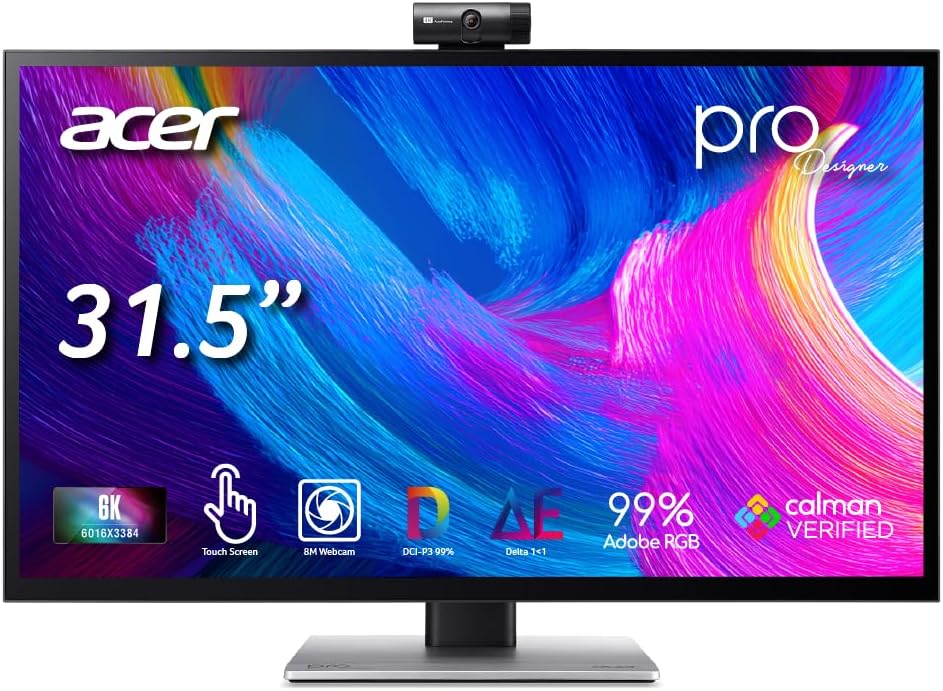
The Acer ProDesigner PE320QXT is a unique solution for creatives who prefer direct interaction with their work. By integrating a high resolution touch screen with a 6K display it removes the need for separate drawing tablets or secondary surfaces.
We may earn a commission when you buy through this link, at no additional cost to you.
Its precision is enhanced by support for MPP 2.0 active styluses providing thousands of pressure levels for natural sketching. The factory calibrated Delta E less than 1 ensures that digital strokes and colors are rendered accurately for professional projects.
The inclusion of a built-in 8MP webcam and microphone array simplifies meeting setups which is a significant convenience for remote teams. However the touch layer adds to the cost and the stylus is sold separately which may be an unexpected extra.
We suggest this monitor for designers and artists who benefit from direct screen manipulation. It is best suited for workflows where touch and stylus input are frequent requirements for editing and collaboration.
Touch capability allows for intuitive gestures like zooming and rotating directly on the canvas which speeds up the design process significantly.
Having a webcam and mic built into the monitor reduces desk clutter and simplifies video calls without needing extra peripherals.
We may earn a commission when you buy through this link, at no additional cost to you.
The G32X 32’’ UHD 6K Monitor impresses with a clean minimalist design that fits well in modern studio environments. A perfect 5.0 rating suggests exceptional user satisfaction with its build quality and visual performance for daily tasks.
We may earn a commission when you buy through this link, at no additional cost to you.
It delivers stunning clarity with a high pixel density that makes text and images appear sharp and crisp. The anti-glare coating helps maintain visibility in varied lighting conditions which is beneficial for environments with natural light.
While it lacks some advanced connectivity features found in higher end models it covers the essentials for a streamlined workflow. The universal mount compatibility allows for flexible positioning which adds to its practicality for diverse setups.
We recommend this monitor for users seeking a reliable and stylish display without unnecessary complexity. It is an excellent choice for those who value simplicity and visual quality in their workspace design.
With 218 pixels per inch the screen provides enough detail to render text and graphics sharply without needing scaling adjustments.
The VESA mounting compatibility allows you to use third party arms to save desk space and achieve the perfect viewing height.
We may earn a commission when you buy through this link, at no additional cost to you.
The Dell 52" Thunderbolt Hub U5226KW focuses on providing a massive workspace with powerful connectivity options. It is designed to act as a central hub for peripherals making it a strong option for enterprise or multi PC environments.
We may earn a commission when you buy through this link, at no additional cost to you.
Its 52 inch curved display offers ample space for multitasking even if the pixel density is lower than smaller 6K screens. The Thunderbolt hub capability allows for charging and data transfer simultaneously which simplifies desk cabling significantly.
Some users note that the resolution trade-off for the larger size might affect text sharpness compared to standard 32 inch models. However for those prioritizing screen real estate and hub functionality this is a reasonable compromise.
We suggest this monitor for professionals who need a large central display and robust connectivity. It is ideal for setups where connecting multiple devices and managing them efficiently is more important than ultra high pixel density.
The built-in USB hub and Thunderbolt ports allow you to connect drives and peripherals directly to the monitor reducing cable clutter.
Included software like Dell Display Manager helps organize windows across multiple screens improving productivity in complex workflows.
We may earn a commission when you buy through this link, at no additional cost to you.
The LG UltraFine evo 32U990A-S sets a high standard for future proof displays with its Thunderbolt 5 connectivity. This feature allows for unprecedented data speeds and power delivery ensuring the monitor remains relevant as devices evolve over time.
We may earn a commission when you buy through this link, at no additional cost to you.
Its Nano IPS Black panel delivers impressive contrast and color coverage including 98 percent DCI P3. This ensures that creative work is viewed with accurate colors and deep blacks which are essential for high quality media production.
The bundle includes useful accessories like cable ties and a cleaning kit which adds value to the purchase. However the high price point and standard 60Hz refresh rate might be drawbacks for those looking for gaming features or budget options.
We recommend this monitor for professionals who require top tier connectivity and color performance. It is an excellent choice for those investing in a long term solution for high end creative workflows and future device compatibility.
With data transfer speeds up to 80 gigabits per second this monitor supports rapid file movements essential for large video projects.
The wide color gamut and HDR certification ensure that the images you create will look consistent across different professional displays.
We may earn a commission when you buy through this link, at no additional cost to you.
The Dell UltraSharp 32 6K Bundle offers a reliable display option with the added security of an extended protection plan. This bundle is designed to provide dependability for business environments where uptime and support are key priorities.
We may earn a commission when you buy through this link, at no additional cost to you.
It features a 31.5 inch screen with 6K resolution delivering crystal clear visuals suitable for detailed work. The inclusion of a protection pack adds value by covering potential issues which can save costs in the long run.
While the brightness is sufficient for well lit areas it may not compete with higher nit monitors in HDR scenarios. The 5ms response time is standard but might be noticeable in fast moving content compared to faster gaming panels.
We suggest this monitor for office users who need a reliable high resolution display with warranty support. It is a practical choice for businesses seeking a balance of performance and protection without premium features.
The 2 year premium extended service plan provides peace of mind ensuring that you have support if hardware issues arise.
LED backlight technology offers visual brilliance with maximum efficiency reducing power consumption while maintaining clear visibility.
We may earn a commission when you buy through this link, at no additional cost to you.
The Dell UltraSharp 52 U5226KW WOST provides a budget friendly entry into large screen displays through a renewed condition. It keeps the core benefits of a 52 inch curved screen and Thunderbolt hub while reducing the initial cost significantly.
We may earn a commission when you buy through this link, at no additional cost to you.
This option is ideal for users who already have a compatible stand or VESA mount arm. It offers the same high resolution and connectivity as the new version but saves money for those willing to source mounting hardware separately.
However buying renewed means you must check the return policy and warranty details carefully to ensure protection. Additionally the lack of a stand may require extra planning for your desk setup which is a logistical consideration.
We recommend this monitor for value focused buyers who need a large workspace and have existing mounting solutions. It is a strategic choice for those looking to maximize screen real estate while minimizing expenditure on new hardware.
Choosing a renewed model allows you to access premium features at a lower price point if you are comfortable with refurbishment standards.
Ensure you have a compatible mount or arm before purchasing since the monitor does not come with a standard base stand.
We may earn a commission when you buy through this link, at no additional cost to you.
Selecting the right 6K monitor involves balancing resolution panel technology connectivity and ergonomics to suit your specific workflow requirements.
Resolution determines the amount of detail you see on screen with 6K offering significantly more space than 4K. High pixel density ensures text remains sharp and images appear continuous without visible pixels which is vital for professional editing.
Look for monitors with a PPI over 200 for a 32 inch screen to ensure crisp visuals that reduce eye strain during long work sessions.
Different panel types like IPS and OLED offer varying levels of color accuracy and contrast. For creative work prioritize monitors with wide color gamut coverage like DCI-P3 and factory calibration to ensure your designs are color accurate.
Choose a panel that supports 10-bit color and has low Delta E values to guarantee that colors are rendered as intended for your project.
Modern 6K monitors often serve as hubs with USB-C or Thunderbolt ports capable of transferring data and charging laptops simultaneously. This reduces cable clutter and simplifies the workspace significantly.
Check for Thunderbolt 4 or higher support to ensure you can daisy chain displays and transfer large files quickly without performance bottlenecks.
While many professional monitors are limited to 60Hz some gaming models support higher refresh rates for smoother motion. If you use your display for both work and play a higher refresh rate can improve the viewing experience.
For static content editing refresh rate is less critical so focus on response time to reduce motion blur if you consume video content frequently.
Physical adjustments like height tilt swivel and pivot are essential for maintaining a comfortable posture throughout the day. A good stand helps reduce neck strain and allows you to position the screen at eye level.
Look for VESA compatibility if you plan to use an arm stand for more flexibility in positioning and desk space management.
Special features such as touch screens built-in webcams or KVM switches can streamline your workflow and reduce the need for extra peripherals. Decide which features are truly necessary for your daily tasks.
Prioritize features that directly contribute to your productivity rather than those that add cost without practical value for your specific use case.
To get the best performance from your monitor connect it using a high speed cable like Thunderbolt or HDMI 2.1 to support the full resolution and refresh rate without compression.
Regularly clean the screen with a soft microfiber cloth and avoid harsh chemicals to protect the anti-glare coating and ensure a clear image over time.
Adjust your brightness and color settings to match your lighting environment using built-in sensors or calibration software to maintain color accuracy and reduce eye fatigue.
A 6K monitor provides roughly 150% more screen real estate than 4K displays allowing you to view multiple windows without constant zooming. This high pixel density also ensures text appears incredibly sharp which is essential for coding and writing.
Yes driving a 6K resolution requires significant graphics processing power. Ensure your computer has a dedicated graphics card or a modern integrated GPU capable of outputting 6K signals to avoid performance lags or flickering.
For casual users like general web browsing or watching standard videos a 6K monitor might be overkill. However if you want sharper text and a spacious desktop for multitasking it can offer a noticeable upgrade over standard displays.
Most 6K monitors work seamlessly with Mac computers especially those with Thunderbolt 4 or USB-C ports. Look for models with Mac-specific features like color matching presets to ensure compatibility with macOS color management.
To support 6K resolution you typically need a Thunderbolt 4 or HDMI 2.1 certified cable. Using standard cables may limit the refresh rate or resolution so always check the cable specifications before connecting.
You can use built-in software tools or a hardware colorimeter to calibrate your monitor for accurate colors. Many professional monitors come with factory calibration but checking it periodically ensures continued accuracy for your work.
Our top picks highlight a range of solutions from the color accurate ASUS ProArt for designers to the gaming focused Samsung Odyssey G8. Each monitor offers unique strengths that cater to different professional needs and usage scenarios.
When choosing prioritize factors that matter most to your daily workflow such as connectivity options color accuracy and ergonomics. A monitor that fits your specific tasks will enhance productivity and comfort more than one with unused features.
Remember that prices and availability can change quickly so always check the current listing for the most up-to-date offers. We hope this guide helps you find the perfect 6K monitor for your workspace.