
CENMATE Aluminum 8 Bay
3.8Editor score
Supports up to 160TB total capacity
Includes active cooling fans for heat
Offers multiple RAID modes like RAID 5
Finding the right 8 Bay Hardware RAID Enclosure is crucial for professionals managing massive data sets. These devices allow you to connect multiple drives for increased capacity and redundancy without building a full NAS system.
We evaluated ten leading models based on transfer speeds, build quality, and RAID flexibility. Our analysis covers everything from budget-friendly DAS options to high-end Thunderbolt arrays used in production studios.
Each pick highlights unique strengths like hot-swapping, cooling efficiency, and interface types. Remember that pricing fluctuates often, so check current deals before making your final storage investment decision today.
3.8Editor score

5.0Editor score

3.7Editor score
As an Amazon Associate we earn from qualifying purchases.
The following table provides a side-by-side look at all ten featured enclosures. Compare their key specifications to find the model that best fits your specific workflow requirements and budget constraints easily.

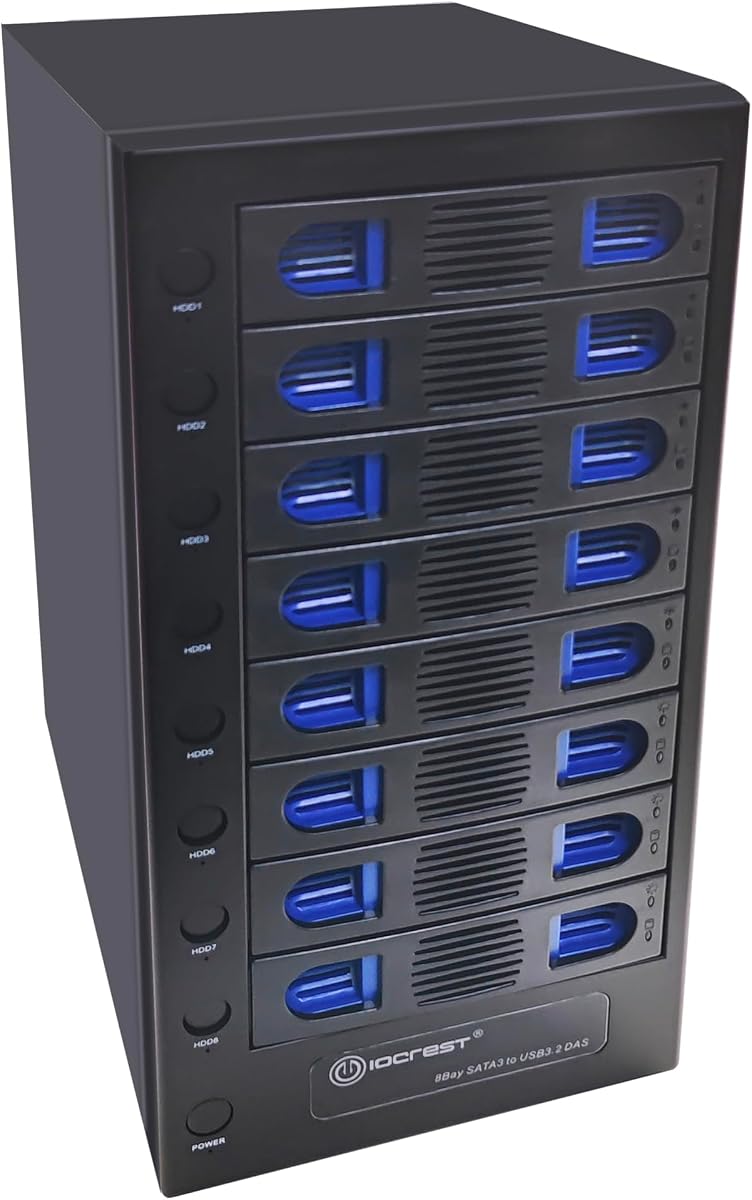


The CENMATE Aluminum 8 Bay enclosure stands out as a budget-friendly option for those needing hardware RAID support without breaking the bank. With a rating of 3.8 stars, it offers a functional solution for personal and enterprise users looking to expand their storage capabilities efficiently.
We may earn a commission when you buy through this link, at no additional cost to you.
This unit supports up to 160TB of total capacity using 2.5 or 3.5 inch SATA drives. It features eight distinct RAID modes including RAID 0, 5, and 10, giving users flexibility in how they prioritize speed versus redundancy. The aluminum construction helps with heat dissipation while housing dual cooling fans to keep drives safe.
While the performance is solid for the price, users should note that the fan noise sits around 40-50 decibels which might be noticeable in quiet environments. Additionally, the setup process requires careful attention to instructions regarding drive loading and RAID configuration to avoid data loss issues.
This enclosure is ideal for hobbyists or small businesses needing a cost-effective way to aggregate storage. If you are looking for an affordable entry point into hardware RAID without investing in premium Thunderbolt options, this model delivers essential features effectively.
Users can switch between modes like CLONE, RAID0, and RAID5 by toggling a physical switch and resetting the device, allowing customization based on specific performance or safety needs.
Built-in fans and aluminum materials work together to maximize data security by preventing overheating during long transfer sessions or heavy workloads.
We may earn a commission when you buy through this link, at no additional cost to you.
The SanDisk Professional G-RAID Shuttle represents the pinnacle of external storage for demanding workflows like 8K video editing and virtual reality production. Boasting a perfect 5.0 rating, it delivers colossal capacity in a transportable design that professionals rely on for critical footage.
We may earn a commission when you buy through this link, at no additional cost to you.
This array comes pre-configured with eight removable Ultrastar hard drives totaling 160TB of storage. It leverages Thunderbolt 3 technology to achieve write speeds up to 2000MB/s, making it ideal for multi-stream editing without bottlenecks. Users can also switch RAID modes via software for ultimate flexibility in data management.
While the performance is unmatched, the price reflects this high-end positioning and requires a Thunderbolt 3 port which may need adapters for older machines. The removable drives are a significant benefit for redundancy and transport but add to the overall cost compared to empty enclosures.
For studios and professionals needing maximum speed and reliability, this is the definitive choice. It combines massive capacity with enterprise-grade hardware in a single unit that simplifies complex storage workflows effectively.
With 40Gbps bandwidth, this enclosure handles large file transfers quickly, supporting workflows that demand real-time editing of high-resolution media files.
Removable drives allow for easy offsite backup or swapping, ensuring your project data remains safe and accessible even when moving between locations.
We may earn a commission when you buy through this link, at no additional cost to you.
The CENMATE Non-RAID DAS offers a streamlined approach for users who prefer direct storage access over complex RAID configurations. With a 4.3 rating, it focuses on providing a reliable enclosure that supports hot-swapping and straightforward data management for individuals.
We may earn a commission when you buy through this link, at no additional cost to you.
Supporting up to 160TB capacity, this unit allows users to replace drives without powering off the device. It uses the same aluminum alloy build and cooling fan system as its RAID counterpart but removes the logic complexity. This makes it easier to maintain simple storage pools without worrying about RAID parity.
However, the lack of RAID support means there is no built-in data redundancy, so users must manage backups independently. The fan noise remains a consideration for quiet environments, though it ensures drives stay cool during extended operations.
This is a great option for archiving or expanding storage where speed and capacity matter more than hardware redundancy. It suits users who want plug-and-play simplicity without investing in advanced RAID features.
Replace drives without shutting down your computer, which is essential for workflow continuity when managing large media libraries or ongoing data transfers.
Connect up to three devices in series to expand total capacity to 480TB, allowing your storage needs to grow over time without replacing existing gear.
We may earn a commission when you buy through this link, at no additional cost to you.
The OWC ThunderBay 8 is designed for users who want universal compatibility across 2.5 and 3.5 inch SSDs and HDDs with Thunderbolt 3 speed. It holds a 3.9 rating and offers the flexibility to daisy-chain multiple units for massive storage capacities.
We may earn a commission when you buy through this link, at no additional cost to you.
This enclosure includes a Thunderbolt 3 cable and supports backward compatibility with Thunderbolt 2. It features quick drive swap trays with thumb screw releases for easy maintenance. The absence of drivers means it works out of the box on both Mac and Windows systems immediately.
While versatile, it requires a Thunderbolt 3 port and careful management when daisy-chaining to avoid bottlenecks. The setup process is generally straightforward but requires attention to cable management for optimal performance.
Ideal for Mac users or those needing high-speed connectivity without the constraints of SATA USB enclosures. It balances performance and flexibility well for creative professionals.
Chain up to six units for over 1,152TB of storage, making it easy to grow your archive as your projects expand.
Works seamlessly with Mac and Windows, offering a unified storage solution for teams using mixed operating systems.
We may earn a commission when you buy through this link, at no additional cost to you.
The CENMATE 10Gbps DAS brings faster USB 3.2 Gen 2 speeds to the popular 8-bay format. With a 4.1 rating, it is designed for users who want faster transfers than standard USB 3.0 without the cost of Thunderbolt options.
We may earn a commission when you buy through this link, at no additional cost to you.
It supports transfers up to 10Gbps under UASP control, significantly reducing wait times for large files. Hot swapping is supported for convenience, and it works with both Windows and Mac systems easily. The aluminum body and dual fans ensure stable operation.
The main drawback is the fan noise which remains a consistent theme across this brand. Additionally, you must have a Type-C port capable of USB 3.2 to achieve full speed.
This is a strong mid-range option for those needing speed and flexibility. It fits well into workflows that prioritize quick access over complex RAID configurations.
Move 1GB movies in 3-5 seconds thanks to USB 3.2 Gen 2 speeds, making it efficient for video editors needing quick access.
Compatible with Thunderbolt 3 and 4 ports via USB-C, ensuring it works with newer laptops and desktops without adapters.
We may earn a commission when you buy through this link, at no additional cost to you.
This generic 8-bay tool-less enclosure offers straightforward DAS functionality with unique features like independent drive switches and smart fan modes. Holding a 4.3 rating, it focuses on simplicity and efficient cooling for users who prefer basic storage expansion.
We may earn a commission when you buy through this link, at no additional cost to you.
It supports up to 22TB per drive totaling massive capacity. The smart fan uses thermal sensors to adjust speed between three levels, balancing noise and cooling. Independent switches allow you to power off specific drives without affecting others.
The main limitation is basic build quality compared to premium brands and lack of advanced RAID. However, the independent switches and cooling management make it a practical choice for archival storage.
Ideal for users who want control over each drive without complex software. It suits home labs or office storage where basic reliability is key.
Built-in thermal sensors adjust fan speed based on temperature, reducing noise when idle and increasing cooling when active.
Power off individual drives to save energy or troubleshoot issues without shutting down the entire enclosure.
We may earn a commission when you buy through this link, at no additional cost to you.
The OWC ThunderBay Flex 8 is a unique all-in-one solution that combines storage with docking and PCIe expansion. With a 3.7 rating, it targets creative professionals who need to connect multiple peripherals and cameras alongside their massive storage arrays.
We may earn a commission when you buy through this link, at no additional cost to you.
Its top four bays support U.2 SSDs for blazing speeds. It includes front SD 4.0 and CFexpress readers plus USB ports for peripherals. The PCIe x16 slot allows adding audio cards or network interfaces directly to the unit.
While powerful, the complexity and price make it less suitable for casual users. Managing PCIe hardware alongside storage can require more technical knowledge. However, for production environments it saves desk space significantly.
This is the ultimate hub for high-end creative setups. If you need a single unit to handle storage, connectivity, and expansion, it is unmatched.
Add audio capture cards or high-speed networking directly to your storage enclosure, simplifying your desk setup and reducing cable clutter.
Top bays support U.2 NVMe SSDs ensuring compatibility with next-generation drive formats as technology advances in storage speeds.
We may earn a commission when you buy through this link, at no additional cost to you.
The QNAP TL-D810TC4-US brings enterprise-grade management tools to a desktop DAS enclosure. With a 4.0 rating, it stands out for its software ecosystem that allows detailed monitoring and configuration via the QNAP JBOD Manager utility.
We may earn a commission when you buy through this link, at no additional cost to you.
It supports up to 10Gbps transfer speeds and works with Windows, Mac, and Linux systems. While it functions as a DAS, the JBOD management allows flexibility for QNAP NAS expansion. Its tower design supports high-capacity drives easily.
The main drawback is potential dependency on QNAP software for full features. If you are not already in their ecosystem, this might be overkill. However the build quality and speed are top notch.
Best for users invested in QNAP infrastructure or needing reliable enterprise expansion. It offers a balance of hardware quality and management features.
Use the free QNAP JBOD Manager utility to view system info and manage configurations efficiently from a central interface.
Easily expand storage for media libraries or surveillance data without buying a new NAS system by adding this unit.
We may earn a commission when you buy through this link, at no additional cost to you.
This Mini ITX NAS case is a chassis for building a custom PC with massive storage potential. With a 4.0 rating, it appeals to hobbyists who want to build their own media server or workstation with complete control.
We may earn a commission when you buy through this link, at no additional cost to you.
It supports hot-swap bays and features dual independent air channels to separate CPU and drive heat effectively. Made of thick steel, it includes indicator lights for monitoring drive status. It works with various motherboards and low-power supplies.
The downside is you must buy and assemble all internal parts separately. This increases total cost and technical effort. However it offers the ultimate flexibility for custom setups.
Ideal for DIY enthusiasts building a custom Plex or home lab server. It provides hardware-level cooling control not found in external enclosures.
Separate airflow for drives and motherboard prevents heat interference, keeping both systems cool during intense workloads.
Compatible with Mini ITX and Micro ATX boards and various power supplies allowing extensive customization for different use cases.
We may earn a commission when you buy through this link, at no additional cost to you.
The ICY DOCK MB998SK-B is designed for internal installation in a PC offering enterprise-grade reliability for 2.5 inch drives. With a perfect 5.0 rating, it focuses on durability and compact density for server or workstation builds.
We may earn a commission when you buy through this link, at no additional cost to you.
It supports SATA and SAS drives in a full metal cage designed for external bays. The locking trays ensure drives stay secure during transport. This option is ideal for those needing high capacity in a compact internal form factor.
The main constraint is that it requires an internal slot and limits you to 2.5 inch drives. This makes it less versatile for general users but perfect for compact high-performance builds.
Best for IT professionals needing reliable internal hot-swap storage. It offers unmatched build quality for its specific form factor and use case.
Eight 2.5 inch drives fit in a standard 5.25 inch bay allowing massive capacity in a small space perfect for small form factor PCs.
Locking trays ensure drives stay secured during transport, making this unit ideal for mobile workstations or servers.
We may earn a commission when you buy through this link, at no additional cost to you.
Selecting the right enclosure requires understanding interface types, RAID capabilities, and cooling needs to ensure your storage meets professional workflow demands reliably.
The interface you choose determines your transfer speeds. Thunderbolt 3 offers up to 40Gbps which is essential for video editing. USB 3.2 Gen 2 reaches 10Gbps suitable for large file backups. Ensure your computer has the compatible port to utilize these speeds fully.
Prioritize interfaces that match your workflow speed requirements. High bandwidth is necessary for media streaming while standard speeds suffice for backups.
Hardware RAID enclosures manage data striping and redundancy internally. This protects your data from drive failure without consuming system resources. Look for support for RAID 5 or 10 to balance capacity and safety effectively.
If you need simple storage without redundancy consider DAS options. Always backup critical data regardless of RAID configuration to ensure maximum safety.
Check if the enclosure supports 2.5 or 3.5 inch drives or both. Most models support up to 160TB total but specific models like the ICY DOCK are limited to 2.5 inch drives. Verify compatibility with high capacity drives like 20TB units.
Ensure your selected model supports your drive sizes and capacity needs. Mismatched drives can lead to installation issues or reduced performance.
Eight drives generate significant heat that must be managed. Active cooling fans are standard but can produce noise around 40-50 decibels. Look for models with adjustable fan speeds or smart thermal sensors if noise is a concern.
Evaluate the balance between cooling efficiency and noise. If placing the unit in a quiet room look for models with silent cooling options.
Hot swapping allows you to replace drives without shutting down the system. This is essential for maintaining uptime in busy workflows or servers. Verify that the enclosure explicitly supports hot swap functionality.
Prioritize hot swap support if you need uninterrupted access. This feature adds significant convenience for maintenance and expansion.
Enclosures with aluminum or steel chassis offer better durability and heat dissipation. For portable needs check for rugged designs like the G-RAID Shuttle. For stationary use prioritize structural integrity and stability.
Match build quality to your usage environment. Portable units should be compact while desktop units focus on airflow and stability.
Always insert drives individually before powering on to ensure detection and proper configuration. Check manufacturer notes about drive loading sequences to avoid errors in drive recognition.
Keep the enclosure in a well ventilated area to maintain stable temperatures. Ensure fans are not obstructed by objects to prevent overheating during long sessions.
Update firmware regularly to fix bugs and improve performance. Follow manufacturer instructions carefully for RAID setup and avoid changing modes without backing up data first.
DAS enclosures provide direct access to individual drives without redundancy logic. RAID enclosures manage data across drives for performance or safety. Choose DAS for simple storage and RAID for redundancy.
Yes most modern 8 bay enclosures support both HDDs and SSDs. Check the compatibility list to ensure high capacity drives are supported for optimal performance and capacity.
Many models require toggling a physical switch and resetting the device to change RAID modes. Always refer to the manual and backup data before switching to prevent loss.
Most universal models support both Windows and Mac systems. However always verify OS compatibility specifically for advanced management tools like those from QNAP.
Yes Thunderbolt 3 offers much higher speeds of 40Gbps compared to 10Gbps USB 3.2. It is ideal for video editing but requires compatible ports on your computer.
If fan noise is an issue place the unit in a separate room or use an enclosure with adjustable fan speeds. Some models include smart thermal sensors to reduce noise when idle.
We reviewed ten top models ranging from budget DAS units to premium Thunderbolt arrays. Each offers unique strengths depending on your needs for speed redundancy and capacity expansion.
Prioritize your specific requirements like interface speed and RAID support before buying. Ensure the unit supports your drive sizes and capacity needs for seamless integration.
Check current prices and availability as deals vary frequently. Make your final decision based on the most up-to-date information to get the best value.