
CERRXIAN 90 Degree SATA Adapter
4.6Editor score
Supports SATA III speeds
Up angled design for routing
Includes two adapters in pack
When building or upgrading a computer, managing cables inside the case is crucial for airflow and aesthetics. A 90 Degree SATA Adapter helps solve tight space issues by redirecting connectors so they fit neatly without bending cables excessively. This ensures your system runs cooler and looks more professional.
We analyzed the most reliable adapters based on build quality, data transfer speeds, and user feedback. Our list includes options for both data only and combined power data connections. Each product was vetted for compatibility with standard motherboards and drives to ensure you get a secure connection every time.
Each pick below highlights specific strengths like price value dual port support or angled direction. You will find detailed breakdowns of specifications and real world usage scenarios. Please note that availability and pricing can fluctuate so always check the current listing before you purchase to avoid unexpected changes.
4.6Editor score

5.0Editor score

4.4Editor score
As an Amazon Associate we earn from qualifying purchases.
The following table provides a side by side comparison of all ten adapters listed in this guide. You can quickly see which ones support power transfer, their specific angles, and key features to help you decide which model fits your specific motherboard layout and drive configuration.


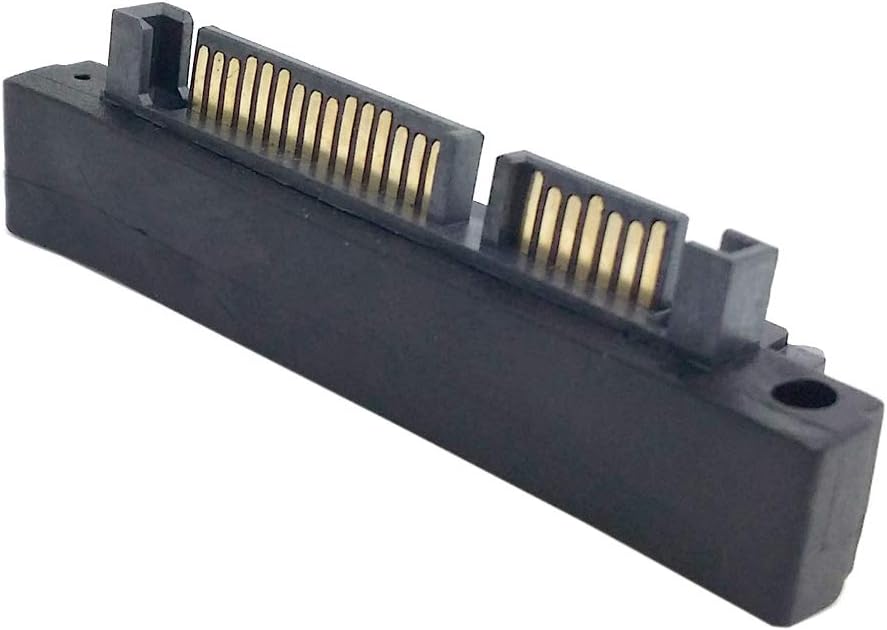


This adapter is designed to solve the common issue of SATA cables hitting the chassis when connecting drives. It redirects the cable flow so you can route it neatly without bending the wire. The build quality is solid and it supports modern high speed standards for reliable performance.
We may earn a commission when you buy through this link, at no additional cost to you.
Users appreciate the up angle design which helps in tight cases where vertical space is limited. It maintains full compliance with SATA III specs ensuring you get the full transfer speed your drive offers. The inclusion of two adapters makes it a great value for multiple drive setups.
Keep in mind that this unit only handles data and not power. You will still need to connect a separate power cable to your SSD or HDD. While this is standard for data adapters it means you need to ensure your power supply has enough available cables.
Buy this if you are building a PC and need to manage cables in a compact case. It is perfect for users who want a quick fix for bent cables and better airflow. The affordable price and dual pack make it a top choice for budget conscious builders.
By redirecting the cable horizontally away from the port you reduce the risk of air blockage and create a cleaner look inside your case.
Getting two adapters in one purchase allows you to set up multiple drives without buying individual units which saves time and money.
We may earn a commission when you buy through this link, at no additional cost to you.
This dual adapter allows you to split a single SATA port into two connections which is useful for RAID setups or multi drive builds. The right angle design ensures that cables do not protrude too far into the case. It is built to maintain signal integrity even when split across two devices.
We may earn a commission when you buy through this link, at no additional cost to you.
The low profile design is a key feature for smaller cases or motherboards where space is tight. Users report that it fits well without blocking other ports or components. The packaging includes two units so you can use one for data and another as a spare.
You should check your motherboard to ensure it supports multiple devices on a single port if using this for splitting. Also note that like most data adapters it does not provide power to the drives. You will need to manage your power connections separately.
This is an ideal pick for users needing to connect more drives than they have direct ports. It works well for hobbyists building servers or storage arrays. The budget friendly price and dual pack option make it a practical choice for expanding your system.
The dual female connector allows you to connect multiple drives to a single controller port facilitating easier RAID array setups.
Its compact design ensures that it does not add bulk to the motherboard area keeping the interior of your case uncluttered.
We may earn a commission when you buy through this link, at no additional cost to you.
This adapter stands out because it can handle both power and data signals which simplifies cabling in tight spaces. The up angled design helps route cables away from sensitive components and towards the airflow path. It is compatible with both 2.5 and 3.5 inch drives making it versatile.
We may earn a commission when you buy through this link, at no additional cost to you.
The construction is robust and ensures a stable connection that minimizes the risk of disconnection during vibration. Users praise its ability to maintain 6Gbps speeds without signal degradation over the extended connection. The design allows for a more organized look inside the computer case.
Be aware that this adapter requires enough space to accommodate the angled bend without pinching. If your case is extremely cramped you might need a different angle option. Always ensure your power source is rated for the drives you are connecting to avoid issues.
Choose this if you need a reliable solution that combines power and data routing in one unit. It is especially useful for older drives or setups where power cables are difficult to reach. The premium features justify the cost for serious system builders.
This adapter carries both power lines and data lines reducing the need for separate cable management steps during installation.
Whether you are using a small SSD or a large HDD this adapter works seamlessly with standard SATA drive interfaces.
We may earn a commission when you buy through this link, at no additional cost to you.
This adapter features a down angled connector which is perfect for drives mounted at the bottom of a case. It ensures that cables do not block other ports or interfere with airflow fans. The design is compatible with standard 22pin connectors found on most modern drives.
We may earn a commission when you buy through this link, at no additional cost to you.
The build quality ensures that power and data are transmitted without loss or interference. Users find it easy to install without needing additional tools or screws. The extension aspect allows for a bit more reach when routing cables to a power supply.
Ensure that the down angle matches your drive orientation to avoid cable stress. If you need an up angle instead you might need a different variant. It is a great addition to a build where clean wiring is a priority.
Select this adapter if you are mounting a drive where a straight cable would cause a sharp bend. It protects your connectors from strain and helps keep the case tidy. The reliable performance makes it a solid choice for daily use.
The downward angle aligns perfectly with drives mounted at the bottom of the chassis reducing strain on the cable.
The extension design provides extra length to route power and data cables to distant power supplies more easily.
We may earn a commission when you buy through this link, at no additional cost to you.
This is a straightforward adapter that converts a vertical connection to a horizontal one without any complex features. It uses standard 22pin connectors which are widely available and compatible with most hardware. The black finish matches typical PC internals and keeps a clean look.
We may earn a commission when you buy through this link, at no additional cost to you.
Users report that it holds tightly and does not loosen over time. It supports both power and data lines effectively which makes it versatile for different drive types. The quality of the contacts is high ensuring consistent performance.
Because it is a standard design it may not have any unique features like dual ports. However it fulfills its purpose well for simple routing needs. If you need a reliable converter this is a safe pick.
Choose this if you want a dependable adapter that gets the job done without extra cost. It is suitable for general upgrades and repairs where a standard adapter is required. The consistent performance makes it a trusted option.
It works with any standard SATA device that uses the common 22pin connector making it universally useful.
The black color scheme blends in with other components keeping the internal look of your case professional.
We may earn a commission when you buy through this link, at no additional cost to you.
This package includes both up and down angled adapters so you can choose the best orientation for your specific board. It is designed specifically to change the installation direction of SATA cables on motherboards. This flexibility makes it highly versatile for different case layouts.
We may earn a commission when you buy through this link, at no additional cost to you.
Users find that having two types in one box saves time when planning a build. The connectors are tight and maintain a secure connection even when the system is moved. It helps prevent cable bending which can damage data lines.
You should verify which angle you need before installation to avoid confusion. The pack includes one of each so you might have an extra that you do not use. It is a practical solution for motherboard routing issues.
This is a great pick for builders who want flexibility without buying separate packs. It simplifies the process of fitting cables into tight spots around the motherboard. The value and convenience make it a strong candidate for any build.
Getting both up and down angles in one pack lets you adapt to any motherboard port direction easily.
By redirecting the cable it prevents sharp bends that could degrade signal integrity over time.
We may earn a commission when you buy through this link, at no additional cost to you.
This adapter provides a down angled solution for connecting drives where a straight cable would be awkward. It transfers both power and data ensuring you have everything you need for a stable connection. The design is robust and suitable for larger drives.
We may earn a commission when you buy through this link, at no additional cost to you.
Users appreciate the ability to route cables downwards which often clears space for graphics cards or other components. The build quality ensures that the connection remains tight and secure during use. It supports high speeds so performance is not impacted.
Keep in mind that this is a down angle only model so check your layout first. If you need an up angle you will need a different adapter. It is a specialized tool for specific routing scenarios.
Buy this if you need a dedicated down angle adapter that handles power and data. It works well for cases where vertical routing is impossible due to obstructions. The reliable performance makes it a useful addition to your toolkit.
The down angle design helps route cables out of the way of sensitive components like GPU coolers.
It carries power lines alongside data so you can manage fewer cables at the drive connection point.
We may earn a commission when you buy through this link, at no additional cost to you.
This adapter stands out with gold plated contacts which provide the best possible signal transmission. The use of high quality materials ensures durability and long life. It is built to meet strict environmental standards and delivers top tier performance.
We may earn a commission when you buy through this link, at no additional cost to you.
Users rate this highly for its smooth connection and lack of signal issues. The data transfer rate supports the latest standards ensuring your drives run at full speed. It is a reliable choice for builds where quality is the main priority.
It may be slightly more expensive than standard options but the performance difference is notable. If you are building a system where stability is critical this is a great choice. The premium features justify the cost for serious enthusiasts.
This is a perfect pick for users who want the best build quality and reliability. It ensures your drive connection is stable and fast. The attention to detail makes it a standout choice for premium builds.
The gold plating reduces resistance and corrosion ensuring a stable connection over many years of use.
Manufactured using RoHS compliant materials this adapter is safe for the environment and meets strict standards.
We may earn a commission when you buy through this link, at no additional cost to you.
This bulk pack offers four adapters with two up and two down angles giving you plenty of options. It is ideal for larger builds or server setups where multiple drives need routing. The compact design ensures they fit in tight spots without adding bulk.
We may earn a commission when you buy through this link, at no additional cost to you.
Users find the variety in angles very useful for complex cases. The materials are high quality and durable for long term use. It simplifies cable management by providing the exact angles you might need.
Since it is a bulk pack the individual pieces may not have premium finishes. However for practical use they perform well. It is a great solution if you want to have spares on hand for future upgrades.
Choose this if you need multiple adapters for a build or to keep as spares. It is cost effective and versatile for different configurations. The convenience of having mixed angles makes it a smart purchase for enthusiasts.
Buying in bulk saves money and ensures you have adapters ready for multiple drives or future upgrades.
Having both up and down angles in one box provides maximum flexibility for any motherboard port layout.
We may earn a commission when you buy through this link, at no additional cost to you.
This adapter converts motherboard ports to a down angle which helps route cables cleanly to the drive bays. It includes two units so you can manage multiple drives easily. The design extends the port slightly allowing for a gentler cable bend.
We may earn a commission when you buy through this link, at no additional cost to you.
Users report that it fits well and does not block adjacent components. It supports 6Gbps speeds so you do not lose performance with the adapter. The connection is tight and prevents accidental disconnections.
If your case requires up angled adapters you will need to select a different option. But for down angle needs this works very well. It is a practical solution for organizing your internal cables.
Buy this if you are building a system with specific cable routing needs. It ensures your connections are stable and out of the way. The inclusion of two units makes it a good value for multi drive setups.
This adapter extends the motherboard port to allow for a gentler cable bend that reduces wear over time.
By directing cables downwards you can route them along the back of the case for a cleaner look.
We may earn a commission when you buy through this link, at no additional cost to you.
Choosing the right adapter depends on your specific motherboard layout and drive types. This guide covers key factors to consider before you purchase to ensure compatibility and performance.
The most important factor is whether you need an up or down angled adapter. Check the position of your motherboard ports and the drive bays to see which direction will avoid obstructions. An up angle bends away from the board while a down angle bends towards the case bottom.
Always verify the physical space in your case to ensure the chosen angle does not block other components like RAM or cooling fans.
Some adapters transfer both power and data while others handle data only. Data only adapters are common for SSDs that use separate power connectors. Combined adapters are useful for traditional HDDs where you want fewer cables at the drive.
Check your power supply cables to see if you need an adapter that supports 12V and 5V power lines for your specific drive type.
Ensure the adapter matches the SATA version of your motherboard and drives. Most adapters support SATA III but checking ensures you get full speed. Look for compatibility with standard 7 pin data and 15 pin power connectors.
Verify that the connector pin count matches your motherboard ports exactly to avoid connection issues or damage.
Look for adapters made from durable materials with sturdy connectors. Gold plated contacts help prevent corrosion and ensure a stable connection over time. Avoid cheap plastic connectors that might snap easily during installation.
Read user reviews to confirm that the adapter fits tightly and does not loosen during system movement.
Check if the adapter supports both 2.5 and 3.5 inch drives. This ensures you can use the adapter for both SSDs and traditional HDDs. Some adapters are optimized for specific sizes so universal compatibility is preferred.
If you plan to mix drive sizes ensure the adapter fits the physical connector of all your devices.
Consider buying a pack with multiple adapters if you have more than one drive. 2-pack or 4-pack options save money and give you spares. It is also useful to have different angles for flexibility.
Buying in bulk ensures you have backups if one adapter fails or you need more for future expansion.
The thickness and length of the adapter can affect fit in tight cases. Measure the available space near your motherboard ports to ensure the adapter does not protrude too much. Thin adapters are better for crowded boards.
Choose a design that does not interfere with nearby RAM slots or heatsinks to avoid installation issues.
Stick with brands that have a track record of reliable products. Established brands often provide better quality control and customer support. Check ratings to confirm user satisfaction with compatibility and durability.
Brands with high ratings are more likely to deliver consistent quality and fewer connection issues over time.
First turn off your computer and disconnect power to safely access the internal components. Open the case and locate the SATA port on your motherboard where you plan to connect the adapter. Ensure the area is clean and free of dust.
Next gently insert the adapter into the motherboard port until it clicks into place. Connect the SATA cable from your drive to the adapter ensuring it is secure. Use cable ties to route the wire neatly along the case edges.
Finally check all connections before closing the case. Power on your system and verify that the drives are detected in BIOS. Avoid moving the cables aggressively to prevent stress on the adapter connections.
No a good quality adapter should not affect data transfer speed. Most adapters support full SATA III speeds of 6Gbps without signal degradation. However cheap or loose connectors might cause minor issues.
Yes most adapters are universal and work with both SSDs and HDDs. They use standard SATA connectors that are consistent across these drives. Just ensure you have the right power supply for your specific drive type.
Up angled adapters bend away from the motherboard while down angled bend towards the case bottom. The choice depends on your cable routing needs and port location on the board. Both serve to reduce cable bending.
It depends on the model. Some adapters carry both power and data lines while others handle data only. Check the product description to confirm if it supports the 15-pin power connection for your drive.
You need an adapter to reduce cable strain and improve airflow. Straight cables can block ports or block airflow. An adapter routes the cable neatly keeping the case clean and efficient.
Yes they are designed for plug and play installation. You simply attach them to the motherboard port and connect your cables. No tools are required to install a standard adapter.
Buying a pack with multiple units like 2 or 4 pieces is cost effective. This ensures you have enough for all your drives and spares. It also provides mixed angles for flexibility in different setups.
The best adapter depends on your specific case layout and drive requirements. Options like the CERRXIAN and Right Angle adapters offer great value and performance for most users. Choosing the right angle ensures your build looks clean and runs efficiently.
Prioritize build quality and compatibility with your motherboard and power supply. High quality connectors ensure long term stability and prevent future connection issues. Consider getting a multi-pack for flexibility and future upgrades.
Prices and availability can change so always check the latest listings before buying. We recommend reading current user reviews to confirm fit for your case. With the right adapter your system will benefit from better airflow and easier maintenance.