
GIGABYTE X470 AORUS Gaming 7 WIFI
4.3Editor score
10+2 Phase VRM
Fins-Array Heatsink
Wave 2 WIFI
This guide compares the top AMD Ryzen Gen 2 X470 motherboards for gaming and performance, evaluating power delivery, connectivity, and build quality for 2026.
Choosing the right motherboard is crucial for building a reliable AMD Ryzen system. The X470 chipset offers robust features for second-generation Ryzen processors, balancing performance and value for enthusiasts and gamers alike.
We analyzed ten top-rated models based on power phases, thermal solutions, and connectivity options. Each product was evaluated against real-world usage scenarios to ensure they meet modern computing demands effectively.
Every pick highlights specific strengths like overclocking support or premium audio. Prices fluctuate often, so verify current deals before purchasing to get the best value for your specific build requirements.
4.3Editor score

4.6Editor score
4.6Editor score
This side-by-side comparison highlights key specifications across all ten selected motherboards to help you quickly identify the model that fits your specific performance needs.


The ASUS Prime X470-Pro stands out as a reliable choice for second-generation Ryzen builds. Its high rating reflects consistent performance and stability in real-world applications.
We may earn a commission when you buy through this link, at no additional cost to you.
It features 5-Way Optimization which automates tuning for your specific system. The SafeSlot Core ensures your graphics card stays securely anchored during intensive gaming sessions.
While it lacks onboard WiFi, the onboard LAN is solid. The absence of Type-C on the rear panel might be a slight inconvenience for newer peripherals.
This board is perfect for users seeking a balance of value and performance. It is highly recommended for anyone building a focused gaming or workstation PC.
5-Way Optimization handles CPU tuning and cooling settings automatically based on your system environment.
The Realtek S1220A codec delivers warm and full sound suitable for immersive gaming and media consumption.
We may earn a commission when you buy through this link, at no additional cost to you.
This model targets enthusiasts who need robust power delivery and wireless connectivity. The 10+2 Phase Digital PWM ensures stable power for high-core count CPUs.
We may earn a commission when you buy through this link, at no additional cost to you.
The Fins-Array Heatsink works with direct touch pipes to cool the VRM effectively. This is essential for maintaining performance during long gaming marathons or rendering tasks.
While the price is higher, the ESS 9018 DAC provides superior audio quality. However, WiFi is limited to Wave 2 which is older than the latest WiFi 6 standards.
Buy this if you prioritize premium features and aesthetics. It suits users who want a fully featured board without needing a separate WiFi card.
The 10+2 Phase IR Digital PWM design ensures precise power delivery for Ryzen processors under heavy load.
Equipped with an ESS 9018 DAC to deliver high-fidelity audio for an immersive gaming soundscape.
We may earn a commission when you buy through this link, at no additional cost to you.
This board offers a great middle ground between premium and budget options. The 8+3 Phase Hybrid PWM provides ample power for most Ryzen 2nd Gen CPUs.
We may earn a commission when you buy through this link, at no additional cost to you.
It includes a front USB 3.1 Type-C port which is useful for modern cases. The support for 2-Way CrossFire or SLI adds flexibility for multi-GPU setups.
The main trade-off is the lack of onboard WiFi and fewer power phases compared to higher-end models. This makes it less ideal for extreme overclocking.
This is an excellent choice for standard gaming builds. It delivers the essential X470 features at a very competitive price point.
8+3 Phase Hybrid Digital PWM ensures steady power delivery for stable system performance.
Front USB 3.1 Gen 2 Type-C offers convenient connectivity for newer peripherals and devices.
We may earn a commission when you buy through this link, at no additional cost to you.
The Prime X470-Pro is a staple for stable and reliable builds. Its SafeSlot Core integration provides extra strength for heavy graphics cards.
We may earn a commission when you buy through this link, at no additional cost to you.
Fan Expert 4 gives you deep control over system temperatures. This allows you to optimize cooling based on your specific case airflow and noise requirements.
The audio codec is a highlight for this tier, offering better sound than many competitors. However, the rear port selection could be more generous for modern needs.
It is recommended for users prioritizing build quality and audio. A great choice for those who do not need integrated wireless networking.
Fan Expert 4 utility provides advanced controls to balance cooling performance with acoustic comfort.
Synchronized RGB effects allow you to match lighting across your entire ecosystem of compatible gear.
We may earn a commission when you buy through this link, at no additional cost to you.
This Micro-ATX board is ideal for smaller cases while still offering modern features. It supports Ryzen 5000 series processors with BIOS updates.
We may earn a commission when you buy through this link, at no additional cost to you.
The inclusion of PCIe 4.0 allows for faster data transfer with compatible storage. Dual M.2 slots provide flexibility for high-speed NVMe drives.
Power phases are basic at 3+3 which limits heavy overclocking potential. Connectivity is functional but not extensive for enthusiasts needing many peripherals.
Perfect for budget small form factor builds. It delivers essential modern capabilities without the high cost of ATX boards.
Micro-ATX design fits smaller cases while maintaining support for modern Ryzen processors.
Dual M.2 slots and PCIe 4.0 enable fast storage speeds and future-proofing.
We may earn a commission when you buy through this link, at no additional cost to you.
This board balances power delivery with modern connectivity options for the user. The 8+1 DrMOS stages provide a stable platform for 3rd Gen Ryzen CPUs.
We may earn a commission when you buy through this link, at no additional cost to you.
OptiMem layout helps memory reach higher frequencies with lower voltage. This translates to better system responsiveness and stability for memory-intensive tasks.
While it offers two USB Type-C ports, the WiFi is limited to 5. Ethernet is also standard 1Gb. These are minor compromises for the price.
It is a versatile option for general users. Great for those needing onboard WiFi and decent power without high-end costs.
ASUS OptiMem layout optimizes signal integrity to boost memory performance and stability.
Rear and front USB Type-C ports provide flexible connectivity for modern peripherals.
We may earn a commission when you buy through this link, at no additional cost to you.
The V2 model upgrades power delivery with 10+3 phases for better load handling. This makes it capable of supporting higher-end Ryzen processors effectively.
We may earn a commission when you buy through this link, at no additional cost to you.
Q-Flash Plus allows BIOS updates without a CPU installed. This feature simplifies the process of enabling support for newer processor generations.
Thermal management is excellent with a large VRM heatsink. However, the lack of WiFi means you must rely on LAN or a separate card.
Highly recommended for those planning to upgrade CPUs later. It provides the power headroom needed for future performance needs.
Digital Twin 10+3 Power Phase design ensures steady and efficient power delivery to the CPU.
Q-Flash Plus allows BIOS updates without needing to install the CPU or memory first.
We may earn a commission when you buy through this link, at no additional cost to you.
This Micro-ATX board brings modern WiFi 6 capabilities to smaller builds. It supports Ryzen 3rd Gen and newer processors for solid performance.
We may earn a commission when you buy through this link, at no additional cost to you.
HDMI 2.1 allows for 4K output at high refresh rates. This is useful for media centers or high-resolution gaming setups without a dedicated card.
The support for ECC memory adds a layer of data integrity for workstations. However, the LAN speed is limited to 1Gb compared to newer standards.
Ideal for compact builds needing modern networking. It delivers excellent connectivity for the size at a reasonable price.
WiFi 6 provides faster wireless speeds and improved efficiency in congested networks.
HDMI 2.1 supports 4K resolution at 60Hz for crisp visual clarity.
We may earn a commission when you buy through this link, at no additional cost to you.
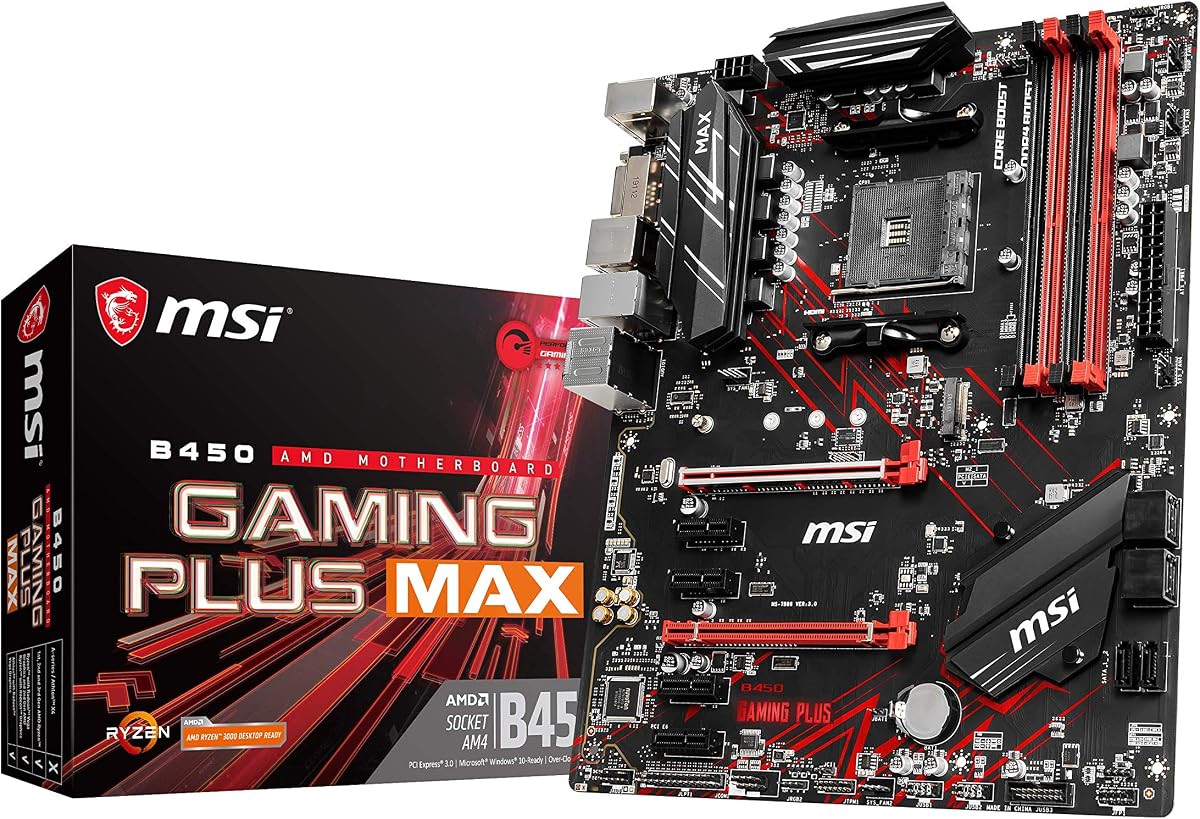
The B450 Gaming Plus Max supports a wide range of older Ryzen processors effectively. It is a solid choice for upgrading existing systems on a budget.
We may earn a commission when you buy through this link, at no additional cost to you.
StoreMI technology allows you to use SSD caching to speed up slower drives. This adds value for users with large HDD storage needs.
Memory speeds can reach up to 4133 MHz with overclocking. However, the lack of PCIe 4.0 limits it compared to newer B550 or X570 boards.
Best for budget upgrades using older CPUs. It provides essential features without the cost of the latest chipset generation.
DDR4 Boost technology delivers pure data signals for enhanced memory stability and speed.
StoreMI technology combines SSD and HDD storage to create a faster virtual drive.
We may earn a commission when you buy through this link, at no additional cost to you.
This board is similar to the Plus model but offers a distinct branding experience. It supports dual graphics cards for increased rendering power.
We may earn a commission when you buy through this link, at no additional cost to you.
It features both DVI and HDMI outputs for flexible display options. This is helpful for older monitors or multi-screen setups requiring specific connections.
Performance is stable for gaming and general use. The main limitation remains the older chipset which does not support PCIe 4.0 storage speeds.
Good for multi-GPU builds on a budget. It offers the flexibility to add a second GPU without high-end costs.
Supports 2-Way CrossFire setups for users needing extra graphical horsepower.
DVI and HDMI outputs ensure compatibility with a wide range of display technologies.
We may earn a commission when you buy through this link, at no additional cost to you.
Selecting the right motherboard involves understanding key components that affect performance and longevity. This section breaks down what to look for before you buy.
The Voltage Regulator Module supplies power to your CPU. A stronger VRM with more phases keeps temperatures lower during overclocking and heavy workloads.
Look for boards with 8+ phases or higher if you plan to use high-core count CPUs.
Heat dissipation is critical for stability. Heatsinks on the VRM and chipset help maintain performance by keeping temperatures within safe limits.
Boards with direct touch heatpipes or large aluminum blocks are preferable for high-power setups.
Check the rear panel for USB 3.1 Gen 2 Type-C ports. You should also ensure there are enough SATA ports for your storage drives.
Front panel headers are important for case fans and USB connectivity. Verify they match your case requirements.
Audio codecs vary significantly in quality. High-end boards often include dedicated DACs or capacitors for cleaner sound without interference.
If gaming or media consumption is your priority, look for Realtek S1220A or similar premium audio solutions.
Integrated WiFi is convenient but check the standard. WiFi 6 is newer and faster than WiFi 5 or Wave 2.
Gigabit Ethernet is standard but 2.5Gb LAN is better for future-proofing high-speed internet connections.
DDR4 support ranges from standard to optimized traces. Look for features like OptiMem or specific voltage tuning support.
Ensure the board supports your desired RAM capacity and speed. Some boards struggle with very high-frequency kits.
PCIe slots determine how many GPUs or expansion cards you can add. X470 supports dual GPU setups for CrossFire or SLI.
M.2 slots are vital for fast storage. Check if they support PCIe 3.0 speeds and how many NVMe drives you can install.
A good BIOS interface makes tuning easier. Some boards allow updates without a CPU installed which is helpful for compatibility.
Software suites like Fan Expert or RGB control help manage your system visually and thermally.
Install the motherboard in a well-ventilated case to ensure adequate airflow. Avoid blocking the heatsinks with cables or other hardware.
Keep your BIOS updated to maintain compatibility with future Ryzen processors. Manufacturers release updates regularly to improve stability and performance.
Dust the board periodically using compressed air to prevent overheating. Regular maintenance keeps the system running efficiently for years.
Yes but X470 motherboards require a BIOS update to support Ryzen 5000 series. Always check the manufacturer's compatibility list before purchasing.
No PCIe 4.0 is not available on X470 chipsets. It is supported on B550 and X570 boards which use newer AMD generations.
Absolutely. These boards are designed for gaming and high-performance tasks. They offer the speed and connectivity needed for modern games.
Yes all X470 and B550 boards listed use DDR4 memory. They support various speeds depending on the specific model and CPU used.
More power phases mean better stability during overclocking. It allows the CPU to draw power efficiently which reduces heat and improves performance.
Download the BIOS file from the manufacturer website and use the update utility in the BIOS menu. Never turn off the PC during the process.
Onboard WiFi adds convenience especially in small cases. However dedicated network cards often offer better speeds if performance is your priority.
Look for boards with Realtek ALC1220 or S1220A codecs for better sound quality. These offer cleaner audio without background noise or interference.
The ASUS Prime X470-Pro and GIGABYTE X470 AORUS models lead this list due to their balanced features and reliability. They offer solid performance for gamers and creators alike.
Prioritize power delivery and cooling if you plan to overclock. Connectivity options like USB-C and WiFi will define your daily experience with the system.
Always check the latest deals and compatibility notes before buying. Prices change frequently so verifying current values ensures you get the best deal.