
Macally Compact Wireless Keyboard
4.4Editor score
Ultra lightweight portable design
Plug and play compatibility
Compact twenty four gigahertz connection
Explore our expert comparison of the best compact editing keyboard options for professionals seeking portable efficiency and premium typing performance in
Finding the right compact editing keyboard can transform your workflow by offering portability without sacrificing essential functionality for creative professionals on the move.
We evaluated ten top-rated models based on connectivity, layout efficiency, build quality, and specialized features to help you find the perfect match for your needs.
Each pick highlights unique strengths and ideal use cases so you can choose confidently while noting that availability and pricing may fluctuate over time.
4.4Editor score

4.5Editor score

4.4Editor score
This side by side comparison highlights the key specifications and strengths of every model included in our curated list for easy reference.



The ProtoArc XK04 stands out as the top choice for professionals needing a portable typing solution that fits easily into any travel bag.
We may earn a commission when you buy through this link, at no additional cost to you.
Its innovative two fold design combined with a premium leather cover offers robust protection while maintaining an ultra compact footprint ideal for mobile editing.
While the key travel is shorter than full size keyboards the optimized layout ensures comfortable typing sessions for messages and notes on the go.
This model is perfect for digital nomads and creators who prioritize portability above all else without sacrificing essential Bluetooth connectivity features.
Weighing just seven point eight ounces the keyboard folds down to fit in small bags making it the ultimate everyday carry accessory.
Switch between up to three devices instantly without re-pairing ensuring seamless transitions between your phone tablet and laptop workflows.
We may earn a commission when you buy through this link, at no additional cost to you.
Microsoft Designer Compact Keyboard delivers a refined typing experience that blends seamlessly into modern minimalist workspaces without cluttering your desk.
We may earn a commission when you buy through this link, at no additional cost to you.
The optimized key spacing and low profile design promote ergonomic comfort while the expressive input key offers quick access to symbols and emojis.
Though it lacks backlighting the reliable Bluetooth connection and durable build quality make it a solid choice for daily productivity tasks.
Ideal for users seeking a clean aesthetic and reliable performance this keyboard is a strong contender for office or home setups.
The compact layout saves desktop space allowing you to position the mouse closer which helps reduce shoulder strain during long work sessions.
A dedicated key provides immediate access to emojis and symbols streamlining communication and creative expression in your daily workflows.
We may earn a commission when you buy through this link, at no additional cost to you.
The Logitech Pebble Keys 2 K380s is renowned for its exceptional battery life making it the ideal choice for users who dislike frequent charging.
We may earn a commission when you buy through this link, at no additional cost to you.
Its slim design and quiet scooped keys provide a comfortable laptop like typing experience while the recycled plastic construction appeals to eco conscious buyers.
Switching between devices is effortless with dedicated Easy Switch buttons ensuring you stay productive across Windows macOS and ChromeOS environments.
This keyboard is perfect for students and professionals who need a reliable low maintenance input device for everyday computing tasks.
Enjoy up to three years of usage on a single set of batteries thanks to advanced auto sleep power saving technology.
Built with nearly fifty percent recycled plastic the Pebble Keys 2 reduces environmental impact without compromising on style or functionality.
We may earn a commission when you buy through this link, at no additional cost to you.
Logitech MX Keys Mini combines premium build quality with intelligent features like smart illumination that lights up when your hands approach the keyboard.
We may earn a commission when you buy through this link, at no additional cost to you.
The perfect stroke typing technology ensures precision and comfort while USB C recharging keeps you powered for months on end without disposable batteries.
Although it comes at a higher price the superior typing feel and seamless multi device flow justify the investment for power users.
This is the ultimate pick for professionals who demand top tier performance and aesthetics from their portable editing setup.
Backlit keys adjust automatically to ambient light conditions ensuring comfortable visibility in dim environments without draining the battery quickly.
Team it with compatible MX mice to type across multiple computers effortlessly copying and pasting between machines in one fluid workflow.
We may earn a commission when you buy through this link, at no additional cost to you.
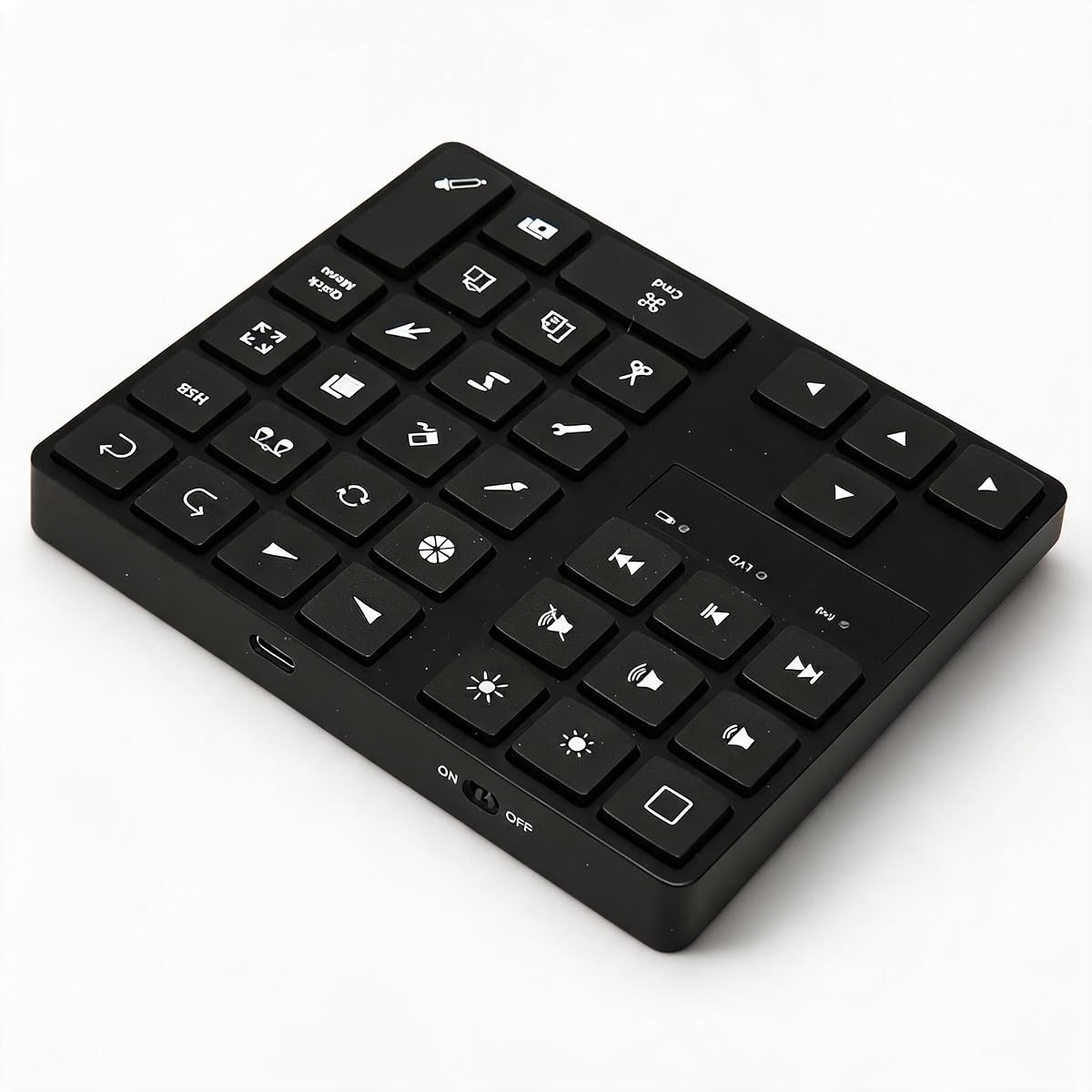
The XPPen Mini Keydial ACK05 is a specialized tool designed to accelerate creative workflows with its unique rotary dial and programmable shortcut keys.
We may earn a commission when you buy through this link, at no additional cost to you.
It supports anti ghosting allowing multiple keys to be pressed simultaneously which is essential for complex software applications like Photoshop and Illustrator.
While not intended for full text entry it excels as a companion device for designers and video editors who need quick access to tools.
This compact keyboard is perfect for artists looking to streamline their process and reduce reliance on mouse menus during editing sessions.
The built in dial offers tactile feedback for precise adjustments such as zooming canvases or changing brush sizes with a single twist.
Create up to four sets of shortcuts to switch instantly between different app profiles enhancing efficiency across various creative projects.
We may earn a commission when you buy through this link, at no additional cost to you.
Macally Compact Wireless Keyboard offers an unbeatable value proposition for users needing a basic reliable typing solution without breaking the bank.
We may earn a commission when you buy through this link, at no additional cost to you.
Its plug and play USB dongle ensures instant connectivity without software installation making it ideal for Chromebooks and public computers alike.
The slim profile and lack of a number pad save desk space while maintaining all essential keys for everyday computing and editing tasks.
This model is the best budget pick for students and office workers who want simplicity and performance at an entry level price.
The included wireless USB dongle provides a stable connection without pairing hassles making setup as simple as plugging it in.
By removing the number pad the layout frees up space for mouse movement improving ergonomics on smaller desks or trays.
We may earn a commission when you buy through this link, at no additional cost to you.
Logitech K250 Compact Wireless delivers a balanced mix of connectivity and functionality with its integrated number pad and reliable Bluetooth pairing.
We may earn a commission when you buy through this link, at no additional cost to you.
Designed for daily use it features spill resistant construction and adjustable tilt legs to ensure durability and comfort during extended typing sessions.
The twelve month battery life means minimal interruptions while the compact layout retains essential keys needed for data entry and editing.
This keyboard is recommended for users who need a numpad but still prefer wireless freedom without the clutter of extra dongles.
Built to withstand accidental spills this keyboard ensures longevity and reliability even in active work environments like cafes or homes.
Adjustable tilt legs let you customize the typing angle to reduce wrist strain and improve posture during long editing tasks.
We may earn a commission when you buy through this link, at no additional cost to you.
The Blackmagic Design Davinci Resolve Speed Editor is a specialized tool crafted specifically for video editors who need precise control over timeline navigation.
We may earn a commission when you buy through this link, at no additional cost to you.
Its search dial allows quick scrolling through clips while dedicated keyboard shortcuts match common edit functions to speed up post production workflows significantly.
The bundle includes a studio activation card adding substantial value for professionals ready to invest in a comprehensive editing solution.
This is the definitive choice for serious video editors who want hardware tailored to the specific demands of DaVinci Resolve software.
The unique search dial provides intuitive control over clips enabling you to jump between scenes without reaching for the mouse.
Receive full access to DaVinci Resolve Studio with the purchase giving you immediate access to professional editing tools upon arrival.
We may earn a commission when you buy through this link, at no additional cost to you.
One-Handed Ergonomic Keyboard offers a unique solution for users suffering from wrist strain by providing a sculpted neutral posture design.
We may earn a commission when you buy through this link, at no additional cost to you.
With thirty five customizable macros it allows creators to assign frequent commands to single keys reducing repetitive mouse clicks and boosting efficiency.
The wired USB-C connection ensures zero latency which is critical for precise drawing or editing work where timing matters.
This device is ideal for digital artists or anyone needing an auxiliary input tool that prioritizes physical comfort and speed.
The sculpted key well promotes a natural hand position that minimizes fatigue during long design or writing sessions.
Assign complex tool combinations to single keys for rapid access to drawing commands and text snippets seamlessly.
We may earn a commission when you buy through this link, at no additional cost to you.
Cherry Stream Wired Keyboard delivers a whisper quiet and reliable typing experience that is perfect for shared workspaces or quiet environments.
We may earn a commission when you buy through this link, at no additional cost to you.
Its compact TKL layout removes the number pad to save desk space while retaining essential keys for efficient editing and navigation.
The built in metal plate ensures stability and the durable construction guarantees longevity even with daily heavy use.
This model is recommended for users who prioritize a consistent wired connection and a quiet typing sound above wireless convenience.
The SX scissor switches provide a precise pressure point and a silent keystroke that won't disturb colleagues nearby.
An integrated metal plate and rubberized feet prevent the keyboard from sliding on smooth surfaces during vigorous typing.
We may earn a commission when you buy through this link, at no additional cost to you.
Selecting the right compact editing keyboard depends on your specific workflow needs connectivity preferences and budget constraints.
Consider whether you need Bluetooth for wireless freedom or a wired USB connection for zero latency. Many models support multiple devices allowing you to switch between your phone tablet and laptop seamlessly.
For editors who work in noisy environments wireless is often preferred to reduce cable clutter while wired options ensure consistent performance without battery worries.
Compact keyboards vary in size from foldable models that fit in pockets to full compact desktop boards. Decide if you need a full set of function keys or just essentials for mobile use.
Smaller layouts save space but may require adaptation to the key positions. Look for ergonomic designs that reduce strain during long editing sessions.
If you choose wireless check the battery type and lifespan. Some models use rechargeable batteries while others rely on disposable AAAs. Long life reduces maintenance and interruptions.
Rechargeable models are more sustainable but need charging time. Disposable batteries offer longer standby periods without power cords which is ideal for travel.
Ensure the keyboard works with your operating system. Most support Windows and macOS but some have specific features for ChromeOS or mobile devices like Android.
Compatibility ensures that shortcuts function correctly and pairing is smooth across all your devices without software conflicts.
Some keyboards offer unique features like programmable shortcuts or rotary dials for creative work. These can significantly speed up your workflow in specific applications.
Evaluate if these tools match your needs. For general typing a standard layout is sufficient but for design software specialized keys add real value.
Look for materials that ensure longevity. Keyboards with metal plates or spill resistant designs withstand daily wear and accidental spills better than cheap plastic alternatives.
A sturdy build means the keyboard stays stable during use and lasts longer even with frequent travel or heavy daily usage.
Compact keyboards range from affordable entry level to premium professional tools. Determine your budget but prioritize features that directly impact your productivity.
Investing in a higher quality model may save money long term by reducing replacement needs and improving workflow efficiency.
Always turn on the power before pairing to ensure the Bluetooth connection is detected by your device during initial setup.
Store your keyboard in a protective case when not in use to prevent scratches and dust accumulation especially if it has sensitive keycaps.
Keep the charging port clean and use the correct cable to avoid connection issues and extend the battery life of rechargeable models.
Yes many compact models are designed with ergonomic features and optimized layouts that support comfortable typing over extended periods. Look for options with soft key travel and adjustable tilt legs to reduce wrist strain.
Most modern compact keyboards support Bluetooth and are compatible with iOS and Android tablets. Check product specifications to confirm connectivity with your specific phone or tablet model.
Wired keyboards offer zero latency and no battery needs while wireless models provide freedom of movement and reduce desk clutter. Choose based on your priority between performance and portability.
Absolutely compact keyboards are often preferred by programmers for their portability and reduced footprint. Ensure the model includes necessary function keys and supports your preferred coding environment.
Use auto sleep modes when not in use and turn off the keyboard manually when traveling. For rechargeable models avoid leaving it plugged in for extended periods after it reaches full charge.
Most compact keyboards have low profile keys that are easy to wipe down with a microfiber cloth. Avoid using excessive moisture and turn the device off before cleaning to prevent damage.
The ProtoArc XK04 leads our list for its perfect balance of portability and premium features while the Microsoft Designer Compact offers a clean minimalist alternative for desk setups.
Prioritize the connectivity and battery type that best fits your daily routine whether you need seamless mobile pairing or long lasting wired stability.
Always verify current pricing and availability before purchasing to ensure you get the best deal for your chosen model.