
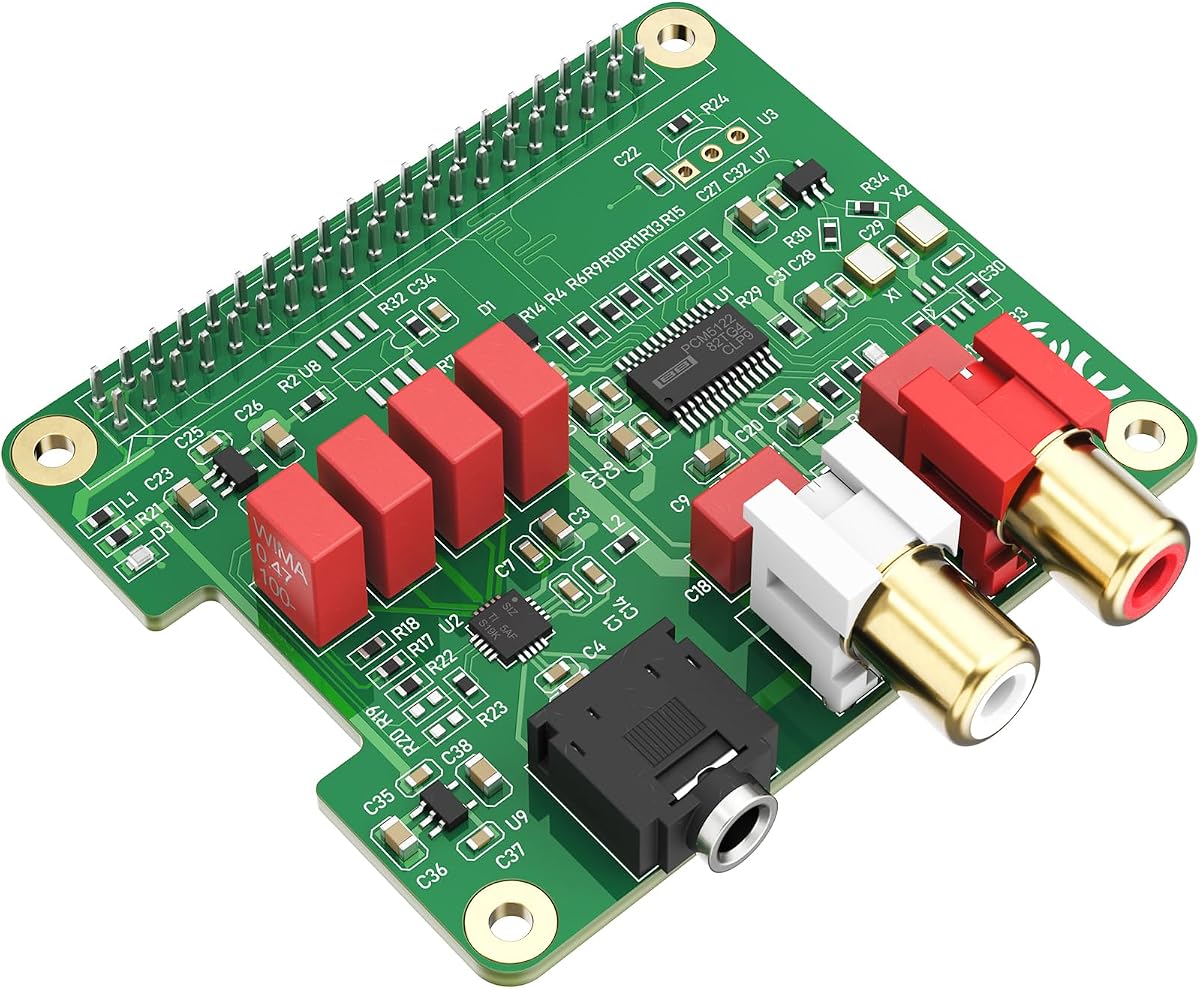
HiFi DAC Audio Sound Card Module PCM5122 I2S Interface 384KHz LED Indicator for Raspberry pi /2/3/B+
4.8Editor score
Affordable PCM5122 Solution
I2S Interface Support
LED Status Indicators
This guide compares the top ten DAC for Raspberry Pi models for 2026 focusing on audio quality, compatibility, features, and ease of use for enthusiasts.
Enhancing the audio output of your Raspberry Pi requires a dedicated digital-to-analog converter. These boards transform digital signals into pristine sound suitable for high-fidelity listening environments and music projects.
We evaluated ten distinct models based on chip performance, output options, software support, and build quality. Our analysis covers budget-friendly shields alongside premium boards designed for audiophile-grade playback and professional integration.
Each pick highlights specific strengths like clock accuracy, amplification power, or digital isolation. Prices fluctuate frequently so verify current listings before purchasing to ensure you secure the best deal available today.
4.8Editor score
4.5Editor score

4.5Editor score
The following table offers a side-by-side comparison of all ten selected models highlighting their core specifications and key features for quick reference.


This HiFi DAC HAT stands out as the top recommendation for most Raspberry Pi users seeking high-quality audio. With a 4.5 star rating it delivers professional-grade sound using the reliable PCM5122 chip.
We may earn a commission when you buy through this link, at no additional cost to you.
Its defining strength lies in the dual ultra-low jitter oscillators which ensure accurate sample rates independent of the Pi internal clock. This design choice eliminates timing errors that often degrade audio quality on standard setups.
The independent grounding scheme further enhances clarity by preventing crosstalk between the line-level and headphone outputs. Users appreciate the versatility of having both RCA and 3.5mm ports for diverse speaker and headphone setups.
Anyone building a music server or network streamer will find this board an ideal foundation. It balances performance features and ease of use perfectly making it the best overall choice for the broadest audience.
The onboard dual oscillators provide stable timing references that prevent jitter from corrupting the audio stream during playback.
Having both RCA line outputs and a dedicated headphone amplifier allows connection to virtually any analog audio equipment directly.
We may earn a commission when you buy through this link, at no additional cost to you.
The DAC Mini Hat is specifically engineered to solve fit issues on smaller Raspberry Pi models like the Zero and Zero 2W. Despite its compact size it maintains full compatibility with standard 40-pin headers.
We may earn a commission when you buy through this link, at no additional cost to you.
It features the same PCM5122 DAC found in larger boards ensuring high-resolution 384kHz playback. The inclusion of the TPA6133 amplifier provides enough power to drive most portable headphones effectively without external bias.
While it lacks some of the advanced clocking features of higher-end boards it offers unbeatable value for space-constrained projects. The gold-plated outputs ensure reliable connections to external amplifiers or active speakers.
This board is perfect for hobbyists building portable media centers or small form-factor audio devices. It delivers excellent performance for its size making it a top choice when physical dimensions are a priority.
The PCB layout is trimmed to prevent overhang on Zero models ensuring it fits flush without blocking other GPIO pins.
The onboard headphone amplifier delivers sufficient voltage to power high-impedance cans making it versatile for listening.
We may earn a commission when you buy through this link, at no additional cost to you.
For audiophiles seeking the absolute best sound quality this Pro Hat utilizes the flagship ES9038Q2M chip. It offers a massive 129dB dynamic range and supports DSD512 for ultra-high-resolution audio streaming.
We may earn a commission when you buy through this link, at no additional cost to you.
The board drives sound with three dedicated Texas Instruments op-amps ensuring robust signal conditioning. This results in a clean powerful output that can handle demanding high-fidelity speakers and headphones with ease.
A unique feature is the balanced output option which reduces noise and improves channel separation for professional audio gear. This capability is rare at this price level and elevates the board above standard consumer shields.
Buyers should invest in this model if they demand reference-class performance from their media center. It represents the pinnacle of Raspberry Pi audio hardware for those willing to pay a premium for superior engineering.
The ability to decode DSD512 files ensures that even the highest quality audio collections are played back with zero compromise.
Dedicated balanced outputs allow connection to professional amplifiers for cleaner signal transmission over long cable runs.
We may earn a commission when you buy through this link, at no additional cost to you.
The Digi One Hat differs from others by providing a digital S/PDIF output rather than analog signals. This makes it ideal for connecting to external receivers or amplifiers that have their own internal DAC.
We may earn a commission when you buy through this link, at no additional cost to you.
It features galvanic isolation which completely separates the Pi digital ground from the audio output. This design choice eliminates ground loops and electrical noise ensuring a pristine digital bit-perfect stream.
Users with high-end home theater systems will appreciate the optical and coaxial connections that support up to 192kHz. The master clock mode ensures the external device receives accurate timing information.
This is the perfect choice for streamers who want to upgrade their existing audio chain. It transforms the Pi into a silent source player without adding analog conversion noise to the system.
Galvanic isolation prevents electrical noise from the Pi processor from interfering with the sensitive digital audio signals.
Both Toslink and RCA digital outputs ensure connection to almost any external amplifier or preamp on the market.
We may earn a commission when you buy through this link, at no additional cost to you.
For those on a tight budget this Sound Card Module offers excellent value. It retains the popular PCM5122 DAC chip ensuring respectable audio quality despite its low cost.
We may earn a commission when you buy through this link, at no additional cost to you.
The board includes helpful LED indicators that show power status and decode activity at a glance. This visual feedback is useful for troubleshooting connectivity or playback issues in headless setups.
It supports an infrared receiver interface allowing users to control playback with a standard remote. This feature adds significant convenience for building a living room media center without needing a keyboard.
This model is highly recommended for first-time builders or simple projects where cost is a primary concern. It proves that good sound does not have to be expensive if you choose the right components.
Red and green LEDs provide immediate feedback on whether the DAC is powered and actively processing audio data.
The built-in IR port accepts common remote receivers enabling hands-free control of your music library.
We may earn a commission when you buy through this link, at no additional cost to you.
The RASPIAUDIO Audio DAC Hat combines functionality with an attractive aesthetic design. Its colored PCB adds visual appeal to open-case builds which is great for display projects.
We may earn a commission when you buy through this link, at no additional cost to you.
It includes an EEPROM chip that enables plug-and-play configuration without complex software setup. This feature saves time for users who want immediate audio output upon connecting the board.
With 112dB SNR and PCM 32-bit support it offers performance that rivals more expensive USB adapters. The dual RCA and 3.5mm outputs provide flexibility for connecting various types of speakers.
This board is a solid choice for makers who care about the look of their build. It delivers reliable audio performance while looking great inside a custom enclosure.
The unique colored PCB design allows this board to stand out visually in projects where the electronics are visible.
The included EEPROM handles detection and configuration automatically removing the need for manual driver installation steps.
We may earn a commission when you buy through this link, at no additional cost to you.
The Argon BLSTR DAC is designed specifically to pair with the Argon ONE V3 enclosure for Raspberry Pi 5. It addresses the common issue of ground loop hum in home audio systems effectively.
We may earn a commission when you buy through this link, at no additional cost to you.
Its standout feature is the included ground loop isolator which removes unwanted noise and hum from the audio signal. This results in a clean listening experience without needing external noise filtering devices.
Built on the reliable PCM5122 codec it ensures high-quality analog conversion directly at the source. Users praise its plug-and-play nature and seamless integration with the specific Argon hardware case.
This option is best for those already using Argon enclosures or dealing with electrical noise issues. It provides a targeted solution for hum that improves sound quality significantly.
The ground loop isolator filters out electrical interference that often causes annoying hum through speakers.
Designed to fit the Argon ONE V3 case perfectly it completes the hardware ecosystem for a clean build.
We may earn a commission when you buy through this link, at no additional cost to you.
This HiFiBerry model stands out due to its onboard Digital Signal Processor which allows advanced audio manipulation. Users can upsample downsample or mix audio sources directly on the board.
We may earn a commission when you buy through this link, at no additional cost to you.
One powerful use case is room equalisation which adjusts sound output to correct acoustic flaws in a listening space. This feature makes it ideal for audiophiles looking to tune their sound precisely.
The board can boot and run independently thanks to its onboard EEPROM. This means it can function as a standalone DAC without needing the Pi processor constantly active.
While expensive it offers capabilities unmatched by standard converters. It is the definitive choice for those needing DSP features for complex audio routing or sound correction.
The DSP chip handles complex audio operations like sample rate conversion and mixing with high precision.
Room equalisation tools allow fine-tuning the audio output to match the specific acoustics of your listening room.
We may earn a commission when you buy through this link, at no additional cost to you.
The HiFiBerry Digi+ Standard provides reliable digital audio outputs via Toslink and coaxial connectors. It is designed to support bit-perfect streaming where the audio data remains unchanged.
We may earn a commission when you buy through this link, at no additional cost to you.
It supports resolutions up to 192kHz which is sufficient for most high-resolution audio needs. The dedicated interface chip ensures stable transmission without corruption during playback.
This card is particularly useful for older Pi models that might struggle with USB audio quality. It leverages the GPIO I2S interface to deliver a clean digital signal path.
Buyers needing a robust digital connection for an external DAC will find this board dependable. It offers a proven solution for connecting to stereo receivers and amplifiers.
The dedicated chip ensures that the audio data stream remains unmodified for pure digital audio reproduction.
Having both optical and coaxial ports gives flexibility to connect to different types of audio equipment.
We may earn a commission when you buy through this link, at no additional cost to you.
The HiLetgo PCM5102 module is an entry-level option for those just starting with Pi audio projects. It offers a simple direct way to upgrade sound quality from the default analog output.
We may earn a commission when you buy through this link, at no additional cost to you.
It features a soldered stereo jack which simplifies the build process for beginners. Users do not need to solder their own 3.5mm connector making it ready to use immediately.
While it lacks premium features like balanced outputs or advanced clocking it performs well for basic listening tasks. The I2S interface ensures digital audio data is transferred efficiently.
This module is ideal for prototyping or learning about DACs on a budget. It provides a functional upgrade without requiring complex wiring or configuration steps.
The 3.5mm headphone jack is already soldered on the board reducing assembly complexity for beginners.
Using the PCM5102 chip it offers a standard lossless digital to analog conversion path suitable for general use.
We may earn a commission when you buy through this link, at no additional cost to you.
Selecting the right DAC depends on your specific needs such as output type, resolution, and software support.
The core component of any audio board is the DAC chip itself. Models like the PCM5122 offer great performance at budget prices while flagship chips like the ES9038Q2M provide audiophile-grade dynamic range. Look for high signal-to-noise ratios and low total harmonic distortion to ensure clear sound.
Prioritize boards with proven chips that match your desired sound quality and resolution needs.
Decide whether you need analog outputs like RCA or 3.5mm jacks or digital outputs like Toslink and coaxial. Analog boards are self-contained while digital boards require an external DAC. Some premium models offer balanced outputs for professional noise reduction.
Choose the interface that matches your existing amplifier or speaker setup to avoid extra conversion steps.
Ensure the board works with your chosen music server software like Volumio, Moode, or RuneAudio. Most modern HATs are plug-and-play with EEPROM chips that simplify configuration. Check if the manufacturer provides dedicated drivers or documentation for your OS.
Verify compatibility with your preferred software to ensure a seamless setup and playback experience.
Timing jitter can degrade audio quality significantly. Better boards include external ultra-low jitter oscillators to handle clocking independently of the Pi processor. This prevents digital noise and ensures accurate sample rates during playback.
Select models with independent clocks if you are aiming for high-resolution audio playback.
Consider the size of your Raspberry Pi model. Some boards are designed specifically to fit Zero models without overhang while others are full-size. A good fit ensures stability and prevents accidental short circuits or connection issues.
Check dimensions to ensure the board fits your specific Pi model and case without obstruction.
If you plan to use headphones directly look for boards with dedicated headphone amplifier chips. These provide the necessary voltage and current to drive high-impedance headphones. Separate output paths reduce crosstalk between line and headphone channels.
Look for integrated amplifiers if you want to drive headphones without an external amp.
Electrical interference from the Pi can introduce hum into analog audio. Boards with galvanic isolation or ground loop isolators separate the audio signals from the Pi power source. This is critical for quiet background playback.
Choose isolation features if you experience electrical noise in your listening environment.
Think about future upgrades when choosing a board. Models with extra GPIO ports or open SDKs allow for further customization or control features. A board that is compliant with HAT specs ensures compatibility with future Pi versions.
Opt for boards that support standard HAT specifications to protect your investment over time.
To install your new DAC board start by powering down the Raspberry Pi completely. Carefully align the 40-pin GPIO header on the DAC with the pins on the Pi and press down firmly until the connections sit flush. Ensure no pins are bent during this process to maintain integrity.
Once connected boot up your Pi and install the recommended music player software. Most boards require minimal setup but refer to the manual for any specific configuration scripts or driver steps. Verify audio output by playing a test tone and adjusting volume levels.
Maintain your DAC by keeping it in a well-ventilated enclosure to prevent overheating. Dust buildup on the connectors can cause interference so clean periodically with compressed air. Avoid handling the audio chips directly as static electricity could damage the components.
Most modern HATs are designed to be compatible with the standard 40-pin GPIO header found on Pi 3, 4, and 5 models. However smaller boards like the Zero require specific compact designs to fit properly without overhang.
It depends on the model. Boards with built-in headphone amplifiers can drive many headphones directly. For passive speakers or high-end gear an external amplifier is usually necessary to provide sufficient power.
While primarily designed for Linux based systems some boards can function on other OSs with custom drivers. However most music server software is optimized for Raspberry Pi OS Debian or Ubuntu environments.
A dedicated DAC HAT bypasses the USB stack reducing latency and potential interference from other USB devices. It uses the I2S interface for a direct digital audio stream which often results in cleaner audio playback.
The top rated boards in this guide are plug-and-play and require no soldering. They connect directly to the GPIO header. Some entry level modules might require soldering wires so check the specific product description.
Install Volumio on your SD card and boot the Pi. The system usually auto detects new HATs via the EEPROM. Navigate to the audio settings in the web interface to confirm the new DAC is selected as the output device.
PCM is the standard format for most audio files while DSD is used for high-resolution SACD formats. Boards that support DSD can play these specialized files without converting them to PCM preserving the original master quality.
Many boards include an IR receiver port that accepts a remote control module. This allows you to change tracks or adjust volume without a physical keyboard. Check the specific model specs for IR compatibility.
This guide highlighted ten excellent DAC options ranging from budget-friendly modules to premium audiophile boards. The HiFi DAC HAT stands out for its balance of features while the DAC Mini Hat offers great value for compact projects.
When deciding prioritize the outputs you need such as RCA or digital S/PDIF and ensure the chip quality matches your listening standards. Consider physical constraints like board size and fit for your specific Raspberry Pi model.
Prices and availability change frequently so always check the latest listings before finalizing your purchase. Invest in a board that offers the right mix of performance and ease of use for your specific audio goals.