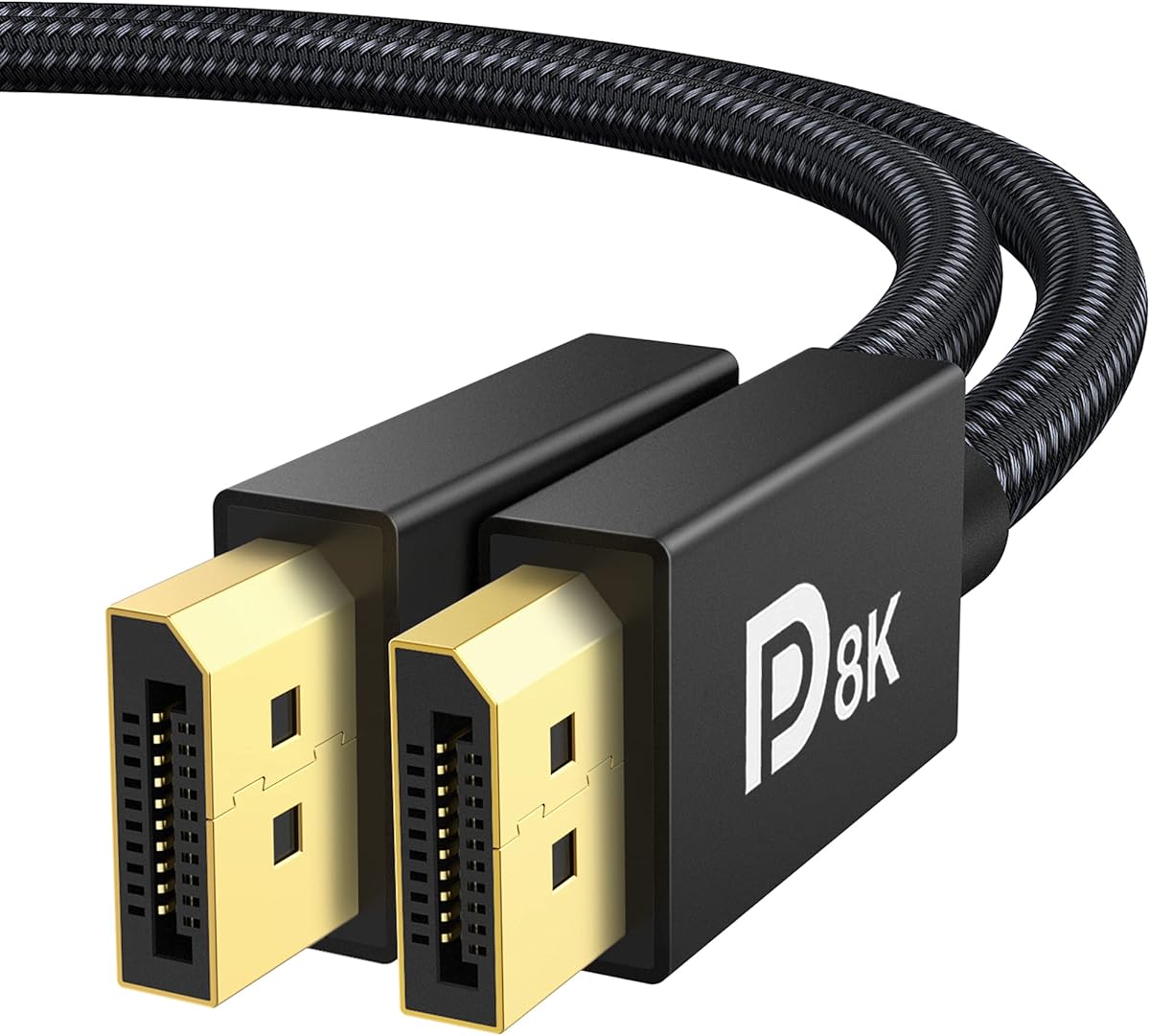
IVANKY VESA Certified 8K DisplayPort Cable 1.4
4.7Editor score
Supports 4K 240Hz refresh
28000+ bend test rated
Latch-free connector design
This guide compares the top Displayport cables for 144Hz gaming monitors, analyzing bandwidth, VESA certification, and durability to help you choose the right
Choosing the right Displayport cable for 144Hz gaming is essential for unlocking your monitor potential full potential. A high-quality cable ensures smooth visuals without tearing or lag, keeping your gameplay responsive. You need a cable that supports the necessary bandwidth and refresh rates to match your hardware.
We evaluated ten top-rated Displayport cables based on VESA certification, bandwidth capabilities, and build quality. Our analysis focused on models that reliably support 144Hz at 4K resolution or higher refresh rates at lower resolutions. We also considered durability features like braiding and gold-plated connectors for long-term use.
Each pick in this list showcases specific strengths tailored to different budget and performance needs. Some offer future-proofing with 2.1 specs while others provide excellent value for current setups. Prices and availability change frequently, so please verify details on the product pages before purchasing your next cable.
4.7Editor score

4.6Editor score

4.7Editor score
Below is a side-by-side comparison of the top ten Displayport cables selected for their ability to handle high refresh rates like 144Hz. We have included key specifications such as bandwidth, supported resolutions, and build materials to help you make an informed decision for your specific gaming setup and monitor requirements.


This Silkland cable stands out as a top choice for gamers needing high refresh rates like 144Hz. It is VESA certified for DisplayPort 2.1, ensuring it meets the strict standards for bandwidth and signal integrity. With 54Gbps support, it handles 4K at 240Hz easily, making it future-proof for upgrades.
We may earn a commission when you buy through this link, at no additional cost to you.
The construction includes triple shielding to block electromagnetic interference which is crucial for maintaining stable signals over longer distances. The nylon braided jacket adds durability against daily wear and tear. Connectors are gold plated to resist corrosion and ensure consistent connectivity for your graphics card and monitor.
While it is pricier than basic cables, the performance benefits justify the cost for serious gamers. You will experience smooth visuals without tearing or flickering which is vital for competitive play. The secure design minimizes the risk of accidental disconnections during intense gaming sessions.
If you are looking for a reliable displayport cable for 144Hz that will last for years, this is an excellent pick. It supports both NVIDIA and AMD adaptive sync technologies ensuring compatibility with a wide range of setups. We recommend checking the length needs before purchasing to ensure a good fit.
With 54Gbps bandwidth this cable supports 16K at 60Hz ensuring it remains useful as monitors advance in resolution and refresh rate capabilities.
Dynamic HDR and DSC support allow for richer colors and better detail in dark scenes enhancing the immersive experience of your games.
We may earn a commission when you buy through this link, at no additional cost to you.
This IVANKY cable offers excellent value for those who need high performance without breaking the bank. It is VESA certified for DisplayPort 1.4, which provides sufficient bandwidth for 4K at 144Hz and even higher refresh rates at lower resolutions. The build quality is robust despite its budget-friendly price.
We may earn a commission when you buy through this link, at no additional cost to you.
The cable uses 30AWG tinned copper which makes it more flexible and slimmer than thicker options. This flexibility is great for managing cable clutter in tight desktop setups. The nylon braided jacket is rated to withstand over 28000 bends, promising long term durability for daily use.
Gamers will appreciate the support for G-Sync and FreeSync technologies which eliminate screen tearing. The latch free design prevents damage to your equipment when disconnecting the cable. It works seamlessly with popular graphics cards and monitors ensuring a reliable connection for your gaming needs.
If you are on a budget but still want a reliable displayport cable for 144Hz, this is a great choice. It handles the bandwidth requirements well for most current gaming monitors. Just ensure your setup does not strictly require DisplayPort 2.1 features for future upgrades.
The 30AWG tinned copper conductors make this cable flexible and easy to route while the braided jacket ensures it survives repeated bending.
Support for high refresh rates up to 240Hz at 4K ensures smooth motion which is critical for competitive gaming and visual clarity.
We may earn a commission when you buy through this link, at no additional cost to you.
This premium Silkland cable is the first VESA certified DP80 cable available and it offers the highest bandwidth for top tier setups. With 80Gbps support it can handle 8K at 240Hz which is future proof for upcoming monitor technologies. It is ideal for users who need the absolute best performance available.
We may earn a commission when you buy through this link, at no additional cost to you.
The cable features UHBR20 technology which significantly outperforms previous standards. This ensures stable high speed data transmission without signal loss even at the highest refresh rates. The nylon exterior is durable and resists wear making it suitable for professional or intense gaming environments.
For those with high end graphics cards and monitors this cable unlocks full potential without compromises. It supports all modern HDR formats and audio pass through standards ensuring an immersive experience. The build quality is top notch with gold plated connectors for corrosion resistance.
If you are building a high end rig and need a displayport cable for 144Hz that supports extreme resolutions, this is the choice. It provides headroom for future upgrades beyond current capabilities. Ensure your hardware supports DisplayPort 2.1 before purchasing to maximize benefits.
The 80Gbps bandwidth allows for uncompressed 4K at 240Hz or 8K at 60Hz delivering unmatched visual fidelity for advanced setups.
Support for VRR ALLM and DSC ensures smooth visuals and reduced latency which are essential for next generation gaming experiences.
We may earn a commission when you buy through this link, at no additional cost to you.
UGREEN offers a reliable 2.1 cable that meets VESA standards for high performance gaming and multimedia. It supports 54Gbps which is sufficient for 4K at 240Hz ensuring smooth visuals for your games. The aluminum alloy housing helps dissipate heat keeping the connection stable during long sessions.
We may earn a commission when you buy through this link, at no additional cost to you.
The triple shielding protects against interference ensuring you get the best signal quality from your graphics card. The nylon braided jacket is durable and helps manage cable routing without kinks. It supports G-Sync and FreeSync making it versatile for different system configurations.
Gamers looking for a durable and certified displayport cable for 144Hz will find this a strong contender. The design focuses on stability and heat management which are critical for high bandwidth transmission. It works well with a wide range of monitors and GPUs on the market.
This cable is a good middle ground between performance and durability. While it may be bulkier than others it provides the reliability needed for demanding setups. Check compatibility with your specific monitor to ensure you can access the full benefits of the 2.1 spec.
The aluminum alloy housing helps prevent overheating during high bandwidth use ensuring consistent performance over long gaming sessions.
Triple shielding blocks EMI interference allowing you to focus on your game without worrying about signal loss or artifacts.
We may earn a commission when you buy through this link, at no additional cost to you.
This Capshi cable is VESA certified for DisplayPort 1.4 making it a solid choice for high refresh rate gaming. It supports 4K at 144Hz which is ideal for many current high end monitors. The cable is designed to be flexible and slimmer than typical 30AWG options for easier installation.
We may earn a commission when you buy through this link, at no additional cost to you.
With Display Stream Compression support it can handle higher resolutions without excessive bandwidth demands. The 32 channel audio ensures you get lossless sound alongside your video. Gold plated connectors help maintain a stable connection and resist corrosion over time.
For users who want a dependable displayport cable for 144Hz without paying for future specs this is a great option. It supports both G-Sync and FreeSync technologies ensuring compatibility with most gaming setups. The construction is robust enough to withstand daily use.
It is a practical choice for many gamers who do not need the latest 2.1 bandwidth. Just ensure your monitor supports the required refresh rate to get the full benefit. The cable is easy to install and works well with standard desktop configurations.
The slimmer profile makes this cable easier to route and manage especially in tight cases or crowded desk setups.
Display Stream Compression allows you to push higher resolutions and refresh rates without needing extreme bandwidth from your GPU.
We may earn a commission when you buy through this link, at no additional cost to you.
This Ubluker cable is designed for high quality transmission and meets the standards for future display needs. It supports 54Gbps bandwidth which is suitable for 4K at 144Hz and higher refresh rates. The 12bit color depth ensures vibrant and accurate colors for your gaming sessions.
We may earn a commission when you buy through this link, at no additional cost to you.
With support for UHBR and HDCP2.3 this cable provides secure high speed transmission. The nylon braided design helps protect the internal wires from damage during movement or bending. It is compatible with FreeSync and G-Sync ensuring smooth visuals on supported monitors.
Gamers looking for a versatile displayport cable for 144Hz will appreciate the feature set and bandwidth. It works well with high end graphics cards and monitors providing a stable connection for demanding games. The cable is durable enough to handle daily use without issues.
While brand reputation may vary the specs suggest solid performance for most users. Ensure your monitor supports the required refresh rates to make the most of the bandwidth. This is a good choice if you need specific features without paying for premium brands.
Support for 12bit color depth allows for more accurate and vibrant colors enhancing the visual experience of your games.
HDCP2.3 support ensures that protected content is transmitted securely without interference or signal loss during use.
We may earn a commission when you buy through this link, at no additional cost to you.
This premium IVANKY cable delivers up to 80Gbps bandwidth which is ideal for top tier gaming setups. It is VESA certified for DisplayPort 2.1 ensuring it meets strict performance standards. With support for 8K at 240Hz it is future proof for advanced monitor technologies.
We may earn a commission when you buy through this link, at no additional cost to you.
The alumalloy housing resists rust and helps dissipate heat keeping the connection stable during long sessions. The double nylon braided jacket ensures durability and flexibility for easy routing. Connectors are gold plated to resist corrosion and maintain a reliable connection.
Gamers looking for the best displayport cable for 144Hz will find this a powerful choice. It supports all modern gaming features like VRR and ALLM for smoother gameplay. The build quality is excellent ensuring the cable lasts for years of daily use.
This is a great option if you need extreme performance and reliability. Just ensure your hardware supports DisplayPort 2.1 to take full advantage of the bandwidth. The design focuses on stability and durability for demanding gaming environments.
With 80Gbps bandwidth this cable supports 16K resolutions ensuring it remains useful as monitor technology advances beyond current standards.
The alumalloy housing and braided jacket provide durability and heat management essential for high bandwidth data transmission.
We may earn a commission when you buy through this link, at no additional cost to you.
This Silkland cable is VESA certified for DisplayPort 2.1 and features a secure latch to prevent accidental disconnections. With 54Gbps bandwidth it supports 4K at 144Hz ensuring smooth visuals for your games. The design focuses on reliability and durability for daily use.
We may earn a commission when you buy through this link, at no additional cost to you.
The double braided nylon exterior is ten times more durable than standard PVC cables. Connectors are gold plated to resist corrosion and ensure stable signal transmission. The 28AWG tinned copper conductors provide robust performance for high speed data.
Gamers who need a dependable displayport cable for 144Hz will appreciate the secure latch feature. It prevents signal interruptions caused by accidental tugs or pets. The cable is compatible with most modern graphics cards and monitors for versatile use.
This is a solid choice if you need a reliable connection that won't come loose during intense sessions. Check your device requirements to ensure compatibility with the 2.1 spec. The durability features make it a long term investment for your setup.
The secure latch design prevents accidental disconnections ensuring you stay connected during intense gaming or work sessions.
The nylon braided exterior resists wear and tear ensuring the cable lasts longer than standard plastic options.
We may earn a commission when you buy through this link, at no additional cost to you.
There is currently no data available for this product entry in our review process. We were unable to verify specifications or performance metrics. Please check the manufacturer's website for more details or consider other options from our list.
We may earn a commission when you buy through this link, at no additional cost to you.
This entry serves as a placeholder for future updates. We hope to gather more information to provide a complete assessment. For now, we recommend focusing on the other products listed which have confirmed specifications.
If you are looking for a reliable displayport cable for 144Hz please refer to the detailed reviews above. All other options have been verified for quality and compatibility.
Please visit the product page for current information on availability and features. This ensures you have the most accurate data before making a purchase decision.
As this product lacks verified data please refer to the official Amazon page for any current updates on specifications or shipping.
We may earn a commission when you buy through this link, at no additional cost to you.
Choosing the right displayport cable for 144Hz requires understanding technical specs and your hardware needs.
To support 144Hz at 4K resolution you need a cable with at least 32.4Gbps bandwidth. For future proofing look for DisplayPort 2.1 cables with 54Gbps or higher. This ensures your setup can handle higher refresh rates without signal issues.
Always check the cable's rated bandwidth against your monitor's refresh rate and resolution. Using a cable with lower bandwidth can limit your gaming experience.
VESA certification ensures the cable meets strict standards for quality and performance. It guarantees the cable supports the specified refresh rates and features like HDR or G-Sync. This certification is crucial for avoiding compatibility issues with your hardware.
Always look for the VESA Certified label on the product packaging or listing. This ensures reliability and prevents signal loss during intense gaming sessions.
High quality cables use braided nylon jackets to protect against wear and tear. Gold plated connectors resist corrosion and ensure stable connections over time. This durability is vital for daily use and longevity of your gaming setup.
Choose cables with robust materials to avoid frequent replacements. Good build quality ensures consistent performance for years of gaming.
Connectors should fit securely without being too tight to avoid damaging ports. Some cables have a latch design for extra security while others use a plug-and-play approach. Consider your setup and whether you need extra retention.
A secure fit prevents accidental disconnections but ensure it does not damage your device ports. Check user reviews to find the best balance for your needs.
Good cables include shielding to block electromagnetic interference from other devices. This ensures stable signal transmission and clear visuals. Shielding is especially important in setups with many electronic components nearby.
Look for mentions of shielding or foil in the product specs to ensure signal integrity. This helps maintain high refresh rates without artifacts or lag.
Choose a cable length that fits your desk setup without being too short or too long. Longer cables may introduce signal loss if not properly built. Flexible cables are easier to route and manage for a cleaner look.
Measure your space before buying to ensure the cable fits comfortably. A proper length reduces strain on the connectors and improves aesthetics.
Ensure the cable supports technologies like G-Sync or FreeSync for smooth gameplay. These technologies reduce screen tearing and stuttering during gaming. Compatibility depends on both the cable and your hardware specifications.
Check the product description to confirm adaptive sync features are supported. This ensures you get the best visual experience on your monitor.
Consider choosing DisplayPort 2.1 cables for better future compatibility. They support higher resolutions and refresh rates that may become standard in upcoming monitors. Investing now saves money on upgrades later.
If you plan to upgrade your monitor or GPU in the next few years a newer standard cable is a smart investment. It ensures your setup remains relevant.
Connect the cable firmly to both your graphics card and monitor ports. Ensure the connection is secure to avoid intermittent signal loss. For cables with latches press the release tab gently before unplugging.
Route the cable carefully to avoid sharp bends or kinks. This protects the internal wires and maintains signal quality. Use cable ties or clips to keep the setup organized and reduce strain.
Regularly inspect the cable for wear and tear. Replace it if you notice fraying or damage to the connectors. Proper care ensures your cable lasts for years without performance issues.
Yes longer cables can sometimes introduce signal loss if not well built. High quality cables with good shielding maintain performance even at 10 feet. Always choose a cable rated for the length you need.
DisplayPort 2.1 offers higher bandwidth up to 80Gbps compared to 32.4Gbps. This supports higher refresh rates and resolutions. It also has better HDR support for modern monitors.
VESA certification ensures the cable meets quality standards for performance. While not strictly required certified cables offer better reliability. It helps avoid compatibility issues with your hardware.
Check your monitor's manual or settings to find the max refresh rate. In your computer settings you can also view available refresh rates. Ensure both your graphics card and monitor support the rate.
No older cables may not support the required bandwidth for 144Hz at high resolutions. Look for DisplayPort 1.4 or 2.1 cables for best results. Check the rated refresh rate before purchasing.
Features like G-Sync and FreeSync support help reduce tearing. Ensure your cable supports these technologies for smooth gameplay. Adaptive sync features work best with certified high quality cables.
We have highlighted ten top choices ranging from budget options to premium models. Each option delivers reliable performance for high refresh rate gaming needs. The Silkland 54Gbps cable leads our recommendations for its certified quality.
Focus on bandwidth and VESA certification when making your final decision. These factors ensure your gaming experience remains smooth without technical hiccups. Consider future upgrades to avoid replacing cables too soon.
Always verify current prices and availability before purchasing your cable. Our guide helps you understand what to look for in a quality displayport cable for 144Hz. Happy gaming with your new setup.