
APC ES620 Dual GPU AI Workstation
4.6Editor score
Dual RTX 5090 GPUs
256GB DDR5 RAM
8TB NVMe Storage
Explore the best Dual GPU AI Setup options for 2026. We compare top workstations and GPUs for local AI inference and deep learning performance.
Building a robust local AI infrastructure requires careful hardware selection. Dual GPU setups offer the parallel processing power needed for training and inference tasks without cloud dependencies.
We evaluated ten leading systems based on VRAM capacity, memory bandwidth, thermal design, and software compatibility. Each entry supports modern frameworks like PyTorch and vLLM effectively.
Read our detailed breakdown to find the right configuration for your workload. Prices and availability change frequently, so verify current listings before purchasing your next system.
4.6Editor score

4.5Editor score

4.5Editor score
The following table provides a side-by-side comparison of the top ten dual GPU AI workstations and components available today, highlighting key specifications for informed decision-making.


The WEELIAO MAXSUN Intel Arc Pro B60 48G Turbo Workstation Graphics Card stands out as a top contender for local AI inference. With 48GB of unified memory, it handles large quantized models efficiently.
We may earn a commission when you buy through this link, at no additional cost to you.
Its dual GPU design delivers 394 TOPS of compute power. This architecture is purpose-built for high-concurrency inference and complex AI workloads. The PCIe 5.0 x8 interface ensures high bandwidth on consumer platforms.
Trade-offs include a steeper software learning curve for new architecture users. However, the native support for PyTorch and vLLM mitigates adoption friction for most developers.
Buyers seeking high-capacity VRAM without enterprise costs should consider this card. It enables running 70B-class models locally without cloud dependencies.
The 48GB VRAM allows running models like DeepSeek-R1:70B entirely on a single card, eliminating the need for multi-card setups.
Triple-thermal design ensures stable temperatures during long inference tasks, maintaining consistent performance.
We may earn a commission when you buy through this link, at no additional cost to you.
The APC MES2X offers a complete turnkey solution for professionals needing maximum local compute. It features dual RTX PRO 6000 GPUs for enterprise-class performance in a single desktop chassis.
We may earn a commission when you buy through this link, at no additional cost to you.
With Ryzen 9-9950X processing and 256GB DDR5 RAM, this workstation handles heavy data science pipelines effortlessly. The liquid cooling system maintains stability under sustained loads.
The main drawback is the substantial price tag, which may exceed standard budgets. Still, the included 8TB NVMe RAID provides fast storage for large datasets.
This setup is ideal for studios requiring reliable local rendering and training without cloud subscription fees.
Dual RTX PRO 6000 Blackwell GPUs deliver unmatched performance for professional workflows.
360mm liquid cooler ensures sustained performance without thermal throttling.
We may earn a commission when you buy through this link, at no additional cost to you.
The APC ES620 brings the latest GeForce RTX 5090 technology to a dual-GPU workstation. It balances raw compute power with a robust cooling system for reliable long-term use.
We may earn a commission when you buy through this link, at no additional cost to you.
Equipped with 256GB DDR5 and 8TB NVMe storage, this system supports massive data ingestion pipelines. The Windows 11 Pro for Workstations OS provides enterprise-grade stability.
Its price is significant, but the hardware specs justify it for high-performance tasks. A powerful 1600W PSU ensures no power bottlenecks.
Professionals in CAD or deep learning will appreciate the high-performance configuration and ready-to-use OS.
Dual RTX 5090 GPUs deliver unprecedented compute power for AI training.
256GB of DDR5 RAM handles large datasets with zero latency.
We may earn a commission when you buy through this link, at no additional cost to you.
The NVIDIA DGX Spark offers enterprise-scale AI performance directly on a desktop. Its GB10 Grace Blackwell chip delivers up to 1 petaFLOP of AI performance for local tasks.
We may earn a commission when you buy through this link, at no additional cost to you.
Designed to build and run AI locally, it integrates the full NVIDIA AI software stack seamlessly. This makes prototyping and rapid iteration exceptionally efficient.
The unified memory of 128GB supports large models locally. However, the cost and fixed hardware configuration limit customization options.
Researchers needing a turnkey AI supercomputer for prototyping will find this unit invaluable.
The GB10 chip delivers up to 1 petaFLOP of AI performance.
128GB unified memory allows running large models efficiently.
We may earn a commission when you buy through this link, at no additional cost to you.
The ASUS Dual EPYC 9965 is a powerful 4U rackmount server designed for high-performance computing clusters. It supports up to eight RTX PRO 6000 GPUs for massive VRAM capacity.
We may earn a commission when you buy through this link, at no additional cost to you.
With 192 cores and 2.3TB DDR5 ECC RAM, it handles massive AI workloads effortlessly. Advanced networking ensures low latency and high bandwidth.
Its enterprise focus means it requires specialized infrastructure and high power capacity. The toolless design simplifies maintenance and upgrades significantly.
Organizations needing dense, scalable compute power should consider this robust server solution.
AMD EPYC 9965 delivers 192 Zen 5c cores for heavy processing.
Toolless design streamlines server maintenance and hardware swaps.
We may earn a commission when you buy through this link, at no additional cost to you.
The Cloud Ninjas Iron Bull AI is designed specifically for demanding photogrammetry tasks. It pairs the powerful Ryzen Threadripper 9970X with an RTX 5090 for rapid processing.
We may earn a commission when you buy through this link, at no additional cost to you.
With 128GB ECC RAM and a 1600W PSU, this workstation ensures stability during long rendering sessions. The 360mm AIO liquid cooler keeps thermal throttling at bay.
Though expensive, the targeted design for PIX4Dsurvey justifies the cost for professionals. It eliminates bottlenecks for complex data science pipelines.
Professionals needing reliable local processing for large data sets should consider this workstation.
Built specifically for PIX4Dsurvey and heavy photogrammetry workflows.
1600W PSU and 360mm AIO cooler ensure sustained stability.
We may earn a commission when you buy through this link, at no additional cost to you.
The AMD EPYC 9965 AI Workstation PC delivers unmatched multi-threaded processing for deep learning. It features triple RTX PRO 6000 Blackwell GPUs for massive VRAM capacity.
We may earn a commission when you buy through this link, at no additional cost to you.
Equipped with 768GB DDR5 ECC RAM, this system accelerates data science pipelines efficiently. Windows 11 Pro for Workstations ensures reliable enterprise-grade performance.
Its cost is high, but the turnkey nature and US-based warranty simplify deployment. Power supply requirements are significant, needing 240V for maximum performance.
Engineers and researchers needing powerful local AI training should consider this workstation.
Triple RTX PRO 6000 GPUs deliver 288GB VRAM for local LLMs.
768GB of DDR5 RAM eliminates memory bottlenecks.
We may earn a commission when you buy through this link, at no additional cost to you.
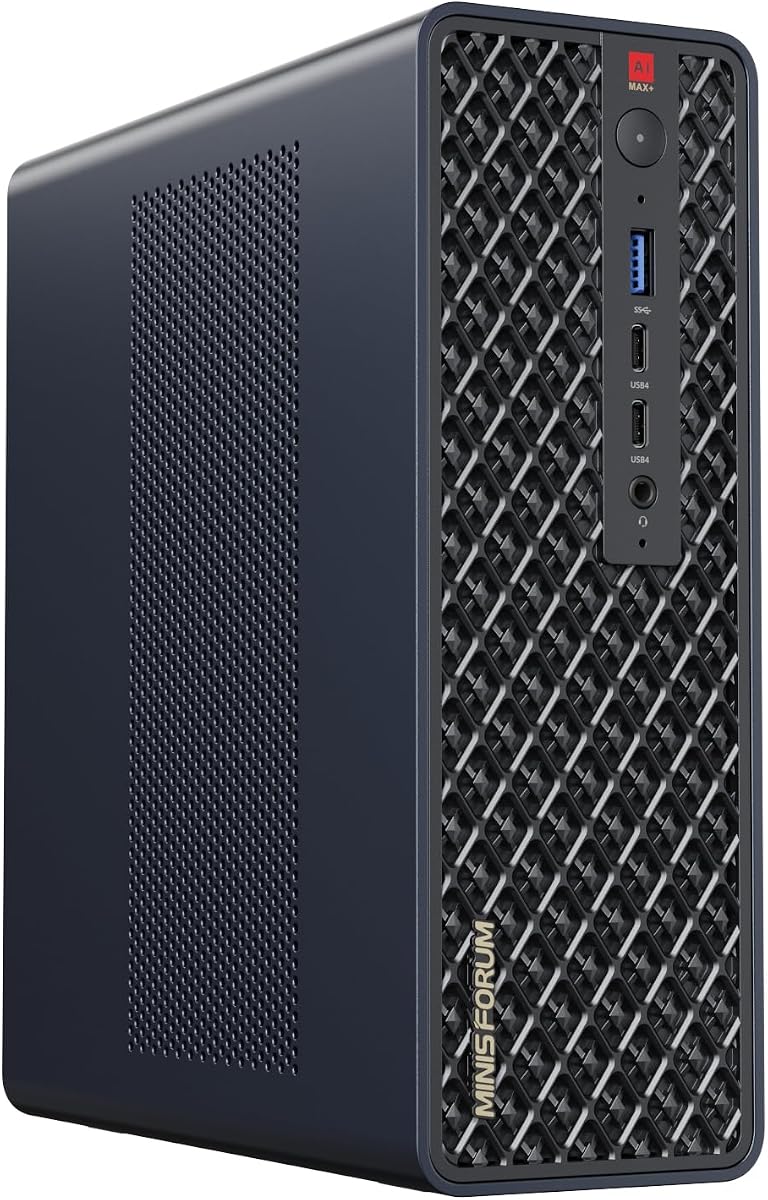
The MINISFORUM MS-S1 MAX is a compact powerhouse capable of running large AI models locally. Its unified memory allows the CPU and GPU to access 128GB LPDDR5x efficiently.
We may earn a commission when you buy through this link, at no additional cost to you.
Cluster design allows multiple units to work together, enabling the run of models up to 235B parameters locally. This makes it ideal for distributed AI computing.
While it lacks discrete GPU slots, the integrated APU provides excellent efficiency. Its cooling system is robust, supporting continuous high loads.
Buyers seeking a compact, efficient dual GPU AI alternative should consider this unit.
AMD Ryzen AI Max+ 395 delivers 126 TOPS total output.
Multiple MS-S1 MAX units can be cascaded into a distributed cluster.
We may earn a commission when you buy through this link, at no additional cost to you.
The NVIDIA RTX PRO 6000 Max-Q delivers enterprise GPU power in a compact workstation edition. Its 96GB GDDR7 ECC memory eliminates VRAM bottlenecks for local LLMs.
We may earn a commission when you buy through this link, at no additional cost to you.
Optimized for agentic workflows, it supports up to 3,511 TOPS of AI performance. The efficient thermal design allows multi-GPU scaling in desktops without overheating.
It may require specific compatible motherboards. However, the seamless integration and reliability justify the investment.
Teams needing scalable local intelligence without cloud latency should consider this GPU.
96GB of GDDR7 ECC memory enables hosting heavy open-source models.
Capped at 300 Watts for better thermal management.
We may earn a commission when you buy through this link, at no additional cost to you.
The MINISFORUM MS-S1 Max Mini offers a versatile platform for personal and professional AI workflows. It integrates the Ryzen AI Max+ 395 with 128GB LPDDR5 for high parallel computing.
We may earn a commission when you buy through this link, at no additional cost to you.
With five 8K video outputs and advanced networking, it handles multiple monitor setups and high-speed data transfer efficiently. The cooling system ensures quiet and stable operation.
Memory is unified and non-upgradeable, limiting future upgrades. However, its compact size makes it ideal for space-constrained environments.
Users needing a compact AI workstation should consider this Mini PC.
16 cores and 32 threads deliver up to 126 TOPS.
Five video outputs support multiple monitors for larger workflows.
We may earn a commission when you buy through this link, at no additional cost to you.
Selecting the right hardware requires balancing compute power, memory, and budget.
VRAM capacity dictates which model sizes you can run locally. Large models require at least 48GB to avoid offloading to slower system RAM.
Prioritize systems with unified or combined VRAM pools.
Bandwidth determines data transfer speeds between CPU and GPU. PCIe 5.0 interfaces offer significant advantages over older standards.
Choose GPUs with high bandwidth buses for faster inference.
Ensure the hardware supports your preferred frameworks like PyTorch or TensorFlow. Native driver support simplifies deployment.
Check for ISV certifications to avoid compatibility issues.
Dual GPU setups generate immense heat. Robust cooling systems prevent thermal throttling during long tasks.
Look for liquid cooling or advanced vapor chambers.
High-end GPUs demand stable and powerful PSUs. Underpowered units can crash under load.
Select systems with at least 1000W to 1600W PSU.
Preprocessing and multitasking rely on CPU strength. High-core-count CPUs balance GPU tasks effectively.
AMD EPYC or Threadripper options excel here.
Fast NVMe SSDs reduce loading times for datasets and models. Large capacities are essential for big data.
Look for RAID 0/1 configurations for redundancy.
Some mini units allow clustering multiple systems for distributed computing. This offers scalable performance.
Check if the OS supports unified management.
Install all latest drivers immediately after setup. Verify that both GPUs are recognized by your system to ensure full compute utilization.
Monitor temperatures using tools like GPU-Z or nvidia-smi. Keep fans clean and ensure proper airflow to prevent overheating during inference.
Maintain regular backups of models and datasets on your SSDs. Update software stacks to stay compatible with latest optimizations.
Yes, if total VRAM exceeds 48GB and bandwidth is high. Models like DeepSeek-R1:70B fit well on systems like WEELIAO MAXSUN.
No, Intel Arc and AMD GPUs also support PyTorch. Drivers and frameworks have expanded compatibility significantly.
Yes, upfront costs are high but long-term costs drop. You avoid recurring cloud subscription fees for heavy users.
Linux Ubuntu is standard for compatibility. Windows 11 Pro for Workstations is also supported for enterprise apps.
Yes, units like MINISFORUM MS-S1 allow cluster setups. Multiple units work together to run massive models locally.
Yes, fast NVMe SSDs reduce data loading times. RAID 0 improves throughput for large datasets.
We highlighted ten top-tier systems ranging from compact clusters to enterprise servers. Each offers unique strengths for specific AI workflows.
Prioritize VRAM capacity and memory bandwidth over raw clock speed. These factors determine practical model size support effectively.
Verify current prices and availability before purchase. Our guide is updated for November 2026 but market conditions shift rapidly.