
Nomo Medical Alert System with Fall Detection
4.1Editor score
Smart hub with extenders
24/7 emergency monitoring included
Wearable tags with panic buttons
This guide compares the top 10 elderly monitoring systems for 2026, evaluating features like fall detection, video clarity, and privacy to help you choose the
Finding the right monitoring system for elderly loved ones can be challenging. You need a solution that balances safety with dignity. These systems offer peace of mind without restricting movement or causing anxiety for seniors living independently.
We compared ten highly rated options based on ease of use, reliability, and specific features like fall detection or two-way audio. Each product was evaluated on its ability to alert caregivers quickly while maintaining privacy and comfort for the user.
Every pick highlights unique strengths such as wired versus wireless designs or camera versus sensor setups. Prices and availability change frequently, so verify current details before purchasing to ensure you get the best value for your specific care needs.
4.1Editor score

4.4Editor score

4.1Editor score
This side-by-side comparison outlines the core capabilities of each system. From simple bed alarms to complex smart hubs, these options cater to different care levels and home environments.






The Lunderg Wireless Early Alert Bed Alarm System stands out for its unique approach to preventing falls without restricting dignity. It holds a strong 4.4 star rating from verified users who appreciate its wireless design that sends alerts directly to a pager you carry.
We may earn a commission when you buy through this link, at no additional cost to you.
Its patented PreRise technology places the sensor at hip level rather than shoulder level. This ensures that alerts happen before a loved one is fully out of bed, reducing false triggers caused by normal movement. The 10 by 33-inch pad is thick enough to be comfortable and resistant to moisture.
While effective, this system requires you to wear the pager constantly to receive alerts. If the pager is left in another room, the alert might not reach you in time. Also, the initial setup involves connecting the pad wirelessly to the monitor without any Wi-Fi configuration.
This system is ideal for caregivers who want a reliable, no-nonsense solution for bed exit monitoring. It is particularly suitable for those who want to avoid smart home dependencies. The included batteries and long pad life make it a practical choice for daily use.
Placing the pad at hip level ensures that rolling over does not trigger alerts, providing more accurate monitoring of actual exit attempts.
By using a wireless pager instead of an in-room alarm, the system avoids alarming the patient or other residents during the night.
We may earn a commission when you buy through this link, at no additional cost to you.
The Nomo Medical Alert System offers a comprehensive approach to senior safety with a smart hub and range extenders. It receives a 4.1 rating for its ability to provide fast alerts and reliable communication without the need for traditional landlines.
We may earn a commission when you buy through this link, at no additional cost to you.
This system includes wearable tags that can detect unusual movement and falls. The two-way voice communication ensures that seniors can talk directly to emergency services or family members instantly. The smart app allows caregivers to track movement and manage alerts effectively.
One consideration is the subscription model required after the initial trial period. While the hardware is robust, ongoing costs are part of the service. Additionally, full functionality relies on a stable home Wi-Fi network which might be an issue in areas with poor connectivity.
For families seeking a high-end medical alert solution that integrates smart home features, this system is an excellent choice. It is best for seniors who need both emergency response and daily monitoring support from trusted contacts.
The hub acts as a central command center, managing satellite extenders to ensure full coverage throughout larger homes.
The system connects with RapidSOS emergency services to route alerts to professional monitors quickly when needed.
We may earn a commission when you buy through this link, at no additional cost to you.
This Elderly Monitor with Camera and Audio provides a straightforward way to check in on seniors without internet dependency. It features a clear camera with night vision and a portable screen that allows for direct visual contact from another room.
We may earn a commission when you buy through this link, at no additional cost to you.
The included SOS call button is a key feature for immediate assistance. It works independently of the camera to alert caregivers instantly. The monitor also tracks room temperature and sends alerts if conditions become unsafe, adding a layer of environmental monitoring.
The main limitation is that it does not support multiple cameras or complex setups. The screen size is compact which may make detailed viewing harder for those with visual impairments. However, for single room monitoring, it offers reliable performance without data risks.
Ideal for families who want a secure, local monitoring solution, this device balances video quality with simplicity. It is a great option for rooms where Wi-Fi security is a concern or where a simple check-in device is preferred.
Using 2.4GHz FHSS technology ensures that video feeds stay within the home network without internet exposure.
Temperature alerts remind caregivers to adjust heating or cooling to prevent health issues related to extreme room conditions.
We may earn a commission when you buy through this link, at no additional cost to you.
The PILSAMAS WiFi Caregiver Pager is an accessible option for those needing basic alert systems without high costs. It connects to home Wi-Fi to send notifications directly to smartphones. The system includes a wearable wristband button for quick access.
We may earn a commission when you buy through this link, at no additional cost to you.
Users appreciate the app control that allows customization of tones and volume levels. This ensures alerts are heard without being disturbing. The buttons can be mounted in bathrooms or bedrooms for strategic placement. It is designed for simple daily assistance calls.
Because it relies on Wi-Fi, it may not work during internet outages unless the router remains active. It does not provide emergency service responses, so it is best for non-critical assistance. Setup is straightforward for most users with basic tech skills.
This system is perfect for budget-conscious families needing daily care alerts. It works well for seniors who need reminders or simple help calls but do not require professional emergency monitoring services.
Assign specific ringtones to different locations so caregivers know exactly where the call is coming from instantly.
The wristband button ensures help is accessible even when the senior is not near a wall-mounted call button.
We may earn a commission when you buy through this link, at no additional cost to you.
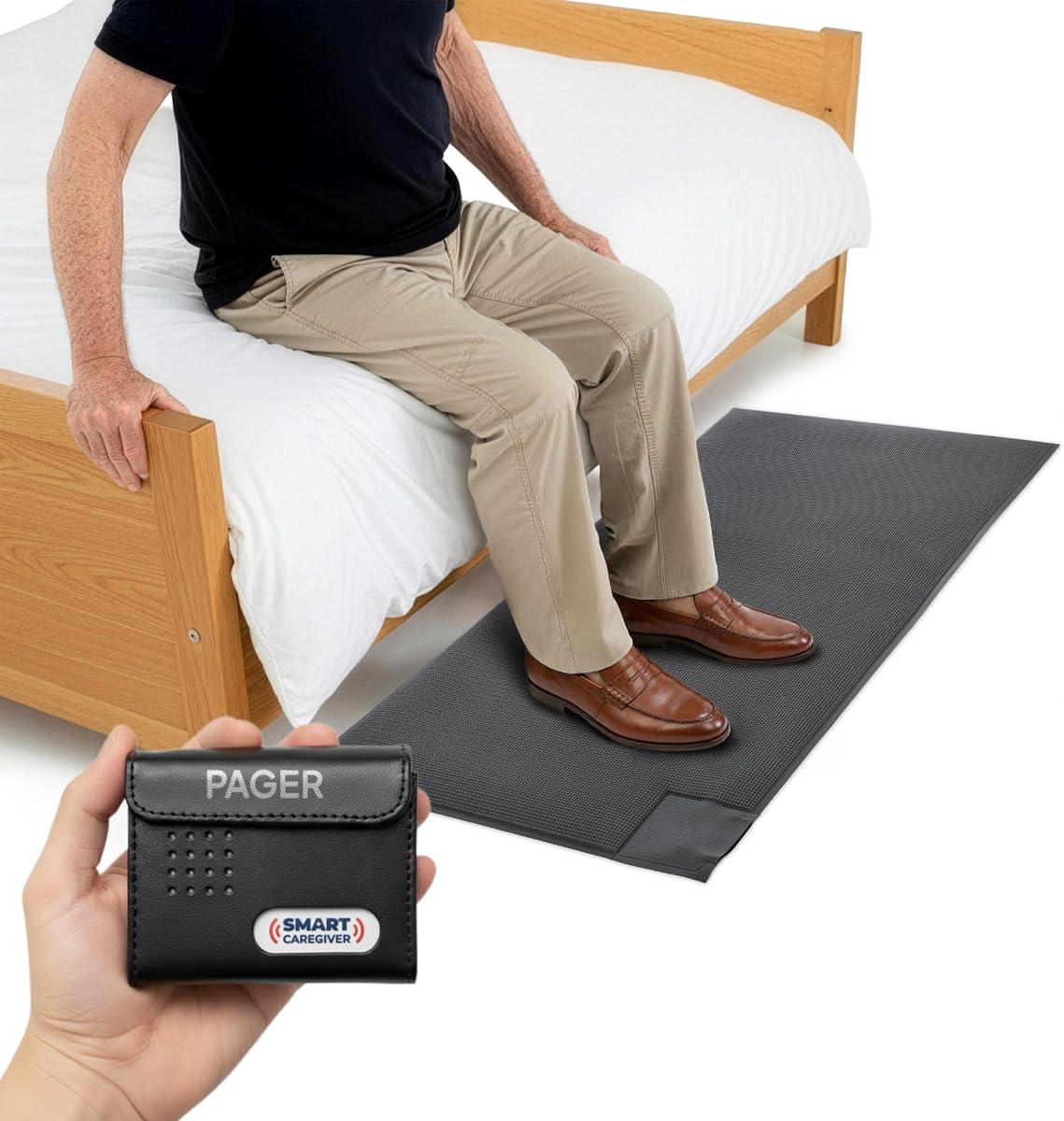
This floor mat alarm system is a top-rated tool for preventing wandering and falls in care settings. It has a strong 4.6 star rating from caregivers who need a simple alert when a patient leaves bed. The mat is durable and designed for daily use.
We may earn a commission when you buy through this link, at no additional cost to you.
When someone steps on the mat, the caregiver pager alerts with sound or vibration. The pager can be carried anywhere within a 300-foot range. This allows freedom to move around the house while staying connected to the patient's needs.
Some users note that the mat's thickness can be a tripping hazard if not positioned carefully. It works best when placed exactly where the patient steps after leaving bed. The pager batteries are not included so factor this into the total cost.
For facilities or home care where wandering is a concern, this system is a reliable choice. It is best used for night monitoring to prevent falls when getting out of bed is a primary risk factor.
Placing the mat near exit doors helps monitor if a patient tries to leave the room or home unnoticed.
The pager can be set to vibrate only ensuring the patient is not startled by loud alarms during sleep.
We may earn a commission when you buy through this link, at no additional cost to you.
The SecuLife Medical Alert Pendant is designed for seniors who are active and mobile outside the home. It includes auto fall detection and GPS tracking to keep family informed of location and safety status throughout the day.
We may earn a commission when you buy through this link, at no additional cost to you.
Unlike traditional systems, it connects directly to family members rather than a call center. This can reduce costs and increase personal connection during emergencies. The device is water resistant and can be worn in the shower for continuous protection.
Some users report connectivity issues or battery drain when GPS tracking is active constantly. The monthly subscription is required for full functionality which adds to long term costs. It is best for seniors who need location awareness.
This pendant is ideal for active retirees who still need safety assurance. It offers a good balance of technology and simplicity for those who prefer communicating directly with relatives instead of professional dispatch services.
Set custom safe zones to receive alerts if your loved one leaves a designated area without permission.
Extended battery life reduces charging frequency so the device stays active longer during travel or daily use.
We may earn a commission when you buy through this link, at no additional cost to you.
This video monitor provides secure viewing without relying on internet connections. It uses a secure proprietary signal to keep feeds private. The monitor is portable with a belt clip so caregivers can move freely while keeping an eye on the patient.
We may earn a commission when you buy through this link, at no additional cost to you.
Both the camera and monitor can be recharged via USB-C. This eliminates the need for constant battery changes and ensures continuous operation. The night vision feature allows clear viewing even in total darkness which is crucial for safety checks.
The lack of remote access means you cannot view the feed from outside the home network. The battery life on the screen may require frequent charging if used constantly. It is best for those prioritizing privacy over remote capabilities.
For caregivers needing a portable local monitor, this system offers reliability. It is suitable for home care where internet security is a concern and constant visual checks are required without complex setup.
Using a dedicated signal instead of Wi-Fi prevents external hackers from accessing the video feed.
The belt clip allows caregivers to wear the monitor while performing tasks in other rooms for hands free monitoring.
We may earn a commission when you buy through this link, at no additional cost to you.
This camera focuses on bridging the distance between family and seniors through simple video calls. It allows parents to see smiling faces with one press without needing smartphones. The system uses home WiFi to send alerts for falls or distress sounds.
We may earn a commission when you buy through this link, at no additional cost to you.
A unique feature is the physical privacy mode that rotates the lens to block the view. This ensures dignity while monitoring. The camera supports local recording on memory cards allowing playback without cloud fees. It is a user-friendly tool for connection.
The device requires constant plug-in power which may limit placement options. It relies on stable WiFi connectivity to function properly. If the internet fails, video calls and some alerts may not work effectively without backup.
For families wanting to reduce loneliness while maintaining safety, this camera is an excellent choice. It is best for seniors who value face-to-face interaction and do not need emergency professional services.
Simultaneous calls ring all family phones to ensure someone answers quickly if the senior calls for help.
Mechanical lens rotation provides true privacy rather than just turning off the software feed.
We may earn a commission when you buy through this link, at no additional cost to you.
This monitor is built for seniors with dementia requiring reliable communication. It uses FHSS secure signals to prevent interference and hacking. The 720P screen allows clear viewing of daily activities without needing WiFi or apps.
We may earn a commission when you buy through this link, at no additional cost to you.
The system includes buttons for common needs like water or toilet reminders. The temperature sensor adds value by alerting when room conditions are extreme. It is a comprehensive tool designed to simplify care tasks effectively.
The screen resolution is lower than modern HD options which might affect image clarity. Setup is straightforward but requires careful placement for the best signal. The lack of internet features may limit advanced monitoring capabilities.
For caregivers of dementia patients who prioritize simplicity and security, this monitor is a solid choice. It is best suited for environments where reliable connection and basic visual checks are more important than high definition.
Buttons for daily tasks help prompt seniors with memory loss to perform necessary routines throughout the day.
Alerts for temperature changes help prevent heat stroke or hypothermia in vulnerable individuals.
We may earn a commission when you buy through this link, at no additional cost to you.
This motion sensor alarm is a simple solution for tracking movement in specific areas. It connects wirelessly to a pager to alert caregivers when motion is detected. It is suitable for monitoring doors or bed exits effectively.
We may earn a commission when you buy through this link, at no additional cost to you.
The range extends up to 300 feet allowing caregivers to move freely. The sensor can be mounted with an adjustable bracket for precise angle detection. It is battery powered and easy to set up without tools or wiring.
It does not distinguish between falls and normal movement so false alarms can occur if pets are present. Batteries for both sensor and pager need regular replacement to ensure reliability. It is best for basic activity checks.
For those needing a budget-friendly way to monitor activity, this sensor is practical. It is best for use with other monitoring systems to add an extra layer of security for door exits.
Adjustable brackets allow flexible placement on walls or doorframes to target specific movement paths.
The wireless pager allows you to monitor movement from anywhere in the house without being in the same room.
We may earn a commission when you buy through this link, at no additional cost to you.
Choosing a monitoring system depends on specific needs like fall detection or video access. Consider how much independence your loved one needs and what alerts are most important.
Decide between Wi-Fi dependent systems and local signal monitors. Wi-Fi offers remote access but requires internet stability while local signals prioritize privacy and simplicity.
For those with poor internet or security concerns, local signal monitors are more reliable for immediate alerts without data risks.
Some systems automatically detect falls using accelerometers while others require manual alerts. Automatic detection is vital for users who cannot reach a button during an emergency.
Prioritize automatic detection if your loved one is at high risk for falls and may not be able to call for help independently.
Ensure the pager or app can receive alerts from where you usually spend time. Systems with 300-foot ranges allow more freedom for caregivers to move around the property.
Check the effective range in multi-story homes to ensure alerts reach all areas where caregivers might be stationed.
If visual checks are important, look for HD resolution and night vision capabilities. Clear visuals help assess safety without entering the room.
Higher resolution cameras are better for identifying falls or distress signs but may require more bandwidth or storage.
Evaluate whether a system requires monthly fees for emergency services or cloud storage. Basic local monitors usually have no recurring costs but lack professional response.
Factor subscription fees into your budget if you need 24/7 monitoring services to ensure long term affordability.
Look for rechargeable batteries or long lasting disposable power sources to prevent missed alerts. Devices with short battery life may fail during critical moments.
Check charging frequency requirements and ensure you can maintain the power supply consistently for reliable operation.
Choose systems with plug-and-play installation to avoid technical hurdles. Complex setups might delay safety installation and cause frustration.
Simple wiring or wireless pairing is essential for quick activation so safety features are available immediately.
Select between bed pads floor mats or motion sensors based on monitoring areas. Bed pads detect exit attempts while motion sensors track general movement patterns.
Use specific sensor types that match the most frequent risks such as bed exits or wandering near doors.
Place sensors in strategic locations like beside the bed or near exit doors. Ensure the receiver or pager is within range so alerts are not missed during critical moments.
Test the system weekly by walking through the sensor zone to verify the alert sounds or vibrations work correctly. This helps identify any battery issues or connection gaps before emergencies occur.
Keep cameras and sensors clean from dust and obstructions. Wipe surfaces gently with a dry cloth and ensure no furniture blocks the view for consistent monitoring performance.
Not all systems require Wi-Fi. Some use local radio signals or cellular connections. Models without Wi-Fi offer better privacy and work even if internet service is interrupted, though they may lack remote viewing features.
Accuracy varies by technology and placement. High-end systems using accelerometers are generally more reliable than basic motion sensors. Always test the system to ensure it reacts correctly to simulated falls.
Yes, many systems are designed specifically for dementia patients. Features like one-touch buttons and wandering alerts help caregivers monitor patients who may become disoriented or try to leave safely.
Wireless alarms typically have a range of 300 to 400 feet indoors. This allows caregivers to move around most homes while staying connected to the alert system.
It is best to test the system weekly to ensure sensors and batteries function properly. Regular testing identifies potential issues before they become a problem during an emergency situation.
Most reputable systems include manufacturer warranties covering defects. Check the product details for warranty length and what parts are covered to ensure peace of mind.
We reviewed ten systems offering different solutions for senior safety. Whether you need a simple bed alarm or a full smart hub, there is a match for every home care scenario.
Prioritize features that match your loved one's specific risks such as fall detection for high mobility users or video for those needing visual checks.
Always check current prices and availability before purchasing since options change quickly. Ensure the system you choose provides the right balance of safety and comfort for daily life.