
BESIGN LS03 Aluminum Laptop Stand
4.8Editor score
Detachable aluminum construction
Six-inch height elevation
Anti-slip rubber holders
Finding the right ergonomic laptop stand can transform your daily workflow by promoting better posture and reducing strain on your neck and shoulders. A high-quality riser elevates your screen to eye level, allowing for a more natural typing position whether you are sitting at a desk or working remotely.
We have carefully evaluated ten leading models based on stability, adjustability, material quality, and cooling capabilities. Our analysis focuses on how each stand supports various laptop sizes, from compact ultrabooks to larger gaming machines, ensuring you find a solution that fits your specific setup needs perfectly.
Each pick in this guide highlights unique features such as rotating bases, telescopic height adjustments, and foldable designs for travel. Remember that product availability and pricing can change frequently, so verify current details before making your final decision to ensure you get the best value for your investment.
4.8Editor score

4.7Editor score
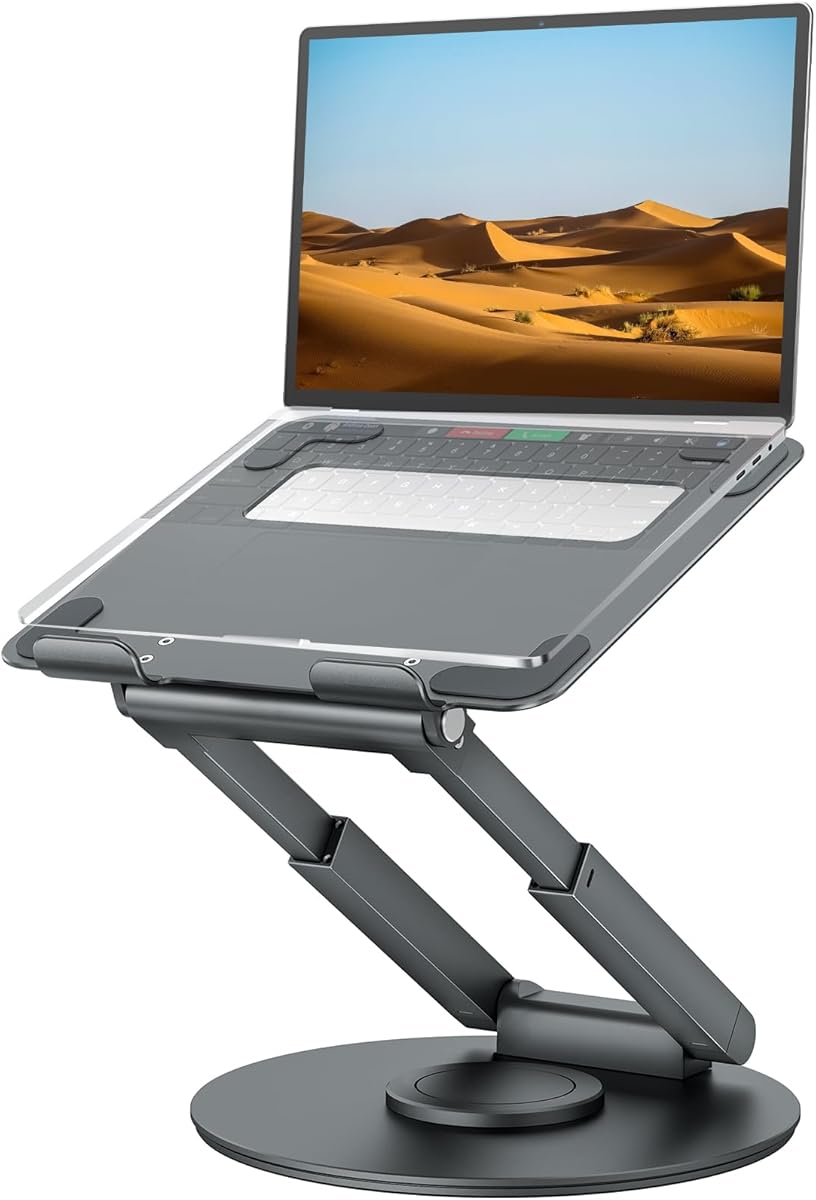
4.7Editor score
As an Amazon Associate we earn from qualifying purchases.
This side-by-side comparison breaks down the key specifications of each model to help you quickly identify which stand matches your height requirements, laptop size, and mobility needs.



The Nulaxy Ergonomic Adjustable Laptop Stand is a highly rated solution designed to elevate your screen to eye level. With a rating of 4.7, it is praised for its dual-rod stability mechanism that ensures a wobble-free typing experience even with heavy devices.
We may earn a commission when you buy through this link, at no additional cost to you.
Its advanced thermal cooling panel features a unique geometric heat-vent design that maximizes airflow to prevent overheating. This is crucial for users who engage in intensive tasks like video editing or gaming. The stand supports laptops from 10 to 16 inches, making it versatile for various users.
While the stability is excellent, users may need to ensure the stand is fully deployed to maximize safety. The dual-foldable design allows it to collapse flat for storage, though it lacks a rotating base for screen sharing. These trade-offs are acceptable given the focus on solid ergonomics and cooling.
This stand is ideal for professionals working long hours who need to correct their posture. It transforms any desk into a healthier workstation. If you prioritize stability and cooling over advanced rotation features, this model is a top recommendation for your setup.
The geometric vent design ensures heat dissipates quickly, preventing thermal throttling during demanding tasks.
Unlike single-hinge models, the dual-support rod mechanism distributes weight evenly for a stable typing surface.
We may earn a commission when you buy through this link, at no additional cost to you.
The LOXP Adjustable Laptop Stand stands out with its 360-degree rotating base, offering unique flexibility for collaboration. It allows you to rotate the laptop to any angle, making it perfect for presentations or sharing screens with colleagues across the desk.
We may earn a commission when you buy through this link, at no additional cost to you.
Constructed from one-piece fiber metal material, it offers greater durability compared to standard aluminum stands. The upgraded rotating base ensures performance remains stable while you type. It supports laptops up to 16 inches and includes non-slip silicone to protect your device from sliding.
While the rotation feature is excellent, it may add a bit of weight compared to simpler models. The lack of specific ventilation holes means relying on natural airflow. These factors are minor trade-offs for the enhanced versatility provided by the swivel mechanism.
This model is best suited for teams or individuals who frequently demonstrate content to others. It improves comfort whether sitting or standing. If you need a sturdy stand that facilitates easy screen sharing, this LOXP option delivers strong value.
The 360-degree rotating base allows effortless sharing of your screen without moving the entire desk setup.
One-piece fiber metal material provides a robust frame that resists wear over time compared to lighter alloys.
We may earn a commission when you buy through this link, at no additional cost to you.
The BESIGN LS03 Aluminum Laptop Stand is a top-rated option known for its excellent balance of quality and affordability. With a rating of 4.8, it offers a reliable way to elevate your laptop by six inches to a perfect viewing level for better posture.
We may earn a commission when you buy through this link, at no additional cost to you.
Made of premium aluminum alloy, it is sturdy enough to support up to 8.8 lbs without wobbling. The detachable design makes it easy to assemble in just three steps, allowing for quick setup. Open ventilation ensures your laptop stays cool during operation.
The fixed height might not suit taller users who need more elevation than six inches. It does not fold flat for travel, limiting portability. However, for a permanent desk setup, these limitations are minor compared to the robust build quality it offers.
This stand is ideal for home offices where budget is a concern but quality cannot be compromised. It helps reduce neck and shoulder pain effectively. If you need a stable, cooling-friendly riser for a fixed workstation, the BESIGN LS03 is a smart choice.
The detachable design allows you to assemble the stand quickly in just three steps without tools.
Open aluminum design provides good ventilation and airflow to prevent your laptop from overheating.
We may earn a commission when you buy through this link, at no additional cost to you.
Amazon Basics Sturdy and Portable Ergonomic Laptop Stand offers a practical solution for those needing adjustable height on a budget. It provides up to 7 inches of height adjustment, helping improve posture during extended use with various devices including tablets.
We may earn a commission when you buy through this link, at no additional cost to you.
Crafted from lightweight aluminum, it features an open hollow design that promotes airflow. This cooling capability helps maintain performance during intensive tasks. Its compact folded size fits effortlessly into most laptop bags, making it a great travel companion.
The load capacity is capped at 11 lbs, which might limit use with heavier gaming laptops. Stability relies on a flat surface, so it may not be as robust as dual-rod models. These limits are standard for portable units in this price range.
If you travel frequently or need a simple stand for a variety of devices, this option is highly convenient. It supports laptops from 10 to 15.6 inches. For users seeking a reliable, lightweight riser without extra features, this model is a solid pick.
Achieve personalized comfort with up to 7 inches of height adjustment to suit your viewing angle needs.
The open hollow design promotes airflow and heat dissipation to keep your laptop cool during extended use.
We may earn a commission when you buy through this link, at no additional cost to you.
The Lamicall Aluminum Laptop Stand is designed with wide compatibility, fitting laptops from 10 up to 17.3 inches. This makes it an excellent choice for users with larger gaming or workstation laptops that other stands might not accommodate securely.
We may earn a commission when you buy through this link, at no additional cost to you.
Its upgraded large base is made of high-quality aluminum alloy, providing great stability. The laptop stand will never shake or slide when you type, ensuring safety for heavy devices. Ventilation holes offer better airflow to prevent overheating and crashes during use.
Because of the larger base, it takes up more desk space when deployed. The height is adjustable but lacks the telescopic range of premium models. These trade-offs are acceptable given the ability to support bigger devices with robust stability.
This stand is perfect for offices with mixed device sizes or individuals with larger screens. It helps fix posture and relieves neck pain. If you need a durable riser that handles 17-inch machines well, Lamicall is a trusted brand.
Compatible with all laptops from 10 up to 17.3 inches, including popular models like MacBook and Dell XPS.
Made of high-quality aluminum alloy, the larger heavier base greatly improves the stability of the notebook stand.
We may earn a commission when you buy through this link, at no additional cost to you.
This Laptop Stand features a smooth dual-axis base that allows effortless 360-degree rotation. It is perfect for sharing screens or adjusting angles for video calls. The design transforms your workspace with unparalleled versatility for collaboration.
We may earn a commission when you buy through this link, at no additional cost to you.
You can freely adjust the height up to 11.81 inches, helping reduce shoulder and neck pain. The open suspended design promotes airflow to keep your laptop cool. It supports laptops from 10 to 16 inches and includes anti-skid silicone to protect your device.
The rotation mechanism adds complexity and might reduce space if you need a rigid setup for typing. It is not ideal for heavy gaming laptops due to standard limits. These factors are minor for users prioritizing flexibility over absolute rigidity.
Ideal for remote workers and team leads who present often, this stand supports flexible work styles. It folds to a compact size for travel. If you need a versatile riser that adapts to many scenarios, this model is a strong contender.
Effortlessly rotate your laptop 360 degrees with a smooth dual-axis base for presentations or sharing.
Freely adjust laptop stand height and angle to a perfect eye level to ensure a comfortable position.
We may earn a commission when you buy through this link, at no additional cost to you.
The Nulaxy 360° Rotating Ergonomic Laptop Stand offers premium features including a 22 lbs load capacity. This makes it suitable for heavy gaming and business laptops that often exceed standard weight limits. The rotating base supports free angle rotation without moving the laptop.
We may earn a commission when you buy through this link, at no additional cost to you.
Built with high-precision dual hinges, it ensures excellent stability and strong fixation. It effectively prevents shaking and screen jitter during typing. The dual foldable structure allows for space-saving storage, making it portable for on-the-go use.
The hinges and rotation add to the complexity of the stand compared to simpler models. While durable, it requires proper setup to maximize stability. These considerations are balanced by the high protection and ergonomic adjustment it provides.
This stand is best for users with large devices who need reliable rotation for meetings. It helps correct bad sitting postures. If you value high load capacity and folding portability with rotation, Nulaxy offers a robust solution.
High-precision dual hinges pass 6000+ rotation tests for excellent stability and strong fixation.
Supports up to 22 lbs, perfectly compatible with heavy gaming and business laptops without slipping.
We may earn a commission when you buy through this link, at no additional cost to you.
This Metal Laptop Riser Holder is constructed from sturdy metal, capable of supporting up to 17.6 lbs. It is a reliable choice for users who need a solid platform for their devices. The stand can be adjusted to a comfortable height and angle.
We may earn a commission when you buy through this link, at no additional cost to you.
It features rubber mats and anti-skid silicone pads to secure your laptop and protect it from scratches. The top design includes multiple ventilation holes to promote airflow. Smooth edges ensure safety for your hands during adjustment.
The lack of a rotating base limits flexibility for presentations compared to other models. It focuses on basic functionality and durability. These trade-offs are acceptable if you prioritize a no-fuss, strong stand for daily work.
Ideal for home office setups or outdoor use, this stand is a solid companion for MacBook or Dell laptops. It helps fix posture and reduce fatigue. If you need a durable, adjustable metal stand, this model serves well.
Made of sturdy metal, it can support up to 17.6 lbs weight on top with protective rubber mats.
The top is designed with multiple ventilation holes to offer greater ventilation and more airflow.
We may earn a commission when you buy through this link, at no additional cost to you.
The tounee Telescopic Laptop Stand is a premium solution designed to promote healthy sit-stand working posture. It features a telescoping button that allows you to easily switch sitting and standing posture. This helps relieve muscle tension and increases productivity throughout the day.
We may earn a commission when you buy through this link, at no additional cost to you.
The base rotates smoothly 360 degrees, making it ideal for face-to-face use. Constructed with high-quality aluminum alloy, it supports up to 22 lbs. The large base ensures stability while the telescopic range offers significant height flexibility from 2.1 to 21 inches.
The advanced features come at a higher price compared to basic stands. Its size might limit desk space. However, the health benefits of standing and the robust construction justify the cost for dedicated users.
This stand is perfect for health-conscious professionals or teams looking to upgrade their office. It reduces stress and neck pain. If you want a high-end riser that supports active standing, the tounee Telescopic Stand is an excellent investment.
Provides on-demand standing throughout the work day to relieve muscle tension and reduce stress.
Solid-built with high-quality aluminum alloy, the large base makes it super sturdy to support up to 22 lbs.
We may earn a commission when you buy through this link, at no additional cost to you.
The Nulaxy 18" Height Telescopic 360 Rotating Aluminum Laptop Stand offers impressive height flexibility up to 18 inches. This makes it suitable for standing positions or taller users who need significant elevation for eye-level viewing.
We may earn a commission when you buy through this link, at no additional cost to you.
It allows you to rotate your screen to share with others in an open office plan. The strong bearing force supports up to 22 pounds securely. Note that an external keyboard and mouse are suggested for typing efficiency due to the height.
The height and rotation require careful adjustment to avoid tipping. The manual notes to remove the laptop before adjusting height or angle for safety. These instructions ensure stability but add a step to daily use.
This stand is ideal for users needing maximum height for ergonomics and collaboration. It helps improve posture and reduce back pain. If you require a telescopic stand that reaches 18 inches and rotates, this model fits the bill well.
Adjust the height to 18 inches so you can comfortably work in standing or sitting positions.
Features a strong bearing force and can support as much as 22 pounds securely without tipping.
We may earn a commission when you buy through this link, at no additional cost to you.
Selecting the right ergonomic laptop stand requires considering your specific workspace needs and laptop characteristics to ensure optimal health and productivity.
Stability is paramount to prevent your laptop from shaking while typing. Look for stands with sturdy bases, dual-rod mechanisms, or heavy aluminum frames that can support your device's weight. Ensure the load capacity exceeds your laptop's weight for safety.
Check the specifications for maximum load limits and construction material to guarantee a wobble-free experience.
Adjustability allows you to raise your screen to eye level, which is critical for neck posture. Models with height and angle adjustments offer the best customization for different users and postures. Fixed stands may limit ergonomic benefits.
Prioritize stands that allow you to position the screen at or near eye level for long-term comfort.
Materials like aluminum provide durability and heat dissipation. A design with ventilation holes or open structures helps prevent overheating during intensive tasks. Metal stands often dissipate heat better than plastic alternatives.
Choose a stand with effective airflow features to keep your laptop running cool and efficient.
If you travel often, a foldable or lightweight design is essential. Some stands collapse flat to fit in backpacks, while others remain rigid for fixed desks. Portability features ensure you can maintain ergonomics on the go.
Look for foldable mechanisms or compact dimensions if you need to carry the stand frequently.
Ensure the stand supports your specific laptop size, typically ranging from 10 to 17 inches. Some stands have wider compatibility, accommodating tablets or larger gaming machines. Check the width and groove design for a secure fit.
Verify that the stand accommodates your device dimensions to avoid instability or slippage.
Advanced models offer features like 360 rotation for screen sharing or telescopic height adjustments for standing work. These features enhance versatility but may come at a higher cost. Consider how often you will use these added functions.
Select models with features that align with your workflow needs such as rotation or active standing.
Quality construction ensures long-term use without degradation. Brands with positive reviews on durability often offer better stability. Warranty coverage provides peace of mind against manufacturing defects or breakage.
Research brand reputation and warranty terms to ensure you are investing in a reliable product.
The physical footprint of the stand matters if you have a small workspace. Some stands occupy significant area when deployed but fold away when not in use. Balance stability with available desk space.
Measure your desk area to ensure the stand fits comfortably without cluttering your workspace.
Place the stand on a flat, stable surface to prevent wobbling. Ensure your laptop is centered securely within the holders or clips to avoid tipping while typing.
Adjust the height and angle gradually until your eyes are aligned with the top third of the screen. This alignment reduces neck strain and promotes a neutral spine posture during work.
Regularly clean the stand and laptop to prevent dust buildup in ventilation areas. Use a soft cloth to wipe down metal surfaces and check silicone pads for wear to maintain grip.
A laptop stand elevates the screen to eye level, allowing you to sit upright without hunching over the keyboard. This reduces strain on the neck and shoulders by promoting a natural viewing angle during long work sessions.
Adjustable stands offer greater versatility to accommodate different heights and viewing angles. Fixed stands are simpler and often lighter, making them suitable for users who have a consistent setup without needing frequent changes.
Many stands support laptops up to 17 inches and heavy weights like 22 lbs. Check the specific load capacity and size limits of the model to ensure it can safely hold your gaming device without tipping.
Yes, stands with open designs or ventilation holes improve airflow around the laptop. This helps dissipate heat more efficiently than a flat surface, preventing overheating during intensive tasks.
Yes, using a stand with an external keyboard and mouse is recommended for ergonomics. This setup allows you to raise the screen without typing directly on the laptop keyboard, reducing wrist strain.
Aluminum is typically the best material for durability and cooling. It is sturdy, lightweight, and resists rust, providing a solid platform that can support heavier devices over time.
Use a soft, slightly damp cloth to wipe down the metal or plastic surfaces. Avoid harsh chemicals that might damage protective coatings. Periodically check silicone pads to ensure they remain sticky and effective.
We have highlighted ten top-rated options including the Nulaxy Adjustable Stand for stability and the BESIGN LS03 for value. Each model offers unique benefits such as rotation, telescopic height, or wide compatibility.
When deciding, prioritize what matters most to your workflow such as height range or portability. Investing in a good stand can significantly improve your comfort and productivity over time.
Please note that availability and pricing for these products may change. Always verify current details and availability on Amazon before making your final purchase decision.