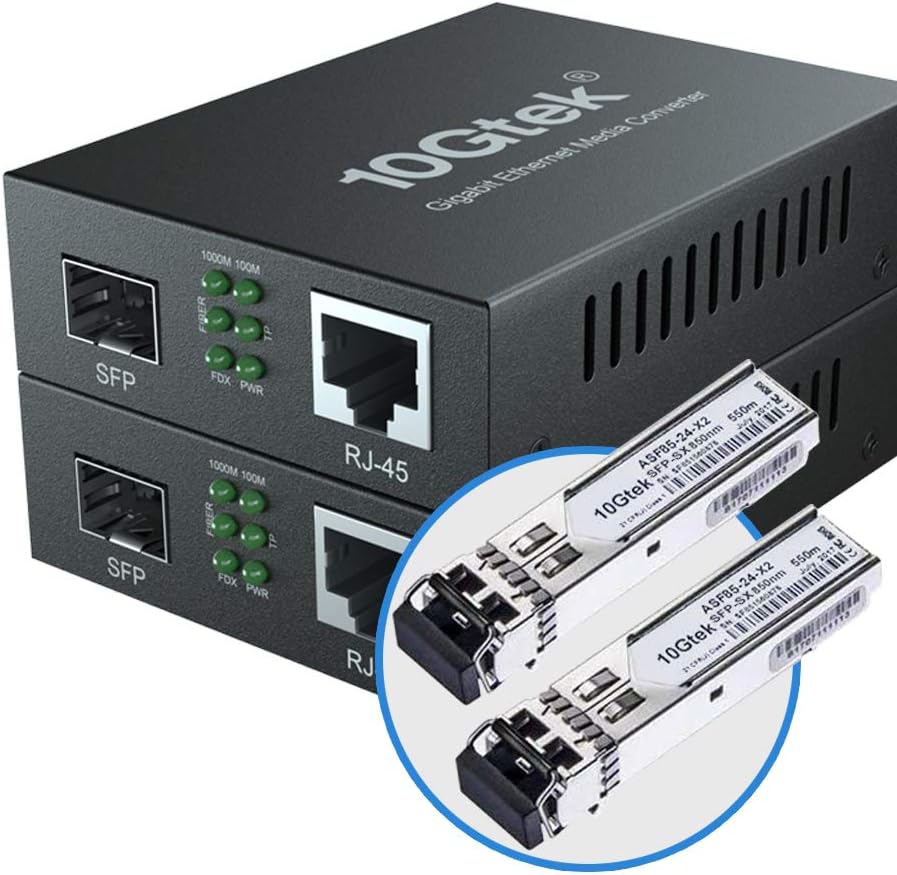
10Gtek Gigabit Ethernet Media Converter
4.7Editor score
Includes SFP MMF 850-nm Module
Up to 550-m Transmission Distance
UL Certified 5V-1A Power Supply
This guide compares ten top-rated Ethernet Fiber Media Converters for reliable high-speed network expansion with fiber to copper conversion capabilities.
Ethernet Fiber Media Converters bridge the gap between copper networks and long-distance fiber optic connections. They enable seamless data transmission across buildings or campuses without signal loss. Choosing the right converter ensures your infrastructure supports modern gigabit speeds while maintaining reliability and ease of installation for any IT environment.
We evaluated ten leading models based on compatibility, transmission distance, build quality, and user feedback. Our comparison focuses on key technical specifications like SFP module inclusion, fiber type support, and port speeds. This list covers options for single-mode and multi-mode fiber, ensuring you find the perfect match for your specific networking needs and budget constraints today.
Each product pick highlights critical features, pros, and cons to help you make an informed decision. Note that prices change frequently due to market demand and inventory levels. Always verify current stock and offers before purchasing to ensure you get the best value for your network expansion project this month.
4.7Editor score

4.7Editor score

4.6Editor score
This side-by-side comparison details the technical specifications and capabilities of all ten selected Ethernet Fiber Media Converters. Use this table to quickly identify which model supports your required fiber type, distance, and speed requirements before making your final purchase decision.


The 10Gtek Gigabit Ethernet Media Converter is a top choice for users needing reliable multi-mode fiber connectivity. With a 4.7 rating, it delivers strong performance for extending copper networks to 550 meters using included SFP modules.
We may earn a commission when you buy through this link, at no additional cost to you.
This pack of two units ensures you can complete both ends of a link immediately. The auto-negotiation RJ45 port supports full/half duplex, and the UL-certified power supply adds safety for office or industrial use.
The trade-off is that it works only with multi-mode fiber, which limits long-distance single-mode deployment. However, for indoor campus or building links under 550 meters, this limitation is rarely an issue for most users.
Anyone needing a straightforward, affordable solution for gigabit fiber expansion should consider this unit. It balances cost, performance, and ease of use effectively for standard IT infrastructure projects.
The inclusion of two units plus SFP modules means no extra sourcing is needed to establish a full connection link.
UL certification on the 5V-1A power supply ensures reliable and safe operation in continuous duty environments.
We may earn a commission when you buy through this link, at no additional cost to you.
The Omada Gigabit SFP to RJ45 Media Converter stands out for its versatility and low cost. Rated 4.7, it supports both single-mode and multi-mode fiber modules, making it adaptable for various existing network infrastructures.
We may earn a commission when you buy through this link, at no additional cost to you.
Its plug-and-play design requires no software configuration. The auto-negotiation RJ45 port works seamlessly with existing copper devices. When paired with appropriate SFP modules, it extends transmission up to 12.4 miles for single-mode applications.
While it lacks included SFP modules, its open compatibility allows you to choose specific modules for distance needs. This flexibility is great for custom deployments where precise link lengths vary across different sites.
Budget-conscious buyers who need a reliable, flexible converter should choose this model. It offers enterprise-grade adaptability at a price point suitable for small businesses or home lab environments.
Works with both single-mode and multi-mode fiber SFP modules, allowing flexibility in fiber type selection.
When used with specific modules, transmission can extend up to 20km for single-mode fiber runs.
We may earn a commission when you buy through this link, at no additional cost to you.
The 10G Ethernet Media Converter is designed for high-speed networks requiring 10Gigabit capabilities. With a 4.6 rating, it offers future-proofing for data centers or server rooms where bandwidth demands are growing rapidly.
We may earn a commission when you buy through this link, at no additional cost to you.
Its RJ45 port auto-adapts to 100M, 1G, 2.5G, 5G, or 10G Base-T speeds. The SFP+ slot accepts 10G SFP+ transceivers like SR/LR. LED indicators provide clear diagnostic status for troubleshooting connections effectively.
The premium price reflects its advanced 10G speed capability. You must also acquire 10G SFP+ modules separately which increases total cost. This is only necessary for users with very high throughput needs.
Network administrators managing high-performance infrastructures should invest in this converter. It ensures your copper links can match the speed of modern 10Gigabit fiber backbones efficiently.
Supports 10Gigabit speeds via SFP+ slot, ideal for data centers and high-throughput server rooms.
The RJ45 port automatically senses and adapts to copper speeds up to 10G Base-T standards.
We may earn a commission when you buy through this link, at no additional cost to you.
This converter pair uses Bidi SFP LC Dual transceiver modules to transmit data bidirectionally over a single strand of fiber if needed. Rated 4.5, it is a specialized option for reducing fiber cable requirements in complex installations.
We may earn a commission when you buy through this link, at no additional cost to you.
The included 2pcs SFP BiDi LC Dual Multi-Mode transceivers support up to 550M distances. It also supports jumbo frames of 9K bytes for optimized TCP throughput on storage and backup traffic.
Bidirectional support is a niche feature often overlooked. While it limits distance compared to dual-strand setups, it saves cabling cost and complexity. Users with specific fiber constraints will appreciate this functionality.
Technical users needing specialized fiber optimization should consider this converter. Its jumbo frame support makes it useful for storage networks where data efficiency is critical.
Bidi modules enable transmission using a single fiber strand, optimizing cabling in tight spaces.
Supports 9K byte jumbo frames to maintain efficient throughput for storage and backup traffic.
We may earn a commission when you buy through this link, at no additional cost to you.
This 10Gtek single-mode converter excels in long-distance networking, rated 4.8 for reliability. It uses SC connectors and 1310-nm wavelength to transmit up to 20km over single-mode fiber, perfect for campus or inter-building links.
We may earn a commission when you buy through this link, at no additional cost to you.
The pack of two units includes everything needed for one end of a link. The SC interface matches legacy SC fiber cabling common in older infrastructure. The UL-certified power supply ensures safe operation.
SC connectors are less common now than LC, which may require adapters. However, for existing SC setups or long links, this is a robust choice. The single-mode limitation means it does not work with multi-mode fiber.
IT managers needing to bridge distances over 550m should choose this unit. Its high rating and long-range capabilities make it a dependable workhorse for outdoor or large campus networks.
Supports transmission up to 20km over single-mode fiber, ideal for outdoor or campus links.
Uses SC connectors matching legacy infrastructure, ensuring compatibility with older SC fiber cabling.
We may earn a commission when you buy through this link, at no additional cost to you.
This pair offers a complete long-distance solution with 20KM SFP LC modules included. Rated 4.9, it is a top-rated choice for users needing single-mode reliability without sourcing separate modules for distance links.
We may earn a commission when you buy through this link, at no additional cost to you.
The built-in 1000Base-LX Single-Mode Module reaches 20km using 1310nm wavelength. The RJ45 port supports full/half duplex and 9K-byte jumbo frames for optimized network traffic flow.
The main limitation is it strictly supports single-mode fiber, so check existing cabling. However, the included 20km modules remove guesswork. U.S.-based technical support adds peace of mind for complex deployments.
Users needing a ready-to-deploy 20KM link should prioritize this model. Its high rating and included modules provide excellent value and reliability for enterprise network extension.
Includes SFP modules specifically matched for 20KM single-mode transmission, ensuring optimal performance.
U.S.-based technical support is available during business hours for assistance with deployment issues.
We may earn a commission when you buy through this link, at no additional cost to you.
This converter arrives with an LC SFP module fitted, ready to link out of the carton. With a 4.7 rating, it simplifies deployment by removing the need to source and match transceivers manually for LC fiber runs.
We may earn a commission when you buy through this link, at no additional cost to you.
The LC SFP module is hot-swappable if the run changes to a different distance or type. The auto-sensing copper port negotiates speeds automatically. DIP switches allow configuration of link fault pass-through or speed limits.
The included module is fixed at 1310 nm for 20km. If your existing fiber requires a specific wavelength this might be a constraint. However, for most OS2 9/125 duplex single-mode links, it is perfectly compatible.
Installers who want minimal setup hassle should choose this unit. The pre-installed module and included wall-mount ears make it an excellent choice for quick, professional fiber-to-copper links.
The LC SFP module ships fitted, so the unit links out of the carton on OS2 9/125 duplex single-mode fiber.
The SFP cage is standard, allowing you to swap modules if the fiber run needs modification later.
We may earn a commission when you buy through this link, at no additional cost to you.
StarTech offers a professional-grade converter designed for reliability in edge and on-prem deployments. Rated 4.7, its open SFP slot allows customization with any MSA-compliant single or multi-mode transceiver to fit specific needs.
We may earn a commission when you buy through this link, at no additional cost to you.
Link Fault Pass-through speeds up troubleshooting by ensuring the far end switch sees fiber breaks. The TAA compliance makes it suitable for government or enterprise procurement requiring specific regulatory standards.
The open slot is flexible but requires buying modules separately. For small setups this increases cost. However, the reliability and compliance features justify this for larger organizations needing verified hardware.
IT pros managing structured data centers or government projects should choose this model. Its lab-tested design ensures seamless integration with enterprise switches and maximum uptime requirements.
The open SFP slot allows you to customize the network extension distance with any MSA-compliant transceiver.
TAA compliance ensures the device meets regulatory standards for government and enterprise procurement projects.
We may earn a commission when you buy through this link, at no additional cost to you.
This multimode converter is factory-matched to the unit with a pre-installed 1000BASE-SX LC duplex module. With a 4.5 rating, it works seamlessly across OM1 to OM5 grades for backward compatibility with existing fiber plants.
We may earn a commission when you buy through this link, at no additional cost to you.
The module is factory-aligned, so the optical side is ready out of the box. Four rear DIP switches let you control features like broadcast storm control or forced speeds for legacy gear integration.
It is limited to multimode fiber, so single-mode deployments are not supported. Also, you must order LC-to-LC patch cords separately. Despite this, its compatibility across OM grades makes it a versatile choice for older networks.
Organizations upgrading OM1 or OM2 legacy fiber to gigabit should choose this model. Its backward compatibility and pre-installed module reduce the risk of deployment errors significantly.
Works across OM1, OM2, OM3, OM4, and OM5 fiber grades ensuring compatibility with existing infrastructure.
The 1000BASE-SX SFP module ships pre-installed and factory-matched, reducing setup effort.
We may earn a commission when you buy through this link, at no additional cost to you.
This StarTech unit boasts a perfect 5.0 rating, reflecting its high reliability and professional design. It is TAA compliant, making it an ideal choice for government procurement or enterprise environments requiring specific regulatory standards.
We may earn a commission when you buy through this link, at no additional cost to you.
The open SFP slot supports any MSA-compliant single or multi-mode gigabit SFP. Advanced features include remote monitor status and link-loss forwarding for enhanced network troubleshooting capabilities.
The high price point is justified by the TAA compliance and enterprise features. Users needing a verified government-compliant device with robust link management features will find this worth the investment.
Network admins needing a compliant, reliable solution for structured deployments should choose this model. Its perfect rating and advanced features set a high standard for professional media conversion.
TAA compliant certification ensures the device meets regulatory standards for government and enterprise procurement.
Includes remote monitor status and link-loss forwarding for enhanced network reliability and troubleshooting.
We may earn a commission when you buy through this link, at no additional cost to you.
Selecting the right Ethernet Fiber Media Converter requires understanding your network's distance, speed, and fiber type needs. This guide outlines key factors to ensure seamless compatibility and reliable long-term performance for your infrastructure.
Fiber type is the most critical factor. Single-mode fiber (SMF) supports much longer distances (up to 20km or more) but requires specific laser-based modules. Multi-mode fiber (MMF) supports shorter distances (up to 550m) using lower-cost LED-based modules. Ensure your existing cabling matches the converter's supported type to avoid incompatibility issues.
Verify your existing fiber type (SMF or MMF) before purchasing to ensure compatibility with the chosen converter.
Determine how far you need to transmit data. Copper Ethernet is limited to 100 meters. If your run exceeds this, fiber is required. Converters vary from supporting 550 meters (multi-mode) to 20km (single-mode). Check product specs for maximum transmission distance with included or compatible modules.
Choose a distance rating that exceeds your required link length to prevent signal loss and ensure reliable data transmission.
Converters typically use SC or LC fiber connectors. LC is smaller and modern, while SC is legacy and larger. If your existing fiber patch cords are SC-type, you must use a converter with SC ports. Using mismatched connectors requires adapters which add cost and complexity.
Match the converter's connector type to your existing fiber patch cords or be prepared to purchase the correct adapters.
Most converters offer standard 10/100/1000Mbps speeds. For high-performance data centers, look for 10Gigabit models with SFP+ slots. Ensure your connected devices and network switches support the target speed to avoid bottlenecks.
Prioritize 10Gigabit converters only if your network devices and fiber infrastructure support the higher speed requirements.
Some converters include SFP transceiver modules while others require separate purchase. A 2-pack often includes both sides and modules. Buying separately gives you choice but increases cost and potential compatibility issues.
Check if modules are included to save cost and time, but verify module specs match your distance and fiber needs.
Auto-negotiation allows the copper port to adjust speed based on the connected device. Full-duplex is standard for modern networks. Ensure the converter supports auto-negotiation for smooth integration with switches and routers.
Ensure the converter supports auto-negotiation to handle various device speeds without manual configuration errors.
Jumbo frames allow packets larger than standard 1500 bytes. This improves throughput for storage and backup traffic. Look for converters supporting 9K-byte jumbo frames if you run high-bandwidth data applications.
Select converters with 9K-byte jumbo frame support for optimized TCP throughput on storage networks.
Look for UL-certified power supplies to ensure safety and reliability. Most desktop units require external AC/DC adapters. Some support wider voltage ranges (100V-240V) for international use.
Prioritize models with UL-certified power supplies and standard voltage ranges for safe, long-term operation.
Begin by verifying your fiber type (single-mode or multi-mode) and connector type (SC or LC) matches the converter. Insert the fiber patch cord carefully into the port ensuring the clip clicks securely. Connect the power adapter and observe LED status indicators.
Connect the RJ45 copper port to your switch, router, or PC using a Cat5e or Cat6 cable. Ensure auto-negotiation LEDs light up on both sides. If LEDs do not light, check cable connections and ensure power is stable.
Avoid bending fiber cables sharply as this can break internal strands. Dust the connectors before plugging in to ensure clear optical paths. Periodically check LEDs to confirm link status and prevent unnoticed connectivity drops.
An Ethernet Fiber Media Converter connects copper-based Ethernet networks to fiber optic networks. It enables you to extend network distance beyond the 100-meter copper limit by converting electrical signals to optical ones and back.
No, you should not mix fiber types. Single-mode and multi-mode fiber have different core diameters and light properties. Using the wrong type will result in signal loss or complete failure of the link.
Most modern converters are plug-and-play and require no software configuration. They handle auto-negotiation for speed automatically. Some advanced units offer DIP switches for link fault pass-through or speed forcing.
SC connectors are square and push-pull type often used in older installations. LC connectors are smaller, latch-style connectors common in modern high-density networking. Ensure your patch cords match the converter port type.
No, you should not daisy-chain media converters. Doing so can cause signal degradation and unpredictable network behavior. Connect devices directly via fiber runs between each pair of converters.
If your converter supports Link Fault Pass-through (LFP), the copper port LED will drop when fiber breaks, alerting the far end switch. Without LFP, the switch may see the link as active even when the cable is broken.
Yes, most gigabit converters support auto-negotiation down to 100 Mbps or 10 Mbps. This ensures backward compatibility with older devices without requiring speed configuration or manual switch settings.
Yes, each converter requires its own SFP module. A typical 2-pack includes two converters and two modules. If purchasing standalone units, ensure you buy one compatible module for each converter to complete the link.
We have reviewed ten top-rated Ethernet Fiber Media Converters for 2026, offering options from budget-friendly gigabit models to premium 10Gigabit solutions. The Omada Gigabit SFP converter stands out as a versatile budget choice for general connectivity needs.
When selecting a converter, prioritize matching fiber type, distance, and connector type to your existing infrastructure. Check for included SFP modules to simplify deployment and verify auto-negotiation support for seamless copper integration.
Prices for these devices fluctuate based on supply and demand. Always verify current pricing and stock before purchasing to ensure you get the best deal. With the right converter, your network can expand reliably and efficiently.