
ARCTIC Case Fan Hub
4.7Editor score
Ten fold PWM fan distributor
SATA power direct input
Compact and lightweight design
This guide compares the top 10 fan control hubs for PC builds, evaluating port counts, PWM support, ARGB syncing, and cable management solutions for optimal
Modern PC builds often require numerous fans to maintain optimal temperatures and aesthetic lighting. A fan control hub simplifies wiring by connecting multiple devices to a single motherboard header. This ensures cleaner cable management and consistent performance across all cooling components.
We evaluated ten leading hubs based on port capacity, power delivery, and compatibility with PWM and ARGB standards. Each model was assessed for build quality, mounting options, and ease of installation. Our goal is to help you choose a reliable solution for your specific case layout.
Each product entry details key specifications, advantages, and potential limitations to guide your decision. We focus on real-world usability and compatibility with common motherboard headers. Please note that product availability and pricing may change over time so check current listings before purchasing.
4.7Editor score

4.7Editor score
4.6Editor score
This side-by-side comparison highlights the key differences between the ten selected fan control hubs. We examine port counts, power types, and unique features to help you identify the best fit for your build needs.


The ARCTIC Fan Controller stands out as a top choice for builders needing precise airflow management. With a rating of 4.7, it offers individual PWM control across ten ports, allowing you to fine-tune each fan's speed independently.
We may earn a commission when you buy through this link, at no additional cost to you.
This hub supports up to 2 A per port with a total capacity of 4.5 A ensuring sufficient power for demanding setups. Its native driver support for both Windows and Linux makes it versatile for diverse operating systems without complex third-party tools.
While the controller offers advanced features, it relies on a SATA power connection which may require an available cable. The magnetic or adhesive mounting provides flexibility, but users should ensure their case has a suitable surface for secure installation.
Ideal for enthusiasts who prioritize airflow optimization and system monitoring, this controller delivers superior performance. It eliminates the need for multiple Y-splitters and simplifies cable routing for a cleaner build layout.
Unlike standard hubs this controller allows you to adjust each fan individually for precise thermal management.
Native drivers ensure seamless integration with both Windows and Linux environments for maximum versatility.
We may earn a commission when you buy through this link, at no additional cost to you.
The ARCTIC Case Fan Hub provides a cost-effective solution for expanding fan connectivity without breaking the bank. It supports ten ports and delivers synchronous PWM signals ensuring all connected fans operate at the same speed based on motherboard settings.
We may earn a commission when you buy through this link, at no additional cost to you.
With direct SATA power input it avoids voltage loss and ensures smooth operation even under high load. The single cable connection to the motherboard reduces clutter significantly and makes cable management much more straightforward than daisy-chaining.
However the hub reads the speed of only the first fan slot which may limit detailed monitoring options. Users looking for granular control over individual fans might need to consider more advanced models with per-port monitoring capabilities.
This hub is perfect for budget builders who need reliability and simplicity. It expands ventilation capacity significantly and keeps cables organized making it a practical choice for standard PC cases.
Get ten ports for a low price without sacrificing the basic PWM control features you need.
One connection to the motherboard means fewer cables and a tidier build interior.
We may earn a commission when you buy through this link, at no additional cost to you.
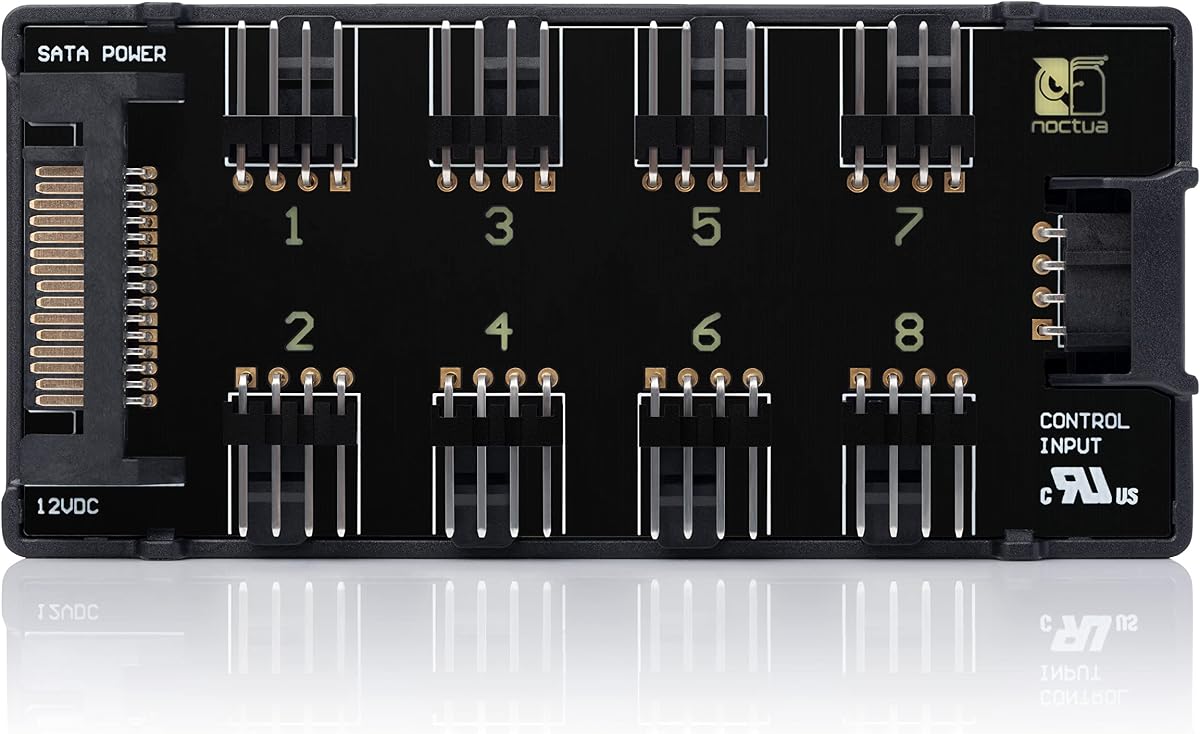
The Noctua NA-FH1 represents premium engineering with a focus on safety and durability. It features eight ports and allows simultaneous power via S-ATA and RPM signaling via the 4-pin interface providing flexible setup options for varied cooling configurations.
We may earn a commission when you buy through this link, at no additional cost to you.
Safety is a priority with built-in fuses that protect against overcurrent and short circuits. The strong magnetic installation ensures the hub stays secure on steel case panels without adhesive residue and the six year warranty reflects Noctua's confidence in the product.
While the price is higher than many alternatives the quality and protection features justify the investment for critical builds. The limitation to eight ports might be a constraint for cases needing more extensive fan arrays but for most users it is sufficient.
This hub is ideal for users who value reliability and safety above cost savings. It delivers stable performance and integrates seamlessly with existing Noctua accessories for a cohesive cooling solution.
Built-in fuses protect your components from electrical faults ensuring long term reliability.
High standards and a long warranty offer peace of mind for your investment.
We may earn a commission when you buy through this link, at no additional cost to you.
The Thermalright ARGB Fan HUB offers a balanced solution for managing both cooling fans and lighting. It supports eight groups of fans and synchronizes ARGB lighting effects ensuring a tidy setup without tangled wires inside the chassis.
We may earn a commission when you buy through this link, at no additional cost to you.
Mounting options include strong paste and magnetic suction which provide flexibility for placement within the case. The SATA power input ensures stable performance even when multiple fans are running simultaneously under demanding conditions.
Note that this device does not control fan speeds or lighting colors it only expands the connections. Users must connect to the motherboard for those functions and care must be taken to avoid inserting 12V RGB devices incorrectly.
This hub is suitable for builders who want neat wiring and basic expansion capabilities. It simplifies the complexity of multi-fan setups and maintains stable performance for standard cooling needs.
Combine ARGB lighting synchronization with PWM fan management in one compact unit.
Choose between magnetic suction or strong paste to fit your case layout best.
We may earn a commission when you buy through this link, at no additional cost to you.
The Thermalright ARGB and Fan HUB X12 provides substantial expansion for systems requiring many fans. It supports twelve groups and offers both 4Pin PWM and 3Pin ARGB interfaces allowing comprehensive management of fans and lighting devices.
We may earn a commission when you buy through this link, at no additional cost to you.
Direct SATA power output ensures stable operation under high loads without voltage loss. The compact white housing fits easily in cases and maintains cable neatness by consolidating multiple connections into one hub unit.
While it does not include a SATA cable users may need to source one separately for installation. The hub lacks speed control functions so all fan regulation must be handled by the motherboard BIOS or software.
This hub is ideal for cases needing extensive fan arrays and ARGB integration. It keeps wiring tidy and provides reliable power distribution for all connected devices in the system.
With twelve ports this hub supports large builds needing aggressive cooling solutions.
Consolidate multiple fan and lighting cables into a single tidy connection point.
We may earn a commission when you buy through this link, at no additional cost to you.
The upHere PWM and ARGB Fan Hub combines fan management with lighting customization. It manages nine PWM fans and ARGB devices while featuring a front-facing RGB panel that syncs with connected lights for a unified aesthetic.
We may earn a commission when you buy through this link, at no additional cost to you.
Included in the box are a remote control and all necessary cables for a plug-and-play experience. The magnetic mounting allows for flexible placement inside the case and the SATA power design ensures reliable operation even at full load.
While the remote offers convenient control it may lack the granular adjustments available through motherboard software. Users should consider their preference for physical controls versus software-based customization when selecting this hub.
This hub suits builders who want an all-in-one solution for fans and lighting. It simplifies setup and offers immediate control without needing to access the motherboard headers directly.
The RGB panel matches your fans automatically creating a cohesive visual display.
Change lighting effects with a click using the included RF remote control.
We may earn a commission when you buy through this link, at no additional cost to you.
The Thermalright Integrated Fan Hub delivers reliable performance with ten ports for multiple fans. It supports PWM regulation and allows reading the speed of a single fan through the red interface for system monitoring purposes.
We may earn a commission when you buy through this link, at no additional cost to you.
Direct SATA power input ensures stable operation without voltage loss and the double-sided adhesive provides a secure mounting method. The compact body keeps internal wiring organized and maximizes space within the chassis for other components.
Like many similar hubs it reads only one fan speed and does not adjust speeds independently. Users should connect the SATA cable separately as it is not included in the package upon delivery.
This hub is a solid choice for builders needing straightforward fan expansion. It provides stable power distribution and helps maintain a tidy cable layout inside the PC case.
Direct SATA power ensures all fans run smoothly even under heavy system load.
Compact design fits in tight spots while still handling ten fans at once.
We may earn a commission when you buy through this link, at no additional cost to you.
The Thermalright Fan and ARGB HUB X8 offers a compact solution for dual-purpose management. It supports eight ARGB fans and eight PWM fans providing extensive connectivity options for cooling and aesthetic enhancements in one device.
We may earn a commission when you buy through this link, at no additional cost to you.
Direct SATA power maintains stability under load and the double-sided stickers allow for quick secure mounting inside the case. The black finish matches most modern PC aesthetics and helps hide the hub in darker areas.
Users should note that speed and lighting adjustments must be made via the motherboard not the hub itself. The package does not include a SATA cable so ensure you have one available before installation.
This hub is well-suited for builders prioritizing both cooling efficiency and RGB lighting. It simplifies wiring and keeps cables organized while supporting a wide range of fan configurations.
Manage both fan cooling and lighting effects with a single unified controller unit.
Strong stickers ensure the hub stays in place without needing additional screws.
We may earn a commission when you buy through this link, at no additional cost to you.
The ARGB Fan HUB J-10 Pro brings flexibility with support for ten ARGB fans and RF remote control. It synchronizes lighting effects and offers multiple fan headers to manage cooling without cluttering the motherboard headers excessively.
We may earn a commission when you buy through this link, at no additional cost to you.
Magnetic suction mounting allows quick placement inside the case and the compact shape keeps internal wiring organized. Direct SATA power input prevents voltage loss ensuring fans run efficiently without performance drops during operation.
While the remote helps with lighting control fan PWM must be handled by connecting to the motherboard directly. Users should be careful to connect the correct interfaces to avoid damaging the hub or connected components.
This hub is ideal for those wanting extra lighting control alongside basic fan connectivity. It balances aesthetic customization with functional cooling support in a small package.
Use the RF remote to tweak colors without opening your case or using software.
Direct power supply from PSU avoids voltage drops and ensures smooth fan speeds.
We may earn a commission when you buy through this link, at no additional cost to you.
The Thermalright Fan and ARGB HUB X8 provides a streamlined option for managing fans and lighting. It supports eight groups of fans with stable SATA power output ensuring consistent performance even under demanding system loads.
We may earn a commission when you buy through this link, at no additional cost to you.
Installation is straightforward with strong double-sided stickers and the black finish integrates well into most cases. The device expands connectivity but requires users to connect to motherboard headers for speed and lighting adjustments.
Be sure to connect the power interface to the 4-pin PWM header and the light interface to the 5V 3-pin ARGB header to prevent damage. Without a SATA cable included you will need to provide your own for the setup.
This hub works well for users who want a reliable expansion tool without extra features. It keeps cables tidy and ensures fans receive stable power for efficient cooling in any build.
SATA direct input ensures all connected fans get stable power without fluctuations.
Expand your ports while keeping cable mess to a minimum inside the case.
We may earn a commission when you buy through this link, at no additional cost to you.
Selecting the right fan hub depends on your build's complexity, cooling needs, and aesthetic goals. Consider these key factors before making a purchase to ensure compatibility and optimal performance.
Port capacity determines how many fans you can connect to a single hub. If your case holds more fans than your motherboard has headers, look for hubs with ten or more ports. This ensures you can add all necessary cooling without using Y-splitters or adapters.
Choose a hub that matches or exceeds your current and future fan count. Eight ports may suffice for standard builds but larger cases often require ten to twelve ports for comprehensive airflow management.
Verify whether the hub supports PWM for speed control and ARGB for lighting. Most hubs support one or both but confirm the connector types match your fans. PWM fans need 4-pin headers while ARGB fans require 5V 3-pin connections to function correctly.
If you want both cooling and lighting, ensure the hub has separate interfaces for each. Mixing incompatible connectors can damage components so always check specifications before connecting devices.
Fan hubs draw power from the PSU via SATA cables. Direct SATA input is preferred as it provides stable voltage without loss. Ensure you have an available SATA power connector from your PSU to support the hub's energy needs efficiently.
A hub that relies solely on motherboard headers may not handle high fan counts due to power limits. Always opt for SATA power when connecting multiple fans for reliable operation.
Mounting options affect where you can place the hub inside the case. Magnetic mounting works well on metal panels and adhesive stickers offer flexibility on non-metal surfaces. Consider your case's interior layout to choose the most secure method.
Secure placement prevents vibrations and ensures long-term stability. Some hubs come with both options so you can select what works best for your specific case model.
Some hubs offer additional control features like remote control or onboard knobs. Others rely entirely on motherboard software. If you prefer physical control, look for models with remotes. Otherwise, software-based control provides more granular adjustments.
Decide based on your workflow and case accessibility. Remotes offer convenience but may lack precision compared to BIOS or software control methods.
A primary benefit of hubs is improved cable management. Look for compact designs that minimize clutter inside the case. Hubs that consolidate multiple connections into one cable help keep airflow paths clear and reduce visual noise.
Consider the cable length and routing options. Long cables can reach difficult areas but short ones keep things neat. Ensure the hub comes with necessary cables or that you can source them easily.
Safety features like short circuit protection and overcurrent fuses protect your components from electrical faults. Premium hubs often include these safeguards to prevent damage during power surges or connection errors. Prioritize models with these protections for peace of mind.
Protection mechanisms add value and reliability to the hub. They ensure that even if a fan fails, the rest of the system remains safe from electrical hazards.
If you use Linux or dual-boot systems check the hub's software compatibility. Some controllers have native drivers for multiple operating systems while others rely on Windows-only software. Ensure the hub works with your preferred environment before purchasing.
Cross-platform support broadens your options for system monitoring and fan management. It ensures you aren't locked into one ecosystem for thermal control features.
To install a fan hub, first connect the SATA power cable to your PSU and the fan power cables to the hub. Then link the hub's PWM and ARGB headers to the corresponding motherboard ports. Ensure connections are oriented correctly to prevent damage.
After connecting, power on the system and access the BIOS to verify fan detection. Use your motherboard software to adjust fan curves and RGB lighting. Check that all fans are running smoothly before finalizing the case assembly.
Regularly dust the hub and fans to maintain airflow efficiency. Keep the mounting secure and ensure no cables obstruct the fans. Periodically check the SATA cable for wear to maintain safe power delivery over time.
Yes, a fan hub works with any case that has space to mount it. Most hubs use adhesive or magnetic mounting which fits various case materials. Ensure you have the necessary SATA power connectors available for setup.
Most hubs do not adjust speeds themselves; they pass PWM signals from the motherboard. You control speeds via BIOS or software. Some advanced controllers allow independent PWM control for each port.
A SATA cable provides direct power from the PSU to the hub. This ensures stable voltage for multiple fans and prevents overloading motherboard headers. It is essential for large fan setups.
Yes, many hubs support both ARGB for lighting and PWM for speed control. Ensure the hub has separate 3-pin ARGB and 4-pin PWM ports to connect both types correctly.
Connecting 12V RGB to a 5V ARGB hub can damage the hub and fans. Always check the connector type before plugging in. The arrow on the plug indicates the correct orientation.
Typical hubs support between eight and twelve fans. Some specialized models may handle more but check the current rating to ensure it matches your fan needs.
Basic hubs do not need drivers and work via motherboard headers. Advanced controllers with software features may require drivers for full functionality on Windows or Linux systems.
Most hubs come with adhesive stickers or magnets. Place the hub on a flat surface inside the case and press firmly. Ensure cables are not pinched and the hub is secure.
We reviewed ten top fan control hubs ranging from budget-friendly options to premium models. The ARCTIC Fan Controller stands out for individual PWM control while the ARCTIC Case Fan Hub offers great value for standard builds.
Prioritize port capacity, power stability, and mounting options based on your specific case and fan count. Ensure compatibility with your motherboard headers to avoid installation issues. Safety features add value for long-term reliability.
Prices and availability may change so check current listings before purchasing. We hope this guide helps you choose the right hub for a cleaner, more efficient cooling setup in your PC.