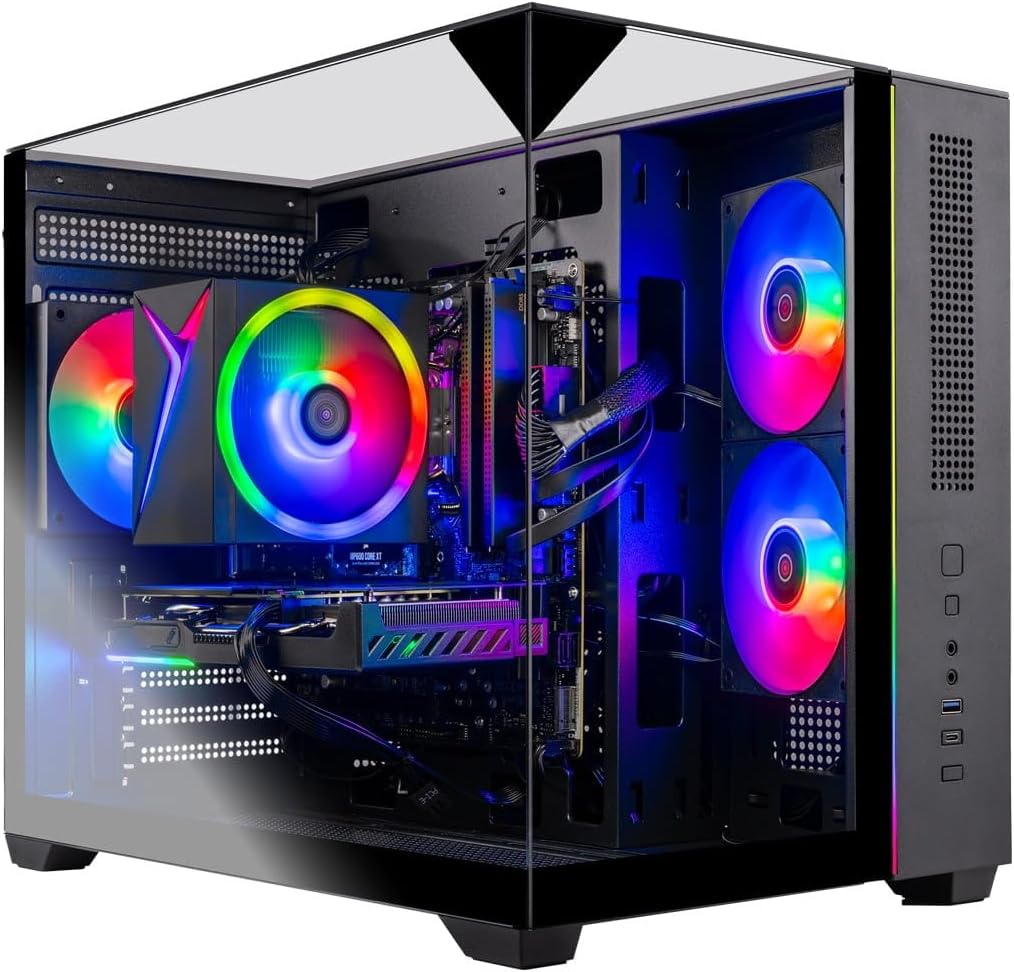
Skytech Gaming PC Desktop
4.5Editor score
Ryzen 7 5700 CPU
RTX 5060 Graphics
32GB DDR4 RAM
Discover the best Gaming PC for Escape from Tarkov in October 2026. This guide compares top prebuilt systems for performance, value, and reliability in
Escape from Tarkov demands powerful hardware to handle its intense physics and large maps smoothly. Choosing the right Gaming PC for Escape from Tarkov ensures you stay competitive without frustrating lag during critical raids.
We evaluated ten prebuilt systems based on processor speed, graphics capability, and cooling efficiency. Our analysis focuses on models that deliver consistent frame rates and stability under heavy gaming loads in demanding titles.
Each pick highlights key strengths like multitasking ability and thermal management. Prices fluctuate often so verify current listings before purchasing to ensure you get the best value available right now for your setup.
4.5Editor score

4.5Editor score

4.5Editor score
This table provides a side-by-side look at the ten selected systems. Compare processors, graphics cards, memory sizes, and storage options to find the perfect match for your budget and performance needs.


The YAWYORE Gaming PC stands out for its balanced configuration suitable for Tarkov. It holds a strong 4.5 rating from users who value stability during long sessions.
We may earn a commission when you buy through this link, at no additional cost to you.
Its 5700X CPU manages background apps well while the RTX 5060 delivers smooth visuals. The 32GB RAM ensures you can keep voice chat and browsers open without stuttering.
While DDR4 is older tech, it performs adequately here and helps keep costs down. Users should remember to remove shipping foam before powering on to avoid heat issues.
This system is ideal for mid-range gamers seeking reliability. It offers a solid entry into high-performance gaming without overspending on unnecessary features.
The combination of the 5700X and 32GB RAM provides excellent multitasking capabilities for streamers and gamers who run multiple apps simultaneously.
Using an MSI B550M motherboard ensures stable power delivery and compatibility for future upgrades when you are ready to expand your system.
We may earn a commission when you buy through this link, at no additional cost to you.
The MSI Codex Z2 brings next-gen performance at an accessible price point. Users appreciate the generous 2TB storage and fast DDR5 memory for quick loading times.
We may earn a commission when you buy through this link, at no additional cost to you.
Its 8700F processor is highly efficient for gaming workloads. The RTX 5070 supports advanced features like ray tracing which enhances visual fidelity in Tarkov.
The compact design means less desk space usage but might feel less premium than larger towers. Cooling is adequate with multiple fans keeping temps under control.
For budget-conscious gamers wanting modern specs this is a top contender. It balances cost and capability well for those planning to game for years.
The Blackwell architecture in the RTX 5070 delivers a significant leap in ray tracing performance for immersive gaming experiences.
Four system cooling fans ensure heat is pushed out effectively preventing thermal throttling during intense multiplayer sessions.
We may earn a commission when you buy through this link, at no additional cost to you.
The Skytech O11 Vision is a premium choice for enthusiasts seeking high-end aesthetics and power. Its liquid cooling system ensures quiet operation even under heavy loads.
We may earn a commission when you buy through this link, at no additional cost to you.
With 12GB of GPU memory and a strong CPU it handles high-resolution textures smoothly. The X670 motherboard allows for robust overclocking potential if desired.
While expensive the build quality justifies the cost for those wanting a showpiece. The tempered glass panels highlight the internal components beautifully for any room.
This PC is perfect for users who prioritize visuals and performance equally. It delivers top-tier reliability for competitive gaming environments where every frame counts.
The Lian Li O11 Vision case offers an unobstructed view of the ARGB components enhancing the overall gaming setup aesthetic significantly.
The 360mm AIO liquid cooler keeps temperatures low allowing the CPU to boost higher without thermal throttling issues.
We may earn a commission when you buy through this link, at no additional cost to you.
KOTIN introduces a unique smart display for real-time system monitoring which appeals to tech lovers. The 9700X processor is a powerful choice for modern gaming needs.
We may earn a commission when you buy through this link, at no additional cost to you.
Performance remains strong with 32GB DDR5 memory and a capable GPU. The 850W PSU leaves room for future upgrades without replacing the power unit.
Users must connect monitors to GPU ports not motherboard ports for display output. The smart display feature adds a layer of interactivity that others lack.
This system is great for those who want detailed system insights while gaming. It balances innovation with solid hardware specs for a premium experience.
The built-in smart screen displays temperatures and usage stats allowing you to monitor performance without opening system software.
WiFi 7 support ensures you have the fastest wireless networking available for low latency online gaming sessions.
We may earn a commission when you buy through this link, at no additional cost to you.
This Skytech model offers great value with its generous RAM amount and no bloatware. It supports high frame rates for competitive shooters like Tarkov well.
We may earn a commission when you buy through this link, at no additional cost to you.
The 5700 CPU is reliable and handles tasks efficiently. Users appreciate the included peripherals which save additional setup costs upon arrival.
Air cooling is effective but not as quiet as liquid solutions. The Crystal case looks nice but might trap dust if not cleaned regularly.
It is a solid pick for those who want a clean Windows experience. The support team adds peace of mind for buyers needing help later.
The system arrives with free keyboard and mouse allowing you to start playing immediately without extra peripheral purchases.
Lack of bloatware means no unwanted apps slow down your PC ensuring maximum performance for your gaming needs.
We may earn a commission when you buy through this link, at no additional cost to you.
This configuration uses top-tier AMD components for extreme performance. The 9850X3D CPU is excellent for gaming physics and simulation tasks in Tarkov.
We may earn a commission when you buy through this link, at no additional cost to you.
With 2TB of Gen4 storage you can install massive game libraries. The liquid cooler keeps the CPU running cool even during marathon sessions.
The price is high but justified by the raw power. AMD graphics cards are solid though some games favor NVIDIA features like DLSS.
It is ideal for enthusiasts who want the fastest possible hardware. Future-proofing is strong here with plenty of headroom for years.
The X3D V-Cache technology significantly boosts gaming FPS by reducing latency in heavy workload scenarios.
The Gen4 SSD ensures nearly instant load times allowing you to re-enter matches quickly after dying.
We may earn a commission when you buy through this link, at no additional cost to you.
CyberPowerPC offers a balanced system with the Ti graphics card for better visuals. The 8700F processor is energy efficient and reliable for daily use.
We may earn a commission when you buy through this link, at no additional cost to you.
16GB RAM is standard but sufficient for most gamers. The RGB lighting adds a nice touch to the overall look of the case.
It is not as powerful as 32GB models but fits budget needs well. Warranty coverage provides security for unexpected hardware issues.
Good for those who need a dependable machine without extra bells. It hits a sweet spot between performance and cost for average users.
The RTX 5060 Ti provides superior rendering capabilities compared to standard cards for smoother gameplay.
Multiple USB ports allow you to connect multiple peripherals easily without needing extra hubs.
We may earn a commission when you buy through this link, at no additional cost to you.
This VR Ready PC is built to handle virtual reality headsets well. The Intel i5 processor provides stable performance for mixed usage scenarios.
We may earn a commission when you buy through this link, at no additional cost to you.
RTX 4060 supports VR apps efficiently but may lag behind newer RTX cards. DDR5 memory helps keep data flow fast for responsive gameplay.
It is a good entry point for VR enthusiasts. The build is compact and fits well in smaller rooms or office setups.
Ideal for users planning to mix VR with traditional gaming. It offers the necessary components to start a VR journey without breaking the bank.
Designed to meet VR Ready standards it ensures smooth immersion without stuttering during complex virtual scenes.
DDR5 RAM provides faster bandwidth than older generations improving load times and system responsiveness.
We may earn a commission when you buy through this link, at no additional cost to you.
Another MSI entry with a clean look and strong RAM. The 32GB memory ensures multitasking is smooth for gamers who need background apps.
We may earn a commission when you buy through this link, at no additional cost to you.
VR Ready status means you can expand your gaming to virtual reality easily. The system stays quiet thanks to efficient thermal design.
It is slightly more compact than standard towers but still powerful. USB-C ports allow for fast data transfer with modern devices.
Perfect for those wanting a neat setup with reliable specs. It balances simplicity with enough power for Tarkov demands.
USB-C connectivity allows fast data transfer and charging of modern peripherals effortlessly.
Having 32GB DDR5 memory ensures you can run heavy applications alongside your games without slowdowns.
We may earn a commission when you buy through this link, at no additional cost to you.
This MSI model packs strong GPU power with WiFi 6E networking. The VR Ready tag ensures compatibility with headsets for immersive experiences.
We may earn a commission when you buy through this link, at no additional cost to you.
CPU performance is decent for the price though limited by the i5 series. It is a solid base for those planning to upgrade parts later.
Air cooling is simple but adequate for non-overclocked usage. The system scales well if you decide to change the CPU in a few years.
Best for users focused on graphics and networking speeds. It offers a good foundation for modern gaming and virtual reality tasks.
Standard components make it easy to upgrade storage or memory down the line without needing a new system.
WiFi 6E delivers lower latency on the 6GHz band for faster connections online.
We may earn a commission when you buy through this link, at no additional cost to you.
Choosing a Gaming PC for Escape from Tarkov requires careful consideration of hardware specs to ensure smooth gameplay and stability during raids.
Tarkov relies heavily on CPU performance for physics and calculations. Look for CPUs with high clock speeds and multiple cores like Ryzen 7 or i5/i7 series.
Higher core counts help manage background apps like Discord without affecting game performance.
A powerful GPU is essential for rendering detailed environments and maintaining high frame rates. Aim for RTX 4060 or higher for consistent quality.
Newer GPU architectures offer better ray tracing support which enhances immersion significantly.
16GB is the minimum but 32GB is recommended for seamless multitasking. More RAM prevents lag when running browser tabs or voice chats.
DDR5 memory is faster than DDR4 and should be prioritized if your budget allows for better data transfer.
NVMe SSDs are crucial for fast loading times. Traditional HDDs will cause delays which can be fatal in Tarkov.
At least 1TB of storage is recommended to fit the game and other titles without constant file management.
Efficient cooling keeps components stable during long raids. Air coolers work fine but AIO liquid coolers offer better thermal performance.
Check if the case has enough fans to maintain airflow and prevent thermal throttling under heavy loads.
Look for systems with WiFi 6 or Ethernet ports for stable internet. USB ports should be sufficient for peripherals like mice and keyboards.
Future-proof connectivity like USB-C helps with modern devices and charging requirements.
Choose systems with standard components to allow future upgrades. Proprietary parts can limit your ability to swap out older hardware.
Ensure the power supply has enough wattage to support future graphics card upgrades easily.
A solid warranty protects your investment against defects. Lifetime tech support is valuable if you lack technical troubleshooting skills.
Read reviews to verify the company's responsiveness before committing to a purchase.
Keep your PC in a well-ventilated area to prevent dust buildup. Dust can block fans and cause overheating during intense gaming sessions.
Update your drivers regularly to ensure compatibility with the latest game patches. Outdated drivers can cause crashes or frame drops.
Perform regular system cleanups to free up disk space. Over time temporary files can fill your drive slowing down performance.
16GB RAM is the minimum requirement but 32GB is recommended for optimal performance. Tarkov uses significant resources and having extra RAM prevents stuttering.
RTX GPUs are preferred for ray tracing features but GTX models can run the game well. Focus on VRAM and clock speeds for better performance.
Most prebuilt PCs allow for RAM and SSD upgrades. Motherboards vary so check compatibility before buying parts to ensure they fit correctly.
High-clock CPUs like Ryzen 7 8700F or i5-14400F are ideal. Single-core performance drives most of the game's physics calculations.
Yes all listed PCs include Windows 11 Home pre-installed. This ensures you can start playing immediately without setting up an OS.
Systems with 32GB RAM and strong CPUs handle streaming well. Dedicated GPUs with NVENC make encoding smoother for Twitch or YouTube.
Most systems run quietly at idle but fan noise increases under load. AIO liquid coolers generally stay quieter than standard air coolers.
Look for systems labeled VR Ready with strong GPUs like the RTX 5070 or RX 9070 XT. These ensure stable performance for virtual reality headsets.
We reviewed ten top systems ranging from budget-friendly to premium high-end. The YAWYORE and Skytech models offer the best balance of price and performance.
Prioritize 32GB RAM and at least a mid-range GPU like RTX 5060 Ti for smooth gameplay. Cooling systems matter just as much as specs for long sessions.
Check current prices and availability before purchasing to ensure you get the best deal. This guide updates regularly to reflect the latest hardware.