
AMBIR PS667
5.0Editor score
No subscription fees required
USB powered simplicity
Local data storage option
Finding the right Id Scanners for Dispensaries is crucial for maintaining compliance and ensuring customer safety. These devices verify age quickly and accurately, reducing the risk of selling to minors and protecting your business from legal penalties. A good scanner integrates seamlessly with your workflow.
We evaluated ten leading models based on scanning speed, accuracy, battery life, and software features. Each product offers unique capabilities for tracking customers, managing bans, and generating compliance reports. Our analysis focuses on reliability and ease of use in high-traffic retail environments.
Each pick highlights key strengths and potential trade-offs to help you make an informed decision. Prices and availability can change, so verify current details before purchasing. We aim to provide clear, honest insights into what makes these scanners effective for dispensary operations.
5.0Editor score

4.8Editor score

4.0Editor score
As an Amazon Associate we earn from qualifying purchases.
This side-by-side comparison highlights the core specifications and capabilities of each top-rated scanner to help you find the perfect fit for your dispensary.


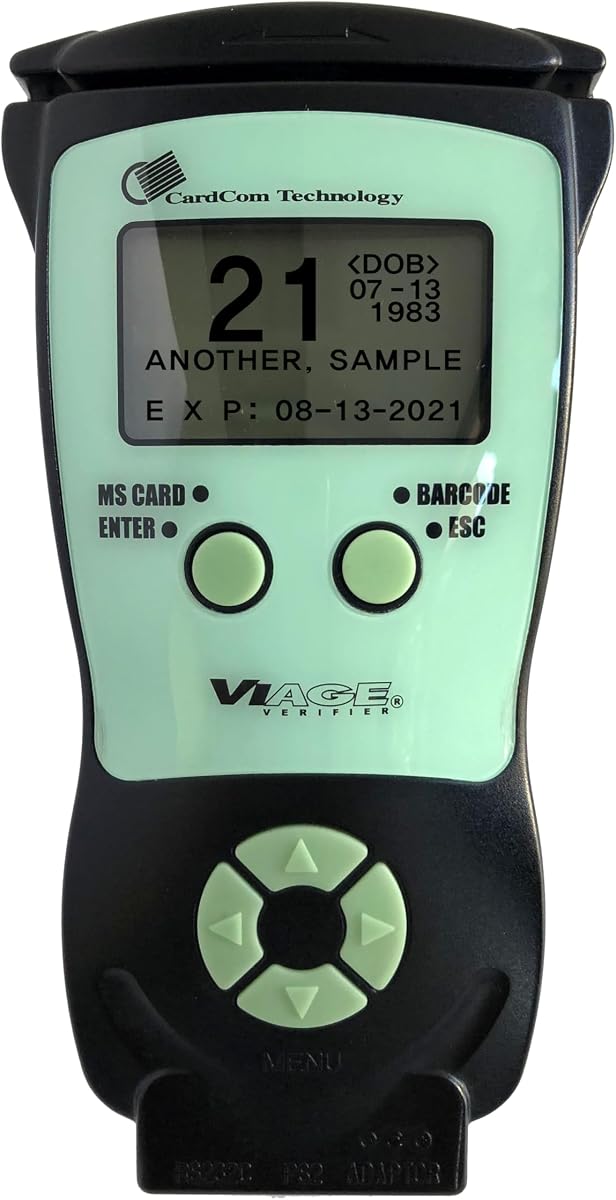


The IDVisor Smart V2 stands out as a top choice for dispensary owners needing reliable age verification. With a 4.8 rating, it offers fast one-second scans and lifetime software updates. Its GPS tracking ensures you never lose your device, making it a secure investment for high-value transactions.
We may earn a commission when you buy through this link, at no additional cost to you.
This scanner excels in customer management, allowing you to track repeat visits and build loyalty. The ability to capture two photos per record helps verify identities more accurately. Intuitive icons and voice warnings make it easy for staff to use without extensive training. Compliance logs are generated automatically to simplify audits.
While the price is higher than some competitors, the included features justify the cost. You get a spare battery and cradle, reducing downtime. The only minor drawback is the reliance on the cradle for charging, which might limit portability if you move locations frequently. Still, the reliability is worth it.
If you need a robust system that balances speed and security, this is the best option. It fits well in busy dispensary environments where accuracy matters. The lifetime updates ensure you stay compliant with changing laws. We recommend it for businesses prioritizing long-term value and security.
The Find My Device feature lets you locate the scanner on Google Maps if lost, adding a layer of asset protection.
Track new vs. repeating clients to offer personalized service, turning security checks into relationship-building opportunities.
We may earn a commission when you buy through this link, at no additional cost to you.
The Unitech EA660 is designed for touchless scanning, which is ideal for hygiene-conscious environments like dispensaries. It verifies US and Canadian IDs, military IDs, and passports. The package includes a charge dock, case, and screen protector, offering a complete solution. It is rated 4.0 and is suitable for front desk or security use.
We may earn a commission when you buy through this link, at no additional cost to you.
This handheld unit simplifies age verification with its touch interface. It helps manage visitor flow by logging scans automatically. The VeriScan Basic Software adds value by providing essential features without extra fees. You can use it in diverse settings, from bars to medical offices, making it versatile for multi-purpose businesses.
However, the 4.0 rating suggests some users found limitations compared to advanced models. The basic software might lack deep CRM features found in premium competitors. While the included accessories are nice, you might need to upgrade software for more detailed tracking. It is a solid mid-tier choice for specific needs.
Choose this if you prioritize touchless hygiene and portability in a professional setting. It offers a good balance of hardware and software for standard operations. The included accessories make it ready to use out of the box. It works well for businesses that need reliable, simple verification.
Touchless scanning reduces physical contact, which is beneficial in healthcare and high-traffic retail environments.
Free accessories like the case and screen protector ensure your device stays protected from day one.
We may earn a commission when you buy through this link, at no additional cost to you.
The AMBIR PS667 offers a rare 5.0 rating for a budget-friendly scanner. It is a complete turnkey solution with hardware and software included. You avoid subscription fees, making it ideal for small businesses watching their bottom line. Data is stored locally, ensuring privacy and control without cloud dependencies.
We may earn a commission when you buy through this link, at no additional cost to you.
This scanner automatically extracts data from 2D barcodes on US IDs. It flags minors and expired IDs instantly, preventing errors. Anti-passback security stops card sharing within a set timeframe. The USB power means no extra outlets are needed. It is Windows and Mac compatible, fitting most existing setups.
While it has a perfect rating, it requires a PC connection, which limits portability compared to handheld units. You need a dedicated station with a computer for it to work. This might not suit mobile security checks or remote dispensary locations. However, for fixed front desks, it is highly efficient.
If you want a reliable, no-fee system for a fixed desk, this is the top budget pick. Its high rating speaks to its stability and ease of use. The one-time purchase model saves money over time. We recommend it for dispensaries prioritizing cost-effectiveness and data privacy.
Local storage means you control all customer data, reducing risks associated with cloud breaches or internet outages.
This feature prevents duplicate scans, ensuring one ID is used once per session for stricter compliance.
We may earn a commission when you buy through this link, at no additional cost to you.
The AgeVisor Mini is a compact countertop unit designed for quick ID verification. It has a 3.9 rating and offers fast 1-second scans. Motion-activated scanning allows one-handed operation, freeing up staff time. The included Barcode Detective subscription helps spot fake IDs, adding an extra layer of security.
We may earn a commission when you buy through this link, at no additional cost to you.
Setup is simple—just plug it in and start verifying. It tracks customer visit counts to identify frequent visitors. You get lifetime software upgrades and US support, ensuring long-term usability. The design fits well on crowded dispensary counters without taking up much space.
Some users may find the 3.9 rating indicates occasional connectivity or durability issues. It lacks the advanced CRM features of higher-end models. The barcode detective service might require additional costs after the free period. Still, it remains a solid choice for basic verification needs.
Choose this if space is limited and you need a reliable, simple scanner. It balances functionality with affordability. The motion activation adds convenience. For dispensaries needing a no-fuss solution, it delivers consistent performance without complex setups.
Its compact design ensures it fits on tight counters, leaving room for other essential dispensary tools.
This feature prevents people from looping IDs, which is crucial for maintaining accurate compliance logs.
We may earn a commission when you buy through this link, at no additional cost to you.
The IDVisor Smart Plus features a large 5-inch LCD screen for clear visibility. It offers robust CRM capabilities to track clients and loyalty. A 4.2 rating reflects solid performance with lifetime updates. The Find My Device feature allows GPS tracking, ensuring asset security even when mobile.
We may earn a commission when you buy through this link, at no additional cost to you.
This model excels in detailed customer management, highlighting new vs. repeating clients. You can export records in Excel format easily. It supports WiFi and USB export for cloud integration. The large screen reduces eye strain, making it comfortable for long shifts in busy environments.
The size might make it less portable than handheld units. It requires a stable surface for optimal use. While the price is competitive, it is still an investment. However, the added visibility and data tools offer significant value for high-volume operations.
Select this if you need clear displays and detailed CRM tools. The screen size improves readability. The export options help with reporting. It is a powerful choice for dispensaries focused on both security and customer relationship management.
The large screen ensures results are visible from a distance, helping staff communicate status to customers instantly.
Assign loyalty memberships and track visits, turning age checks into opportunities to build customer retention.
We may earn a commission when you buy through this link, at no additional cost to you.
The Minor Decliner is designed with compliance at its core, featuring a built-in log. It has a 4.5 rating and offers clear Go/No-Go results. The device does not store photos, prioritizing privacy. Fake ID detection powered by Intellicheck technology boosts accuracy to 90%+.
We may earn a commission when you buy through this link, at no additional cost to you.
It operates on plug-in power, ensuring continuous operation without battery worries. Results appear in less than a second, keeping lines moving. The system works fully without a computer, simplifying setup. A free vinyl decal warns customers that IDs are scanned, deterring underage attempts.
While the lack of battery limits portability, it ensures reliability in fixed spots. You must be near an outlet. The fake check service costs credits after free trials. Still, for strict compliance, this model offers peace of mind during inspections.
Choose this for its strong compliance features and privacy focus. It simplifies audits with its log. The no-photo approach respects customer data. It is ideal for dispensaries prioritizing legal safety and straightforward verification.
No photos are stored, which simplifies data protection and reduces liability in case of a breach.
The built-in log means you do not need extra software to prove compliance during regulatory checks.
We may earn a commission when you buy through this link, at no additional cost to you.
The CAV3200 is a portable scanner with dual scanning technology for magnetic stripe and 2D barcodes. A 4.7 rating highlights its reliability. It comes with free software and lifetime ID updates, removing hidden costs. Standalone operation makes it easy to use without external devices.
We may earn a commission when you buy through this link, at no additional cost to you.
Its ergonomic design allows quick scanning without training. The backlight display ensures visibility in dim areas. Memory settings support due diligence reporting for audits. It is designed to work independently, offering flexibility for events or different dispensary locations.
The standalone nature is great, but it might need occasional charging. There are fewer advanced CRM features compared to top models. However, the dual scanning covers more ID formats. This is ideal for businesses needing broad coverage without subscription fees.
Select this if you need portability and dual scanning. The free updates save money long-term. It works well in varied settings. We recommend it for dispensaries that want a versatile, cost-effective scanner with solid performance.
Supports both magnetic stripes and barcodes, ensuring compatibility with older and newer ID cards.
Updates are provided for the device life, keeping you current with ID format changes without extra charges.
We may earn a commission when you buy through this link, at no additional cost to you.
The Quantum Edge V3 is built for tough environments with a water and dust seal. It has a 4.5 rating and validates IDs within seconds. The device includes Wi-Fi for easy connection with multiple devices. A carry case is provided to protect it during transport.
We may earn a commission when you buy through this link, at no additional cost to you.
It is ideal for high-volume venues like hospitals or clubs where spills occur. Audible warnings help users know results without looking at the screen. The scanner captures three pictures for better verification. Setup is easy, ready to use right out of the box.
Lack of GPS tracking compared to some models limits security features. The Wi-Fi might need network configuration. However, its ruggedness makes it stand out. If you need a scanner that can handle a wet or messy environment, this is the choice.
Choose this for durability and ease of use. It resists dust and water well. The warnings simplify the process. We recommend it for dispensaries operating in challenging conditions where equipment protection is critical.
Sealed against water and dust, it survives spills and splashes common in bar or dispensary settings.
Sound alerts notify staff instantly of age status, reducing the need to check the screen visually.
We may earn a commission when you buy through this link, at no additional cost to you.
The AMBIR DS687 is a turnkey solution with duplex scanning in one pass. It carries a 4.3 rating and no subscription fees. Automatic data extraction reads 2D barcodes for instant info. The system includes anti-passback security to prevent card sharing.
We may earn a commission when you buy through this link, at no additional cost to you.
It is USB-powered, needing no external power supply. Setup is straightforward for Windows and Mac users. Data storage is local for maximum privacy. This makes it a solid choice for businesses that want control over their data without ongoing costs.
It relies on a PC connection, which reduces portability. You need a computer at the verification point. However, for fixed desks, it offers high privacy and security. The two-year warranty adds peace of mind for the investment.
Pick this if you want local storage and no fees. The duplex scan speeds up entry. It fits well in computer-based workflows. We recommend it for dispensaries valuing privacy and cost efficiency over portability.
Scans both sides of the ID in one pass, speeding up the verification process significantly.
All data stays on your system, avoiding cloud risks and giving you full control over customer records.
We may earn a commission when you buy through this link, at no additional cost to you.
The ACUANT AssureTec offers near-infrared image capture for secure authentication workflows. It has a 5.0 rating and supports magstripe reading. The scanner captures front and back in one pass. Note that software is sold separately, giving you flexibility in your stack.
We may earn a commission when you buy through this link, at no additional cost to you.
It is a desktop USB scanner compatible with Windows PCs. The near-infrared feature helps detect security features invisible to the naked eye. This makes it a strong choice for security-focused environments needing advanced verification. The 5.0 rating reflects its reliable hardware.
Buying software separately may add to the total cost. You need a PC to run it. But you choose the best software for your needs. For those who want top-tier hardware control, this model delivers high performance.
Choose this for advanced security and hardware reliability. The infrared capture adds depth. We recommend it for dispensaries needing sophisticated authentication without being locked into specific software bundles.
Near-infrared capture helps identify security elements on IDs that standard scanners might miss.
Hardware-only design lets you pair it with your preferred software, avoiding vendor lock-in.
We may earn a commission when you buy through this link, at no additional cost to you.
Choosing the right scanner involves considering your specific operational needs, budget, and security requirements.
Fast scanning speeds reduce wait times at the entrance or counter. Look for devices that process IDs in under a second to keep lines moving efficiently during peak hours.
Prioritize speed to improve customer experience and throughput.
Ensure the scanner can read all state IDs, military IDs, and passports. Advanced models offer barcode or magnetic stripe checks to spot fake IDs effectively.
Accuracy is non-negotiable to prevent illegal sales and fines.
For handheld devices, long battery life ensures uninterrupted scanning. Check for removable spare batteries if you need continuous use throughout the day.
Choose models with 10+ hour battery life for flexibility.
Look for features like customer tracking, ban lists, and compliance reports. Some software includes loyalty tools that help turn security checks into relationship-building moments.
Robust software helps you stay compliant and manage customer data efficiently.
Decide if you prefer local storage or cloud-based solutions. Local storage offers more control and security against cloud breaches but limits remote access.
Choose storage that aligns with your privacy policies and compliance needs.
High-traffic environments need rugged devices. Look for water-resistant or dust-proof models to withstand spills and daily wear.
Durability ensures your investment lasts longer in busy settings.
Some models have one-time costs while others require annual subscriptions. Consider the long-term cost of ownership including updates and software fees.
Total cost of ownership should fit your budget without hidden fees.
Intuitive interfaces reduce training time. Devices with visual cues like lights or voice alerts simplify verification for staff.
Ease of use ensures consistent and correct scanning by all employees.
To start using your scanner, ensure it is charged or connected to power. Follow the manufacturer's setup guide to link it to your network or PC.
Clean the scanning window regularly with a soft cloth to maintain accuracy. Keep the device dry and avoid exposing it to direct liquids or extreme temperatures.
Update the software periodically to stay compliant with new ID formats. Train staff on how to interpret results quickly to maintain smooth operations.
Most top scanners read IDs from all 50 states, Canadian provinces, and military IDs. Always check the specific product's compatibility list to ensure it covers any unique state codes you may encounter.
Some models store data locally on your device, while others offer cloud storage. Always review the privacy settings to understand how information is handled and whether photos are captured during scans.
Portable handheld scanners are best for off-site use. Ensure the model has a battery option and does not require a PC connection for standalone verification.
Look for scanners with anti-passback features and optional fake ID detection subscriptions. These tools analyze hidden security data in barcodes to identify tampered or forged documents.
Many models offer lifetime software updates included in the purchase price, but some may require paid subscriptions for advanced features. Always confirm the pricing model before buying.
Warranties typically range from one to two years. Check the product details for specific warranty terms and whether they cover accidental damage or just manufacturing defects.
Handheld scanners often work independently, but desktop models may require a PC connection. Verify if the device supports standalone operation if you want flexibility without a computer.
Most devices allow you to export logs via USB or WiFi. Check the software capabilities to ensure you can generate reports in formats compatible with your audit requirements.
We reviewed ten top scanners, highlighting strengths like speed, security, and cost. The IDVisor Smart V2 and AMBIR PS667 stand out for different needs depending on your priorities.
Prioritize accuracy and compliance features to protect your business from fines. Consider whether you need portability or a fixed station based on your dispensary layout.
Remember that prices and offers may change. Check current listings to confirm availability and pricing before making your final decision.