
V-one Wired USB Gaming Controller
4.2Editor score
Supports Windows XP through 11
Includes vibration feedback function
Compatible with Steam and Android
Discover the top joysticks for Windows 11 flight simulators and gaming. This guide compares ten controllers to help you find the perfect fit for immersive
Finding the right joystick for Windows 11 can transform your gaming experience significantly. Whether you are simulating flights or commanding vehicles, precise control matters. This guide explores the best options available to enhance your digital adventures.
We compared ten popular joysticks based on compatibility, build quality, and user feedback. Each product offers unique features suited for different gaming styles and budgets. Our analysis ensures you understand what makes each controller stand out in today's market.
Each pick highlights specific strengths like vibration feedback, ergonomic design, and programmable buttons. Prices fluctuate often so always check current listings before buying. We aim to provide clear insights to help you choose confidently without confusion or regret.
4.2Editor score

4.4Editor score

4.0Editor score
This table compares all ten joysticks side by side so you can quickly see key differences. Look at compatibility, button counts, and special features to find the right match for your setup and gaming needs.






The PXN 2113PRO offers an accessible entry into flight simulation on PC. With a rating reflecting mixed but functional feedback it provides core features for hobbyists. Its vibration function adds immersion when configured correctly in drivers.
We may earn a commission when you buy through this link, at no additional cost to you.
This joystick supports Windows 11 natively and includes twelve programmable buttons. The eight-way hat switch allows quick access to in-game menus. It works well with titles like Microsoft Flight Simulator and World of Tanks.
Users note vibration requires setting driver strength to fifty percent or higher. The suction cups help secure it on smooth tables during intense sessions. Lack of support for consoles limits its audience to PC gamers only.
Buy this if you want basic flight control without spending much. It delivers a solid experience for those testing the waters of simulation gaming. Ensure your driver settings are optimized for best performance.
Adjustable vibration adds realism to flight maneuvers and combat scenarios.
Supports popular simulators including X Plane 10 and Assault Horizon.
We may earn a commission when you buy through this link, at no additional cost to you.
The Thrustmaster T-Flight Hotas One brings realistic hands-on flying to your desk. Rated highly by users it combines a precision stick with a dedicated throttle for full control. Its modular design adds flexibility for space-constrained setups.
We may earn a commission when you buy through this link, at no additional cost to you.
Adjustable resistance lets you tailor the stick to your preference. The responsive trigger and hat switch improve aircraft management during takeoffs and landings. Compatibility with Windows 11 ensures seamless integration with modern simulators.
While rudder pedals are sold separately the system expands with them later. It fits casual pilots and enthusiasts alike with its balanced features. The detachable throttle allows separate use on a lap if needed.
Choose this for a complete flight experience without overwhelming cost. It suits those who value ergonomics and versatility in their gear. Ideal for both commercial aviation and combat jet simulations.
Use stick and throttle together or separately for varied setups.
Designed for long sessions with reduced hand fatigue.
We may earn a commission when you buy through this link, at no additional cost to you.
The V-one Wired USB Gaming Controller serves as a cost-effective solution for diverse devices. It supports Windows 11 and Android making it useful beyond just PC gaming. Users appreciate its plug-and-play nature across multiple platforms.
We may earn a commission when you buy through this link, at no additional cost to you.
Features include vibration feedback and turbo functions to enhance gameplay intensity. The multi-mode design adapts to different systems without complex setup. It works well with Steam titles and retro PS3 compatible games.
Though it lacks Xbox One support its versatility compensates for that limitation. The red design stands out while remaining functional for general use. Budget buyers find it a reliable starter controller for casual sessions.
This is an excellent choice if you need broad compatibility at low cost. It balances basic features with cross-device flexibility effectively. Great for students or casual gamers on a tight budget.
Seamlessly switches between PC Android and PS3 modes easily.
Minimal setup required for most modern Windows systems.
We may earn a commission when you buy through this link, at no additional cost to you.
The Thrustmaster USB Joystick provides a straightforward experience for Windows users. Rated moderately it focuses on essential controls without unnecessary complexity. The point of view button is a standout feature for immersion.
We may earn a commission when you buy through this link, at no additional cost to you.
With three axes and four buttons it covers basic flight needs well. The ergonomic handle ensures comfortable grip during extended play. It remains a valid option for those seeking simplicity over advanced customization.
Some users might find the limited button count restricting for complex sims. However it delivers consistent performance for casual flying or arcade games. The brand reputation adds trust to this entry-level option.
Pick this if you prefer minimal setup and reliable basic controls. It suits newcomers who want to try flight sims without investment. A dependable tool for straightforward gaming tasks.
Quick camera angles enhance situational awareness during play.
Designed for ease of use without complicated menus.
We may earn a commission when you buy through this link, at no additional cost to you.
The Microsoft Sidewinder Precision 2 brings reliable precision to your flight setup. It offers sixteen programmable functions allowing deep customization for specific games. Users value the rotating handle for accurate rudder control during turns.
We may earn a commission when you buy through this link, at no additional cost to you.
Throttle control is integrated into the stick with a full range of motion. Saving game commands into profiles streamlines switching between titles. It remains a solid choice for those who value functional design over looks.
While older it still performs well on modern Windows 11 systems. Some features require driver installation but once set it works seamlessly. The build quality ensures longevity for daily gaming sessions.
Select this if you prioritize programmability and sturdy construction. It appeals to veterans who know what works for flight sims. A classic tool that balances function and reliability effectively.
Custom commands tailored to specific game requirements and styles.
Full range throttle control directly from the stick unit.
We may earn a commission when you buy through this link, at no additional cost to you.
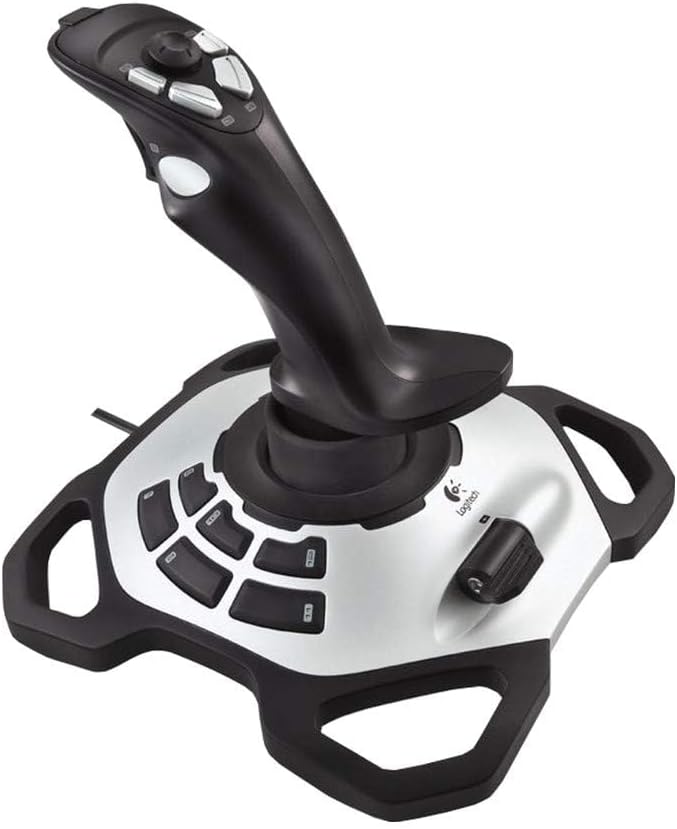
The Logitech Extreme 3D Pro stands out for its focus on precision. Users praise its accurate tracking and smooth axis movements during gameplay. With twelve programmable buttons it offers flexibility without needing extra hardware.
We may earn a commission when you buy through this link, at no additional cost to you.
Its ergonomic design ensures comfort during long simulation sessions. The twist rudder axis adds depth for steering control. It is a favorite among those who demand responsive and reliable input devices.
Though it lacks a throttle it functions perfectly as a standalone stick. Logitech quality assurance ensures durability over time. The high rating reflects consistent performance across varied titles.
Opt for this if you need precise input for combat or racing sims. It suits users who want a solid single stick solution. A professional grade tool for serious hobbyists.
Minimal lag or drift ensures responsive control in games.
Independent rudder axis improves steering realism significantly.
We may earn a commission when you buy through this link, at no additional cost to you.
The VOYEE PC Controller provides enhanced comfort for extended use. Its ergonomic grips fit hands well reducing strain over time. Users highlight the rumble feedback as a key feature for immersion.
We may earn a commission when you buy through this link, at no additional cost to you.
Upgraded trigger buttons and joysticks respond quickly to commands. The seven foot cord offers flexibility in sitting positions. It works with Windows 11 and 360 systems seamlessly.
Limitations include lack of support for FPS games specifically. However for other genres it delivers a satisfying experience. The affordable price makes it an attractive upgrade from basic controllers.
Choose this if comfort and haptics are your priority. It suits gamers who play long sessions and value feedback. A practical choice for general gaming on PC or console.
Design reduces hand fatigue during marathon gaming sessions.
Upgraded triggers ensure quick reaction without lag.
We may earn a commission when you buy through this link, at no additional cost to you.
The Thrustmaster SimTask FarmStick targets serious farming simulator players. It offers thirty-three programmable inputs to control heavy machinery effectively. Hall effect sensors ensure precise and durable performance over time.
We may earn a commission when you buy through this link, at no additional cost to you.
Ambidextrous design lets you switch hands easily. The joystick includes thumbwheels and rocker switches for total control. It is compatible with PC and Xbox Series X for broad access.
This device requires a racing wheel for full cockpit functionality. While niche it delivers unmatched realism for tractor and loader operations. Ideal for fans who demand dedicated hardware for their hobby.
Invest in this if farming simulators are your main focus. It transforms generic gameplay into realistic equipment management. A specialized tool for true simulation enthusiasts only.
Hall effect sensors eliminate drift for long-term accuracy.
Specialized inputs for tractors and loaders increase realism.
We may earn a commission when you buy through this link, at no additional cost to you.
The Logitech G X56 H.O.T.A.S offers top-tier precision for pilots. With over 189 programmable controls it covers every function imaginable. RGB lighting allows you to match your rig aesthetics perfectly.
We may earn a commission when you buy through this link, at no additional cost to you.
Twin throttles and adjustable stick force ensure accurate feedback. Mini analog sticks help manage control surfaces independently. It is ideal for VR setups due to intuitive button placement.
The physical size requires significant desk space. While pricey it delivers unmatched customization and durability. This system suits those seeking professional grade performance at home.
Select this if you want the absolute best flight simulation hardware. It delivers military grade precision for ambitious pilots. A comprehensive setup for serious enthusiasts only.
Access hundreds of inputs for complex flight procedures.
Hall effect sensors and spring force adjust for realism.
We may earn a commission when you buy through this link, at no additional cost to you.
The Thrustmaster T.16000M FCS uses advanced tech for high accuracy. H.E.A.R.T technology ensures precision that does not decrease with use. Sixteen buttons with braille style help identify keys without looking.
We may earn a commission when you buy through this link, at no additional cost to you.
Ambidextrous design lets you tailor the grip to your preference. The hat switch and twist rudder improve flight and maneuvering. It fits comfortably for extended use across varied gaming scenarios.
Setup requires TARGET software for full profile customization. The build quality is robust ensuring longevity. Users appreciate the lack of drift which maintains responsiveness over years.
Choose this for a high-performance single stick solution. It balances features and ergonomics effectively for serious simulators. A solid investment for precision and comfort in flight sims.
Magnetic sensors ensure consistent precision without wear.
Braille style buttons allow quick identification during play.
We may earn a commission when you buy through this link, at no additional cost to you.
Selecting the right joystick involves looking at compatibility, features, and ergonomics. This section breaks down the key factors to consider before purchasing.
Ensure the joystick explicitly supports Windows 11 before buying. Some older models may require drivers or lack native recognition for new OS versions. Check product descriptions carefully for supported OS versions like Windows 10 and 11.
Always verify system requirements to avoid connection issues after purchase.
More buttons allow deeper customization for complex simulators. Look for programmable buttons that can be mapped to specific game commands. A high count is useful for managing multiple functions without reaching for a keyboard.
Prioritize models with mapping software for better control flexibility.
A comfortable grip reduces fatigue during long gaming sessions. Check if the stick has padded grips or adjustable handles. Quality materials ensure durability and consistent performance over time.
Choose a design that fits your hand size and preferred play style.
Vibration feedback adds immersion to flight and combat scenarios. Ensure the joystick supports rumble and that you can adjust strength levels. Some models offer force feedback which provides physical resistance.
Look for customizable feedback settings to match your personal preference.
Standalone sticks may not include throttles which are vital for flight sims. Consider HOTAS systems if you need throttle control built-in. Some models offer detachable throttles for flexible setups.
Decide if you need separate or integrated throttle controls based on budget.
Most joysticks use USB connections which are standard on PCs. Check the cable length to ensure it reaches your setup comfortably. Wireless options are rare but available for specific models.
Verify port requirements like USB 2.0 or 3.0 for optimal performance.
Good software allows profile management and button mapping. Check if the manufacturer provides updates for new games and OS versions. Some units work plug and play while others need installation.
Prioritize brands with active support for long-term usability.
Prices range from budget friendly to premium professional sets. Balance features with what you need rather than buying the most expensive. Entry level models work well for casual play.
Set a budget before shopping to narrow down choices effectively.
Start by connecting your joystick to a USB port on your computer before launching games. Windows usually installs drivers automatically but check the manufacturer site for updates. Ensure the device is recognized in system settings before playing.
Customize button mappings using the provided software to match your play style. Test controls in game menus to confirm all inputs work correctly. Adjust vibration strength if available for better immersion during gameplay.
Keep the joystick clean by wiping it with a dry cloth regularly. Avoid placing heavy objects on the stick which can cause calibration issues. Store in a dry place to prevent wear on buttons and cables.
Not all joysticks work seamlessly with Windows 11 without updates. Check product descriptions for explicit support of Windows 10 and 11. Some older models may require drivers to function correctly on the latest system.
A joystick is typically a single stick for control while HOTAS includes a throttle system. HOTAS setups provide separate throttle and stick controls for realistic flight simulation. Both work on Windows 11 but HOTAS offers more comprehensive input options.
Most PC joysticks do not work on Xbox consoles unless stated otherwise. Some models like Thrustmaster T-Flight Hotas One support both PC and Xbox. Verify compatibility in product specs before buying for cross-platform use.
Vibration may require driver settings adjusted to higher strength levels. Ensure vibration is enabled in the control panel or game settings. Check the manual for specific steps to enable this feature properly.
Wireless joysticks are rare compared to wired USB options. Wired connections ensure consistent performance without battery concerns. Some gaming controllers offer wireless but dedicated flight sticks often remain wired.
Most work plug and play but software helps with custom mapping and profiles. Drivers might be needed for advanced features like vibration or button mapping. Always check if setup requires installation steps before using.
We reviewed ten joysticks offering a range of features and price points. From budget picks like V-one to premium setups like Logitech G X56 there is something for everyone. Each option delivers unique benefits for flight and vehicle simulation.
Prioritize compatibility with your games and your comfort during long play. Features like vibration and programmable buttons enhance immersion significantly. Choose what aligns with your specific gaming needs and budget constraints.
Remember that prices and availability can change frequently online. Always check current listings and user reviews before making a final decision. With the right joystick your Windows 11 experience will reach new heights.