
Hamile for iPad 9/8/7th Generation Case with Keyboard 10.2 Inch – Wireless
4.5Editor score
Long life battery up to 180 hours
Adjustable 7 colors backlit keyboard
Magnetically detachable keyboard design
Finding the right keyboard case for your 8th generation iPad can transform your device into a powerful productivity tool. These accessories offer typing comfort and protection while maintaining portability for daily use.
We compared ten top-rated keyboard cases based on compatibility, build quality, battery life, and additional features like trackpads or backlighting. Each option was reviewed to ensure it meets diverse user needs effectively.
Each pick below highlights specific strengths and weaknesses to help you decide which case fits your workflow best. Remember that prices and availability can change, so check current listings before purchasing.
4.5Editor score

4.5Editor score

4.4Editor score
As an Amazon Associate we earn from qualifying purchases.
The following table provides a side by side comparison of all ten keyboard cases reviewed in this guide. Look closely at the specifications to identify which features matter most for your specific usage scenarios.

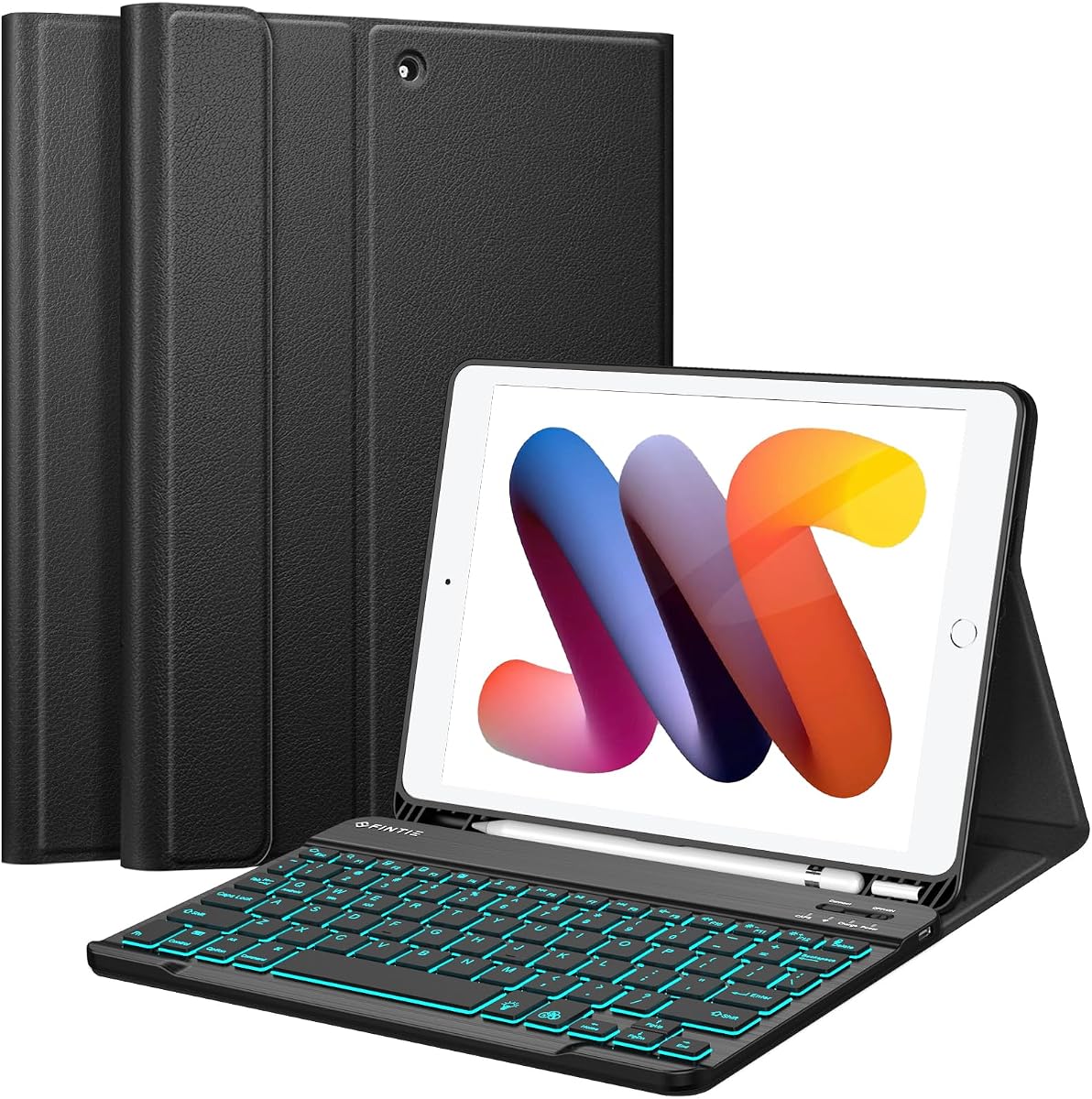


This keyboard case stands out as a top contender for users seeking versatility and functionality. It offers strong protection and typing comfort while transforming your iPad into a laptop like setup.
We may earn a commission when you buy through this link, at no additional cost to you.
The magnetic detachable keyboard is a key strength allowing you to use the tablet in various modes easily. The included Bluetooth mouse enhances navigation making it ideal for productivity tasks beyond typing.
While the detachable nature adds convenience it might be less seamless than a fixed keyboard for some users. The price is reasonable given the extra accessories provided with the package.
This case is best suited for users who need flexibility across different iPad models and value additional peripherals like a mouse. It is a solid choice for professionals and students alike.
Supports multiple iPad generations ensuring future proofing for users upgrading devices.
The bundled Bluetooth mouse adds significant value for navigation and presentation tasks.
We may earn a commission when you buy through this link, at no additional cost to you.
The FINTIE keyboard case offers great value for money making it a top pick for budget conscious buyers. It combines protection with essential typing features without breaking the bank.
We may earn a commission when you buy through this link, at no additional cost to you.
Its long lasting battery life ensures you can type for days on a single charge. The adjustable backlight makes typing in low light conditions comfortable and efficient.
The absence of a trackpad means you will rely on touch navigation which might slow down some tasks. The viewing angles are fixed but adequate for most standard use cases.
This case is ideal for students or casual users who prioritize cost and battery life over advanced features. It provides reliable protection and a solid typing experience.
The energy efficient design supports over 230 hours of continuous usage.
Offers a competitive price while maintaining quality materials and build.
We may earn a commission when you buy through this link, at no additional cost to you.
This case is designed for power users who demand a full laptop experience from their iPad. It features a premium build with advanced functionalities that enhance productivity significantly.
We may earn a commission when you buy through this link, at no additional cost to you.
The precision trackpad allows for seamless navigation without touching the screen. The 360 degree rotating hinge offers incredible versatility for different viewing and typing angles.
The premium features come with a higher price tag which might not suit every budget. The added bulk from the hinge mechanism could be a downside for portability.
If you need advanced control and flexibility this case is worth the investment. It transforms your iPad into a true workstation for professional tasks.
Multi gesture controls redefine productivity by allowing smooth cursor navigation.
The patented hinge lets you use the iPad in any orientation comfortably.
We may earn a commission when you buy through this link, at no additional cost to you.
The Hamile keyboard case focuses on convenience and reliable performance for daily use. It offers a comfortable typing experience with features that ensure your device stays cool.
We may earn a commission when you buy through this link, at no additional cost to you.
The magnetic keyboard attaches firmly and can be removed easily when not needed. The honeycomb design helps dissipate heat extending the life of your iPad during long sessions.
While the keyboard is detachable it might be misplaced if not stored carefully. The viewing angles are functional but lack the flexibility of some premium options.
This case is a great choice for users who want a balance of functionality and ease of use. It protects your iPad well while providing a solid typing solution.
The honeycomb grid pattern effectively prevents overheating during extended use.
With 400mAh capacity it supports up to 180 hours of usage.
We may earn a commission when you buy through this link, at no additional cost to you.
Divufus offers a practical solution for creators and note takers who need secure storage for their stylus. The case ensures your pencil is always within reach during work.
We may earn a commission when you buy through this link, at no additional cost to you.
The battery life is impressive allowing for extended usage without frequent charging. The honeycomb grid design protects against overheating while the non slip lining ensures stability.
Lack of a trackpad limits cursor control options which might frustrate some users. The backlight options are minimal compared to other models with more color choices.
This case is perfect for artists and students who prioritize pencil storage and durability. It provides essential protection without unnecessary bulk or high cost.
Secure pencil holder keeps your stylus safe and easily accessible.
Compatible with iOS Android and Windows for versatile use cases.
We may earn a commission when you buy through this link, at no additional cost to you.
Logitech is known for quality and this slim folio reflects that reputation. It is tailored specifically for iPad users who want simplicity and reliability in their typing solution.
We may earn a commission when you buy through this link, at no additional cost to you.
The inclusion of iOS specific shortcut keys speeds up common tasks significantly. The slim design adds minimal weight making it easy to carry in a bag.
The requirement for replaceable coin cell batteries might be inconvenient for some users. The lack of backlight limits usability in low light environments effectively.
This is an excellent choice for users who prefer a lightweight and efficient setup. It works perfectly for travel and everyday typing without extra frills.
Dedicated shortcut keys allow one tap access to media and controls.
Minimal bulk ensures your iPad remains portable and easy to handle.
We may earn a commission when you buy through this link, at no additional cost to you.
This case focuses on portability and comfort making it ideal for users on the go. It balances protection with essential typing features without adding significant weight.
We may earn a commission when you buy through this link, at no additional cost to you.
The slim wireless keyboard is easy to carry and pairs seamlessly with your iPad. The pencil holder is a useful addition for creatives who use an Apple Pencil.
The design is simple and lacks advanced features like a trackpad or backlight. The viewing angles are adjustable but may not suit all user preferences.
This case is best for users who prioritize portability and simplicity. It is a solid option for students and casual users who value ease of use.
The ultra thin design fits easily into any bag or backpack.
Spacious scissor structure keys provide a relaxed typing experience.
We may earn a commission when you buy through this link, at no additional cost to you.
The Dexnor case offers a unique floating design that looks sleek and modern. It combines a trackpad with backlighting to enhance productivity and typing comfort.
We may earn a commission when you buy through this link, at no additional cost to you.
The aluminum alloy hinge provides a sturdy connection for the floating cantilever stand. The trackpad allows for precise cursor control making navigation intuitive and smooth.
The price is higher than many other options which might limit its accessibility. The viewing angles are customizable but the stand might be less stable for some.
This case is great for users who want a stylish and functional workstation. It suits professionals who value design and efficiency in their daily workflow.
The cantilever stand offers a modern look and stable viewing angles.
Smart touchpad supports multi finger gestures for easy navigation.
We may earn a commission when you buy through this link, at no additional cost to you.
INFILAND delivers a responsive keyboard experience that minimizes delays and maximizes efficiency. The magnetic keyboard locks securely in place ensuring a stable typing surface.
We may earn a commission when you buy through this link, at no additional cost to you.
The precision trackpad enhances navigation allowing you to multitask without touching the screen. The backlight options let you customize the setup to your preferred mood or environment.
The design is versatile but may lack some connectivity options like USB-C charging. The price is competitive but may be a factor for budget focused buyers.
This case is excellent for users who value speed and responsiveness in their typing. It is a reliable choice for professionals and students alike.
Magnetic keyboard delivers instant key response for seamless typing.
Fold and detach features allow versatile use across different tasks.
We may earn a commission when you buy through this link, at no additional cost to you.
This case offers rotatable functionality that lets you use your iPad in various orientations easily. The trackpad and pencil holder make it a practical choice for diverse tasks.
We may earn a commission when you buy through this link, at no additional cost to you.
The precision trackpad allows for cursor control without touching the screen directly. The 360 degree swivel design provides multiple viewing angles for optimal comfort.
The absence of backlight might limit use in darker environments. The design is robust but may add some weight to the device.
This case is best for users who need flexibility and standard protection. It is a solid option for general use and note taking.
Supports 360 degree swivel for comfortable viewing angles.
Touchpad allows easy control of cursor without touching screen.
We may earn a commission when you buy through this link, at no additional cost to you.
Choosing the right keyboard case involves weighing several factors to ensure you get the best fit for your needs.
Always check the model number of your iPad to ensure the case fits perfectly. Models like A2270 and A2428 are specific to the 8th generation iPad.
Confirming compatibility prevents return hassles and ensures all buttons and ports align correctly.
Look for cases with long lasting batteries to avoid frequent charging interruptions. Models with 400mAh or higher capacities often offer better endurance.
Consider how often you type and whether the battery life meets your daily workflow needs.
Adjustable backlighting is essential if you work in low light conditions. Multiple color options can improve visibility and reduce eye strain.
Ensure the brightness levels are sufficient for your environment before purchasing.
A built in trackpad simplifies navigation and makes the device feel more like a laptop. This is useful for tasks requiring precise cursor control.
Decide if you need a trackpad or if touch navigation is sufficient for your usage.
If you use an Apple Pencil, a dedicated holder keeps it secure and accessible. This prevents loss and makes switching between typing and drawing easy.
Check if the holder is integrated or if it requires extra accessories.
Look for durable materials like PU leather and reinforced corners for protection. Heat dissipation features can also extend the life of your iPad.
Strong build quality ensures your device remains safe from drops and scratches.
Ensure the keyboard includes useful shortcut keys for iOS and other systems. Scissor switch keys often provide a better tactile feel and quieter typing.
A good layout improves typing speed and reduces fatigue during long sessions.
Set a budget that aligns with the features you need. Basic models cost less but premium ones offer advanced functionalities like trackpads.
Compare different options to find the best value for your specific requirements.
To use your keyboard case, first ensure your iPad is compatible with the model and insert it securely into the case. Pair the keyboard via Bluetooth settings on your iPad.
Regularly clean the keyboard and case surface with a soft cloth to remove dust and prevent damage to the keys.
Keep the battery charged and avoid exposing the case to extreme temperatures to maintain its longevity and performance.
Most keyboards are designed specifically for the 8th generation iPad and similar models. Always check the product description for compatibility with your specific model number before purchasing.
You can charge the keyboard using the included USB-C cable. Connect it to a power source or your iPad to replenish the battery when needed.
Some models come with a built-in trackpad while others do not. Check the product specifications to confirm if a trackpad is included with your chosen case.
Many cases support multiple orientations but verify if the specific model allows portrait use. Some cases are optimized for landscape typing only.
Most modern cases include backlit keys for low light typing. Check if the product offers adjustable brightness and color options to suit your preferences.
Many cases include a dedicated pencil holder for the Apple Pencil. Confirm compatibility with your Pencil generation to ensure it fits securely.
Battery life varies by model but many last for hundreds of hours on a single charge. Check the specific product details for exact battery capacity and usage estimates.
Some cases feature a magnetic detachable keyboard allowing for flexible use. Others are fixed designs so check the product features for detachability options.
Choosing the right keyboard case depends on your specific needs and budget. The options reviewed offer a range of features from basic protection to advanced trackpads.
Prioritize features like battery life and backlighting if you use your iPad frequently or in different environments. Compatibility should always be your first consideration.
Remember that prices and availability may change so verify current listings before making your purchase. Select the case that best fits your workflow for the best experience.