
HP DesignJet T210
4.4Editor score
24-inch wide media rolls
HP Click software included
Gigabit Ethernet connectivity
Large format plotter printers are essential tools for architects, engineers, and designers who need to produce precise technical drawings and vibrant posters. These machines handle wide media rolls and sheets, delivering sharp lines and accurate colors that standard office printers cannot match for professional workflows.
We evaluated ten leading models based on their media handling capabilities, print speeds, connectivity options, and software integration. Our comparison focuses on how well each device supports CAD workflows, manages different paper types, and offers cost-effective maintenance solutions for busy studios.
Each pick in this list highlights specific strengths such as budget friendliness, premium features, or multifunction abilities. Please note that prices fluctuate frequently, so check current listings before making a final purchase decision for your specific project needs.
4.4Editor score
4.5Editor score
4.6Editor score
As an Amazon Associate we earn from qualifying purchases.
This table provides a side-by-side comparison of all ten models, highlighting their key specifications, media handling options, and unique features to help you choose the right device.






The HP DesignJet T210 is a solid entry-level option for those needing reliable large format output without breaking the bank. With a 4.4 rating from users, it proves capable of handling technical line drawings, renders, and posters efficiently while maintaining crisp text quality for professional documentation.
We may earn a commission when you buy through this link, at no additional cost to you.
Its standout quality lies in its cost-saving efficiencies, using significantly less ink for routine maintenance compared to competitors. The included HP Click software simplifies workflows by allowing users to predefine print settings and print files directly from CAD applications via drag and drop functionality.
Trade-offs include the lack of an included automatic sheet feeder, requiring manual switching if you use multiple media types. Additionally, while it handles 24-inch rolls well, it may not suit those needing wider 36-inch outputs for very large architectural blueprints or maps.
This printer is ideal for small studios, students, or startups needing a reliable machine for CAD and poster prints. Its connectivity options including Wi-Fi and Gigabit Ethernet ensure easy network integration for the final recommendation for budget-conscious professionals.
The HP Click software integrates seamlessly with common CAD apps to reduce setup time and paper waste through auto-nesting features.
Routine maintenance consumes 95% less ink than other plotters, lowering long term operational costs for daily use environments.
We may earn a commission when you buy through this link, at no additional cost to you.
This variant of the HP DesignJet T210 stands out by including a 2-year HP Care Pack with onsite support, making it the top choice for businesses needing reliable assistance. With a 4.5 rating, it retains all the strengths of the base model while adding peace of mind for critical project deadlines.
We may earn a commission when you buy through this link, at no additional cost to you.
The key strength is the onsite support, ensuring that technical issues are resolved quickly without downtime. This is vital for construction industry professionals who need to print blueprints and plans consistently to keep projects moving forward without interruption or delays.
Trade-offs involve the higher initial investment compared to the base model, though the warranty value often offsets this over time. The absence of an automatic sheet feeder remains, meaning users may still need to switch media sources manually for mixed size jobs.
Ideal for construction firms or architects who value uptime and support over raw speed. The 1-click printing and smart app integration ensure you can manage prints from anywhere, making it a final recommendation for reliability-focused users.
The 2-year Care Pack ensures any hardware issues are resolved at your location, minimizing downtime during critical project phases.
Use the HP Smart app to manage and monitor your printing from anywhere, ensuring efficiency across the entire team.
We may earn a commission when you buy through this link, at no additional cost to you.
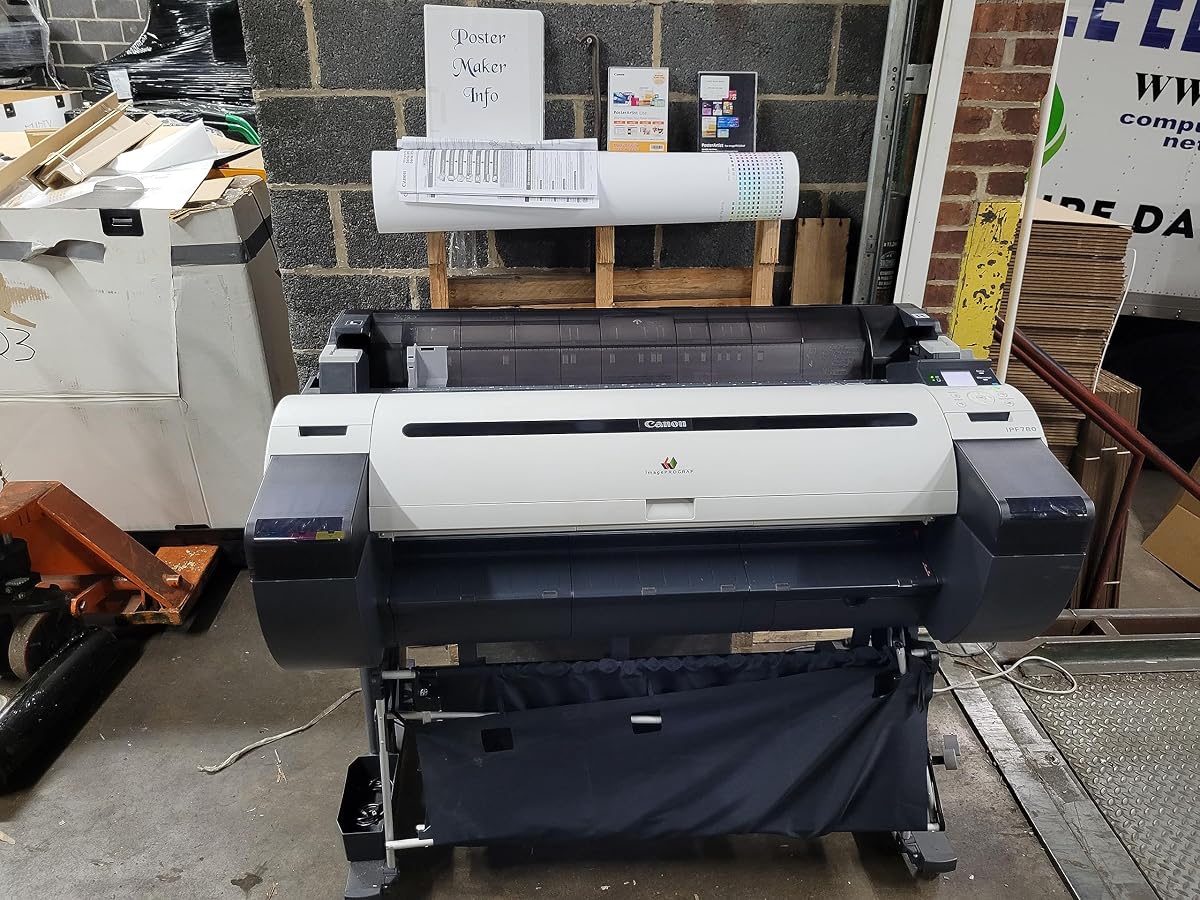
The Canon imagePROGRAF iPF780 represents a premium option for those requiring wider media handling and top-tier image quality. With a 4.6 rating, this 36-inch printer is built for high volume professional environments where precision and color accuracy are non-negotiable for client deliverables.
We may earn a commission when you buy through this link, at no additional cost to you.
Its key strength lies in the Canon Platinum Reseller backing, ensuring access to specialized support and warranty services. This makes it a robust choice for design studios needing to produce large maps, posters, and detailed technical drawings without compromising on output fidelity.
Trade-offs include the higher price point compared to smaller 24-inch models, which may not be necessary for smaller studios. Additionally, while support is strong, specific speed details are not provided in the data, so high volume users should verify throughput requirements beforehand.
Best for large firms needing wide format capabilities and premium service. The 36-inch width and reliable warranty make it a strong investment for projects requiring expansive media and professional reliability as a final recommendation.
Supporting 36-inch rolls allows for printing larger blueprints and posters without needing to split images across pages.
Access to Canon Platinum Resellers ensures expert advice and efficient service for maintaining your large format workflow.
We may earn a commission when you buy through this link, at no additional cost to you.
The HP DesignJet T650 offers a powerful combination of 36-inch width and automatic media handling. With a 4.1 rating, it is designed for professionals who need speed and efficiency, making it suitable for busy architecture and construction offices requiring quick turnaround times.
We may earn a commission when you buy through this link, at no additional cost to you.
Key strengths include the automatic sheet and roll switch, allowing seamless transitions between media types without manual intervention. This feature, combined with 82 A1 prints per hour, significantly boosts productivity and reduces waiting time for large batch printing jobs in professional settings.
Trade-offs involve the larger physical footprint and higher cost compared to 24-inch alternatives. While the 1GB memory helps with large files, users with limited office space may find it too bulky for smaller workstations or shared print areas in small studios.
Ideal for production environments needing speed and wide media support. The automatic switching and warranty make it a strong choice for teams prioritizing workflow efficiency and high volume capabilities as a final recommendation.
Seamlessly switch between sheets and rolls to handle mixed media projects without manual reloading or downtime.
1GB memory handles large CAD files and complex prints more smoothly, reducing processing time for intricate designs.
We may earn a commission when you buy through this link, at no additional cost to you.
The HP DesignJet T630 comes with essential accessories like an auto sheet feeder, media bin, and stand. With a 4.0 rating, it offers a complete package for setup, appealing to users who want a ready-to-use solution for large format printing without additional accessory purchases.
We may earn a commission when you buy through this link, at no additional cost to you.
Key strengths include the inclusion of the stand and media bin, which simplify physical setup and print organization. The automatic cutter ensures clean edges on prints, and the feeder supports flexible media handling for different project sizes without constant manual adjustments.
Trade-offs include a lack of explicit warranty details in the data, which may be a concern for some buyers. While it covers standard 36-inch needs well, users requiring faster speeds or advanced software features might look elsewhere for higher-end capabilities.
Best for those wanting a complete setup out of the box. The included stand and feeder make it easy to integrate into any workspace, offering a practical solution for daily printing tasks as a final recommendation.
The included stand and media bin save time on assembly and help keep your print station organized and ready.
Automatic horizontal cutter ensures clean, ready-to-use prints without needing manual trimming after output.
We may earn a commission when you buy through this link, at no additional cost to you.
The Canon imagePROGRAF TC-21M brings multifunction capabilities with cloud printing and USB Flash support. With a 4.4 rating, it is designed for ease of use, featuring a touchscreen interface that simplifies operation for users who may not be tech experts in their workflows.
We may earn a commission when you buy through this link, at no additional cost to you.
Key strengths include the USB Flash port for direct printing without a computer, and cloud connectivity for remote access. The auto sheet feeder allows handling up to 100 sheets, providing flexibility for both letter size and 11×17 inch printing needs effectively.
Trade-offs include the limitation to 24-inch media width, which may not suffice for very large architectural plans. Additionally, specific speed data is not detailed, so high volume users should verify throughput rates against their specific production demands beforehand.
Ideal for users needing simple multifunction features and ease of access. The touchscreen and cloud support make it a versatile tool for modern offices looking for adaptable printing solutions as a final recommendation.
Print directly from a USB flash drive without needing a connected computer, streamlining simple print jobs quickly.
Cloud printing allows you to send jobs remotely, adding flexibility for team members working outside the office.
We may earn a commission when you buy through this link, at no additional cost to you.
The HP DesignJet T830 is a compact multifunction printer tailored for architecture studios needing scan and copy capabilities. With a 4.0 rating, it offers a small footprint while maintaining quality output for technical documents, facilitating effective communication within professional teams.
We may earn a commission when you buy through this link, at no additional cost to you.
Key strengths include its multifunctionality, allowing users to scan and copy technical documents directly. The HP Smart app support enables mobile printing, and dynamic security helps protect sensitive project data from unauthorized access during the printing process.
Trade-offs involve dynamic security restrictions that may limit non-HP cartridge use over time. This can increase long-term costs if users rely on third-party consumables for routine maintenance and daily printing requirements in their work environments.
Ideal for teams needing a small MFP solution. The compact design and mobile options make it a practical choice for studios with limited space requiring versatile document handling as a final recommendation.
Designed to fit into smaller offices without compromising on large format output capabilities for daily tasks.
Dynamic security features help protect your technical documents from unauthorized access during printing and storage.
We may earn a commission when you buy through this link, at no additional cost to you.
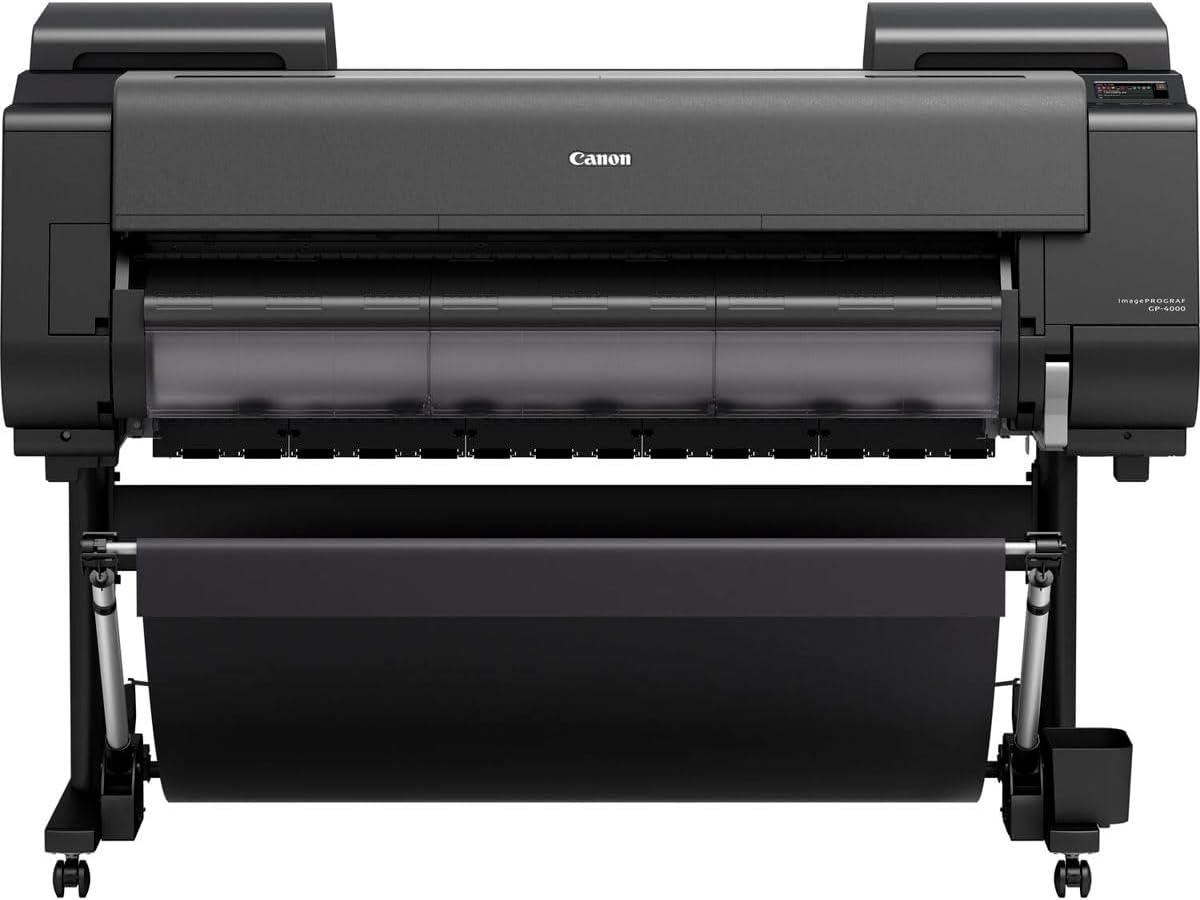
The Canon imagePROGRAF GP-4000 boasts a perfect 5.0 rating, signaling exceptional quality and reliability in the large format space. As a professional grade device supported by a Platinum Reseller, it targets users who require top-tier performance and service without any compromise.
We may earn a commission when you buy through this link, at no additional cost to you.
Key strengths include the Platinum Reseller backing which ensures premium support and service. The high speed output suggests efficiency for heavy-duty jobs, making it a robust choice for environments where speed and consistent quality are critical for project timelines.
Trade-offs include the significantly higher cost and limited specific details in the data. Users should ensure their budget supports this investment and verify compatibility with their existing workflows before committing to this high-end solution.
Ideal for top-tier design and engineering firms needing flawless output. The perfect rating and support make it a standout option for those prioritizing quality and reliability as a final recommendation.
The perfect 5.0 rating reflects exceptional performance standards suitable for the most demanding professional projects.
Backed by Canon Platinum Resellers for expert service and support tailored to high-end professional needs.
We may earn a commission when you buy through this link, at no additional cost to you.
The Canon imagePROGRAF iPF785 focuses on delivering large-format color output for professional use. With a 4.1 rating, it is supported by a Platinum Reseller and includes a 1-year onsite warranty, providing a reliable foundation for those needing detailed color work.
We may earn a commission when you buy through this link, at no additional cost to you.
Key strengths include the onsite warranty and Platinum Reseller support, ensuring professional maintenance and service. The large-format color capabilities make it suitable for presentations, marketing materials, and design proofs that require vibrant and accurate color reproduction.
Trade-offs include a lack of detailed technical specifications in the provided data. Buyers should confirm speed and media width requirements with the reseller to ensure it matches their specific production needs for daily output.
Ideal for firms needing reliable color production. The warranty and reseller support make it a safe choice for those prioritizing service and color accuracy as a final recommendation.
A 1-year onsite warranty ensures you get support where your equipment is installed, minimizing downtime.
Designed for large-format color, ensuring accurate reproduction for design proofs and marketing materials.
We may earn a commission when you buy through this link, at no additional cost to you.
The Canon imagePROGRAF TM-305 delivers 36-inch width with a specialized 5-Color inkjet system for precision. With a 4.3 rating, it is aimed at users who prioritize color fidelity and line accuracy for large technical documents and presentations.
We may earn a commission when you buy through this link, at no additional cost to you.
Key strengths include the 36-inch wide media capability and the 5-Color ink system, which enhances color accuracy for technical prints. Supported by a Platinum Reseller, it offers professional service that helps maintain the system for consistent output.
Trade-offs include the fact that it is a printer only unit, meaning scanners must be added separately for multifunction needs. This may require additional budget and desk space for those wanting a complete all-in-one solution.
Ideal for studios focused on high-quality prints. The 5-Color system and 36-inch width make it a solid choice for detailed color and technical output as a final recommendation.
The 5-Color inkjet enhances color accuracy and detail for precise technical and presentation prints.
Supporting 36-inch media allows for larger blueprints and documents without needing to split images.
We may earn a commission when you buy through this link, at no additional cost to you.
Choosing the right plotter printer requires understanding your specific project needs and budget. Here are key factors to consider before making a decision.
Media width determines the size of prints you can produce. Most models offer 24-inch or 36-inch widths. Choose 36-inch if you need to print full architectural sheets without splitting images, while 24-inch is often sufficient for posters and smaller plans.
Select the widest media that fits your budget and physical space to ensure future-proofing.
Connectivity options like Gigabit Ethernet, Wi-Fi, and USB ensure the printer integrates with your existing network. Wi-Fi allows for mobile printing, while Ethernet provides stable speeds for large file transfers in shared environments.
Prioritize models with both wired and wireless options for maximum flexibility.
Software integration simplifies your workflow by allowing direct printing from CAD applications. Look for included suites like HP Click or tools that support PDF error checking and auto-nesting to reduce paper waste.
Choose printers that integrate directly with your design software to save time.
Maintenance costs can vary significantly between models. Look for features that reduce ink waste during routine maintenance. Some models claim to use 95% less ink for maintenance, which can lower long term operational expenses.
Calculate long term ink usage to compare the true cost of ownership beyond the initial price.
Automatic features like sheet feeding and horizontal cutting save time on manual tasks. Automatic sheet feeders allow handling mixed media without manual switches, while automatic cutters provide clean edges for immediate use.
Opt for models with automatic cutting and feeding if you handle diverse media sizes regularly.
Warranty and support options vary by product. Onsite support can be critical for minimizing downtime. Some bundles include extended care packs with onsite service, which is valuable for professional environments.
Consider buying models with extended onsite warranties if you rely on daily output for business operations.
Memory and speed dictate how quickly the printer processes and outputs large files. Higher memory helps with complex CAD files, while higher print speeds reduce wait times for large batches.
Check memory size and pages per hour metrics to ensure they meet your volume needs.
Multifunction models include scanning and copying capabilities, saving space. However, printer-only models may offer higher print quality or speed. Consider if you need to digitize existing documents at the device.
Choose multifunction if you need to scan blueprints regularly; otherwise, a printer-only model may be more efficient.
Start by loading the correct media roll or sheet into the feeder. Ensure the paper is aligned properly to prevent jams and maintain clean edges on your prints. Use the software settings to match the paper type for optimal ink output.
Regularly update the firmware and use recommended cartridges to ensure print quality remains consistent. If you use the printer infrequently, run a cleaning cycle to prevent printhead clogging. Check the printer's maintenance indicators for when heads need cleaning.
Keep the printer in a clean, dust-free environment to prolong its lifespan. Clean the external surfaces with a soft cloth and avoid using harsh chemicals. Follow the manufacturer's recommended cleaning schedule for internal rollers and cutters to ensure smooth operation.
Large format plotters typically use media rolls ranging from 24-inch to 36-inch widths. They can also handle sheets using an optional sheet feeder, allowing for flexible output sizes without needing to use rolls for every job.
Yes, most large format plotters require specific ink cartridges designed for high quality output. These inks are formulated to dry quickly on wide media and provide sharp lines for technical drawings. Always check compatibility with your specific model.
Speeds vary by model but typically range from 20 seconds to 45 seconds per A1 page. High volume models can print up to 80 A1 pages per hour. This speed depends on the complexity of the image and the quality settings used.
A plotter printer is a specialized device designed to produce high quality large format graphics. Unlike standard printers, plotters use wide media rolls to create architectural blueprints, engineering drawings, and large posters with precise line quality.
HP plotters are popular for their reliability and software integration. Features like HP Click and Smart App support make workflow management easy. For many professionals, the balance of features and service support makes them a strong investment.
Most Canon and HP plotters are designed to work with specific branded cartridges. Some models may have restrictions or dynamic security features that limit third-party ink use. Always check the specific device terms to ensure compatibility.
Choosing the right large format plotter printer depends on your specific project needs and budget. The HP DesignJet T210 offers great value for budget-conscious users, while the Canon imagePROGRAF iPF780 stands out for those needing premium support and wide media.
Consider your required media width, connectivity needs, and software integration when making a decision. Automatic features and maintenance costs should also factor into your choice to ensure smooth long-term operations.
Remember to check current prices and warranty options before purchasing to get the best deal for your professional workflow. Investing in a reliable model now can save significant time and cost as your projects grow.