
Logitech G Saitek X56 H.O.T.A.S
4.0Editor score
189 programmable controls
RGB lighting customization
Hall-effect sensors
This guide compares the top Mac Game Flight Controllers available in October 2026 to help you find the perfect simulator hardware for your setup.
Finding the right Mac Game Flight Controllers can transform your virtual aviation experience into a lifelike cockpit environment. Whether you are training for real-world flight or simply enjoying simulation games, quality hardware matters for immersion and precision.
We evaluated ten leading flight controllers based on compatibility, build quality, programmability, and user feedback. Our analysis focuses on devices that work seamlessly with macOS and popular simulation titles to ensure a smooth setup process.
Each pick highlights unique strengths and ideal use cases for different pilot preferences. Please note that product availability and pricing may change over time, so check current listings before making your final purchase decision.
4.0Editor score

4.5Editor score

4.3Editor score
The following table provides a side-by-side comparison of all ten flight controllers featured in this guide. It highlights key specifications to help you quickly identify the best match for your Mac gaming needs.





This controller stands out with its military-grade precision and extensive customization options. Users rate it highly for its responsiveness and build quality in flight simulation environments.
We may earn a commission when you buy through this link, at no additional cost to you.
The 189 programmable controls allow for complex aircraft management without reaching for a keyboard. Hall-effect sensors ensure smooth movement and accurate data transmission during flight.
While the feature set is robust, new users may find the setup process challenging. The software requires time to master but pays off in long-term usability and comfort.
Ideal for serious simmers who need granular control over their aircraft. This system offers the depth required for professional training or high-level gameplay on Mac.
Hall-effect sensors provide consistent resistance and accuracy for every input.
Adjustable force settings let you tailor the stick to your specific preference.
RGB lighting can match your gaming rig aesthetic for better immersion.
Mini analog sticks add extra control layers for modern space and flight sims.
We may earn a commission when you buy through this link, at no additional cost to you.
This unit offers incredible value for those entering flight simulation on a budget. With a 4.5 rating, it proves that cost does not always mean compromised quality.
We may earn a commission when you buy through this link, at no additional cost to you.
The detachable throttle allows you to reconfigure the device based on your desk space. Users appreciate the ergonomic design that prevents hand fatigue during long sessions.
While not as feature-rich as premium options, it covers the essentials for most simulation titles. The adjustable resistance dial adds a layer of realism without significant cost.
Perfect for casual pilots or students looking for a reliable starter controller. It delivers a solid experience without requiring complex configurations or high investment.
Wide hand rest keeps your hands in a natural position during flight.
Adjustable tension allows you to fine-tune the stick to your liking.
Throttle can be separated from the stick for unique setups.
Plug and play functionality means no drivers needed for basic operation.
We may earn a commission when you buy through this link, at no additional cost to you.
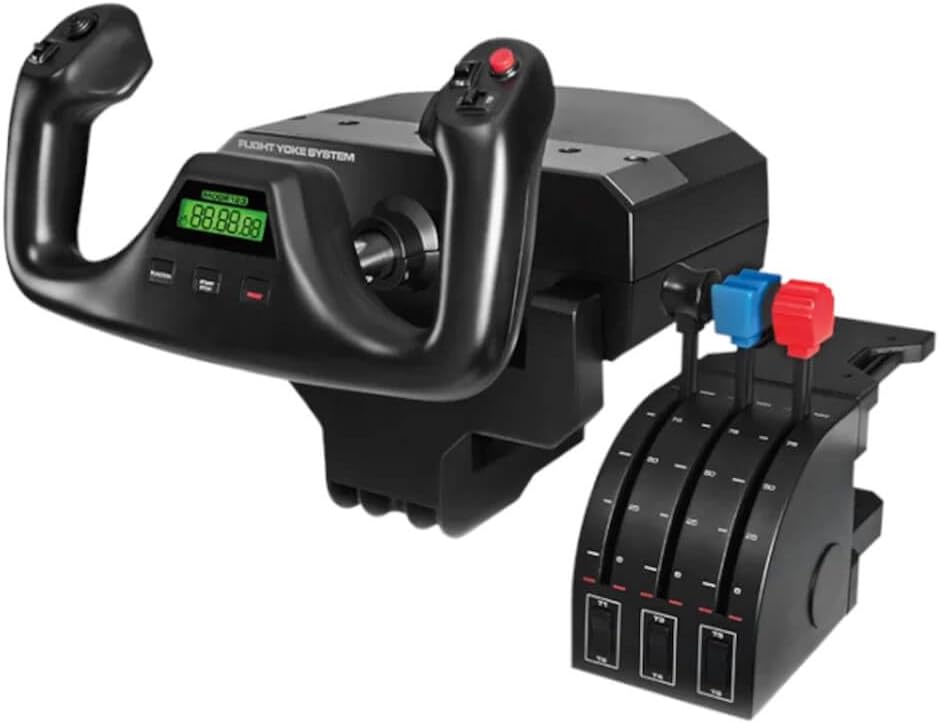
Designed for realism, this yoke system mimics the physical feel of a real aircraft cockpit. The stainless steel shaft ensures smooth and accurate control inputs.
We may earn a commission when you buy through this link, at no additional cost to you.
Comes with a throttle quadrant and five four programmable controls to manage flight functions effortlessly. The dual position desk clamp keeps the unit secure on your workspace.
While it occupies significant space, the immersion it provides is unmatched for general aviation simulations. Users note that it builds muscle memory effectively over time.
Highly recommended for civil aviation enthusiasts seeking a professional setup. This system balances high build quality with practical controls for a wide range of aircraft.
Stainless steel shaft provides a smooth and accurate control experience.
Robust clamping force ensures the yoke stays stable during intense maneuvers.
POV hat and mode switch allow for quick access to different functions.
Throttle quadrant offers dedicated controls for essential flight management.
We may earn a commission when you buy through this link, at no additional cost to you.
This controller features a unique OLED display that provides real-time flight data directly on the stick. It is designed to work across multiple platforms including Mac and Xbox.
We may earn a commission when you buy through this link, at no additional cost to you.
The ambidextrous design ensures comfort for both left and right-handed users. An intuitive configuration wheel makes mapping controls faster than traditional software interfaces.
While the touchpad offers cursor control, it may require calibration for optimal performance on macOS. Overall, the compact design makes it ideal for smaller desks.
A great choice for users wanting a portable yet detailed flight stick. It balances advanced features with a manageable size for daily use in simulation games.
OLED screen shows flight data without needing to look at your monitor.
Quick access to tuning options helps you adapt to changing conditions.
Ambidextrous grips allow for comfortable use regardless of dominant hand.
Compact layout saves desk space compared to larger yoke systems.
We may earn a commission when you buy through this link, at no additional cost to you.
The X52 Pro features an LCD display that provides essential flight data directly on the controller. Its progressive throttle allows for precise control over engine power settings.
We may earn a commission when you buy through this link, at no additional cost to you.
Five position handle adjustments ensure a comfortable fit for users of different hand sizes. The smart technology software lets you program unique profiles for various games.
Though it is an older model, it remains a reliable option for military and civil flight sims. Some users may find the software requires updates for modern OS compatibility.
This system is best suited for pilots who prioritize data visibility and precision. It offers a proven design that has been refined over many years of simulation use.
LCD display provides real-time data feedback during flight operations.
Illuminated buttons enhance visibility in low light cockpit environments.
Progressive throttle allows for smooth power management.
Detents for afterburner and idle provide tactile reference points.
We may earn a commission when you buy through this link, at no additional cost to you.
Designed by aerospace engineers, this yoke offers a full 180-degree rotation for realistic aircraft handling. The included switch panel adds master and avionics controls to your setup.
We may earn a commission when you buy through this link, at no additional cost to you.
Users praise the solid steel shaft and dual linear ball bearings for smooth movement. The mounting system allows for use with clamps or suction pads for versatile installation.
While more expensive, the realism and build quality justify the investment for serious simmers. It is tailored for general aviation scenarios requiring authentic mechanical feedback.
Ideal for pilots who want a true-to-life cockpit feel on their Mac. This system bridges the gap between gaming peripherals and professional flight training equipment.
180-degree rotation range mimics real aircraft control surface limits.
Dampened self-centering mechanism provides realistic feedback without dead zones.
Heavy-duty clamps ensure stability during aggressive maneuvers.
Suction pads offer a clamp-free solution for thicker tabletops.
We may earn a commission when you buy through this link, at no additional cost to you.
This bundle combines the realistic yoke system with dedicated rudder pedals for full aircraft control. The pedals add another layer of realism by managing directional control with your feet.
We may earn a commission when you buy through this link, at no additional cost to you.
With a 4.6 rating, users are particularly happy with the differential toe brakes for taxiing and landing. The setup offers a complete experience without needing extra purchases.
Assembly can be complex and requires significant desk and floor space. However, the immersion gained from using both hand and foot controls is unmatched for civil aviation.
Best for users who want a comprehensive simulation package. This bundle eliminates the need to mix and match different brands for a cohesive experience.
Differential toe brakes allow for precise ground control of aircraft.
Adjustable foot rests ensure comfort for users of all sizes.
Combined bundle ensures compatibility between yoke and pedals.
High user rating reflects satisfaction with the complete package.
We may earn a commission when you buy through this link, at no additional cost to you.
This HOTAS unit offers high-resolution sensors for precise movement detection. The swappable throttle detents provide tactile feedback for different thrust levels during flight.
We may earn a commission when you buy through this link, at no additional cost to you.
Users can customize the RGB lighting to match their cockpit theme. The design supports both left and right-handed grips for broader accessibility.
Some users report issues with initial setup and software stability. However, the hardware potential is high for those willing to troubleshoot for a custom setup.
A unique option for pilots wanting customizable physical feedback. It is a strong contender for those prioritizing sensor precision over immediate plug-and-play ease.
Hall-Effect sensors ensure consistent accuracy without contact wear.
High resolution provides detailed input for complex flight maneuvers.
RGB lighting enhances immersion with a personalized aesthetic.
Swappable throttle allows for different setups in the same unit.
We may earn a commission when you buy through this link, at no additional cost to you.
This variant offers seventy five programmable controls and a convenient USB hub for additional peripherals. The stainless steel shaft ensures durability and a realistic feel in every movement.
We may earn a commission when you buy through this link, at no additional cost to you.
An integrated LCD display provides quick access to flight data without cluttering your screen. It is compatible with a wide range of simulators and operating systems.
Users appreciate the extensive control options available for complex cockpit setups. However, the setup requires careful planning due to the unit's physical size.
Excellent for pilots needing multiple inputs for advanced avionics management. This model serves as a robust foundation for a professional flight simulation station.
Seventy five programmable controls allow for deep customization.
POV hat and buttons provide immediate access to critical functions.
USB hub reduces cable clutter by adding extra ports.
Compatible with various OS versions for broad accessibility.
We may earn a commission when you buy through this link, at no additional cost to you.
This renewed option offers a cost-effective way to access premium flight hardware. The digital chronograph is perfect for timing checkpoints and instrument procedures during flight.
We may earn a commission when you buy through this link, at no additional cost to you.
Users note that the refurbished units maintain high build quality with a steel shaft. It is compatible with Mac OS systems for a broader range of users.
While the warranty is shorter than new items, the savings are significant for budget-conscious buyers. It includes a control quadrant with throttle and prop controls.
Ideal for those wanting a reliable yoke at a lower price point. This unit brings professional features to casual pilots who need a realistic experience.
Digital chronograph helps track time between checkpoints accurately.
14 buttons and switches provide comprehensive flight management.
Renewed units offer near-new quality at a reduced cost.
Stainless steel shaft ensures long-term durability and smooth motion.
We may earn a commission when you buy through this link, at no additional cost to you.
Choosing the right flight controller involves balancing budget, features, and simulation preferences.
Ensure the device supports macOS and your preferred simulation titles to avoid driver issues.
Check for USB connectivity and software requirements before purchasing to guarantee seamless integration.
Look for materials like stainless steel shafts and solid plastics to ensure durability over time.
A robust build reduces drift and wear during frequent use for long-term reliability.
More buttons and axes allow you to map essential aircraft functions without relying on the keyboard.
Software that supports profiles helps manage different aircraft setups easily during your flights.
Choose between yoke for civil aviation or joystick for combat scenarios based on your flight interests.
Yoke setups mimic real airplane controls while hotas units are versatile for mixed simulation genres.
Set a clear budget as prices range from affordable starter kits to expensive professional systems.
High-end units offer realism but entry-level devices provide a solid experience for casual pilots.
Comfort is key during long sessions so look for padded grips and adjustable tension mechanisms.
Adjustable handles and mounts ensure the device fits your desk and hand size properly.
Consider bundles that include rudder pedals or throttle quadrants for a more complete cockpit.
Additional accessories enhance immersion but ensure your desk space and USB ports can accommodate them.
Read user feedback regarding macOS performance to avoid potential software glitches.
Look for patterns in reviews regarding durability and customer support for peace of mind.
Install the latest drivers provided by the manufacturer to ensure full functionality on your Mac. Follow the installation guide carefully to configure the device for your simulation software.
Calibrate your device using the control panel settings to minimize drift and maximize precision. Adjust resistance settings to suit your preferred level of physical feedback during flight.
Clean the device regularly with a dry cloth to remove dust from buttons and sticks. Store it in a cool dry place when not in use to protect it from environmental damage.
Most controllers support Microsoft Flight Simulator via third party tools or virtual machines. Native Mac support varies by model, so check the product details for compatibility before buying.
A yoke mimics a real airplane control wheel and is ideal for civil aviation. A joystick is better for combat and general flight sims offering more flexibility in a smaller space.
Yes you can combine a yoke with rudder pedals or throttle quadrants. Ensure your system has enough USB ports or use a hub to connect multiple peripherals at once.
Some devices offer native Mac drivers while others rely on universal software. Always check the product specifications to confirm Mac OS support before making a purchase decision.
Use the manufacturer software to map functions to specific buttons and axes. Save your profile so settings are retained even after disconnecting the device from your Mac.
It depends on how much realism you want. For complex aircraft management it adds dedicated controls for power and flaps but simple sims may not require one.
We reviewed ten top flight controllers ranging from budget-friendly options to high-end professional systems. Each device offers unique features tailored to different simulation needs and pilot preferences.
Prioritize compatibility and ergonomics to ensure a smooth and comfortable experience. Selecting the right controller will greatly enhance your enjoyment and realism during flight sessions.
Always check current prices and availability before purchasing as these details can change frequently. Investing in a quality flight controller today will provide lasting satisfaction for your simulations.