
ARCTIC Fan Controller
4.6Editor score
Ten individual PWM ports
Magnetic mounting included
Linux and Windows support
This guide compares the top front panel fan controllers for PC builds, evaluating LCD displays, PWM control, temperature sensors, and safety features for
Choosing the right front panel fan controller is essential for maintaining optimal thermal performance in your computer system. These devices allow you to monitor and adjust fan speeds directly from the drive bay, ensuring your hardware stays cool without excessive noise.
We evaluated ten top-rated controllers based on display quality, channel count, safety features, and ease of installation. Each product offers unique benefits, from basic manual knobs to advanced LCD screens showing real-time temperature and RPM data.
Each pick highlights specific strengths and ideal use cases to help you find the perfect fit for your build. Please note that prices and availability can change frequently, so verify current details before making your final purchase decision today.
4.6Editor score

5.0Editor score

4.2Editor score
The following table provides a side-by-side comparison of all ten selected controllers. Review the key specifications, display types, and channel capacities to determine which model aligns best with your specific cooling requirements and case configuration.
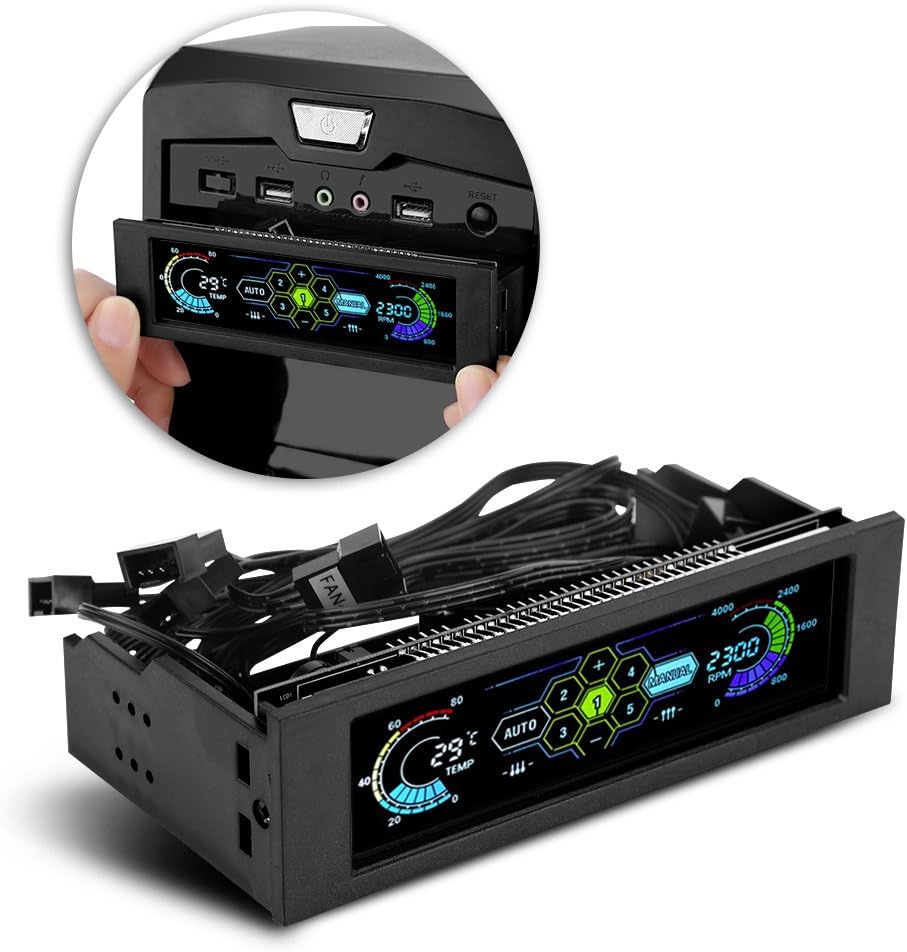


The STW‑6041 stands out as a highly reliable front panel fan controller for modern PC builds. With a perfect five-star rating from verified users, it delivers robust performance through its advanced LCD interface and precise PWM circuitry.
We may earn a commission when you buy through this link, at no additional cost to you.
Its standout features include a wide LCD screen displaying four sets of fan speeds and temperatures simultaneously. The aluminum alloy panel undergoes multiple matt treatments to ensure a premium look and durable feel. Safety is prioritized with a high-temperature alarm that flashes and sounds when limits are exceeded.
Users may find the requirement for a 5.25-inch drive bay limiting for compact cases. Additionally, the price point is higher than basic knob-only controllers. However, these trade-offs are acceptable given the extensive monitoring and safety features included.
This unit is ideal for enthusiasts who need detailed thermal oversight and silent operation. Its reliable service life and robust capacitors make it a long-term investment. Choose this controller for superior build quality and comprehensive system monitoring.
The LCD screen provides real-time data for up to four fans, allowing precise adjustments to maintain optimal operating temperatures.
Built-in anti-seize and over-temperature alarms protect your hardware from overheating, ensuring peace of mind during heavy workloads.
We may earn a commission when you buy through this link, at no additional cost to you.
The V BESTLIFE Fan Speed Controller offers versatile control with a distinct Auto/Manual switch for different cooling needs. Its 4.7-star rating reflects strong user satisfaction with its detailed LCD screen and responsive temperature monitoring capabilities.
We may earn a commission when you buy through this link, at no additional cost to you.
This controller manages up to five fans and displays critical data like hard disk state and alarm temperatures on a large screen. You can manually set alarm ranges between 40 and 90 degrees, giving you precise control over thermal thresholds. It immediately alerts you if a fan breaks down.
Some users might find the initial setup of alarm ranges slightly complex compared to simpler units. The panel size can vary, requiring careful case compatibility checks. Despite this, the flexibility it offers is valuable for complex cooling setups.
Ideal for users who want dynamic control without software dependency, this model handles diverse scenarios well. Its comprehensive monitoring ensures your system runs smoothly under various loads. Pick this for its balance of automation and manual override.
Switch easily between automatic temperature-based control and manual adjustments to suit your specific performance or noise preferences.
The big LCD screen keeps you informed on hard disk state and multiple temperatures simultaneously for better diagnostics.
We may earn a commission when you buy through this link, at no additional cost to you.
The SaiDian controller brings a unique twist with its LCD date and time display alongside standard temperature monitoring. While its rating is lower at 3.9 stars, it remains a cost-effective solution for users needing basic thermal oversight with extra utility features.
We may earn a commission when you buy through this link, at no additional cost to you.
It controls three groups of fans and offers both manual and automatic speed adjustments. The large screen displays temperature, fan speed, and hard disk status clearly. Alarm temperatures are adjustable between 50 and 90 degrees to prevent overheating damage effectively.
Users report mixed experiences regarding the interface responsiveness and build quality consistency. The limited number of controllable groups may not suit larger cooling configurations. However, the inclusion of time/date adds a niche appeal for some setups.
This unit is best for budget-conscious buyers who need essential monitoring plus extra display features. Its power supply interface and cable lengths are standard for most chassis. Choose this if you need a simple, functional controller at a lower price point.
The ability to show date and time on the fan controller adds a unique utility to your dashboard beyond temperature stats.
Fan jam alarms trigger immediately when a fan fails, alerting you to potential cooling issues before they cause damage.
We may earn a commission when you buy through this link, at no additional cost to you.
The Thermaltake Commander F6 RGB represents the high-end segment of front panel controllers with its striking RGB LCD screen and six-channel capability. Its 4.2-star rating highlights solid performance for users seeking advanced aesthetic integration with robust functionality.
We may earn a commission when you buy through this link, at no additional cost to you.
Equipped with six voltage control knobs and temperature sensors, this unit manages complex fan setups effortlessly. It is compatible with up to two Lumi LED strips, enhancing the visual appeal of your build. Safety is ensured through warning alarms with short circuit protection.
The premium features come at a higher cost, which may not be justified for simple systems. Installation involves more wiring due to the number of sensors and strips supported. Yet, for enthusiasts, the customization options are well worth the investment.
Ideal for high-performance rigs needing extensive fan management and visual flair, this controller is a top tier choice. Its warranty adds confidence to the purchase. Select this if you prioritize premium aesthetics and maximum channel flexibility.
The RGB LCD screen and LED strip compatibility allow seamless blending with other lighting elements in your gaming PC.
Short circuit protection and warning alarms ensure your expensive components stay safe from electrical surges or faults.
We may earn a commission when you buy through this link, at no additional cost to you.
The Ejoyous Computer Fan Controller focuses on robust safety and precise control through its double safety function and PWM circuitry. While specific rating data is unavailable, its features suggest a reliable tool for managing up to four case fans independently.
We may earn a commission when you buy through this link, at no additional cost to you.
Its wide LCD display lets you monitor RPM and four temperature values conveniently. The double safety function includes a temperature blink and acoustic alarm if limits are exceeded. Additionally, fan monitoring detects standstill, supporting more reliable operation.
The lack of published ratings makes it harder to gauge long-term reliability compared to established brands. Some users might prefer products with more community feedback. However, its design choices indicate a focus on durability and user safety.
This model suits users looking for a standard LCD controller with strong safety mechanisms. The aluminum alloy panel ensures a sturdy fit in your chassis. Consider this if safety alerts and clean cable management are high priorities.
Monitor RPM and temperatures for up to four fans on one screen to identify overheating hotspots quickly.
PWM circuitry adjusts fan performance to reduce annoying high-frequency noises for a quieter computing environment.
We may earn a commission when you buy through this link, at no additional cost to you.
The ARCTIC Fan Controller offers exceptional value with ten ports for individual PWM control. Its 4.6-star rating confirms its popularity among users seeking to organize complex fan setups without expensive front panel displays.
We may earn a commission when you buy through this link, at no additional cost to you.
This hub provides up to 2 A per port, surpassing typical motherboard limitations. It supports Windows and Linux via native drivers, allowing software-based customization. The magnetic or adhesive mounting ensures it fits anywhere without needing a drive bay slot.
Because it lacks a physical LCD screen, you must rely on software for temperature monitoring and adjustments. This might not suit users preferring hardware-only controls. Still, the reduction in cable chaos is a massive benefit for cleaner builds.
Best for gamers and professionals using fan-control software, this unit simplifies wiring significantly. It ensures optimal airflow management across many fans. Choose this if you value cable organization and software flexibility over physical dials.
Native driver support means you can use existing system monitoring tools to tweak fan curves directly from your OS.
Dedicated ports for every fan eliminate signal loss and ensure every fan runs at its intended speed reliably.
We may earn a commission when you buy through this link, at no additional cost to you.
The Noctua NA-FC1 is a compact manual speed controller designed for 4-pin PWM fans. Its 4.8-star rating speaks to its build quality and reliability. It works perfectly alongside motherboard controls to achieve truly quiet operation even with high-speed fans.
We may earn a commission when you buy through this link, at no additional cost to you.
A unique 'No stop' mode prevents fans from dropping below 300 RPM, avoiding BIOS fan errors. It includes a 3-way splitter cable for controlling three fans simultaneously. The compact design allows flexible placement inside the case without obstructing airflow.
It lacks an LCD or automatic features, focusing purely on manual reduction. This might not suit those wanting automated temperature curves. However, its simplicity is a feature for those who prefer hands-on tuning without complex software.
Ideal for users needing extra fans or quiet tweaks without new hardware dependencies. Its six-year warranty guarantees long-term performance. Pick this if you value Noctua quality and want a simple plug-and-play solution.
The No stop mode keeps fans spinning at a safe minimum speed to prevent system errors during idle states.
Works as a manual reducer or in tandem with motherboard controls to fine-tune noise levels instantly.
We may earn a commission when you buy through this link, at no additional cost to you.
The Delinx controller boasts a near-perfect 4.9 rating thanks to its versatile Auto/Manual dual mode and precise digital display. This unit is perfect for DIY projects, PC cooling, or specialized scenarios like aquariums and server cabinets.
We may earn a commission when you buy through this link, at no additional cost to you.
It features a digital display switching between real-time temperature and fan speed up to 50,000 RPM. Start and full-speed temperatures are adjustable with hysteresis for stable management. It switches to manual mode automatically if the probe is disconnected.
Its compact size makes integration easy but might make reading the screen difficult in large setups. It relies on a USB-C adapter for power, which is included. Despite this, its safety features like over-voltage protection ensure stable long-term use.
Best for versatile users who need precise thermal regulation across different environments. The power-off memory saves settings without manual resets. Choose this for its high reliability and flexible application scope.
Seamlessly switch between automatic thermal control and manual adjustments based on your current cooling needs.
Supports 5V to 24V inputs with built-in protection for safe use across diverse electronic and computing projects.
We may earn a commission when you buy through this link, at no additional cost to you.
This controller provides essential 4-channel CPU temperature sensor and LCD display functions. While its 3.2 rating indicates some limitations, it offers standard features like high-temperature alarms and low-noise PWM operation for basic cooling management.
We may earn a commission when you buy through this link, at no additional cost to you.
It displays four sets of fan speeds and temperatures on its LCD screen. The alloy panel has multiple matt treatments for durability. When temperatures exceed limits, the system flashes and sounds an alarm to protect your hardware from overheating.
Users report inconsistent quality control and fewer advanced features compared to top models. The alarm functionality is reliable but basic. It may not suit high-end systems requiring detailed thermal data or robust long-term stability.
Ideal for entry-level builds needing straightforward monitoring and safety alerts. The standard optical drive installation works in most chassis. Consider this if budget is a primary concern and you need simple LCD feedback.
The wide LCD screen displays multiple fan and temperature readings simultaneously for quick glance monitoring.
Built-in alarms alert you immediately when temperatures spike or fans stop, preventing potential hardware damage.
We may earn a commission when you buy through this link, at no additional cost to you.
This controller supports five groups of fans with a big LCD screen for temperature and hard disk state monitoring. Its 3.4 rating suggests basic performance suited for simple monitoring tasks rather than complex thermal management.
We may earn a commission when you buy through this link, at no additional cost to you.
It allows manual setup of alarm temperatures from 40 to 90 degrees. You can switch between auto and manual modes for different needs. The big screen keeps you informed about system conditions constantly to ensure stable operation.
Build quality and longevity may vary, as indicated by the rating. It offers standard protections like immediate alerts if fans break down. However, advanced features like PWM precision or noise reduction are limited compared to premium units.
Best for users needing a low-cost solution for multi-fan setups. Its straightforward installation fits standard drive bays. Choose this if your priority is basic fan count expansion and visual temperature feedback.
Controls up to five fan groups to help distribute cooling load effectively across your system.
Manual alarm settings ensure you are notified if critical temperature thresholds are breached during operation.
We may earn a commission when you buy through this link, at no additional cost to you.
Selecting the right fan controller involves understanding your specific cooling needs, case constraints, and desired features. Consider these key factors to make an informed decision.
The number of channels determines how many fans you can control individually. Basic models support three to four fans, while advanced units offer six or more. Ensure the controller matches the total number of cooling components in your build.
Choose a model with enough channels to cover all critical areas like CPU, case intake, and exhaust.
Display types range from simple knobs to full LCD screens. LCDs provide real-time temperature and RPM data, helping you diagnose cooling issues quickly. Some units also show date, time, or hard disk status for added utility.
Select an LCD controller if you need detailed monitoring, or a knob-based one for simple manual adjustments.
Safety features like high-temperature alarms and fan anti-seize protection are crucial for preventing hardware damage. These systems alert you when limits are exceeded or if a fan stops working. Look for models with acoustic alarms for immediate notification.
Prioritize controllers with reliable alarm systems to protect your investment during heavy loads or failures.
Controllers offer manual, automatic, or dual modes. Automatic modes adjust speeds based on temperature probes, while manual modes give you direct control. Dual-mode units provide the best of both worlds for flexible thermal management.
Opt for dual-mode controllers if you want automation but still need manual override for specific tasks.
Most panel controllers fit into a standard 5.25-inch optical drive bay. Ensure your case has an available slot before purchasing. Some compact or hub-based controllers use adhesive or magnetic mounting instead, offering more placement options.
Verify your case's bay availability to avoid installation issues when mounting a drive bay controller.
PWM control allows precise speed adjustment and reduces noise by managing fan duty cycles. Voltage control is older and less efficient. Modern units often use PWM for better performance and silence. Check the specifications to confirm the technology used.
Choose PWM controllers for better efficiency and quieter operation in your computer system.
Durable materials like aluminum alloy panels ensure longevity and a professional look. High-specification capacitors resist heat and extend service life. Check user reviews for insights into real-world durability and reliability over time.
Invest in units with robust build materials to ensure they withstand high temperatures and long usage periods.
Prices vary significantly based on features like LCD screens and channel counts. Determine your needs and set a budget. While premium options offer more features, basic units often suffice for simple cooling needs.
Balance features against cost to find a controller that meets your needs without overspending on unused capabilities.
Begin by turning off your computer and unplugging the power supply to ensure safety during installation. Mount the controller into the 5.25-inch drive bay or use adhesive/magnetic mounts if supported. Securely connect the controller to your motherboard or power supply via the provided cables.
Once installed, connect your fans to the designated ports and ensure the temperature probes are placed in optimal spots like near the CPU or exhaust. Power on the system and access the controller's display or knobs to set initial fan speeds or automatic thresholds based on your cooling needs.
Regularly clean the controller's vents and display to prevent dust buildup that could affect performance. Periodically check cable connections and update any software drivers if applicable to maintain reliable operation. Avoid adjusting settings while under heavy load to prevent sudden fan changes.
A front panel fan controller is a device installed in your computer case that allows you to monitor and adjust fan speeds manually or automatically. It usually includes sensors to measure temperatures and displays RPM or temperature data on a screen or through LEDs.
If your motherboard lacks sufficient fan headers or you need more precise noise and temperature control than software provides, a front panel controller is essential. It also offers hardware-level monitoring independent of operating system software.
Install the controller into an available drive bay slot or use adhesive mounts. Connect the power cables and fan headers to your motherboard or power supply. Ensure temperature probes are placed in hot zones for accurate readings.
Yes, by manually lowering fan speeds during low-load tasks or using PWM control, a fan controller can significantly reduce system noise while maintaining adequate cooling during intense workloads.
PWM (Pulse Width Modulation) controls fan speed by varying power pulses, allowing precise and efficient speed changes. Voltage control adjusts speed by lowering power voltage, which is older and less effective for high-speed PWM fans.
LCD controllers provide real-time data like temperatures and RPM which helps in troubleshooting and optimization. If you need detailed monitoring beyond simple speed control, the investment in an LCD unit is often worthwhile.
This depends on the model, with most supporting between three and ten fans. Check the specific channel count and total amperage limit to ensure it matches your cooling setup requirements.
Look for high-temperature alarms, fan failure alerts, and over-voltage protection. These features ensure your system alerts you before hardware damage occurs due to cooling failures.
In summary, the STW‑6041, ARCTIC Fan Controller, and Thermaltake Commander F6 RGB represent top choices for various needs from reliability to premium aesthetics. Each offers distinct advantages in channel count, display quality, and safety features.
Prioritize safety and display clarity if you need constant monitoring, or opt for simple PWM hubs if you prefer software control. Assess your case compatibility and budget to narrow down the best fit for your specific build configuration.
Remember to verify current availability and details before purchasing as models and features evolve. With the right controller, you can ensure your system stays cool, quiet, and protected for years to come.