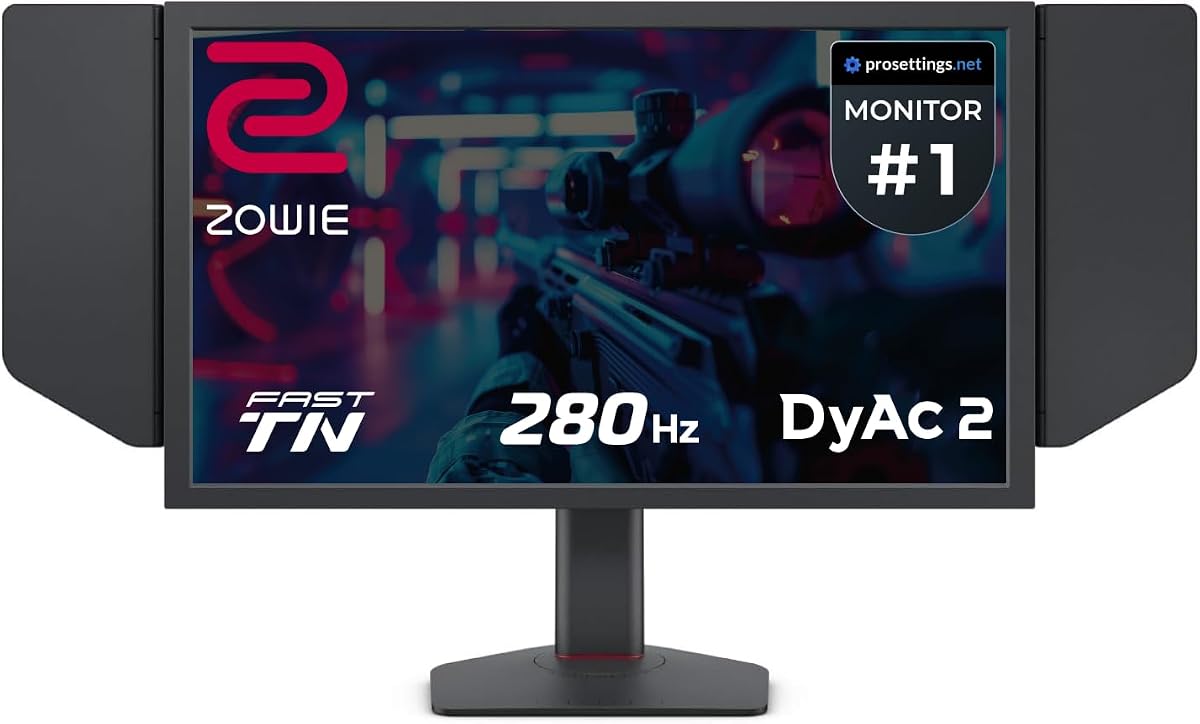
BenQ Zowie XL2546X+
4.3Editor score
Fast TN panel technology
280Hz refresh rate
DyAc 2 blur reduction
Finding the right display is crucial for immersive gameplay. A Benq monitor for gaming offers precise motion clarity and fast response times. These displays ensure you see every detail without blur during intense competitive sessions.
We analyzed top models focusing on refresh rates and panel technology. Our list covers various sizes and features to suit different play styles. Each option provides unique benefits for esports enthusiasts and casual gamers alike.
Every pick highlights specific strengths like DyAc technology or 4K resolution. Prices and availability can change frequently so check current listings. Use this guide to find the perfect screen for your setup.
4.3Editor score

4.3Editor score

4.2Editor score
As an Amazon Associate we earn from qualifying purchases.
This side-by-side comparison highlights key specifications across all ten models. You will see differences in resolution refresh rates and unique features to help you decide.


The BenQ Zowie XL2566X+ stands out as a top contender with its 400Hz refresh rate and DyAc 2 technology. It delivers exceptional motion clarity for competitive players. The monitor excels in reducing blur during fast-paced games.
We may earn a commission when you buy through this link, at no additional cost to you.
Its Fast TN panel ensures sharp outlines and reduces distractions from afterimages. The redesigned panel improves electrical conductivity for better responsiveness. Color performance is enhanced with vibrant hues to help identify enemies quickly.
While TN panels often lack color depth, this model mitigates that with better design. The trade-off includes slower response times compared to newer IPS options. However, the speed gain is worth it for serious esports athletes.
This monitor is ideal for FPS players who prioritize motion clarity above all. It is perfect for setups where every millisecond counts. We recommend it for those seeking the sharpest competitive edge.
DyAc 2 technology uses dual backlight systems to reduce blur without harsh flicker.
The native FHD resolution on a 24.1 inch screen offers optimal pixel density for gaming.
We may earn a commission when you buy through this link, at no additional cost to you.
The XL2546X+ offers a more accessible entry into the Zowie line while maintaining core esports features. It uses the same DyAc 2 tech to ensure clear motion visuals. This makes it a strong budget choice for competitive gamers.
We may earn a commission when you buy through this link, at no additional cost to you.
Its 280Hz refresh rate is still high enough to provide smooth gameplay. The Fast TN panel helps you focus on targets without distracting afterimages. Redesigned panels improve conductivity to reduce overshoot during quick movements.
Color performance has been tweaked to offer vibrant hues compared to older TN models. However, it may not match the color accuracy of high-end IPS displays. The focus remains strictly on speed and clarity.
Buyers looking for performance without the highest price tag should consider this model. It suits players who need reliable speed for FPS titles. It is an excellent value for the core Zowie experience.
This model balances professional features with a more affordable price point for gamers.
Sharp outlines on moving images help players track targets without visual distractions.
We may earn a commission when you buy through this link, at no additional cost to you.
The EX271U brings a premium experience with its 4K resolution and support for high-end audio. It features built-in eARC for console sound setups. This monitor is perfect for those who want immersive visuals and audio.
We may earn a commission when you buy through this link, at no additional cost to you.
Its 165Hz refresh rate ensures smooth performance even at high resolutions. The KVM feature allows seamless switching between platforms like PC and consoles. Pixsoul Engine enhances colors to match game preferences accurately.
While it may not reach 400Hz speeds, it offers a balanced experience. The higher resolution demands powerful hardware to drive it fully. Eye-Care technology helps reduce strain during long gaming sessions.
This model is ideal for multi-platform gamers who value detail over pure speed. It is great for AAA titles that benefit from 4K clarity. Consider it if you have a powerful GPU and want depth.
Built-in eARC supports up to 7.1 channels for a true surround sound experience.
Plug-and-play support across platforms with multiple inputs and a KVM switch.
We may earn a commission when you buy through this link, at no additional cost to you.
The XL2586X+ pushes the boundaries with a 600Hz refresh rate and DyAc 2 technology. It is designed for those who want the absolute fastest visual feedback available. The vivid color film improves performance significantly over standard panels.
We may earn a commission when you buy through this link, at no additional cost to you.
Its speed allows for unmatched fluidity in competitive titles. The panel reduces overshoot effectively to maintain image integrity during movement. Colors appear more vibrant and clear for better target identification.
The cost is high and requires a powerful system to utilize fully. Most average users may not notice the difference over 360Hz. However, it represents the pinnacle of motion clarity technology.
Buyers seeking the ultimate competitive edge should look no further. It is best for pro-level setups where every bit of speed matters. We recommend it for dedicated esports professionals.
600Hz refresh rate offers the fastest response times on the market.
New vivid color film enhances performance by 35 percent compared to standard panels.
We may earn a commission when you buy through this link, at no additional cost to you.
The MA320U is designed with Mac users in mind offering calibrated colors for Pro and Air. It supports 90W power delivery to keep laptops charged while gaming. The P3 color gamut ensures vibrant visuals for supported titles.
We may earn a commission when you buy through this link, at no additional cost to you.
Integrated controls allow adjustment of brightness and volume directly from the keyboard. Dual USB-C ports offer versatile connectivity options for peripherals. The stand offers full adjustability for comfortable viewing angles.
While optimized for productivity it can still handle gaming effectively for casual play. The 4K resolution makes text crisp and games detailed. However it lacks high refresh rates needed for competitive titles.
This monitor suits hybrid setups where work and gaming coexist. It is ideal for creators who want to play during breaks. Consider it if you prioritize color accuracy and Mac integration.
Exclusive color tuning ensures accurate colors for macOS applications and media.
Dual USB-C ports deliver power to charge your laptop while in use.
We may earn a commission when you buy through this link, at no additional cost to you.
The GW2790Q offers a balanced IPS experience with 2K resolution and 100Hz refresh rate. It includes Low Blue Light Plus to reduce harmful radiation during sessions. Brightness Intelligence adjusts display levels based on ambient light conditions.
We may earn a commission when you buy through this link, at no additional cost to you.
Its IPS panel provides wider viewing angles than TN options. Coding and ePaper modes make it versatile for long work sessions. The slim bezel creates an immersive view for media and casual games.
While not built for competitive shooters it handles slower paced games well. The focus is on eye comfort and clarity over raw speed. It is a solid choice for those who game occasionally.
Buyers who work and play on the same screen will appreciate this model. It suits those who prioritize eye health and accurate colors. Consider it for a versatile multi-purpose desk setup.
Low Blue Light Plus filters harmful radiation while maintaining vivid color quality.
Brightness Intelligence Tech auto adjusts based on content and ambient light.
We may earn a commission when you buy through this link, at no additional cost to you.
The RD320U is built for coding but offers a large 4K canvas for games. Its Nano Matte panel minimizes reflection distractions during long sessions. The contrast ratio of 2000:1 delivers deep blacks and high contrast clarity.
We may earn a commission when you buy through this link, at no additional cost to you.
Coding modes provide clear fonts and better differentiation for reduced eye strain. MoonHalo backlight allows customization of light to suit room conditions. Night hours protection enhances eye safety during dark room usage.
While the response time is not ideal for shooters the display quality is superb. It handles immersive RPGs well with its high resolution. The focus remains on comfort and precision for text and UI.
This model is perfect for developers or writers who also enjoy gaming. It suits those who prioritize eye comfort over speed. Consider it if you need a large detailed screen for work.
Nano Matte Panel diffuses ambient light to preserve color accuracy.
Advanced modes deliver clear fonts and better code differentiation to reduce eye strain.
We may earn a commission when you buy through this link, at no additional cost to you.
The GW2486TC offers a compact 24 inch display with versatile USB-C connectivity. It features a built-in noise cancelling mic to shift focus to what is important during chats. Eye-Care technology reduces fatigue for extended productivity.
We may earn a commission when you buy through this link, at no additional cost to you.
It includes an integrated USB hub to simplify desk organization with less cabling. Adaptive brightness optimizes performance for work and play to protect vision. Height adjustability ensures a comfortable viewing angle for any setup.
While it has a standard refresh rate it can handle casual games effectively. The FHD resolution provides a balance for smaller desks. It is a practical choice for users needing connectivity and comfort.
Buyers who need an all-in-one hub with display should consider this model. It suits those working from home with a gaming side. Consider it for a clean and simple office setup.
Synchronize images videos and data with an all-in-one cable.
Built-in noise cancellation mic allows you to focus on what matters.
We may earn a commission when you buy through this link, at no additional cost to you.
The PD2706QN offers professional accuracy with 95% P3 and 100% sRGB coverage. It is factory calibrated for consistent color accuracy across screens. This makes it excellent for designers who also enjoy gaming visually.
We may earn a commission when you buy through this link, at no additional cost to you.
Nano Matte panel reduces glare while preserving color accuracy and contrast. Uniformity tech ensures colors look the same across the whole screen. Ergonomic adjustments allow for comfortable sessions during work and play.
The 100Hz refresh rate is decent for general gaming but not for esports. It handles single player titles well with its detailed visuals. Focus remains on consistency and clarity for creative tasks.
This monitor is ideal for professionals needing color precision and gaming. It suits those who want one screen for everything. Consider it if color accuracy is your top priority.
Factory calibrated with average Delta E less than or equal to 2 for precision.
Ensures consistent color and brightness across the entire screen display.
We may earn a commission when you buy through this link, at no additional cost to you.
The Acer Nitro KG241Y offers a budget friendly option with 180Hz refresh rate. It supports AMD FreeSync Premium for smooth gameplay and reduced screen tearing. The zero frame design allows you to focus on the screen content.
We may earn a commission when you buy through this link, at no additional cost to you.
Its 1ms response time helps keep motion sharp during action scenes. HDR Ready features enhance contrast for supported titles. The ergonomic tilt helps position the screen comfortably on any desk.
VA panels may show some motion blur compared to TN or IPS options. It lacks some connectivity choices found on premium models. However it remains a solid value for basic gaming needs.
This model suits students or budget gamers seeking high refresh rates. It is a good entry point for those new to PC gaming. Consider it if you want speed without spending much.
180Hz refresh rate ensures fluid motion for fast-paced gaming sessions.
Zero frame design allows you to focus on the important stuff.
We may earn a commission when you buy through this link, at no additional cost to you.
Selecting the right monitor depends on your gaming style and hardware capabilities. This guide covers essential factors to consider before making a purchase.
Refresh rate determines how many times the screen updates per second measured in Hz. Higher rates like 240Hz or 400Hz provide smoother motion which is vital for competitive shooters. A higher refresh rate reduces motion blur and gives you a competitive advantage in fast games.
Look for at least 144Hz for smooth gaming and consider higher if you play FPS titles.
Panel types like TN IPS and VA offer different trade-offs for speed and color. TN panels offer the fastest response times but narrower viewing angles and lower color depth. IPS panels provide better colors and wider angles with slightly slower response times.
Choose TN for pure speed and IPS for a balanced experience with better visuals.
Resolution defines the level of detail on the screen. 1080p is standard for esports and easy on GPUs while 4K offers stunning clarity for single player games. Higher resolution requires more powerful graphics cards to maintain high frame rates.
Balance resolution with your GPU power to ensure smooth performance without lag.
Response time measures how quickly a pixel changes color and is crucial for motion clarity. Look for 1ms response time to minimize ghosting during fast movement. Lower response times help maintain sharpness during high-speed action sequences.
Prioritize 1ms response time for competitive gaming to keep images clear.
Adaptive Sync technologies like FreeSync and G-Sync prevent screen tearing. FreeSync is free and works well with AMD GPUs while G-Sync offers robust performance with NVIDIA. These sync your monitor refresh rate with your GPU frame rate.
Ensure your monitor supports FreeSync or G-Sync for tear-free visuals.
Connectivity options ensure your monitor works with all your devices. HDMI and DisplayPort support high bandwidth for high refresh rates. USB-C connectivity offers versatile connections for laptops and charging capabilities.
Check for enough ports to connect your PC console and peripherals.
Eye care features reduce strain during long gaming sessions. Flicker-free technology and low blue light filters help protect your vision over time. Adjustable stands allow you to set the right height for comfort.
Look for flicker-free and low blue light features to protect your eyes.
Ergonomic stands let you adjust height tilt and pivot for a better posture. Good ergonomics prevent neck pain during extended play sessions. VESA mount compatibility allows you to use third party monitor arms.
Choose a monitor with height adjustable stand to suit your comfort needs.
Start by connecting your monitor using the recommended DisplayPort cable for best performance. Ensure your graphics card drivers are updated to support the highest refresh rate.
Calibrate your monitor settings using built-in modes like sRGB or specific game presets. Adjust brightness and contrast to match your room lighting for better comfort.
Clean the screen with a microfiber cloth to avoid scratches. Use a screen cleaning solution designed for electronics and avoid spraying liquid directly on the display.
Yes higher refresh rates provide smoother motion and better competitive advantage. If you play fast games like shooters you will notice a difference.
DyAc stands for Dynamic Accuracy and reduces motion blur by controlling backlight flicker. It ensures sharper visuals during rapid movement in games.
Not recommended as 4K demands high-end hardware to run games smoothly. Budget PCs are better suited for 1080p or 1440p resolutions.
TN panels offer the fastest response times and are best for pure speed. IPS panels offer better colors but slightly slower response for casual play.
Yes many BenQ models feature USB-C and support for macOS including color calibration. Check specific models for full Mac compatibility and USB-C charging.
Enable V-Sync or adaptive sync like FreeSync in game settings. Ensure your monitor supports the same sync technology as your graphics card.
1ms means the pixel changes color in one millisecond reducing ghosting. It is ideal for competitive gaming where clarity during motion is key.
Yes many feature Low Blue Light and flicker-free technology. These features reduce eye fatigue during long sessions.
We have reviewed ten top options ranging from competitive esports screens to premium 4K displays. Each offers unique strengths tailored to specific play styles and hardware needs.
Prioritize refresh rates and panel type based on the games you play most. If speed is key choose a TN model but if visuals matter try an IPS option.
Always verify current availability and pricing before buying to ensure you get the best deal. Your ideal BenQ gaming monitor is out there to elevate your setup.