
ASUS ROG Tessen Mobile Gaming Controller
4.1Editor score
Foldable compact design
Zero-latency USB-C connection
Programmable aluminum paddles
Finding the right controller for your ASUS ROG Ally or PC setup can transform your gaming experience. A good controller offers precise inputs, comfortable ergonomics, and reliable connectivity to keep you immersed in the action without distraction or lag.
We compared ten top-rated controllers focusing on features like tri-mode connectivity, drift-resistant joysticks, and customization options. Each entry was evaluated based on real-world performance data, build quality, and compatibility with modern gaming platforms and handheld systems.
Each pick shows distinct strengths tailored to different gaming needs and budgets. Prices and availability change frequently so please check the links for the most current offers before making your final decision on which controller to add to your setup.
4.1Editor score

3.9Editor score

4.0Editor score
As an Amazon Associate we earn from qualifying purchases.
This side-by-side comparison highlights the key specifications and unique selling points of each controller in our lineup to help you quickly identify which model matches your specific gaming requirements and device compatibility needs.


The ASUS ROG Raikiri II Xbox Wireless Gaming Controller stands out as a top-tier option for gamers seeking precision and flexibility. With a rating near 4 stars, it delivers reliable performance across PC and Xbox platforms using advanced connectivity and sensor technology.
We may earn a commission when you buy through this link, at no additional cost to you.
Its standout quality is the TMR joystick technology which minimizes drift while consuming less power than traditional alternatives. The dual-mode trigger system allows you to switch between short travel micro-switches and full-range TMR sensors depending on the game genre you are playing.
While highly capable, the controller requires some setup via Armoury Crate to unlock full potential which might deter non-technical users. The price point reflects the premium features but could be steep for those who only play occasionally or do not need such customization.
This controller is ideal for competitive players and enthusiasts who demand low latency and high accuracy. If you value long battery life and versatile connection modes for both wired and wireless play, this model is a strong recommendation for your setup.
You can choose between Bluetooth, 2.4GHz RF, or USB-C to ensure stable connection with your preferred device.
The TMR joysticks provide consistent input accuracy over time without the wear issues common in Hall Effect sensors.
We may earn a commission when you buy through this link, at no additional cost to you.
The ASUS ROG Raikiri II Pro PC Controller is designed for those who want the absolute best in responsiveness and customization. Its 8K sampling rate ensures that every input is registered with minimal latency for competitive gaming scenarios on PC.
We may earn a commission when you buy through this link, at no additional cost to you.
Key strengths include the hot-swappable TMR joystick modules which allow you to replace worn parts without buying a new controller. The full color display adds a unique interface element where you can view status indicators or change profiles directly on the device.
The main trade-off is the cost which positions it as a premium choice rather than an entry-level option. Additionally, the sheer number of customizable buttons and settings might require significant time to configure to your liking before you enjoy full benefits.
Buy this if you are a serious gamer who values cutting-edge technology and long-term durability. The battery life and modular design make it a sustainable investment for years of intense gaming sessions across different titles.
The 8K sampling rate provides a distinct advantage in fast-paced games where milliseconds matter for reaction time.
With remappable buttons and display features, you can tailor every aspect of the controller to match your play style.
We may earn a commission when you buy through this link, at no additional cost to you.
The ASUS ROG Tessen Mobile Gaming Controller offers exceptional value for mobile gamers looking to upgrade their gameplay. It delivers console-grade control at a fraction of the cost of full-sized controllers while maintaining high build quality and responsiveness.
We may earn a commission when you buy through this link, at no additional cost to you.
Its standout quality is the foldable design that allows you to carry it anywhere while securely holding your phone in landscape orientation. The mechanical switches on the buttons and D-pad provide tactile feedback that enhances your sense of control during intense sessions.
The limitation to Android devices and wired USB-C connections means it is not suitable for PC or wireless mobile gaming. However, for on-the-go gaming without battery anxiety due to pass-through charging, it remains one of the most practical options available.
This controller is perfect for budget-conscious users who primarily play on Android phones. If you want reliable inputs without breaking the bank, the Tessen provides a solid foundation for enjoying popular titles like Call of Duty Mobile and Minecraft.
The foldable bridges allow the controller to fit easily in your pocket making travel gaming convenient and stress-free.
Mechanical switches and 500Hz polling ensure that every tap and movement is registered accurately during gameplay.
We may earn a commission when you buy through this link, at no additional cost to you.
The ASUS ROG Raikiri Pro OLED display controller distinguishes itself with a built-in screen for animations and status indicators. This feature adds a layer of visual feedback that helps you manage profiles without needing to look at your device screen.
We may earn a commission when you buy through this link, at no additional cost to you.
Strengths include the tri-mode connectivity which allows seamless switching between wired and wireless options. The ESS DAC ensures that audio output through the 3.5mm jack is clear and immersive enhancing your overall gaming experience significantly.
Users may find the extensive customization options require time to set up properly. Also, the battery life depends heavily on whether you keep the OLED display active during sessions which might limit continuous playtime for some.
Ideal for users who want visual feedback and strong customization. If you appreciate having a status display directly on the controller and want high-fidelity audio support, this model offers unique benefits over standard gamepads.
The OLED display allows you to check battery life or switch profiles instantly without digging into your PC menus.
Built-in ESS DAC provides superior sound output for headsets ensuring you hear every detail in your game.
We may earn a commission when you buy through this link, at no additional cost to you.
The ASUS ROG Raikiri Pro Gaming Controller is a versatile option that supports both PC and Xbox through USB-C and RF connections. It provides a solid foundation for players who need reliability across multiple gaming systems without compromise.
We may earn a commission when you buy through this link, at no additional cost to you.
Key strengths include the extended battery life which can support up to 48 hours of play on a single charge. The rear buttons allow for quick access to commands which is helpful in strategy games or shooters requiring complex inputs.
Some users report a lower overall rating compared to newer iterations of the product. While it remains highly functional, the reliance on Armoury Crate for some features might be a drawback if you prefer plug-and-play functionality out of the box.
This controller is best for those who need broad compatibility between PC and Xbox. If you want a proven device with long battery life and customizable triggers, it serves as a reliable companion for your gaming setup.
Designed to work seamlessly on both PC and Xbox systems offering flexibility for multi-console households.
The battery design supports extended play sessions reducing the need for frequent recharging during gaming marathons.
We may earn a commission when you buy through this link, at no additional cost to you.
The renewed version of the ASUS ROG Raikiri Pro Gaming Controller provides access to premium features at a reduced cost. It is tested and certified to ensure it looks and works like new making it a safe choice for budget-minded buyers.
We may earn a commission when you buy through this link, at no additional cost to you.
Strengths include all the original capabilities such as the OLED display and tri-mode connectivity. You get the same customization options via Armoury Crate ensuring you do not sacrifice performance or features by choosing this refurbished option.
While cost-effective, availability may vary compared to standard new stock. Also, you may not receive original packaging which matters if you plan to gift the item to someone else rather than using it yourself.
This is an excellent choice for value hunters who want high-end features without the high price tag. If you are comfortable with renewed products and want a reliable controller with a warranty, this model offers significant savings.
The refurbishing process includes functional testing and inspection to ensure the device meets high standards.
Save money while still getting the same core experience as the brand new version of this popular controller.
We may earn a commission when you buy through this link, at no additional cost to you.
The ASUS ROG Xbox Ally serves as a complete handheld gaming system rather than just a controller. It includes built-in controls and a screen allowing you to play PC and Xbox games anywhere without needing an external device.
We may earn a commission when you buy through this link, at no additional cost to you.
Key strengths include the high refresh rate screen which ensures smooth visuals during fast-paced action. The inclusion of three months of Xbox Game Pass Premium adds immediate value by giving access to hundreds of games out of the box.
Because it is a full handheld console it costs more than a standalone controller. While it replaces the need for external input devices, it does not function as a wireless controller for your TV setup without specific configurations.
This system is ideal for travelers who want a dedicated gaming device with native controls. If you want to play full PC games on the go with excellent screen quality and battery life, the Xbox Ally is a top choice.
Boot straight into the Xbox experience just like a console making it easy to pick up and play your favorites.
The 120Hz display with FreeSync Premium ensures every frame looks smooth and responsive during intense gameplay.
We may earn a commission when you buy through this link, at no additional cost to you.
This renewed version of the ASUS ROG Raikiri II controller brings professional features to a more accessible price point. It retains the same TMR joysticks and multi-mode connectivity that make the original version so popular among gamers.
We may earn a commission when you buy through this link, at no additional cost to you.
Strengths include the travel case which ensures your controller is protected during transit. The battery life extends up to 50 hours allowing you to game for long periods without needing to recharge your device or controller often.
Buying renewed means there may be minor cosmetic signs of wear though functionality is tested. You also miss out on original packaging which might be a factor if you plan to gift it to someone else immediately after purchase.
This controller is great for frequent travelers who need a reliable device with a case included. If you want the performance of the Raikiri II without the full price and have a need for portability, this model is worth considering.
The included protective case ensures your controller stays safe in your bag during commutes or flights.
With up to 50 hours of play, you can game for days on a single charge without interruption.
We may earn a commission when you buy through this link, at no additional cost to you.
The CRKD NEO S offers a unique blend of performance and collectible value for gamers who appreciate aesthetic design. It provides Hall Effect sensors and swappable stick tops allowing you to personalize your device while maintaining precise control.
We may earn a commission when you buy through this link, at no additional cost to you.
Strengths include its broad compatibility which covers PC, Switch, and mobile devices seamlessly. The adjustable trigger sensitivity lets you fine-tune actuation points for specific games enhancing your performance in competitive scenarios.
The collectible nature means design options are limited to specific editions. Additionally, full customization often relies on a mobile app which adds a step to the setup process for those who prefer physical controls for adjustments.
This controller is best for collectors and budget buyers who want Hall Effect tech. If you like unique designs and need a reliable wireless controller for multiple devices at a low price, this model stands out strongly.
Hall Effect thumbsticks eliminate stick drift ensuring your controls remain precise throughout the lifespan of the device.
Seamlessly pair with different systems so you can switch from PC to Switch without needing a new controller.
We may earn a commission when you buy through this link, at no additional cost to you.
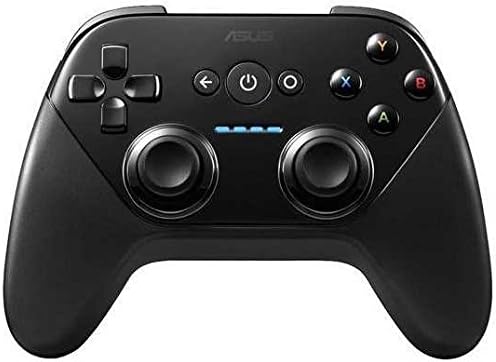
The ASUS TV500BG Gamepad provides a straightforward solution for casual gamers who want to play on their TV. It is engineered to work with Android TV and Windows systems offering basic wireless control for media and game consumption.
We may earn a commission when you buy through this link, at no additional cost to you.
Key strengths include its simplicity and low price point which makes it accessible for many households. The wireless connectivity allows you to move around comfortably while playing without being tethered to your TV or computer by cables.
It lacks advanced features like trigger adjustment or programmable buttons found in premium models. For complex gaming needs, you might find it lacking but for casual play and media navigation, it serves its purpose reliably.
Ideal for users who want an affordable controller for smart TV gaming. If you just need basic inputs for games like Minecraft or media navigation, this model offers a practical and budget-friendly solution.
Designed for ease of use this controller provides essential inputs without complicated setup or configuration steps.
As one of the most affordable options it provides good value for casual users with minimal feature needs.
We may earn a commission when you buy through this link, at no additional cost to you.
Selecting the right controller requires considering factors like connectivity, durability, and compatibility with your specific gaming system or handheld device.
Wireless controllers often support Bluetooth, 2.4GHz RF, or wired USB-C. 2.4GHz RF typically offers lower latency than Bluetooth which is crucial for competitive gaming.
Check if the controller supports your preferred connection type before buying to ensure stable performance during gameplay.
Modern controllers use either Hall Effect or TMR sensors to prevent stick drift. Hall Effect sensors are common but TMR sensors offer better durability and precision.
Prioritize models with drift-resistant technology if you play games requiring precise aiming or frequent joystick usage.
Triggers can be linear or step-based. Linear triggers allow full travel for racing games while step triggers offer short travel for shooters.
Ensure the controller supports the trigger style that fits your favorite game genres for optimal control.
Battery life varies significantly between models. Some offer up to 80 hours while others last around 30 hours depending on usage and features like RGB lighting.
Consider how long you game at a time and whether fast charging is available to minimize downtime.
Verify the controller works with your specific devices such as PC, Xbox, or Android phones. Some controllers are optimized for specific platforms only.
Choose a model that explicitly lists your device to avoid connection or driver issues.
Advanced controllers offer remappable buttons, adjustable sensitivity, and software support for custom profiles.
If you like to tweak inputs for specific games, look for controllers with robust software support.
Comfort is key for long sessions. Look for ergonomic grips and balanced weight distribution to reduce hand fatigue.
Reading user reviews about comfort helps ensure the controller fits your hand size well.
Built-in quality affects lifespan. Premium models often include metal components or reinforced switches for better longevity.
Check warranty terms especially if buying renewed models to ensure you have protection against defects.
Always charge the controller before first use to ensure optimal battery performance. Follow the manufacturer's instructions regarding charging times to extend the lifespan of the battery cells.
Keep the controller clean by wiping it with a dry cloth after use to remove sweat and dust. Avoid exposing it to extreme temperatures or moisture which can damage internal electronics.
Regularly check firmware updates through the provided software to maintain compatibility and performance. Proper storage in a protective case when not in use prevents accidental drops or damage to sensitive parts.
Yes, most of the listed controllers including the Raikiri II and Raikiri Pro are certified for Xbox systems. Ensure you check the specific product description for Xbox compatibility details before purchasing to confirm full support.
Some models like the ROG Tessen are specifically designed for Android phones only while others like the Raikiri II support Android via Bluetooth. Check the product specs to confirm which models support mobile devices.
Most ASUS controllers use Armoury Crate software on PC to update firmware. Connect the controller via USB and follow the prompts in the software to install any available updates for your specific model.
Yes, most of these controllers are XInput compatible which means they work with Steam out of the box. Steam input settings may need minor configuration for non-Xbox layouts on some older models.
Both technologies prevent stick drift but TMR sensors consume less power and are often more precise. Hall Effect uses magnetic fields while TMR uses tunnel magnetoresistance which generally offers better efficiency.
Some models include a travel case while others do not. The renewed versions often retain original accessories but check the product details to confirm what is included in the box.
Most of these controllers have internal batteries that are not easily replaceable by users. If battery life degrades over time, you may need to contact support for replacement or service options.
We highlighted top choices like the ASUS ROG Raikiri II for versatility and the ROG Tessen for budget mobile users. Each controller offers unique strengths depending on your needs for connectivity and customization.
Prioritize features like drift-resistant joysticks and battery life to ensure a comfortable gaming experience over time. Your choice should align with the devices you own and the types of games you play most often.
Remember that prices and availability change frequently so check the latest offers before purchasing. Investing in a high-quality controller today can significantly improve your gaming sessions for years to come.